Incorporating robots into your classroom can transform the way students learn and engage with critical concepts. These tools not only foster curiosity but also enhance problem-solving skills among learners. From coding robots like Botley 2.0 to interactive options like Ozobot Ari, the choices are vast. So, how do you determine which robots will truly spark interest and creativity in your students? Let’s explore the top options available for your classroom.
Learning Resources Cooper the STEM Robot Classroom Set
If you’re looking for an engaging way to introduce coding concepts to young learners, the Learning Resources Cooper the STEM Robot Classroom Set is an excellent choice. This hands-on kit offers screen-free coding through built-in programming buttons, allowing kids to explore black line tracking, light sensing, and object detection. As they engage with Cooper, they’ll develop critical thinking and logical reasoning skills, perfect for ages 5 and up. Plus, it’s eco-friendly with a rechargeable battery, reducing waste. With 20 lesson plan cards, 40 coding cards, and a ball accessory included, your students will plunge into coding activities right away!
Best For: The Learning Resources Cooper the STEM Robot Classroom Set is best for educators and parents looking to introduce coding concepts to children aged 5 and up.
Pros:
- Encourages critical thinking and problem-solving abilities in young learners.
- Offers multiple interactive modes for hands-on learning experiences.
- Eco-friendly design with a rechargeable battery, reducing waste and saving money.
Cons:
- Limited to screen-free coding, which may not appeal to all tech-savvy kids.
- Requires adult supervision for younger children during initial use.
- May need additional resources for more advanced coding concepts beyond the included materials.
Learning Resources Cooper The STEM Robot for Kids

Learning Resources Cooper is an engaging STEM robot specifically designed for young learners aged 5 and up. This interactive tool makes coding fun and accessible, offering screen-free education through simple command buttons and 40 coding cards that spark critical thinking. With four play modes—line tracking, optical sensing, obstacle avoidance, and robot-to-robot communication—Cooper encourages exploration and creativity. Plus, the USB-C charging cable means you won’t have to worry about replacing batteries constantly. Whether in a classroom, during homeschool projects, or as a family learning activity, Cooper is perfect for fostering a love for STEM in children.
Best For: Children aged 5 and up who are interested in learning coding concepts in a fun and interactive way.
Pros:
- Fosters critical thinking and problem-solving skills through hands-on coding activities.
- Offers diverse play modes that enhance creativity and exploration in learning.
- Convenient USB-C charging means no need for battery replacements, ensuring readiness for use.
Cons:
- May require adult supervision for younger children to navigate effectively.
- Limited to the coding concepts introduced through the provided cards and commands.
- Some children may outgrow the robot’s educational scope as they advance in coding skills.
Learning Resources Botley 2.0 The Coding Robot Classroom Set

The Botley 2.0 The Coding Robot Classroom Set is the perfect choice for educators looking to spark curiosity and creativity in students. This STEM toy introduces programming concepts through engaging play, enhancing logical reasoning and problem-solving skills. With its interactive features, you can encourage creativity using activity cards and obstacle course pieces. Students can transform Botley into various characters, like a train or police car, making learning fun and dynamic. The set includes two Botley robots, multiple activity sets, and accessory kits, ensuring a thorough educational experience. It’s also an award-winning gift option for classrooms and special occasions.
Best For: Educators and parents seeking to introduce children to programming and enhance their problem-solving skills through interactive play.
Pros:
- Enhances critical thinking and logical reasoning skills through hands-on activities.
- Engages students with interactive features and the ability to transform the robot into various characters.
- Includes multiple components for a comprehensive learning experience, suitable for various classroom settings.
Cons:
- Requires AAA batteries that are not included, which may be an additional expense.
- Limited advanced programming features may not cater to older or more experienced students.
- Some assembly of obstacle courses and activity sets may require adult supervision.
JOYIN Alphabet Robots Toys for Kids

JOYIN Alphabet Robots Toys for Kids are perfect for toddlers enthusiastic to explore the world of letters and words. These engaging S.T.E.M. Alphabots help your little ones identify letters and form words while building three giant robots. Measuring 7 1/4 inches tall, each durable robot is made from high-quality, non-toxic materials that meet safety standards. With detachable letters, kids can transform them into different robots, promoting creativity. These toys make great gifts for any occasion—be it Christmas, birthdays, or classroom prizes—ensuring hours of educational fun while supporting your child’s development in a playful way.
Best For: Toddlers eager to learn letters and words through interactive play and creativity.
Pros:
- Promotes letter identification and word formation through fun play.
- Made from high-quality, non-toxic materials that ensure child safety.
- Versatile for various occasions like holidays, classroom prizes, and birthdays.
Cons:
- May require adult supervision during play due to small detachable parts.
- Limited to letter-based play, which may not appeal to all children.
- Size of robots might be too small for some children who prefer larger toys.
Ozobot Ari Classroom Kit (18 Bots) – Interactive Learning Robot for STEM Education

For teachers and parents seeking an engaging way to enhance STEM education, the Ozobot Ari Classroom Kit stands out with its 18 interactive robots. These bots feature a touch screen that captivates students, offering vibrant displays and real-time feedback. With built-in accelerometers and gyroscopes, learners can explore physics concepts like acceleration and motion hands-on. The AI integration personalizes learning paths, catering to each student’s unique needs and creativity. Plus, the included time-of-flight sensor allows for precise measurement of obstacles, deepening practical STEM experiences. This kit truly sparks curiosity, making learning fun and interactive for every student in the classroom.
Best For: Teachers and parents looking for an engaging and interactive way to enhance STEM education for students.
Pros:
- Engaging interactive touch screen with vibrant displays that captivate students.
- Hands-on exploration of physics concepts through built-in accelerometers and gyroscopes.
- AI technology that personalizes learning paths, catering to individual student needs.
Cons:
- May require initial setup and training for effective use in classrooms.
- Limited to a specific curriculum focus on STEM, potentially excluding other subjects.
- Cost may be a factor for some schools or homeschooling families with tight budgets.
Ozobot Ari Classroom Kit (12 Bots) for Hands-On STEM Education
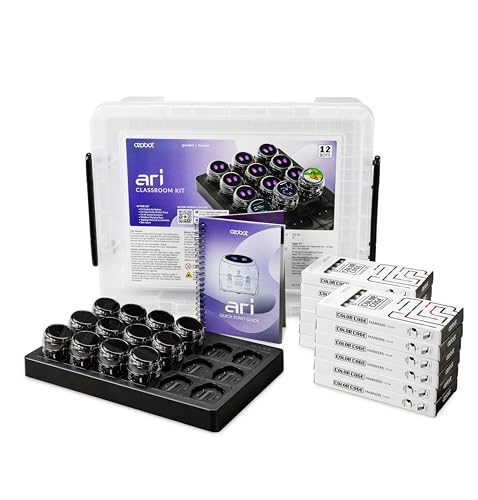
Designed specifically for educators and students, the Ozobot Ari Classroom Kit (12 Bots) transforms STEM education into an engaging, hands-on experience. With its interactive touch screen, you can easily engage with content, make choices, and get real-time feedback. The built-in accelerometer and gyroscope help you explore physics concepts like acceleration and velocity in real time. Plus, Ari’s AI-powered learning paths adapt to your unique needs and creativity. The time-of-flight sensor enhances your understanding of distance measurement and obstacle detection, making every lesson practical and interactive. Get ready to spark curiosity and excitement in your classroom!
Best For: The Ozobot Ari Classroom Kit is best for educators and students seeking an interactive and hands-on approach to STEM education.
Pros:
- Engages students with interactive touch screen and real-time feedback.
- Facilitates exploration of physics concepts through motion-based learning with built-in sensors.
- Offers personalized learning paths powered by AI to cater to individual student needs.
Cons:
- Requires a learning curve for both teachers and students to effectively utilize all features.
- May have limitations in programming complexity compared to more advanced robotics kits.
- The need for charging and maintenance of multiple bots could be time-consuming in a classroom setting.
26 Pieces Alphabet Robots for Kids Educational Learning Toys

Looking for a fun and educational toy that engages young minds? The 26 Pieces Alphabet Robots for Kids are perfect for you! These Alphabots turn letters into playful robots, making ABC learning exciting for ages 3-5. They enhance critical skills like hand-eye coordination, fine motor skills, and spatial awareness while kids effortlessly play. With their twistable features, your child will thrive in mental engagement and activity. Made from quality materials, these robots come with a convenient storage box, ideal for classroom rewards or birthday gifts. Watch your little ones enjoy hours of fun while mastering their alphabet!
Best For: The 26 Pieces Alphabet Robots are best for children aged 3-5 who are eager to learn the alphabet while having fun.
Pros:
- Enhances critical skills such as hand-eye coordination, fine motor skills, and spatial awareness.
- Interactive features allow children to twist and transform letters into robots, promoting mental engagement.
- Convenient storage box makes it easy to carry and store, perfect for classroom rewards and gifts.
Cons:
- May not be suitable for older children who have already mastered the alphabet.
- Some parents may find the pieces small and a choking hazard for younger siblings.
- Limited to alphabet learning, which may not appeal to children looking for more versatile toy options.
Wonder Workshop Dash Robot – Coding Robot for Kids 6

The Wonder Workshop Dash Robot is an ideal choice for children aged 6 to 11 who are enthusiastic to explore the world of coding through engaging play. This compact robot, weighing just 1.54 pounds, requires no assembly and offers a seamless STEM learning experience. Kids can grasp coding concepts like sequencing and loops while enjoying voice-activated interactions, dancing, and obstacle navigation. With five compatible apps, Dash enhances interactive learning at home or in classrooms. Plus, it provides up to 5 hours of playtime and includes accessories to spark creativity. Rated 4.6 stars, Dash is a hit among young learners!
Best For: The Wonder Workshop Dash Robot is best for children aged 6 to 11 who are eager to learn coding through interactive play.
Pros:
- STEM Learning: Teaches essential coding concepts like sequencing and loops, promoting early STEM education.
- Engaging Interactions: Features voice activation, allowing kids to command Dash to sing, dance, and navigate obstacles.
- Long Playtime: Offers up to 5 hours of active play, ensuring extended fun and learning without frequent recharging.
Cons:
- No Camera: Dash lacks a camera, which may limit certain interactive features compared to other robotics toys.
- Age Limitation: Primarily designed for younger children, potentially making it less appealing for older kids or teens.
- App Dependency: Requires compatible apps for full functionality, which may necessitate additional devices or downloads.
Tale-bot Pro Classroom Set Coding Robots for Kids (6 Robots Included)

For educators seeking an engaging way to introduce coding concepts to young learners, the Tale-bot Pro Classroom Set is an excellent choice. This set includes six versatile coding robots designed for kids aged three and up. With interactive maps and rich learning materials, you can teach basic coding concepts like commands and sequences. Children can express their creativity using stickers and blank maps, while the robot’s features—like walking, singing, and recording—keep them entertained. Plus, it supports six languages and is compatible with Lego blocks, enhancing their building skills. The included storage case makes organization easy in any classroom.
Best For: Educators looking to introduce coding and STEM concepts to young children in an engaging and interactive way.
Pros:
- Encourages creativity through customizable storytelling with blank maps and stickers.
- Supports multilingual learning with six language options, making it suitable for diverse classrooms.
- Provides a screen-free experience while promoting logical and computational thinking skills.
Cons:
- Limited to basic coding concepts, which may not challenge older or more advanced students.
- The need for supervision and guidance may limit independent play for younger children.
- Requires storage space for the set and its components, which may be a concern in smaller classrooms.
Talebot Pro Coding Robot for Kids Aged 3-5

Designed specifically for young learners aged 3-5, the Talebot Pro Coding Robot introduces foundational programming concepts in an engaging and interactive way. This upgraded educational toy promotes screen-free STEM learning, making it perfect for preschool and homeschool settings. Kids can easily interact with the robot by pressing command buttons to make it walk, draw, sing, and dance. With support for up to 256 commands, your child will grasp coding basics like sequences and loops. Plus, it enhances creativity through storytelling, voice recording, and Lego compatibility, making learning fun and inclusive for all children, including those with autism.
Best For: The Talebot Pro Coding Robot is best for young learners aged 3-5 who are eager to explore foundational programming concepts through interactive play.
Pros:
- Engages children with screen-free interaction, promoting active learning.
- Supports creativity and storytelling, allowing kids to record their own voice commands and imaginative tales.
- Compatible with Lego blocks, enhancing building skills and providing endless creative possibilities.
Cons:
- Limited to a specific age range (3-5 years), which may not appeal to older children.
- Requires adult supervision for optimal use and guidance during play.
- May have a learning curve for some children, particularly those who are not familiar with coding concepts.
Factors to Consider When Choosing a Robot for Classroom Learning
When picking a robot for classroom learning, you need to take into account several key factors. Think about the age appropriateness, how well the robot aligns with your learning objectives, and the interactive features it offers. Don’t forget to evaluate the educational value and whether it provides screen-free coding options for a more hands-on experience.
Age Appropriateness
Choosing the right robot for classroom learning hinges on understanding the developmental stages of your students. You’ll want to look at the recommended age range to guarantee the robot’s features match their skills. For preschoolers aged 3-5, focus on robots that teach basic concepts like letter recognition and simple commands. As children grow older, around age 5 and up, they can handle more advanced coding concepts, such as sequences and loops, which suits early elementary education. Remember, cognitive and motor skills vary widely by age, so select a robot that offers engaging challenges without overwhelming them. Finally, consider how well the robot aligns with your curriculum and encourages collaboration among peers for a richer learning experience.
Learning Objectives Alignment
Selecting a robot that aligns with your learning objectives can considerably enhance the educational experience in the classroom. Focus on how the robot’s features support goals like critical thinking, problem-solving, and logical reasoning. Ask yourself if it reinforces specific objectives, such as coding, math skills, or language development, to meet curriculum standards.
Evaluate whether the robot comes with lesson plans or activity cards that streamline integration into your teaching framework. Also, consider its suitability for the target age group and whether it adapts to different skill levels, ensuring all students can benefit from its use. By aligning a robot with your learning goals, you’ll create a more engaging and effective learning environment.
Interactive Features Offered
While considering a robot for classroom learning, it is essential to focus on its interactive features, as these can markedly boost student engagement and hands-on experience. Look for robots with obstacle avoidance, line tracking, and light sensing capabilities that foster practical coding and robotics skills. Play modes encouraging robot-to-robot communication can enhance teamwork, making learning dynamic and social. Additionally, seek options that include activity cards and challenge sets, allowing you to tailor lesson plans to various skill levels. Game-based play features promote creativity and critical thinking while making coding concepts enjoyable. Finally, consider screen-free interaction methods like command buttons or voice responses, which cater to diverse learning styles and help minimize distractions.
Screen-Free Coding Options
When considering a robot for classroom learning, it’s essential to explore screen-free coding options that allow students to grasp programming concepts through hands-on play. These robots engage kids without the distractions of digital screens, enhancing focus and retention. Many utilize built-in programming buttons and coding cards, letting children learn sequencing, loops, and commands through direct interaction. This method promotes critical thinking and problem-solving, making learning more enjoyable. Additionally, screen-free robots often feature various play modes like obstacle avoidance and line tracking, encouraging exploration and creativity. By eliminating screens, these tools foster collaboration as students work together to tackle coding challenges and share ideas, enriching their learning experience and making it more interactive.
Educational Value Provided
Choosing the right robot for classroom learning hinges on its educational value, so it’s important to assess how well it fosters critical thinking and problem-solving skills. Many robots introduce foundational programming concepts, making them ideal for engaging students. Look for robots that feature diverse interactive elements like obstacle avoidance and line tracking, which encourage creativity while learning. A good choice also offers a range of lesson plans and activity cards, helping you structure lessons to meet varying skill levels. Additionally, screen-free coding options promote hands-on learning, allowing young learners to grasp complex ideas without screen distractions. Finally, evaluate the robot’s compatibility with different educational approaches to verify it supports inclusivity and caters to diverse learning needs.
Ease of Use
Selecting a robot that’s easy to use is essential for maximizing classroom engagement. Look for intuitive controls, like built-in programming buttons, so kids can grasp coding concepts without needing much adult help. Opting for screen-free coding options can enhance hands-on learning, keeping students focused and engaged. It’s also beneficial if the robot comes with a quick start guide or lesson plan cards, allowing you to implement coding activities right away. Rechargeable battery systems are a plus, as they eliminate the hassle of frequent battery changes, ensuring uninterrupted sessions. Finally, choose a robot designed for accessibility across different age groups, so even younger children can comfortably interact with it, fostering a collaborative learning environment.
Compatibility With Curriculum
To guarantee a robot enhances classroom learning, it’s crucial that it aligns with your curriculum goals and educational standards. Look for robots that can integrate into various subjects like mathematics, science, and language arts. This multidisciplinary approach can enrich your students’ learning experiences. Consider robots that provide lesson plans or coding activities that complement your existing curriculum, making it easier for you to incorporate them into your teaching. Evaluate how well the robot fosters critical skills such as problem-solving, logical reasoning, and creativity, which are essential for student success. Finally, ascertain the robot’s features are adaptable to different grade levels so that it supports progressive learning as your students advance through the curriculum.
Battery and Charging Options
When evaluating battery and charging options for classroom robots, it’s important to take into account the long-term implications on both the environment and your budget. Choose rechargeable robots to cut down on waste and save money over time. Check the charging method—USB-C is often more compatible with existing equipment, making it user-friendly. Also, consider the battery life; you’ll want robots that offer several hours of active playtime on a single charge to keep interruptions to a minimum. Quick charging times are essential for maximizing classroom efficiency, allowing for seamless shifts between lessons. Finally, verify the robot’s battery is durable and meets safety standards to protect your students during activities.