An AI robot security dog sounds like a patrol-ready watchdog, but most products in this category are robot pets or programmable quadrupeds with cameras—not dedicated security systems. The right choice depends on whether you want interactive companionship, a robotics project, or a platform to build your own monitoring features.
These seven listings span ready-to-use companions and hands-on kits. We focus on what their stated features can support, where extra hardware or programming may be needed, and why a camera alone does not make a robot a reliable security device.
Best 7 AI Robot Security Dog Picks for 2026
Mobile Camera Platform

- 4K camera with live streaming
- Remote control; Wi-Fi and Bluetooth
- App control still in development
Best For: Adults experimenting with mobile camera robotics
Interactive Home Monitor
Loona Robot Pet with Charging Dock

- Camera and speaker for check-ins
- Face, gesture, and voice interaction
- Indoor use; charging dock included
Best For: Families seeking a robot pet with home monitoring
ROS Development Pick
HIWONDER ROSPug with Jetson Nano

- Jetson Nano and ROS platform
- Live camera feed to app
- SLAM and vision project capabilities
Best For: Developers building vision and navigation projects
Raspberry Pi Builder Kit
SunFounder PiDog AI Robot Dog Kit
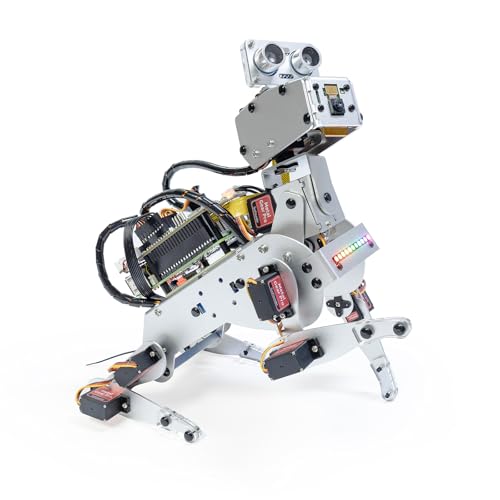
- Camera and multiple sensors
- Python, app control, and FPV
- Raspberry Pi sold separately
Best For: Makers building an indoor robotics project
Best ROS Starter
PuppyPi Standard Kit with Raspberry Pi 5

- Raspberry Pi 5 with ROS1/ROS2 support
- Camera-based recognition and tracking
- Lidar and arm are expansion options
Best For: Indoor ROS and AI-vision learners
Best Multi-Language Learning Kit
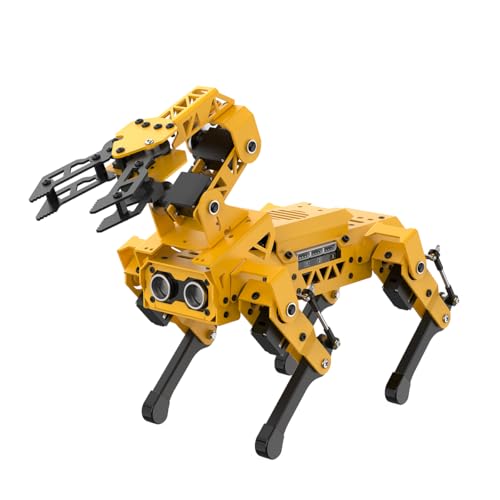
- Programs with Python, Scratch, or Arduino
- Offers AI vision and voice interaction
- Robotic arm is an expansion option
Best For: Beginners exploring multiple programming tools
Best Pro Kit for ROS Projects
PuppyPi Pro with Raspberry Pi 5

- Raspberry Pi 5 with ROS1/ROS2 support
- Camera supports tracking and face detection
- Verify included Lidar and arm hardware
Best For: Indoor ROS and vision projects using a Pro kit
Mobile Camera Platform – FX Aegis Pro AI Robot Dog
If you’re shopping for an ai robot security dog, the FX Aegis Pro is a programmable quadruped with a wide-angle 4K camera and real-time video streaming. Its mobility and remote control make it a platform for experimenting with mobile observation, not a ready-made security system.
Best For: Adults exploring robotics, camera streaming, and home-assistant applications.
Pros:
- 12 degrees of freedom and a listed top speed of 3.7 m/s.
- Can climb steps up to 16 cm and carry up to 8 kg, according to the listing.
- Includes a remote controller and supports Wi-Fi and Bluetooth connectivity.
Cons:
- App control is still in development.
- The listed battery runtime of up to 12 hours will vary with use.
The Aegis Pro stands out for its camera and mobility specifications. Choose it for hands-on development rather than assuming it includes security alerts or autonomous patrols.
Loona is the companion-style option for shoppers considering an ai robot security dog. Its camera and speaker support checking in on your home while you’re away, while face recognition, gestures, voice commands, and games make everyday interaction its main appeal.
Best For: Households wanting an interactive indoor robot pet with a home-monitoring feature.
Pros:
- Camera and speaker support home monitoring.
- Responds to faces, gestures, and voice commands.
- Includes a charging dock and supports automatic recharging.
Cons:
- Intended for indoor use.
- Reliable interaction calls for good lighting and clean camera and depth-sensor surfaces.
Loona makes the most sense if you’ll use its pet features as well as its camera. The supplied notes describe monitoring, but not security alarms or intrusion detection.
For developers researching an ai robot security dog, the HIWONDER ROSPug offers a Jetson Nano and ROS-based platform for building vision and navigation projects. Its HD wide-angle camera can send a live feed to the app, but the supplied features describe development capabilities rather than a finished security product.
Best For: Robotics learners and developers working on ROS, computer vision, and navigation.
Pros:
- Supports projects including target recognition, obstacle avoidance, and face detection.
- Offers SLAM mapping, path planning, and dynamic obstacle avoidance capabilities.
- Control options include an app, PC software, and a wireless PS2 handle.
Cons:
- Its ROS and programming focus makes it a hands-on development platform, not a plug-and-play monitor.
- No security alerts or recording features are specified in the supplied notes.
ROSPug is the strongest fit here for experimenting with autonomous movement and machine vision. Budget time for development if your goal is a security-oriented application.
The SunFounder PiDog is a build-and-program option for anyone exploring an ai robot security dog concept with a Raspberry Pi. Its camera, microphone, speaker, ultrasonic sensor, and Python support provide tools for robotics experiments, including vision and obstacle detection; the Raspberry Pi itself is not included.
Best For: Makers and students aged 15 and up who want to develop their own interactive robot dog.
Pros:
- Camera and sensors support vision, sound, touch, and obstacle-detection projects.
- Supports Python, app control, and first-person video.
- Includes online documentation, tutorials, and a community forum.
Cons:
- Requires a separately purchased compatible Raspberry Pi.
- Listed for indoor use; no ready-made security monitoring workflow is specified.
PiDog offers room to customize behaviors, but it’s a robotics kit rather than an out-of-box security device. It suits buyers who want the building and programming to be part of the project.
Best ROS Starter – PuppyPi Standard Kit with Raspberry Pi 5
If you’re shopping for an ai robot security dog as a robotics project, the PuppyPi Standard Kit offers a Raspberry Pi 5 (4GB), Python programming, and ROS1/ROS2 support. Its camera-based recognition and tracking make it a useful platform for experimenting with visual awareness, but the supplied notes do not describe a ready-made security system.
Best For: Learners who want a programmable indoor quadruped for ROS and AI-vision projects.
Pros:
- Supports ROS1, ROS2, and Python, with source code and documentation provided.
- Camera supports face detection, target tracking, line following, and other vision exercises.
- Eight high-torque servos and inverse kinematics enable coordinated movement.
Cons:
- TOF Lidar and a robotic arm are described as expansions; verify what the Standard Kit includes before planning those projects.
- Listed for indoor use, not outdoor perimeter patrol.
Choose this version if programming and vision experiments matter more than an out-of-the-box security function. Confirm the kit contents if mapping or grasping is central to your plans.
Best Multi-Language Learning Kit – MechDog Pro
The MechDog Pro is an ai robot security dog candidate for learners who want to build their own recognition or tracking experiments, rather than buy a finished security device. It combines AI vision and voice interaction with Python, Scratch, and Arduino programming options.
Best For: Students and robotics beginners who want several ways to program a moving quadruped.
Pros:
- Supports Python, Scratch, and Arduino, plus PC and mobile-app control.
- AI vision and voice interaction provide options for interactive projects.
- Eight brushless servos and inverse kinematics support controlled movement and posture adjustments.
Cons:
- The 3DOF robotic arm is described as an expansion; check whether it is included in the configuration you buy.
- The supplied notes do not specify security alerts, recording, or patrol features.
Its appeal is flexibility: beginners can start with familiar programming tools and work toward more involved vision projects. Treat security-style behavior as something to develop, not a stated built-in capability.
Best Pro Kit for ROS Projects – PuppyPi Pro with Raspberry Pi 5
The PuppyPi Pro Kit brings Raspberry Pi 5 (4GB), ROS1/ROS2 support, and camera-based vision features to an ai robot security dog project. The notes describe recognition, tracking, and potential Lidar-based navigation, but do not establish that this kit works as a turnkey security patrol robot.
Best For: Robotics learners seeking a Pro-version PuppyPi for indoor ROS, vision, and navigation experiments.
Pros:
- Supports Python, ROS1, and ROS2, with source code and documentation provided.
- Camera features include target tracking, face detection, and gesture control.
- Eight high-torque servos and inverse kinematics support coordinated quadruped movement.
Cons:
- The notes describe TOF Lidar and robotic-arm support as expansions without confirming that either is included in the Pro Kit.
- Listed for indoor use; no security monitoring or alert function is specified.
This is worth considering if you want the Pro-labeled PuppyPi configuration and plan to develop your own perception workflows. Check the exact package contents before assuming mapping hardware or a grasping arm comes in the box.
How We Picked the Best AI Robot Security Dog
We compared the seven selected listings by their stated cameras and vision features, interaction options, programming platforms, hardware requirements, and likely setup effort. We also separated ready-to-use companions from ROS- and Raspberry Pi-based projects. The product names alone do not establish patrol coverage, automatic alerts, reliable person detection, or recording performance, so verify those capabilities before buying for security.
Quick Comparison: Which Type Fits Your Goal?
For approachable interaction: Loona emphasizes voice, gesture, and companion-style behavior. For a camera-equipped entry point: FX Aegis Pro lists a 4K camera and remote control, making it worth considering if you want to explore mobile viewing while learning robotics. For Raspberry Pi makers: SunFounder PiDog is a kit aimed at users comfortable assembling and programming their own system.
For more advanced development: HIWONDER ROSPug and the PuppyPi listings highlight ROS, vision, and SLAM-related features. The two PuppyPi entries have the same supplied name; check their seller pages for any actual configuration differences. The Arduino/Scratch/Python robot dog with a robotic arm suits buyers interested in tracking and coding experiments, not necessarily a finished monitoring setup.
Key Buying Factors for an AI Robot Security Dog
Monitoring Features Versus Camera Specs
A camera resolution claim tells you little about usable security footage. Check whether the robot offers live viewing, recording, low-light visibility, motion or person alerts, and accessible video history. Confirm where footage is stored and whether cloud features need a subscription. If those functions are not explicitly listed, do not assume they are included.
Autonomy, Mobility, and Coverage
Remote control, target tracking, and SLAM mapping are different capabilities. Ask whether the robot can navigate without supervision, avoid obstacles, return to charge, and operate on the floors and thresholds in your space. Battery life, Wi-Fi range, and the ability to keep watching when the robot is idle may matter more than impressive walking demonstrations.
Setup, Software, and Privacy
ROS, Python, Arduino, and Raspberry Pi support can make an AI Robot Security Dog more adaptable, but often shifts the work to you. Check whether a computer, Raspberry Pi board, Jetson hardware, batteries, or other accessories are included. For any connected camera or microphone, review app permissions, account requirements, update support, and data-handling policies.
Who Should Buy Which AI Robot Security Dog?
Choose Loona if companionship is the priority and monitoring is secondary. Consider FX Aegis Pro if you want a camera-equipped educational quadruped and can verify the viewing functions you need. Pick PiDog for a Raspberry Pi build; look at ROSPug or PuppyPi if you already have the skills and time for ROS-based experimentation. The Arduino/Scratch/Python option is a better fit for coding and tracking exercises.
If your primary need is dependable home protection, start with a purpose-built security camera or alarm. Treat these robot dogs as companions, learning platforms, or potential custom-project components unless the seller documents the specific security functions you require.