Finding the right magnifier can make everyday reading, labeling, and close-up tasks feel much easier with macular degeneration. The best options balance screen size, magnification range, and simple controls.
This roundup focuses on practical assistive vision devices for macular degeneration that are portable, easy to use, and suited to real-world daily tasks.
Best 10 Assistive Vision Device for Macular Degeneration Picks for 2026
Compact 5.0" Multi-Mode Magnifier
Portable Digital Video Magnifier

- 2X-32X zoom for close-up reading
- 26 color modes for contrast tuning
- Foldable handle with HD LCD screen
Best For: Daily low-vision reading with customizable display settings
Simplified Button Reader

- 2X-32X zoom with simplified controls
- HD screen with color restoration
- TV/computer output for bigger viewing
Best For: Seniors and first-time users who want simple controls
Large-Screen Travel Magnifier

- 8-inch IPS screen with 1280x800 resolution
- 2X-20X magnification for close reading
- Foldable handle and carrying case included
Best For: Readers who want a larger screen in a portable design
High-Zoom Pocket Reader

- 3X-48X zoom for very close reading
- Memory function with simplified buttons
- Photo, playback, and TF card support
Best For: Short reading tasks that need the strongest zoom
7.0-Inch High-Definition Reader

- 7.0-inch anti-glare LED display
- 2X-32X zoom with 26 image modes
- AV/HDMI output and photo storage
Best For: Users who want a larger screen and TV output for close-up reading
Simplified Everyday Reader

- Simplified buttons for easier operation
- 2X-32X magnification with auto focus
- Foldable handle and memory function
Best For: Seniors and low-vision users who want simple everyday reading support
Portable Comfort Reader
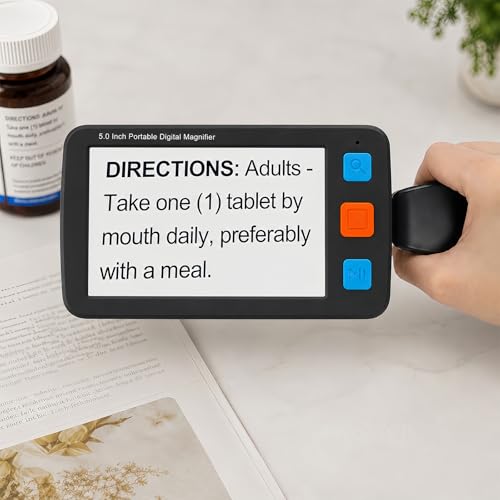
- 4X-32X zoom on a 5-inch HD screen
- 17 color modes and 5 brightness levels
- Foldable handle with AV output
Best For: Users who want a lightweight magnifier with adjustable contrast and brightness
DualLens Travel Reader

- 2X-48X zoom with near and far dual lens
- 26 color modes, brightness control, LED lighting
- Rechargeable battery and foldable stand
Best For: Users who want a portable reader with added distance-viewing support
RedFlex Low Vision Aid

- 2X-32X zoom with 26 color modes
- Foldable bracket and adjustable handle design
- 800x480 screen with DSP image processing
Best For: Users who want a simple, compact magnifier for everyday reading
Compact 5.0" Multi-Mode Magnifier – Portable Digital Video Magnifier
If you want an assistive vision device for macular degeneration that keeps setup simple, this 5.0-inch digital video magnifier is built for everyday reading tasks. It offers 2X-32X zoom, 26 color modes, and a foldable handle, making it practical for menus, labels, books, and other small print at home or on the go.
Best For: Users who want a compact low-vision reader with flexible magnification and color options.
Pros:
- 2X-32X adjustable zoom covers a wide range of reading needs.
- 26 color modes help tailor contrast for different vision preferences.
- Foldable handle and bracket support more comfortable viewing angles.
- 5.0-inch HD LCD screen uses 800×480 resolution with DSP image processing.
Cons:
- Smaller 5-inch screen may feel limited for users who prefer a larger display.
- Best suited to close-up reading rather than general long-form viewing.
- Requires adjustment to find the most comfortable color and zoom settings.
This model is a straightforward choice if you need a portable magnifier that balances usability, screen clarity, and customizable display modes. Its foldable design and memory feature make it a practical daily aid for low-vision reading.
Simplified Button Reader – 5 Inch Low Vision Aid
This assistive vision device for macular degeneration focuses on ease of use, with simplified buttons and 2X-32X zoom for close-up reading. The 5.0-inch HD screen, color modes, and auto-focus reading aid design make it a practical option for seniors and other users who want a simple digital magnifier for everyday tasks.
Best For: Users who want a simple, button-light magnifier for routine reading and viewing.
Pros:
- Simplified controls are designed to be easier for elderly users or children with low vision.
- 2X-32X magnification supports menus, books, groceries, and labels.
- 800×480 HD LCD with DSP image processing helps preserve color and detail.
- Can connect to a TV or computer with the included cable for a larger view.
Cons:
- 5-inch screen is compact if you want a bigger viewing area.
- Plastic or acrylic lens material may be less premium than glass alternatives.
- Battery-powered use may require more attention than plug-in devices.
For buyers who value straightforward operation over extra features, this magnifier is a sensible pick. It keeps the core functions needed for low-vision reading while avoiding a cluttered control layout.
Large-Screen Travel Magnifier – 8.0" Portable Video Reader
If you’re shopping for an assistive vision device for macular degeneration with a larger screen, this 8.0-inch portable electronic magnifier is designed for close-up reading and everyday visual tasks. It offers 2X-20X magnification, 26 color modes, and a foldable handle, with a fixed-focus design that works best when placed directly on the page.
Best For: Users who want a larger screen for reading newspapers, books, maps, and labels at close range.
Pros:
- 8.0-inch IPS display with 1280×800 resolution provides a bigger viewing area.
- 2X-20X magnification is useful for reading and viewing daily print materials.
- Foldable handle and carrying case make it more travel-friendly.
- Can run for about 4 hours and connect to a TV for a larger display.
Cons:
- Fixed-focus design means it must be placed on books or newspapers to avoid blur.
- Lower maximum zoom than some 5-inch models in this roundup.
- Best suited to flat reading surfaces rather than handheld scanning.
This is a strong option if you prefer a bigger screen over maximum zoom. The larger display and portable design make it a practical companion for reading at home or while out and about.
High-Zoom Pocket Reader – 5.0" Digital Magnifier
This assistive vision device for macular degeneration is aimed at users who want strong zoom in a compact format. With 3X-48X magnification, a 5.0-inch HD screen, simplified buttons, and a foldable handle, it’s built for quick reading of labels, menus, prescriptions, and other small print.
Best For: Users who want higher magnification for short reading tasks and everyday portability.
Pros:
- 3X-48X zoom offers the highest magnification range in this roundup.
- Simplified buttons and memory function reduce repeated setup.
- Foldable handle and lightweight build support portable use.
- Photo, playback, and TF card support add extra utility.
Cons:
- Not recommended for long books or novels.
- 5-inch screen is smaller than the 8-inch option in this list.
- TF card is limited to 32GB and not included.
If maximum zoom matters more than screen size, this model stands out. It’s especially practical for on-the-go reading where quick access to small print is the priority.
7.0-Inch High-Definition Reader – Portable 7" Video Magnifier
If you want an assistive vision device for macular degeneration that prioritizes a larger view, this 7.0-inch portable video magnifier offers a high-definition screen, 2X-32X zoom, and multiple enhancement modes. It is designed for practical everyday reading and can also send its display to a TV through AV or HDMI for an even larger view.
Best For: Users who want a larger screen and flexible TV output for reading books, labels, and other close-up text.
Pros:
- 7.0-inch LED display with smooth reading and anti-glare viewing
- 26 image enhancement modes for different lighting and contrast needs
- 2X-32X magnification with adjustable zoom
- AV and HDMI output for connecting to a TV
Cons:
- Larger screen may be less pocket-friendly than smaller handheld models
- Feature-rich interface may be more than some users need for basic reading
This model stands out if screen size and display flexibility matter most. The built-in photo storage and electronic curtain function add useful reading support, but the biggest advantage is the larger, high-clarity viewing area.
Simplified Everyday Reader – 5-Inch Auto Focus Magnifier
This assistive vision device for macular degeneration is built around simple controls, auto focus, and a 5-inch HD display for everyday reading tasks. With 2X-32X magnification and multiple color modes, it is aimed at users who want a straightforward magnifier for books, menus, and store labels.
Best For: Seniors or low-vision users who want simple controls and an easy-to-hold reading aid for daily use.
Pros:
- Simplified button layout designed for easier operation
- Auto focus and memory function help reduce repeated adjustments
- 5-inch HD screen with 2X-32X zoom and 26 color modes
- Foldable bracket and handle support more comfortable reading
Cons:
- Smaller screen than 7-inch alternatives
- Less elaborate than models with larger displays or more output options
For buyers who value ease of use over extra features, this is a practical low-vision aid. Its combination of simple buttons, auto focus, and ergonomic support makes it a good fit for routine reading without much setup.
Portable Comfort Reader – 5-Inch Color Mode Magnifier
If you need an assistive vision device for macular degeneration that balances portability with viewing comfort, this 5.0-inch video magnifier gives you 4X-32X zoom, 17 color modes, and five brightness levels. It is a practical option for reading books, newspapers, menus, labels, and other close text where adjustable contrast matters.
Best For: Users who want a lightweight portable magnifier with adjustable color and brightness settings.
Pros:
- 4X-32X magnification on a 5.0-inch HD screen
- 17 color modes and 5 brightness levels for comfort tuning
- Foldable handle for easier carrying and handheld use
- AV output and TF card expansion add extra flexibility
Cons:
- Plastic lens material instead of glass
- Smaller display than larger-screen alternatives
This model is a strong pick for users who want customization in a compact format. Its memory, screen lock, and output features make it a versatile reader, especially when you need quick adjustments across different lighting conditions.
ErgoView Desk Reader – Portable 5.0" HD Digital Magnifier
If you’re looking for an assistive vision device for macular degeneration that works for reading, writing, menus, and maps, this portable digital video magnifier is built for everyday use. Its 5.0-inch LCD, 3X-48X zoom range, foldable bracket, and 26 color modes make it a flexible option for close-up tasks at home or on the go.
Best For: People who want a handheld magnifier with a foldable stand for reading and viewing small print at a desk or table.
Pros:
- 3X-48X magnification on a 5.0-inch HD LCD for close reading.
- 26 color modes and adjustable brightness for customized viewing.
- Foldable bracket supports hands-free desktop use.
- HDMI and AV output let you connect to a TV, monitor, or projector.
Cons:
- Best suited to close-range tasks rather than general distance viewing.
- Feature set may take time to learn for first-time users.
Overall, this model stands out for its practical mix of portability and desktop support. If you want a low-vision reader that can also save photos, play them back, and connect to a larger screen, it offers a strong balance of convenience and flexibility.
DualLens Travel Reader – 5" Low Vision Video Magnifier
This assistive vision device for macular degeneration is designed for users who need a compact magnifier with both near and far viewing options. With 2X-48X zoom, 26 color modes, adjustable brightness, and dual outputs for TV connection, it’s built to make reading and simple distance viewing easier in a portable package.
Best For: Seniors and low-vision users who want a lightweight magnifier for reading plus occasional distance viewing.
Pros:
- 2X-48X magnification on a 5.0-inch 800 x 480 LCD.
- Near and far dual lens supports books as well as signs and boards.
- 26 color modes, 4 brightness levels, and adjustable LED lighting.
- Compact design includes a foldable stand and rechargeable 2500mAh battery.
Cons:
- TF card storage is supported but the card is not included.
- Smaller display may not suit users who prefer a larger built-in screen.
This is a useful pick if you want a travel-friendly magnifier with more viewing flexibility than a basic reader. The near/far lens setup and TV output make it a versatile everyday aid for low-vision tasks.
RedFlex Low Vision Aid – 5" 2X-32X Digital Magnifier
If you need an assistive vision device for macular degeneration that keeps things simple, this 5.0-inch digital video magnifier focuses on the essentials. It offers 2X-32X zoom, 26 color modes, a foldable bracket, and a high-resolution screen with far and near camera switching for reading and everyday viewing.
Best For: Users who want an easy-to-use reading aid with straightforward controls and a compact design.
Pros:
- 2X-32X zoom covers common reading and viewing needs.
- 26 color modes and memory of prior settings reduce repeated adjustments.
- Foldable bracket and interchangeable handle support comfortable use.
- 800×480 screen and DSP image processing help restore color and detail.
Cons:
- Lower top magnification than the 48X models in this roundup.
- Designed mainly for close-up use, despite far/near camera switching.
This model is a practical choice when ease of use matters more than maximum magnification. Its familiar controls, memory function, and desktop-friendly stand make it a solid everyday aid for low-vision reading.
How We Picked the Best Assistive Vision Device for Macular Degeneration
We prioritized devices that are simple to operate, offer useful magnification ranges, and are practical for reading mail, prescriptions, menus, books, and labels. We also looked at portability, display size, focus behavior, color modes, and whether the controls are beginner-friendly.
For an Assistive Vision Device for Macular Degeneration, ease of setup matters just as much as maximum magnification. A device that is too complicated can end up unused, so we favored options with clear buttons, stable handling, and features that reduce eye strain.
Quick Comparison: What Matters Most
Smaller 5-inch models are usually lighter and easier to carry, while 7-inch and 8-inch screens can feel more comfortable for longer reading sessions. Higher zoom is helpful for detail work, but broader magnification ranges are often more versatile for mixed tasks.
Color modes and contrast settings can be especially useful if glare, faded print, or uneven lighting is a problem. Auto-focus can also be a major convenience when switching between text and objects.
Key Buying Factors for an Assistive Vision Device for Macular Degeneration
Screen Size and Portability
If you want something for travel or occasional use, a compact unit may be best. If you read for longer periods, a larger screen can improve comfort and reduce repositioning.
Magnification Range
Look for a range that matches your tasks. Lower minimum magnification helps with larger text and navigation, while higher maximum magnification supports fine print and detail work. A wide range is usually the most flexible choice.
Controls and Focus
Simplified buttons, auto-focus, and easy brightness adjustment can make a big difference for users with limited vision or dexterity. The most effective devices are the ones you can operate confidently without extra help.
Display Modes and Contrast
Multiple color modes can help improve readability by increasing contrast or reducing glare. This is often one of the most useful features in a modern Assistive Vision Device for Macular Degeneration.
Who Should Buy Which Assistive Vision Device for Macular Degeneration?
Choose a compact 5-inch model if you need a lightweight, portable reader for quick tasks. Choose a larger 7-inch or 8-inch model if comfort and screen visibility matter more than size. If you want the most flexibility, pick a device with a wide zoom range, auto-focus, and several color modes.
In general, the best choice is the one that matches your daily reading habits, not just the highest specification on paper. For most shoppers, an easy-to-use device with strong contrast options will deliver more value than one with features they will rarely use.