Finding the right assistive vision device with text to speech can make everyday reading faster, easier, and less stressful. From handheld AI readers to scan pens, today’s options support a wide range of needs.
This roundup focuses on practical choices for students, professionals, and anyone who wants clearer access to printed text, labels, and learning materials.
Best 10 Assistive Vision Device with Text to Speech Picks for 2026
AI Reading Device
OrCam Read AI Assistive Reader
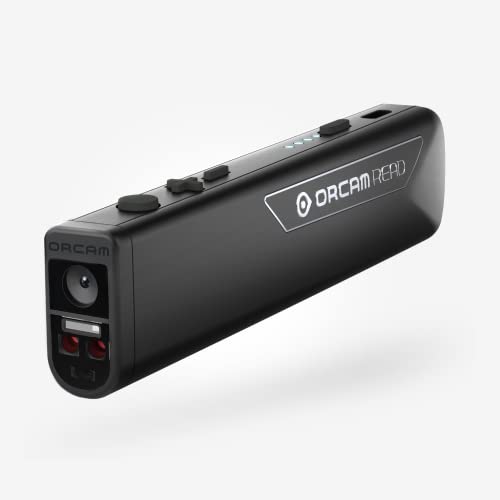
- Reads printed and digital text aloud
- Works offline and in low light
- Smart reading feature targets specific text
Best For: Heavy readers who want portable text-to-speech support
Scan-and-Translate Pen
Scanmarker Pal Reading & Translation Pen

- Scans, translates, and reads text aloud
- Supports 100+ languages with offline options
- Highlights words on screen for better comprehension
Best For: Students, travelers, and language learners
Text-to-Speech Book Player
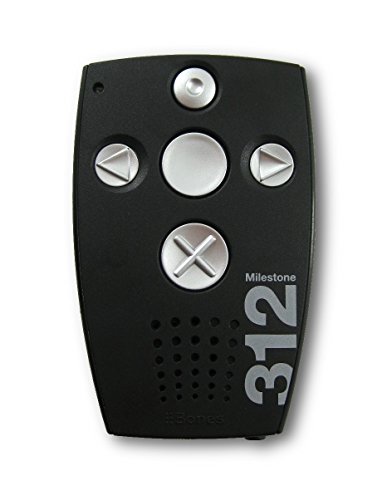
- Plays DAISY, TXT, DOC, and audio files
- Includes text-to-speech, recording, and FM radio
- Expandable storage via SD cards
Best For: Users who want a simple book reader with extra audio functions
Scan-to-Read Pen
142-Language Scan Translation Pen

- Text-to-speech with highlighted words
- Online translation in 142 languages
- Adds text extraction, photo translation, and recording
Best For: Students and travelers needing portable reading and translation support
AI Reading & Magnification

- Reads printed or digital text aloud
- Includes hands-free Stationary Reader mode
- Wi-Fi magnifier supports text and images
Best For: Low-vision users who need reading, magnification, and hands-free listening
OCR Translation Pen
112-Language Text to Speech Reader

- OCR scanning with text-to-speech output
- Supports 112 online voice translation
- Includes photo translation and recording
Best For: Students and professionals needing scan, speech, and translation tools
All-in-One Scan & Translate Pen
Translation Pen, Scan Reading Pen for Language Learning

- Scan-to-read with text to speech and highlighting
- 142 online languages plus 10 offline options
- Photo translation and text extraction included
Best For: Students, travelers, and language learners
Portable OCR Translator Pen
Scan Reader Pen with Voice Translation

- OCR text to speech with 98% accuracy claim
- 112 online voice translation languages
- Offline scanning translation in 13 languages
Best For: Portable reading and translation support
Reading & Recording Translator Pen
Scan Translator Pen for Learning Support

- Scan reading aloud with word highlighting
- 142 online languages and 10 offline languages
- Adds note-taking and voice recording features
Best For: Learning support, notes, and translation
AI Reading Device – OrCam Read AI Assistive Reader
If you’re looking for an assistive vision device with text to speech for everyday reading, the OrCam Read is built for people who handle lots of printed or digital text at school, work, or on the go. It works without internet access, can read in low-light settings, and includes a smart reading feature so you can ask it to focus on the part of the text you want.
Best For: Users who need portable text-to-speech help for heavy reading, learning, or office tasks.
Pros:
- Reads printed and digital text aloud with a built-in smart reading feature.
- Works offline and in low-light environments.
- Designed for students, professionals, and people with reading difficulties such as dyslexia.
- Includes Bluetooth and headphone compatibility for flexible listening.
Cons:
- Not intended for people with moderate to severe visual impairment.
- Requires the user to be able to hear audio output.
- Needs full control over hand movements to operate.
Overall, the OrCam Read is a practical pick when you want a dedicated reading device that focuses on fast, flexible text-to-speech support rather than broad accessibility features.
Scan-and-Translate Pen – Scanmarker Pal Reading & Translation Pen
The Scanmarker Pal is a compact assistive vision device with text to speech that scans text, translates it, and reads it aloud for learners and travelers. It is aimed at dyslexia support, studying, and quick multilingual help, with highlighted words on screen for easier follow-along comprehension.
Best For: Language learners, students, and users who want a portable scan-and-read pen.
Pros:
- Scans, translates, and reads text aloud in over 100 languages.
- Highlights words on screen to support comprehension.
- Supports offline use for English, Spanish, French, German, and Italian.
- Compact design works well for travel and can connect to Bluetooth headphones.
Cons:
- Best suited to text scanning rather than full-page reading.
- Requires Bluetooth or USB support on the connected device.
- May be more than needed if you only want basic reading aloud.
For users who want translation and text-to-speech in one pocket-sized tool, the Scanmarker Pal offers a flexible balance of reading support and multilingual convenience.
Text-to-Speech Book Player – Milestone 312 Reader-Player
The Milestone 312 is a straightforward assistive vision device with text to speech for users who need a dedicated book player and reader. It supports several reading and audio formats, including DAISY, TXT, DOC, and multiple music files, making it useful for both reading and listening tasks.
Best For: Users who want a compact text-to-speech book player with extra audio features.
Pros:
- Supports DAISY, NLS, TXT, DOC, and multiple audio formats.
- Includes text-to-speech, voice recording, and FM radio.
- Expandable memory supports more storage with SD cards.
- Button-based controls keep operation simple.
Cons:
- More limited in scope than scan-based reading devices.
- Uses USB connectivity rather than modern wireless-first features.
- Internal storage is modest without an added SD card.
If you want a focused reader-player with dependable text-to-speech and a few useful extras, the Milestone 312 is built for simple, practical everyday use.
Scan-to-Read Pen – 142-Language Scan Translation Pen
This assistive vision device with text to speech is designed for users who need quick scan reading, translation, and study support in a portable form. It handles online translation in 142 languages and adds offline support for 10 major languages, plus text extraction, photo translation, and recording features for classroom or travel use.
Best For: Students, travelers, and language learners who want scan-to-read help and note-taking tools.
Pros:
- Supports online scanning translation in 142 languages.
- Includes text-to-speech reading with on-screen word highlighting.
- Offers text extraction, phone sync, photo translation, and recording.
- Lightweight design and left/right-hand mode improve portability and comfort.
Cons:
- Not suitable for blind people, according to the product notes.
- Offline language support is limited to 10 major languages.
- Best for scanned text rather than broad everyday reading needs.
For buyers who want a feature-rich reading pen with study, translation, and recording functions, this model covers a lot of ground in one compact device.
AI Reading & Magnification – OrCam Read 3 Handheld Reader
If you want an assistive vision device with text to speech that can handle reading, magnifying, and on-device navigation in one package, the OrCam Read 3 is built for flexible everyday use. It reads printed or digital text aloud, can act as a stationary reader at home, and includes a browser-based magnifier for text, images, handwriting, and screen content.
Best For: People with low vision who want a handheld reader that also supports magnification and hands-free home reading.
Pros:
- Reads printed and digital text aloud from nearly any surface
- Stationary Reader mode supports hands-free listening at home
- Smart Reading helps find and jump to specific words or content
- Wi-Fi magnifier can zoom text, images, handwriting, and change display colors
Cons:
- Requires the included stand for stationary reading mode
- Magnifier features depend on Wi-Fi and account login
- May offer more capability than shoppers who only need basic text reading
The OrCam Read 3 stands out for combining text-to-speech and magnification in a single tool, making it a strong fit for users whose needs vary between reading, viewing, and listening. Its feature set is broad, but still centered on practical everyday reading support.
Scan & Translate Pen – Text to Speech Reading Pen
This scan-and-translate pen is a practical assistive vision device with text to speech for users who need help reading printed text aloud, but its main focus is translation and language support. It scans text, reads it out, and offers online and offline language features for students, travelers, and older users.
Best For: Students, language learners, and elderly users who need scan reading plus translation support.
Pros:
- Scans text and reads it aloud for pronunciation and comprehension
- Supports 142 online languages and 10 offline languages
- Lightweight, pocket-sized design for on-the-go use
- Can connect Bluetooth headphones for private listening
Cons:
- The listing says it is not suitable for blind people
- Offline language support is limited compared with online mode
- More of a translation tool than a full-featured vision aid
For shoppers who want quick scan reading with built-in translation, this pen covers a lot of ground in a compact format. Just note that its strengths are language-learning and text scanning rather than dedicated support for blind users.
OCR Translation Pen – 112-Language Text to Speech Reader
If you are looking for an assistive vision device with text to speech that also handles translation and text capture, this scanner reader pen offers a broad feature set. It uses OCR to scan words or sentences, voice out the original or translated text, and add photo translation plus recording tools in a compact pen format.
Best For: Students and professionals who want a scan pen with text reading, translation, and note-taking features.
Pros:
- OCR scanning with text-to-speech output for words or sentences
- Supports 112 online real-time voice translation
- Includes text extraction, photo translation, and intelligent recording
- Bluetooth headset support and a built-in touchscreen
Cons:
- Text-to-speech language support is more limited than the 112-language translation claim
- Best suited to scanning and translation, not full low-vision mobility support
- Feature-rich interface may be more than some casual users need
This model is the most feature-packed of the three if you want scanning, speech output, and translation in one device. It is especially appealing for study, meetings, and travel, but it is still more of a productivity pen than a dedicated vision-assistance system.
All-in-One Scan & Translate Pen – Translation Pen, Scan Reading Pen for Language Learning
If you want an assistive vision device with text to speech for reading printed text aloud, this translation pen is built for fast scan-to-read and translation support. It combines OCR scanning, voice translation, text extraction, and photo translation, making it practical for students, language learners, travelers, and older users who need help understanding written content on the go.
Best For: Students, travelers, and language learners who need scan reading and multilingual translation in one device.
Pros:
- Scan-to-read with text-to-speech support and word highlighting on screen.
- Supports 142 online languages and 10 offline languages for translation.
- Includes image translation, text extraction, and built-in camera support.
- Bluetooth connectivity adds flexibility for connected use.
Cons:
- Not suitable for blind people, according to the notes.
- Offline language support is limited compared with online translation.
Overall, this is a strong all-purpose reading and translation pen if your priority is quick OCR-based reading support plus broad language coverage. It is especially useful when you need a portable tool that can handle menus, documents, and classroom material without much setup.
Portable OCR Translator Pen – Scan Reader Pen with Voice Translation
This assistive vision device with text to speech is designed for quick reading help and language conversion in a compact pen form. It uses OCR to scan text into audio, supports two-way voice translation, and adds offline scanning translation for common travel and learning situations.
Best For: People who want a portable scan reader for dyslexia support, translation, and everyday communication.
Pros:
- OCR text-to-speech reading support with reported 98% accuracy.
- Supports 112 online real-time voice translation for two-way communication.
- Offers offline scanning translation in 13 languages.
- Adjustable voice output speed can make listening easier.
Cons:
- Offline translation is limited to 13 languages.
- Smaller language coverage than some higher-count alternatives.
For buyers focused on straightforward reading support, this pen stands out for its OCR-to-audio function and simple portable design. It is a practical option if you want a text to speech scanner that can also help with travel, shopping, and classroom communication.
Reading & Recording Translator Pen – Scan Translator Pen for Learning Support
If you’re shopping for an assistive vision device with text to speech that does more than basic reading, this scan translator pen adds voice translation, text extraction, and recording features. It is aimed at learners, older users, and people with learning difficulties who need a portable tool for reading printed text, translating documents, and capturing notes.
Best For: Users who want reading support plus note-taking and voice recording in one portable pen.
Pros:
- Scan reading aloud with highlighted words for better comprehension.
- Supports 142 online languages and 10 offline languages.
- Includes smart note-taking and a voice recorder for classes or meetings.
- Built-in camera enables online and offline photo translation.
Cons:
- Not suitable for blind people, according to the notes.
- Offline language support is limited to 10 languages.
This model is a good pick if you want reading help that also doubles as a practical study and work tool. The added recording and note-taking features make it more versatile than a basic scan reader while still keeping the core text-to-speech and translation functions front and center.
How We Picked the Best Assistive Vision Device with Text to Speech
We prioritized devices that combine reliable text capture, clear spoken output, and simple day-to-day use. We also looked at portability, language support, offline versus online functionality, and whether the device is better for reading books, labels, notes, or multilingual travel.
Quick Comparison
Not every Assistive Vision Device with Text to Speech serves the same purpose. Some are designed for fast scanning and voice playback, while others add translation, smart magnification, or AI-based reading assistance. In general, handheld readers are better for larger reading tasks, and pen-style scanners are best for quick lookups and study support.
Key Buying Factors for an Assistive Vision Device with Text to Speech
Reading Format
Choose a device based on what you need to read most often. Books, mail, invoices, menus, and classroom handouts may require different scanning angles, recognition speed, and text layout handling.
Voice Quality and Speed
Look for natural-sounding speech, adjustable reading speed, and easy pause or repeat controls. Clear audio matters most when you will use the device for long sessions or in noisy environments.
Language and Translation Support
If you study languages or travel often, consider how many languages the device supports and whether translation works offline. Some tools are better for text-to-speech alone, while others are built for multilingual use.
Portability and Workflow
Pen readers are lightweight and discreet, while larger handheld devices may offer stronger reading features and better handling for full pages. Think about whether you need something pocketable, desk-friendly, or suited to regular home use.
Accessibility Features
Useful extras include OCR accuracy, smart magnification, bookmarking, and support for dyslexia or learning differences. The best choice depends on whether your priority is vision assistance, study efficiency, or both.
Who Should Buy Which Assistive Vision Device with Text to Speech?
Choose a handheld AI reader if you want a more complete Assistive Vision Device with Text to Speech for books, documents, and independent reading. Pick a scan pen if you need a simple, portable tool for quick text capture, translation, and classroom use. If your main goal is multilingual communication, prioritize models with strong translation coverage. For users who mainly need dependable spoken reading and easy handling, a straightforward text-to-speech reader is usually the most practical option.