Finding the right camera slider for beginners can make your first motion shots feel far more polished without adding a steep learning curve.
Below, we focus on beginner-friendly options that balance smooth movement, setup simplicity, and practical features for video, timelapse, and content creation.
Best 10 Camera Slider for Beginners Picks for 2026
Budget-Friendly Travel Slider
Zecti 24" Carbon Fiber Camera Slider

- 24-inch portable manual slider with carrying bag
- Four bearings and dual rail system for smoother motion
- Supports phones, action cams, and small cameras
Best For: Beginners wanting a lightweight manual slider for travel
Motorized All-in-One Slider
GVM 48" Automatic Round Trip Slider
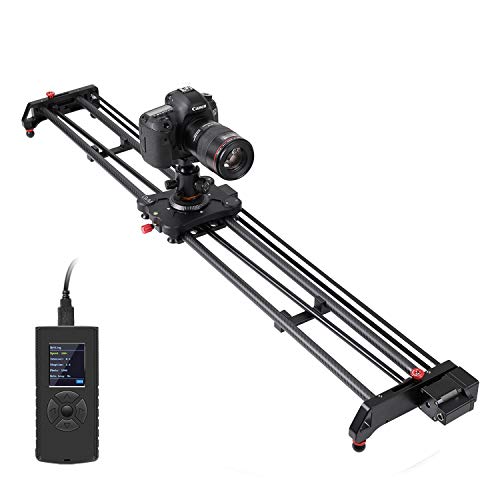
- Motorized control with adjustable speed, interval, and loop
- Supports time lapse, panoramic, manual, and electric modes
- Includes battery, charger, remote, and carrying bag
Best For: Beginners who want automated motion for time lapse and panoramas
Compact Starter Slider
NEEWER 16" Carbon Fiber Slider Kit

- Lightweight 16-inch slider with carrying bag
- Includes ball head, phone clamp, and action camera mount
- Four bearings and adjustable legs for smooth setup
Best For: Beginners who want an easy-to-carry multi-device starter kit
Simple Manual Budget Slider
Andoer 30cm Aluminum Track Slider

- Basic aluminum alloy manual slider with 3 length options
- Four bearings for smooth, silent sliding
- Multiple threads for tripod and accessory mounting
Best For: Beginners who want a simple manual slider with accessory support
Easy Starter Motion Kit
Smallest Motion Control Slider for Simple Cinematic Shots

- 2-in-1 slider and panorama mount
- No apps required; quick-start included
- Works with phones, GoPros, and mirrorless cameras
Best For: Beginners who want one compact kit for slides, pans, and time-lapse
Travel-Friendly Manual Slider
Lightweight Carbon Fiber Slider for Travel Practice

- 16-inch portable rail with carrying bag
- Carbon fiber design with precision bearings
- Adjustable legs and level for easier setup
Best For: Beginners who want a portable manual slider for learning motion shots
Automated Learning Slider
Automated 48-Inch Slider for Hands-Off Motion
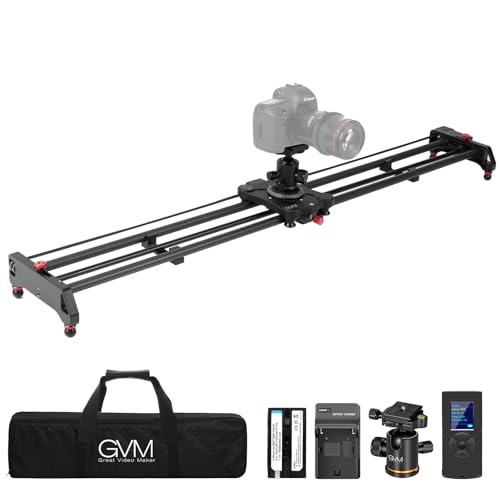
- Motorized motion with remote control settings
- Supports video, time-lapse, and 120-degree panorama
- Includes shutter cables and extension cable
Best For: Beginners who want an automated slider with advanced motion options
Starter Motion Pro
NEEWER 47.2" Motorized Carbon Fiber Slider

- App control with manual, video, and time lapse modes.
- Silent stepper motor for smooth, quiet motion.
- Long 47.2-inch rail for wider camera moves.
Best For: Beginners who want a longer motorized slider for video and time lapse.
All-in-One Motion Kit
GVM 48" Carbon Fiber Motorized Slider

- App control with tracking, panoramic, time lapse, and video modes.
- Includes shutter cables, extension cable, and carry bag.
- Carbon fiber rail with adjustable legs for better stability.
Best For: Beginners who want a versatile slider with extra accessories.
Compact Learning Pick
NEEWER 31.5" Motorized Carbon Fiber Slider

- Shorter 31.5-inch rail for simpler handling.
- App control plus 2.4G remote support.
- Silent motor and carbon fiber build for smooth motion.
Best For: Beginners who want a compact motorized slider for small setups.
Budget-Friendly Travel Slider – Zecti 24" Carbon Fiber Camera Slider
If you want a camera slider for beginners that’s easy to carry and simple to mount, this 24-inch Zecti model is a practical place to start. It keeps the setup compact, adds a carrying bag, and supports vertical, horizontal, diagonal, and sideways use with removable legs and a bubble level.
Best For: Beginners who want a lightweight, travel-ready manual slider for small cameras, phones, or action cams.
Pros:
- Lightweight 24″/60 cm carbon fiber design at 654 g for easy travel
- Includes four precision bearings and a double interior rail system for smoother movement
- Works in multiple orientations with adjustable legs, non-skid feet, and a bubble level
- Compatible with cameras, smartphones, GoPro, DJI, and other small devices
Cons:
- Manual slider can be noisy if screws are overtightened
- Maximum weight recommendation is 4.4 pounds, so it suits lighter gear
This is a beginner-friendly option if portability matters more than advanced motion control. Once adjusted correctly, it offers a flexible way to learn slider shots without a heavy setup.
Motorized All-in-One Slider – GVM 48" Automatic Round Trip Slider
For a camera slider for beginners who want automation instead of hand-pushing a carriage, this GVM motorized model adds a lot of control. It supports time lapse, panoramic shooting, manual and electric modes, and lets you set start/end points, speed, interval, and stop time.
Best For: Beginners who want a motorized slider for time lapse, panorama, and repeatable video moves.
Pros:
- Motorized operation with customizable start/end points and auto loop
- Supports manual and electric modes plus time lapse and panoramic shooting
- Carbon fiber rail and adjustable feet help maintain stable movement
- Includes battery, charger, cables, remote, and carrying bag
Cons:
- Heavier than manual compact sliders at 11.8 pounds
- Designed for cameras rather than phones or action cameras
This is the most feature-rich choice in the group, but it also asks more from the user in terms of setup and handling. If you want automated motion from the start, it gives you room to grow into more advanced shooting styles.
Compact Starter Slider – NEEWER 16" Carbon Fiber Slider Kit
If you’re shopping for a camera slider for beginners and want a compact kit with extra mounting options, this NEEWER 16-inch model is easy to understand and easy to carry. It comes with a mini ball head, phone clamp, and action camera mount, so you can practice with different devices right away.
Best For: Beginners who want a lightweight starter slider for cameras, phones, and action cameras.
Pros:
- Lightweight 16″/40 cm carbon fiber slider at 615 g
- 4 bearings and a tension knob for smooth, quiet sliding
- Includes adjustable legs, bubble level, ball head, phone clamp, and action camera mount
- Compatible with many phones, GoPro models, and Insta360 cameras
Cons:
- Lower load capacity than larger sliders, with 4.4 lb horizontal support
- Shorter rail length may be limiting for wider motion shots
This kit is a strong pick if you want a small, versatile slider that reduces the learning curve. It gives beginners a lot of flexibility without making the setup feel complicated.
Simple Manual Budget Slider – Andoer 30cm Aluminum Track Slider
For a camera slider for beginners who just want a basic manual track, this Andoer slider keeps things straightforward. It uses an aluminum alloy body, 4 high-precision bearings, and multiple thread options for mounting accessories like a tripod, LED light, monitor, or mic.
Best For: Beginners who want a simple, low-frills manual slider for learning the basics.
Pros:
- Simple aluminum alloy slider with three length options
- 4 precision bearings are designed for smooth, silent movement
- Multiple 1/4″ and 3/8″ threads support extra accessories
- Can support up to 11 lb, giving it more headroom than some compact models
Cons:
- No motorized features or bundled travel extras listed
- Short 30 cm version may be limiting for more cinematic moves
This is the most basic option here, which can be an advantage if you want to learn slider technique without extra features. It focuses on core motion, mounting flexibility, and affordability-friendly simplicity.
Easy Starter Motion Kit – Smallest Motion Control Slider for Simple Cinematic Shots
If you want a camera slider for beginners that keeps setup simple, the MovieMaker kit is built around quick, guided motion shots instead of complicated rigging. It combines a compact slider with a panorama base, so you can practice smooth slides, panning, and time-lapse work without buying multiple devices.
Best For: Beginners who want an all-in-one motion kit for phones, action cameras, or mirrorless cameras.
Pros:
- 2-in-1 design switches between slider and panorama mount.
- No apps required, with a quick-start example included.
- Works with iPhone, Android, GoPro, Insta360, and mirrorless cameras.
- Ping-pong motion supports continuous back-and-forth shots.
Cons:
- Tracks for longer motion shots are sold separately.
- Battery life is listed at 2.5 hours, so extended shoots may need planning.
- Maximum load is limited to 750 g.
This is a practical starter pick if you want to learn motion control without a bulky or app-dependent setup. The compact design and included accessories make it easier to start filming right away.
Travel-Friendly Manual Slider – Lightweight Carbon Fiber Slider for Travel Practice
The Zecti model is a straightforward camera slider for beginners who want to practice manual motion on a compact, travel-friendly rail. Its 16-inch size, carrying bag, and adjustable legs make it easy to test slide shots on a tripod or flat surface without dealing with a large setup.
Best For: Beginners who want a simple manual slider they can carry anywhere.
Pros:
- Compact 16-inch rail is easy to pack for travel.
- Carbon fiber build uses four precision bearings for smoother movement.
- Adjustable legs and bubble level help with setup on different surfaces.
- Multiple mounting points support horizontal, vertical, and slanted shots.
Cons:
- It is manual, so motion depends on the user.
- The notes warn that overtightened screws can affect smoothness.
- Phone holder is not included for smartphone use.
For beginners learning framing and slide control, this is a sensible low-complexity option. It focuses on portability and basic versatility rather than powered automation.
Automated Learning Slider – Automated 48-Inch Slider for Hands-Off Motion
For beginners ready to move beyond basic manual sliders, this motorized GVM unit offers automated motion and remote control in a longer 48-inch format. It supports tracking, horizontal moves, time-lapse, and 120-degree panoramic shooting, giving you room to experiment with different kinds of motion control as your skills grow.
Best For: Beginners who want a motorized slider with room to grow into more advanced motion control.
Pros:
- Motorized operation supports video, time-lapse, and automatic cycling.
- Remote control lets you set speed, dwell time, distance, and loop settings.
- 120-degree panorama mode adds another creative option.
- Includes multiple shutter cables and extension cable for wider compatibility.
Cons:
- At 48 inches and 5.42 kg, it is less portable than shorter manual sliders.
- It is more complex than a basic beginner rail.
- Designed for cameras, so it is not the simplest plug-and-play choice for phone users.
This slider makes sense if you are a beginner who wants to learn on a more capable automated system. It offers a lot of control, but the size and feature set are better suited to committed users than casual first-timers.
Starter Motion Pro – NEEWER 47.2" Motorized Carbon Fiber Slider
If you’re shopping for a camera slider for beginners, this NEEWER ER1 gives you a straightforward way to add smooth motion, time lapse moves, and basic pan-style shots to your videos. The app control and silent motor make it easier to learn controlled camera movement without a complicated setup, while the 47.2-inch rail offers plenty of room for wider motion shots.
Best For: Beginners who want a longer motorized slider for video, time lapse, and simple panoramic motion.
Pros:
- App control plus 2.4G remote support for manual, video, and time lapse modes.
- Silent stepper motor helps keep movement smooth and quiet.
- 47.2-inch carbon fiber rail provides a long travel path for creative shots.
- Supports 45° tilt, horizontal movement, and 120° panoramas.
Cons:
- Charger and 2.4G remote are not included.
- Minor shake may occur during macro photography.
- It is a larger, heavier setup than compact beginner sliders.
Overall, this is a capable learning-friendly motorized slider if you want room to grow into more advanced motion work. The carbon fiber build, battery power, and app-based controls make it practical for creators who want polished movement without jumping straight into a high-complexity rig.
All-in-One Motion Kit – GVM 48" Carbon Fiber Motorized Slider
The GVM 48-inch motorized rail is a strong pick if you want a camera slider for beginners that can cover a lot of shooting styles from one setup. Its app control, adjustable start and end points, and multiple shooting modes make it easier to experiment with tracking shots, panoramic moves, and time lapse without needing extra gear.
Best For: Beginners who want a versatile slider with app control and bundled accessories for different shooting styles.
Pros:
- Supports tracking, panoramic, time lapse, video capture, and free shooting modes.
- App control lets you manage motion from a phone or tablet.
- Carbon fiber build and adjustable legs help improve stability.
- Includes multiple shutter release cables, an extension cable, and a carry bag.
Cons:
- At 4 kg, it is not the lightest option in this group.
- Battery life is listed at about 2 hours.
- Setup may feel more advanced because of the many shooting and torque settings.
This model stands out for beginners who want a more feature-rich slider and do not mind spending a little time learning the controls. The accessory bundle and wide mode selection make it a practical all-rounder for building skills in motion shooting.
Compact Learning Pick – NEEWER 31.5" Motorized Carbon Fiber Slider
If you want a camera slider for beginners and prefer a shorter rail that is easier to handle, this 31.5-inch NEEWER ER1-80 keeps the focus on smooth motion, app control, and time lapse or video work. It uses the same silent stepper motor approach as the larger model, but in a more compact size that may be easier to manage for smaller spaces and simpler setups.
Best For: Beginners who want a more compact motorized slider for video and time lapse projects.
Pros:
- Shorter 31.5-inch rail is easier to place and transport than longer sliders.
- App control and 2.4G remote support manual, video, and time lapse modes.
- Silent stepper motor helps keep camera movement smooth and quiet.
- Carbon fiber build and roller bearings add stability and anti-shake support.
Cons:
- Charger and 2.4G remote are not included.
- Maximum load is limited to 11 lb horizontally and 5.5 lb at a 45° tilt.
- Best suited to simple motion work rather than large, elaborate setups.
For new users, this is the easiest of the three to fit into a smaller kit. It still offers the core features needed to learn motion control, but its shorter rail makes it a better match for streamlined video and time lapse shooting.
How We Picked the Best Camera Slider for Beginners
For a Camera Slider for Beginners, we prioritized ease of use, stable construction, smooth travel, and features that help new users get results quickly. We also looked at whether a slider is portable enough for solo shooting, whether it supports common cameras and phones, and whether the controls feel approachable rather than overly technical.
Quick Comparison
Short sliders are usually easier to pack and learn on, while longer rails offer more room for dramatic push-ins and tracking shots. Manual sliders are often the simplest starting point, while motorized models add timelapse and repeatable motion at the cost of extra setup and battery management. If you are choosing your first Camera Slider for Beginners, think about whether you want maximum simplicity or more automated movement.
Key Buying Factors for Camera Slider for Beginners
Length and Portability
Compact sliders are easier to carry and use in tight spaces. Longer rails can be more versatile, but they are less travel-friendly and may require more careful tripod placement.
Manual Vs. Motorized Control
Manual sliders are best if you want a low-cost, straightforward way to learn motion shots. Motorized sliders suit creators who want consistent moves for product video, interviews, or timelapse work.
Load Capacity and Camera Support
Check that the slider can safely support your camera, lens, and any accessories. Beginners often underestimate total weight, which can affect smoothness and stability.
Mounting and Compatibility
Look for standard tripod threading, ball-head support, phone mounts, or action camera adapters if you plan to use multiple devices. Fewer compatibility issues usually means less frustration on day one.
Motion Smoothness and Controls
Bearings, rail materials, and drive systems all influence how clean the footage looks. If you are new to motion tools, simple, predictable controls are usually more valuable than a long feature list.
Who Should Buy Which Camera Slider for Beginners?
If you want the easiest learning curve, start with a compact manual slider. If you plan to shoot timelapses, repeatable product shots, or cinematic moves, a motorized option is worth considering. Creators working mostly with lightweight cameras or phones may prefer a smaller slider, while DSLR and mirrorless users should lean toward higher load capacity and better rail stability. The best Camera Slider for Beginners is the one that matches your workflow now, not the one with the most advanced feature set.