If you want smoother streams and less strain on your PC, a capture card with hardware encoder can make a big difference. It handles more of the video work on the device, helping reduce CPU usage and latency.
Below, you’ll find a focused roundup of 10 options for creators, gamers, and educators, plus a practical buying guide to help you choose the right fit for your setup.
Best 10 Capture Card with Hardware Encoder Picks for 2026
Classic PCIe Recorder

- 1080p capture with H.264 hardware encoding
- Reduces CPU usage with ultra-low latency
- PCIe card with HDMI and analog audio pass-through
Best For: Desktop streamers wanting an internal 1080p capture card
Portable 4K Capture
Elgato 4K S USB-C Capture Card

- Captures in 4K60 with HDR10 support
- Supports 1440p120 or 1080p240 passthrough
- Compact USB-C external design
Best For: Modern console players who want a portable high-refresh capture card
Standalone Streaming Encoder

- 1080p60 hardware H.265/H.264 encoding
- Supports RTMP, SRT, RTSP, HLS, and WebRTC
- Browser setup with OSD overlay and audio input
Best For: Direct-to-network streaming and always-on encoder installations
Budget PCIe Loop-Out Card
MYPIN PCIe 4K30 HDMI Capture Card

- 4K30 HDMI capture with zero-delay loop-out
- PCIe high-speed transmission for PC setups
- Works with OBS, VLC, vMix, and more
Best For: Budget PC builders who want an internal HDMI capture card with loop-out
Portable USB Capture
XIIXMASK USB 3.0 HDMI Capture Card

- 1080p60 capture with 4K 60Hz loop-out
- Mic-in support for live commentary
- USB-A and USB-C connection options
Best For: Streamers and gamers needing an easy external HDMI capture setup
Internal PCIe Multicam
ACASIS 4K HDMI PCIe x4 Video Capture Card

- Four-way HDMI capture for multicam workflows
- 1080p60 output with ultra-low latency
- Built-in fan for heat dissipation
Best For: Desktop streamers and presenters needing an internal multicam capture card
Ultra-Portable USB Capture
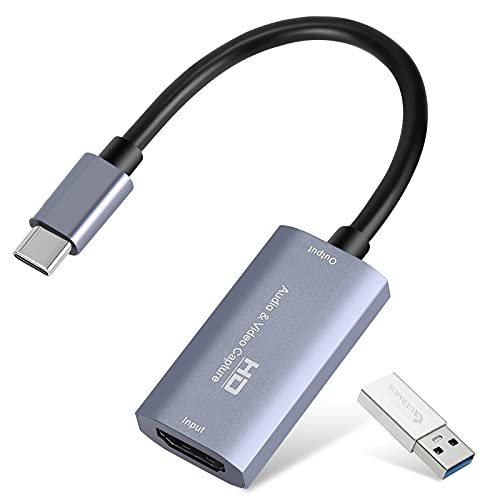
- 1080p60 capture over USB 3.0
- Plug-and-play with no external power
- Small, lightweight, and travel-friendly
Best For: Travel-friendly streaming and recording with simple setup
Premium 4K Pass-Through Capture
PORTTA DX20R 4K60 HDR Capture Card

- 4K@60Hz capture with up to 1080p@240Hz passthrough
- Supports HDR, VRR, and ultra-low latency
- Plug-and-play on Windows, macOS, and Linux
Best For: Serious streamers and gamers who want high-refresh passthrough plus 4K60 capture
Simple USB 3.0 Capture Pick
VIXLW V316B-FR 1080p60 HDMI Capture Card

- 1080p capture with HDMI loop-out for live play
- Plug-and-play with no driver or external power needed
- Mic-in support for commentary during streams
Best For: Windows users who want straightforward 1080p streaming with loop-out monitoring
Portable Low-Latency Capture
acer USB 3.0 HDMI Capture Card 1080p60

- 4K input with 1080p@60Hz output
- YUY2 color handling and low-latency capture
- Mic-in plus broad app and device support
Best For: Creators who need a portable 1080p capture card for gaming, teaching, or streaming
Classic PCIe Recorder – AVerMedia Live Gamer HD C985
If you want a capture card with hardware encoder for a desktop streaming rig, the AVerMedia Live Gamer HD C985 is built around full HD 1080p capture and H.264 encoding. It is designed to reduce CPU usage while keeping latency low, making it a practical choice for console gameplay recording and live streaming on Windows systems.
Best For: PC-based streamers who want a PCIe card for 1080p console capture with built-in H.264 encoding.
Pros:
- 1080p capture with H.264 hardware encoding
- Ultra-low latency and reduced CPU usage
- HDMI pass-through plus analog 3.5mm audio pass-through
- Works with RECentral and popular streaming software
Cons:
- Requires a PCIe slot and Windows 8 support from the listed specs
- Less flexible than USB capture options for portable setups
Overall, this is a straightforward internal capture solution for users who want dependable 1080p recording without leaning heavily on the CPU. It fits best in a dedicated gaming PC where PCIe installation is not a problem.
Portable 4K Capture – Elgato 4K S USB-C Capture Card
The Elgato 4K S is a capture card with hardware encoder-style capture priorities for modern consoles, focusing on 4K60 recording, high-frame-rate passthrough, and HDR10 support. With USB-C connectivity and cross-platform compatibility, it is a strong fit if you want a compact external option for current-gen gaming and smooth recording workflows.
Best For: Players who want a compact USB-C capture card for PS5, Xbox Series X/S, Switch 2, and high-frame-rate gameplay.
Pros:
- 4K60 capture with HDR10 support
- Supports 1440p120 or 1080p240 passthrough
- USB 3.0 Type-C connection for a simple external setup
- Works with PS5, Xbox Series X/S, Switch 2, and more
Cons:
- Requires newer system support, including Windows 11 or recent macOS/iPadOS
- Not a built-in PCIe solution for desktop-only builds
This is a clean choice for modern gaming setups that need both high-quality capture and flexible passthrough. Its compact design makes it easier to move between systems or use with a laptop.
Standalone Streaming Encoder – UNISHEEN JM1000 HDMI Encoder
If your goal is a capture card with hardware encoder-like functionality for direct streaming, this UNISHEEN HDMI encoder is built for 1080p60 H.265/H.264 output without needing PC software. It is aimed at network-based live delivery, browser setup, and always-on deployments rather than local gameplay capture.
Best For: Users who need a standalone HDMI encoder for RTMP, RTSP, SRT, HLS, or WebRTC streaming.
Pros:
- Dedicated hardware H.265/H.264 encoding at 1080p60
- Supports many streaming and IP distribution protocols
- Browser-based setup with no drivers or software required
- Built-in OSD overlay plus external 3.5mm audio input
Cons:
- Not a traditional USB or PCIe capture card for editing workflows
- Requires some networking knowledge for advanced setup
This is best viewed as a streaming appliance rather than a game capture device. If you want direct-to-network output and simple deployment, it offers a focused feature set in a compact box.
Budget PCIe Loop-Out Card – MYPIN PCIe 4K30 HDMI Capture Card
The MYPIN PCI-E capture card is a practical capture card with hardware encoder support for users who want 4K30 HDMI input, zero-delay loop-out, and fast internal PCIe transfer. It is aimed at PC-based capture and streaming where broad software compatibility matters more than premium extras.
Best For: Budget-minded users who want a PCIe HDMI capture card with loop-out for gaming, streaming, or general video recording.
Pros:
- Captures up to 4K at 30fps over HDMI
- Zero-delay HDMI loop-out for monitoring or gameplay
- PCIe high-speed transmission with broad OS support
- Compatible with OBS, VLC, vMix, and other software
Cons:
- Listed capture resolution is 1080p in the specs despite 4K30 input claims
- Not as compact or portable as USB capture solutions
This card makes sense if you want an internal install and value zero-latency passthrough. It is a versatile option for streaming, recording, and other HDMI-based video workflows, especially on Windows or Linux systems.
Portable USB Capture – XIIXMASK USB 3.0 HDMI Capture Card
If you want a capture card with hardware encoder-style simplicity for streaming or recording from a console, camera, or PC, the XIIXMASK USB 3.0 HDMI capture card is built around easy 1080p60 capture with 4K 60Hz loop-through. It uses USB 3.0 for fast transfer, supports USB-A and USB-C connections, and keeps latency low for real-time preview and live use.
Best For: Streamers and gamers who want a compact external capture card for 1080p60 recording with mic-in commentary support.
Pros:
- 1080p60 capture with 2K30 output support and 4K 60Hz HDMI loop-out
- Mic-in port lets you add commentary directly during live streams or recordings
- USB-A/USB-C cable support makes it easy to connect to a range of setups
- Aluminum alloy body is designed for stability and better heat dissipation
Cons:
- Audio setup in OBS may require a restart after configuration
- Party chat is not recorded through the mic-in port
- Capture is limited to 1080p60 / 2K30 rather than higher-resolution recording
This is a practical pick if you need a straightforward external HDMI capture device with broad compatibility and low-latency live preview. The mic input and dual USB cable support make it especially useful for budget-friendly streaming rigs.
Internal PCIe Multicam – ACASIS 4K HDMI PCIe x4 Video Capture Card
If you need a capture card with hardware encoder-like efficiency for a desktop streaming build, the ACASIS PCIe x4 card is aimed at internal installs with low latency and stable 1080p60 capture. It supports up to four HDMI capture streams at once, making it a strong fit for multicam workflows, broadcasting, and conferencing.
Best For: Desktop users who want an internal PCIe capture card for multicam streaming, teaching, or conferencing.
Pros:
- Captures up to four HDMI inputs simultaneously for multicam use
- 1080p60 capture with ultra-low latency and no compression
- Built-in turbo fan helps with heat dissipation during long sessions
- Compatible with several streaming and conferencing programs, including OBS and Zoom
Cons:
- Requires an internal PCIe x4, x8, or x16 slot
- Designed for PC use rather than portable setups
- Capture resolution is 1080p rather than full 4K recording
This card makes the most sense for a fixed desktop system where performance and multiple inputs matter more than portability. If your priority is low-latency live production on a PC, the ACASIS is the more specialized option here.
Ultra-Portable USB Capture – Guermok Video Capture Card
The Guermok video capture card is a compact USB3.0 capture option for anyone who wants quick HDMI-to-USB recording without extra drivers or power. It supports 1080p60 capture, 2K30 output, and low-latency preview, so it works well for live gaming, meetings, teaching, and portable recording setups.
Best For: Users who want a lightweight, plug-and-play external capture card for travel or simple desktop use.
Pros:
- Plug-and-play design with no additional driver or external power requirement
- 1080p60 capture and 2K30 output over a USB 3.0 connection
- Small, lightweight body is easy to carry for travel or emergencies
- Wide compatibility with OBS, Zoom, Windows, Mac, Linux, Android, and many devices
Cons:
- One-way HDMI-to-USB-C transmission only
- Audio setup in OBS may require a restart after configuration
- Using the wrong adapter orientation can make it appear as USB 2.0
This is a strong choice if portability and simplicity matter most. It does not try to be a high-end internal card, but it does deliver practical capture performance in a very compact form.
Premium 4K Pass-Through Capture – PORTTA DX20R 4K60 HDR Capture Card
If you want a capture card with hardware encoder-style convenience for fast streaming and recording, the PORTTA DX20R is built around high-resolution passthrough and low-latency capture. It supports up to 4K@60Hz input, 2K@144Hz, and 1080p@240Hz passthrough, while working with HDR and VRR for smoother gameplay. The plug-and-play design also makes it a practical choice for multi-OS setups.
Best For: Streamers and players who need 4K60 capture with high-refresh passthrough on PC, console, or mixed OS setups.
Pros:
- Captures up to 4K@60Hz with passthrough as high as 1080p@240Hz.
- Supports HDR and VRR for smoother, more responsive gameplay.
- Works with Windows, macOS, and Linux without driver installation.
- Includes utility software for video settings, audio mixing, firmware, and EDID/VRR control.
Cons:
- Software customization requires downloading the PORTTA CapHub Utility.
- Best features are geared toward users who need advanced passthrough and capture options.
This is a strong pick if your priority is high-quality capture with flexible passthrough and low-latency operation. The combination of 4K60 support, HDR/VRR, and broad OS compatibility makes it especially appealing for serious gamers and content creators.
Simple USB 3.0 Capture Pick – VIXLW V316B-FR 1080p60 HDMI Capture Card
If you need a capture card with hardware encoder-style simplicity for basic streaming and recording, this HDMI-to-USB 3.0 model keeps the setup straightforward. It captures up to 1080p and offers HDMI loop-out for gameplay with no delay, while also supporting mic-in for live commentary. For Windows users who want an easy plug-and-play workflow, it covers the essentials.
Best For: Windows streamers who want an easy, low-cost capture device for 1080p streaming and commentary.
Pros:
- Plug-and-play operation with no driver or external power supply required.
- HDMI loop-out allows live play with no delay.
- Supports mic-in for adding external commentary.
- Works with streaming apps like OBS, VLC, and Potplayer.
Cons:
- Official support is Windows-focused in the supplied details.
- Capture resolution tops out at 1080p for video source input use.
This is a practical budget-friendly option if you mainly want simple 1080p capture and pass-through monitoring. It does not try to be a feature-heavy advanced unit, but it does the basics well for everyday streaming setups.
Portable Low-Latency Capture – acer USB 3.0 HDMI Capture Card 1080p60
This capture card with hardware encoder-style ease is aimed at creators who want quick setup, low latency, and solid 1080p performance. It accepts 4K input and outputs up to 1080p@60Hz, using YUY2 technology for richer color than MJPEG. With mic-in support, plug-and-play operation, and broad device compatibility, it is a versatile choice for streaming and recording on the go.
Best For: Streamers, teachers, and creators who want a lightweight, low-latency 1080p capture solution with mic support.
Pros:
- 4K input with 1080p@60Hz output for smooth capture.
- YUY2 format delivers richer colors than MJPEG.
- Mic-in makes it easy to add commentary without extra adapters.
- Works with OBS, XSplit, VLC, and devices like PS5, Switch, Xbox, DSLR, PC, and Android.
Cons:
- Capture resolution is limited to 1080p/720p in the supplied details.
- Some compatibility claims are broad, so setup needs may vary by device and app.
For users who value portability and easy setup more than advanced high-resolution capture, this acer unit is a sensible fit. Its mix of low latency, mic input, and wide device support makes it useful across gaming, classes, and simple live production.
How We Picked the Best Capture Card with Hardware Encoder
We focused on cards and encoders that balance video quality, latency, connection type, and compatibility. That means looking at whether the device supports common streaming and recording workflows, offers dependable passthrough, and fits typical use cases like gaming, teaching, conferencing, and live broadcasting.
For a Capture Card with Hardware Encoder, the biggest advantage is offloading encoding tasks from your computer. We gave priority to products that make that benefit clear, especially when paired with practical features such as 1080p60 capture, 4K passthrough, PCIe or USB connectivity, and broad software support.
Quick Comparison: Which Type Fits Your Setup?
PCIe cards are usually the better choice for desktop users who want a more permanent installation and stable performance. USB capture cards are easier to move between machines and are often better for laptops, small desks, or multi-device setups. Dedicated HDMI encoders are a different category entirely and are best for network streaming workflows rather than direct capture into a PC.
If your priority is high refresh-rate passthrough for gaming, look closely at supported passthrough resolutions and refresh rates. If your priority is simplicity, choose the option with the cleanest plug-and-play path and the least software overhead.
Key Buying Factors for a Capture Card with Hardware Encoder
Encoding Format
Look for support for H.264 if you want broad compatibility, or H.265 if you want better compression efficiency and your workflow supports it. Hardware encoding should reduce load on your system, but the exact benefit depends on the device and software stack.
Capture Resolution and Frame Rate
Match the capture specs to your actual needs. Many buyers only need 1080p60 for streaming, while others may want higher passthrough support for gaming on a 144Hz or 240Hz display.
Passthrough and Latency
Low-latency passthrough matters if you play directly through a monitor while recording or streaming. Check both the passthrough resolution and refresh rate, not just the capture limit.
Connection and Compatibility
USB 3.0 is convenient, but PCIe may offer a more robust experience in a desktop tower. Also confirm support for your operating system, streaming software, console, and input type before buying.
Who Should Buy Which Capture Card with Hardware Encoder?
Choose a PCIe model if you stream regularly from a dedicated desktop and want the most stable setup. Choose a USB model if you need portability, simpler installation, or occasional use across multiple systems. Choose a standalone HDMI encoder if your goal is network-based streaming to RTMP, RTSP, SRT, or similar platforms without relying on a capture workflow inside a PC.
In short, the best Capture Card with Hardware Encoder is the one that matches your source device, your monitor setup, and the resolution you actually plan to record or stream. Prioritize compatibility first, then latency, then format support, and you’ll end up with a much better long-term fit.