The best CNC router for artists turns digital designs into detailed reliefs, signs, sculptures, panels, and mixed-material artwork. The right machine should balance creative flexibility with manageable setup, reliable motion, and a work area suited to your projects.
We selected 10 options spanning compact desktop engravers and larger all-metal machines. Use the guide below to compare capabilities and identify the best fit for your studio, workshop, skill level, and materials.
Best 10 Cnc Router for Artists Picks for 2026
Precision Upgrade

- 710W spindle with 130mm pass height
- 32-bit control for detailed toolpaths
- Claimed ±0.05 mm repeatable positioning
Best For: Detailed relief carving and taller desktop projects
All-Material Studio Pick

- 800W spindle for varied materials
- Ball screws and linear guides on all axes
- Arrives largely assembled and supports GRBL software
Best For: Compact mixed-material studio work
Clamped-Work Specialist

- 410 × 405 × 77mm work area
- Integrated T-track for versatile clamping
- 710W trimmer with 100mm pass height
Best For: Medium projects requiring secure workholding
Large-Format Creative Platform

- 33 × 33-inch large working area
- Closed-loop motors with step-loss protection
- Rigid frame and flexible spindle ecosystem
Best For: Large signs, panels, and oversized artwork
Best Compact Pick

- 0.1 mm listed positioning accuracy
- Compact 15-pound desktop design
- Includes cutters and assembly tools
Best For: Small-format art, education, and maker projects
Best Metal-Capable Option

- 800W router for wood and light metal work
- Dual linear guides on every axis
- Wi-Fi and multiple upgrade paths
Best For: Larger artwork and mixed-material projects
Best Large-Format Creative Pick

- 18.1-inch square working area
- High-precision Z-axis for relief work
- Touch screen and expansion ports
Best For: Large signs, panels, reliefs, and workshop projects
Best for Consistent Desktop Carving
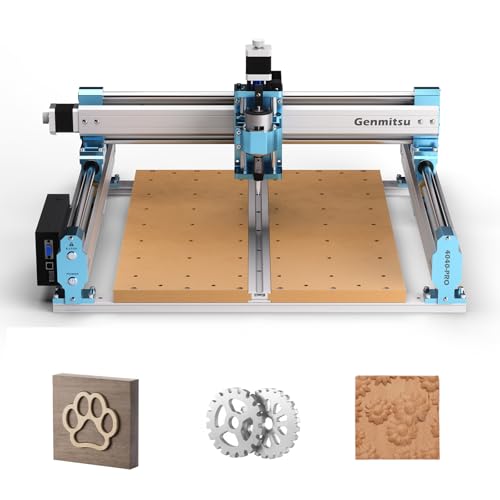
- Reinforced spoilboard helps reduce bed flex
- Rigid lead-screw motion system
- 17.1 x 15.7 x 3.1 in work area
Best For: Artists making signs, reliefs, and prototypes
Best Beginner-Friendly All-Metal Option

- All-aluminum structure with linear-rail Z-axis
- Pre-wired setup in about 10–15 minutes
- Optional Y-axis extension available
Best For: Hobbyist artists learning CNC engraving
Best Ready-to-Use Spindle Package
4040-PRO CNC Router with 500W Spindle

- 500W spindle included
- 52mm and 65mm clamps support upgrades
- GRBL/Candle control with accessory kit
Best For: Artists wanting a bundled desktop CNC starter setup
Precision Upgrade – Genmitsu PROVerXL 4030S
The Genmitsu PROVerXL 4030S is a strong cnc router for artists who need reliable detail work and room for thicker or taller pieces. Its 710W spindle, upgraded linear guideway, 32-bit controller, and reported ±0.05 mm repeatable positioning accuracy support relief carving, engraving, and work in wood, acrylic, and aluminum.
Best For: Artists creating detailed carvings, curved-surface engravings, or taller projects on a desktop machine.
Pros:
- 710W spindle supports faster work and harder materials such as aluminum and acrylic.
- 130mm pass height accommodates thicker materials and taller projects.
- 32-bit MCU, upgraded Z-axis guideway, and claimed ±0.05 mm repeatability favor precise detail.
- Modular assembly is designed to reduce setup time, with optional app-based wireless control.
Cons:
- At 33 kg, it is not especially portable.
- The wireless control module is purchased separately.
- Its fixed desktop format may not suit very large artwork.
The 4030S is a well-rounded choice when precision and vertical clearance matter more than portability. It offers a useful step up from basic hobby machines without moving to a full industrial system.
All-Material Studio Pick – LUNYEE 3020 Nova
The LUNYEE 3020 Nova is a practical cnc router for artists who work across wood, acrylic, plastics, leather, PCB material, and some metals. Its all-metal construction, ball screws, linear guides, and 800W spindle give it a precision-focused setup for varied desktop projects.
Best For: Makers who want one compact router for mixed-material artwork and engraving.
Pros:
- 800W spindle offers six speed settings, a 6,000–30,000 RPM range, and constant torque control.
- 1204 ball screws and HG-15 linear guides on all axes are designed to reduce backlash.
- Supports common GRBL software, including UGS, Fusion 360, Easel, and Candle.
- Fully assembled with wiring pre-connected; only the Z-axis module needs installation.
Cons:
- The 3020 format provides less working room than larger routers.
- Its 19.2 kg weight still makes frequent repositioning inconvenient.
- Although marketed for many materials, suitable tooling and settings will still be required.
The Nova stands out for artists who value material flexibility and a quick start. Its smaller format makes it easier to fit into a studio, while the industrial-style drive components support more controlled engraving.
Clamped-Work Specialist – Genmitsu 4040-PRO MAX
The SainSmart Genmitsu 4040-PRO MAX is a capable cnc router for artists who need a reinforced work surface and a moderate-size cutting area. Its 710W trimmer, linear guideway structures, integrated T-track, and 100mm pass height are useful for stable engraving and clamped work in wood, acrylic, and compatible metals.
Best For: Artists who use fixtures, clamps, or taller materials on medium-size projects.
Pros:
- 410 × 405 × 77mm work area provides a useful desktop production space.
- Reinforced MDF spoilboard and integrated aluminum T-track expand clamping options.
- 710W digital-display router supports higher-power engraving and cutting.
- Reduced vibration and linear guideway structures are intended to improve motion stability.
Cons:
- The 100mm pass height is useful but lower than the 4030S’s 130mm specification.
- It uses a fixed base and weighs 24 kg, limiting portability.
- The supplied notes do not specify wireless control or included design software.
The 4040-PRO MAX makes the most sense when workholding is central to your process. The T-track and reinforced spoilboard add practical flexibility, while the 710W trimmer supports demanding desktop jobs.
Large-Format Creative Platform – FoxAlien XE-Ultra 8080
The FoxAlien XE-Ultra 8080 is a large-format cnc router for artists whose designs exceed typical desktop work areas. Its 33 × 33 × 4.72-inch workspace, rigid aluminum frame, ball screws, linear rails, and closed-loop motors are suited to ambitious woodworking, acrylic, aluminum, carbon-fiber, and DIY cutting projects.
Best For: Artists making large panels, signs, or oversized designs who want closed-loop motion protection.
Pros:
- Large 33 × 33-inch workspace handles substantially bigger materials than compact routers.
- Closed-loop NEMA 23 motors provide 2.6 N·m torque and step-loss protection.
- 16mm XY and 12mm Z ball screws with HG-15 rails support rigid, smooth movement.
- Open spindle ecosystem supports a 65mm router, VFD spindle, or selected engraving modules.
Cons:
- Its 40 kg weight and large footprint require dedicated studio space.
- A spindle is not included in the package.
- The 5.3-inch pass height is less than the stated 130mm clearance of the 4030S.
The XE-Ultra 8080 is the strongest fit here for scale. It costs flexibility at setup—the spindle must be chosen separately—but its expansive bed, rigid frame, and closed-loop motors offer a compelling foundation for larger artistic work.
Best Compact Pick – TTC3018 Pro CNC Router
If you need a compact cnc router for artists, the TTC3018 Pro emphasizes portability, approachable assembly, and accurate small-format engraving. Its 300 x 180 x 40 mm work area suits personalized pieces, nameplates, acrylic projects, and other desk-friendly creations.
Best For: Artists, educators, and makers working on small wood, acrylic, MDF, nylon, aluminum, or brass projects.
Pros:
- All-metal Z-axis and T8 lead screws provide listed 0.1 mm positioning accuracy.
- Compact 15-pound design fits small workspaces.
- Includes cutters, ER11 collet, spindle motor, and assembly tools.
- Works with GRBL, ArtCam, Fusion 360, and Windows or Mac systems.
Cons:
- The 300 x 180 mm work area limits larger artwork and signage.
- Uses a wired USB connection only; it has no Wi-Fi, Bluetooth, or TF card slot.
- Assembly is part of the learning experience and setup.
This is a practical starter machine for artists prioritizing low space requirements and included accessories over a large cutting area or wireless workflow.
Best Metal-Capable Option – 3030-Evo Max CNC Router
The 3030-Evo Max is a strong choice for artists who want a cnc router for artists with more rigidity and material flexibility. Its 800W trim router, dual linear guides, and upgrade paths make it suitable for detailed woodwork as well as light-duty metal projects.
Best For: Makers creating larger artwork, signs, functional parts, and projects involving aluminum, brass, wood, acrylic, MDF, or plastics.
Pros:
- Lists ±0.01 mm repeatability and ±0.05 mm cutting accuracy on 6061 aluminum plate.
- 800W router offers six speed settings from 8,000 to 24,000 RPM.
- All-metal construction uses dual linear guides on each axis.
- Supports Wi-Fi control, GRBL-compatible software, laser engraving, and a fourth axis.
Cons:
- At 39.5 pounds, it is less portable than compact desktop models.
- Router speed adjustment uses a manual dial.
- Some advanced capabilities require optional upgrades, such as the 1.5kW spindle or closed-loop motors.
Choose this model when material range, rigidity, and future expandability matter more than the simplest possible setup or smallest footprint.
Best Large-Format Creative Pick – TTC450 Pro CNC Router
For artists who need more room for panels, signs, or layered reliefs, the TTC450 Pro is a large-format cnc router for artists with an 18.1-inch square work area. Its all-metal structure, touch screen, and expansion ports support a more adaptable creative workflow.
Best For: Artists, makerspaces, schools, and small workshops producing larger signs, furniture panels, reliefs, and repeat projects.
Pros:
- 460 x 460 x 80 mm working area accommodates larger creative pieces.
- 57 stepper motor Z-axis lists positioning accuracy up to 0.0025 mm.
- Touch screen and ports support fourth-axis, laser, and 500W spindle expansions.
- Compatible with GRBL software, ArtCam, Fusion 360, Easel, and Carveco Maker.
Cons:
- At 20.5 kg, it is not especially portable.
- Requires CH340 driver installation, with a separate CH341 driver recommended for Windows 11.
- The supplied 775 spindle is listed at 80 watts, which may limit demanding cuts.
This model is compelling for artists who value workspace and expansion potential, particularly when a compact router would restrict panel size or production volume.
Best for Consistent Desktop Carving – Genmitsu 4040-PRO
For artists seeking a cnc router for artists with a flatter work surface and room for larger pieces, the Genmitsu 4040-PRO combines a reinforced spoilboard, lead-screw drives, and a 435 x 400 x 80mm work area. It is suited to detailed carving, engraving, signs, reliefs, and prototypes in compatible materials such as wood, acrylic, MDF, nylon, and carbon fiber composites.
Best For: Artists who prioritize consistent cutting depth and want a desktop CNC platform they can upgrade over time.
Pros:
- Reinforced hybrid spoilboard and center aluminum support bar help reduce bed flex.
- Dual 16mm steel tubes and lead-screw drives support stable, accurate motion.
- 32-bit controller with silent Toshiba drivers enables quieter operation.
- Pre-assembled modules allow setup in about 15 minutes.
Cons:
- The corded 240-volt setup may require checking workspace power compatibility.
- It is a fixed-base, 3-axis machine rather than a larger-format router.
The 4040-PRO is a strong choice for artists who want reliable desktop carving space and a rigid foundation for increasingly advanced CNC projects.
Best Beginner-Friendly All-Metal Option – FoxAlien Masuter Pro
The FoxAlien Masuter Pro is a practical cnc router for artists who want a compact, beginner-oriented machine for engraving and cutting. Its all-aluminum structure, pre-wired components, and 400 x 400 x 60mm work area support projects in wood, acrylic, MDF, nylon, and similar materials.
Best For: Hobbyist artists and DIY users who want quick assembly, accessible controls, and a platform with expansion potential.
Pros:
- All-metal construction and a linear-rail Z-axis support stability.
- Pre-assembled, pre-wired parts can be set up in about 10–15 minutes.
- Includes 52mm and 65mm spindle clamps for compatibility and customization.
- Optional Y-axis extension kit can support larger projects.
Cons:
- The 69mm spindle clamp is sold separately.
- The included 60W spindle and 12-volt setup may be limiting for heavier work.
- Its 60mm cutting height is smaller than some comparable desktop machines.
With straightforward setup and a sturdy aluminum frame, the Masuter Pro is a sensible entry point for artists learning CNC engraving and planning gradual upgrades.
Best Ready-to-Use Spindle Package – 4040-PRO CNC Router with 500W Spindle
This 4040-PRO package is a versatile cnc router for artists who want a supplied 500W spindle and a broad accessory kit rather than a bare machine. Its 15.7 x 15.7 x 2.9-inch work area and aluminum construction suit desktop engraving, woodworking, acrylic projects, and compatible milling tasks.
Best For: Artists who want a bundled starter setup with spindle hardware and USB-based GRBL control.
Pros:
- Includes a 500W spindle with 52mm and 65mm clamps.
- Accessory kit includes clamps, Z-probe, test board, tools, cables, and manual.
- GRBL and Candle support provides previewing, origin setting, and real-time display.
- Pre-wired parts are designed for quicker assembly.
Cons:
- The laser is optional rather than included.
- The 2.9-inch work height is relatively compact for deeper projects.
- Its mixed V-wheel, belt, and linear-guide design differs from a fully lead-screw-driven system.
For artists comparing bundled desktop routers, this model stands out by pairing a 500W spindle and useful setup accessories with familiar GRBL/Candle workflow support.
How We Picked the Best Cnc Router for Artists
We focused on the features that matter most in an artistic workflow: usable cutting area, frame construction, spindle or router power, motion-system design, Z-axis clearance, control compatibility, and overall suitability for materials such as wood, acrylic, MDF, plastics, aluminum, and brass. The selection includes approachable beginner machines as well as larger, more rigid models for ambitious work.
We also considered whether each router can support common creative tasks, including engraving, carving, sign-making, relief work, inlay preparation, and small-batch production. A powerful spindle alone does not guarantee better results; rigidity, accurate motion, software support, and safe operation are equally important.
Quick Comparison
| What to Compare | Best For | Why It Matters |
|---|---|---|
| Compact 3018-class machines | Learning and small artwork | Lower cost and smaller footprint, but limited work area and depth |
| 3020–4040 machines | General studio projects | A useful balance of capacity, rigidity, and benchtop size |
| Large 4040–8080 machines | Panels, signs, and batch work | More room for larger pieces, though they require more space and investment |
| All-metal frames and ball screws | Precision-focused work | Improved stiffness and controlled movement can help with detailed cuts |
Key Buying Factors for a Cnc Router for Artists
Work Area and Z Height
Choose a bed that accommodates your typical artwork without forcing excessive repositioning. Z height is important for thicker stock, carved reliefs, fixtures, and rotary or specialty setups. Oversizing the machine can be wasteful if your studio has limited space.
Rigidity and Motion Components
All-metal construction, supported linear guides, ball screws, and lead screws can improve stability and reduce unwanted play. These features matter most when carving hardwood, cutting deeper profiles, or attempting nonferrous metals. A lighter machine may still be suitable for plywood, MDF, acrylic, and shallow engraving.
Spindle Power and Material Range
Higher-wattage routers generally offer more headroom for cutting, but they also create more noise, dust, and safety demands. Match power to your materials rather than choosing solely by the largest number. Verify collet sizes, compatible bits, speed control, and whether the machine is intended for metals or only light engraving.
Software, Assembly, and Safety
Check GRBL or controller compatibility with your preferred CAD/CAM software, file formats, and operating system. Beginners should prioritize clear assembly instructions, limit switches, emergency-stop functionality, and an accessible support community. Always use eye and hearing protection, dust collection, workholding, and appropriate feeds and speeds.
Who Should Buy Which Cnc Router for Artists?
Beginners and artists working on small ornaments, jewelry, plaques, and test pieces should start with a compact desktop model such as the TTC3018 Pro or a beginner-oriented Masuter Pro. For a broader mix of signs, relief carvings, acrylic projects, and small furniture components, 3020- or 4040-class machines offer a stronger long-term balance.
Choose a larger 4040 or 8080 machine if you regularly make oversized panels, need fewer workpiece setups, or plan to produce multiple pieces efficiently. Artists who prioritize rigidity and occasional aluminum or brass work should look closely at all-metal designs with linear guides, ball screws, or closed-loop motors. Before buying, confirm the machine’s actual cutting envelope, available replacement parts, electrical requirements, and the space needed for safe operation.