The best desktop computer for podcasting should handle multitrack recording, audio plugins, video editing, and everyday production without slowing you down. The right choice depends on your software, microphone setup, storage needs, and available workspace.
These 10 desktops range from compact business PCs to powerful towers and all-in-one systems, giving solo creators and growing podcast teams several practical ways to build a reliable workstation.
Best 10 Desktop Computer for Podcasting Picks for 2026
Best Overall Performance

- 12-core/20-thread i7 processor
- 32GB DDR5 RAM and 1TB PCIe SSD
- USB-C, dual-display support, Wi-Fi, and Bluetooth
Best For: Demanding podcast production and multitasking
Best Business-Ready Value

- Six-core Intel Core i5 processor
- 16GB RAM and 512GB NVMe SSD
- Nine USB ports with front USB-C
Best For: Everyday podcasting and compact office setups
Best Compact Renewed Option

- Compact small-form-factor design
- 32GB RAM and 1TB SSD
- HDMI, DisplayPort, Wi-Fi, and Bluetooth
Best For: Budget-conscious creators with limited desk space
Best for Storage Flexibility
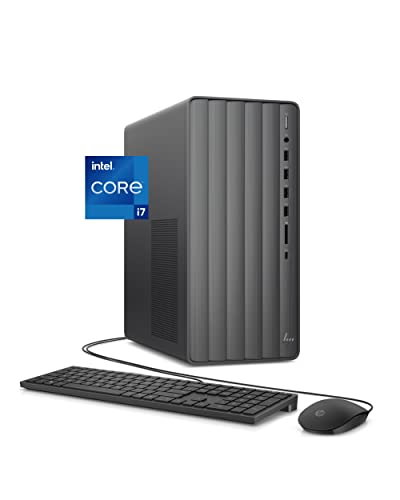
- 12th-gen Core i7-12700 processor
- 512GB SSD plus 1TB SATA hard drive
- Wi-Fi, Bluetooth, USB-C, HDMI, and VGA
Best For: Podcasting with sizable media libraries
Power User Pick
HP Pavilion i7 Podcasting Tower

- Eight-core Intel i7 with 32GB RAM
- Fast 1TB PCIe SSD
- Eight USB ports and Wi-Fi 6
Best For: Multitasking-heavy podcast workstations
Complete Workspace Value
Dell OptiPlex Podcasting Bundle

- Includes a 24-inch Full HD monitor
- 32GB RAM and 512GB NVMe SSD
- Wi-Fi 6, Bluetooth, keyboard, and mouse
Best For: First-time podcasters needing a complete setup
Space-Saving Choice

- Built-in 24-inch Full HD display
- Listed 32GB RAM and 1TB SSD
- 5MP webcam with privacy shutter
Best For: Compact podcasting and video-call setups
Best with Extra Features

- Six-core Intel i7-8700 processor
- 32GB RAM and 1TB SSD
- Wi-Fi, Bluetooth, and extensive ports
Best For: Multitasking podcasters and content creators
Complete Starter Bundle

- Includes 24-inch monitor and accessories
- 16GB RAM with 500GB SSD
- Compact design with Wi-Fi and Bluetooth
Best For: First-time podcasters wanting a ready-to-use setup
Balanced Workstation

- Six-core Intel i5-8500 processor
- 32GB RAM and 1TB SSD listed
- HDMI, DisplayPort, Wi-Fi, and Bluetooth
Best For: Audio-focused podcasting and home-office production
Best Overall Performance – Dell Core i7 Podcasting Tower
For demanding recording, editing, and multitasking, this Dell tower is a strong desktop computer for podcasting. Its 12-core Intel Core i7-12700K, 32GB of DDR5 RAM, and 1TB PCIe SSD provide plenty of headroom for audio software, browser tabs, file management, and content-creation workflows.
Best For: Podcasters who want fast multitasking performance, modern connectivity, and support for up to two 4K displays.
Pros:
- 12 cores and 20 threads support demanding multitasking and content creation.
- 32GB DDR5 RAM and a 1TB PCIe SSD offer responsive performance and useful storage.
- Includes USB-C, HDMI, DisplayPort, Wi-Fi, Bluetooth, and a headphone/microphone combo jack.
- Windows 11 Pro, keyboard, and mouse are included.
Cons:
- Integrated Intel UHD Graphics 770 are intended for general display use rather than graphics-intensive work.
- The supplied configuration has a 32GB maximum RAM listing, despite the bullet copy mentioning configurations up to 64GB.
This is the most capable option here for creators who routinely run several applications at once. Its strong processor and generous memory make it a particularly practical choice for recording, editing, and managing large podcast files.
Best Business-Ready Value – HP ProDesk 600 Podcasting PC
This HP ProDesk is a practical desktop computer for podcasting when you need dependable everyday performance without a large tower. Its six-core Intel Core i5, 16GB of RAM, 512GB NVMe SSD, and included Windows 11 Pro setup are suited to recording, editing, productivity, and light content creation.
Best For: Home studios and office-based podcasters who want a compact, ready-to-use system with ample USB connectivity.
Pros:
- Six-core, 12-thread Intel Core i5 processor supports everyday multitasking.
- 16GB DDR4 RAM and a 512GB NVMe SSD provide a balanced starting configuration.
- Nine USB ports, including front USB-C, make it easy to connect microphones and accessories.
- Includes Wi-Fi, Gigabit Ethernet, Windows 11 Pro, keyboard, and mouse.
Cons:
- The 512GB SSD provides less storage than the larger-capacity Dell options.
- Its 180W power supply and entry-level dedicated graphics are better suited to light content creation than demanding visual workloads.
The ProDesk 600 focuses on practical features rather than maximum performance. It is a sensible pick for podcast recording and routine editing, especially if numerous USB peripherals and a compact microtower footprint matter.
Best Compact Renewed Option – Dell OptiPlex 7050 SFF
If desk space is limited, this renewed Dell OptiPlex 7050 is a compact desktop computer for podcasting with 32GB of RAM and a 1TB SSD. The quad-core Intel Core i7-7700 can handle recording software, editing applications, and general multitasking, while HDMI and DisplayPort support flexible monitor setups.
Best For: Budget-conscious podcasters who prefer a small-form-factor tower with substantial memory and storage.
Pros:
- Compact SFF design measures about 11.5 by 3.6 by 11.4 inches.
- 32GB DDR4 RAM and a 1TB SSD offer useful capacity for projects and media files.
- Includes HDMI, DisplayPort, Wi-Fi, Bluetooth, Ethernet, keyboard, and mouse.
- Professionally renewed and supplied with a 90-day seller warranty.
Cons:
- The older quad-core i7-7700 is less capable for heavy multitasking than the newer 12th-generation processors.
- It is a renewed system with a shorter 90-day warranty.
- Graphics are integrated Intel UHD 630.
This OptiPlex is appealing when storage, RAM, and a small footprint matter more than cutting-edge processor performance. It should suit straightforward podcast production, though intensive projects may benefit from a newer CPU.
Best for Storage Flexibility – HP Envy i7 Podcasting Tower
The HP Envy combines a 12th-generation Intel Core i7-12700 with both fast SSD storage and a larger SATA hard drive, making it a versatile desktop computer for podcasting. The 16GB of RAM is suitable for recording and routine editing, while the dual-storage setup gives working files and media libraries room to grow.
Best For: Podcasters who want a newer i7 processor, integrated 4K-capable graphics, and separate fast and high-capacity storage.
Pros:
- 12th-generation Intel Core i7-12700 supports demanding multitasking and content creation.
- Combines a 512GB SSD with a 1TB SATA hard drive for speed and capacity.
- Offers USB-C, multiple USB-A ports, HDMI, VGA, Ethernet, Wi-Fi, and Bluetooth.
- Includes Windows 11 Pro, keyboard, mouse, and a one-year limited warranty.
Cons:
- Its 16GB RAM is lower than the 32GB configurations in the Dell systems.
- Integrated Intel UHD Graphics 770 are not designed for graphics-intensive workloads.
- The SATA hard drive will generally be slower than the included SSD.
The Envy is a well-rounded choice for creators who need both responsive system storage and extra space for recordings, exports, and media. It offers newer processor performance without requiring an external storage solution immediately.
Power User Pick – HP Pavilion i7 Podcasting Tower
For creators seeking a capable desktop computer for podcasting, the HP Pavilion combines an eight-core Intel Core i7 processor, 32GB of RAM, and a 1TB PCIe SSD. That hardware is well suited to running recording software, managing multiple applications, and storing a growing library of audio and video files.
Best For: Podcasters who want strong multitasking performance, generous storage, and a traditional tower with plenty of connectivity.
Pros:
- Eight-core Intel i7-11700F and 32GB DDR4 RAM support demanding multitasking.
- 1TB PCIe SSD provides fast boot times and ample space for media projects.
- Includes Wi-Fi 6, Bluetooth, HDMI, Ethernet, and eight USB ports.
- Windows 11 Home, keyboard, and mouse are included.
Cons:
- The dedicated GeForce GT 610 graphics card is oriented toward basic graphics and multimedia rather than advanced visual production.
- The tower does not include a monitor.
This is the strongest performance-focused option in the group for a podcast workstation. Its spacious SSD and plentiful ports make it easier to connect peripherals and keep active projects accessible.
Complete Workspace Value – Dell OptiPlex Podcasting Bundle
This renewed Dell OptiPlex is a practical desktop computer for podcasting when you need a ready-to-use workspace. It pairs an Intel Core i7 processor and 32GB of RAM with a 512GB NVMe SSD, while the included 24-inch Full HD monitor helps you get started without buying a display separately.
Best For: Beginners and home-office podcasters who value an included monitor, keyboard, mouse, and straightforward setup.
Pros:
- Includes a new 24-inch 1920×1080 monitor for an all-in-one workspace setup.
- 32GB DDR4 RAM and a 512GB M.2 NVMe SSD support responsive everyday use.
- Built-in Wi-Fi 6 and Bluetooth 5.2 provide modern wireless connectivity.
- Windows 11 Pro is pre-installed, with keyboard and mouse included.
Cons:
- As a renewed computer, it has a shorter 90-day warranty.
- The integrated Intel HD Graphics 530 is suited to basic display tasks rather than demanding graphics work.
- The 512GB SSD offers less storage than the 1TB options in this roundup.
The bundled monitor is this system’s main advantage for new podcasters. It provides a complete starting point, though users with extensive audio or video archives may eventually want additional storage.
Space-Saving Choice – Lenovo 24-Inch All-in-One
The Lenovo all-in-one is a convenient desktop computer for podcasting if you prefer a tidy, space-saving setup. Its 24-inch Full HD display, 32GB of listed memory, 1TB SSD, built-in webcam, and integrated speakers keep the core workstation in a single unit.
Best For: Podcasters working in compact spaces who want a clean all-in-one desk setup with built-in video-call features.
Pros:
- Integrated 24-inch Full HD display reduces desk clutter.
- Listed configuration includes 32GB RAM and a 1TB SSD.
- 5MP AI camera, privacy shutter, and noise suppression support video calls.
- Includes keyboard and mouse, with HDMI input and wireless connectivity.
Cons:
- Integrated Intel UHD Graphics are intended for everyday display use rather than demanding graphics workloads.
- The all-in-one design may offer less upgrade flexibility than a desktop tower.
- The supplied details contain inconsistent processor and memory descriptions, so buyers should verify the exact configuration before purchasing.
This Lenovo stands out for convenience rather than tower-style expandability. Its built-in screen and conferencing features make it attractive for compact podcasting desks, provided the listed configuration matches the model being offered.
Best with Extra Features – HP ProDesk 600 G4 i7 Tower
For creators seeking a capable desktop computer for podcasting, the renewed HP ProDesk 600 G4 combines a six-core Intel Core i7-8700, 32GB of RAM, and a 1TB SSD. Its tower design and broad port selection make it a practical foundation for recording, editing, multitasking, and everyday work.
Best For: Podcasters who want extra memory and storage for larger editing projects, multiple applications, and media-heavy workflows.
Pros:
- Six-core Intel Core i7-8700 processor with up to 4.6 GHz maximum speed.
- 32GB DDR4 RAM supports demanding multitasking and content-creation workloads.
- Fast 1TB SSD, built-in Wi-Fi adapter, Bluetooth, and multiple USB ports.
- Includes Windows 11 Pro and supports up to 4K display resolution through DisplayPort.
Cons:
- Integrated Intel HD Graphics 630 is intended for general media work rather than graphics-intensive production.
- As a renewed 2018-era system, it includes a relatively short 90-day warranty.
This HP is the strongest performance-oriented option in the group, particularly for buyers who value 32GB of memory and a roomy SSD. It is a sensible podcasting workstation when expandable tower hardware matters more than newer-generation components.
Complete Starter Bundle – HP ProDesk SFF i5 Setup
This HP bundle is a convenient desktop computer for podcasting when you need more than the tower alone. It pairs an Intel Core i5-8500 and 16GB of RAM with a 500GB SSD, a 24-inch monitor, webcam, speakers, and keyboard and mouse for a ready-to-use home setup.
Best For: Beginners, families, and home users who want a complete workstation for recording, video calls, schoolwork, and everyday tasks.
Pros:
- Includes a 24-inch 1080p LCD monitor plus webcam, speakers, keyboard, and mouse.
- Six-core Intel Core i5-8500, 16GB DDR4 RAM, and SSD storage handle everyday multitasking.
- Compact small-form-factor design suits desks and limited workspaces.
- Built-in Wi-Fi and Bluetooth simplify connections to networks and wireless accessories.
Cons:
- The 500GB SSD provides less working storage than the 1TB alternatives.
- Integrated graphics and a 1080p monitor are better suited to basic video work than advanced visual production.
- The monitor model may vary, and the renewed system has a 30-day warranty.
The main advantage here is convenience: the included display and accessories reduce the extra purchases needed to begin podcasting. It is a practical entry point for straightforward audio recording, remote interviews, and general home use.
Balanced Workstation – Dell OptiPlex 3060 i5
The Dell OptiPlex 3060 is a balanced desktop computer for podcasting, offering a six-core Intel Core i5-8500, 32GB DDR4 RAM, and a 1TB SSD in a traditional tower-style enclosure. Built-in Wi-Fi, Bluetooth, HDMI, and DisplayPort make it flexible for a monitor and connected recording accessories.
Best For: Podcasters who want strong memory and storage capacity with straightforward connectivity for a home or office studio.
Pros:
- Six-core Intel Core i5-8500 processor reaches up to 4.1 GHz.
- 32GB DDR4 RAM and a 1TB SSD provide useful capacity for multitasking and media files.
- Built-in Wi-Fi and Bluetooth support wireless networking and accessories.
- Offers both HDMI and DisplayPort outputs, plus USB 3.0 and USB 2.0 ports.
Cons:
- Integrated Intel UHD Graphics 630 is not designed for demanding dedicated-GPU workloads.
- The supplied specifications contain conflicting RAM details, so buyers should verify the configured memory before ordering.
- Its 90-day renewed-system warranty is shorter than many new desktop warranties.
This Dell strikes a useful middle ground: it has the same 32GB-and-1TB capacity class as the higher-end option while using a Core i5 processor. It is a sensible choice for audio-focused podcasting, editing, streaming, and general productivity where integrated graphics are sufficient.
How We Picked the Best Desktop Computer for Podcasting
We focused on the hardware that most affects podcast production: processor performance, memory, solid-state storage, expandability, display support, connectivity, and overall practicality. Multicore Intel processors and at least 16GB of RAM are well suited to recording multiple tracks, running real-time effects, and keeping a browser or show notes open alongside a digital audio workstation.
We also considered how each format fits a different workspace. Full-size towers generally offer better upgrade potential, while small-form-factor desktops save room. All-in-one models simplify setup by combining the computer and display, but they may provide fewer upgrade options.
Quick Comparison
| Best For | Recommended Configuration | Why It Matters |
|---|---|---|
| Heavy audio and video production | Core i7, 32GB RAM, 1TB SSD | More headroom for large sessions, plugins, and video timelines |
| Typical solo podcasting | Core i5 or i7, 16GB RAM, 512GB SSD | Balanced performance for recording, editing, and publishing |
| Large sample libraries and archives | 1TB SSD or SSD plus hard drive | Provides faster working storage and more capacity |
| Small workspaces | Small-form-factor or all-in-one desktop | Reduces desk clutter while retaining desktop-class usability |
Key Buying Factors for a Desktop Computer for Podcasting
Processor and Real-Time Performance
Podcast editing is usually responsive on a modern Core i5, while an i7 is a better choice for multiple guests, complex plugin chains, video podcasts, and frequent rendering. Core count helps when exporting or multitasking, but stable audio performance also depends on your recording software and interface drivers.
RAM and Storage
Choose 16GB of RAM as a practical baseline and 32GB if you edit video, use many virtual instruments, or want more long-term flexibility. An SSD makes booting, project loading, and file transfers much faster than a traditional hard drive. A 1TB SSD is preferable if you keep raw recordings and video locally; a secondary hard drive can provide inexpensive archive space.
Ports, Displays, and Connectivity
Check for the connections your audio interface requires, including USB-A or USB-C, and confirm that the graphics outputs support your intended monitor setup. Dual-monitor support is useful for keeping the timeline, mixer, scripts, and video preview visible at once. Built-in Wi-Fi and Bluetooth are convenient, but wired Ethernet can offer a more consistent connection for uploads and network storage.
Upgradeability and Noise
A tower is usually easier to upgrade with additional RAM, storage, or expansion cards. Compact systems and all-in-ones save space but can be more limited. For microphone recording, prioritize a quiet case and fans, and keep the computer as far from the microphone as practical to reduce unwanted noise.
Who Should Buy Which Desktop Computer for Podcasting?
Choose a Powerful Tower for Serious Production
Pick a Core i7 tower with 32GB of RAM and a 1TB SSD if you produce video podcasts, manage several tracks, or expect your projects to grow. This is the most flexible category for creators who want performance and future upgrades.
Choose a Business Desktop for Value
Refurbished or business-oriented desktops can be excellent for audio-only podcasting when they include a capable Core i5 or i7 processor, 16GB or more of RAM, and an SSD. Verify the condition, warranty, included accessories, and available ports before buying.
Choose an All-In-One for a Clean Workspace
An all-in-one is a sensible option when desk space and simple setup matter most. It can work well for recording and editing, but confirm that the display size, webcam needs, storage, and upgrade limits fit your workflow.