A desktop computer with dual Ethernet can simplify network segmentation, provide a backup connection, or support demanding business and home-lab setups without relying on extra adapters.
These 10 options range from compact Ryzen mini PCs to powerful Dell business desktops, with differences in processing power, memory, storage, expandability, display support, and overall footprint.
Best 10 Desktop Computer with Dual Ethernet Picks for 2026
Best Dual-Gigabit Mini PC

- Dual 1000Mbps RJ45 ports
- Upgradeable RAM and NVMe storage
- Compact Windows 11 Pro mini PC
Best For: Home offices and compact wired-network workstations
Best Business Tower Setup

- Core i3-13100 with DDR5 memory
- HDMI and DisplayPort for two monitors
- Windows 11 Pro with keyboard and mouse
Best For: Conventional business desks and office productivity
Best 2.5GbE Networking Mini PC

- Dual 2.5GbE RJ45 ports
- 16GB RAM and 512GB NVMe SSD
- Triple 4K display support
Best For: Home servers, firewalls, NAS, and network labs
Best High-Performance Business Desktop

- 20-core Intel Core i7 processor
- Dual 4K monitor support
- Up to 64GB DDR5 and 4TB SSD
Best For: Heavy office multitasking and light creative workloads
Best Dual-Network Mini PC

- Dual 2.5GbE ports for routing, NAS, and homelab use
- 16GB dual-channel DDR4 memory
- Triple 4K display support
Best For: Compact networking projects and multi-monitor productivity
Best Business Tower
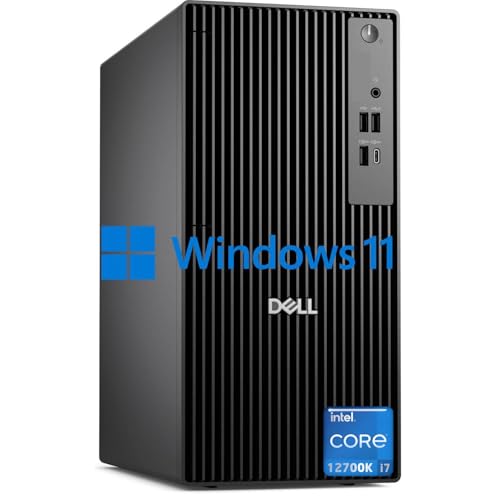
- Powerful 12-core/20-thread processor
- 32GB DDR5 RAM and 1TB PCIe SSD
- Dual 4K monitor support
Best For: Business productivity when dual Ethernet is verified separately
Best Upgradeable Mini PC

- Dual 2.5GbE LAN ports
- RAM expandable up to 64GB
- Triple 4K display outputs
Best For: Upgradeable home-office and dual-LAN setups
Renewed Value Pick

- Core i7-7700 with 32GB RAM
- 1TB SSD and dual-monitor outputs
- Compact renewed Windows 11 Pro system
Best For: Home offices and everyday productivity
Compact Networking Pick

- Two Gigabit Ethernet ports
- Triple 4K display support
- 16GB RAM and 512GB NVMe SSD
Best For: Small offices and dual-LAN workstations
Performance Tower Pick

- Core i7-12700K with 12 cores
- 32GB DDR5 and 1TB PCIe SSD
- Dual 4K monitor support
Best For: Demanding business and content-creation workloads
Best Dual-Gigabit Mini PC – C4 Plus Ryzen 5 3501U
If you need a desktop computer with dual ethernet for office work, home networking, or multimedia, the Origimagic C4 Plus combines two 1000Mbps RJ45 ports with a compact mini-PC design. Its Ryzen 5 processor, Windows 11 Pro, and upgradeable memory and storage make it a flexible everyday workstation.
Best For: Home offices, classrooms, light multitasking, digital signage, and users who need dual-gigabit networking in a small footprint.
Pros:
- Dual 1000Mbps LAN ports support bandwidth aggregation and load balancing.
- Ryzen 5 3501U with 4 cores and 8 threads handles office work, streaming, and light gaming.
- RAM can expand to 32GB, while storage supports an additional M.2 NVMe drive up to 4TB.
- Includes HDMI, DisplayPort, USB-C, Wi-Fi 5, Bluetooth 5.0, and a VESA mount.
Cons:
- The included 8GB RAM and 256GB SSD are modest for heavier multitasking.
- Its dual LAN ports are Gigabit rather than 2.5GbE.
- Integrated Radeon Vega 8 graphics are intended for light gaming and everyday use.
The C4 Plus is a practical choice when compact size and two wired network connections matter more than high-end graphics or maximum storage out of the box. Its upgrade paths and Linux/Ubuntu compatibility add useful long-term flexibility.
Best Business Tower Setup – Dell QCT1250 Core i3 Desktop
The Dell QCT1250 is a traditional business desktop for buyers who want a ready-to-use Windows 11 Pro setup. Although the supplied specifications list one Ethernet port rather than dual ethernet, it offers a capable Core i3-13100 platform, dual-monitor connectivity, and included wireless keyboard and mouse.
Best For: Business users, office productivity, and buyers who prefer a conventional tower with accessories included.
Pros:
- Intel Core i3-13100 provides 4 cores and 8 threads for everyday productivity.
- Includes 16GB DDR5 memory, with configurations available up to 64GB.
- Supports HDMI and DisplayPort output for a dual-monitor workspace.
- Includes Windows 11 Pro plus a wireless keyboard and mouse.
Cons:
- The supplied notes identify Ethernet connectivity but do not specify dual LAN ports.
- Integrated Intel UHD Graphics 730 is designed for general use rather than demanding graphics work.
- The listed configuration has a 16GB memory capacity and storage details may vary by configuration.
This Dell is better suited to a standard office setup than to a dual-network appliance. Choose it for business-focused reliability, multiple display outputs, and included peripherals; look elsewhere if two physical Ethernet ports are essential.
Best 2.5GbE Networking Mini PC – BOSGAME E5 Ryzen 3 5300U
For a desktop computer with dual ethernet aimed at more advanced networking, the BOSGAME E5 stands out with two 2.5GbE RJ45 ports. It pairs those connections with a Ryzen 3 5300U, 16GB of RAM, dual NVMe slots, and support for up to three 4K displays.
Best For: Home servers, pfSense or OPNsense appliances, NAS projects, virtual machines, and multi-monitor office work.
Pros:
- Two 2.5GbE LAN ports provide faster wired networking than standard Gigabit Ethernet.
- 16GB DDR4 RAM and a 512GB NVMe SSD are included.
- Dual SODIMM slots support up to 64GB, and a second M.2 NVMe slot is available.
- HDMI, DisplayPort, and full-function USB-C can drive up to three 4K displays at 60Hz.
Cons:
- Ryzen 3 integrated graphics are not intended for demanding 3D rendering or intensive 3A gaming.
- Wi-Fi connectivity is Wi-Fi 5 rather than a newer wireless standard.
- Its networking-focused features may be more than needed for a basic office PC.
The E5 is the strongest match here for buyers prioritizing dual wired networking performance. Its 2.5GbE ports, expansion options, and compact design make it especially useful for enthusiast network builds and flexible workstation setups.
Best High-Performance Business Desktop – Dell Pro 1250 Core i7-14700
The Dell Pro 1250 is a powerful slim business desktop for demanding productivity and light creative work. The supplied notes confirm Ethernet connectivity, but do not specify dual ethernet ports, so it should be considered when processing power and dual-monitor support are higher priorities than two wired network connections.
Best For: Professional multitasking, office workloads, light creative tasks, and users who want a powerful Windows 11 Pro desktop.
Pros:
- Intel Core i7-14700 combines 20 cores and 28 threads with turbo speeds up to 5.6GHz.
- Supports up to 64GB of DDR5 memory and up to a 4TB PCIe M.2 SSD.
- HDMI 2.1 and DisplayPort 1.4a support dual 4K monitor setups.
- Includes Windows 11 Pro and a wireless keyboard and mouse.
Cons:
- The supplied notes do not confirm two Ethernet ports.
- Integrated graphics are better suited to productivity and light creative work than demanding gaming.
- Memory and storage configurations may vary from the maximum options described.
This Dell offers substantially more processing headroom than the mini PCs, making it a strong productivity desktop. However, buyers specifically seeking dual ethernet should verify the port configuration before purchase, since the supplied information only identifies Ethernet generally.
Best Dual-Network Mini PC – GMKtec G11 Ryzen R2514
If you need a desktop computer with dual ethernet for networking projects, the GMKtec G11 is a compact and capable option. Its two 2.5GbE ports support uses such as firewall and router setups, NAS storage, VPN access, and home-lab applications, while the Ryzen Embedded processor and 16GB of dual-channel RAM handle everyday multitasking.
Best For: Home labs, firewall or router projects, compact NAS builds, business multitasking, and multi-monitor workstations.
Pros:
- Dual 2.5GbE ports are well suited to routing, NAS, and isolated-network setups.
- 16GB dual-channel DDR4 memory supports smoother multitasking and integrated graphics performance.
- Supports up to three independent 4K displays at 60Hz.
- Includes Wi-Fi 6E, Bluetooth 5.2, and dual M.2 PCIe 3.0 SSD slots.
Cons:
- It is a mini PC, so it does not offer the expansion space of a traditional tower.
- Storage capacity is not specified in the supplied details.
The G11 stands out when dual wired networking is the priority. Its compact design, Linux compatibility, and display flexibility make it especially practical for homelab and small-office deployments.
Best Business Tower – Dell Pro i7-12700K Desktop
For buyers wanting a desktop computer with dual ethernet in a conventional business tower, verify the network-port configuration before purchase: the supplied specifications list Ethernet connectivity but do not explicitly confirm two Ethernet ports. With its Intel Core i7-12700K, 32GB DDR5 RAM, 1TB PCIe SSD, and Windows 11 Pro, this Dell is otherwise designed for demanding office multitasking.
Best For: Business users who need strong processing performance, ample memory, fast storage, and dual-monitor support.
Pros:
- 12-core, 20-thread Intel Core i7-12700K supports demanding multitasking.
- 32GB DDR5 RAM and a 1TB PCIe SSD provide a strong ready-to-use configuration.
- Supports dual 4K monitors through HDMI and DisplayPort outputs.
- Includes Windows 11 Pro, Wi-Fi 6, Bluetooth, TPM security, keyboard, and mouse.
Cons:
- The supplied details mention Ethernet but do not confirm dual Ethernet ports.
- Integrated Intel UHD Graphics 770 is intended for general productivity rather than dedicated graphics workloads.
This Dell is a capable business desktop, but it is not the safest pick if two physical Ethernet connections are essential. Confirm the exact port layout with the seller before ordering for a dual-network setup.
Best Upgradeable Mini PC – BOSGAME E5 Plus Ryzen 5400U
The BOSGAME E5 Plus is a practical desktop computer with dual ethernet for everyday users who also want room to expand. Its two 2.5GbE LAN ports support stable wired networking and dual-LAN applications, while the accessible memory and storage design lets you upgrade beyond the included 8GB RAM and 256GB SATA SSD.
Best For: Home offices, small businesses, dual-LAN applications, private NAS projects, and users planning future upgrades.
Pros:
- Two 2.5GbE LAN ports provide fast wired connectivity.
- RAM is expandable up to 64GB through two SODIMM slots.
- Includes a second M.2 NVMe slot for higher-speed storage expansion.
- Supports triple 4K displays and comes with Windows 11 Pro pre-installed.
Cons:
- The included 8GB RAM and 256GB SATA SSD are modest for heavier multitasking.
- Wi-Fi 5 is older than the Wi-Fi 6E connectivity offered by some competing mini PCs.
The E5 Plus offers an appealing balance of dual-network connectivity, upgradeability, and compact size. Plan on adding memory or storage if your workload extends beyond basic office and browsing tasks.
Renewed Value Pick – Dell OptiPlex 7050 SFF
If you need a desktop computer with dual ethernet capabilities, verify your network requirements before buying this renewed Dell OptiPlex 7050. It offers a capable Core i7 processor, generous memory, fast SSD storage, and wired Ethernet connectivity in a compact small-form-factor case.
Best For: Home offices, multimedia work, everyday productivity, and buyers who want a compact renewed Windows 11 Pro desktop.
Pros:
- Intel Core i7-7700 processor with 32GB DDR4 RAM.
- 1TB SSD supports fast booting and ample everyday storage.
- HDMI and DisplayPort support dual monitors, with Wi-Fi and Bluetooth included.
- Includes a wired keyboard, mouse, power cord, and a 90-day seller warranty.
Cons:
- Supplied specifications list one Ethernet connection, so it may not meet a true dual-Ethernet requirement.
- Older 2017-era processor platform.
- Renewed condition may not suit buyers seeking a new system.
This is a practical, well-equipped option for standard office and home use, but shoppers specifically seeking two built-in Ethernet ports should confirm the port configuration before ordering.
Compact Networking Pick – BOSGAME E7 Mini PC
The BOSGAME E7 is a strong choice if you are shopping for a desktop computer with dual ethernet in a compact format. Its two Gigabit Ethernet ports are designed for flexible wired networking, while the six-core Intel processor, expandable memory, and triple-display support suit busy workstations.
Best For: Small businesses, home offices, study spaces, networked workstations, and users who need dual wired networking in a mini PC.
Pros:
- Two Gigabit Ethernet ports provide built-in dual-LAN connectivity.
- Intel Core 3 100U offers six cores, eight threads, and speeds up to 4.7GHz.
- 16GB DDR4 RAM and a 512GB PCIe NVMe SSD support responsive everyday use.
- Supports up to three 4K displays and includes Wi-Fi 6 and Bluetooth 5.2.
Cons:
- Supplied details contain conflicting memory-expandability information, so confirm the maximum supported RAM.
- Mini PC design may offer less internal expansion than a traditional tower.
For buyers prioritizing dual Ethernet, this is the most directly aligned option in the group. Its compact design and multi-display support add useful flexibility for business and productivity setups.
Performance Tower Pick – Dell QCT1250 Desktop Tower
This Dell tower delivers substantially more processing headroom than a basic office PC, making it worth considering for demanding business workloads. However, while it includes Ethernet, the supplied notes identify one RJ45 connection rather than dual Ethernet, so confirm the networking hardware if that feature is essential.
Best For: Content creation, data processing, demanding multitasking, and business users who want a modern desktop tower with fast DDR5 memory.
Pros:
- Intel Core i7-12700K provides 12 cores, 20 threads, and speeds up to 5.0GHz.
- 32GB DDR5-5600 memory and a 1TB PCIe SSD support demanding workflows.
- HDMI and DisplayPort enable dual 4K monitor support.
- Includes Wi-Fi, Bluetooth, USB-C, wired keyboard and mouse, plus a one-year seller warranty.
Cons:
- Supplied specifications list Ethernet but do not confirm two Ethernet ports.
- Integrated Intel UHD Graphics 770 may be limiting for demanding graphics or gaming workloads.
- Higher-performance tower may be more than needed for basic office tasks.
This is the best performance-oriented choice of the three, but it should be selected for processor and memory strength rather than assumed dual-Ethernet support. Verify the exact port layout before purchase.
How We Picked the Best Desktop Computer with Dual Ethernet
We focused on systems suited to business, office, networking, media, and home-lab use. Our comparison considers processor generation and core count, included RAM and storage, upgrade potential, chassis size, display support, operating-system readiness, and the practical value of having two wired network connections. Because port configurations can vary by exact listing or revision, verify the detailed specifications before ordering, especially the number and type of Ethernet ports.
We also included a mix of compact mini PCs and traditional Dell desktops. Mini PCs are easier to place in crowded workspaces, while larger business systems typically offer stronger cooling, more expansion room, and better long-term serviceability.
Quick Comparison
- Best for compact workspaces: The C4 Plus, BOSGAME E5, E5 Plus, GMKtec G11, and BOSGAME E7 offer small-footprint designs.
- Best for demanding productivity: Dell systems with Core i7 processors, 32GB RAM, and 1TB PCIe SSDs are better suited to multitasking and heavier workloads.
- Best for basic office work: Entry-level Ryzen and Intel mini PCs can handle web apps, documents, video calls, and light server tasks.
- Best for multiple displays: Select Dell models provide dual-monitor or dual-4K support; confirm the included video outputs.
Key Buying Factors for a Desktop Computer with Dual Ethernet
Confirm the Network Hardware
Do not assume that “dual LAN” means two identical high-speed ports. Check whether both ports are built in, their rated speeds, supported drivers, and whether they can operate independently for separate networks, failover, or link aggregation. If the listing is unclear, contact the seller before purchasing.
Match the Processor to the Workload
Ryzen 3, embedded Ryzen, and Core 3 systems are generally appropriate for everyday productivity and lightweight services. Core i7 and higher-core-count processors are preferable for virtualization, compilation, content creation, large spreadsheets, and sustained multitasking.
Check Memory, Storage, and Upgrades
Choose at least 16GB of RAM for a flexible modern office PC. The listed 32GB configurations are better for demanding applications and virtual machines. NVMe SSDs usually deliver faster responsiveness than SATA drives, while upgradeable memory and accessible storage can extend the system’s useful life.
Consider Size, Cooling, and Expansion
A mini PC saves desk space and often uses less power, but compact designs may limit internal expansion. A small-form-factor or tower desktop is usually easier to repair and upgrade. Also consider fan noise, Wi-Fi and Bluetooth needs, USB availability, and the power supply’s capacity.
Who Should Buy Which Desktop Computer with Dual Ethernet?
Choose a compact mini PC if you need a quiet, space-efficient system for office work, networking, digital signage, or a small home lab. Select a Dell business desktop if serviceability, stronger sustained performance, multiple displays, or future expansion matters more than minimal size. Buyers running virtual machines, databases, development tools, or creative applications should prioritize the Core i7 models with 32GB RAM and 1TB PCIe storage. For lighter workloads and lower cost, a Ryzen 3 or Core 3 configuration should be sufficient.