Choosing among today’s desktop laser cutting machines means balancing laser power, material compatibility, enclosure design, software, and workspace. The right model can handle anything from personalized wood projects to faster production runs and detailed metal marking.
Our roundup compares 10 notable options across diode, CO2, and dual-laser designs so you can match features and capability to your budget, materials, and experience level.
Best 10 Desktop Laser Cutting Machines Picks for 2026
Best Portable Dual-Laser Pick
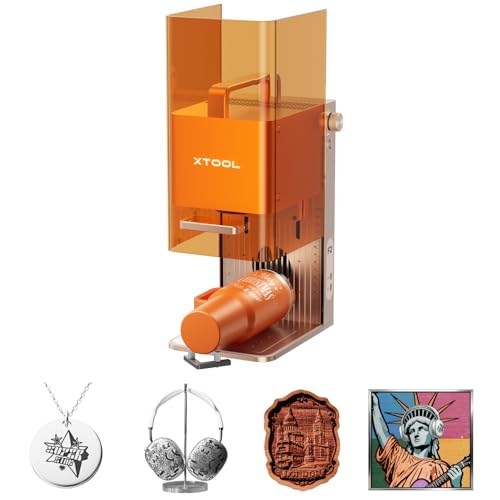
- Dual lasers handle 300+ materials
- 50MP camera supports precise alignment
- Up to 6000 mm/s engraving speed
Best For: On-site customization and small-batch projects
Best Large-Format CO2 Power
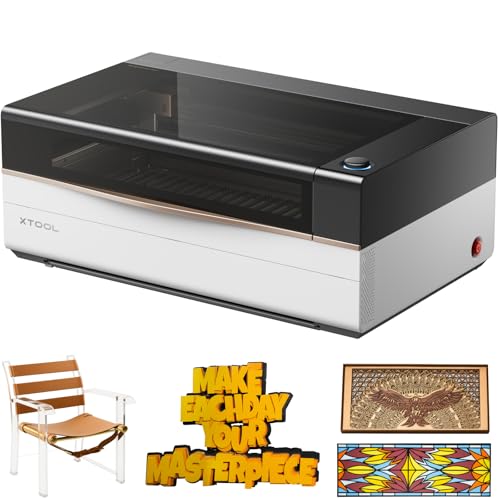
- Cuts up to 20 mm wood and 25 mm acrylic
- 36 × 18 inch workspace
- Automated autofocus and batch workflows
Best For: Professional production and oversized projects
Best Beginner-Friendly Compact Pick

- Class 1 enclosed design with flame detection
- Camera positioning and autofocus simplify setup
- Up to 15,000 mm/min engraving speed
Best For: Beginners and compact home workshops
Best Traditional K40 Value

- 45W CO2 power cuts acrylic and wood
- 12 × 8 inch workspace with detachable base
- Built-in air assist and LightBurn support
Best For: DIY makers and small businesses
Best All-in-One Pick
xTool M2 Color Craft Laser Engraver

- Combines 10W laser work with CMYK color printing
- Dual cameras support accurate Place & Go setup
- Enclosed Class 1 design suits home crafting
Best For: Home crafters wanting printing, cutting, and engraving in one machine
Best Compact Value
Twotrees TTS-10 Pro 10W Engraver

- 10W laser with a 300 x 300mm work area
- Supports LightBurn, LaserGRBL, TF cards, and offline use
- Metal frame suits small craft and engraving projects
Best For: Hobbyists and small businesses working on compact materials
Best for Cutting Power
Longer RAY5 20W Laser Engraver Bundle

- 20W output provides stronger wood and acrylic cutting
- Includes air assist and a 3-in-1 rotary attachment
- 400 x 365mm work area supports larger projects
Best For: Makers and small workshops needing cutting and rotary versatility
Versatile Desktop Pick

- 300 × 300mm workspace for larger layouts
- True 12W power for engraving and cutting
- Compatible with three popular software options
Best For: Makers and small businesses wanting an expandable desktop machine
Metal-and-Material Specialist
LaserPecker LP5 Dual Laser Engraver

- Combines 20W diode and fiber lasers
- Handles wood, acrylic, and selected metals
- Portable design for mobile customization
Best For: Commercial makers working across crafts and jewelry metals
Beginner-Friendly Enclosed Pick
Carverall A1 Pro 12W Laser Engraver
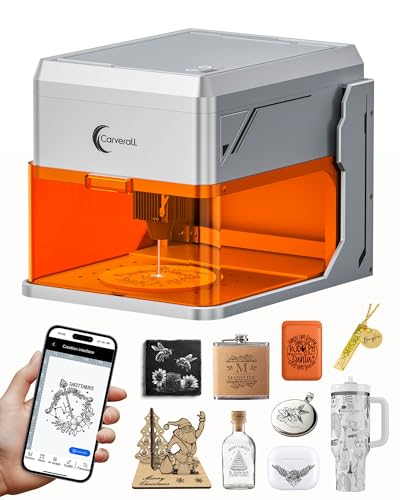
- Camera-assisted positioning reduces setup guesswork
- Enclosed Class 1 design with tilt protection
- Compact format for small personalized items
Best For: Beginners and small-batch makers prioritizing simple, safer operation
Best Portable Dual-Laser Pick – xTool F2 5W IR & 15W Diode
The xTool F2 is a versatile desktop laser cutting machines option for makers and small businesses that need fast, precise work in a compact, enclosed unit. Its 15W diode and 5W IR lasers cover more than 300 materials, while the built-in camera helps align small projects accurately.
Best For: On-site customization, small-batch production, and makers working with both wood-based materials and metal.
Pros:
- Dual lasers support cutting, 3D embossing, and vivid metal color marking.
- 50MP camera provides up to 0.1 mm alignment accuracy on small pieces.
- Speeds up to 6000 mm/s and optional slide extension support batch work.
- Fully enclosed, portable design arrives assembled and includes material presets.
Cons:
- Slide extension, rotary accessories, and purifier are optional.
- The included diode and IR power levels may be less suited to heavy industrial cutting than a CO2 system.
Choose the F2 when portability, material flexibility, and quick setup matter more than a large cutting bed. Its camera-guided workflow and dual-laser design make it especially practical for personalized products and small batches.
Best Large-Format CO2 Power – xTool P3 80W CO2 Laser Cutter
The xTool P3 is a high-capacity desktop laser cutting machines choice for production-focused users. Its 80W CO2 laser cuts up to 20 mm wood and 25 mm acrylic, while the 36 × 18 inch workspace and automated setup are designed for demanding workflows.
Best For: Professional studios, larger projects, clear acrylic cutting, and high-volume customization.
Pros:
- 80W CO2 power handles materials beyond typical diode capabilities, including clear acrylic.
- Large 36 × 18 inch work area supports oversized projects.
- LiDAR autofocus, dual cameras, and AutoLift Base simplify setup.
- AI nesting and spreadsheet-based batch filling help reduce waste and streamline production.
Cons:
- At 317 pounds, it is substantially less portable than compact desktop models.
- Conveyor, rotary, IR laser, and purifier accessories are sold separately unless bundled.
- Its large footprint and professional feature set may be excessive for occasional hobby use.
The P3 is the strongest fit here for users who need CO2 cutting power and a genuinely large work area. Its automation and safety systems add convenience, but the size, weight, and accessory costs make it better suited to established workshops.
Best Beginner-Friendly Compact Pick – Creality Falcon A1C 10W
The Creality Falcon A1C is a practical desktop laser cutting machines option for beginners who want an enclosed, portable setup. Its 10W diode supports common materials, while the smart camera, autofocus, and guided software reduce the setup work.
Best For: Beginners, classrooms, home workshops, and everyday engraving on wood, leather, bamboo, cardboard, and dark opaque acrylic.
Pros:
- Class 1 enclosed design includes flame detection, tilt protection, and a USB safety lock.
- Smart camera and autofocus help with positioning and material changes.
- Engraving speeds reach up to 15,000 mm/min.
- Quick-swap modules support 5W, 10W, and optional 1.2W IR configurations.
Cons:
- Additional laser modules are sold separately.
- The included 10W diode is intended for compatible materials rather than heavy-duty CO2 cutting.
- Its compact format provides less workspace than larger production machines.
The Falcon A1C stands out for approachable operation and safety-conscious design. It is a sensible starting point for users who value quick setup and software assistance, with upgrade flexibility available as projects become more varied.
Best Traditional K40 Value – OMTech K40+ 45W CO2 Laser
The OMTech K40+ is a conventional CO2 desktop laser cutting machines option for makers and small businesses that want stronger cutting performance than a typical diode unit. Its 45W tube, 12 × 8 inch work area, air assist, and LightBurn compatibility support hands-on production work.
Best For: DIY makers and small businesses cutting or engraving wood, acrylic, leather, and other compatible materials.
Pros:
- 45W CO2 laser cuts up to 10 mm acrylic and 8 mm wood according to the supplied specifications.
- Engraving speeds reach up to 300 mm/s for detailed or batch projects.
- Built-in air assist helps clear debris, reduce carbonization, and lower cutting risks.
- Supports LightBurn and LaserGRBL, with a detachable base and optional rotary axis.
Cons:
- The 12 × 8 inch workspace is smaller than the xTool P3’s production area.
- At 83.6 pounds, it is not especially portable.
- Rotary capability requires an optional rotary axis.
The K40+ offers a more traditional CO2 workflow with useful safety and airflow features built in. It is worth considering when cutting power and software compatibility are priorities, provided the compact work area meets your project requirements.
Best All-in-One Pick – xTool M2 Color Craft Laser Engraver
For shoppers comparing desktop laser cutting machines, the xTool M2 stands out by combining a 10W diode laser with a full-color CMYK inkjet module. Its enclosed Class 1 design, dual cameras, and print-to-cut workflow make it a versatile choice for home crafting and personalized projects.
Best For: Home crafters and DIY makers who want color printing, laser engraving, and cutting in one enclosed machine.
Pros:
- Combines CMYK inkjet printing with 10W laser cutting and engraving.
- Built-in dual cameras support real-time previews and more accurate placement.
- Works with more than 300 materials, including cardstock, felt, leather, and wood.
- Beginner-friendly software includes templates and an AI image generator.
Cons:
- The 3W IR module is sold separately.
- Its 43.3-pound weight and larger package may require a dedicated workspace.
The xTool M2 is the most versatile option here for creators who want more than traditional engraving. Choose it when color output, guided placement, and enclosed home use matter more than a simple open-frame setup.
Best Compact Value – Twotrees TTS-10 Pro 10W Engraver
The Twotrees TTS-10 Pro is a practical desktop laser cutting machine for smaller projects and hands-on hobby work. Its 10W blue diode laser, 300 x 300mm work area, metal frame, and support for LightBurn and LaserGRBL give it a straightforward feature set for wood, acrylic, leather, and similar materials.
Best For: Hobbyists, educators, and small-business users making coasters, jewelry, keychains, phone cases, and small signs.
Pros:
- 10W optical output supports engraving on wood, bamboo, acrylic, leather, dark glass, and coated or anodized metal.
- 300 x 300mm work area fits many common small craft projects.
- Supports USB, TF card, mobile app, and computer web operation, including offline engraving.
- Full-metal construction and dual Y-axis motors support a stable motion system.
Cons:
- It is not recommended for bare stainless steel or uncoated metal without surface preparation.
- The work area may be too small for projects larger than about 12 inches.
- Assembly and software setup may still require consulting the manual or online tutorials.
The TTS-10 Pro makes sense when you want a capable 10W engraver without stepping up to a larger work area. Check your material list and project dimensions carefully, especially if you plan to work with bare metals or oversized pieces.
Best for Cutting Power – Longer RAY5 20W Laser Engraver Bundle
Among desktop laser cutting machines, the Longer RAY5 is the cutting-focused choice, pairing a 20W optical laser with air assist and a 400 x 365mm work area. The bundle also includes a 3-in-1 rotary attachment, making it useful for both flat materials and cylindrical or rounded items.
Best For: Workshop users, makers, and small production operations that need stronger cutting performance and rotary engraving capabilities.
Pros:
- 20W laser can cut up to 15mm pine wood and 8mm acrylic in a single pass under the stated conditions.
- Included air pump helps manage smoke, dust, heat, and scorching during cuts.
- 3-in-1 rotary attachment supports cups, tumblers, rings, spheres, and other rounded items.
- Supports USB, TF card, Wi-Fi, and app connections, plus LightBurn and LaserGRBL.
Cons:
- The open desktop design may require more attention to ventilation and workspace safety.
- Air assist and rotary features add components to install and manage.
- Some advanced cutting claims depend on material type and multiple-pass settings.
The RAY5 is the strongest fit for buyers prioritizing cutting capacity, a larger work area, and expanded production options. Its included air assist and rotary bundle add value for makers who expect to move beyond basic flat-surface engraving.
Versatile Desktop Pick – ACMER S2 12W Laser Engraver
The ACMER S2 is a practical choice among desktop laser cutting machines for makers who want a roomy work area, broad software support, and enough power for both detailed engraving and deeper cuts. Its 300 × 300mm workspace suits signs, layered artwork, ornaments, and small-batch projects.
Best For: Home makers, crafters, and small businesses needing flexible engraving and cutting across wood, leather, acrylic, coated metal, and other materials.
Pros:
- True 12W laser with support for more than 100 materials.
- 300 × 300mm work area accommodates larger layouts and multi-piece projects.
- Works with ACMER Studio, LightBurn, and LaserGRBL on Windows, macOS, and Linux.
- Includes an anti-UV shield, safety goggles, and motion protection.
Cons:
- Deeper cutting may require multiple passes.
- Optional rotary, riser, and air-assist accessories add to the system cost.
Choose the S2 if expandability and workspace matter more than an enclosed, ready-to-run design. Its precision and compatibility make it a balanced desktop platform for evolving projects.
Metal-and-Material Specialist – LaserPecker LP5 Dual Laser Engraver
The LaserPecker LP5 stands out among desktop laser cutting machines for its dual-laser design. It combines a 20W diode laser for wood and acrylic work with a fiber laser for marking and cutting certain metals, while its portable 6.02kg format suits mobile customization businesses.
Best For: Sellers, craft-fair operators, kiosks, and makers who need fast customization across wood, leather, jewelry metals, and other materials.
Pros:
- Dual diode and fiber lasers cover both non-metal and metal projects.
- Up to 10,000mm/s speed and stated 0.0027mm precision support detailed work.
- Portable design is suited to craft fairs, kiosks, and mobile services.
- Supports 3D grayscale engraving for relief art and coins.
Cons:
- At 23.2 pounds, it is portable but not especially lightweight compared with compact engravers.
- Its specialized dual-laser capabilities may be more than casual hobbyists need.
The LP5 is the strongest fit here for users who regularly switch between non-metal crafts and metal customization. Its combination of speed, portability, and fiber-laser capability targets commercial work more than basic hobby engraving.
Beginner-Friendly Enclosed Pick – Carverall A1 Pro 12W Laser Engraver
The Carverall A1 Pro is a compact, enclosed option among desktop laser cutting machines, with camera-assisted positioning, app control, and no-assembly setup. Its small work area is designed for items such as dog tags, keychains, jewelry blanks, and bookmarks rather than oversized signage.
Best For: Beginners, home studios, and small-batch makers who value guided positioning, Class 1 safety features, and convenient offline or mobile operation.
Pros:
- HD camera enables visual placement of designs on the material.
- Class 1 enclosure, tilt protection, built-in air assist, and exhaust fan support safer, cleaner operation.
- Free CutLabX software, mobile app control, and compatibility with LightBurn and LaserGRBL.
- Supports more than 200 materials and includes IR-head readiness for bare-metal marking.
Cons:
- The 3.94 × 3.94-inch work area limits project size.
- The optional roller for cylindrical items is sold separately.
The A1 Pro is a convenient starting point when ease of use and enclosure design are priorities. Its compact footprint and camera workflow are particularly useful for repeatable small products, while the removable base offers more placement flexibility.
How We Picked the Best Desktop Laser Cutting Machines
We selected machines representing the main categories available to home users, makers, studios, and small businesses: enclosed diode engravers, open-frame cutters, CO2 systems, and dual-laser models. We considered advertised laser output, cutting and engraving materials, work-area practicality, camera or autofocus features, safety design, automation, portability, and the likely learning curve.
Specifications can vary by configuration and accessory bundle, so verify the included air assist, rotary attachment, exhaust setup, software support, and warranty before ordering. Laser performance also depends on material thickness, density, focus, speed, and multiple-pass settings.
Quick Comparison
| Best For | Look For | Most Suitable Machine Type |
|---|---|---|
| Detailed crafts and personalization | Camera alignment, autofocus, and simple software | Enclosed diode engraver |
| Thicker wood and acrylic cutting | Higher optical power and air assist | 20W diode or CO2 laser |
| Fast production work | Large bed, automation, and reliable ventilation | CO2 or high-output enclosed system |
| Metal marking and mixed materials | Fiber, infrared, or dual-laser capability | Fiber/diode dual laser |
| Budget experimentation | Low entry cost and active community support | Open-frame diode engraver |
Key Buying Factors for Desktop Laser Cutting Machines
Laser Type and Power
Diode lasers are typically compact, efficient, and useful for wood, leather, cardboard, coated metals, and some acrylic. CO2 lasers are generally better suited to faster cutting of wood, acrylic, and other nonmetal materials. Fiber or infrared sources are valuable for detailed metal marking. Do not judge capability by wattage alone; optical output, focus size, air assist, and motion control matter just as much.
Work Area and Material Capacity
Measure the largest pieces you expect to cut, including clearance for frames, ventilation, and rotary accessories. A compact machine may be ideal for small signs and jewelry but frustrating for sheet goods or batch production.
Safety and Ventilation
Prefer a fully enclosed design with an interlock, viewing window, filtration or exhaust compatibility, and clear operating instructions. Laser fumes can be hazardous, and some materials—including PVC and unknown plastics—should never be cut. An enclosure does not eliminate the need for appropriate ventilation and supervision.
Software and Workflow
Camera positioning, autofocus, preview functions, material presets, and compatibility with common design software can save substantial setup time. Check whether the machine works with your preferred operating system and whether key features require a subscription or proprietary app.
Who Should Buy Which Desktop Laser Cutting Machines?
Choose a compact enclosed diode model if you prioritize ease of use, safer indoor operation, camera alignment, and small personalized projects. A higher-power diode machine is a stronger fit for makers who want more cutting ability without the size and maintenance demands of CO2 equipment. Choose a CO2 model when throughput, thicker nonmetal materials, and a larger work area matter most. For jewelry, tools, coated metals, and mixed-material work, a fiber/diode dual-laser system offers broader capability. Finally, an open-frame engraver makes sense for experienced users seeking a lower-cost platform, provided they can supply proper enclosure, ventilation, and safety controls.