If you need crisp text, true-to-life color, and dependable sharing for teaching or presentations, a document camera with 4K output can make a big difference. These models are built to handle papers, books, small objects, and live demos with far more clarity than basic webcams.
In this roundup, we focus on versatile options for classrooms, remote lessons, office workflows, and hybrid meeting spaces, with an eye toward image quality, connectivity, and everyday ease of use.
Best 10 Document Camera with 4K Output Picks for 2026
Pro Classroom Pick
INSWAN INS-2 UHD 4K 13MP Document Camera

- 4K UHD capture with 13MP sensor
- A3-size coverage for large documents
- LED light, autofocus, and plug-and-play support
Best For: Educators and art instructors needing clear large-format presentation
Pro AV Workhorse
ELMO TT-12F 4K Output Document Camera
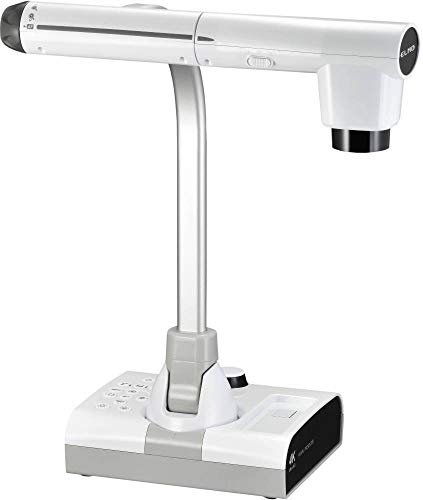
- 4K-capable output with HDMI and USB
- RGB/VGA support for flexible installs
- Optical and digital zoom for presentation control
Best For: Classrooms and AV installs needing multiple output options
Desk OCR Pick
VIISAN VS13AM 4K Document Camera

- 4K overhead capture for documents and objects
- OCR-friendly scanning for desk workflows
- 20x optical zoom for close-up detail
Best For: Office and home-office users focused on scanning and review
Portable 2-in-1 Pick
INSWAN INS-Flip 4 Foldable 4K Camera

- 4K capture at 30 fps with 13MP sensor
- Foldable 0.67 lb design for portability
- Works as both document camera and webcam
Best For: Teachers and remote workers who need a compact dual-use camera
Premium Classroom Pick
AVer F50+ 4K Versatile Document Camera

- 4K video capture with 10x optical zoom
- HDMI and USB for flexible classroom setups
- Manual and automatic controls for easier use
Best For: Classrooms and distance learning sessions needing crisp 4K imaging
Budget USB Pick
4K USB Document Camera for Teacher, 8MP Visualiser

- 8MP imaging with up to 2448P output
- Adjustable brightness and image reversal
- Foldable USB-C design for easy setup
Best For: Teachers needing a simple, portable USB visualizer for demos
Best for Comfort
Elmo TT-12G 4K Interactive Document Camera
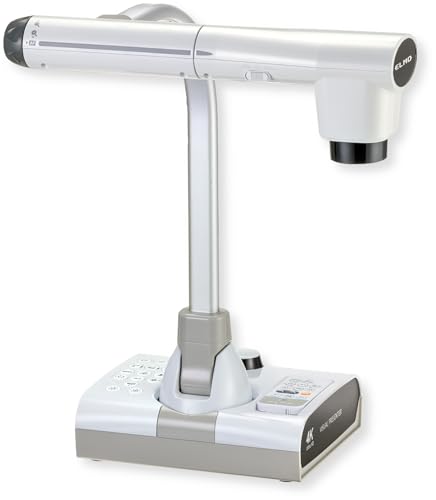
- 4K Ultra HD imaging with 12MP sensor
- 192x total zoom for detailed demonstrations
- HDMI, USB, and VGA outputs for compatibility
Best For: Interactive classrooms and presentations needing maximum zoom and flexibility
Foldable 4K Classroom Pick

- 15MP sensor with up to 3820 x 2160 4K output
- HDMI projection works without a computer
- Foldable design with 360-degree rotating top camera
Best For: Classrooms and online meetings needing easy USB or HDMI sharing
Low-Light Teaching Upgrade

- 8MP Sony sensor streams smoothly at 30 fps
- Low-light design reduces noise without extra LEDs
- AI pointer tracking and broad platform support
Best For: Teachers who want low-light clarity and interactive presentation tools
Direct-Connect Presenter Choice

- 13MP camera with 4K 3840 x 2160 HDMI output
- HDMI and USB dual mode for flexible setups
- Built-in LED light and autofocus aid classroom use
Best For: Classrooms and meetings that need direct display connection
Pro Classroom Pick – INSWAN INS-2 UHD 4K 13MP Document Camera
If you want a document camera with 4K output for lessons, artwork, and large-format sharing, the INSWAN INS-2 is built for exactly that kind of use. Its 13MP Sony sensor, A3 capture area, and built-in LED make it a practical choice when clarity and coverage matter in classrooms or presentation spaces.
Best For: Educators, art instructors, and presenters who need sharp 4K display for large documents, two-page spreads, and artwork.
Pros:
- Captures up to 4K Ultra HD at 3840 x 2160 resolution with a 13MP sensor
- A3-size capture and multi-joint arm suit large documents and artwork
- Built-in LED, anti-glare sheet, autofocus, and brightness control support clearer viewing
- Works plug-and-play with Windows, Mac, iPad, and Chromebook
Cons:
- USB-connected design is aimed more at desktop use than portability
- Built-in mic and software features are useful, but not the main reason to buy it
Overall, the INS-2 stands out as a strong teaching-focused document camera with 4K output and a wide capture area. It’s a sensible option if your priority is reliable classroom presentation rather than ultra-compact design.
Pro AV Workhorse – ELMO TT-12F 4K Output Document Camera
The ELMO TT-12F is a professional document camera with 4K output support, built for setups that rely on multiple video connections and high-end classroom or AV integration. With USB 3.0, HDMI, and RGB/VGA outputs, it fits environments where flexibility and system compatibility matter more than compact size.
Best For: Schools, presenters, and AV setups that need a robust document camera with 4K-capable output options and multiple connection types.
Pros:
- Supports up to 4K resolution output with HDMI and USB connectivity
- Includes RGB/VGA output for broader system compatibility
- USB 3.0 interface supports fast data handling
- Offers optical and digital zoom for close viewing control
Cons:
- Listed video capture resolution is 480p in the supplied details
- Heavier, larger build is less convenient for frequent transport
- Not the most compact option for casual desktop use
If you need a more permanent, connection-rich document camera setup, the TT-12F is a serious candidate. Its strengths are in integration and output versatility, especially where HDMI and VGA still matter.
Desk OCR Pick – VIISAN VS13AM 4K Document Camera
If your priority is a document camera with 4K output for scanning, close-up review, and everyday desk work, the VIISAN VS13AM is aimed at practical office and home-office tasks. It’s designed for papers, books, receipts, cards, and small objects, with OCR-friendly workflows and macro-style close viewing.
Best For: Office users, home-office setups, and anyone who needs overhead capture plus document scanning and OCR support.
Pros:
- Delivers 4K capture for clear overhead viewing of documents and small items
- Works well for scanning papers, receipts, books, and cards
- Supports OCR-oriented document workflows
- 30 fps capture and 20x optical zoom help with close-up presentation
Cons:
- More focused on desk and scanning tasks than classroom mobility
- Best fit is practical document handling, not high-feature conferencing use
The VS13AM makes sense if you want one tool for overhead display and document digitizing. It’s less about flashy presentation features and more about getting everyday paperwork and close-up content into usable digital form.
Portable 2-in-1 Pick – INSWAN INS-Flip 4 Foldable 4K Camera
The INSWAN INS-Flip 4 is a document camera with 4K output that leans hard into portability and versatility. It folds into a compact shape, weighs just 0.67 lbs, and can switch between document camera and webcam roles, making it a practical option for teachers, remote workers, and presenters who move between setups.
Best For: Users who want a lightweight, foldable document camera for teaching, video calls, and object demonstrations.
Pros:
- Captures up to 4K at 30 fps with a 13MP Sony sensor
- Foldable, lightweight design is easy to carry and store
- Works as both a document camera and webcam
- Supports Windows, Mac, and Chromebook with plug-and-play setup
Cons:
- Smaller footprint may not suit the largest document setups
- Built for portability first, so it’s less of a fixed classroom station
For people who need 4K presentation quality without giving up desk space or travel convenience, the INS-Flip 4 is the most flexible pick here. Its two-in-one design makes it especially useful when one device has to cover both meetings and teaching.
Premium Classroom Pick – AVer F50+ 4K Versatile Document Camera
If you want a document camera with 4k output that leans toward classroom reliability, the AVer F50+ is built for clear lessons and live demos. It combines 4K video, 10x optical zoom, and simple one-touch software, making it a practical fit for distance learning and presentation-heavy setups.
Best For: Teachers and presenters who want a dependable 4K document camera with optical zoom and simple connectivity.
Pros:
- 4K video capture for sharp document and object detail
- 10x optical zoom plus digital zoom for closer inspection
- HDMI and USB connectivity for flexible classroom use
- Manual and automatic focus/exposure control for different scenes
Cons:
- Heavier than compact USB-style visualizers at 8.9 pounds
- No wireless connectivity listed
- Best suited to fixed setups rather than ultra-portable use
Overall, the F50+ is a strong choice if you care more about image quality and teaching workflow than travel-friendly size. Its long warranty and straightforward operation add to its appeal in busy classroom environments.
Budget USB Pick – 4K USB Document Camera for Teacher, 8MP Visualiser
This document camera with 4k output is geared toward teachers who want a simple USB visualizer for live demos, web meetings, and classroom capture. It offers 8MP imaging, up to 2448P output, adjustable brightness, and a foldable body that is easy to move and store.
Best For: Teachers and remote presenters who want an affordable plug-and-play USB document camera with adjustable lighting.
Pros:
- 8MP sensor with up to 2448P capture for detailed visuals
- Manual image reversal and brightness adjustment for flexible shooting
- Foldable design helps save desk space and improve portability
- USB-C plug-and-play compatibility with Windows, macOS, and Chromebooks
Cons:
- No HDMI output listed
- Uses digital-style zoom rather than optical zoom
- Focus behavior is automatic, which may not suit every close-up workflow
For straightforward teaching or conferencing, this model covers the basics well and adds useful image controls you do not always find at this level. It is a practical pick if you want an easy USB setup more than a premium hardware build.
Best for Comfort – Elmo TT-12G 4K Interactive Document Camera
The Elmo TT-12G is a document camera with 4k output aimed at classrooms and presenters who need serious zoom and broad connectivity. With a 12MP sensor, 192x total zoom, and HDMI/USB/VGA outputs, it is built for detailed demonstrations and mixed-device environments.
Best For: Educators and trainers who need high zoom, flexible outputs, and interactive classroom use.
Pros:
- 4K Ultra HD output with a 12MP sensor for sharp imaging
- 192x total zoom helps show fine details clearly
- HDMI, USB, and VGA outputs support modern and legacy devices
- Flexible arm, LED lighting, and autofocus improve presentation workflow
Cons:
- Larger and less portable than compact USB models
- More feature-rich than needed for basic one-on-one use
- Likely best suited to permanent classroom or lectern setups
If you need a feature-packed presenter camera rather than a basic visualizer, the TT-12G stands out for zoom range and connection options. It is a strong fit for classrooms that regularly switch between devices and presentation formats.
Foldable 4K Classroom Pick – 4K 15MP Webcam with Zoom
If you want a document camera with 4K output that can double as a webcam, this foldable model focuses on flexible setup and straightforward classroom use. It supports USB for Zoom, Teams, Meet, and other online tools, while HDMI lets you send live images straight to a projector or monitor without a computer.
Best For: Teachers, trainers, and presenters who want a lightweight, desk-based document camera with direct HDMI projection.
Pros:
- 15MP sensor supports up to 3820 x 2160 4K at 15Hz.
- HDMI output can project directly to a monitor or projector.
- Autofocus helps capture clear text, with A4 size recommended.
- Foldable, lightweight design with a 360-degree rotating top camera.
Cons:
- 4K output is limited to 15Hz.
- Micro SD image saving works only in HDMI mode.
- Not water resistant.
Overall, this is a practical pick if you value portability, direct projection, and simple setup over advanced studio-style features. It fits well in classrooms and online meeting spaces where quick document sharing matters most.
Low-Light Teaching Upgrade – OKIOCAM S2-4K Ultra HD
The OKIOCAM S2-4K is a strong document camera with 4K output for teachers who need clean live images and dependable streaming. Its 8MP Sony Exmor R sensor, low-light performance, and AI tracking make it especially useful for lessons, presentations, and hybrid setups where clarity and engagement matter.
Best For: Teachers and presenters who need strong low-light image quality, AI tracking, and broad device compatibility.
Pros:
- 8MP sensor captures up to 3264 x 2448 with 30 fps streaming.
- Back-illuminated design improves low-light clarity without extra lights.
- OKIOPoint AI-tracking follows your pointer in real time.
- Works with Windows, Mac, Chromebook, iPad, and interactive displays.
Cons:
- 4K branding refers to the product line, while listed capture maxes at 3264 x 2448.
- Needs the OKIOCAM Live software for several advanced features.
- Not water resistant.
This model stands out if you want a teaching-focused camera that stays sharp in dim rooms and adds software tools for more interactive lessons. It is a thoughtful fit for classrooms, remote instruction, and conference-style demonstrations.
Direct-Connect Presenter Choice – IPEVO VZ-R Ultra 13MP
If you need a document camera with 4K output that can connect directly to displays, the IPEVO VZ-R Ultra is built for flexible teaching and presentation setups. Its HDMI mode sends 4K images to IFPs, TVs, monitors, or projectors without a computer, while USB mode keeps it compatible with classroom and meeting software.
Best For: Educators and presenters who want direct HDMI sharing plus USB flexibility for online teaching.
Pros:
- 13MP camera supports up to 4K 3840 x 2160 in HDMI mode.
- HDMI and USB dual mode adds setup flexibility.
- Built-in LED light helps in low-light environments.
- Autofocus, real-time exposure, and filter controls are available on the camera body.
Cons:
- No zoom function.
- Heavier than some compact document cameras at 1.19 kg.
- Not water resistant.
This is a solid choice if your priority is direct display output and tactile on-device controls. It suits classrooms, conference rooms, and hybrid learning environments where you want easy switching between projector use and software-based teaching.
How We Picked the Best Document Camera with 4K Output
We looked for models that combine strong 4K-class image quality with practical features users actually need: flexible mounting or foldable designs, USB and HDMI connectivity, built-in lighting, audio support, and compatibility with common teaching and presentation setups. For a Document Camera with 4K Output, image sharpness matters, but so does the ability to position the camera quickly and share content without extra friction.
Quick Comparison
The best choice depends on how you plan to use it. Classroom users may value AI tracking, classroom-friendly controls, and strong zoom. Office buyers may prefer dual-mode output, OCR scanning, and compatibility with monitors or projectors. Portable users should focus on weight, foldability, and plug-and-play operation.
Key Buying Factors for a Document Camera with 4K Output
Resolution and Sensor Quality
Look beyond the headline 4K label. A larger sensor and strong optics help preserve fine print, diagrams, and textures, especially when zooming in on small items or handwritten work.
Connectivity and Workflow
USB is convenient for laptops and online lessons, while HDMI and VGA can matter in classrooms or conference rooms. If you plan to present to multiple displays, choose a model that can connect cleanly to your existing setup.
Lighting and Focus
Built-in LEDs help when room lighting is uneven. Autofocus and image stabilization are especially useful if you move between pages, objects, or live demonstrations during a session.
Portability and Desk Space
Foldable arms, lightweight bodies, and compact footprints make a big difference if you transport the camera between rooms or store it between uses. If the camera will stay in one place, a sturdier base and broader reach may be more important.
Software Features
OCR, image inversion, annotation tools, and tracking can streamline lesson prep and document capture. These extras are most useful when they save time or simplify repeated tasks.
Who Should Buy Which Document Camera with 4K Output?
Teachers and trainers should prioritize ease of use, bright illumination, and flexible output options. Hybrid workers and presenters may want a balanced mix of 4K clarity and computer-friendly connectivity. Buyers who need scanning and archiving should look closely at OCR and capture software. If portability is key, a compact foldable Document Camera with 4K Output is usually the smartest choice.
In short, choose the model that best matches your room, workflow, and display needs rather than chasing specs alone.