Choosing the right camera can make art demos clearer, faster, and easier to follow. The best models capture fine brushwork, sketch lines, texture, and color without constant repositioning.
This roundup focuses on document cameras for art demonstrations that balance image quality, overhead viewing, ease of setup, and compatibility across common teaching platforms.
Best 10 Document Cameras for Art Demonstrations Picks for 2026
Ultra-Detail Pick
IPEVO V4K 8MP USB Document Camera
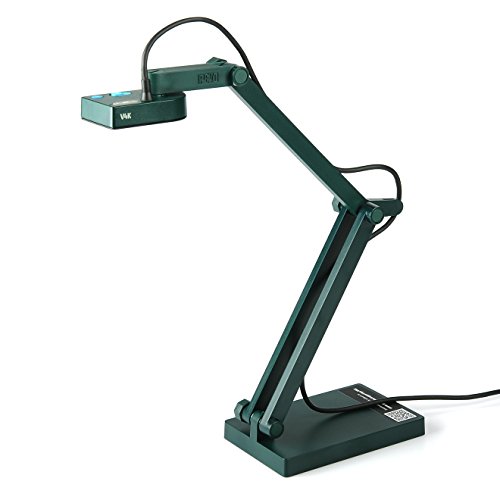
- 8MP Sony CMOS sensor
- Up to 3264 x 2448 UHD capture
- Fast autofocus and 30 fps streaming
Best For: Artists and teachers who need sharp, dependable live demos
Smart Tracking Pick
OKIOCAM S2-4K AI Document Camera

- AI pointer tracking with OKIOPoint
- 8MP capture up to 3264 x 2448
- Strong low-light performance
Best For: Instructors who want tracking tools and flexible platform support
Budget Flex Pick

- 3-in-1 document camera and webcam
- Built-in LED fill light
- USB-C support with autofocus
Best For: Users who want an affordable, multi-use teaching camera
Ledger-Size Pick
OKIOCAM T-4K Compact Art Camera

- Ledger-size capture area
- 8MP Sony sensor with UHD capture
- AI-tracking and 30 fps streaming
Best For: Artists showing larger pages, layouts, or artwork
Premium 4K Demo Pick
OKIOCAM S2 Pro 13-MP USB Document Camera
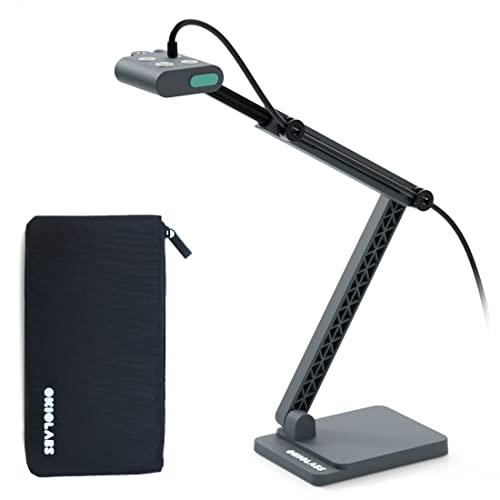
- 13MP 4K capture for fine art detail
- Built-in LED light for dim spaces
- OKIOPoint adds interactive zoom and tracking
Best For: Artists and teachers wanting high-detail live demos
Flexible Budget Classroom Pick
USB Document Camera for Teachers with A3 Format

- A3 capture area for larger artwork
- 3-level LED fill light for tricky lighting
- 3-in-1 design works as doc cam or webcam
Best For: Teachers needing a flexible, larger-format demo camera
Portable Art Demo Pick
OKIOCAM S-4K 8MP USB Document Camera

- 8MP Sony sensor with up to 3264 x 2448 capture
- Compact build for easy transport
- OKIOPoint adds tracking for live demos
Best For: Portable teaching and travel-friendly art demonstrations
Classroom Clarity Pick
8MP USB Document Camera with Auto Focus

- 8MP resolution for clear live demos
- Flip controls help with reversed views
- LED light and exposure settings reduce glare
Best For: Teachers and presenters showing art, worksheets, or hybrid lessons
Flexible Visualizer Choice
Manual Focus USB Document Camera

- Manual focus avoids autofocus drift
- Flexible arm reaches many angles
- Lightweight design with stable base
Best For: Controlled demos, teaching videos, and compact setups
High-Detail Teaching Pick

- 8MP 4K capture for sharp detail
- Multi-angle arm suits demos and webcam use
- Handles A4 and A3 materials
Best For: Teachers and presenters showing large or detailed art materials
Ultra-Detail Pick – IPEVO V4K 8MP USB Document Camera
If you want document cameras for art demonstrations that keep brushwork, texture, and color changes visible, the IPEVO V4K is built for clean live viewing. Its 8MP Sony CMOS sensor, fast autofocus, and high frame rate make it a practical choice for showing detailed steps without constant interruptions.
Best For: Artists and instructors who want reliable UHD imaging for live demos, remote teaching, and frequent material changes.
Pros:
- 8MP sensor captures up to 3264 x 2448 UHD stills.
- Streams at up to 30 fps at Full HD for smoother demos.
- Fast autofocus helps when switching between art materials.
- Works with Mac, Windows, and Chromebook.
Cons:
- No built-in zoom.
- Best performance depends on a compatible computer setup.
- Max shooting area is smaller than the largest ledger-size models.
For a straightforward, high-resolution demo camera, this model balances sharp image quality with easy cross-platform use. It is a strong fit if your priority is showing fine artistic detail clearly on screen.
Smart Tracking Pick – OKIOCAM S2-4K AI Document Camera
For document cameras for art demonstrations where you want the camera to help track the action, the OKIOCAM S2-4K adds AI pointer tracking to strong 8MP image capture. It is designed for clear close-ups, low-light use, and flexible classroom or studio presentations.
Best For: Demonstrators who want AI tracking, low-light performance, and broad device support.
Pros:
- 8MP Sony Exmor R sensor captures up to 3264 x 2448.
- OKIOPoint AI-tracking follows the pointer in real time.
- Good low-light performance without extra lighting.
- Supports Mac, Windows, Chromebook, iPad, and interactive displays.
Cons:
- Software features are tied to OKIOCAM Live.
- More advanced than a basic plug-and-play camera.
- May be more than needed if you only want simple overhead capture.
This is a strong option if you want the camera to do more of the instructional work for you. The combination of AI tracking, close-focus ability, and low-light clarity makes it especially useful for guided art lessons.
Budget Flex Pick – Kitchbai 3-in-1 Doc Camera
If you need document cameras for art demonstrations that can also double as a webcam, this 3-in-1 model covers the basics well. It offers 1080p capture, built-in LED fill light, autofocus, and image inversion, making it handy for simple live demos and video calls.
Best For: Budget-minded users who want a flexible camera for teaching, conferencing, and basic demo work.
Pros:
- 3-in-1 design works as a document camera, webcam, and visualiser.
- Built-in LED light helps in dim environments.
- Autofocus and image invert add convenience for live use.
- USB-C compatibility works with MacBook, Windows, Mac, and Chromebook.
Cons:
- 1080p resolution is lower than the 8MP UHD models.
- Smaller 5MP sensor limits detail compared with premium options.
- Best suited to basic demos rather than highly detailed close-ups.
This model makes sense if versatility matters more than top-tier image resolution. It is a practical pick for casual art demonstrations, online tutoring, and general classroom use.
Ledger-Size Pick – OKIOCAM T-4K Compact Art Camera
For document cameras for art demonstrations where larger work surfaces matter, the OKIOCAM T-4K is built to show ledger-size materials or both pages of an open book at once. Its 8MP Sony sensor and high-resolution capture make it a strong fit for showing larger sketches, references, or finished artwork.
Best For: Artists and teachers who need a compact camera with a larger capture area for books, maps, and artwork.
Pros:
- Captures up to ledger-size materials with a max view of 13.86 x 18.11 inches.
- 8MP Sony Exmor R sensor delivers up to 3264 x 2448 capture.
- Lag-free streaming up to 30 fps in Full HD.
- AI-tracking via OKIOPoint helps direct attention during demos.
Cons:
- Digital zoom is limited to 6x.
- Designed for USB use, so it still depends on host software.
- Smaller than some multi-joint classroom cameras, despite the large viewing area.
This is the best fit when you need to show bigger art surfaces without losing portability. It combines a wide capture area with solid image quality, making it useful for sketchbooks, layouts, and larger classroom demonstrations.
Premium 4K Demo Pick – OKIOCAM S2 Pro 13-MP USB Document Camera
If you want document cameras for art demonstrations that can clearly show brushwork, texture, and color detail, the OKIOCAM S2 Pro is a strong premium option. Its 13MP 4K sensor, built-in light, and fast autofocus help keep close-up demonstrations sharp and easy to follow in live teaching or conferencing.
Best For: Artists and instructors who want 4K detail, smart pointer support, and a sturdy setup for live demos.
Pros:
- 13MP sensor with true 4K capture up to 3840 x 2160 for detailed artwork viewing
- Built-in LED light helps when demonstrating in dimmer spaces
- OKIOPoint smart pointer can zoom in and follow what you indicate during lessons
- Metal weighted base and reinforced arm are built for durability
Cons:
- More advanced than a basic plug-and-play camera if you only need simple capture
- Best results may depend on using the included OKIOCAM software features
For art demonstrations where clarity matters, this model stands out for its high-resolution image quality and interactive presentation tools. It is especially appealing if you want a camera that can handle both detailed artwork and live online teaching with minimal fuss.
Flexible Budget Classroom Pick – USB Document Camera for Teachers with A3 Format
For document cameras for art demonstrations on a tighter budget, this PAKOTOO model offers a practical mix of flexibility and classroom-friendly features. Its hose-style arm can be angled freely, the A3 capture area is roomy enough for larger sketches or crafts, and the LED fill light plus autofocus help keep demonstrations readable.
Best For: Teachers or creators who want a flexible, larger-format camera for everyday demonstrations and remote lessons.
Pros:
- 3-in-1 design works as a document camera or webcam
- A3 format support gives extra space for bigger artwork or materials
- 3-level LED fill light and exposure control help in difficult lighting
- Autofocus plus image invert and mirroring features suit live teaching
Cons:
- Not plug and play, so setup takes an extra step
- 5MP resolution is lower than higher-end 4K alternatives
- Requires selecting the USB camera source in your computer settings
This is a sensible choice if you need a versatile, adjustable camera for art demos, classroom lessons, or video calls. It is less premium than the top-end models, but the larger capture area and flexible arm make it easy to position over drawings, paper crafts, or tabletop work.
Portable Art Demo Pick – OKIOCAM S-4K 8MP USB Document Camera
If portability is the priority, this OKIOCAM S-4K is a smart fit among document cameras for art demonstrations. It pairs an 8MP Sony Exmor R sensor with a compact body, supports letter-size materials in landscape orientation, and includes OKIOPoint tracking to make live explaining and pointing more engaging.
Best For: Instructors who need a lightweight, portable document camera for travel, small desks, or quick setup.
Pros:
- 8MP Sony Exmor R sensor delivers up to 3264 x 2448 capture
- Compact and lightweight design is easy to carry and store
- OKIOPoint helps the camera follow what you point to in presentations
- Works with Windows, Mac, iOS, Chrome, and interactive displays
Cons:
- Maximum resolution captures at up to 15 fps, so it is less ideal for the highest-detail motion
- Smaller body means less coverage than larger-format document cameras
This model makes sense if you want a portable teaching tool that still offers strong image quality for sketches, demos, and tabletop work. It is a particularly good match for artists who move between rooms or want a setup that travels easily.
Classroom Clarity Pick – 8MP USB Document Camera with Auto Focus
If you want document cameras for art demonstrations that can keep up with live sketching, color checks, and detailed handouts, this 8MP USB model is built for practical teaching use. Its image flip controls, adjustable LED lighting, and 8MP resolution make it easier to show artwork, reverse text, and glossy materials clearly without software setup.
Best For: Teachers and presenters who need a plug-and-play document camera for classroom demos, hybrid lessons, and art critique sessions.
Pros:
- 8MP resolution with auto focus for crisp live demonstrations.
- Left/right mirror and up/down flip controls help show reversed text or materials correctly.
- 3-level LED light and 10-stage exposure adjustment help manage glare and dim rooms.
- Foldable design with USB-C compatibility for Mac, Windows, and Chromebook.
Cons:
- Does not support HDMI.
- Not compatible with iPads.
- Built-in audio is limited to dual microphones rather than a dedicated external mic setup.
Overall, this is a flexible teaching camera for users who value quick setup, lighting control, and easy image correction. It is especially useful when art demonstrations or worksheet walkthroughs need to be shown clearly in real time.
Flexible Visualizer Choice – Manual Focus USB Document Camera
For document cameras for art demonstrations where stable focus and angle control matter, this 3-in-1 USB visualizer gives you a manual-focus setup with a flexible hose arm and rotatable lens. It is designed to show textures, colors, and small details more consistently, which can be useful when you do not want autofocus to shift during a lesson.
Best For: Educators and creators who want a lightweight, manually focused document camera for controlled demonstrations and video calls.
Pros:
- Manual focus helps avoid repeated autofocus hunting during demos.
- Flexible 360-degree adjustable camera and hose design support many viewing angles.
- Lightweight 1.1-pound build with weighted base for stability.
- Built-in microphone and USB-C support for Mac, Windows, and Chromebook.
Cons:
- Only 2MP effective still resolution is lower than 8MP alternatives.
- Must be connected to a computer to work.
- Not compatible with iPad, mobile phones, or other portable devices.
This model makes sense if you prefer direct control over focus and positioning rather than relying on automatic adjustments. It is a practical choice for live demonstrations, teaching videos, and compact workspaces.
High-Detail Teaching Pick – 8MP 4K Auto Focus Doc Cam
If you need document cameras for art demonstrations with more detail and broader use, this 8MP 4K doc cam is positioned as a strong all-in-one option. It supports overhead viewing, webcam use, and A4/A3 coverage, so you can show artwork, sketches, worksheets, and 3D objects in one device.
Best For: Teachers, trainers, and remote presenters who want a sharp, multi-angle document camera for larger art or classroom materials.
Pros:
- 8MP sensor with 2448P ultra HD resolution for detailed visuals.
- Multi-joint arm supports document camera, overhead camera, and webcam modes.
- Covers both A4 and A3 materials, including posters, maps, and presentation boards.
- Auto focus and 3-level LED fill light help keep subjects clear in different lighting.
Cons:
- Bulkier feature set may be more than needed for very basic use.
- Designed around USB use, so it is not a standalone camera system.
- Focuses on classroom and presentation workflows rather than specialized studio features.
This is the most versatile option in the group if you want one camera for demos, teaching, streaming, and larger-format visuals. It fits especially well when art demonstrations need both close detail and room to show bigger pages or boards.
How We Picked the Best Document Cameras for Art Demonstrations
We prioritized sharp resolution, reliable autofocus or manual focus control, usable overhead positioning, and practical features such as built-in lighting, microphone support, and easy connection to Mac, Windows, and Chromebook systems. For art workflows, we also looked for coverage that works well with sketchbooks, paper sizes, and table-top demonstrations.
Quick Comparison
When comparing Document Cameras for Art Demonstrations, think in terms of image clarity, working area, and control. Higher-resolution models help show detail in line work and mixed media, while features like image inversion, LED illumination, and foldable arms make setup more adaptable for classrooms and studios.
Key Buying Factors for Document Cameras for Art Demonstrations
Image Quality and Focus
Look for at least 8MP if you want crisp overhead video, especially for pencil shading, ink edges, or paint texture. Autofocus is convenient for moving hands and materials, while manual focus can be useful when you want to lock in a stable view.
Lighting and Color Visibility
LED lighting helps reduce shadows cast by your hand or tools. Good color performance matters too, since art instruction often depends on showing true pigment, contrast, and surface detail.
Viewing Area and Flexibility
If you demonstrate on larger sheets, sketchbooks, or mixed-media boards, check the capture area and arm reach. A wider overhead frame is useful for full-page layouts, while a more compact design may suit small desk setups.
Compatibility and Classroom Use
Most Document Cameras for Art Demonstrations should work smoothly with common video apps and school devices. If you teach across different platforms, verify support for Mac, PC, Windows, and Chromebook before buying.
Who Should Buy Which Document Cameras for Art Demonstrations?
Teachers who need fast setup and dependable everyday use should favor simple USB models with autofocus and decent lighting. Artists and instructors who want to show fine detail may prefer higher-resolution units with stronger overhead control. If you need portability for remote lessons, choose a foldable design that travels easily and stores without hassle. For larger classrooms or more advanced demonstrations, prioritize models with broader coverage, stable mounting, and clearer low-light performance.
In short, the best choice depends on your workspace, your materials, and how often you switch between live teaching, recording, and online sessions.