If you need a faster, cleaner way to digitize books, a document camera can be a practical alternative to flatbed scanning. The best models make it easier to capture pages, reduce setup time, and keep text readable.
In this roundup, we focus on document cameras for book scanning that balance resolution, software features, and ease of use for students, teachers, offices, and home archiving.
Best 10 Document Cameras for Book Scanning Picks for 2026
Premium Book Scanning Pick
CZUR ET24 Pro 24MP Book Scanner
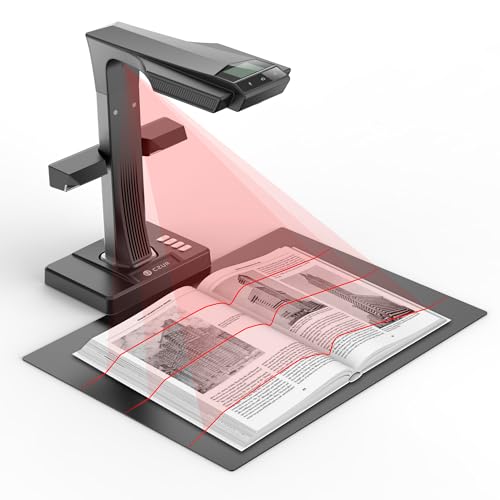
- 24MP capture with 5696 × 4272 resolution
- Curve-flattening tech for bound book pages
- ABBYY OCR with editable PDF, Word, and Excel
Best For: Users who want high-detail book scanning with flattening and OCR
Versatile Desk Capture Choice
VIISAN VS13AM 4K Overhead Camera

- 4K overhead capture with 13MP stills
- Handles books, receipts, cards, and small objects
- Built for document scanning and OCR workflows
Best For: Users who need one camera for book pages, desk work, and presentations
Compact Budget-Friendly Option
INSWAN INS-1 Classic USB Document Camera

- 8MP capture with autofocus and macro support
- Built-in LED plus anti-glare sheet
- Plug-and-play with PC, Mac, Chromebook, and iPad
Best For: Small desks and users who want simple, compact book scanning
High-Resolution Bulk Scanning Pick

- 38MP sensor with 7168 × 5376 resolution
- Scans a page in about 1.5 seconds
- Curve-flattening plus OCR for searchable files
Best For: Heavy book scanning projects that need speed and detail
Professional Large-Format Capture
INSWAN INS-2 UHD 4K 13MP Document Camera

- 13MP Sony sensor with 4K Ultra HD capture
- Supports A3 pages and two-page spreads
- LED light, anti-glare sheet, and OCR software
Best For: Educators and presenters handling large books and displays
Fast Book-Page Flattening
CZUR Shine Ultra Smart Portable Document Scanner

- Patented technology helps flatten curved book pages
- About 1 second per page scanning speed
- 13MP camera with OCR for 180+ languages
Best For: Thin-book scanning with quick page flattening
Bright A4 Teaching Scanner
NetumScan 13MP Book Document Camera

- One-key automatic correction for skewed pages
- 13MP CMOS sensor with built-in LED lighting
- Supports Word, PDF, text, and live projection
Best For: Teachers and office users scanning A4 books and notes
Portable High-Resolution Choice
CZUR Shine Ultra Pro 24MP portable book scanner
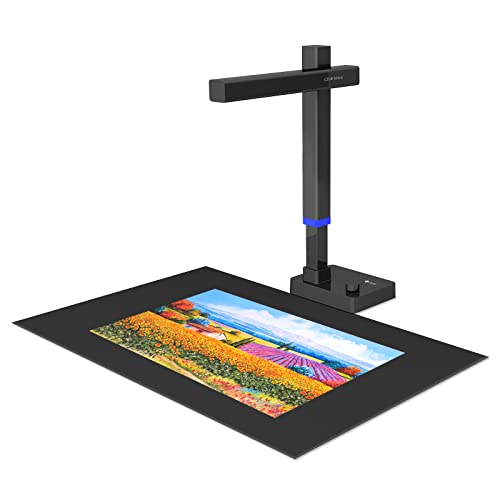
- 24MP auto-focus camera with book-page flattening
- Exports searchable PDF, Word, Excel, and JPG
- Foldable 2-lb design for Windows and macOS
Best For: People who need a lightweight book-scanning setup for home, office, or remote teaching
Budget-Friendly Teaching Pick
NetumScan 13MP USB book document camera

- One-key correction and mass automatic scanning
- Built-in 6 LED lights and OCR support
- Foldable aluminum body for A3/A4 capture
Best For: Teachers and students who want an easy-to-use book scanner for lessons and notes
Large-Format Power Pick
VIISAN S21 A2 large-format book scanner

- A2 capture size for books, newspapers, and maps
- 26MP imaging with auto-flatten and finger removal
- OCR exports to PDF, Word, Excel, EPUB, and TXT
Best For: People scanning oversized books or archival materials that need a larger overhead capture area
Premium Book Scanning Pick – CZUR ET24 Pro 24MP Book Scanner
If you want document cameras for book scanning that can handle bound pages with less cleanup, the CZUR ET24 Pro is built around curve-flattening and high-resolution capture. It’s aimed at users who need dependable desktop scanning for books, documents, and mixed paper workflows, with OCR and broad system support included.
Best For: Scanning books and documents with flattening technology, strong OCR, and wide OS compatibility.
Pros:
- 24MP camera with 5696 × 4272 resolution and 320 DPI for detailed page capture.
- Upgraded flattening technology helps correct curved book pages during scanning.
- ABBYY OCR supports editable PDF, Word, Excel, and 180+ languages.
- Works with macOS, Windows, and Ubuntu-based Linux systems.
Cons:
- Very glare-prone papers are not recommended.
- Arabic OCR support is limited by operating system and ET-series rules.
- Linux support is limited to Ubuntu 20.04 to 24.04.
Overall, the ET24 Pro is a strong choice if your priority is cleaner book-page scanning rather than a basic presentation camera. Its combination of flattening, OCR, and HDMI output makes it especially practical for document-heavy setups.
Versatile Desk Capture Choice – VIISAN VS13AM 4K Overhead Camera
For document cameras for book scanning that also cover everyday desk tasks, the VIISAN VS13AM focuses on clear 4K overhead capture and practical OCR workflows. It’s a flexible option for papers, books, receipts, cards, and small objects when you want one camera for both viewing and digitizing.
Best For: Everyday book and paperwork capture with 4K detail and a versatile overhead setup.
Pros:
- 4K video capture with 13MP still resolution for clear document viewing.
- Designed for documents, books, receipts, cards, and small objects.
- Supports document-scanning and OCR-style workflow use.
- Useful for office, home office, and tabletop presentation tasks.
Cons:
- No dedicated book-flattening technology is listed.
- More presentation-oriented than high-volume scan-first models.
- OCR capabilities are described broadly rather than in detailed language support terms.
The VS13AM is a practical middle-ground pick if you want a document camera that can scan book pages and still serve everyday desk work. It’s best suited to users who value flexibility and sharp overhead viewing over specialized scanning features.
Compact Budget-Friendly Option – INSWAN INS-1 Classic USB Document Camera
If you’re shopping document cameras for book scanning on a smaller desk, the INSWAN INS-1 keeps things compact while still offering autofocus, LED lighting, and useful software. It’s a straightforward plug-and-play choice for scanning pages, showing close-up details, and handling general webcam-style use.
Best For: Compact desktop scanning and light book capture with simple setup.
Pros:
- 8MP SONY camera captures up to 3264 × 2448 images.
- Autofocus, macro capability, and built-in LED help with close-up page capture.
- Includes anti-glare sheet and Documate software with editing tools.
- Plug-and-play USB operation with broad compatibility across PC, Mac, Chromebook, and iPad.
Cons:
- Lower resolution than the higher-end book scanner models in this roundup.
- Viewing area is smaller than larger overhead scanners.
- Less specialized for bound-book flattening than dedicated book scanners.
The INS-1 is a sensible pick when you want a compact, easy-to-use camera for lighter book scanning and everyday document work. It gives you a useful feature set without the size or complexity of a full professional scanner.
High-Resolution Bulk Scanning Pick – CZUR ET MAX 38MP Book Scanner
For document cameras for book scanning that prioritize speed and image quality, the CZUR ET MAX stands out with a 38MP sensor and fast page workflow. It’s designed for users digitizing books and documents at scale, with curve-flattening, OCR, and HDMI output for both scanning and live use.
Best For: Fast, high-resolution book and document scanning with strong OCR support.
Pros:
- 38MP CMOS sensor with 7168 × 5376 resolution and 410 DPI.
- Patented curve-flattening technology helps clean up bound book pages.
- Scans a page in about 1.5 seconds with practiced operation.
- OCR supports editable and searchable files in 180+ languages.
Cons:
- Not recommended for glossy or highly reflective materials.
- Linux support is limited to Ubuntu 20.04 to 24.04.
- Arabic OCR is restricted to ET Series scanners on Windows.
The ET MAX is the strongest fit if you want a premium scanner for lots of book pages and document batches. Its mix of resolution, speed, and curve correction makes it especially appealing for productivity-focused scanning setups.
Professional Large-Format Capture – INSWAN INS-2 UHD 4K 13MP Document Camera
If you need document cameras for book scanning that can also handle oversized pages, the INSWAN INS-2 is built for bigger layouts like A3 documents, two-page spreads, and artwork. Its 13MP Sony sensor and 4K capture make it a strong pick when clarity matters for teaching, presentations, or detailed reference material.
Best For: Educators and presenters who need sharp capture for large books, spreads, and display materials.
Pros:
- 13MP Sony sensor with 4K Ultra HD output for detailed capture
- A3 capture support and flexible multi-joint arm for larger pages
- Built-in LED, anti-glare sheet, and brightness control help with difficult lighting
- Documate software includes OCR, annotation, whiteboard tools, and recording
Cons:
- Designed more for classroom and presentation use than ultra-portable travel setups
- OCR and software features depend on using the included Documate workflow
- Larger form factor may be more than needed for simple single-page scans
Overall, the INS-2 is a capable choice if your priority is a document camera that can scan or display books at a larger size without giving up image quality. It is especially appealing for users who want a teaching-friendly camera with robust lighting and software tools.
Fast Book-Page Flattening – CZUR Shine Ultra Smart Portable Document Scanner
For document cameras for book scanning, the CZUR Shine Ultra stands out because it is designed to flatten curved pages after capture, which can make thin books easier to digitize. It also works as both a document camera and a scanner, so it suits users who want fast page-turn scanning plus OCR support.
Best For: Users scanning thinner books who want fast page capture and page-flattening features.
Pros:
- Patented page-flattening technology for curved book pages
- About 1 second per page scanning speed for fast workflows
- 13MP CMOS camera with smart paging and auto-cropping
- OCR supports 180+ languages for text recognition
Cons:
- Best suited to thinner books; thicker books are better matched to the ET series
- Not compatible with Android or iOS
- OCR language support does not currently include Thai, Hebrew, or Arabic
In practice, the Shine Ultra is a strong fit if speed and page cleanup matter more than maximum versatility. It is a smart option for home, office, or classroom users who want quick scans with less manual correction.
Bright A4 Teaching Scanner – NetumScan 13MP Book Document Camera
If you want document cameras for book scanning that can also support live teaching and video recording, the NetumScan 13MP model is built around simplicity. It captures up to A4 size, includes built-in LED lighting, and uses automatic correction to straighten images quickly.
Best For: Teachers and office users who want an easy USB document camera for books, notes, and live projection.
Pros:
- One-key automatic correction helps fix skewed pages quickly
- 13MP CMOS sensor with built-in LED for brighter captures
- Supports mass automatic scanning and output to Word, PDF, and text formats
- Foldable aluminum alloy body with adjustable bracket for portability
Cons:
- Capture size is limited to A4, so larger books or spreads may not fit well
- Requires software installation to get started
- USB flash drive is included for software/manual access, which adds a setup step
For users focused on straightforward scanning and live projection, the NetumScan delivers a practical mix of brightness, auto-correction, and portability. It is a good fit when you want a compact tool for books, music scores, or classroom materials.
Portable High-Resolution Choice – CZUR Shine Ultra Pro 24MP portable book scanner
If you want document cameras for book scanning that can handle everyday digitizing without taking up much desk space, the CZUR Shine Ultra Pro is built around portability and strong image quality. Its 24MP auto-focus camera, book-page flattening, and OCR support make it a practical pick for turning books and documents into searchable files.
Best For: Users who want a lightweight, foldable scanner for books, paperwork, and remote teaching setups.
Pros:
- 24MP auto-focus camera with up to 5696 × 4272 resolution
- Can flatten curved book pages and export JPG, PDF, searchable PDF, Word, and Excel
- Foldable, height-adjustable design weighs only 2 lbs
- Works with Windows and macOS and supports Zoom, Skype, and Google Meet
Cons:
- Glossy photo and glossy magazine materials are not recommended
- OCR does not support Thai, Hebrew, or Arabic
- Not positioned as the professional-level CZUR option if you need more advanced scanning
Overall, this model makes sense if you want a travel-friendly book scanner that balances convenience, flattening tools, and broad file output. It is especially appealing when you need one device for scanning and screen-sharing in the same workspace.
Budget-Friendly Teaching Pick – NetumScan 13MP USB book document camera
For buyers comparing document cameras for book scanning on a simpler budget, the NetumScan 13MP model focuses on fast correction, decent image capture, and classroom-friendly use. It scans A3/A4 material, includes built-in LED lighting, and adds OCR so you can move from page images to editable text more easily.
Best For: Teachers, students, and casual users who want an easy USB book scanner for lessons and everyday scanning.
Pros:
- One-key automatic correction helps fix skewed pages quickly
- Built-in 6 LED lights provide even illumination
- Supports OCR and export to Word or TXT with 98%+ claimed accuracy
- Foldable aluminum alloy body is easy to carry and adjust
Cons:
- Minimum system requirement is Windows 7
- Capture size is limited to A3/A4 rather than larger formats
- Resolution is listed as 800 dpi, which is less detailed than higher-end book scanners
In practice, this is a straightforward scanner for users who want scanning, live projection, and video recording in one compact device. It is a solid fit when ease of setup matters more than premium-resolution capture.
Large-Format Power Pick – VIISAN S21 A2 large-format book scanner
If you need document cameras for book scanning with a larger capture area, the VIISAN S21 stands out for A2-format work and advanced cleanup tools. It is designed for scanning books, newspapers, manuscripts, and maps, while its software adds page flattening, finger removal, and split-page handling for better results.
Best For: Users who need A2/A3 scanning for large books, archives, and detailed document work.
Pros:
- Large A2 capture size is ideal for oversized books, newspapers, and maps
- 26MP output with software-enhanced up to 600 DPI detail
- Auto-flatten, finger removal, edge repair, and double-page split features
- Supports OCR export to PDF, Word, Excel, EPUB, TXT, and more
Cons:
- Bundled OfficeCam software is not compatible with ARM-based devices
- Very glossy papers are not recommended
- Built-in LEDs are not recommended for use in bright light
For high-volume or larger-format scanning, this model offers more flexibility than typical book cameras. It is best viewed as a specialist tool for users who want big capture size plus software help that reduces manual cleanup.
How We Picked the Best Document Cameras for Book Scanning
We prioritized models that can capture sharp page images, handle books without excessive repositioning, and offer useful software features such as OCR, auto-flatten, and finger removal. We also considered resolution, supported capture size, lighting, portability, and compatibility with common operating systems.
Quick Comparison
For the fastest bulk scanning, higher-resolution scanners with auto-flatten and book-curvature correction are the easiest to live with. For classroom or presentation use, a lighter USB document camera may be more versatile. If you need one device for both scanning and live demos, look for a model that balances image quality with webcam-style flexibility.
Key Buying Factors for Document Cameras for Book Scanning
Resolution and Image Clarity
Higher megapixels generally help preserve small text, diagrams, and marginal notes, especially on dense pages or older books. If you scan textbooks, manuals, or archival material, prioritize sharper optics and consistent edge-to-edge focus over marketing claims alone.
Capture Area and Book Size
Check the supported page or bed size before buying. A3 coverage works well for most books and documents, while larger formats are better if you regularly scan oversized pages, magazines, or spread layouts.
Software Features
For Document Cameras for Book Scanning, features like OCR, auto-cropping, auto-flatten, and finger removal can save significant time. These tools matter most when you plan to scan many pages or want cleaner PDFs with less manual editing.
Lighting and Convenience
Built-in LEDs help keep pages evenly lit, but glare can be an issue on glossy paper. Adjustable lights, stable stands, and simple one-button capture can make a big difference in daily use.
Compatibility and Workflow
Make sure the camera works with your operating system and file workflow. If you need Windows, macOS, or Linux support, verify the software first. For classroom and office use, USB simplicity is often more important than extra features you may never use.
Who Should Buy Which Document Cameras for Book Scanning?
Choose a high-resolution model if your top priority is crisp text and fewer rescans. Pick a portable scanner if you need to move between home, office, or classroom setups. If you want to scan thick books quickly, look for larger-format support and strong dewarping software. For occasional use, a simpler USB document camera may be the most cost-effective choice.
In short, the best choice depends on your book sizes, scanning volume, and how much editing you want to do afterward. Matching those needs to the right feature set will matter more than chasing the highest spec on the box.