If you need to show worksheets, books, lab setups, or 3D objects clearly, a document camera with lighting can make a big difference. The best models improve visibility, reduce shadows, and keep lessons readable on screens or projectors.
This roundup of 10 picks focuses on practical performance for teachers, trainers, and remote presenters, with attention to image quality, light control, compatibility, and ease of use.
Best 10 Document Cameras with Built in Lighting Picks for 2026
Premium Large-Format Pick
INSWAN INS-2 UHD 4K 13MP Doc Camera

- 13MP sensor with 4K Ultra HD capture
- Built-in LED, anti-glare sheet, brightness control
- A3-size support with Documate tools
Best For: Educators and art instructors who need large-format capture and clear lighting
Classroom Presentation Workhorse
Elmo TT-12G 4K Interactive Document Camera
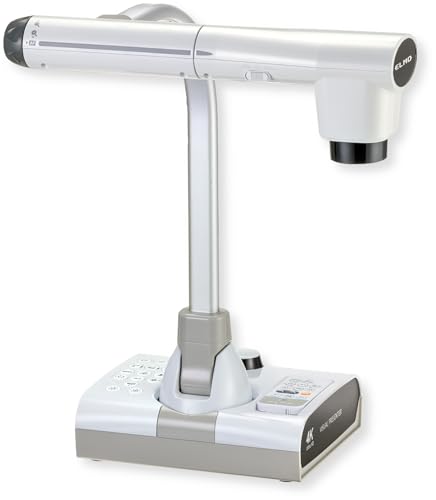
- 4K Ultra HD with 12MP sensor
- 192x zoom and integrated LED lighting
- HDMI, USB, and VGA outputs
Best For: Teachers and presenters who need zoom, lighting, and wide device support
Budget-Friendly Teaching Pick
Kitchbai 4K USB Visualiser with 3-Level LED

- 3-level LED lighting with brightness controls
- 8MP capture up to 2448P at 30fps
- Foldable design with dual microphones
Best For: Teachers and remote presenters who want adjustable lighting in a compact design
Interactive Smart Pointer Pick
OKIOCAM S2 Pro 13MP USB Document Camera
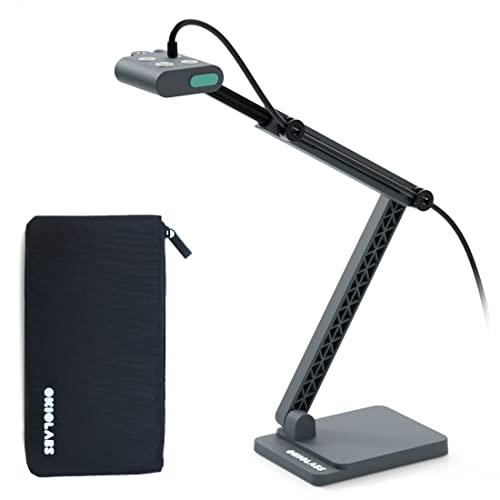
- 13MP 4K sensor with low-grain output
- Integrated LED light for dim rooms
- OKIOPoint smart pointer for interactive demos
Best For: Remote teachers and presenters who want smart software tools and built-in lighting
Classroom-Ready Value Pick
USB Document Camera with 3-Level LED Lighting

- 3-in-1 doc camera and webcam design
- 3-level LED fill light for darker spaces
- Supports A3 capture and image mirroring
Best For: Teachers and presenters needing flexible low-light support
High-Resolution Workhorse
IPEVO V4K 8MP USB Document Camera

- 8MP capture up to 3264 x 2448
- Fast focus with up to 30 fps streaming
- Mac, Windows, and Chromebook compatible
Best For: High-resolution classroom and remote-teaching use
Feature-Packed Presenter
4K Document Camera with LED Light

- 3-level LED fill light with autofocus
- A4 and A3 coverage for larger materials
- Works as a webcam with built-in mic
Best For: Teachers and presenters wanting an all-in-one setup
Editor’s Pick for Bright, Flexible Teaching
THUSTAR 8MP 4K Document Camera with LED Lights

- 3-level built-in LED lighting
- 8MP output with 30fps video
- Foldable A3-size classroom design
Best For: Teachers needing a bright, portable USB visualizer
Best Simple Classroom Visualizer

- 3-in-1 camera, webcam, and visualizer
- Manual focus with 1080P/30fps output
- Dual built-in microphones for calls
Best For: Classroom users who want a compact plug-and-play doc cam
Best Budget-Friendly LED Option
INSWAN INS-1 Classic USB Document Camera

- Built-in LED with anti-glare sheet
- 8MP imaging with autofocus and macro
- Documate software for teaching tools
Best For: Teachers wanting an easy USB camera with lighting support
Premium Large-Format Pick – INSWAN INS-2 UHD 4K 13MP Doc Camera
If you need document cameras with built in lighting for classrooms, art demos, or large presentations, the INSWAN INS-2 is built to handle bigger visuals without sacrificing clarity. Its 13MP sensor, 4K capture, and A3-sized coverage make it a strong fit when you need to show full pages, artwork, or two-page spreads with a clean, professional image.
Best For: Educators and art instructors who need large-format capture, flexible positioning, and dependable built-in lighting.
Pros:
- 13MP sensor records 4K Ultra HD video at 3840 x 2160 at 30fps
- Multi-joint arm supports flexible positioning for A3-size documents and artwork
- Built-in LED light, anti-glare sheet, and brightness control help improve visibility
- Documate software adds zoom, annotation, recording, OCR, and whiteboard tools
Cons:
- Larger footprint than compact desktop document cameras
- Built for presentation use, so it may be more camera than some casual users need
This is a practical choice if your priority is showing large materials clearly in real time. The combination of built-in lighting, autofocus, and broad software support makes it especially useful for teaching and presentation workflows.
Classroom Presentation Workhorse – Elmo TT-12G 4K Interactive Document Camera
Among document cameras with built in lighting, the Elmo TT-12G stands out for classrooms that need strong image quality and flexible connectivity. It delivers 4K Ultra HD output, a wide capture area, and integrated LED lighting for shadow-free visuals, making it a solid fit for live teaching, hybrid lessons, and demonstrations.
Best For: Teachers and presenters who want a feature-rich document camera with broad device compatibility and strong zoom.
Pros:
- 4K Ultra HD imaging with a 12MP sensor for sharp presentation visuals
- 192x total zoom combines 12x optical and 16x digital zoom
- Integrated LED lighting helps produce bright, shadow-free images
- HDMI, USB, and VGA outputs support modern and legacy setups
Cons:
- Heavier and larger than many USB-only document cameras
- May be more than needed if you only want simple plug-and-play use
The TT-12G is a strong all-around classroom option when image detail, output flexibility, and reliable lighting all matter. It is especially well suited to environments that still rely on a mix of old and new display hardware.
Budget-Friendly Teaching Pick – Kitchbai 4K USB Visualiser with 3-Level LED
If you are shopping for document cameras with built in lighting and want a compact, flexible teaching tool, this Kitchbai visualiser is a practical pick. It offers adjustable brightness, A3-size capture, and a foldable design, so it fits well in small workspaces, live demos, and remote lessons.
Best For: Teachers and remote presenters who want a foldable document camera with adjustable lighting and easy setup.
Pros:
- 3-level LED light and brightness buttons help in both dark and bright settings
- 8MP sensor supports high-definition capture up to 2448P at 30fps
- Foldable, multi-joint design makes it easier to store and position
- Built-in dual microphones add audio support for video calls and demos
Cons:
- Less premium than higher-end 4K classroom models
- Manual image inversion may take a little setup for some workflows
This model makes sense if you want a straightforward classroom or home-office visualiser with useful lighting controls. Its compact foldable body and broad compatibility make it easy to work into everyday teaching and conferencing setups.
Interactive Smart Pointer Pick – OKIOCAM S2 Pro 13MP USB Document Camera
For buyers comparing document cameras with built in lighting, the OKIOCAM S2 Pro offers a polished mix of image quality, portability, and presentation tools. Its 13MP 4K sensor, integrated LED light, and OKIOPoint smart pointer help make live demos and remote teaching feel more interactive without adding much complexity.
Best For: Remote teachers and presenters who want a lightweight document camera with smart presentation features and built-in lighting.
Pros:
- 13MP sensor captures true 4K images with low-grain output
- Integrated LED light helps in dimly lit environments
- OKIOPoint smart pointer adds interactive document tracking in software
- Lightweight build and included pouch make it easy to carry and store
Cons:
- Smaller capture area than some larger classroom models
- Digital zoom is more limited than higher-zoom alternatives
The S2 Pro is a good fit when portability and presentation features matter as much as image quality. It brings together built-in lighting, quick autofocus, and software tools that can make lessons and live demos feel more engaging.
Classroom-Ready Value Pick – USB Document Camera with 3-Level LED Lighting
If you want document cameras with built in lighting for teaching or remote demos, this PAKOTOO model focuses on flexibility and low-light usability. It combines a document camera and webcam in one, supports A3-sized materials, and adds a 3-level LED fill light plus manual exposure control to help keep images usable in dim rooms.
Best For: Teachers and presenters who need an adjustable, multi-use camera for classrooms, video calls, and distance learning.
Pros:
- 3-in-1 design works as a document camera, webcam, and live presentation tool
- 3-level LED fill light helps when lighting is poor or uneven
- Manual exposure plus auto focus make it easier to refine image clarity
- Supports A3 capture and left/right mirroring for flexible teaching setups
Cons:
- Not plug-and-play, so setup requires selecting the camera source in software
- Image quality and stability depend on correct positioning of the hose-style arm
Overall, this is a practical pick if built-in lighting matters more than premium refinement. It is best suited to classroom use, online lessons, and everyday presentation tasks where adjustability and compatibility are the priority.
High-Resolution Workhorse – IPEVO V4K 8MP USB Document Camera
Among document cameras with built in lighting, this IPEVO model stands out more for image quality than for a built-in lamp. Its 8MP sensor, fast focusing, and Sony CMOS image sensor are aimed at clean live demos, web conferencing, and distance learning, including use in dimly lit environments.
Best For: Users who want a high-resolution document camera for frequent classroom, meeting, or remote-teaching use.
Pros:
- 8MP sensor captures up to 3264 x 2448 ultra-high-definition images
- Fast focus and up to 30 fps help keep live demos smooth
- Sony CMOS sensor is designed for noise reduction and color reproduction
- Compatible with Mac, Windows, and Chromebook workflows
Cons:
- Does not include an internal flash or LED fill light in the supplied specs
- Best performance depends on system requirements for lag-free streaming
If your priority is sharper capture rather than extra lighting hardware, this is the strongest image-first option here. It suits heavy daily use and software-based teaching setups where resolution and responsiveness matter most.
Feature-Packed Presenter – 4K Document Camera with LED Light
This is a strong choice if you are comparing document cameras with built in lighting and want a full-featured classroom tool. It pairs 8MP imaging with a 3-level LED fill light, autofocus, and a flexible multi-joint arm, making it useful for lessons, meetings, and content recording in changing light.
Best For: Teachers and presenters who want a versatile document camera with lighting, webcam support, and broad material coverage.
Pros:
- 3-level LED fill light and autofocus support low-light presentations
- Supports both A4 and A3 materials for larger documents and posters
- Multi-joint arm and rotatable head allow top, side, and selfie views
- Built-in microphone and webcam function make it useful for online teaching
Cons:
- More features may be more than needed if you only want basic scanning
- Detailed setup and use may take longer than simpler fixed-position cameras
Overall, this model offers the broadest feature set in the group for mixed classroom and remote-work use. If you want lighting, webcam functionality, and flexible viewing angles in one package, it is an easy one to shortlist.
Editor’s Pick for Bright, Flexible Teaching – THUSTAR 8MP 4K Document Camera with LED Lights
If you want document cameras with built in lighting for live demos, distance education, or classroom sharing, this THUSTAR model gives you a lot of control. The 8MP sensor, 30fps output, and 3-level LED lighting help keep documents and small objects visible, while the foldable body and A3 capture area make it practical for daily teaching setups.
Best For: Teachers and presenters who want a bright, foldable document camera with strong image control and built-in lighting.
Pros:
- 3-level built-in LED lighting helps in dark or mixed lighting conditions.
- 8MP capture with up to 2448P output and 30fps streaming.
- Manual brightness controls and image inversion add useful viewing flexibility.
- Foldable design and A3 coverage suit classroom and desk use.
Cons:
- Lighting is adjustable, but it is still a basic built-in LED setup rather than a larger studio-style light.
- Best fit is for wired USB use on compatible desktop and laptop systems.
Overall, this is a strong pick if your priority is clear image capture with built-in lighting and easy classroom portability. It balances brightness control, resolution, and simple plug-and-play convenience well for teaching and demo work.
Best Simple Classroom Visualizer – Gawervan 1080P USB Doc Camera
For buyers comparing document cameras with built in lighting, this Gawervan model is more about straightforward teaching utility than flashy extras. It offers 1080P live demos, manual focus, a 360° adjustable lens, and dual microphones, making it a practical option for lessons, remote teaching, and webcam use where clarity and easy setup matter most.
Best For: Teachers, students, and remote presenters who want a compact USB document camera with reliable focus and microphone support.
Pros:
- 3-in-1 design works as a document camera, webcam, and visualizer.
- Manual focus helps keep worksheets and objects sharp, even in dim lighting.
- Dual built-in mics improve audio for calls and lessons.
- Compact foldable hose design is easy to move and store.
Cons:
- No built-in lighting is listed in the supplied specs.
- Resolution is 1080P, so it is less detailed than higher-resolution alternatives.
This is a solid pick if you want a simple, portable classroom camera and do not need integrated lighting. It focuses on ease of use, manual control, and broad compatibility rather than premium imaging extras.
Best Budget-Friendly LED Option – INSWAN INS-1 Classic USB Document Camera
If you’re shopping for document cameras with built in lighting and want a proven classroom-friendly choice, the INSWAN INS-1 stands out for its LED light, anti-glare sheet, and easy plug-and-play operation. It combines 8MP imaging, autofocus, and macro capability with software tools that are useful for online teaching and live demos.
Best For: Educators and home users who want a compact USB document camera with built-in LED lighting and software tools.
Pros:
- Built-in LED light and anti-glare sheet help in challenging lighting.
- 8MP capture with up to 3264 x 2448 resolution and 30fps streaming.
- Autofocus plus macro shooting down to about 3.9 inches.
- Documate software adds zoom, annotation, rotation, and recording tools.
Cons:
- Built-in lighting uses 7-segment brightness control rather than a more advanced multi-level system.
- Heavier software reliance may not matter if you only need basic USB video capture.
This model is a practical middle ground if you want built-in lighting without overcomplicating the setup. It offers strong image quality and useful software features while staying compact and easy to connect.
How We Picked the Best Document Cameras with Built in Lighting
We looked for Document Cameras with Built in Lighting that are easy to set up, dependable for daily classroom use, and compatible with common teaching workflows. Priority went to image clarity, flexible capture options, USB or multi-port connectivity, and features that help in mixed lighting conditions.
We also favored models that support common platforms such as Windows, macOS, and Chromebook when that compatibility was clearly offered. Built-in microphones, image invert tools, and foldable or adjustable arms were considered useful extras, but not at the expense of core image performance.
Quick Comparison
For the simplest setup, compact USB models are usually the best fit. If you want stronger presentation flexibility, look for a higher-resolution sensor, adjustable arm, and an LED system with multiple brightness levels. If you teach in larger rooms or need switching between devices, pay close attention to port options and operating system support.
Key Buying Factors for Document Cameras with Built-In Lighting
Resolution and Sensor Quality
Higher resolution helps preserve text sharpness, diagrams, and fine detail. An 8MP camera can be plenty for most classrooms, while 12MP or 13MP models offer more room for cropping and larger displays.
Lighting Control
Built-in lighting should reduce shadows without washing out the page. Multiple brightness levels are useful because you can adjust for glossy paper, dark rooms, or strong overhead lights.
Capture Area and Arm Design
Check whether the camera supports A3-sized materials if you plan to show worksheets, notebooks, or full-page documents. A flexible arm or adjustable head makes it easier to frame the subject quickly.
Compatibility and Connectivity
USB-only cameras are often the easiest for school and office use, while HDMI, VGA, or additional output options can help in more traditional presentation setups. Make sure the model works with your device and software before buying.
Audio, Software, and Classroom Tools
Built-in microphones can be handy for video calls and recorded lessons, but they are not essential if you already use a headset or dedicated mic. Features like image invert, smart pointers, and annotation support can also improve teaching efficiency.
Who Should Buy Which Document Cameras with Built in Lighting?
Teachers who want the best everyday classroom tool should prioritize ease of use, good lighting, and broad compatibility. Remote presenters and trainers may prefer models with stronger video output and microphone support. If you regularly show large pages or physical materials, choose one of the Document Cameras with Built in Lighting that explicitly supports A3 capture and adjustable illumination.
For budget-conscious buyers, a basic 8MP USB model is often enough. For more demanding use, especially live demonstrations or hybrid teaching, step up to a higher-resolution camera with better lighting control and more flexible mounting options.