If you want fast portable storage without giving up data protection, an external SSD with hardware encryption is one of the smartest upgrades you can make. It keeps your files moving quickly while adding a stronger security layer than basic software-only protection.
Below, we focus on secure drives that balance speed, portability, and real-world usability for backups, travel, and sensitive work files.
Best 10 External SSD with Hardware Encryption Picks for 2026
Fast, Everyday Security
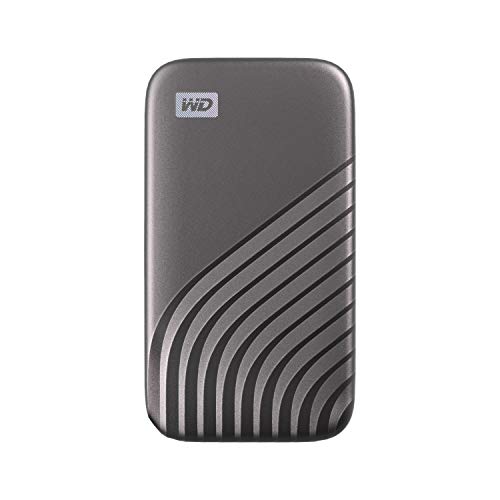
- Up to 1050MB/s read, 1000MB/s write
- 256-bit AES hardware encryption
- USB-C and USB-A compatibility
Best For: Fast portable backup with password protection
Phone-Based Protection

- Phone unlock with ArmorLock security
- 256-bit AES-XTS hardware encryption
- IP67 resistance and rugged build
Best For: Managed secure storage for professional use
PIN-Locked Portable Security

- 7-15 digit PIN unlock, no software needed
- AES-XTS 256-bit hardware encryption
- Works across many operating systems
Best For: Cross-platform secure storage without software
Admin-Controlled Encryption

- Separate admin and user PIN modes
- Hardware-based encryption and auto lock
- Up to 1000MB/s read and write
Best For: Business users needing managed encrypted access
Speed-Focused Portable Pick

- Up to 1050MB/s read speed
- USB-C and USB-A cables included
- Lightweight aluminum body with TRIM support
Best For: Fast everyday storage and mobile media workflows
Locked-Down Business Drive
SecureDrive Duo 1TB Hardware Encrypted
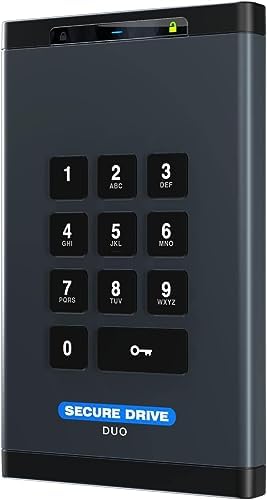
- Hardware encryption with password protection
- Unlock via keypad, phone app, face ID, or fingerprint
- USB-C and USB-A cables included
Best For: Sensitive business storage and compliance-minded users
Rugged Premium Option
SanDisk Extreme Portable SSD 2TB

- 256-bit AES hardware encryption
- Up to 1050MB/s read speed
- IP65 resistance and 3-meter drop protection
Best For: Fast encrypted storage for travel and outdoor use
Touch Fingerprint SSD
NEWQ 1TB Portable SSD with Fingerprint Encryption

- Fingerprint or password access
- Local encryption app, no cloud required
- USB-C support for phones, tablets, and PCs
Best For: Mobile users who want biometric protection and simple encrypted backups
T7 Speed SSD
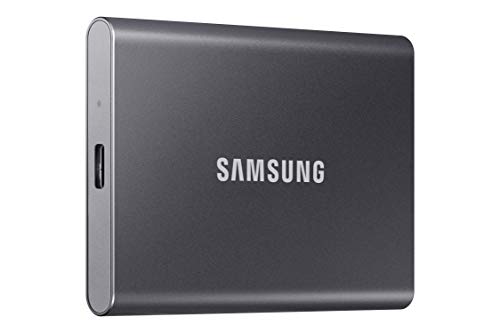
- 256-bit AES hardware encryption
- Up to 1,050 MB/s read speed
- Shock-resistant aluminum design
Best For: Creators and travelers who want a fast, durable encrypted SSD
T9 Creator SSD
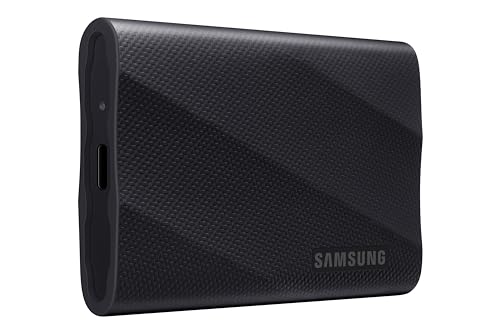
- Up to 2,000 MB/s sustained speeds
- AES 256-bit hardware encryption
- Magician Software adds encryption and health monitoring
Best For: Power users and creators who want fast encrypted storage
Fast, Everyday Security – WD My Passport SSD 1TB
If you want an external SSD with hardware encryption that balances speed, portability, and simple password protection, the WD My Passport SSD is an easy fit. It uses NVMe tech with up to 1050MB/s read and 1000MB/s write speeds, so it works well for fast backups and moving large files between modern systems.
Best For: Users who want a compact encrypted SSD for fast everyday backup and file transfers.
Pros:
- Up to 1050MB/s read and 1000MB/s write speeds
- 256-bit AES hardware encryption with password protection
- Shock- and vibration-resistant, with drop resistance up to 6.5 ft
- USB 3.2 Gen 2 and USB-C compatibility, with USB-A support for older systems
Cons:
- Requires reformatting for other operating systems
- Designed more for portable backup than rugged field use
Overall, this is a strong general-purpose encrypted SSD if you want fast transfers and straightforward password-based protection in a slim drive. It is especially appealing for Mac and PC users who need speed without giving up basic data security.
Phone-Based Protection – G-Technology ArmorLock 2TB
The G-Technology ArmorLock is a standout external SSD with hardware encryption if you want security that does not rely on a traditional password workflow. It uses ArmorLock security, unlocks with your phone, and pairs that with 256-bit AES-XTS hardware encryption and up to 1000MB/s read and write speeds.
Best For: Teams or professionals who want encrypted storage with phone-based unlocking and strong rugged protection.
Pros:
- Phone-based unlock, so no password entry is needed
- 256-bit AES-XTS hardware encryption
- Up to 1000MB/s read and write performance
- IP67 dust/water resistance plus up to 3m drop and 1000lb crush resistance
Cons:
- Security workflow depends on smartphone access
- Overkill if you only need simple personal file protection
This model makes sense when security management matters as much as drive speed. Its multi-user and multi-drive management features, along with rugged construction, make it a better fit for controlled workflows than for casual everyday use.
PIN-Locked Portable Security – iStorage diskAshur2 SSD 1TB
If you need an external SSD with hardware encryption that works without software, the iStorage diskAshur2 is built around a physical PIN login. Enter a 7-15 digit PIN to unlock it, and the drive uses AES-XTS 256-bit hardware encryption to protect data in real time whenever it is disconnected.
Best For: Users who want cross-platform encrypted storage with PIN access and no software setup.
Pros:
- 7-15 digit PIN authentication with no software required
- AES-XTS 256-bit hardware encryption
- Compatible with Windows, macOS, Linux, Chrome, Android, and more
- IP56 dust and splash resistance with rugged portable design
Cons:
- USB 3.0 interface is older than newer USB-C options
- Speed is lower than the fastest NVMe-based encrypted SSDs
The diskAshur2 is a practical pick when compatibility and security come first. It is less about raw top-end performance and more about giving you encrypted access on a wide range of devices and operating systems.
Admin-Controlled Encryption – Apricorn Aegis NVX 500GB
The Apricorn Aegis NVX is an external SSD with hardware encryption aimed at users who want tighter control over access and provisioning. It combines NVMe-class speed with admin and user PIN modes, brute-force defense, and unattended auto lock, making it a good fit for business-oriented security needs.
Best For: Business and financial users who need hardware-encrypted storage with admin controls and access policies.
Pros:
- Hardware-based encryption with separate admin and user modes
- Provision Lock, unattended auto lock, and brute-force defense
- Up to 1000MB/s read and write speeds
- Compatible with Aegis Configurator and data recovery PIN features
Cons:
- 500GB capacity is modest compared with larger encrypted SSDs
- Best suited to controlled business use rather than casual portability
For buyers who care about policy-driven access and locked-down workflows, this drive offers more than basic encryption. It pairs fast transfer speeds with management features that make sense in secure office environments and regulated use cases.
Speed-Focused Portable Pick – SSK Portable SSD 250GB USB C
If you want an external ssd with hardware encryption-style security features are not listed here, but you do get a fast, compact drive built for everyday transfers. This SSK portable SSD focuses on speed, low heat, and broad compatibility, making it a practical choice for moving large files between laptops, phones, tablets, and even iPhone workflows.
Best For: Fast everyday storage, mobile file transfers, and iPhone ProRes capture on a lightweight budget drive.
Pros:
- Up to 1050MB/s read and 1000MB/s write speeds over USB 3.2 Gen 2
- Includes both USB-C and USB-A cables for flexible device support
- Aluminum alloy case helps with heat dissipation and keeps the drive lightweight
- Supports S.M.A.R.T. health diagnostics and TRIM for drive management
Cons:
- No hardware encryption feature is listed in the supplied specs
- 250GB capacity may show as about 232GB on Windows due to binary calculations
- Smaller capacity may fill quickly if you work with large media files
This is a sensible pick if your priority is speed, portability, and simple cross-platform use rather than advanced security features. It is especially appealing for creators who need a compact drive for fast transfers or 4K60 ProRes recording support.
Locked-Down Business Drive – SecureDrive Duo 1TB Hardware Encrypted
If you need an external ssd with hardware encryption features, this SecureData SecureDrive Duo is built around security first. It adds hardware encryption, password protection, and multiple unlock methods, making it a stronger fit for sensitive business data than a standard portable drive.
Best For: Businesses and professionals who need hardware-encrypted storage with compliance-focused features.
Pros:
- Includes hardware encryption and password protection
- Unlock options include keypad or phone app, with support for face ID and fingerprint use
- Comes with USB-C and USB-A cables for broad compatibility
- Includes splash-proof pouch and shock-resistant design for travel
Cons:
- Listed transfer speed is only 5MB/s in the supplied details
- More security-focused than performance-focused
- May require reformatting for Mac or Linux use depending on setup
This drive makes the most sense when protection matters more than raw speed. If your buying decision centers on encrypted file storage, compliance needs, and convenient unlock options, it stands out clearly.
Rugged Premium Option – SanDisk Extreme Portable SSD 2TB
For shoppers comparing an external ssd with hardware encryption, this SanDisk Extreme Portable SSD adds 256-bit AES hardware encryption to a fast, rugged design. It combines NVMe-level performance, strong environmental protection, and a portable form factor that works well for travel, creative work, and backup.
Best For: Users who want fast encrypted storage with strong water, dust, and drop resistance.
Pros:
- Up to 1050MB/s read and 1000MB/s write speeds
- Includes 256-bit AES hardware encryption with password protection
- Rated up to 3-meter drop protection and IP65 water and dust resistance
- Carabiner loop adds extra portability and attachment options
Cons:
- Best features depend on host device and other real-world factors
- USB-C only may be less convenient without an adapter
- Premium rugged design may be more than some users need
This is the most balanced pick for buyers who want both speed and encrypted protection in a durable enclosure. It is a strong all-around portable SSD if you need something you can trust on the move.
Touch Fingerprint SSD – NEWQ 1TB Portable SSD with Fingerprint Encryption
If you want an external ssd with hardware encryption for phone and PC backups, the NEWQ 1TB Touch Portable SSD is built around quick fingerprint or password access. It also keeps setup simple with a local app for encryption and file transfer, so you can protect files without needing cloud accounts or ongoing fees.
Best For: Users who want biometric protection and easy USB-C compatibility across phones, tablets, and computers.
Pros:
- Fingerprint or password unlock for privacy-focused storage
- Compatible with iPhone 15/16/17, Samsung, Google, PCs, tablets, and more USB-C devices
- Local encryption and transfer app with no email binding, registration, or cloud storage required
- Up to 400 MB/s read speed for fast backups and transfers
Cons:
- Top speed is lower than premium performance drives like Samsung’s T7 and T9
- Security setup depends on the companion app for encryption and file management
Overall, this is a practical pick if security and convenience matter more than maximum benchmark speed. The fingerprint-based access and broad USB-C support make it a good everyday encrypted drive for mobile-first users.
T7 Speed SSD – Samsung T7 2TB Portable SSD
The Samsung T7 is a strong choice if you’re shopping for an external ssd with hardware encryption and want a proven mix of speed, portability, and durability. It offers AES 256-bit hardware encryption, up to 1,050 MB/s read speeds, and a compact aluminum design that’s easy to carry for work or travel.
Best For: Creators and everyday users who want a fast, compact encrypted SSD with broad device compatibility.
Pros:
- 256-bit AES hardware encryption for secure file storage
- Up to 1,050 MB/s read and 1,000 MB/s write speeds
- Shock resistance and fall protection up to 6 feet
- Compatible with PCs, Macs, phones, tablets, and PS5
Cons:
- Not the fastest option in Samsung’s lineup compared with the T9
- Some high-end features are more creator-focused than casual users may need
For most buyers, the T7 hits a very practical balance of speed, security, and portability. If you want a trusted encrypted external drive without stepping up to the higher-cost performance tier, it’s an easy model to consider.
T9 Creator SSD – Samsung T9 1TB Portable SSD
If you need an external ssd with hardware encryption and top-tier transfer speeds, the Samsung T9 is the most performance-focused option here. It reaches up to 2,000 MB/s and adds AES 256-bit hardware encryption, plus Samsung’s Magician Software for firmware updates, extra encryption, and drive health monitoring.
Best For: Creators and power users who want fast encrypted storage with ongoing drive-management tools.
Pros:
- Up to 2,000 MB/s sustained read and write speeds
- AES 256-bit hardware encryption plus Magician Software security tools
- Dynamic Thermal Guard helps control heat during heavy use
- Wide compatibility with desktops, cameras, gaming consoles, Macs, PCs, and iPhone 15 Pro workflows
Cons:
- Likely more speed than casual backup users need
- Higher-performance features may make it overkill for simple file storage
The T9 is the best fit when speed matters as much as security. It’s a strong pick for demanding media work, large transfers, and users who want encryption backed by software-based drive management.
How We Picked the Best External SSD with Hardware Encryption
We prioritized drives that combine dependable performance with built-in encryption, practical portability, and broad compatibility. For an External SSD with Hardware Encryption, that means looking beyond headline speed to the way the drive unlocks, how it handles lost-device risk, and whether the design fits everyday use.
- Security: Hardware-based encryption, PIN/fingerprint/keypad/app options, or enterprise-grade access controls.
- Performance: Fast enough for large file transfers, photo/video work, and backup tasks.
- Usability: Simple setup, reliable unlocking, and good cross-platform support.
- Durability: Travel-friendly builds, shock resistance, and water/dust ratings where available.
- Value: A sensible mix of security features and storage capacity for the price.
Quick Comparison
The right choice depends on how you plan to use it. Some buyers need the easiest plug-and-play encrypted storage for personal files, while others need stricter access controls for business or regulated environments. Faster models are better for editing and large transfers; smaller, lower-capacity drives can still make sense for secure daily transport.
Fastest and Most Flexible
Choose a high-speed model if you regularly move large video, photo, or project files and want encryption without slowing your workflow.
Best for Stronger Access Control
Look for keypad, app-based, fingerprint, or enterprise unlock methods if your top priority is reducing unauthorized access.
Best for Rugged Travel
If the drive will live in a bag or field kit, durability and weather resistance matter nearly as much as encryption.
Key Buying Factors for External SSD with Hardware Encryption
Encryption Method
True hardware encryption is built into the drive itself, which can help keep performance stable and simplifies secure use. For many buyers, that is preferable to relying only on software encryption.
Unlock Experience
Think about how you want to access your files: password, keypad, phone app, fingerprint, or managed enterprise tools. A secure drive is only useful if it is convenient enough to use consistently.
Speed and Interface
USB-C is the current baseline, but interface support still matters. If you edit media or copy large backups often, faster NVMe-based drives may be worth the premium.
Capacity and Portability
Smaller drives can be great for documents and sensitive travel files, while 1TB to 2TB models are usually better for creative work or frequent backups.
Durability and Compliance
Water/dust resistance, shock protection, and compliance features can be important for contractors, healthcare, legal, or government users who need more than casual protection.
Who Should Buy Which External SSD with Hardware Encryption?
Choose a consumer-friendly encrypted SSD if you want simple protection for personal backups, tax files, or travel documents.
Choose a rugged encrypted model if your drive will be used outdoors, moved often, or exposed to rough handling.
Choose a higher-security drive if you handle confidential client data, regulated records, or shared business files and need stronger access controls.
Choose a speed-first model if encryption is mandatory but your main priority is fast transfers for creative or professional workflows.
In short, the best External SSD with Hardware Encryption is the one that matches your security needs, workflow, and tolerance for extra setup. A little planning upfront makes it much easier to get both speed and peace of mind.