Choosing among the best laser cutting machines for acrylic means balancing laser power, working area, speed, air assist, and safety—not simply picking the highest wattage.
We compare 10 machines suited to different budgets and projects, from compact hobby engravers to more capable tools for makers and small businesses.
Best 10 Laser Cutting Machines for Acrylic Picks for 2026
Best High-Power Pick

- 40W output for demanding cutting work
- Large bed with rotary and passthrough support
- Enclosed, guided setup for easier operation
Best For: Large acrylic projects and small-business production
Best Compact Workshop Value

- 300-by-300mm working area
- Specified to cut 3mm acrylic
- Wi-Fi, TF card, LightBurn, and LaserGRBL support
Best For: Hobby projects and thin acrylic work
Best Enclosed Batch-Work Option
20W 300mm Enclosed Laser Cutter

- 20W output with a 300-by-300mm work area
- Up to 20,000mm/min operating speed
- Enclosed design with multiple safety features
Best For: Small-business orders and larger acrylic designs
Compact Starter Pick
ACMER S1 3500mW Laser Engraver

- Small 130 × 130mm workspace
- 99% preassembled for easier setup
- Supports ACMER Studio, LightBurn, and LaserGRBL
Best For: Beginners and small acrylic craft projects
Versatile Rotary Bundle
Creality Falcon 10W Laser Engraver

- Cuts 3mm black acrylic in one pass
- Includes adjustable 4-in-1 rotary kit
- Air assist helps control smoke and burning
Best For: Makers working with acrylic and cylindrical projects
High-Power Workspace Pick

- True 12W laser with 300 × 300mm workspace
- Cuts up to 12mm black acrylic with multiple passes
- Includes shield, goggles, and motion protection
Best For: Larger acrylic layouts and small-business production
Best with Extra Features

- Verified 10W output for acrylic and more than 300 materials
- Compact A4 work area with one-touch focus
- Wireless, offline, and beginner-friendly controls
Best For: Beginners and small acrylic craft projects
Best Large-Format Value
Creality Falcon 5W Laser Engraver
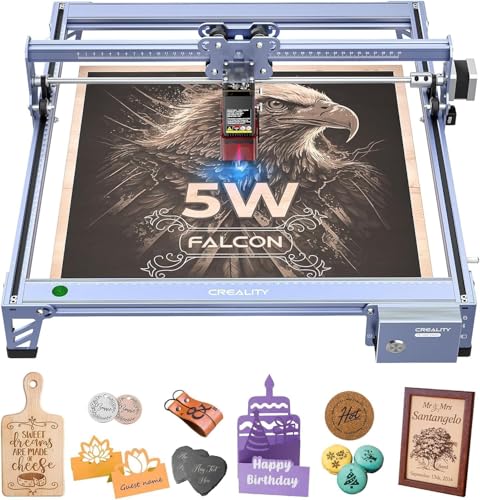
- 400 × 415mm work area for larger layouts
- 0.06mm compression spot for detailed engraving
- 10,000mm/min speed with movement detection
Best For: Larger acrylic layouts and detailed maker projects
Best 10W Acrylic Cutter
Creality Falcon 10W Laser Engraver

- 10W output with a stated 3mm black acrylic cut
- 10,000mm/min speed and 0.06mm spot focus
- LightBurn, LaserGRBL, Wi-Fi, USB, and SD support
Best For: Thin dark acrylic and higher-output DIY cutting
Best High-Power Pick – xTool S1 40W Rotary Bundle
For shoppers seeking laser cutting machines for acrylic that can also handle larger projects, the xTool S1 combines 40W power, a spacious work area, and a rotary bundle. Its enclosed Class 1 design and guided software make it especially approachable for home makers and growing small businesses.
Best For: Large acrylic projects, batch work, curved-object engraving, and users who want guided setup.
Pros:
- 40W laser can cut materials such as 18mm cherry wood in a single pass.
- Large 23.93-by-15.16-inch bed supports signs and multiple small items.
- Auto-focus, AI-assisted XCS software, and more than 1,000 tutorials simplify operation.
- Enclosed Class 1 design includes flame sensors, lid-open protection, and emergency stop features.
Cons:
- At 86.8 pounds, it is substantially less portable than desktop diode machines.
- The larger enclosed setup requires more dedicated workspace.
The xTool S1 is the most capable choice here for users prioritizing power, productivity, and convenience over portability. Its rotary and passthrough features add flexibility for oversized or curved projects, though the machine’s size and weight make it better suited to a permanent workshop location.
Best Compact Workshop Value – Twotrees TTS-55 Pro
The Twotrees TTS-55 Pro is a practical entry point for laser cutting machines for acrylic, offering a 300-by-300mm work area and claimed support for cutting 3mm acrylic. Its compact frame, wireless controls, and compatibility with popular software suit hobby projects and smaller production runs.
Best For: Hobbyists and makers who need a compact machine for thin acrylic, wood, leather, and craft materials.
Pros:
- 5.5W laser is specified to cut 3mm acrylic and 5mm plywood.
- Fine 0.08-by-0.46mm spot focus supports detailed engraving.
- Built-in Wi-Fi, TF-card offline engraving, and up to 30,000mm/min speed offer flexible control.
- Works with LaserGRBL and LightBurn across supported operating systems.
Cons:
- Lower laser power is aimed at thinner materials rather than demanding cuts.
- Air-assist support is included as an integration feature, so a complete air-assist system may require additional equipment.
Choose the TTS-55 Pro when workspace and budget matter more than maximum cutting depth. It provides a useful work area and strong software compatibility, but shoppers planning frequent thick-acrylic or production work should consider a higher-powered option.
Best Portable Beginner Pick – ACMER S1 6W Laser Engraver
Among laser cutting machines for acrylic, the ACMER S1 stands out for its small footprint and beginner-focused workflow. The nearly preassembled machine includes AI design tools, supports common file formats, and is easy to move between workspaces, though its 130-by-130mm area is intended for smaller projects.
Best For: Beginners, home users, and creators making small acrylic signs, decorations, and personalized items.
Pros:
- Compact 2kg design is easy to carry and store.
- Arrives 99% preassembled with a one-minute laser-head installation.
- ACMER Studio includes AI tools for turning prompts or photos into designs.
- Supports macOS, Windows, and Linux, plus LightBurn and LaserGRBL.
Cons:
- The 130-by-130mm work area limits project size.
- Its 6W laser is better suited to thin acrylic and light-duty cutting than demanding material work.
- The Class 4 certification means users must follow appropriate laser-safety procedures.
The ACMER S1 is a sensible choice for learning and small-format crafting, particularly if portability and simple software are priorities. Its limited work area and lower power make it less appropriate for large sheets or higher-volume cutting.
Best Enclosed Batch-Work Option – 20W 300mm Enclosed Laser Cutter
This 20W enclosed machine is designed for shoppers comparing laser cutting machines for acrylic with larger work capacity and faster workflow. Its 300-by-300mm area supports larger designs or multiple pieces, while enclosure, flame detection, and automatic shutdown features add practical protection for home workshops.
Best For: Small businesses, batch production, signs, ornaments, and users who want an enclosed 20W platform.
Pros:
- 20W laser power is suited to demanding cutting and engraving tasks.
- 300-by-300mm work area accommodates larger designs and multiple pieces.
- Up to 20,000mm/min speed can help shorten project turnaround times.
- Fully enclosed operation includes flame detection, tilt protection, automatic shutdown, and emergency stop.
Cons:
- The 16-pound enclosed unit needs more workspace than compact open-frame engravers.
- One-year warranty coverage is listed, which may be less extensive than some competing options.
- Material performance can vary, so acrylic cutting results depend on the specific sheet and settings.
For users focused on repeat orders or larger craft pieces, this model offers a strong balance of power, workspace, speed, and enclosure. It is a more practical production-oriented choice than the compact machines, provided you have room for its larger footprint.
Compact Starter Pick – ACMER S1 3500mW Laser Engraver
The ACMER S1 is a compact entry point for shoppers comparing laser cutting machines for acrylic. Its 130 × 130mm work area, 3,500mW laser, and 99% preassembled design suit small craft projects, light cutting, and detailed engraving without a complicated setup.
Best For: Beginners, home users, and small projects involving thin acrylic, plywood, wood, leather, and similar materials.
Pros:
- Beginner-friendly ACMER Studio software includes AI design tools and also supports LightBurn and LaserGRBL.
- Compact, lightweight aluminum-alloy design is easy to store and carry.
- Supports Windows, macOS, and Linux, with a claimed 0.01mm repeatable positioning accuracy.
Cons:
- The 130 × 130mm work area limits larger signs and multi-piece layouts.
- Its 3,500mW laser is better suited to thinner acrylic and lighter cutting work than the higher-powered options here.
The S1 emphasizes accessibility and portability over maximum cutting capacity. It is a practical choice for learning laser work and handling smaller acrylic projects, provided its compact workspace matches your plans.
Versatile Rotary Bundle – Creality Falcon 10W Laser Engraver
The Creality Falcon 10W combines a 10,000mW laser with air assist and a rotary roller, making it one of the more flexible laser cutting machines for acrylic in this roundup. It can cut 3mm black acrylic in one pass according to the supplied specifications and also handles cylindrical projects such as tumblers.
Best For: Makers who want acrylic cutting, engraving, air-assisted cleanup, and rotary work in one package.
Pros:
- Air assist helps remove smoke and dust, reduce excessive burning, and improve cut-edge consistency.
- Included 4-in-1 rotary kit supports cylinders, spheres, rings, and other shaped objects.
- Offers up to 10,000mm/min speed, a 0.06mm laser spot, and compatibility with LightBurn and LaserGRBL.
Cons:
- Assembly takes approximately 10–20 minutes and rotary-kit installation requires careful manual review.
- The listed 20.4-pound weight makes it less portable than the compact ACMER S1.
- The supplied one-pass acrylic cutting claim specifically refers to 3mm black acrylic.
This model is a strong fit when project variety matters as much as flat-sheet cutting. Air assist and the rotary attachment add useful capability, though buyers should match acrylic thickness and color to the stated cutting specifications.
High-Power Workspace Pick – ACMER S2 12W Laser Cutter
The ACMER S2 is the high-power choice among these laser cutting machines for acrylic, pairing a true 12W laser with a larger 300 × 300mm workspace. It supports more than 100 materials and can cut up to 12mm black acrylic with multiple passes, giving makers more room for signs, layered designs, and deeper cutting projects.
Best For: Experienced hobbyists, small businesses, and users who need a larger workspace for detailed acrylic layouts and repeat projects.
Pros:
- True 12W laser module and 72W system power provide more cutting flexibility than the lower-powered S1.
- 300 × 300mm work area accommodates larger signs, multi-piece layouts, and layered art.
- Supports ACMER Studio, LightBurn, and LaserGRBL across Windows, macOS, and Linux.
- Includes an anti-UV protective shield, safety goggles, and motion protection that pauses abnormal operation.
Cons:
- Cutting 12mm black acrylic requires multiple passes rather than a single pass.
- Rotary modules, risers, and air assist are optional accessories rather than stated included equipment.
The S2 is the most suitable option here for users who have outgrown a compact engraver. Its larger bed and higher laser output add useful headroom, while the expandable accessory ecosystem supports a broader range of future projects.
Best with Extra Features – K15 Pro 10W Laser Engraver
For shoppers seeking laser cutting machines for acrylic without giving up desk space, the K15 Pro combines a verified 10W diode laser with an A4-size work area. Its one-touch focus, wireless and offline controls, included starter materials, and compatibility with LightBurn and LaserGRBL make it a practical option for small craft projects and repeat jobs.
Best For: Beginners, home crafters, and small businesses making acrylic gifts, signs, coasters, and other compact projects.
Pros:
- Verified 10.36–10.58W output and support for more than 300 materials.
- Reportedly cuts acrylic up to 8mm and plywood up to 12mm.
- Compact 11.8 × 7.9-inch A4 work area with four heightening columns.
- Includes free software, offline TF-card operation, a starter kit, one-year warranty, and lifetime technical support.
Cons:
- The A4 work area is smaller than the beds on the other Creality options.
- The optional IR laser head and other accessories cost extra.
The K15 Pro is a strong fit when convenience and compact storage matter more than large-format production. Its claimed acrylic capacity and beginner-oriented controls make it appealing for everyday crafting, though larger projects will require a bigger machine.
Best Large-Format Value – Creality Falcon 5W Laser Engraver
The Creality Falcon 5W is worth considering among laser cutting machines for acrylic if you need more room for signs, panels, or multiple smaller pieces. Its 400 × 415mm work area, 10,000mm/min speed, and fine 0.06 × 0.06mm compression spot prioritize detailed work while retaining room to scale up.
Best For: Makers who want a larger workspace for acrylic, wood, leather, and other creative projects.
Pros:
- Large 400 × 415mm working area for bigger materials and layouts.
- 0.06 × 0.06mm compression spot and stated repositioning accuracy below 0.007 inches.
- Engraving speeds up to 10,000mm/min for higher-volume tasks.
- Eye-protective cover, 97% UV filtration, and automatic stopping when movement is detected.
Cons:
- It uses a 5W output, so cutting capacity may be more limited than a 10W model.
- The rotary roller and raisers for cylindrical or taller objects are optional purchases.
- It is a Class 4 laser, so appropriate safety practices remain essential.
The Falcon 5W stands out for workspace and positioning precision rather than maximum laser power. It is a sensible choice for detailed acrylic engraving and larger layouts, provided its lower output suits the thickness and color of the acrylic you plan to use.
Best 10W Acrylic Cutter – Creality Falcon 10W Laser Engraver
For buyers comparing laser cutting machines for acrylic and prioritizing cutting power, the Creality Falcon 10W offers a stated 10W output and a 17-by-16-inch footprint. The supplied specifications report one-pass cutting through 3mm black acrylic, while LightBurn, LaserGRBL, Wi-Fi, USB, and SD-card transfer give you several ways to run projects.
Best For: Acrylic and wood crafters who want higher diode output, a larger-format setup, and flexible software or file-transfer options.
Pros:
- 10W output with a stated one-pass cut through 3mm black acrylic.
- 0.06 × 0.06mm spot focus and reported accuracy within 0.004 inches.
- Up to 10,000mm/min engraving speed for efficient project work.
- Supports LightBurn, LaserGRBL, Wi-Fi, USB, and SD-card file transfer.
Cons:
- The supplied cutting example is specifically for 3mm black acrylic, so results can vary by material.
- The listed dimensions indicate a larger footprint than the compact K15 Pro.
- Assembly is estimated at 10–20 minutes rather than an almost-ready-to-use setup.
The Falcon 10W is the most cutting-focused choice in this group, particularly for thin dark acrylic and wood. Its broad connectivity and familiar software support add flexibility, but buyers should match their material thickness and color to the machine’s stated capabilities.
How We Picked the Best Laser Cutting Machines for Acrylic
We evaluated these Laser Cutting Machines for Acrylic by comparing advertised optical power, work area, motion speed, precision, compatibility with acrylic and other common materials, and useful features such as air assist, rotary support, enclosure compatibility, and offline operation. We also considered whether each machine fits a realistic use case: occasional DIY projects, regular crafting, personalized products, or small-batch production.
Because listings can vary by seller and configuration, verify the exact included accessories, software support, warranty, and safety equipment before ordering. Optical output—not the machine’s larger electrical input rating—is the more meaningful specification when comparing cutting capability.
Quick Comparison
| Best For | Look For | Shortlist |
|---|---|---|
| Entry-level engraving | Compact footprint and simple controls | Twotrees TTS-55 Pro, Creality Falcon 5W |
| General DIY projects | 10W class output and dependable work area | K15 Pro, Creality 10W models |
| Cutting thicker acrylic | Higher optical power and air assist | ACMER S1 6W, xTool S1 40W |
| Small-business production | Larger bed, speed, repeatability, and accessories | xTool S1, ACMER S2 |
Key Buying Factors for Laser Cutting Machines for Acrylic
Optical Power and Acrylic Type
Power affects how quickly a machine can cut and the thickness it can handle, but results also depend on acrylic color, cast versus extruded material, focus, passes, and air flow. Clear acrylic can be difficult for some diode lasers because much of the visible blue light passes through it. For frequent acrylic cutting, confirm that the machine and laser wavelength are suitable for the material you plan to use.
Work Area, Speed, and Precision
A larger bed is useful for signs, panels, and batch work, while a compact machine may be easier to store. Advertised maximum speed does not guarantee faster finished projects; acceleration, number of passes, setup time, and material testing matter too. Fine spot size and stable motion are especially valuable for small lettering and detailed engraving.
Air Assist, Ventilation, and Safety
Air assist can reduce flare-ups, smoke, and edge discoloration while improving cut consistency. Acrylic produces hazardous fumes, so use appropriate ventilation and never operate an open-frame laser unattended. A suitable enclosure, flame-resistant workspace, eye protection where required, emergency stop, limit switches, and reliable software controls are important—not optional extras.
Software and Expandability
Check compatibility with your preferred design workflow, including LightBurn or the manufacturer’s software. Rotary accessories, honeycomb beds, air pumps, enclosures, and replacement lenses can substantially change the machine’s long-term value.
Who Should Buy Which Laser Cutting Machines for Acrylic?
Choose an entry-level 5W–6W machine if you mainly engrave wood, leather, coated items, and thin craft materials and want the lowest initial cost.
Choose a 10W machine for a balanced DIY setup capable of more demanding engraving and lighter cutting, especially when you value a manageable footprint.
Choose a higher-power model such as the xTool S1 40W or ACMER S2 if acrylic cutting, larger projects, repeatable output, and faster production are central to your work. Budget separately for ventilation, air assist, an enclosure, and material testing before scaling up.