A nanny cam with audio can help you check in on a room and hear what is happening while you are away. The best choice depends less on the biggest resolution number than on where the camera will sit, what it can see, and how its audio and alerts work.
These 10 options range from compact fixed-view cameras to pan-and-tilt models. Use the comparisons below to narrow down the features worth paying for—and to spot costs or limitations you should check before buying.
Best 10 Nanny Cam with Audio Picks for 2026
Best for Detailed Room Checks

- 4K wide view plus 2K telephoto lens
- 8× hybrid zoom and auto-tracking
- Local recording; microSD card extra
Best For: Close-up checks across a nursery or shared room
Best Clock-Style Option
Noahlink 2K Clock Indoor Camera

- 3MP video with low-light color night vision
- Two-way talk and motion alerts
- Clock shows temperature and humidity
Best For: A tabletop camera with an everyday clock display
Best Two-Room Bundle
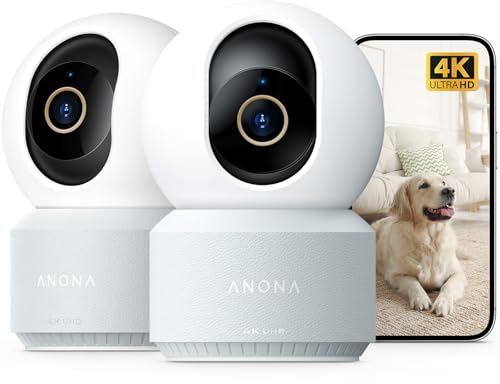
- Two 4K indoor cameras
- Pan-and-tilt view with auto-tracking
- Two-way audio and baby-cry alerts
Best For: Monitoring two indoor rooms
Best Compact Plug-In Pick
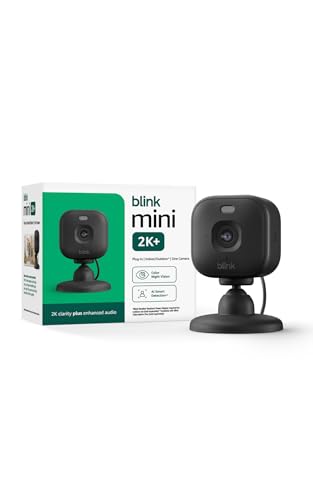
- Compact 2K camera with night vision
- Noise-canceling two-way talk
- Subscription needed for person detection
Best For: Simple monitoring near a power outlet
Best for Sharper Nursery Video
Tapo C210P2 2K Pan/Tilt Camera

- 2K video with wide pan/tilt coverage
- Two-way audio and baby-cry alerts
- 30-foot night vision
Best For: Sharper nursery viewing with cry notifications
Best Compact Fixed-View Pick
Blink Mini 1080p Indoor Camera
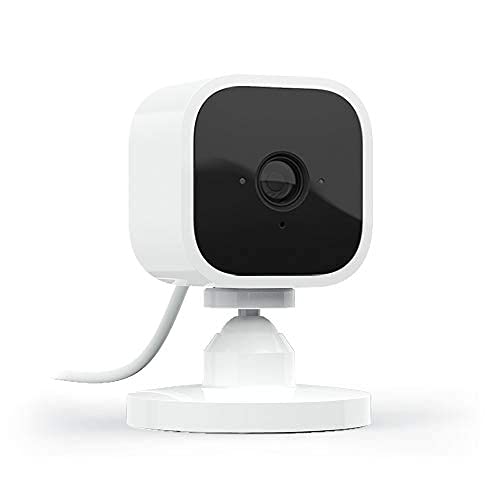
- 1080p video and two-way audio
- Customizable motion zones
- Subscription or extra module for saved clips
Best For: Simple monitoring of one indoor spot
Best for Following Movement

- Automatic motion tracking
- Two-way audio and optional cry detection
- Local microSD or paid cloud storage
Best For: Monitoring movement across a room
Cry-Alert Pick

- Baby-cry, person, and motion alerts
- Two-way audio and 1080p video
- Optional local microSD recording
Best For: A fixed nursery view with cry alerts
Pan/Tilt Pick

- Remote pan/tilt and patrol mode
- Motion and sound alerts
- Two-way audio; optional microSD storage
Best For: Adjustable viewing across a larger room
Fixed-View Pick

- Two-way audio
- 1080p video and night vision
- Local recording listed; verify specifics
Best For: A simple stationary indoor view
Best for Detailed Room Checks – eufy Security Indoor Cam S350
If you want a nanny cam with audio that lets you inspect more than a fixed view, the eufy Indoor Cam S350 pairs a 4K wide-angle camera with a 2K telephoto camera. Its 8× hybrid zoom and pan-and-tilt coverage help you check a crib or follow activity across a room.
Best For: Families who want close-up views, cry and sound alerts, and local recording without a required subscription.
Pros:
- Dual cameras show a wide view and closer details.
- Auto-tracking and presets help you revisit important spots.
- Local microSD recording and a physical privacy mode are available.
Cons:
- Requires plug-in power; the microSD card is sold separately.
- Does not support HomeKit or HomeBase 2.
The S350 is a strong fit when seeing what a child is holding matters as much as hearing an alert. Plan for a power outlet and a separate card if you want local recordings.
Best Clock-Style Option – Noahlink 2K Clock Indoor Camera
This clock-style nanny cam with audio combines a 3MP camera with a tabletop display for time, temperature, and humidity. Two-way talk lets you speak through the app, while motion alerts help you keep up with activity at home.
Best For: Buyers who want a tabletop camera that also serves as a visible room clock.
Pros:
- Adjustable clock display shows time, temperature, and humidity.
- Two-way audio and AI motion alerts support remote check-ins.
- Supports 2.4 GHz and 5 GHz Wi-Fi, with Bluetooth setup.
Cons:
- Needs corded power.
- Local recording requires a separate microSD card; cloud storage requires a subscription.
Choose this model if its clock display will be useful where you place it. Its color night vision is intended for low-light conditions, so do not count on color footage in a completely dark room.
Best Two-Room Bundle – Anona 4K Indoor Camera 2-Pack
The Anona two-pack is a practical nanny cam with audio setup if you need to watch two indoor spaces. Each camera offers 4K video, two-way audio, app alerts for people, pets, and baby crying, plus motorized pan-and-tilt viewing.
Best For: Households setting up cameras in two rooms and wanting broad, adjustable coverage.
Pros:
- Two cameras are included.
- Pan-and-tilt controls, auto-tracking, and 8× zoom help follow activity.
- Supports both Wi-Fi bands and local or cloud recording.
Cons:
- Both cameras require corded power.
- Local storage needs a separate microSD card for each camera you want to record on.
This bundle makes sense for a nursery and playroom or other two-room setup. Consider where outlets are available before placing the cameras, and budget for cards if you prefer local storage.
Best Compact Plug-In Pick – Blink Mini 2K+
The Blink Mini 2K+ is a compact nanny cam with audio for a room where you have an outlet nearby. It provides 2K video, night vision, motion detection, and two-way talk with noise cancellation for clearer conversations.
Best For: Buyers who want a small plug-in camera for straightforward video and two-way talk.
Pros:
- Compact design includes a stand and mounting kit.
- 2K video, night vision, and up to 4× zoom aid room checks.
- Noise-canceling two-way talk helps with conversations.
Cons:
- Requires plug-in power.
- Person detection and cloud clip storage require an optional Blink Subscription Plan after the cloud trial.
The Mini 2K+ covers the essentials without taking up much space. Check the subscription terms before buying if smart person alerts or saved cloud clips are important to your setup.
Best for Sharper Nursery Video – Tapo C210P2 2K Pan/Tilt Camera
If you want a nanny cam with audio that can show details across a nursery, the Tapo C210P2 pairs 2K video with two-way talk and app-based viewing. Its pan/tilt coverage lets you check different parts of the room without repositioning the camera.
Best For: Parents who want sharper video, room-wide coverage, and baby-cry alerts.
Pros:
- 2K video and 360° horizontal, 114° vertical pan/tilt range.
- Two-way audio plus motion, person, and baby-cry notifications.
- Up to 30 feet of infrared night vision and viewing from two smartphones.
Cons:
- Requires a power outlet and 2.4 GHz Wi-Fi.
- Designed for indoor use, not weather exposure.
This is the strongest fit here if seeing small details matters as much as hearing and responding. Plan for a nearby outlet and a reliable 2.4 GHz connection.
Best Compact Fixed-View Pick – Blink Mini 1080p Indoor Camera
The Blink Mini is a straightforward nanny cam with audio for watching one spot, such as a crib area or playroom corner. It provides 1080p live view, two-way talk, night vision, and motion alerts through the Blink Home Monitor app.
Best For: Buyers who want a compact, easy-to-set-up camera for a fixed indoor view.
Pros:
- See, hear, and speak through the smartphone app.
- Customizable motion detection zones help focus alerts.
- Plug-in setup and Alexa support, including Echo Show viewing.
Cons:
- No pan/tilt coverage is listed, so placement matters.
- Saving clips requires a subscription after the trial or a separately sold Sync Module 2 for local storage.
Choose the Mini when simple installation and a dependable view of one area matter more than scanning an entire room. Check the storage options before buying if you want recordings.
Best for Following Movement – Kasa EC71 Pan/Tilt Camera
For a nanny cam with audio that can follow activity around a room, the Kasa EC71 combines two-way talk with automatic motion tracking. Its 1080p video, pan/tilt controls, and optional baby-cry detection make it useful for checking a nursery or shared play space.
Best For: Households that want moving-subject tracking and flexible recording options.
Pros:
- 360° horizontal and 113° vertical pan/tilt coverage, plus patrol mode.
- Motion tracking, person alerts, and optional baby-cry detection.
- Continuous local recording to a microSD card or optional Kasa Care cloud storage.
- Two-way audio and up to 30 feet of infrared night vision.
Cons:
- Requires wired power and 2.4 GHz Wi-Fi.
- microSD card is not included; cloud storage requires a subscription.
The EC71 is worth considering when movement tracking matters more than higher-than-1080p resolution. Budget for a microSD card or cloud plan if you want to keep footage.
Cry-Alert Pick – Tapo C101 Indoor Camera
The Tapo C101 is a practical nanny cam with audio if you want a fixed view of one room plus notifications for motion, people, or a baby crying. Its 1080p video and infrared night vision help you check in after dark.
Best For: Monitoring a nursery or another single room when cry alerts and two-way talk matter most.
Pros:
- Baby-cry, person, and motion notifications are available without an additional fee.
- Two-way audio lets you speak through the camera.
- Supports local recording to a microSD card up to 512GB, sold separately.
Cons:
- Its fixed 117-degree field of view cannot pan to follow activity.
- Requires corded power and 2.4GHz Wi-Fi.
Choose this model for its specific cry-detection alerts; consider a pan/tilt camera instead if you need to look around the room remotely.
The Kasa EC70 is a nanny cam with audio for households that want to adjust the view remotely rather than watch a fixed angle. Its pan/tilt controls, 1080p live stream, and motion and sound alerts make it useful for checking activity across a room.
Best For: Watching a larger room where remote pan/tilt and general sound alerts are more useful than a fixed view.
Pros:
- Pan/tilt viewing and patrol mode help cover more of the room.
- Motion and sound detection can send smartphone alerts.
- Two-way audio and optional local microSD recording up to 256GB are supported.
Cons:
- Requires corded power and 2.4GHz Wi-Fi.
- Sound alerts are not described as baby-cry-specific detection.
This is the more flexible viewing choice of the three, especially for a playroom or shared living space. Budget for a separate microSD card if you want local recordings.
The Tapo C100 is a straightforward nanny cam with audio for checking a designated indoor spot. The C100-specific details list two-way audio, 1080p video, night vision, and local recording.
Best For: A simple, stationary indoor view when you do not need remote pan/tilt.
Pros:
- Two-way audio supports speaking through the camera.
- 1080p video and night vision support day and nighttime check-ins.
- Local recording is listed among its features.
Cons:
- Requires a nearby outlet for corded power.
- The supplied notes mix C100 details with claims for a different SolarCam model, so storage limits and alert features should be verified before purchase.
Treat this as the basic fixed-view option. Do not rely on the solar charging, weather resistance, or spotlight claims in the mixed notes for this indoor C100 listing.
How We Picked the Best Nanny Cam with Audio
We compared the listed cameras by resolution, viewing coverage, stated audio features, Wi-Fi compatibility, storage choices, and likely ongoing costs. The selection includes fixed-view and pan-and-tilt designs at 1080p, 2K, and 4K, so you can weigh simpler setups against more flexible coverage. Features and subscription terms can vary by model or change over time; confirm the current product listing before ordering. We did not treat a higher resolution label as a guarantee of better low-light video or clearer sound.
Quick Comparison: Which Type Fits Your Room?
- For broad room coverage: Consider a pan-and-tilt option such as the Anona 4K UHD, Tapo C210P2, or Kasa EC70/EC71. Check whether movement is manual, automatic, or both.
- For a fixed view: The Blink Mini, Blink Mini 2K+, Tapo C100, and Tapo C101 suit a camera aimed at one doorway, crib area, or play space. Placement matters because they cannot turn to follow activity across the room.
- For extra visual detail: Compare the eufy S350 and Anona 4K UHD with the 2K models. Detail still depends on lighting, distance, app playback, and whether zoom is optical or digital.
- For a less conventional look: The 2K clock camera adds a clock-style design and temperature and humidity display. Verify its field of view and placement needs rather than choosing it for appearance alone.
Key Buying Factors for a Nanny Cam with Audio
Audio and Alerts
Distinguish between a camera that records sound and one that also supports two-way talk. If speaking through the camera matters, confirm the exact model’s microphone, speaker, and app controls. Motion alerts are common, but their usefulness depends on adjustable detection zones, sensitivity, and notification settings. Test alert timing during the return window if timely check-ins are important.
Coverage and Image Quality
Start with the room layout. A fixed camera can work well when the relevant area stays in frame; pan-and-tilt helps when activity moves around. Night vision matters as much as daytime resolution in dim rooms. Plan for a nearby outlet, and check Wi-Fi band support before buying—especially if your home network separates 2.4 GHz and 5 GHz devices.
Storage, Cost, and Privacy
Check whether recordings require a microSD card, cloud plan, hub, or subscription, and whether live viewing remains available without one. Look for account security options such as two-factor authentication, keep firmware updated, and restrict access to people who need it. Tell caregivers about any monitoring, obtain required consent, and check local rules on audio recording; laws vary by location.
Who Should Buy Which Nanny Cam with Audio?
Choose a straightforward fixed-view model if you need to monitor one defined spot and can mount or place it securely. Choose pan-and-tilt for a larger room or changing activity zones. Consider 2K or 4K when you need more visual detail, but prioritize reliable audio, sensible alerts, and a storage arrangement you are comfortable paying for. If you share access with family members or caregivers, check the app’s permissions and privacy controls before deciding.