A nanny camera with local recording can save footage to a memory card instead of relying solely on a cloud subscription. But “local” does not always mean the same thing: card capacity, recording triggers, and playback options vary.
These five clock and charger-style cameras offer different combinations of resolution, night vision, Wi-Fi, and power. Here’s what to check before choosing one for your home.
Best 5 Nanny Camera with Local Recording Picks for 2026
Best Wide-Angle Clock Cam
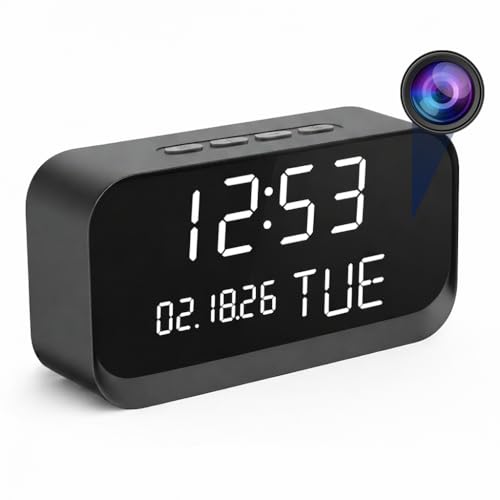
- 150° view and 1080p video
- Local TF recording up to 256GB
- Infrared night vision and motion alerts
Best For: Wide-view indoor monitoring with remote access
Best Night-Light Clock Cam
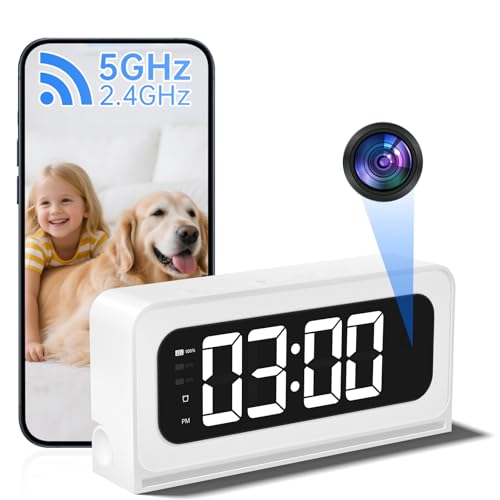
- 2K video with color low-light imaging
- SD/TF recording up to 256GB
- Adjustable clock display and night light
Best For: Bedside monitoring with a built-in night light
Best Offline Option

- Included 64GB SD card
- Records on motion without Wi-Fi
- No night vision
Best For: Offline monitoring in well-lit rooms
Nursery Night-Light Pick

- 2K video with full-color low-light viewing
- Local microSD recording; card sold separately
- Three-level night light and rechargeable battery
Best For: Bedside nursery monitoring with local storage
Flexible Placement Pick

- Local recording to compatible 8–256 GB cards
- 2K color low-light video and human-motion alerts
- Rechargeable battery with USB-C charging
Best For: Temporary indoor placement with local recording
Best Wide-Angle Clock Cam – Aivisee 1080p Clock Camera
If you want a nanny camera with local recording that also works as a tabletop clock, this Aivisee model offers 1080p video, a 150° viewing angle, and TF-card recording with loop playback. You can check the live feed through its app when connected to Wi-Fi.
Best For: Indoor monitoring where a wide view, night vision, and remote access matter.
Pros:
- Supports TF cards up to 256GB for local recording; cloud storage is also available.
- Infrared night vision and motion alerts help cover low-light and daytime activity.
- Supports 2.4GHz and 5GHz Wi-Fi, with Bluetooth-assisted setup.
Cons:
- TF card is not included.
- Video-only device; the supplied details do not list two-way audio.
This is a practical pick for broad indoor coverage, provided you budget for a memory card if local storage is your priority.
Best Night-Light Clock Cam – 2K Smart Clock Camera
For a nanny camera with local recording that doubles as a bedside clock, this model combines 2K video, a built-in night light, and SD-card support. Its low-light color imaging is a notable option if you prefer color footage at night.
Best For: A bedroom or nursery setup needing a clock, adjustable night light, and local video storage.
Pros:
- Records to an 8GB–256GB SD/TF card, with optional subscription-based cloud storage.
- Supports both 2.4GHz and 5GHz Wi-Fi and sends motion-related app alerts.
- Clock display and night light each offer three brightness levels.
Cons:
- SD card is not included and must meet the specified Class 10 and FAT32 requirements.
- Cloud storage requires a subscription.
It offers more bedside utility than a basic camera, but check card compatibility before counting on local recording. The listing describes a 5,200mAh battery and at least 12 hours of operation, while its details also identify corded power.
Best Offline Option – DUVIX 1080p Charger Camera
If your priority is a nanny camera with local recording and no Wi-Fi requirement, this compact DUVIX model saves motion-triggered 1080p footage directly to its included 64GB SD card. It is intended for open monitoring in well-lit indoor rooms.
Best For: Buyers who want offline, motion-activated recording without cloud uploads.
Pros:
- Included, pre-installed 64GB card makes local recording available out of the box.
- No Wi-Fi is needed, and footage is not automatically uploaded to the cloud.
- Compact body and included charger allow flexible placement near a household outlet.
Cons:
- No night vision; clear footage requires a well-lit space.
- Motion-triggered mode does not provide continuous recording.
This is the straightforward privacy-focused choice of the three, but it is a poor fit for dark rooms or anyone who needs continuous footage.
Nursery Night-Light Pick – Visiocore 2K Clock Camera
If you want a nanny camera with local recording that fits on a nursery nightstand, this Visiocore clock camera combines 2K video, a built-in night light, and microSD storage. It supports both 2.4 GHz and 5 GHz Wi-Fi for phone viewing.
Best For: Parents who want a bedside clock camera with adjustable night lighting and local video storage.
Pros:
- Records locally to a compatible microSD card; optional cloud storage is also available.
- Offers 2K video, full-color low-light viewing, and AI human-detection alerts.
- Has a 5,200 mAh rechargeable battery rated for up to 12 hours and a night light with three brightness levels.
Cons:
- MicroSD card is not included.
- The listing conflicts on maximum card capacity: its bullets say 256 GB, while its specifications say 128 GB.
The night light makes this a practical bedside option, but confirm supported card capacity before buying storage. Its stated battery runtime is up to 12 hours, so plan for regular charging or plugged-in use.
Flexible Placement Pick – HEDNIC 2K Alarm Clock Camera
For a nanny camera with local recording that can sit where an alarm clock would, this HEDNIC model supports compatible SD/TF cards alongside optional subscription cloud storage. Its rechargeable battery and USB-C charging offer flexibility when an outlet is inconvenient.
Best For: Shoppers who want a clock-style indoor camera for temporary placement or locations with limited outlet access.
Pros:
- Supports local recording to an 8–256 GB compatible SD/TF card.
- Provides 2K video, color low-light viewing, and human-motion alerts through the phone app.
- Supports 2.4 GHz and 5 GHz Wi-Fi, with a night light and clock display that each have three brightness levels.
Cons:
- SD/TF card is not included; cloud storage requires a subscription.
- The stated battery runtime is at least 12 hours, so longer untethered monitoring calls for a charging plan.
This is a useful fit when you want local storage without giving up remote viewing. Check that your card meets the listing’s Class 10-or-higher and FAT32 requirements before setup.
How We Picked the Best Nanny Camera with Local Recording
We focused on the five selected clock and charger-style cameras and compared their listed features against practical home-monitoring needs: local storage, image resolution, night vision, motion alerts, connectivity, and power. Listing claims are a starting point, not proof of performance. Before buying, confirm the current seller listing and manual—especially the supported card size, whether a card is included, and which features work without a subscription.
Quick Comparison: Which Type Fits Your Room?
The charger-style camera is the compact option and lists a 64GB SD card, making it worth considering if you want an included storage card. The clock models look more at home on a bedside table, desk, or shelf. Among them, the listed options range from 1080p to 2K and include different combinations of alarms, night-vision modes, motion detection, and rechargeable power. If you need to check footage remotely, prioritize a model with the Wi-Fi and app features you can actually use; if you mainly need footage saved on-site, verify its offline recording behavior first.
Key Buying Factors for a Nanny Camera with Local Recording
Storage and Playback
Check whether recording uses microSD, an included SD card, or another format; cards are not necessarily included. Confirm maximum capacity, whether the camera overwrites old clips, and how you retrieve footage. Ask whether it records continuously, only after motion, or both. Local storage can reduce reliance on paid cloud plans, but it does not guarantee that setup, alerts, or remote viewing will work without internet.
Picture Quality and Night Vision
2K offers more pixels than 1080p, but placement and lighting matter just as much. A wider view may capture the whole room while making faces appear smaller. If monitoring after dark is important, distinguish full-color night vision from infrared: color footage may require some ambient light. Check sample footage when available rather than relying on a resolution label alone.
Power, Wi-Fi, and Alerts
Choose a powered location that gives a useful view without exposed cords where children can reach them. A rechargeable battery offers placement flexibility, but check its expected runtime and whether recording changes when unplugged. Dual-band Wi-Fi can help with network compatibility; “5G” in a listing may refer to 5 GHz Wi-Fi, not cellular service. Motion and human-detection alerts can be useful, but sensitivity and false alerts vary by room.
Privacy and Responsible Placement
Protect the app with a strong password and available two-factor authentication, and keep firmware updated. Follow applicable recording and consent laws. Avoid bathrooms and other spaces where people reasonably expect privacy, and be clear with caregivers about camera use.
Who Should Buy Which Nanny Camera with Local Recording?
Choose the charger-style model if compact size and a listed included card are your priorities. Choose a 1080p clock camera if its feature set meets your needs without paying for resolution you may not use. Consider a 2K clock model for a room where added image detail matters, an alarm-equipped version if that function is useful, or a rechargeable option when outlet placement is difficult. Whichever Nanny Camera with Local Recording you choose, verify storage and power behavior before relying on it for important footage.