A dependable backup setup starts with choosing storage that fits your data, network, and recovery needs. The best NAS enclosures for backups make it easier to centralize files, protect against drive failure, and access copies across multiple devices.
This roundup includes network-attached storage and direct-attached enclosures for different budgets and workflows, including home users, remote workers, creators, and small offices. Because every enclosure is diskless, plan separately for compatible hard drives or SSDs and a backup strategy that includes more than one copy of important files.
Best 10 Nas Enclosure for Backups Picks for 2026
Best Overall
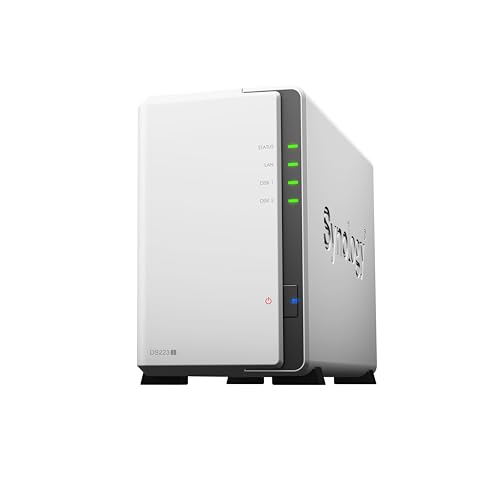
Synology DS223 Home & Office Backup Hub

- Automated backups for computers and mobile devices
- Cloud and external-drive backup destinations
- Two-bay diskless design with two-year warranty
Best For: Homes and small offices needing simple centralized backups
Best for Capacity

- Up to 144TB with compatible drives
- Four bays with RAID support
- 10GbE and 10Gbps USB connectivity
Best For: Creators, families, and small teams with growing storage needs
Best Budget Option
Synology DS223j 2-Bay DiskStation
- Automated backups for computers and mobile devices
- Private-cloud access and file syncing
- Two-bay diskless enclosure with two-year warranty
Best For: Home users wanting an approachable Synology backup system
Best for Advanced Homes

- Up to 80TB with HDD and NVMe support
- Intel N100, 8GB DDR5, and 2.5GbE
- Supports Docker, VMs, and media-server apps
Best For: Advanced home users and creators with demanding workloads
Best DAS for NAS Backups

- Four bays with hardware RAID
- USB Type-C for major desktop operating systems
- Designed for external or QNAP NAS backup storage
Best For: QNAP users wanting a flexible four-bay direct-attached backup enclosure
Best Beginner NAS for Backups

- Automatic phone photo and video backups
- 2.5GbE networking with 8GB RAM
- Remote private-cloud access across major devices
Best For: Families and home users building an automated private backup system
Best High-Speed DAS for Backups

- USB 3.2 Gen 2 with up to 10Gbps transfer rates
- Four hot-swappable individual drive bays
- Quiet, tool-free plug-and-play design
Best For: Fast computer-connected backups without built-in RAID
Performance NAS

- Intel quad-core CPU with 4GB RAM and 2.5GbE
- Automatic mobile photo and video backups
- Two bays support up to 60TB and TRAID
Best For: Networked home backups and media storage
Simple DAS Backup Storage

- USB 3.0 DAS for local computer backups
- Accepts two 2.5-inch or 3.5-inch SATA drives
- Tool-free, hot-swappable design with cooling fan
Best For: Direct-attached storage without NAS networking
RAID Backup Enclosure

- Hardware RAID supports RAID 0, 1, JBOD, and Single
- USB 3.2 Gen 2 supports up to 10Gbps
- Two bays accept drives up to 22TB each
Best For: Direct USB backups with RAID 1 mirroring
Best Overall – Synology DS223 Home & Office Backup Hub
The Synology DS223 is a practical nas enclosure for backups when you want straightforward file consolidation for computers, phones, and external drives. Its automated backup tools support Macs, PCs, and mobile devices, with additional backup destinations including cloud services and external drives.
Best For: Homes and small offices seeking a dependable two-bay backup hub with file sharing and optional IP-camera monitoring.
Pros:
- Automated backups for Macs, PCs, and mobile devices
- Centralizes files while supporting collaboration and version control
- Supports backups to cloud and external-drive destinations
- Includes a two-year warranty and ongoing software updates
Cons:
- Diskless design requires separate storage drives
- Two bays provide less expansion than four-bay alternatives
The DS223 emphasizes easy, centralized backup management rather than high-end performance. It is a sensible choice for buyers who want Synology’s software ecosystem in a compact tabletop enclosure.
Best for Capacity – UGREEN DXP4800 Plus 4-Bay NAS
The UGREEN DXP4800 Plus is a nas enclosure for backups aimed at families, creators, and small teams that need substantial capacity. Its four bays, RAID options, automatic backups, 10GbE networking, and 10Gbps USB ports make it suited to larger libraries and faster file transfers.
Best For: Small teams and demanding home users who need high capacity, fast wired networking, and advanced applications.
Pros:
- Supports up to 144TB with compatible drives
- Four bays and RAID options can help with storage flexibility and drive-failure recovery
- Includes 10GbE and 10Gbps USB connectivity
- Supports Docker, virtual machines, encryption, and flexible permissions
Cons:
- Hard drives are not included
- Wired Ethernet is required; Wi-Fi is not supported
- Actual transfer speeds depend on the network, drives, processor, and file sizes
With its larger enclosure and advanced hardware, the DXP4800 Plus is more than a basic backup box. It makes the most sense when you expect growing storage needs or plan to run demanding NAS applications.
Best Budget Option – Synology DS223j 2-Bay DiskStation
The Synology DS223j offers a compact nas enclosure for backups for users who want centralized files and private-cloud access without moving to a larger multi-bay system. It supports automated backups for Macs, PCs, and mobile devices, along with sharing, syncing, and remote access.
Best For: Home users who need an approachable two-bay Synology system for personal files, device backups, and media access.
Pros:
- Supports automated backups to multiple destinations
- Provides private-cloud access and multi-platform file sharing
- Can support IP-camera recording and remote viewing
- Includes a two-year warranty and Synology support resources
Cons:
- Diskless enclosure requires separate drives
- Two bays limit future storage expansion
The DS223j focuses on the essentials: backup, syncing, sharing, and remote access. Choose it when ease of use and Synology’s supported software experience matter more than higher-end processing or connectivity.
Best for Advanced Homes – UGREEN NAS DXP2800 2-Bay
The UGREEN DXP2800 is a nas enclosure for backups designed for advanced home users, remote workers, and creators. It combines two HDD bays with dual M.2 NVMe slots, 8GB of DDR5 RAM, an Intel N100 processor, and 2.5GbE networking for backups, media libraries, and heavier applications.
Best For: Tech-savvy households and creators managing 4K video, RAW photos, device backups, media servers, or multiple NAS applications.
Pros:
- Supports up to 80TB across HDD and M.2 NVMe storage
- Includes an Intel N100 CPU, 8GB DDR5 RAM, and 2.5GbE networking
- Supports Docker, virtual machines, and Plex-compatible media-server applications
- Offers AI photo organization and local AI-powered surveillance features
Cons:
- HDDs and SSDs are not included
- Advanced features may be more than basic backup users need
- Drive compatibility should be checked before purchase
The DXP2800 is a flexible upgrade for buyers whose backup needs overlap with media serving and advanced apps. Its two-bay layout remains compact, while the NVMe slots and modern hardware add performance headroom.
Best DAS for NAS Backups – QNAP TR-004
QNAP TR-004 4 Bay USB Type-C Direct Attached Storage (DAS) with hardware RAID (Diskless)
Check Price On AmazonThe QNAP TR-004 is a practical nas enclosure for backups when you want direct-attached storage rather than a networked NAS. Its four bays, USB Type-C connection, and hardware RAID options make it useful for backing up a QNAP NAS or adding external storage to a Windows, macOS, or Linux computer.
Best For: QNAP NAS owners and desktop users who want a four-bay, diskless DAS with flexible hardware RAID.
Pros:
- Four 3.5-inch SATA bays support RAID 0, 1, 5, JBOD, and individual disks.
- Works with Windows, macOS, and Linux through USB Type-C.
- Can serve as external storage for QNAP NAS backups.
- Lockable drive bays and a metal enclosure add practical durability.
Cons:
- Diskless design requires purchasing compatible drives separately.
- It is a DAS, not a standalone networked NAS.
- QNAP NAS compatibility has specific model and QTS version limitations.
The TR-004 is a strong choice if your backup workflow can stay connected to a computer or compatible QNAP NAS. Check the compatibility restrictions carefully, especially because its storage pool cannot be combined with the connected NAS and NAS applications cannot be installed on the enclosure.
Best Beginner NAS for Backups – UGREEN NAS DH4300 Plus
The UGREEN NAS DH4300 Plus is a beginner-friendly nas enclosure for backups, private cloud storage, and family media. It supports automatic phone photo and video backups, remote access across major operating systems, and multiple applications, while its four bays provide room for expanding local storage.
Best For: Home users, families, and remote workers who want automated backups and private cloud access without recurring cloud-storage fees.
Pros:
- Automatically backs up photos and videos from phones in real time.
- Supports remote access from Windows, macOS, Android, iOS, web browsers, and smart TVs.
- Includes 2.5GbE networking, 8GB LPDDR4X RAM, Docker support, and 4K HDMI output.
- AI-powered photo organization includes semantic search and duplicate removal.
Cons:
- Storage disks are not included.
- Supports Docker but not virtual machines.
- Its extensive features may be more than needed for simple local backups.
With automated mobile backups and broad device compatibility, the DH4300 Plus is aimed at users moving away from external drives or third-party cloud storage. It is the most complete option here for a private, network-accessible backup hub, provided you supply the drives and do not need virtual-machine support.
Best High-Speed DAS for Backups – TERRAMASTER D4-320
The TERRAMASTER D4-320 is a fast four-bay DAS that can work as a nas enclosure for backups only when connected to a computer or other host system. Its USB 3.2 Gen 2 Type-C interface, hot-swappable bays, and support for up to four individual disks make it suited to high-speed local backup and file-transfer workflows.
Best For: Users who need fast, plug-and-play backup storage with hot-swappable drives and no built-in RAID requirement.
Pros:
- USB 3.2 Gen 2 supports data transfer up to 10Gbps.
- Supports four individual disks and up to 120TB total capacity according to the supplied specifications.
- Hot-swappable, tool-free trays simplify drive changes.
- Compatible with Windows, macOS, and Linux, with temperature-controlled cooling.
Cons:
- It is a DAS, not a NAS.
- No RAID function is included.
- Diskless design requires separate hard drives or SSDs.
The D4-320 is a good fit for straightforward, high-throughput backups where RAID is managed by the host or is not needed. Choose another enclosure if you want built-in hardware RAID or network access without leaving a computer connected.
Performance NAS – TerraMaster F2-425
The TerraMaster F2-425 is a strong nas enclosure for backups when you want network access, automatic mobile backups, and room for two large drives. Its quad-core Intel processor, 4GB RAM, and 2.5GbE port also make it suitable for demanding home storage and media tasks.
Best For: Home users who want networked backups, multi-device synchronization, and a capable media server in a compact two-bay enclosure.
Pros:
- Supports automatic photo and video backups through the TNAS Mobile app.
- Offers 2.5GbE networking, 4GB RAM, and an Intel quad-core processor.
- Supports up to 60TB across two bays, flexible TRAID arrays, and cloud synchronization.
- Runs at a stated 19dB(A) and uses tool-free push-lock drive trays.
Cons:
- Diskless design means drives must be purchased separately.
- Its two-bay capacity may be limiting for larger storage collections.
Choose the F2-425 if you need more than a simple external drive enclosure. It combines backup automation, redundancy options, remote synchronization, and home media features in one network-connected unit.
Simple DAS Backup Storage – CENMATE 2-Bay Enclosure
The CENMATE 2-Bay Enclosure is a practical alternative when your nas enclosure for backups search is really about direct-attached storage. It connects over USB 3.0, accepts 2.5-inch and 3.5-inch SATA drives, and provides a straightforward way to expand local computer storage.
Best For: Users who want plug-and-play local backups or extra drive capacity without NAS networking or RAID features.
Pros:
- Supports two 2.5-inch or 3.5-inch SATA HDDs or SSDs, up to 20TB per drive.
- Includes USB-A and USB-C 3.0 connectivity with transfer rates up to 5Gbps.
- Tool-free installation and hot swapping simplify drive changes.
- Aluminum construction and a built-in fan help with heat management.
Cons:
- It is a DAS and does not provide NAS networking or RAID.
- The fan is rated around 40–50 decibels, so it may not suit noise-sensitive spaces.
This enclosure is best viewed as a simple local storage accessory rather than a full NAS. It works well for direct USB backups, but users needing network access or drive redundancy should consider a true NAS or RAID enclosure.
RAID Backup Enclosure – TerraMaster D2-320
The TerraMaster D2-320 is a useful choice for a nas enclosure for backups if you prefer direct USB storage with hardware RAID. Its two bays support RAID 1 mirroring for redundancy, while USB 3.2 Gen 2 provides faster transfers than typical USB 3.0 enclosures.
Best For: Users who want a direct-attached two-drive backup enclosure with RAID 1 mirroring and flexible storage modes.
Pros:
- Supports RAID 0, RAID 1, JBOD, and Single modes.
- USB 3.2 Gen 2 offers transfer speeds up to 10Gbps.
- RAID 1 mirrors data and supports automatic recovery after drive replacement.
- Accepts 2.5-inch and 3.5-inch SATA HDDs or SSDs up to 22TB per drive.
Cons:
- It is a DAS, not a network-attached storage device.
- Diskless operation requires separate compatible drives.
The D2-320 is a better fit than a basic USB enclosure when mirrored local backups matter. It does not provide network features, but its RAID choices, tool-free trays, and temperature-controlled fan make it a flexible desktop backup solution.
How We Picked the Best Nas Enclosure for Backups
We evaluated these enclosures by looking at bay count, storage expandability, connectivity, RAID support, ease of setup, and the type of backup workflow each model supports. Network-attached storage earns extra consideration for automatic device backups, remote access, user accounts, and centralized file sharing. Direct-attached storage can be a better fit when you want simple local backups without managing a full NAS operating system.
We also considered whether each enclosure suits beginners, demanding creative workloads, family use, or small-team collaboration. All listed models are diskless, so real-world capacity, speed, and redundancy depend on the drives you install.
Quick Comparison
| Best For | Recommended Type | Typical Advantage |
|---|---|---|
| Simple home backups | Two-bay NAS | Centralized storage with automated network backups |
| Families and small teams | Four-bay NAS | More capacity and flexible RAID options |
| Local computer backups | USB DAS enclosure | Easy plug-and-play storage without network administration |
| Creators and large files | Performance-focused NAS or four-bay enclosure | Faster transfers and room to expand |
Key Buying Factors for a Nas Enclosure for Backups
NAS or DAS?
A NAS connects to your router and can serve multiple computers, phones, and users. It is the more versatile choice for automatic backups, shared folders, media libraries, and remote access. A DAS connects directly to one computer over USB, making it simpler and often less expensive, but less convenient for household-wide access.
Bay Count and RAID
Two bays are suitable for modest home libraries and mirrored RAID 1 protection. Four bays provide more usable capacity and additional RAID configurations, but they also cost more and require more drives. RAID helps maintain availability after a drive failure; it is not a substitute for an off-site or cloud backup.
Drive, Network, and Software Support
Check whether the enclosure supports the drive sizes and interfaces you plan to use. For NAS models, review the operating system’s backup tools, snapshot support, user permissions, mobile apps, and remote-access options. For DAS models, verify USB speed, operating-system compatibility, and whether hardware RAID requires a particular configuration.
Noise, Cooling, and Security
Fans and active cooling are valuable for sustained transfers, especially with several hard drives installed. Place the enclosure somewhere ventilated and use strong administrator credentials, current firmware, and encryption where available.
Who Should Buy Which Nas Enclosure for Backups?
Choose a two-bay NAS if you want centralized household backups, straightforward file sharing, and a compact footprint. A four-bay NAS is better for growing media collections, multiple users, or small teams that need capacity headroom. Choose a USB DAS enclosure for fast, local backups from one workstation or when you prefer minimal setup. Whichever model you choose, combine drive redundancy with a separate backup stored offline, off-site, or in the cloud.