The best NAS enclosures turn one or more hard drives into a centralized storage system for backups, media, file sharing, and remote access. The right choice depends on more than bay count: processor performance, networking, software, noise, and expandability all affect the experience.
We compare 10 NAS and multi-drive enclosure options, from straightforward two-bay home systems to faster four-bay models for creators and small teams. Use the guide below to narrow the field by workload, budget, and the level of data protection you need.
Best 10 Nas Enclosures Picks for 2026
Reliable Home Backup

- Centralized storage and file collaboration
- Automated multi-destination backups
- Optional IP-camera monitoring
Best For: Homes and small offices needing simple, dependable backups
High-Speed Team Storage

- Four bays and up to 144TB capacity
- 10GbE networking with 8GB DDR5 RAM
- Docker, virtual machines, and AI photo tools
Best For: Creators and small teams needing fast, expandable storage
Simple Private Cloud
- Easy multi-platform file access
- Automated computer and mobile backups
- IP-camera recording support
Best For: Households wanting uncomplicated private storage
Advanced Home Media Hub

- Up to 80TB with HDD and NVMe storage
- Intel N100, 8GB DDR5, and 2.5GbE
- Docker, virtual machines, and media-server support
Best For: Creators and advanced households with demanding media workloads
Best DAS Alternative

- Four-bay USB 3.2 Gen 2 enclosure
- Supports up to 120TB across four drives
- Tool-free, hot-swappable, and plug-and-play
Best For: Fast direct-attached storage without NAS networking
Best Beginner NAS

- Four-bay private cloud storage
- AI photo backup and album organization
- 8GB RAM with 2.5GbE networking
Best For: Families and home users building a private cloud
Best Budget Dual-Bay DAS

- Supports two 2.5-inch or 3.5-inch SATA drives
- USB 3.0 with USB-A/C connectivity
- Tool-free, hot-swappable, and expandable
Best For: Simple external storage for desktops and laptops
Quiet 2-Bay Performer

- Intel quad-core CPU with 4GB RAM
- 2.5GbE and 4K media support
- Quiet, tool-free two-bay design
Best For: Home media, backups, and quiet desktop storage
Creator-Ready Expansion Hub

- Ryzen processor with expandable 64GB RAM
- Dual 10GbE and up to 144TB capacity
- Docker, surveillance, SD, and HDMI support
Best For: Creators, offices, and demanding self-hosted workflows
Simple Private Cloud Starter

- Beginner-friendly private storage
- 2.5GbE, RAID, snapshots, and backups
- Remote access with Docker support
Best For: Families and beginners replacing cloud subscriptions
Reliable Home Backup – Synology DS223
The Synology DS223 is a practical choice among nas enclosures for households and small offices that want centralized file storage, automated backups, and straightforward remote access. Its two-bay, diskless design lets you select compatible drives for your capacity and redundancy needs.
Best For: Home users and small teams seeking dependable backups, file collaboration, and optional IP-camera monitoring.
Pros:
- Centralizes files from computers, phones, and external drives.
- Supports automated backups to cloud and external destinations.
- Enables file sharing, syncing, version control, and IP-camera monitoring.
- Includes a two-year warranty and ongoing software updates.
Cons:
- Diskless design requires separate drive purchases.
- Two bays provide less expansion room than four-bay alternatives.
The DS223 focuses on accessible storage and backup essentials rather than high-end performance. It is a sensible fit when simple management and broad device compatibility matter most.
High-Speed Team Storage – UGREEN DXP4800 Plus
The UGREEN DXP4800 Plus is a performance-focused option among nas enclosures for creators, families, and small teams. With four drive bays, 10GbE connectivity, 8GB DDR5 RAM, and support for Docker and virtual machines, it is built for demanding storage and collaboration workloads.
Best For: Small offices, creators, and advanced households managing large media libraries, backups, and multiple applications.
Pros:
- Four-bay design supports up to 144TB with compatible drives.
- Includes 10GbE, 2.5GbE, 10Gbps USB, HDMI, and SD connectivity.
- Supports RAID options, Docker, virtual machines, and private-cloud access.
- AI photo organization can recognize content and detect duplicates.
Cons:
- Hard drives are not included.
- Actual transfer speeds depend on the network, drives, processor, and file types.
- Wired Ethernet is required; Wi-Fi is not supported.
The DXP4800 Plus offers substantial capacity and connectivity for users who expect more from a NAS than basic backup. Its feature set is compelling, but setup and application management may suit technically confident buyers best.
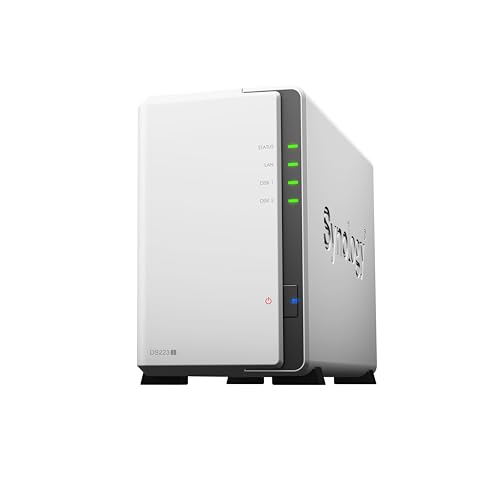
Simple Private Cloud – Synology DS223j
The Synology DS223j is a straightforward two-bay option among nas enclosures for users who want a private cloud without paying for unnecessary complexity. It supports multi-platform file access, syncing, automated backups, and basic home security recording.
Best For: Home users who need easy file sharing, device backups, remote access, and IP-camera support.
Pros:
- Provides private-cloud access and data ownership across platforms.
- Supports automated backups for Macs, PCs, and mobile devices.
- Can record and monitor property using multiple IP cameras.
- Synology provides a two-year warranty and setup resources.
Cons:
- Drives must be purchased separately.
- Two bays limit future storage expansion.
- It is aimed at core storage and backup needs rather than advanced workloads.
The DS223j is a good match for households prioritizing ease of use and essential protection. Choose it when private-cloud convenience matters more than high-end connectivity or application performance.
Advanced Home Media Hub – UGREEN DXP2800
The UGREEN DXP2800 is an advanced two-bay choice among nas enclosures for remote workers, creators, and tech-focused households. Its Intel N100 processor, 8GB DDR5 RAM, 2.5GbE networking, and dual M.2 NVMe slots support large media libraries, backups, Docker, virtual machines, and media-server applications.
Best For: Advanced home users and creators managing 4K video, RAW photos, device backups, and multiple NAS applications.
Pros:
- Supports up to 80TB using two HDD bays and two M.2 NVMe slots.
- Includes 2.5GbE networking, an Intel N100 CPU, and 8GB DDR5 RAM.
- Supports Docker, virtual machines, and Plex-compatible media-server applications.
- Offers AI photo organization and local AI-assisted surveillance features.
Cons:
- HDDs and SSDs are not included.
- Two 3.5-inch bays provide less drive expansion than four-bay systems.
- Its advanced features may be more than basic backup users need.
The DXP2800 balances compact two-bay storage with stronger hardware and application support. It is especially attractive for users building a personal media, backup, and home-automation hub rather than a simple file server.
Best DAS Alternative – TerraMaster D4-320
If you are comparing nas enclosures but only need direct-attached storage, the TerraMaster D4-320 is a practical four-bay option. It connects over USB 3.2 Gen 2, supports up to four SATA drives, and provides plug-and-play access without a RAID function.
Best For: Users who want fast, expandable desktop storage for Windows, Mac, or Linux without setting up a networked NAS.
Pros:
- USB 3.2 Gen 2 supports data transfer speeds up to 10Gbps.
- Holds four 2.5-inch or 3.5-inch SATA HDDs or SSDs, with up to 120TB total capacity based on supported drives.
- Tool-free trays, hot swapping, and plug-and-play compatibility simplify drive management.
- Temperature-controlled cooling, sound-absorbing panels, and vibration damping help reduce operating noise.
Cons:
- It is a DAS rather than a NAS, so it does not provide network-based remote access.
- There is no RAID function, leaving drive management and data protection to the connected computer and user.
The D4-320 makes sense when direct USB performance and easy drive access matter more than NAS features. Its four bays and quiet-cooling design offer useful capacity for backups, media, or working files, provided you do not need built-in RAID or network sharing.
Best Beginner NAS – UGREEN DH4300 Plus
Among nas enclosures for home users, the UGREEN DH4300 Plus stands out as a beginner-friendly four-bay system designed for private storage and remote access. It combines automatic photo backup, AI-assisted album organization, multi-device access, and Docker support in a single enclosure; storage drives are sold separately.
Best For: Families, home users, and remote workers moving from cloud storage or external drives to a private personal cloud.
Pros:
- Four-bay NAS design supports private storage that can be accessed from compatible devices and locations.
- Automatic phone photo and video backup includes AI album organization, duplicate removal, and semantic search.
- 8GB LPDDR4X RAM and a 2.5GbE network port support multitasking and faster file transfers.
- Works with Windows, macOS, Android, iOS, web browsers, and smart TVs, with 4K HDMI output.
Cons:
- Storage disks are not included.
- It supports Docker but not virtual machines.
- The system may offer more features than users who only need basic local file storage require.
The DH4300 Plus is the most complete NAS enclosure in this group for users seeking private, remotely accessible storage. Its photo tools and approachable setup are particularly useful for families, while the 2.5GbE connection and 8GB of memory give it room for multiple applications.
Best Budget Dual-Bay DAS – CENMATE 2-Bay Enclosure
If your nas enclosures search is really about adding simple external drive capacity, the CENMATE two-bay enclosure offers a straightforward DAS design. It accepts 2.5-inch and 3.5-inch SATA HDDs or SSDs, connects through USB 3.0, and does not include RAID or NAS functionality.
Best For: Individuals and small businesses that need an affordable, tool-free enclosure for up to two SATA drives.
Pros:
- Supports two 2.5-inch or 3.5-inch SATA drives, with up to 20TB per drive according to the supplied specifications.
- USB 3.0 provides transfer rates up to 5Gbps and includes both USB-A and USB-C cable compatibility.
- Tool-free installation, hot swapping, and plug-and-play operation make routine drive changes easy.
- A USB host port allows daisy chaining, with expansion of up to three devices and 120TB stated capacity.
Cons:
- It is a DAS with no RAID or NAS features.
- The cooling fan is rated around 40–50 decibels, which may be noticeable in quiet spaces.
- Its USB 3.0 connection is slower than newer USB 3.2 Gen 2 enclosures.
The CENMATE is a sensible choice for basic desktop storage, especially when you value broad drive-size support and easy swapping over network access. Consider its fan noise and lack of RAID before using it as the foundation for an always-on storage setup.
Quiet 2-Bay Performer – TerraMaster F2-425
For home users comparing nas enclosures, the TerraMaster F2-425 combines a quad-core Intel processor, 4GB of RAM, and 2.5GbE networking in a compact, diskless 2-bay design. It is suited to fast file transfers, backups, and home media streaming without taking over your workspace.
Best For: Home media libraries, multi-user file access, photo backups, and quiet desktop setups.
Pros:
- Quad-core Intel CPU and 4GB RAM support multitasking and 4K transcoding.
- Hardware 4K H.265 decoding works with Plex, Emby, Jellyfin, and DLNA streaming.
- 2.5GbE networking, mobile setup, automatic backups, and cloud synchronization.
- Quiet 19dB(A) operation and tool-free push-lock drive trays.
Cons:
- Only two drive bays are available.
- Drives are not included.
- Plastic enclosure may feel less premium than metal alternatives.
The F2-425 is a balanced choice among nas enclosures when quiet operation and home multimedia features matter more than expansion capacity. Its 60TB maximum and TRAID support provide useful flexibility for a two-drive system.
Creator-Ready Expansion Hub – UGREEN DXP4800 GT
Among high-capacity nas enclosures, the UGREEN DXP4800 GT stands out for creators, technical users, and office teams that need fast networking and room to expand. Its four SATA bays, SSD options, dual 10GbE ports, and expandable memory support demanding storage and self-hosted workflows.
Best For: 4K/8K editing, large media libraries, office collaboration, Docker apps, and local surveillance storage.
Pros:
- AMD Ryzen Embedded processor, 8GB DDR4 RAM, and expansion up to 64GB.
- Dual 10GbE networking supports high-speed transfers and link aggregation.
- Four SATA bays plus U.2 and M.2 SSD expansion support up to 144TB total capacity.
- Includes SD backup, multiple USB ports, HDMI, Docker, virtual machines, and surveillance tools.
Cons:
- Its advanced features may be more than casual users need.
- Drives and SSDs must be purchased separately.
- Full networking performance requires compatible 10GbE equipment.
The DXP4800 GT is a strong premium option for nas enclosures when speed, capacity, and expansion are priorities. It offers a broad platform for media production and private, locally managed services, though setup and networking may require more planning.
Simple Private Cloud Starter – Yxk Zero1 2-Bay NAS
The Yxk Zero1 is one of the more approachable nas enclosures for personal storage, offering a two-bay diskless design with 4GB RAM and 2.5GbE connectivity. It focuses on straightforward file access, phone backups, private sharing, and basic data protection for home users.
Best For: Beginners, family file sharing, phone backups, personal media, and private cloud use.
Pros:
- Remote access through phone apps, desktop clients, and web browsers.
- 2.5GbE networking supports faster transfers and 4K streaming.
- RAID modes, automated backups, snapshots, encryption, and user permissions support data protection.
- Docker support provides an upgrade path for users who want additional flexibility.
Cons:
- Two bays limit expansion compared with larger nas enclosures.
- Hard drives must be purchased separately.
- Plastic construction may be less substantial than premium metal designs.
The Zero1 makes sense for shoppers who want a simple private cloud without an ongoing storage subscription. Its compact, quiet design and beginner-oriented features are appealing, while Docker and RAID options leave room to grow.
How We Picked These Nas Enclosures
We evaluated these Nas Enclosures by looking at the features that matter after installation: drive-bay capacity, diskless flexibility, processor and memory specifications, network connectivity, software ecosystem, cooling, noise, and ease of setup. We also considered the intended user, since a simple two-bay backup server and a four-bay creative-work server have very different requirements.
Products described as diskless require separate hard drives or SSDs. That adds to the total cost, but it lets you choose the capacity, drive type, and redundancy configuration that best fits your needs.
Quick Comparison
| Best For | Recommended Type | Why It Fits |
|---|---|---|
| Basic home backups | Two-bay NAS | Lower cost, simpler setup, and enough capacity for household files |
| Media and creative projects | Four-bay NAS | More usable capacity and greater flexibility for RAID configurations |
| Remote work | Modern two- or four-bay NAS | Centralized files, user accounts, and remote-access tools |
| Direct-attached storage | USB multi-drive enclosure | Useful when you want local storage without a full NAS operating system |
Key Buying Factors for Nas Enclosures
Bay Count and RAID
Two-bay systems are compact and cost-effective, but RAID 1 mirrors data and leaves roughly half the installed capacity available. Four-bay models provide more room for RAID 5, larger pools, and future expansion. RAID is not a substitute for an independent backup, so keep another copy of important files.
Performance and Networking
Processor capability and memory influence file transfers, indexing, media serving, container workloads, and multiple simultaneous users. A faster network port can help with large video files, but your computer, switch, cables, and storage drives must support comparable speeds for the benefit to be noticeable.
Software and Remote Access
Check whether the platform includes dependable backup tools, mobile access, file synchronization, user permissions, snapshots, and surveillance support if needed. A polished operating system can be more valuable than peak specifications for everyday home use.
Cooling, Noise, and Drive Support
Hard drives generate heat and vibration, particularly during long transfers. Look for active cooling, accessible drive bays, and compatibility with the capacity and interface of your preferred SATA drives. For a desk or bedroom, fan noise and vibration deserve special attention.
Who Should Buy Which Nas Enclosures?
Choose a basic two-bay Synology or comparable entry-level NAS if your priorities are automated backups, shared folders, and a guided setup. Advanced home users and remote workers may prefer a more powerful two-bay model with faster networking and stronger hardware.
Creators, tech enthusiasts, and small offices should generally start with a four-bay NAS. The extra bays make it easier to balance capacity, redundancy, and future growth. If you only need a local USB storage box for a computer, a multi-drive external enclosure may be simpler and less expensive than a network appliance.
Before buying, total the enclosure, drives, optional UPS, and backup destination. Then select the model whose software, capacity path, and networking match your actual workload—not just the highest specification on the product page.