The right portable hard drive enclosure can turn a spare SATA SSD or hard drive into useful external storage without the cost of buying a complete drive.
These 10 options cover compact 2.5-inch enclosures, larger 3.5-inch cases, tool-free designs, docking stations, and models with USB-A or USB-C connectivity. Use the guide below to match the enclosure to your drive, computer, and storage plans.
Best 10 Portable Hard Drive Enclosures Picks for 2026
Best Compact Pick
Tool-Free 2.5-Inch SATA Enclosure
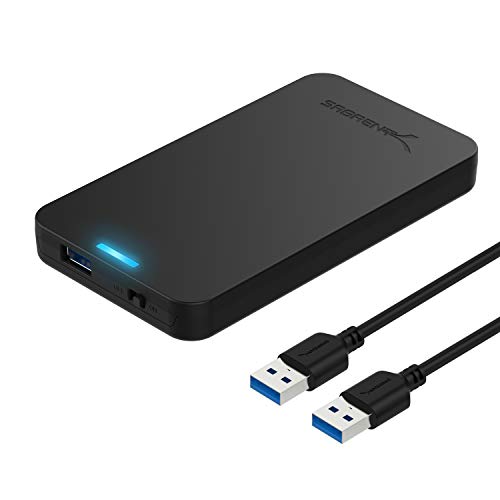
- Tool-free installation
- USB 3.0 with UASP support
- Fits one 2.5-inch SATA drive
Best For: Turning a 2.5-inch notebook drive or SSD into portable storage
Best Ventilated Dock
3.5-Inch USB 3.0 Drive Enclosure

- Supports 2.5- and 3.5-inch SATA drives
- Includes 12V/2A power adapter
- Ventilated, shock-protected design
Best For: Powered desktop drive access and data transfer
Best Drive-Swapping Dock
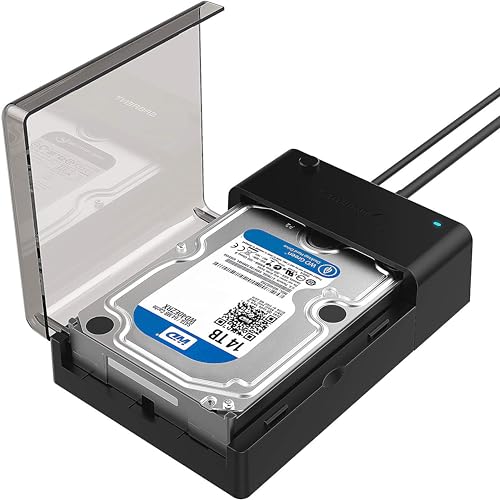
- Fits 2.5- and 3.5-inch SATA drives
- Tool-free hot-swapping
- Includes required 12V adapter
Best For: Frequent drive swaps, backups, and troubleshooting
Best Gaming-Compatible Option
UGREEN Dual-Size SATA Enclosure
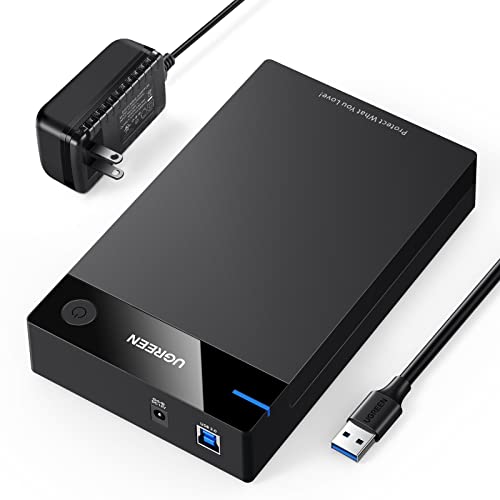
- Supports SATA drives up to 20TB
- Works with PCs and selected consoles
- Includes power adapter and USB 3.0 cable
Best For: PC storage, drive upgrades, and compatible gaming consoles
Best Compact 2.5-Inch Pick
UGREEN USB 3.0 SATA III Enclosure

- USB 3.0 supports up to 5Gbps transfers
- Fits 7mm and 9.5mm 2.5-inch SATA drives
- Includes EVA foam and safety protections
Best For: Reusing or transferring data from a 2.5-inch SATA drive
Best Tool-Free Option
BENFEI 2.5-Inch USB-C/USB-A Enclosure

- Tool-free installation with plug-and-play setup
- Offers USB Type-C and Type-A connections
- Supports 2.5-inch SATA drives up to 6TB
Best For: Quick drive swaps across USB-C and USB-A devices
Best for 3.5-Inch Drives
SABRENT USB 3.0 SATA Enclosure
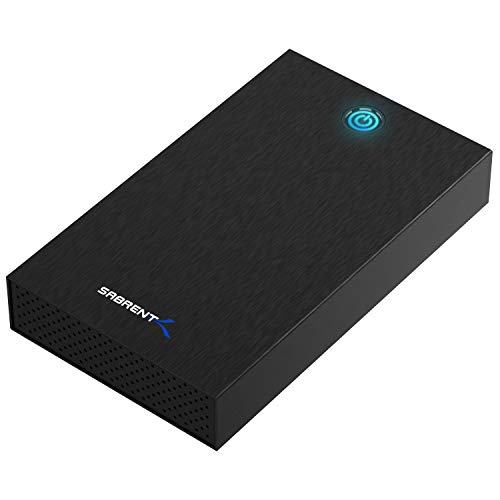
- Accepts both 2.5-inch and 3.5-inch SATA drives
- Tool-free design with UASP support
- Includes required 12V/2A external power adapter
Best For: Accessing and swapping larger desktop SATA drives
Best Clear Enclosure
ORICO 2.5-Inch Transparent SATA Case

- Transparent housing shows the installed drive
- Tool-free setup with UASP-supported USB 3.0
- Supports 2.5-inch SATA drives up to 6TB
Best For: Visible, portable reuse of a 2.5-inch SATA drive
Best Heavy-Duty Pick
ORICO 20TB USB 3.0 HDD Enclosure

- Supports 3.5-inch SATA drives up to 20TB
- Includes required 12V/2A power adapter
- Tool-free installation with shock-absorbing interior
Best For: High-capacity desktop hard drives and SSDs
Best Lightweight Option
ORICO 2.5-Inch Black SATA Enclosure

- Slim ABS body is easy to carry
- No extra power supply required
- Supports UASP and 7mm/9.5mm SATA drives
Best For: Portable everyday use with a 2.5-inch SATA drive
Best Compact Pick – Tool-Free 2.5-Inch SATA Enclosure
If you need a compact option among portable hard drive enclosures, the SABRENT EC-UASP is designed for a single 2.5-inch SATA HDD or SSD. Its tool-free installation, plug-and-play operation, and USB 3.0 connectivity make it a straightforward way to reuse a notebook drive or add portable storage.
Best For: Users converting a 2.5-inch SATA notebook drive or SSD into a portable external drive.
Pros:
- Tool-free installation with hot-swappable, plug-and-play operation
- Supports USB 3.0 transfer rates up to 5 Gbps and UASP SATA III
- Compact, lightweight plastic enclosure with included USB 3.0 cable
- Compatible with Windows and Mac systems
Cons:
- Supports only one 2.5-inch SATA drive
- Not designed for 3.5-inch drives or other interfaces
- USB 2.0 connections are limited to up to 480 Mbps
This is a practical, budget-friendly enclosure for smaller SATA drives. Choose it when portability and simple installation matter more than supporting multiple drive sizes.
Best Ventilated Dock – 3.5-Inch USB 3.0 Drive Enclosure
The CLAVOOP 3.5-inch enclosure is a lay-flat solution for connecting a bare SATA hard drive or SSD to a computer, console, or other compatible device. It supports both 3.5-inch and 2.5-inch SATA drives, includes a 12V power adapter, and adds ventilation and shock-absorbing features for desktop use.
Best For: Users who need a powered enclosure for 3.5-inch drives and occasional 2.5-inch SATA drive access.
Pros:
- Supports 2.5-inch and 3.5-inch SATA I/II/III drives up to 20TB
- USB 3.0 and UASP support, with tested read speeds up to 336 MB/s
- Large ventilation openings, non-slip feet, and built-in shock-proof sponges
- Includes a 12V/2A power adapter and USB 3.0 cable
Cons:
- Requires external power for 3.5-inch drives
- Does not support IDE, mSATA, or M.2 drives
- Larger and less travel-friendly than a 2.5-inch enclosure
With broad SATA support and a stable powered design, this enclosure is a useful choice for data transfers, drive access, and recovery tasks. Confirm your drive interface before buying.
Best Drive-Swapping Dock – SATA HDD/SSD Lay-Flat Station
The SABRENT EC-DFLT is a portable hard drive enclosure in a convenient open docking-station format. It accepts bare 2.5-inch and 3.5-inch SATA drives without tools, supports hot-swapping, and includes the power supply needed for larger 3.5-inch disks.
Best For: Users who regularly swap bare SATA drives for backups, transfers, or troubleshooting.
Pros:
- Accepts both 2.5-inch and 3.5-inch SATA I/II/III drives
- Tool-free, plug-and-play design with hot-swapping
- Includes a 12V/2A adapter for 3.5-inch drives
- Supports USB 3.0 with UASP and backward compatibility with USB 2.0 and 1.1
Cons:
- Requires a USB-A host port or a separate USB-C adapter
- Does not support IDE/PATA, M.2, NVMe, or SAS drives
- S.M.A.R.T. diagnostics do not pass through the USB bridge
This dock prioritizes quick access over enclosed-drive protection. It is a strong fit for a home lab or repair kit, provided your drives use standard SATA connectors and you have the required host port.
Best Gaming-Compatible Option – UGREEN Dual-Size SATA Enclosure
UGREEN’s enclosure provides a simple way to connect a bare 2.5-inch or 3.5-inch SATA HDD or SSD to a computer, console, router, or TV. It combines USB 3.0 and UASP support with a protective ABS housing, rubber shock strips, ventilation openings, and a supplied 12V power adapter.
Best For: Users who want one SATA enclosure for PC storage, drive upgrades, and supported gaming consoles.
Pros:
- Supports 2.5-inch and 3.5-inch SATA I/II/III drives up to 20TB
- USB 3.0 offers up to 5 Gbps transfer rates with UASP support
- Includes a 12V/2A adapter and USB 3.0 A-to-B cable
- Compatible with Windows, Linux, macOS 8.0 and later, PS4, PS5, and Xbox systems
Cons:
- Designed for SATA drives only, not M.2 or other interfaces
- 3.5-inch drives require the included external power adapter
- The enclosure is relatively bulky for portable use
This is a versatile choice when compatibility across drive sizes and devices matters. Its protective housing and included power supply make it more suitable for a stationary setup than frequent travel.
Best Compact 2.5-Inch Pick – UGREEN USB 3.0 SATA III Enclosure
For straightforward portable hard drive enclosures, the UGREEN 2.5-inch model is a compact choice for connecting a SATA SSD or HDD to a computer, game console, or other compatible device. It supports USB 3.0 speeds up to 5Gbps and UASP for potentially faster transfers with a compatible host.
Best For: Users transferring files, recovering data from an older 2.5-inch drive, or expanding storage with a SATA SSD or HDD.
Pros:
- Supports 2.5-inch 7mm and 9.5mm SATA drives up to 6TB.
- USB 3.0 and UASP support can provide transfer speeds up to 5Gbps.
- Includes EVA foam protection, a detachable 12-inch cable, and multiple safety protections.
- Works with Windows, Linux, and macOS 8.0 and later without a separate power adapter.
Cons:
- It supports only 2.5-inch SATA drives; the storage drive is not included.
- Drives with screws may need those screws removed to fit.
- UASP benefits require a compatible computer.
The UGREEN enclosure is a practical, travel-friendly option when you have a 2.5-inch SATA drive ready to reuse. Its protective interior and broad operating-system compatibility add convenience, while the USB 3.0 connection keeps everyday transfers simple.
Best Tool-Free Option – BENFEI 2.5-Inch USB-C/USB-A Enclosure
The BENFEI enclosure stands out among portable hard drive enclosures for its tool-free installation and dual Type-C/Type-A connection design. It is made for 2.5-inch SATA SSDs and HDDs, letting you install a drive by opening the cover, connecting it, and closing the enclosure.
Best For: Users who want quick drive swaps and flexible connections to laptops, phones, tablets, or computers with USB-C or USB-A ports.
Pros:
- Tool-free, plug-and-play installation with no driver required.
- Supports USB Type-C and Type-A connection options.
- UASP support and transfer rates up to 5Gbps, with USB 2.0 and 1.1 backward compatibility.
- Supports 7mm and 9.5mm 2.5-inch SATA drives up to 6TB and includes an 18-month warranty.
Cons:
- Limited to 2.5-inch SATA drives; the drive itself is not included.
- Its integrated-cable design may be less convenient if you prefer a replaceable cable.
- UASP performance depends on the connected host device.
With its tool-free cover and Type-C/Type-A connectivity, the BENFEI is a convenient choice for frequent drive access. It offers a simple setup and broad compatibility, particularly for users moving data among newer and older USB-equipped devices.
Best for 3.5-Inch Drives – SABRENT USB 3.0 SATA Enclosure
The SABRENT EC-KSL3 is a flexible option among portable hard drive enclosures because it accepts both 2.5-inch and 3.5-inch SATA drives. Its tool-free design supports quick swaps, while the included 12V/2A adapter supplies the external power required for larger desktop drives.
Best For: Users who need to access or swap 2.5-inch and 3.5-inch SATA HDDs or SSDs from a USB-A computer.
Pros:
- Fits both 2.5-inch and 3.5-inch SATA HDDs and SSDs.
- Tool-free slide-and-click setup makes drive changes quick.
- USB 3.0 with UASP supports up to 625MB/s theoretical transfer speeds.
- Includes a 12V/2A power adapter, aluminum shell, shock-absorbing tray, and activity LED.
Cons:
- Requires a wall outlet and is not bus-powered through USB.
- Uses USB-A, so USB-C-only computers require an adapter that is not included.
- Not compatible with SAS, M.2, NVMe, or IDE/PATA drives.
The SABRENT is the strongest fit when drive size flexibility matters, especially for desktop 3.5-inch disks. Its external power requirement makes it less portable than bus-powered 2.5-inch models, but the enclosure is better suited to swapping and accessing larger SATA drives.
Best Clear Enclosure – ORICO 2.5-Inch Transparent SATA Case
If you want to reuse a laptop drive or SSD, this portable hard drive enclosure offers a simple, tool-free way to connect a 2.5-inch 7mm or 9.5mm SATA drive to a computer, TV, or PS4. Its transparent housing also makes it easy to see which drive is installed.
Best For: Users who want a lightweight, clearly visible enclosure for transferring files or repurposing a 2.5-inch SATA drive.
Pros:
- Transparent crystal PC housing lets you see the installed drive.
- Tool-free, plug-and-play installation with hot-swap support.
- USB 3.0 supports up to 5Gbps and UASP acceleration.
- Includes a 50cm USB-A cable and supports drives up to 6TB.
Cons:
- Designed only for 2.5-inch SATA drives.
- Plastic construction may provide less protection than a metal enclosure.
This ORICO model is a practical pick when visibility and easy installation matter. It is especially useful for moving files between systems or giving an older 2.5-inch drive a portable external-drive role.
Best Heavy-Duty Pick – ORICO 20TB USB 3.0 HDD Enclosure
For desktop-size storage, this portable hard drive enclosure supports 3.5-inch SATA HDDs and SSDs up to 20TB. It includes the external power supply required for 3.5-inch drives, along with tool-free installation and USB 3.0 connectivity.
Best For: Desktop users who need a high-capacity enclosure for a 3.5-inch SATA hard drive or SSD.
Pros:
- Supports most 3.5-inch SATA I, II, and III drives up to 20TB.
- Includes a 12V/2A power adapter and USB 3.0 data cable.
- Tool-free, plug-and-play design requires no driver or reboot.
- Features auto-sleep mode, activity LEDs, thermal pads, and internal shock-absorbing material.
Cons:
- Requires external power for 3.5-inch drives.
- Larger desktop drives make it less convenient for travel than 2.5-inch enclosures.
- The drive itself is not included.
This is the strongest choice in the group for large-capacity 3.5-inch storage. The included power adapter and protective features make it suitable for desktop backups, file access, and drive recovery.
Best Lightweight Option – ORICO 2.5-Inch Black SATA Enclosure
This compact portable hard drive enclosure turns a 2.5-inch SATA HDD or SSD into external storage without requiring a separate power supply. Its slim ABS body, tool-free design, and compatibility with PCs, routers, and game consoles make it a flexible everyday option.
Best For: Travelers and everyday users who need a slim enclosure for a 2.5-inch SATA drive.
Pros:
- Lightweight, slim design is convenient to carry.
- Tool-free installation, plug-and-play operation, and hot-swap support.
- UASP-enabled USB 3.0 offers up to 5Gbps with compatible systems.
- Works with 7mm and 9.5mm 2.5-inch SATA drives without extra power.
Cons:
- Limited to 2.5-inch SATA drives and a stated capacity of up to 6TB.
- ABS plastic construction offers less rigidity than some metal cases.
- The listed data-transfer detail indicates lower performance on systems that do not support the full USB/UASP capability.
Choose this enclosure when portability and simple setup are more important than accommodating a desktop-size drive. It is a versatile fit for repurposing laptop storage, expanding console storage, or recovering files from an older drive.
How We Picked These Portable Hard Drive Enclosures
We focused on practical compatibility, connection standards, installation simplicity, and everyday usability. The selection includes enclosures for both 2.5-inch and 3.5-inch SATA drives, along with compact models intended for laptop-sized HDDs and SSDs. We also considered tool-free access, UASP support, included power requirements, advertised capacity limits, and whether an enclosure is better suited to portability or desktop use.
Because USB performance depends on the host computer, cable, drive, and enclosure chipset, advertised speeds should be treated as maximum interface rates rather than guaranteed real-world results.
Quick Comparison
| Type | Best For | Power Needs | Typical Advantage |
|---|---|---|---|
| 2.5-inch enclosure | Laptop HDDs and SATA SSDs | Usually USB-powered | Compact and travel-friendly |
| 3.5-inch enclosure | Desktop hard drives | External power adapter | Supports larger, higher-capacity drives |
| Dual-size enclosure | Mixed drive collections | Often external power for 3.5-inch drives | More flexible compatibility |
| Docking station | Frequent drive swapping | External power commonly required | Fast, tool-free access without mounting |
Key Buying Factors for Portable Hard Drive Enclosures
Drive Size and Interface
Confirm that your drive is a SATA model and check its physical size. Most 2.5-inch enclosures accept standard 7mm or 9.5mm drives, while 3.5-inch models are designed for desktop HDDs. An enclosure cannot directly convert incompatible interfaces such as IDE, SAS, or NVMe unless compatibility is specifically stated.
USB Connection and Speed
USB 3.0, also called USB 3.2 Gen 1 in newer naming, offers a 5Gbps interface and is widely compatible. UASP support can improve transfer efficiency when used with a compatible operating system and controller. A USB-C connector may be more convenient, but check whether the enclosure includes the cable or merely uses a USB-C-shaped port.
Power and Portability
Compact 2.5-inch SATA SSDs and laptop drives are generally powered through USB. Most 3.5-inch hard drives need a dedicated 12V power adapter, making those enclosures less convenient for travel. If you plan to move the enclosure between locations, prioritize a sturdy case, secure drive fit, and a cable that matches your devices.
Installation and Protection
Tool-free covers make drive swaps quicker, while screw-mounted designs may provide a more secure long-term fit. Look for ventilation around larger drives and avoid assuming that an enclosure is waterproof or shockproof unless the manufacturer explicitly says so.
Who Should Buy Which Portable Hard Drive Enclosures?
- For a laptop drive or SATA SSD: Choose a compact 2.5-inch USB 3.0 enclosure.
- For desktop hard drives: Choose a 3.5-inch enclosure with its own power adapter.
- For mixed 2.5-inch and 3.5-inch storage: A dual-size enclosure offers the most flexibility.
- For repeated drive changes: A docking station is faster and easier than installing drives inside a case.
- For simple backups: Prioritize reliable USB compatibility, UASP support, and a secure tool-free design over cosmetic features.