If you want a webcam that protects your space as much as your image, a physical shutter is one of the simplest upgrades you can buy. It gives you instant visual privacy without relying on software alone.
Our picks balance clear video, reliable microphones, and easy setup, so you can choose a privacy focused camera with physical shutter that fits work, streaming, or everyday calls.
Best 10 Privacy Focused Camera with Physical Shutter Picks for 2026
Compact Privacy Pick
EMEET C950 1080P Webcam with Privacy Cover
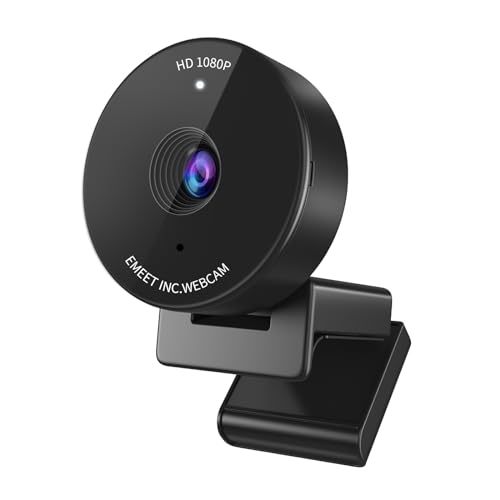
- Physical sliding privacy cover
- 1080p video with low-light correction
- 70° view limits background exposure
Best For: Students and remote workers who want a simple privacy-focused webcam
Business Privacy Choice

- Built-in privacy shutter for lens blocking
- 1080p/30fps with autofocus and RightLight 2
- Dual mics and Teams certification
Best For: Business users who want a dependable meeting webcam with a shutter
Smooth 2K Privacy Option

- Physical privacy shutter for lens blocking
- 2K video at 60fps with Sony 8MP sensor
- PDAF autofocus and dual mics
Best For: People who want sharper, smoother calls with a privacy shutter
Premium Work Webcam
Logitech Brio 501 with Privacy Cover

- Rotating privacy shutter for camera blocking
- Full HD with RightLight 4 and auto-framing
- Show Mode for desk presentations
Best For: Hybrid workers who want privacy plus premium meeting features
Best for Easy Setup
JLab Go Pop Cam, 1080p Webcam With Shutter
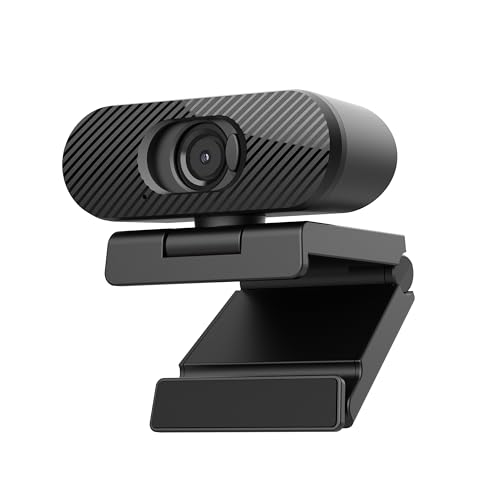
- Physical slide shutter covers the lens
- 1080p/30fps with auto-exposure
- USB plug-and-play for PC, Mac, Chromebook
Best For: Simple, portable webcam users who want a physical privacy cover
Smooth 60FPS Choice
NexiGo N680P Pro Webcam With Cover

- 1080p/60fps with autofocus
- Sliding privacy shutter included
- Stereo mic with noise reduction
Best For: Smooth video callers and streamers who want a privacy cover
Budget-Friendly Privacy Option
1080P Webcam With Privacy Cover

- Physical privacy cover for the lens
- 1080p video with HDR and light correction
- Dual noise-canceling microphones
Best For: Budget-conscious buyers who want a basic webcam with a shutter
4K Ring-Light Privacy Webcam
4K Webcam with Built-In Privacy Cover

- Sliding privacy cover physically blocks the lens
- 4K@30FPS and 1080P@60FPS support
- Built-in ring light with adjustable color and brightness
Best For: Remote work, Zoom calls, and streaming with added privacy
2K Privacy Shutter Webcam

- Flip shutter gives physical lens privacy
- 2K video with low-light correction
- Includes tripod and noise-canceling mic
Best For: Affordable meetings and everyday use with physical privacy protection
Philips 4K Privacy Shutter Webcam
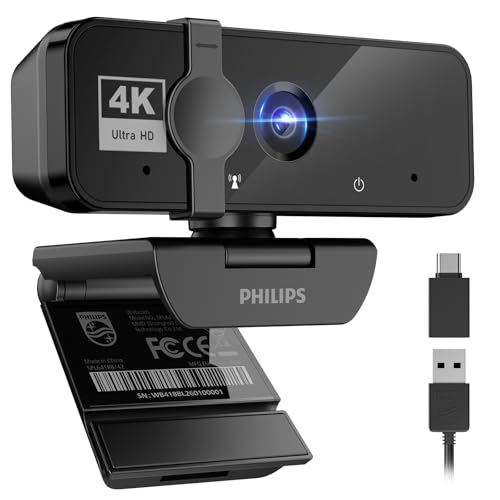
- Built-in physical privacy cover
- True 4K video for professional calls
- Plug-and-play USB setup
Best For: Business meetings and remote work with simple physical privacy
Compact Privacy Pick – EMEET C950 1080P Webcam with Privacy Cover
If you want a privacy focused camera with physical shutter for everyday calls, the EMEET C950 keeps things simple: 1080p video, a built-in sliding privacy cover, and a narrow 70° field of view that helps keep your room out of frame. It is aimed at practical use for meetings, classes, and casual streaming rather than flashy creator features.
Best For: Students, remote workers, and anyone who wants a straightforward webcam with a physical privacy cover.
Pros:
- Physical sliding privacy cover for lens blocking when not in use
- 1080p/30fps video with low-light correction for clearer calls
- 70° field of view helps limit background exposure
- Built-in omnidirectional mic and broad platform compatibility
Cons:
- Fixed focus, so it does not offer autofocus tracking
- Narrower view is less flexible for group shots
- Best image quality depends on good lighting and proper distance
The C950 is a good pick if your priority is privacy first, with enough video and audio quality for standard online communication. It is especially appealing when you want a no-frills webcam with a physical shutter and a smaller frame that keeps distractions out of view.
Business Privacy Choice – Logitech C925-E 1080p Webcam
The Logitech C925-E is a privacy focused camera with physical shutter designed for business use, combining a built-in webcam cover with 1080p/30fps video, autofocus, and RightLight 2 for better visibility in dim rooms. Its 78° view and dual mics make it a solid all-around option for video meetings and presentations.
Best For: Professionals who want a reliable business webcam with a built-in privacy shutter.
Pros:
- Built-in privacy shutter slides open and closed for quick lens blocking
- 1080p video at 30 fps with autofocus and light correction
- Dual omnidirectional microphones for clear call audio
- Certified for Microsoft Teams and compatible with major meeting apps
Cons:
- USB-A connection may be less convenient on newer laptops without adapters
- 78° field of view is useful, but not especially wide or narrow
- Focused on business use rather than creator-style features
This model stands out if you need dependable video quality and a privacy shutter in a work-oriented webcam. It balances security, ease of use, and meeting-ready features without overcomplicating the setup.
Smooth 2K Privacy Option – AIRHUG 2K 60fps Webcam
If you are shopping for a privacy focused camera with physical shutter and also care about smoother video, the AIRHUG 2K model is the most feature-rich pick here. It combines a Sony 8MP sensor, 2K resolution at 60fps, PDAF autofocus, and a built-in physical privacy shutter for everyday home or office use.
Best For: Users who want a sharper, smoother webcam with a privacy shutter for meetings or streaming.
Pros:
- Built-in physical privacy shutter blocks the lens when not in use
- 2K resolution with 60fps for smooth, detailed video
- PDAF autofocus keeps your face crisp during calls
- Dual omnidirectional mics and low-light correction improve meeting quality
Cons:
- Higher-spec camera may be more than needed for basic calls
- 60° field of view is intentionally tight and less flexible for group use
- Performance benefits are most noticeable when you need better image quality
For anyone who wants privacy plus a more polished image, this webcam offers a strong mix of security and performance. The narrower framing and physical shutter make it easy to keep your workspace private while still looking sharp on camera.
Premium Work Webcam – Logitech Brio 501 with Privacy Cover
The Logitech Brio 501 is a privacy focused camera with physical shutter that adds a more premium workplace feature set, including Full HD video, RightLight 4, auto-framing, and Show Mode. Its integrated privacy shutter is easy to rotate closed between meetings, making it a practical option for busy desks.
Best For: Professionals who want a polished webcam with privacy, framing assistance, and desk-sharing features.
Pros:
- Integrated privacy shutter rotates closed to block the camera
- Full HD video with RightLight 4 and auto-framing
- Show Mode lets you tilt the camera to present desk items
- Noise-reduction microphones help in busy environments
Cons:
- More premium features may be unnecessary for basic video calls
- Wider 90° field of view may show more of your room than desired
- Show Mode is useful, but not essential for everyone
This is a strong choice if you want a privacy shutter plus workplace convenience features that go beyond standard webcam basics. It is especially appealing for hybrid workers who need a camera that can handle both meetings and occasional desk presentations.
Best for Easy Setup – JLab Go Pop Cam, 1080p Webcam With Shutter
JLab Go Pop Cam, USB Webcam, 1080p, Built-in Privacy Shutter, Plug and Play, Black
Check Price On AmazonIf you want a privacy focused camera with physical shutter for everyday calls, the JLab Go Pop Cam keeps things simple. It delivers 1080p/30fps video, automatic exposure, and a built-in slide shutter that physically covers the lens when you are done.
Best For: Users who want a lightweight, no-fuss webcam for PC, Mac, or Chromebook with a physical lens cover.
Pros:
- Built-in physical privacy shutter for instant lens coverage
- Plug-and-play USB setup with no drivers needed
- 1080p Full HD video with auto-exposure for steady image quality
- Compact clip-on design for laptops and monitors
Cons:
- No microphone is listed in the supplied notes
- Fixed-focus design may be less flexible than autofocus models
This is a practical pick if you value straightforward setup and a physical privacy control more than extra features. Its minimalist design and broad compatibility make it easy to use across common devices.
Smooth 60FPS Choice – NexiGo N680P Pro Webcam With Cover
This privacy focused camera with physical shutter is a strong fit if you want smoother motion for calls and streaming. The NexiGo N680P Pro records at 1080p/60fps, adds autofocus, and includes a snug privacy cover you can slide shut when the camera is not in use.
Best For: Streamers, remote workers, and presenters who want a fast frame rate plus a physical lens cover.
Pros:
- 1080p at 60fps for smoother video
- Built-in privacy shutter with secure slide cover
- Autofocus and low-light correction for more consistent image quality
- Stereo microphone with noise-reduction technology
Cons:
- Software support is mentioned, which may be more than some users need
- Bulkier than the simplest clip-on webcams
For buyers who care about both privacy and video smoothness, this model stands out. It combines a physical cover, stronger motion handling, and plug-and-play convenience in one well-rounded webcam.
Budget-Friendly Privacy Option – 1080P Webcam With Privacy Cover
If you are shopping for a privacy focused camera with physical shutter on a budget, this NIVEOLI webcam covers the basics well. It offers 1080p video at 30fps, dual noise-reducing microphones, automatic light correction, and a built-in privacy cover for quick lens blocking.
Best For: Everyday video calls, streaming, and home office use when you want a simple webcam with a physical shutter.
Pros:
- Built-in privacy cover for physical lens protection
- 1080p Full HD video with HDR support
- Dual noise-canceling microphones for clearer voice pickup
- Plug-and-play compatibility across multiple platforms
Cons:
- Fixed focus rather than autofocus
- Video tops out at 30fps instead of 60fps
This is a sensible all-around option if you want a straightforward webcam with security-minded hardware. It prioritizes easy setup and core features over premium performance extras.
4K Ring-Light Privacy Webcam – 4K Webcam with Built-In Privacy Cover
If you want a privacy focused camera with physical shutter for everyday calls, this 4K webcam combines a sliding lens cover with a built-in ring light and autofocus. It is a practical choice for Zoom, Teams, Google Meet, and streaming when you want better image quality without adding extra gear.
Best For: Remote workers and streamers who want a 4K webcam with a physical privacy cover and built-in lighting.
Pros:
- Built-in sliding privacy cover physically blocks the lens
- 4K@30FPS and 1080P@60FPS options for sharper video
- Ring light with three color temperatures and adjustable brightness
- TOF autofocus and dual noise-canceling microphones
Cons:
- Built-in light may be unnecessary if you already use studio lighting
- Physical design is more feature-heavy than a basic plug-and-play webcam
Overall, this model stands out if privacy is a priority but you also want a more polished on-camera look. The combination of a real privacy cover, autofocus, and integrated light makes it well suited to busy home offices and casual streaming setups.
2K Privacy Shutter Webcam – 2K Webcam with Tripod
This privacy focused camera with physical shutter is a straightforward option for laptop and desktop users who want clear video and an easy setup. It offers 2K resolution, auto low-light correction, and a flip-style privacy shutter for physically covering the lens when you are not on camera.
Best For: Budget-minded users who want a 2K webcam with a physical shutter, tripod, and simple plug-and-play setup.
Pros:
- Flip privacy shutter provides physical lens coverage
- 2K video with auto low-light correction for dim rooms
- Built-in noise-canceling microphone for clearer calls
- Includes a tripod and supports Windows, macOS, and Chrome OS
Cons:
- 2K resolution is below the 4K options in this roundup
- More basic feature set than webcams with integrated lighting
If you mainly need dependable call quality and privacy protection, this webcam covers the essentials well. The included tripod adds flexibility, and the physical shutter makes it easy to keep the lens covered between meetings.
Philips 4K Privacy Shutter Webcam – 4K USB Webcam for Meetings
For buyers looking for a privacy focused camera with physical shutter from a recognizable brand, this PHILIPS 4K webcam keeps things simple and professional. It delivers 4K video, an integrated microphone, and a built-in physical privacy cover for safer everyday use at home or in the office.
Best For: Professionals who want a branded 4K webcam with a physical privacy shutter for meetings and video calls.
Pros:
- Physical privacy cover mechanically blocks the lens
- True 4K video for meetings and online presentations
- Integrated microphone supports daily communication
- Plug-and-play USB setup with Windows and macOS compatibility
Cons:
- No autofocus or lighting features listed in the supplied details
- Warranty period is only listed as 3 months
This is a solid pick if you want a no-fuss webcam that emphasizes privacy and business-ready image quality. It is especially appealing for users who prefer a straightforward setup instead of extra streaming-oriented features.
How We Picked the Best Privacy Focused Camera with Physical Shutter
We focused on the features that matter most in a Privacy Focused Camera with Physical Shutter: a true mechanical cover, dependable video quality, decent built-in audio, and simple USB setup. We also favored models with useful extras like autofocus, light correction, and higher frame rates for smoother meetings.
Quick Comparison
Most buyers will choose between basic 1080p webcams for everyday calls, midrange 2K options for sharper detail, and 4K models for the best image quality. If you join meetings in changing light, prioritize auto light correction and autofocus. If privacy is your top concern, make sure the shutter is a physical cover rather than a software-only mute feature.
Key Buying Factors for a Privacy Focused Camera with Physical Shutter
Privacy Cover Type
Look for a shutter that fully blocks the lens when closed and feels easy to open and close. A physical shutter is more trustworthy than an app setting because it works even when your computer is off.
Video Resolution and Frame Rate
1080p is enough for most calls, while 2K and 4K can add clarity if you want a sharper professional look. Higher frame rates, such as 60fps, can make motion look smoother, which is helpful for streaming or presentations.
Lighting and Focus
Auto light correction helps with backlit rooms and dim offices. Autofocus or PDAF is useful if you move around, while fixed focus can be fine for a desk setup where distance stays consistent.
Audio and Compatibility
Built-in microphones are convenient, but quality varies. For the best experience, check that the webcam works well with your preferred meeting apps and supports plug-and-play USB use on your system.
Who Should Buy Which Privacy Focused Camera with Physical Shutter?
If you want a simple, affordable option for daily video calls, a 1080p model with a physical shutter is usually the best value. If you work in a polished office setup or present often, move up to 2K or 4K for better detail and a more professional appearance. Streamers and creators should pay special attention to frame rate, autofocus, and mic quality. Anyone prioritizing security and convenience over extras should choose the most straightforward Privacy Focused Camera with Physical Shutter that still offers dependable video and light handling.