The best RAID enclosures for Windows make it easier to combine separate SATA drives into faster, safer, or more flexible external storage. The right model depends on your preferred RAID level, drive sizes, connection speed, and capacity goals.
We selected 10 enclosures ranging from portable dual-bay units to tool-free five-bay systems, with options for 2.5-inch SSDs, 3.5-inch hard drives, hot swapping, USB-C, and high-speed USB interfaces.
Best 10 Raid Enclosures for Windows Picks for 2026
Best Overall
TERRAMASTER D2-320 2-Bay USB RAID Enclosure

- USB 3.2 Gen 2 up to 10Gbps
- RAID 0, 1, JBOD, and SINGLE modes
- Supports up to 44TB across two drives
Best For: Fast two-drive Windows DAS storage with flexible RAID
Best Five-Bay Value
ORICO 5-Bay RAID HDD Enclosure

- Eight RAID and disk-management modes
- Five drives and up to 110TB capacity
- Built-in 150W supply and 80mm fan
Best For: Large Windows desktop storage and backup projects
Best Compact Option
Vantec NexStar GX Dual-Bay RAID Enclosure

- Dual 2.5-inch SATA drive support
- Individual, RAID 0, and RAID 1 modes
- Compact aluminum enclosure with UASP
Best For: Small Windows setups using 2.5-inch SSDs or HDDs
Best for Large Workstations
ORICO 5-Bay 130TB RAID Enclosure

- Supports up to 110TB across five bays
- Works with 2.5-inch and 3.5-inch SATA drives
- Eight hardware RAID and disk modes
Best For: High-capacity Windows workstations and media libraries
Best High-Capacity Pick

- Five bays for 2.5-inch and 3.5-inch SATA drives
- Supports RAID 0, 1, 3, 5, 10, span, and JBOD
- Tray-less hot-swap design with 150W power supply
Best For: High-capacity multi-drive storage setups
Best High-Speed Professional Pick

- Up to 104TB across four 3.5-inch drives
- Six RAID and storage modes, including RAID 5 and 10
- USB 3.2 Gen 2x2 with hot-swap cooling features
Best For: Professional editing and enterprise storage
Best Portable Dual-Bay Pick

- Portable two-bay enclosure for 2.5-inch SATA drives
- USB 3.1 Gen 2 with up to 10Gbps transfer rate
- Supports RAID 0, RAID 1, JBOD, and Normal modes
Best For: Portable laptop, gaming, and creator storage
Best All-Around 2-Bay RAID
CENMATE Aluminum RAID Enclosure

- Supports 2.5-inch and 3.5-inch SATA drives
- Four modes: RAID 0, RAID 1, Normal, and JBOD
- USB-A/C 3.0 with cooling fan
Best For: Windows users needing flexible, high-capacity external storage
Best Compact 2.5-Inch Option
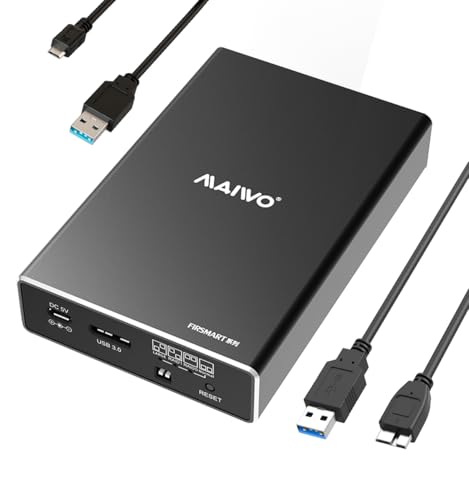
- Built for two 2.5-inch SATA drives
- USB 3.0 with UASP and up to 5Gbps
- Compact tool-free design with four modes
Best For: Portable Windows storage setups using 2.5-inch drives
Best for Cooling and Capacity
CENMATE Fan-Cooled RAID Enclosure
- Supports 2.5-inch and 3.5-inch SATA drives
- Up to 40TB total stated capacity
- Built-in fan and USB-A/C 3.0 connectivity
Best For: Home offices and businesses needing flexible, cooled storage
Best Overall – TERRAMASTER D2-320 2-Bay USB RAID Enclosure
For shoppers comparing raid enclosures for windows, the TERRAMASTER D2-320 is a versatile two-bay DAS with USB 3.2 Gen 2 connectivity and hardware RAID. It supports RAID 0, RAID 1, JBOD, and SINGLE modes, making it suitable for performance-focused storage or mirrored backups.
Best For: Windows users who want a fast, compact two-drive enclosure with flexible RAID options and support for large-capacity SATA drives.
Pros:
- USB 3.2 Gen 2 offers data transmission up to 10Gbps.
- Supports RAID 0, RAID 1, JBOD, and SINGLE configurations.
- Accommodates two 2.5-inch or 3.5-inch SATA drives, up to 44TB total.
- Tool-free trays and temperature-controlled cooling simplify setup and operation.
Cons:
- It is a DAS enclosure, not a network-attached storage device.
- Drives are not included.
The D2-320 stands out when you need modern USB performance in a two-bay format. Its RAID 1 support and automatic recovery after drive replacement add useful data-protection potential, while the tool-free design keeps maintenance straightforward.
Best Five-Bay Value – ORICO 5-Bay RAID HDD Enclosure
If you need raid enclosures for windows with substantial expansion room, this ORICO five-bay enclosure provides eight configuration modes and support for up to 110TB. Its USB 3.0 connection, aluminum construction, cooling fan, and built-in 150W power supply are designed for large desktop storage setups.
Best For: Windows users managing multiple 3.5-inch SATA drives, large backups, video files, or other capacity-heavy projects.
Pros:
- Offers RAID 0, 1, 3, 5, 10, JBOD, CLONE, and CLEAR modes.
- Five bays support up to 22TB per drive and 110TB total.
- Built-in 150W power supply supports multiple high-performance drives.
- 80mm cooling fan, front and rear vents, and aluminum housing aid heat dissipation.
Cons:
- USB 3.0 transfer speeds are lower than newer USB 3.2 Gen 2 enclosures.
- Designed around 3.5-inch SATA disks.
- Data should be backed up before changing RAID modes.
This ORICO model is a practical choice when bay count and capacity matter more than the newest USB interface. The broad RAID selection gives it flexibility, while the integrated power supply helps keep a multi-drive workstation tidier.
Best Compact Option – Vantec NexStar GX Dual-Bay RAID Enclosure
Vantec Nexstar GX USB 3.0 Dual 2.5" SATA SSD/HDD RAID Enclosure, Black (NST-272S3-BK)
Check Price On AmazonThe Vantec NexStar GX is a compact pick among raid enclosures for windows, using two 2.5-inch SATA SSDs or HDDs in an aluminum enclosure. It supports Individual, RAID 0, and RAID 1 modes, plus UASP and automatic RAID 1 rebuilding.
Best For: Windows users who want a small, portable two-drive enclosure for 2.5-inch SATA storage.
Pros:
- Supports dual 2.5-inch SATA I/II/III SSDs or HDDs.
- Provides Individual, RAID 0, and RAID 1 configurations.
- Automatic RAID 1 rebuild can simplify drive replacement.
- Compact aluminum housing includes front vents for heat dissipation.
Cons:
- USB 3.0 is limited to up to 5Gbps.
- Capacity support is listed as over 2TB per drive, less than newer high-capacity models.
- Requires the included AC adapter for power.
Choose the NexStar GX when a smaller footprint is more important than maximum capacity or interface speed. Its 2.5-inch drive support and RAID 1 rebuild feature make it a convenient option for compact mirrored storage.
Best for Large Workstations – ORICO 5-Bay 130TB RAID Enclosure
For high-capacity raid enclosures for windows, this ORICO five-bay DAS supports both 2.5-inch and 3.5-inch SATA HDDs and SSDs. Hardware RAID modes, a 150W built-in power supply, and active cooling make it suited to large backup, media, and workstation storage requirements.
Best For: Windows workstations, creative studios, and users who need up to 110TB of multi-drive desktop storage.
Pros:
- Supports RAID 0, 1, 3, 5, 10, JBOD, Clone, and Clear modes.
- Accepts 2.5-inch and 3.5-inch SATA drives, up to 110TB total.
- 150W built-in power supply supports five high-consumption mechanical drives.
- Aluminum alloy shell, 80mm fan, and honeycomb vents support extended operation.
Cons:
- Uses USB 3.0 rather than a faster USB 3.2 Gen 2 interface.
- Drives are not included.
- Its five-bay design takes more desk space than compact enclosures.
This ORICO enclosure is the stronger fit for users building a high-capacity desktop storage station. Its broad hardware RAID support and dual-form-factor compatibility offer flexibility, while the built-in power and cooling systems are practical for multi-drive workloads.
Best High-Capacity Pick – Syba 5-Bay RAID Enclosure
For shoppers comparing RAID enclosures for windows, the Syba SY-ENC50118 stands out for its five-bay capacity, broad RAID selection, and tray-less design. It supports 2.5-inch and 3.5-inch SATA drives, with USB 3.0 and eSATA connectivity for Windows, macOS, and Linux systems.
Best For: Users who need a flexible, high-capacity enclosure for up to five SATA hard drives and multiple RAID configurations.
Pros:
- Supports RAID 0, 1, 3, 5, 10, span, and JBOD.
- Accepts 2.5-inch and 3.5-inch SATA drives, up to 24TB per drive.
- Tray-less hot-swap design simplifies drive installation and removal.
- 150W power supply supports multiple drives under sustained loads.
Cons:
- USB 3.0 is limited to a maximum stated speed of 5Gbps.
- eSATA access to multiple drives requires port multiplier support with FIS-based switching.
- Its five-bay desktop design is less portable than a compact enclosure.
The Syba is a practical choice when expansion room and RAID versatility matter more than the newest USB interface. Its wide drive compatibility makes it suitable for mixed storage setups.
Best High-Speed Professional Pick – ORICO 4-Bay RAID Enclosure
The ORICO 4-Bay enclosure is a strong option among RAID enclosures for windows when fast transfers and large storage capacity are priorities. Its USB 3.2 Gen 2×2 interface, four drive bays, six modes, and 104TB maximum capacity suit demanding storage workflows.
Best For: Video editors, enterprise IT users, and professionals managing large multi-drive datasets.
Pros:
- Supports RAID 0, 1, 5, 10, JBOD, and Normal modes.
- Supports four 3.5-inch SATA drives up to 26TB each.
- USB 3.2 Gen 2×2 provides a stated transfer rate of up to 20Gbps with compatible USB4 systems.
- Includes hot-swapping, a 150W power supply, and a low-noise 45dB fan.
Cons:
- Thunderbolt connections are limited to around 10Gbps according to the supplied notes.
- Changing RAID modes erases drive contents, so backups are essential.
- Its four-bay professional design may be more capacity than casual users need.
Choose the ORICO when transfer speed, cooling, and high storage ceilings justify a larger desktop enclosure. Confirm that the host computer supports the connection speed you want before buying.
Best Portable Dual-Bay Pick – CineRAID CR-H218P
For a compact approach to RAID enclosures for windows, the CineRAID CR-H218P offers two 2.5-inch SATA bays in a portable aluminum-style enclosure with USB 3.1 Gen 2 connectivity. It supports RAID 0, RAID 1, JBOD, and Normal modes while remaining bus powered.
Best For: Laptop users, gamers, and creators who want portable dual-drive storage with basic RAID options.
Pros:
- Compact dual-bay design supports 2.5-inch SATA SSDs and HDDs.
- USB 3.1 Gen 2 supports speeds up to 10Gbps and is backward compatible with USB 3.0 and 2.0.
- Offers RAID 0, RAID 1, JBOD, and Normal modes.
- Includes a TPU cover for added protection during transport.
Cons:
- Only supports two drives and 2.5-inch form factors.
- Bus-powered operation may be less suitable for larger desktop drive arrays.
- It offers fewer RAID modes than the five- and four-bay alternatives.
The CineRAID is the most travel-friendly choice in this group and fits users who value a smaller footprint. Its two-bay layout provides useful mirroring or performance options without the bulk of a larger enclosure.
Best All-Around 2-Bay RAID – CENMATE Aluminum RAID Enclosure
For shoppers comparing raid enclosures for windows, this CENMATE model offers a flexible two-bay setup for both 2.5-inch and 3.5-inch SATA HDDs or SSDs. Its USB 3.0 connection includes both USB-A and USB-C cable support, while four selectable modes cover common storage configurations.
Best For: Windows users who need a versatile desktop enclosure for mixed-size drives, higher-capacity storage, and RAID flexibility.
Pros:
- Supports 2.5-inch and 3.5-inch SATA HDDs and SSDs, up to 20TB per drive.
- Offers RAID 0, RAID 1, Normal, and JBOD modes.
- Includes USB-A/C 3.0 connectivity and plug-and-play compatibility with Windows 7 and later.
- Aluminum construction and a built-in cooling fan help manage heat.
Cons:
- The fan may produce approximately 40–50 dB of noise.
- Changing or designing a RAID array may result in data loss.
- RAID software is not available on Mac OS.
With broad drive-size support and a 40TB total stated capacity, this is a practical choice when you want one enclosure for both desktop and laptop storage workflows. Keep the fan-noise note and RAID setup precautions in mind.
Best Compact 2.5-Inch Option – MAIWO Dual-Bay RAID Enclosure
If you are looking for compact raid enclosures for windows, the MAIWO K25272 is designed specifically for two 2.5-inch SATA HDDs or SSDs. It combines USB 3.0 with UASP support, tool-free installation, and four selectable storage modes in a portable aluminum enclosure.
Best For: Laptop users and anyone building a small external RAID setup with 2.5-inch SATA drives.
Pros:
- Supports two 2.5-inch 7mm or 9.5mm SATA HDDs or SSDs.
- Provides RAID 0, RAID 1, Normal/PM, and Large/JBOD modes.
- USB 3.0 with UASP delivers up to 5Gbps bandwidth.
- Compact, tool-free design supports hot swapping and plug-and-play use.
Cons:
- Each bay supports up to 6TB, for a stated total capacity of 12TB.
- An additional power connection is required, using the included Micro USB to USB-A power cable.
- The HDDs or SSDs are not included.
This MAIWO enclosure is a good fit when portability matters more than support for larger 3.5-inch drives. Its independent power cable and compact footprint are useful, but plan for the additional power connection during setup.
Best for Cooling and Capacity – CENMATE Fan-Cooled RAID Enclosure
This CENMATE enclosure is a strong option among raid enclosures for windows when you want support for both 2.5-inch and 3.5-inch SATA drives. It provides two bays, four RAID modes, USB-A/C 3.0 connectivity, and a built-in fan in an aluminum housing.
Best For: Home offices and small businesses that need a two-drive enclosure with broad drive compatibility and active cooling.
Pros:
- Supports 2.5-inch and 3.5-inch SATA HDDs and SSDs, up to 20TB per drive.
- Includes RAID 0, RAID 1, Normal, and JBOD modes.
- USB 3.0 output supports transfer rates up to 5Gbps and includes USB-A/C cabling.
- Aluminum-alloy construction and a built-in 2-inch fan help reduce heat.
Cons:
- The fan is rated at approximately 40–50 dB and may be noticeable.
- RAID configuration changes can result in data loss.
- Mac OS does not include RAID software for this enclosure.
The combination of 3.5-inch drive support, stated 40TB total capacity, and active cooling makes this a capable stationary storage option. It is best suited to users who value drive flexibility and cooling more than silent operation.
How We Picked the Best Raid Enclosures for Windows
We compared these enclosures by looking at the features that matter most in a Windows storage setup: bay count, supported drive formats, RAID modes, interface speed, installation convenience, cooling, capacity, and compatibility. We also considered whether each enclosure suits a particular use case, such as backup, media storage, editing, portable SSD storage, or a large multi-drive array.
Because an enclosure does not usually include drives, the total cost depends on the disks you install. We therefore favored products with clearly stated compatibility and practical layouts rather than judging them only by headline capacity or connection speed.
Quick Comparison
| Best For | Recommended Type | Why It Stands Out |
|---|---|---|
| Simple two-drive setups | Dual-bay enclosure | Compact, easier to install, and typically supports RAID 0, RAID 1, JBOD, or independent disks |
| Large media libraries | Four- or five-bay enclosure | More capacity and greater flexibility for multi-drive arrays |
| Mixed drive sizes | JBOD or independent-disk model | Lets you use drives without committing every disk to one array |
| Fast transfers | USB 3.2 Gen 2 or Gen 2×2 model | Higher interface bandwidth when paired with a compatible Windows port and fast SSDs |
| Frequent drive changes | Tool-free or hot-swappable enclosure | Quicker access for testing, replacing, or rotating drives |
Key Buying Factors for Raid Enclosures for Windows
Drive Size and Bay Count
Check whether the enclosure accepts 2.5-inch drives, 3.5-inch drives, or both. Two-bay models are easier to place on a desk and are often enough for mirrored backups. Four- and five-bay models are better for larger collections but require more power, cooling, and desk space.
RAID Modes and Data Protection
RAID 0 combines drives for speed and capacity but provides no redundancy. RAID 1 mirrors data across two drives, reducing usable capacity while protecting against a single-drive failure. JBOD and normal modes can be useful when you want independent volumes. RAID is not a substitute for a separate backup.
USB Speed and Windows Compatibility
Match the enclosure to your computer. USB 3.0 is adequate for many hard drives, while USB 3.1, USB 3.2 Gen 2, and Gen 2×2 can make better use of SSDs. The host port, cable, drivers, and installed drives can all limit real-world performance. Confirm that the enclosure supports your Windows version and preferred USB connector.
Cooling, Installation, and Noise
Fans are particularly valuable in five-bay systems or during long transfers. Tool-free trays simplify installation, while hot-swap support helps users who regularly change disks. If the enclosure will sit near your workstation, check fan placement and noise expectations.
Who Should Buy Which Raid Enclosures for Windows?
Choose a compact dual-bay model if you want straightforward external storage, a mirrored backup, or a smaller SSD-based setup. A four- or five-bay enclosure is the better choice for photographers, video editors, home-lab users, and anyone building a large Windows media library. Select a high-speed USB model when your PC has the matching port and you plan to use SSDs. For routine backups, prioritize RAID 1, cooling, and reliable drive access over maximum throughput. For flexible drive management, choose JBOD, independent-disk support, or a tool-free design.