Engineering students need more than fine detail from a resin printer. Reliable calibration, manageable post-processing, useful build volume, and predictable operating costs matter when producing prototypes, enclosures, mechanisms, and presentation models on a student budget.
We selected 10 models spanning compact entry-level printers, high-resolution machines, and bundles that include washing and curing equipment. The guide below explains which features deserve attention before you buy.
Best 10 Resin Printers for Engineering Students Picks for 2026
Top Precision Pick

- 16K resolution for highly detailed models
- 30 °C smart tank heating
- Auto-leveling and AI monitoring
Best For: Engineering students who prioritize detail and automated print management
Best Stability Features

- Ball screws and precision rails reduce vibration
- Intelligent leveling with pre-print self-check
- AI checks for plate, resin, and residue
Best For: Students seeking stable mechanics and guided calibration
Best Complete Workflow Bundle
Saturn 4 Ultra 16K Wash-and-Cure Kit

- Includes 16K resin printer and wash/cure station
- Printer reaches up to 150 mm/h
- 7.5-liter Mercury Plus V3.0 capacity
Best For: Students wanting an integrated print and post-processing setup
Best Compact Starter
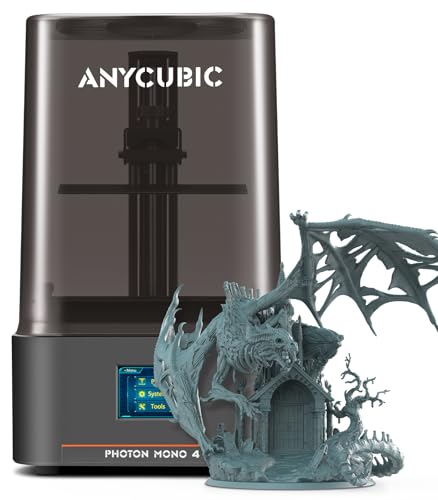
- 10K resolution with 17 × 17 μm pixels
- Factory-calibrated and ready to start quickly
- Compact 10 x 10 x 15-inch design
Best For: Beginners needing detailed resin prints in limited space
Best High-Resolution Pick

- 16K resolution with 14 x 19 μm XY detail
- Heated resin tank and automated monitoring
- Large build area with up to 150 mm/h printing
Best For: Detailed prototypes and larger engineering models
Best Complete Starter Bundle

- 10K resolution with 17 x 17 μm pixels
- Includes Wash & Cure 3.0 station
- 6.04 x 3.42 x 6.49-inch build volume
Best For: Students wanting an integrated print and post-processing setup
Best for Easy, Stable Operation

- 16K detail with 14 x 19 μm pixel size
- Factory pre-leveling and smart resin feeding
- Heating and remote monitoring for stable workflow
Best For: Students seeking simplified setup and connected operation
Best with Extra Features

- 9K monochrome LCD with 18 × 18 μm XY resolution
- Up to 150 mm/h printing with Tilt Release technology
- AI monitoring, smart sensing, and Wi-Fi cluster printing
Best For: Detailed prototypes and efficient multi-printer workflows
Best Precision-Focused Option
Reflex RS Turbo Resin 3D Printer

- High-contrast amber screen for detailed, fast curing
- 2 μm repeat positioning accuracy from the C5 ball-screw Z-axis
- Real-time force sensing and automated diagnostic reports
Best For: Precision-focused prototyping and advanced resin workflows
Best Beginner-Friendly Pick
ELEGOO Mars 5 Resin 3D Printer
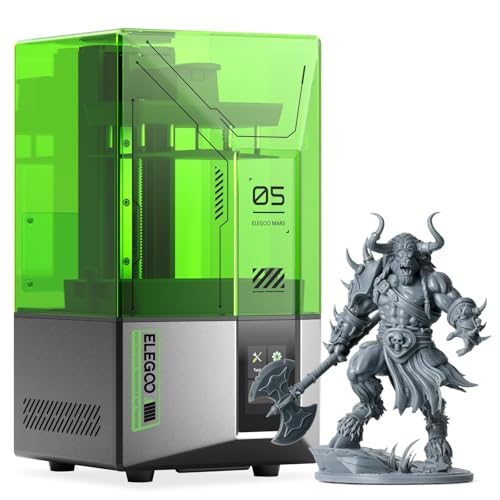
- One-click automatic leveling simplifies setup
- Self-checks and residue detection help reduce failed prints
- 4K monochrome LCD supports detailed models
Best For: First-time resin printing and student coursework
Top Precision Pick – ELEGOO Saturn 4 Ultra 16K
For engineering students who need highly detailed prototypes, the ELEGOO Saturn 4 Ultra 16K is a strong choice among resin printers for engineering students. Its 16K resolution, heated resin tank, automatic leveling, and fast tilt-release system are designed to support precise, repeatable models.
Best For: Students prioritizing fine detail, print monitoring, and streamlined operation.
Pros:
- 16K resolution supports smooth surfaces and intricate model details.
- Smart tank heating maintains resin at 30 °C for improved fluidity and layer adhesion.
- Automatic leveling, residue detection, and AI monitoring simplify printing.
- Tilt-release technology enables speeds up to 150 mm/h.
Cons:
- Its 35.5-pound weight and larger 24 x 17 x 15-inch footprint may require dedicated workspace.
- AI detection results can vary with the environment, model, and resin type.
Choose this model when dimensional detail and hands-off features matter more than a compact setup. The heated tank and automatic checks are particularly useful for students learning resin-printing workflows.
Best Stability Features – ANYCUBIC Photon P1 14K
The ANYCUBIC Photon P1 14K emphasizes mechanical stability and guided setup, making it a practical option among resin printers for engineering students. Its ball screws, precision rails, intelligent leveling, and AI-assisted checks are aimed at consistent model formation.
Best For: Students who value stable motion, calibration assistance, and print-failure checks.
Pros:
- Industrial-grade ball screws and precision guide rails help reduce vibration.
- 14K printing and LighTurbo 4.0 support sharp details and uniform illumination.
- Intelligent Leveling 3.0 performs a pre-print self-check and provides leveling assistance.
- AI features inspect the build plate, bottom-layer separation, resin level, and residue.
Cons:
- At 37.8 pounds, it is relatively heavy for a student workspace.
- The listed dimensions of 20.67 x 13.78 x 12.8 inches require a substantial work surface.
This is a sensible fit for coursework involving repeated technical models, where platform alignment and stable movement are important. Its built-in checks can also help reduce wasted time on preventable failures.
Best Complete Workflow Bundle – Saturn 4 Ultra 16K Wash-and-Cure Kit
ELEGOO Saturn 4 Ultra 16K Resin 3D Printer and ELEGOO Mercury Plus V3.0 Wash and Cure Station
Check Price On AmazonThis bundle pairs the ELEGOO Saturn 4 Ultra 16K resin printer with the Mercury Plus V3.0 wash and cure station. For engineering students comparing resin printers for engineering students, the package offers a more complete path from detailed printing to post-processing.
Best For: Students who want a printer and dedicated wash-and-cure equipment in one package.
Pros:
- Includes the Saturn 4 Ultra 16K printer for high-detail resin models.
- Printer supports smart tank heating at 30 °C and speeds up to 150 mm/h.
- Mercury Plus V3.0 provides a 7.5-liter wash-and-cure capacity.
- Wash-and-cure station is compatible with Mars, Saturn, Photon, Halot, and other MSLA, LCD, and DLP printers.
Cons:
- The combined setup needs more space than the printer alone.
- This is a heavier and more involved package for students with limited workspace.
The main advantage is workflow convenience: the printer and post-processing station are supplied together. It is a strong choice when you want a dedicated setup for producing and finishing engineering prototypes rather than assembling components separately.
Best Compact Starter – ANYCUBIC Photon Mono 4 10K
The ANYCUBIC Photon Mono 4 10K is a compact, approachable option for engineering students entering resin printing. Its 10K screen, factory calibration, quick setup, and power-failure recovery make it convenient for a student bench or smaller workspace.
Best For: Beginners who need detailed prints in a compact, easy-to-start machine.
Pros:
- 10K resolution and 17 × 17 μm pixel precision capture fine details.
- Factory-calibrated assembly can be ready to print after a quick four-point leveling check.
- Laser Engraving Platform 2.0 improves adhesion and helps reduce shedding and warping.
- Power-failure recovery can resume a print after downtime.
Cons:
- Its 7-inch screen and listed specifications indicate a smaller setup than larger-format options.
- The notes do not list automated resin monitoring or AI inspection features.
For students balancing limited space, straightforward setup, and detailed models, the Mono 4 is an appealing starting point. It offers useful reliability features without the larger footprint and weight of the other listed machines.
Best High-Resolution Pick – ELEGOO Saturn 4 Ultra 16K
For engineering students seeking resin printers for engineering students, the ELEGOO Saturn 4 Ultra 16K combines fine detail, a relatively large build area, and automation features that can make prototype work more consistent. Its heated resin tank and monitoring tools are particularly useful when print conditions vary.
Best For: Engineering students printing detailed prototypes, larger models, and repeat project parts.
Pros:
- 16K resolution with 14 x 19 μm XY pixel size for intricate parts.
- 8.33 x 4.66 x 8.66-inch build volume supports larger models.
- Automatic resin heating, leveling, power-resume, and smart monitoring features.
- Up to 150 mm/h print speed, plus Wi-Fi transfer and cluster-printing support.
Cons:
- At 35.4 pounds, it is a substantial printer for a dorm or small workspace.
- Its advanced features may be more than beginners need for occasional projects.
The Saturn 4 Ultra 16K is a strong choice when detail, throughput, and print consistency matter. The heated tank and automated checks add practical value for students working through demanding prototypes or multiple assignments.
Best Complete Starter Bundle – ANYCUBIC Photon Mono 4 Bundle
For students comparing resin printers for engineering students, the ANYCUBIC Photon Mono 4 bundle stands out because it includes both the printer and a Wash & Cure 3.0 station. That combination creates a more complete workflow for producing detailed parts and handling post-processing in a student workspace.
Best For: Students who want a ready-to-use print, wash, and cure setup for detailed project models.
Pros:
- 10K resolution and 17 x 17 μm pixels support fine model detail.
- Uniform LighTurbo illumination is designed to reduce layer lines and rasterization.
- 6.04 x 3.42 x 6.49-inch build volume suits many classroom-scale projects.
- Included Wash & Cure 3.0 has a 4L cleaning bucket and larger basket capacity.
Cons:
- The build volume is smaller than the larger-format options in this roundup.
- The bundle’s wash-and-cure station adds to the space required in a small work area.
This bundle is a practical option for students who value a coordinated post-processing setup. Its resolution and build volume fit many detailed prototypes, while the included wash-and-cure equipment helps avoid assembling a separate workflow.
Best for Easy, Stable Operation – UniFormation GK3T 16K
For engineering students evaluating resin printers for engineering students, the UniFormation GK3T focuses on simplifying the workflow without giving up fine detail. Factory pre-leveling, resin heating, remote monitoring, and compatibility with wash-and-cure stations can help students spend less time managing the printer and more time refining designs.
Best For: Students who prioritize straightforward setup, stable operation, and remote print monitoring.
Pros:
- 16K resolution and 14 x 19 μm pixel size produce highly detailed surfaces.
- Factory pre-leveling, smart resin feeding, and quick-release components streamline use.
- Built-in heating is designed to maintain resin fluidity down to 0°C/32°F.
- Smartphone and slicing-software control provide remote status updates and one-touch controls.
Cons:
- At 52.8 pounds, it is the heaviest option listed here and may be difficult to relocate.
- The complete print-to-cure workflow depends on compatible wash-and-cure equipment.
The GK3T is appealing for students who want a guided, connected printing experience. Its heating system and pre-leveled design address common setup concerns, while the 16K screen supports detailed prototypes and models.
Best with Extra Features – ELEGOO Mars 5 Ultra
For engineering students who need detailed prototypes without spending excessive time on setup, the ELEGOO Mars 5 Ultra is a capable choice among resin printers for engineering students. Its 9K monochrome LCD, automated checks, and fast printing features support repeatable project work.
Best For: Students prioritizing fine detail, faster print cycles, and remote printer management.
Pros:
- 9K LCD provides 18 × 18 μm XY resolution for highly detailed models.
- Tilt Release technology supports printing speeds up to 150 mm/h.
- Smart mechanical sensor, AI camera, and resume-after-interruption features help monitor jobs.
- Wi-Fi file transfer and cluster printing support multiple printers on the same network.
Cons:
- Its 24.6-pound weight makes it less convenient to move between workspaces.
- The extensive monitoring and network features may be more than beginners need.
The Mars 5 Ultra stands out when project detail and workflow efficiency matter most. Its calibration assistance and print monitoring can reduce interruptions, while the high-resolution screen suits intricate engineering components and presentation models.
Best Precision-Focused Option – Reflex RS Turbo Resin 3D Printer
The Reflex RS Turbo is designed for engineering students who value dimensional consistency and advanced process control. Its high-contrast amber screen, precision Z-axis, and automated failure detection make it one of the more technically focused resin printers for engineering students.
Best For: Advanced students working on precision parts, repeatable prototypes, and demanding resin projects.
Pros:
- High-contrast amber screen is engineered for sharper details and faster curing.
- C5 ball-screw Z-axis is rated for repeat positioning accuracy of 2 μm.
- Force sensors can detect resin residue, pause prints, and generate diagnostic reports.
- One-click slicing repairs several model defects and automatically generates supports.
Cons:
- At 50.6 pounds, it is substantially heavier than the other listed options.
- Its advanced systems may be excessive for students seeking a simple first printer.
This printer is a strong fit when accuracy, monitoring, and process optimization outweigh portability or simplicity. The combination of automated leveling, layer-based motion control, and precision hardware is particularly relevant to iterative engineering work.
Best Beginner-Friendly Pick – ELEGOO Mars 5 Resin 3D Printer
Students new to resin printing may appreciate the ELEGOO Mars 5 because it emphasizes straightforward setup and built-in safeguards. Automatic leveling, self-checks, and residue detection make it a practical entry point among resin printers for engineering students.
Best For: Beginners who want simple setup, reliable checks, and detailed project prints.
Pros:
- One-click automatic leveling reduces initial calibration work.
- Smart mechanical sensing helps detect resin residue and shortages.
- One-click self-check verifies key printer functions before printing.
- 4K monochrome LCD and COB lighting reproduce detailed models and textures.
Cons:
- Its 4K display offers less stated resolution than the Mars 5 Ultra’s 9K screen.
- It does not list the Ultra model’s AI camera, Wi-Fi transfer, or cluster-printing features.
The Mars 5 keeps the learning curve manageable while still offering the detail needed for student prototypes and models. Its overheat protection and automated checks add useful reassurance during regular coursework and lab projects.
How We Picked These Resin Printers for Engineering Students
We focused on the needs of students who want to turn CAD files into accurate visual prototypes and small functional parts. Selection criteria included resolution, build volume, leveling and calibration aids, print-monitoring features, ease of post-processing, ecosystem support, and overall value. We also included both standalone printers and bundles, since a wash-and-cure station can make a major difference in a dorm, workshop, or shared lab.
High pixel counts are useful for fine edges and small details, but they do not guarantee engineering-grade accuracy by themselves. Mechanical design, resin choice, exposure settings, and careful part orientation remain equally important.
Quick Comparison
| Best for | What to prioritize | Recommended type |
|---|---|---|
| Detailed prototypes | High XY resolution and stable exposure | 16K or 14K MSLA printer |
| First resin printer | Simple leveling and guided setup | Automatic or assisted-calibration model |
| Small workspace | Compact footprint and low workflow complexity | Entry-level 9K or 10K printer |
| Efficient post-processing | Compatible wash-and-cure station | Printer bundle |
| Repeated prototyping | Stable operation and larger build area | Large-format high-resolution model |
Key Buying Factors for Resin Printers for Engineering Students
Resolution and Practical Accuracy
A 9K, 10K, 14K, or 16K screen can produce sharp surfaces, text, holes, and fine mechanical details. However, compare the printer’s XY pixel size and build dimensions rather than relying only on the advertised K rating. For many student projects, consistent exposure and a rigid platform are more valuable than the highest headline resolution.
Build Volume and Project Size
Check whether the platform accommodates the parts you expect to print. Compact machines are easier to place and generally use less resin, while larger printers can produce brackets, housings, assemblies, or multiple parts in one run. Remember that resin printing works best when parts are oriented for drainage and support removal, so usable space may be smaller than the raw dimensions suggest.
Setup, Leveling, and Monitoring
Features such as assisted leveling, mechanical sensors, failure detection, and remote monitoring can reduce wasted resin. These conveniences are especially valuable for students learning the workflow or sharing equipment with classmates.
Post-Processing and Running Costs
Resin printing requires washing, curing, gloves, ventilation, consumables, and safe disposal. Budget for a wash-and-cure station, replacement release film, build-plate supplies, and enough resin for failed prints. Water-washable resin may simplify cleanup, but it still requires responsible handling and disposal.
Who Should Buy Which Resin Printers for Engineering Students?
Choose a high-resolution Saturn- or GK3T-class model if you regularly print detailed prototypes, batches of components, or larger assemblies and have adequate ventilation and workspace.
Choose a Photon Mono or Mars model if you are new to resin printing, have limited space, or primarily need small mechanical parts, enclosures, scale models, and visual prototypes.
Choose a printer-and-wash bundle if you want the most complete workflow from the start. The additional equipment costs more upfront but can save time and reduce the mess of manual washing and curing.
Before ordering, confirm software compatibility, replacement-part availability, resin requirements, and the manufacturer’s current specifications. The best choice among these Resin Printers for Engineering Students is the one that matches your project size, workspace, budget, and willingness to manage resin safely.