Robot building kits turn screen-free play into a hands-on STEM challenge, combining construction, problem-solving, and technology in one activity. The best options make it easy for children to build, test, and improve their creations indoors.
We compared these 10 kits by age range, project variety, control options, educational value, and overall indoor play appeal to help you find the right match for your child’s interests and experience level.
Best 10 Robot Building Kits for Indoor Use Picks for 2026
Versatile Builder
Opmind 5-in-1 STEM RC Robot Kit

- Builds five different models
- App and remote control with programming features
- Rechargeable, compatible motor system
Best For: Kids who want varied builds and interactive app control
Hands-On Starter

- Includes kid-friendly drill and screwdriver
- Uses bolts, gears, and interchangeable parts
- Supports early fine-motor and engineering skills
Best For: Younger children beginning hands-on construction play
Coding Progression

- Builds in about 15 minutes
- Supports Scratch, Arduino, and mBlock
- Expandable with Makeblock modules and parts
Best For: Kids ready to progress from assembly into coding
Feature-Packed 5-in-1
Sillbird STEM Robot Building Kit
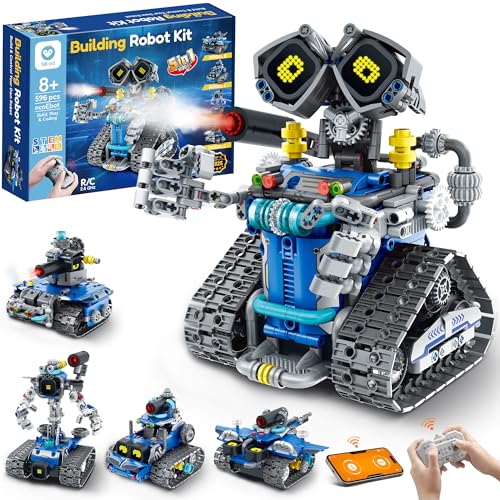
- 596 pieces build five models
- Adds LED eyes, sounds, and mist effects
- Remote, Bluetooth app, and rechargeable play
Best For: Kids seeking varied builds and interactive robot features
Best Creative Variety

- Build 36 different robot designs
- Includes 14 motorized models
- Sorting tray and video tutorials included
Best For: Kids who want varied indoor STEM building projects
Best Solar STEM Option
12-in-1 Solar Robot Building Kit

- Build 12 robot and vehicle models
- Works with sunlight or strong artificial light
- Includes a larger solar panel and 190 pieces
Best For: Kids exploring renewable energy through hands-on builds
Best Mechanical Coding Project
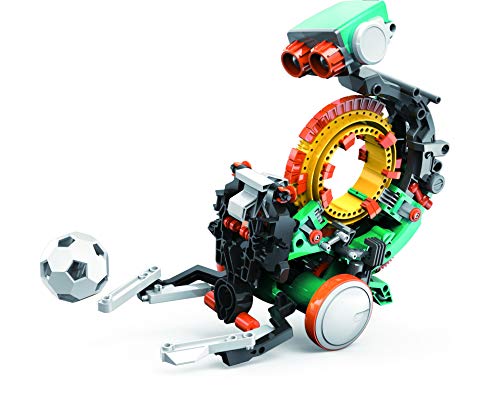
- Mechanical coding wheel controls actions
- Robot can throw, lift, kick, and draw
- Designed as a multi-hour STEM build
Best For: Older kids interested in coding and mechanical engineering
Best 3-in-1 Build-and-Code Kit

- 440 pieces with three robot configurations
- App, remote, and programmed-path control
- Includes extra pieces for continued building
Best For: Kids who want varied builds and beginner-friendly coding play
Best Mechanical Engineering Project

- Combines wooden construction with circuits
- Includes motors, PCB, wires, and tutorial
- No soldering required; batteries not included
Best For: Older children, teens, adults, and classroom engineering projects
Best Control Variety
Programmable Building Block Robot
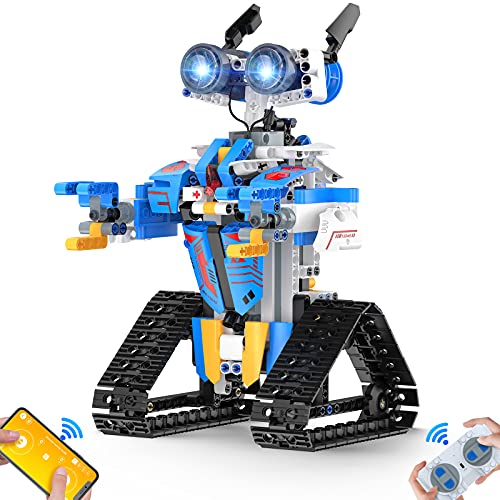
- 468-piece kit with lights and moving joints
- App and remote control with multiple modes
- USB charging cable and sturdy ABS construction
Best For: Kids who want building, programming, and interactive robot play
Versatile Builder – Opmind 5-in-1 STEM RC Robot Kit
For families comparing robot building kits for indoor use, the Opmind 5-in-1 kit combines hands-on construction with remote and app-based play. Its 419 included building pieces can form five models, while the rechargeable system supports extended building and driving sessions.
Best For: Kids ages 8–13 who enjoy switching between builds and exploring app-controlled robot functions.
Pros:
- Five build options include a warrior robot, ninja, boar, chariot, and buggy.
- App features include four-direction movement, 360-degree rotation, navigation paths, and AI programming.
- Rechargeable battery and a motor system compatible with major building-block brands.
- ABS construction is described as ASTM- and CPSIA-certified.
Cons:
- The supplied information lists both 419 and 443 pieces, so buyers should confirm the package contents.
- Age guidance varies in the listing from 6–12 to 8–13.
This is a flexible indoor STEM option for children who want both building variety and programmable-style play. The multiple models and app tools offer more ways to stay engaged than a single-build kit.
Hands-On Starter – Design & Drill Robot Workshop
The Design & Drill Robot Workshop is a straightforward choice among robot building kits for indoor use, especially for younger children. Instead of electronic coding, it focuses on assembling and taking apart a robot with a kid-friendly drill, screwdriver, bolts, gears, and interchangeable pieces.
Best For: Children ages 3–6 developing early construction, fine-motor, and problem-solving skills.
Pros:
- Includes a drill, screwdriver, gear socket bit, 32 bolts, 26 interchangeable pieces, and seven gears.
- Hands-on tightening and loosening activities support fine-motor and early engineering practice.
- Designed for independent, robotics-lab-themed construction play.
Cons:
- Two AA batteries are required and are not included.
- It is a manual construction toy rather than a remotely controlled or programmable robot.
This kit is best viewed as an introductory construction set rather than an advanced robotics platform. Its simple tools and reusable parts make it suitable for younger indoor builders who are learning how things fit together.
Coding Progression – Makeblock mBot STEM Robot
The Makeblock mBot is a strong pick for robot building kits for indoor use when coding is a priority. It can be assembled in about 15 minutes, then used as a remote-control car or as a learning platform for Scratch and Arduino programming.
Best For: Kids ages 8–12 who want a structured path from basic assembly to coding and robotics projects.
Pros:
- Step-by-step learning progression from Scratch to Arduino.
- Supports line-following, obstacle avoidance, remote control, and programming activities.
- Includes coding cards and access to three Makeblock apps plus mBlock software.
- Open-source design works with more than 100 electronic modules and 500 parts from the Makeblock platform.
Cons:
- The robot requires four AA batteries, and the remote requires a CR2025 battery; these are not included.
- Additional modules and parts are not included with the basic robot kit.
mBot is a practical choice for families seeking an expandable learning platform rather than a one-time building project. Its tutorials and software support continued learning as a child becomes more comfortable with programming.
Feature-Packed 5-in-1 – Sillbird STEM Robot Building Kit
The Sillbird kit adds interactive features to the robot building kits for indoor use category. Its 596 pieces create five models with different difficulty levels, and children can control the finished robot by remote, Bluetooth app, or creative coding activities.
Best For: Kids ages 8–14 who want progressively challenging builds plus lights, sounds, and app control.
Pros:
- 596 pieces support five models, including robot, tank, and car designs.
- Digital LED eyes, sound effects, and a water-activated mist feature add interactive play.
- Offers remote control, Bluetooth app access, and coding activities.
- Rechargeable battery provides up to 40 minutes of continuous play per charge.
Cons:
- The mist feature requires adding a little water.
- The supplied details describe a rechargeable battery while also listing one included AA battery, so power requirements should be verified.
This set suits children who want more than a static build. The graduated models can support growing confidence, while the lights, sounds, mist, and control options provide additional indoor play value.
Best Creative Variety – 36-in-1 Motor Robotics Kit
For families comparing robot building kits for indoor use, the JOVA Klever Kits set stands out for its broad selection of projects. Kids ages 8–13 can assemble 36 different robot designs, including 14 motorized models, with instructions and video tutorials to support the build.
Best For: Kids who want lots of indoor robot-building variety, screen-free STEM play, and opportunities to build with family or friends.
Pros:
- Offers 36 robot builds, including 14 motorized designs.
- Includes a sorting tray to help organize and store parts.
- Provides a full-color instruction booklet and video tutorials.
- Supports hands-on learning in science, engineering, mechanics, and problem-solving.
Cons:
- The 334-piece set may require careful organization during assembly.
- The recommended age range is limited to children ages 8–13.
With its unusually high number of build options and dedicated parts tray, this kit is a practical choice for children who may want to revisit robot building repeatedly rather than complete just one project.
Best Solar STEM Option – 12-in-1 Solar Robot Building Kit
The Sillbird Solar Building Robot Kit is a versatile option among robot building kits for indoor use, especially when paired with a strong artificial light source such as a flashlight. Its 12 buildable models introduce kids ages 8–14 to solar power, engineering, and hands-on problem-solving.
Best For: Kids interested in renewable energy, adjustable build difficulty, and robot projects that can be used indoors with artificial light or outdoors in sunlight.
Pros:
- Offers 12 robot, car, and other buildable models.
- Can run on sunlight or a strong indoor artificial light source.
- Features an upgraded larger solar panel for stronger power output.
- Includes 190 pieces and clear step-by-step instructions.
Cons:
- Indoor operation depends on having a sufficiently strong light source.
- Solar power may be less convenient than battery power for consistent indoor play.
This kit adds an energy-focused learning angle to robot construction. Its varying difficulty levels can also make it a suitable choice for children developing their building skills over time.
Best Mechanical Coding Project – Mech-5 Coding Robot Kit
For older children seeking robot building kits for indoor use, the TEACH TECH Mech-5 offers a deeper mechanical engineering and coding project. Designed for ages 10 and up, it uses snap-on coding buttons and a mechanical coding wheel to program actions such as throwing, lifting, kicking, and drawing.
Best For: Future engineers ages 10 and up who prefer a focused, multi-hour indoor build with mechanical coding and hands-on actions.
Pros:
- Uses a mechanical coding wheel to control multiple robot actions.
- Introduces mechanical engineering and coding basics through play.
- Provides an in-depth, hands-on building experience rather than a pre-assembled toy.
- Can throw, lift, kick, draw, and perform other programmed actions.
Cons:
- Assembly may take multiple hours and requires careful attention to instructions.
- It is recommended for ages 10 and up, making it less suitable for younger builders.
- Requires two AAA batteries.
Mech-5 is the strongest choice here for a substantial indoor project centered on mechanical coding. It is best suited to children who are ready to follow detailed assembly steps and spend significant time refining a build.
Best 3-in-1 Build-and-Code Kit – App/Remote Robot Car
For shoppers comparing robot building kits for indoor use, this 440-piece set combines hands-on construction with app and remote-control play. Kids can build a robot with movable fingers, then rebuild it as a stunt tank or robot girl, making it a flexible choice for supervised STEM activities at home.
Best For: Kids ages 8–12 who want multiple builds plus introductory programming and remote-control features.
Pros:
- Offers three build configurations from 440 pieces.
- Supports app control, remote control, and programmed paths.
- Includes extra pieces and sturdy plastic construction.
- Encourages engineering, creative thinking, and hand-eye coordination.
Cons:
- Disposable batteries are required for operation.
- The manufacturer age guidance varies between 6+ and 6–12 years.
This kit is a strong indoor option when variety matters. Its combination of rebuilding, movement, and basic coding gives children several ways to stay engaged, although battery operation is worth planning for before play begins.
Best Mechanical Engineering Project – Wooden Robot Arm Kit
This wooden robot arm is a more focused choice among robot building kits for indoor use, emphasizing mechanical assembly and circuit basics rather than a programmable mobile robot. The project includes motors, a PCB microcontroller board, wires, and a step-by-step tutorial for a hands-on building experience.
Best For: Older kids, teens, adults, and classroom or family projects interested in circuits, mechanical movement, and engineering challenges.
Pros:
- Introduces circuits, motors, and mechanical control through assembly.
- Uses wooden pieces for a challenging 3D puzzle-style build.
- Requires no soldering and includes the assembly accessories.
- Supports problem solving, logical thinking, and motor skills.
Cons:
- Six AA batteries are required but not included.
- The assembly may be more demanding than a simple play-focused robot kit.
Choose this kit if the building process is the main attraction. It offers a satisfying indoor STEM project with a clear engineering focus, but buyers should supply batteries and allow time for careful assembly.
Best Control Variety – Programmable Building Block Robot
For families seeking robot building kits for indoor use with plenty of control options, this 468-piece building-block robot offers app and 2.4GHz remote operation. It can move in multiple directions, rotate, light up, and support path, voice, gravity-sensor, and STEM programming modes.
Best For: Kids ages 8 and up who enjoy construction, interactive movement, lights, and experimenting with several control modes.
Pros:
- Includes 468 pieces, stickers, remote control, and USB charging cable.
- Provides app Bluetooth control and a 2.4GHz remote with a stated range over 20 meters.
- Offers remote, path, voice, gravity-sensor, and programming modes.
- Uses sturdy, non-toxic ABS plastic with smooth edges.
Cons:
- The listing has inconsistent manufacturer age information, including an 8-year recommendation.
- Assembly still requires following the included step-by-step instructions.
This is a versatile pick for indoor play when children want both building and interactive features. Its charging cable and broad control selection reduce the need for disposable batteries, while the lights and moving joints add play value after assembly.
How We Picked These Robot Building Kits for Indoor Use
We focused on kits that offer more than a single finished toy. Strong choices provide meaningful assembly, multiple builds or functions, and an appropriate challenge for the recommended age. We also considered whether instructions are accessible, whether the kit supports coding or remote control, and how well it works in a typical indoor space.
Because the lineup includes beginner construction sets, solar-powered projects, app-controlled models, and advanced robotic systems, the best option depends on the child’s age, patience, and preferred way to play.
Quick Comparison
| Best For | Look For | Typical Advantage |
|---|---|---|
| First-time builders | Simple instructions and fewer parts | Lower frustration and quick progress |
| Creative explorers | Multiple models and interchangeable components | More replay value |
| Young coders | App control, programming, or sensors | Stronger technology skills |
| Older kids and teens | Complex mechanisms and expanded projects | Longer-lasting challenge |
| Small indoor spaces | Compact robots and controlled movement | Easier testing at home |
Key Buying Factors for Robot Building Kits for Indoor Use
Age and Difficulty
Check the manufacturer’s age guidance, but also consider the child’s building experience. A high-part-count kit may be exciting for an experienced eight-year-old yet overwhelming for a beginner. Look for clear diagrams, labeled components, and manageable stages.
Build Variety and Replay Value
Multi-in-one kits can keep children engaged longer because they support different robots, vehicles, or mechanical projects. Confirm whether all models can be built simultaneously or require taking one apart before starting another.
Control and Coding Features
Remote controls are usually easy to enjoy immediately, while app control and programmable functions offer deeper learning. Check device compatibility, required apps, Bluetooth or wireless requirements, and whether a phone or tablet is needed.
Indoor Practicality
For indoor use, prioritize compact designs, smooth-floor performance, quieter motors, and safe speeds. Also check whether batteries, charging equipment, or adult assistance are required. Small parts mean a clear workspace and supervision are important.
Who Should Buy Which Robot Building Kits for Indoor Use?
Choose a straightforward drill-and-build or basic RC kit for a child who is new to robotics. Pick a multi-build set for creative children who enjoy changing designs and experimenting. App-enabled or coding-focused models suit kids who already like technology, programming, or controlled challenges. Older children, teens, and confident builders will generally get more from kits with complex mechanisms, robotic arms, sensors, or multiple programming options.
When in doubt, match the kit to the child’s current skill level rather than buying the most advanced model. A robot that can be completed successfully—and modified afterward—is more likely to encourage independent learning and repeat indoor play.