Smart glasses let you capture a hands-free point of view without reaching for your phone. But a 4K claim alone won’t tell you how steady the footage looks, how long you can record, or whether the frames are comfortable.
This roundup covers 10 options, from camera-first sunglasses to glasses with translation and open-ear audio. Use the buying guide below to match the features to what you actually plan to film.
Best 10 Smart Glasses for Video Recording Picks for 2026
Best for Action Footage
AI Smart Glasses with 1200p EIS Video

- 1200p/30fps video with six-axis EIS
- Polarized UV400 lenses
- Wi-Fi sync and voice AI
Best For: Outdoor creators recording rides and hikes
Best for Flexible Clip Lengths
Osawalla Photochromic Camera Glasses

- 1080p video with EIS
- Clips from 15 seconds to 12 minutes
- 40.8g frame with photochromic lenses
Best For: Travelers wanting adjustable clip lengths
Best Lens Versatility

- 1080p video with anti-shake processing
- Two interchangeable lens pairs
- Three-minute recording limit per clip
Best For: Buyers switching between adaptive and polarized lenses
Best for Everyday Sharing
L802 Photochromic Camera Glasses

- 1200p video with stabilization
- Photochromic lenses and open-ear audio
- Wi-Fi file transfer via phone app
Best For: Casual recording and phone-based sharing
Best for Multilingual Travel

- 4K video with electronic stabilization
- Translation across 165+ languages
- Up to 80 minutes of video per charge
Best For: Travelers who want hands-free filming and translation
Best for Everyday Use

- Stabilized 1080p video at 30 fps
- Two lens options for indoor and outdoor use
- AI translation across 139 languages
Best For: Buyers who want swappable lenses and hands-free capture
Best for Everyday Style

- Hands-free photo and video capture
- Open-ear audio and Meta AI
- Charging case adds up to 48 hours
Best For: Daily wear with hands-free capture and calls
Travel Translation Pick
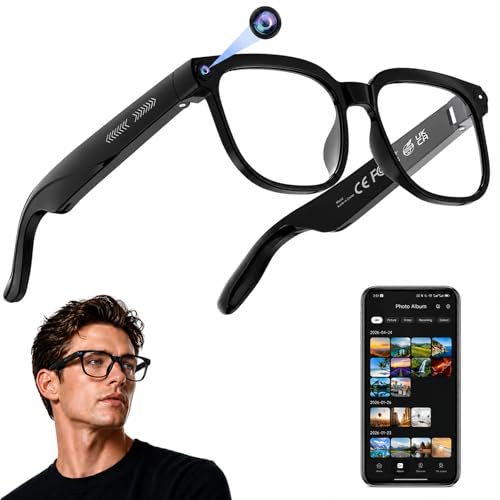
- Listed 4K recording
- Translation and object recognition
- Conflicting water-resistance details
Best For: Travel clips and translated conversations
Adaptive Lens Pick

- Claimed anti-shake 4K camera
- Photochromic lenses and ear hooks
- Conflicting battery-life figures
Best For: Recording across indoor and outdoor settings
Best for Action Footage – AI Smart Glasses with 1200p EIS Video
For shoppers comparing smart glasses for video recording during rides or hikes, this pair combines an 8MP camera, 1200p/30fps video, and six-axis electronic image stabilization. Polarized UV400 lenses make it an outdoor-focused option.
Best For: Cyclists and hikers who want stabilized, hands-free footage plus voice-controlled AI features.
Pros:
- Six-axis EIS is designed to reduce shake in action footage.
- Wi-Fi sync and app-based one-click editing simplify sharing.
- Voice AI, object recognition, and translation add travel utility.
Cons:
- No built-in HUD display.
- The notes conflict on weather resistance, listing both IP64 and IP54; verify the rating before purchase.
This is a strong feature match for active recording, though its stated five-hour runtime applies to music playback rather than continuous video.
Best for Flexible Clip Lengths – Osawalla Photochromic Camera Glasses
These smart glasses for video recording offer 1080p capture, an 8MP camera, and selectable clip lengths from 15 seconds to 12 minutes. Photochromic lenses and a lightweight 40.8g frame suit changing light and extended everyday wear.
Best For: Travelers who want flexible recording lengths, adaptive lenses, and open-ear audio.
Pros:
- EIS helps smooth first-person footage.
- Six clip-length settings accommodate quick moments and longer scenes.
- Supports phone calls, music, object recognition, and translation through its connected features.
Cons:
- Photochromic lenses may darken more slowly indoors or in winter.
- The advertised seven-hour battery figure is for music playback, not video recording.
Choose this pair if recording-length control matters more than maximum stated video resolution; check how its lenses respond in your typical conditions.
Best Lens Versatility – Mingtawn Recording Glasses
Mingtawn’s smart glasses for video recording include interchangeable photochromic and polarized blue-mirror lenses, making them adaptable to different outings. Despite the product title’s 4K wording, the supplied feature details specify 1080p video and 2K image capture.
Best For: Buyers who want one recording frame with two lens options for travel and outdoor use.
Pros:
- Includes two interchangeable lens pairs.
- Built-in anti-shake processing aims to improve recorded footage.
- Object recognition, voice assistance, and ENC dual microphones add hands-free functions.
Cons:
- Video is specified as 1080p in the feature details, not 4K.
- Individual recordings are limited to three minutes.
The lens bundle is the clearest reason to consider this model. Its stated one-hour continuous-use figure is more relevant to recording plans than its separate music-playback claim.
Best for Everyday Sharing – L802 Photochromic Camera Glasses
The L802 is a practical option among smart glasses for video recording if you want simple button-operated, first-person capture. It records 1200p video with algorithm-based stabilization and transfers saved files to a phone through the Genimiro app over Wi-Fi.
Best For: Everyday users who want hands-free clips, photochromic lenses, and straightforward phone transfers.
Pros:
- 1200p video and stabilization target casual point-of-view recording.
- Photochromic lenses darken in sunlight.
- Open-ear calls and music keep ears uncovered.
Cons:
- AI assistance and translation require the app on a connected phone.
- Storage claims conflict: the title and bullets say 16GB, while the details list 32GB.
Its appeal is a straightforward capture-and-transfer workflow. Confirm storage capacity before ordering if you expect to keep many clips on the glasses.
Best for Multilingual Travel – iONCT 4K Camera Smart Glasses
For shoppers comparing smart glasses for video recording, the iONCT pair combines hands-free 4K capture with an 8MP camera, electronic image stabilization, and voice or button controls. It also includes interchangeable sunglass and blue-light-blocking lenses.
Best For: Travelers who want first-person video and translation features in one pair of glasses.
Pros:
- Records 4K video and takes 32MP photos, with electronic stabilization.
- Offers AI translation across more than 165 languages and camera-based object recognition.
- Provides open-ear audio, hands-free calls, and up to 80 minutes of total video recording per charge.
Cons:
- Not water-resistant, so wet-weather use calls for caution.
- Recording time is shorter than the stated 10-hour music playback time.
This is a feature-packed choice if translation matters as much as filming; plan around its recording battery limit and lack of water resistance.
Best for Everyday Use – Bapick AI Camera Glasses
The Bapick option is worth a look if you want smart glasses for video recording that can switch between outdoor and screen-focused use. Its 8MP camera supports stabilized 1080p video, while the supplied notes also list 4K imaging and 32MP photos.
Best For: Buyers who want interchangeable polarized and blue-light-blocking lenses alongside hands-free capture.
Pros:
- Stabilized 1080p recording at 30 fps and 32MP photo support.
- Includes polarized sunglass lenses and anti-blue-light lenses.
- Offers open-ear audio, Bluetooth 5.3 calling, and AI translation across 139 languages.
Cons:
- The listed stabilized video resolution is 1080p, despite the separate 4K imaging claim.
- Up to 80 minutes of continuous capture may require charging during longer outings.
Choose this pair for its lens options and broad everyday features, but check the recording specifications carefully if 4K video is your priority.
Best for Everyday Style – Ray-Ban Meta Gen 2 Wayfarer
For smart glasses for video recording that also work as everyday clear-lens eyewear, the Ray-Ban Meta Gen 2 Wayfarer pairs camera capture with open-ear audio and voice-enabled Meta AI. This listing is the matte-black, clear-lens version.
Best For: Everyday wearers who want hands-free video, calls, and AI features in a recognizable Wayfarer frame.
Pros:
- Captures photos and videos without reaching for a phone.
- Open-ear speakers let you hear audio while remaining aware of your surroundings.
- Offers up to eight hours of moderate use, plus an additional 48 hours of charging from the case.
Cons:
- No augmented reality display.
- The included clear lenses are not tinted for bright sunlight.
This is the straightforward pick for daily wear and hands-free capture. The supplied notes do not specify video resolution, so compare that detail separately if image specs drive your decision.
Travel Translation Pick – Plunthorn 4K AI Smart Glasses
These smart glasses for video recording pair a listed 4K camera with real-time translation and a voice assistant. They suit travelers who want hands-free clips alongside help with conversations and identifying objects.
Best For: Travel and everyday recording with translation features.
Pros:
- Listed 3840 × 2160 video resolution.
- Real-time translation, voice assistant, and object recognition.
- Open-ear Bluetooth audio for music and hands-free calls.
Cons:
- No GPS geotagging.
- Water protection is unclear: the bullets claim IP65, but the details say “Not Water Resistant.”
The camera-and-translation combination is appealing for trips, but verify the water-resistance rating before relying on them in rain.
Stabilized Video Pick – AMZISH 8MP Camera Glasses
For shoppers comparing smart glasses for video recording, this AMZISH pair emphasizes an 8MP camera, 30fps video, and electronic stabilization. Its interchangeable clear and dark lenses make it adaptable to different settings.
Best For: Hands-free travel or activity clips when steadier footage matters.
Pros:
- 8MP camera with 30fps video and claimed stabilization.
- Up to 60 minutes of continuous recording per session.
- Includes clear and dark interchangeable lenses.
- 32GB storage and Wi-Fi/Bluetooth transfer options.
Cons:
- The listed recording limit is 60 minutes per session.
- IP65 protection does not make them suitable for swimming or submersion.
This is the most recording-focused option here if stabilization and a stated session limit help you plan shoots; the longer advertised battery figures apply to other uses, not continuous video.
Adaptive Lens Pick – Uigsas U610 4K Camera Glasses
These smart glasses for video recording combine a claimed anti-shake 4K camera with photochromic lenses that darken outdoors. Included ear hooks are a practical extra for keeping the glasses in place during activities.
Best For: Indoor-to-outdoor use with hands-free recording.
Pros:
- Claimed 4K camera with anti-shake recording.
- Photochromic lenses adapt to outdoor light.
- Includes ear hooks and 32GB of storage.
- Real-time translation and Bluetooth calls.
Cons:
- No GPS geotagging.
- Battery figures differ: the bullets claim 10+ hours of music playback, while the details list a four-hour average battery life.
The adaptive lenses set this pair apart for changing light conditions, but check expected recording runtime before planning a long outing.
How We Picked These Smart Glasses for Video Recording
We compared the listed camera specifications, stabilization claims, lens options, storage, audio features, and everyday usability across the 10 selected models. The lineup includes 1080p, 1200p, and advertised 4K options, plus the Ray-Ban Meta (Gen 2) Wayfarer for shoppers interested in a recognizable frame style. Specifications are a starting point, not a substitute for sample footage: resolution claims alone cannot establish image quality, recording reliability, or battery life.
Quick Comparison: Find Your Starting Point
For moving point-of-view clips, start with models that explicitly advertise electronic image stabilization (EIS) or anti-shake recording. For outdoor use, compare the polarized UV400 sunglasses and other tinted-lens options. If you move between indoor and outdoor settings, the L802’s photochromic lenses may be more convenient. Shoppers interested in translation or AI assistance should compare those features separately from camera performance. If frame style matters most, consider the clear-lens Ray-Ban Meta Wayfarer alongside the less familiar brands.
Key Buying Factors for Smart Glasses for Video Recording
Video Quality and Stability
Check native resolution, frame rate, field of view, and stabilization—not just a “4K” badge. Higher resolution can help with detail, but shaky footage may still be hard to watch. Look for unedited daytime, indoor, and walking samples when available, and confirm whether an advertised resolution refers to recorded video rather than photos or an upscaled file.
Recording Time, Storage, and Transfers
Ask how long the glasses can record continuously, whether clips stop at a time limit, and how many clips fit in available storage. The L802 lists 16GB, but capacity alone does not tell you how long footage can be stored. Check charging method, phone compatibility, required app, and how easily files transfer before buying.
Fit, Lenses, and Controls
Glasses only work as an everyday camera if they fit comfortably and suit the lighting where you record. Consider frame weight, nose fit, clear versus tinted lenses, UV protection for outdoor wear, and whether prescription options are available. Physical buttons can be easier to use while moving; voice controls may be useful when your hands are occupied.
Audio and Privacy
If you narrate clips, check microphone performance in wind and traffic. Open-ear speakers are convenient but may be audible to people nearby. Learn where the camera points, whether a recording indicator is visible, and the rules for recording or sharing footage where you live and travel.
Who Should Buy Which Smart Glasses for Video Recording?
Choose an EIS or anti-shake model if walking footage is the priority. Choose polarized sunglasses for bright outdoor activities, photochromic lenses for changing light, or clear lenses for predominantly indoor wear. If you mainly want translation, AI features, or music, verify that those functions work well in your language and with your phone before prioritizing them over video quality. Whatever your shortlist, confirm current specifications and return terms, then seek real footage from the exact model you plan to buy.