If you want a smart home camera for Google Home, the best options do more than stream video. They should fit into your routines, send useful alerts, and give you dependable access from the Google Home ecosystem.
This roundup focuses on cameras that balance image quality, smart detection, night vision, two-way audio, and practical installation so you can choose the right fit for indoor or outdoor use.
Best 10 Smart Home Camera for Google Home Picks for 2026
Premium indoor pick
Google Nest Cam Indoor 3rd Gen, 2K wired
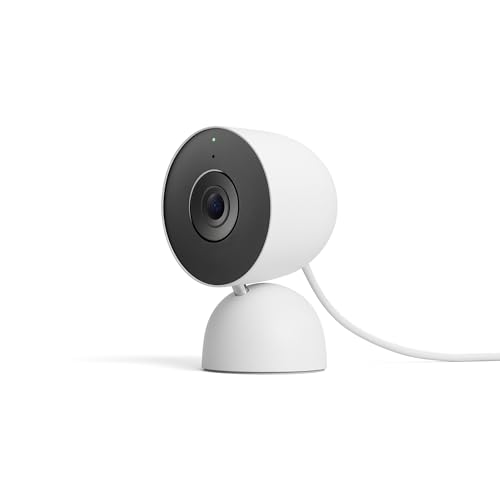
- 2K HDR video with color night vision
- Google Home and Gemini smart alerts
- Wired indoor design with strong security
Best For: Buyers who want the sharpest Google Home indoor camera with intelligent alerts
Budget pan/tilt option
Tapo C210 2K pan/tilt indoor camera

- 2K video with 360° pan/tilt coverage
- Google Assistant support for live viewing
- Local storage and two-way audio
Best For: Families needing full-room indoor coverage with Google Home support
Most flexible Google pick
Google Nest Cam Battery wireless indoor/outdoor
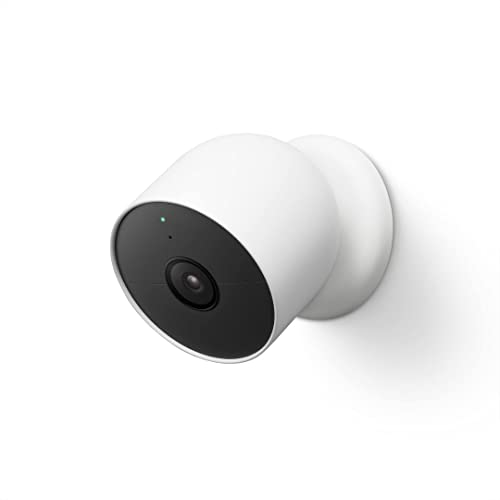
- Wireless battery design for easy placement
- Person, animal, and vehicle alerts
- Indoor or outdoor use with night vision
Best For: Users who want a wireless Google Home camera they can move inside or outside
Value indoor tracker
Kasa EC71 1080p pan/tilt indoor camera

- 360° pan/tilt with patrol mode
- Motion tracking and person detection
- Local microSD storage plus Google Home support
Best For: Budget shoppers wanting a tracking indoor camera for Google Home
Floodlight Pick
Google Nest Cam with Floodlight
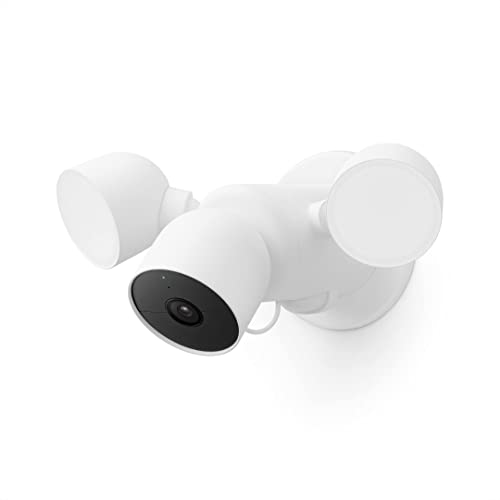
- 1080p HDR video with night vision
- Person, animal, and vehicle alerts
- Customizable floodlight for outdoor deterrence
Best For: Outdoor Google Home users who want lighting plus smart alerts
Indoor Coverage Pick
Tapo 1080P Indoor Pan/Tilt Camera

- 360° pan and 114° tilt coverage
- 1080p video with night vision and 2-way audio
- Motion, person, and baby-cry alerts
Best For: Families wanting wide indoor coverage in a Google Home setup
Window Mount Pick

- Easy peel-and-stick window mounting
- Color night vision with glare reduction
- 24/7 local recording without subscription
Best For: People who want a simple window-mounted camera with Google support
Smart 2K Indoor Coverage
ZEEPORTE 2K Indoor Cameras for Home Security

- 2K QHD video with customizable activity zones
- Motion alerts, 2-way audio, and built-in siren
- Night vision to 30 ft plus microSD local storage
Best For: Indoor baby, pet, and room monitoring with sharper 2K detail
Versatile Indoor/Outdoor Pair
WYZE Cam OG Indoor/Outdoor 1080p Wi-Fi Smart Home Security Camera

- Indoor/outdoor design with IP65 rating
- 1080p HD video and color night vision
- Motion and sound alerts with cloud or microSD storage
Best For: Flexible home monitoring with indoor/outdoor placement and Google Assistant support
Roku-Ready Home Monitoring
Roku Indoor Camera, Home Security with 1080p HD Color Night Vision

- 1080p full-color night vision for indoor rooms
- Motion and sound detection with 2-way audio
- Roku TV/player viewing plus Google Assistant support
Best For: Indoor family and pet monitoring with easy Roku-based viewing
Premium indoor pick – Google Nest Cam Indoor 3rd Gen, 2K wired
If you want a smart home camera for Google Home with sharper detail and smarter alerts, the Google Nest Cam Indoor (3rd Gen) is built for that job. Its 2K HDR video, color night vision, and Gemini-powered notifications make it a strong pick for checking in on rooms, hallways, kids, or pets with more context than a basic camera.
Best For: Homeowners who want a wired indoor Google Home camera with 2K clarity and intelligent alerts.
Pros:
- 2K HDR video for crisp indoor detail and wider room coverage
- Works with Google Home and Gemini for smarter notifications and video summaries
- Color night vision helps you see more clearly in the dark
- Encrypted video, two-step verification, and enhanced Google Account security
Cons:
- Requires a corded power setup
- Gemini features need a Google Home Premium subscription
- Best suited to indoor use only
Overall, this is the most feature-rich option here if your priority is Google Home integration plus higher-resolution indoor monitoring. It favors buyers who want smarter alerts and clearer video over portability.
Budget pan/tilt option – Tapo C210 2K pan/tilt indoor camera
The Tapo C210 is a practical smart home camera for Google Home if you want room-wide coverage on a budget-friendly indoor camera. Its 2K video, pan/tilt movement, and motion or baby-cry notifications make it especially useful for bedrooms, nurseries, and pet monitoring.
Best For: Families who want a Google Home-compatible pan/tilt camera for monitoring a whole room.
Pros:
- 2K video captures more detail than basic 1080p cameras
- 360° horizontal and 114° vertical pan/tilt coverage
- Works with Google Assistant and can stream to Chromecast/Nest displays
- Local microSD storage plus optional cloud features
Cons:
- Google streaming is limited to Chromecast and Nest devices with screens
- Needs 2.4GHz Wi-Fi
- Not a battery-powered option
This is a strong pick if you care more about coverage and flexible viewing than premium smart features. It gives you a lot of room-monitoring value for an indoor Google Home setup.
Most flexible Google pick – Google Nest Cam Battery wireless indoor/outdoor
If you want a smart home camera for Google Home that is easy to place anywhere, the Google Nest Cam Battery is a flexible wireless choice. It uses built-in intelligence to tell people, animals, and vehicles apart, and it sends alerts through the Google Home app without requiring a subscription for the core detection features.
Best For: People who want a wireless Google Home camera for indoor or outdoor placement.
Pros:
- Wireless battery power makes placement much easier
- Person, animal, and vehicle detection works without a subscription
- 1080p HDR video with night vision
- Can be used indoors or outdoors
Cons:
- Video resolution is lower than 2K models
- Only 3 hours of free event video history
- Continuous 24/7 recording needs extra accessories and Nest Aware Plus
This model stands out for flexibility rather than raw resolution. It makes the most sense if you want easy installation and dependable Google Home alerts in more than one location.
Value indoor tracker – Kasa EC71 1080p pan/tilt indoor camera
The Kasa EC71 is a smart home camera for Google Home that focuses on affordable room coverage and useful everyday monitoring. With 360° pan/tilt movement, motion tracking, 1080p video, and support for Google Home voice viewing, it works well as a baby monitor, pet cam, or general indoor security camera.
Best For: Budget-minded buyers who want a Google Home-compatible indoor camera with pan/tilt tracking.
Pros:
- 360° pan/tilt coverage with patrol mode for scanning a room
- Motion tracking and person detection add useful alerts
- 1080p video, two-way audio, and night vision up to 30 ft
- Local microSD storage or optional Kasa Care cloud storage
Cons:
- Only 1080p resolution, not 2K
- Requires 2.4GHz Wi-Fi
- Google Home viewing is limited to smart displays like Echo Show-style screen support and Chromecast-type viewing
For the money, this is a practical all-rounder if you want movement tracking and local storage without paying for a more advanced camera. It’s a straightforward indoor pick for everyday Google Home-compatible monitoring.
Floodlight Pick – Google Nest Cam with Floodlight
If you want a smart home camera for Google Home that does more than just record, the Nest Cam with Floodlight is built for outdoor monitoring and active deterrence. It combines 1080p HDR video, night vision, and 180° motion detection with a customizable floodlight, so you can see activity clearly and light up the area when something matters.
Best For: Homeowners who want an outdoor Google Home camera with built-in lighting and person, animal, and vehicle alerts.
Pros:
- Built-in intelligence can distinguish between people, animals, and vehicles.
- 1080p HDR video with night vision and 3 hours of free event video history.
- Customizable floodlight helps illuminate important activity automatically.
- Works through the Google Home app and supports two-way talk with the built-in speaker and mic.
Cons:
- 24/7 recording and familiar face features require a Nest Aware subscription.
- Local storage backup is limited to up to an hour of recorded events during outages.
As an outdoor option, this model makes sense if you want a Google-integrated camera that can watch, light, and alert from one device. It is a strong fit for driveways, entryways, and other areas where visible deterrence matters.
Indoor Coverage Pick – Tapo 1080P Indoor Pan/Tilt Camera
For an indoor smart home camera for Google Home, the Tapo C201 focuses on broad room coverage and practical monitoring. Its pan/tilt design gives you a 360° horizontal and 114° vertical range, while 1080p Full HD video, motion/person/baby-cry alerts, and night vision help you keep tabs on what is happening inside the home.
Best For: Families who want a budget-friendly indoor Google Assistant-compatible camera for room-wide coverage.
Pros:
- Pan/tilt coverage reaches 360° horizontally and 114° vertically.
- 1080p video, night vision up to 30 ft., and 2-way audio support everyday monitoring.
- Motion, person, and baby-cry detection send instant notifications.
- Local microSD storage is available, with optional Tapo Care cloud storage.
Cons:
- It is an indoor-only camera.
- Uses wired power, so placement depends on outlet access.
This is a practical pick when you need flexible indoor viewing rather than outdoor hardware. The Google Assistant compatibility and no-fee core features make it easy to add to a Google Home setup.
Window Mount Pick – Wyze Window Camera
The Wyze Window Camera is a smart home camera for Google Home users who want to monitor through a window without a complicated install. It uses a stick-on window mount, a glare-reducing design, upgraded color night vision, and 24/7 local recording so you can keep an eye on the outside from inside the home.
Best For: Apartment or home users who want an easy window-mounted camera with Google Assistant support.
Pros:
- Simple peel, stick, and plug installation with an included long cable.
- Special window design helps reduce glare and reflections for clearer footage.
- Color night vision and motion/sound alerts improve visibility and awareness.
- 24/7 local recording to microSD is available without a subscription.
Cons:
- It is designed around window mounting, so it is less versatile than a general indoor camera.
- Uses 2.4GHz Wi-Fi only, not 5GHz.
If you want a straightforward way to monitor a front window, driveway view, or other exterior sightline, this Wyze model is an easy fit. The Google Assistant support and subscription-free core recording make it appealing for simple setups.
Smart 2K Indoor Coverage – ZEEPORTE 2K Indoor Cameras for Home Security
If you’re shopping for a smart home camera for Google Home-style voice-controlled monitoring, this ZEEPORTE 2-pack is built for simple indoor oversight. It delivers 2K QHD video, motion alerts, 2-way audio, and night vision, making it a practical fit for nurseries, living rooms, hallways, and pet monitoring. It also includes local microSD storage support for users who want more control over recordings.
Best For: Indoor monitoring of babies, pets, and common areas with 2K detail and local storage.
Pros:
- 2K QHD resolution captures more detail than standard 1080p indoor cameras.
- Motion detection with instant alerts helps you react quickly to activity.
- 2-way audio and a built-in siren add communication and deterrence options.
- Night vision reaches up to 30 ft for overnight monitoring.
Cons:
- Designed for indoor use only.
- Needs corded power, so placement depends on outlet access.
- Google Home compatibility is not listed in the supplied notes; Alexa support is confirmed.
For buyers who want sharper indoor video and helpful security features in a 2-pack, this ZEEPORTE set offers a strong mix of clarity, alerts, and storage flexibility. It is especially appealing for rooms where you want both live viewing and quick response tools.
Versatile Indoor/Outdoor Pair – WYZE Cam OG Indoor/Outdoor 1080p Wi-Fi Smart Home Security Camera
This WYZE Cam OG 2-pack is a flexible smart home camera for Google Home users who want indoor/outdoor coverage and simple app-based monitoring. It records in 1080p HD, adds color night vision, and sends motion or sound alerts, so it works well for general home checking, pets, and kids’ rooms. The IP65 rating also makes it suitable for outdoor placement when paired with the required outdoor power adapter.
Best For: Indoor or outdoor monitoring when you want easy setup, color night vision, and Google Assistant compatibility.
Pros:
- Works indoors and outdoors with an IP65 rating.
- 1080p HD video with color night vision helps preserve detail after dark.
- Motion and sound alerts keep you updated through the Wyze app.
- Two recording options: cloud subscription or local microSD storage.
Cons:
- Outdoor use requires the separately sold Wyze Outdoor power adapter.
- Uses 2.4GHz Wi-Fi only, so 5GHz networks are not supported.
- Resolution is 1080p, so it is less detailed than 2K options.
As a practical two-camera bundle, the WYZE Cam OG is a strong pick if you want broad placement flexibility and dependable smart alerts. It balances smart-home compatibility, storage options, and day-to-night visibility without getting overly complicated.
Roku-Ready Home Monitoring – Roku Indoor Camera, Home Security with 1080p HD Color Night Vision
If you want a smart home camera for Google Home that is also easy to check from a Roku setup, this Roku Indoor Camera 2-pack keeps things straightforward. It offers 1080p HD color night vision, motion and sound detection, and 2-way audio for live check-ins with kids or pets. The camera is intended for indoor rooms like bedrooms, living rooms, kitchens, halls, and offices.
Best For: Indoor family and pet monitoring with Roku-friendly viewing and Google Assistant compatibility.
Pros:
- 1080p HD full-color night vision improves visibility in low light.
- Motion and sound detection provide quick alerts.
- 2-way audio lets you talk to pets or check in from the app.
- Can be viewed on a Roku TV or player using Roku Voice.
Cons:
- Indoor use only and not water resistant.
- Night vision range is listed at 15 ft, which is shorter than some rivals.
- Google Home is not explicitly named in the supplied feature details; Google Assistant support is listed.
This Roku two-pack makes sense if you value simple room monitoring and a TV viewing option as much as mobile access. It is a good fit for everyday indoor surveillance where fast alerts and easy check-ins matter more than advanced security extras.
How We Picked the Best Smart Home Camera for Google Home
We looked for models that offer solid Google Home compatibility, dependable video quality, and features people actually use every day. Priority went to clear resolution, motion alerts, night vision, two-way talk, and flexible mounting or placement options. We also considered whether a camera is better suited for indoor monitoring, outdoor security, or multi-use setups like pet or baby monitoring.
Quick Comparison: What Matters Most
Before choosing a Smart Home Camera for Google Home, compare the basics side by side: wired versus battery power, fixed versus pan-and-tilt coverage, and whether you want local storage, cloud storage, or both. Indoor cameras often emphasize easier setup and lower cost, while outdoor models usually add weather-ready design and stronger deterrence features such as floodlights or sirens.
Key Buying Factors for a Smart Home Camera for Google Home
Video Quality and Night Vision
Look for at least 1080p, and consider 2K if you want sharper detail for faces, pets, or package areas. Good night vision matters just as much as daytime clarity, especially for entries, nurseries, and living rooms.
Motion Alerts and Smart Detection
Useful alerts should help you react faster without constant false notifications. Features such as person detection, activity zones, and AI-based motion filtering can make a big difference for daily use.
Audio and Two-Way Communication
Two-way audio is valuable for checking in on kids, pets, or visitors. If you want to speak through the camera or hear clearly at a distance, make sure the microphone and speaker quality are consistently strong.
Power, Placement, and Coverage
Wired cameras are best if you want uninterrupted power and frequent monitoring. Battery-powered models are more flexible, while pan-and-tilt cameras cover a wider area with fewer blind spots. For outdoor use, weather resistance and mounting options are essential.
Who Should Buy Which Smart Home Camera for Google Home?
If you want the simplest setup for everyday monitoring, a wired indoor model is usually the easiest choice. If you need coverage around a driveway, porch, or yard, choose an outdoor camera with smart alerts and strong night vision. For larger rooms or pet monitoring, a pan-and-tilt camera is often the most practical option. And if you already rely on Google Home for automation, pick a camera that fits smoothly into that ecosystem instead of forcing extra apps or complicated steps.
In the end, the best Smart Home Camera for Google Home is the one that matches your space, your privacy preferences, and how you plan to use alerts day to day.