Moving video projects, photo libraries, game files, and system backups requires more than a basic drive case. The best SSD enclosures for large files pair fast interfaces with reliable controllers, effective cooling, and a fit that matches your SSD.
We selected 10 models spanning USB4, USB 3.2 Gen 2, NVMe, SATA, and 2.5-inch drives. Use the guide below to narrow the choices by transfer speed, compatibility, durability, portability, and value.
Best 10 SSD Enclosures for Large Files Picks for 2026
Most Versatile Design

- Supports PCIe and SATA M.2 SSDs
- Toolless drive installation
- Up to 1,000 MB/s via USB 3.2 Type-C
Best For: Mixed-drive users and supported game consoles
Best Compact NVMe Value
- 10Gbps USB 3.2 Gen 2 interface
- Supports 2230–2280 NVMe drives
- Thermal pad and shock-absorbing design
Best For: Portable NVMe storage up to 4TB
Best 2.5-Inch SATA Option

- Fits 2.5-inch SATA SSDs and hard drives
- Tool-free, plug-and-play setup
- Up to 5Gbps over USB 3.0
Best For: Repurposing existing 2.5-inch SATA drives
Best for Fast NVMe Transfers

- USB 3.2 Gen 2 supports up to 10Gbps
- Tool-free fit for 2230–2280 NVMe SSDs
- Aluminum cooling for sustained transfers
Best For: Creators and gamers moving large files from NVMe SSDs
Best for 2.5-Inch SATA Value
BENFEI Tool-Free SATA Enclosure

- Supports 2.5-inch SATA drives up to 6TB
- USB Type-C and Type-A connectivity
- Tool-free installation with UASP support
Best For: Repurposing a 2.5-inch SATA SSD for portable storage
Best for Rugged Versatility
ASUS TUF Gaming A1 SSD Enclosure
- Up to 10Gbps USB-C performance
- Supports M.2 NVMe and SATA SSDs
- IP68 and MIL-STD-810H durability
Best For: Gamers and travelers needing a durable dual-interface enclosure
Best Aluminum 2.5-Inch Pick

- Up to 6Gbps SATA transfer support with UASP
- Fits 2.5-inch SATA SSDs and HDDs up to 6TB
- Tool-free aluminum design with passive cooling
Best For: 2.5-inch SATA drive upgrades, backups, and file transfers
Best Rugged M.2 Option
ASUS Cobble 10Gbps SSD Enclosure

- 10Gbps USB-C performance for large transfers
- Supports NVMe and SATA M.2 drives
- IP55 water and dust resistance with tool-free swapping
Best For: Cross-platform M.2 workflows and protected portable storage
Best Value Dual-Protocol Pick

- Supports compatible NVMe and SATA M.2 drives
- 10Gbps USB 3.2 Gen 2 with UASP and TRIM
- Includes USB-C and USB-A cables plus thermal pads
Best For: Flexible M.2 drive transfers across USB-C and USB-A systems
Fastest USB4 Pick – SABRENT USB4 NVMe Enclosure
For demanding workloads involving large files, this SABRENT enclosure pairs USB4 connectivity with advertised transfers up to 3,900 MB/s. Its active cooling fan and aluminum-and-ABS build are suited to sustained transfers, provided your computer has a compatible USB4 or Thunderbolt port and you use a PCIe NVMe SSD.
Best For: Creators, editors, and mobile power users moving large files with USB4 or Thunderbolt systems.
Pros:
- Up to 3,900 MB/s over USB4 and up to 2,700 MB/s over Thunderbolt 3/4.
- Tool-free support for 2230, 2242, 2260, and 2280 PCIe NVMe drives.
- Integrated active cooling fan helps maintain stable performance during large transfers.
- Works with USB4, Thunderbolt 3/4, and backward-compatible USB-C ports.
Cons:
- Does not support SATA M.2 SSDs.
- Top speeds require compatible USB4 hardware and a suitable NVMe SSD.
This is the strongest option here for speed-focused users who regularly transfer very large files. Its cooling and broad host compatibility add practicality, but buyers should verify both the SSD type and host-port capability first.
Most Versatile Design – ADATA EC700G M.2 Enclosure
The ADATA EC700G is a flexible choice for large-file storage projects because it supports both PCIe and SATA M.2 SSDs and offers USB 3.2 Type-C connectivity. Advertised external speeds reach up to 1,000 MB/s, making it a practical option for computers and several current game consoles.
Best For: Users who want one tool-free M.2 enclosure for PCIe or SATA drives, computers, and supported consoles.
Pros:
- Supports both PCIe and SATA M.2 SSD formats.
- Toolless installation makes drive swaps straightforward.
- Advertised speeds reach up to 1,000 MB/s through USB 3.2 Type-C.
- Compatible with Windows, macOS, and listed Xbox Series X, Nintendo Switch, and PlayStation 5 systems.
Cons:
- Its 1,000 MB/s advertised speed is below USB4 enclosure options.
- RGB lighting and geometric styling may not suit every setup.
The EC700G emphasizes compatibility over maximum throughput. It is a sensible pick when drive-interface flexibility and console support matter more than achieving the highest possible speeds for very large files.
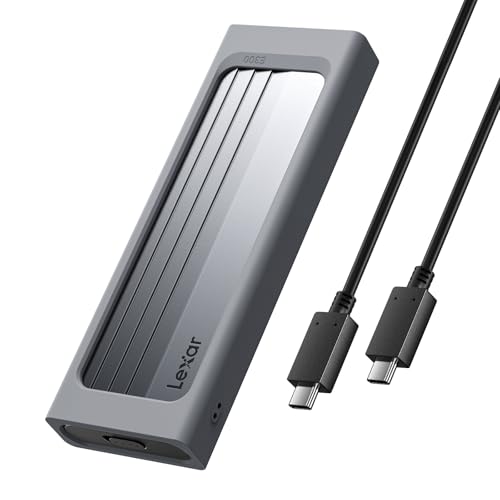
Best Compact NVMe Value – Lexar E300 M.2 Enclosure
For users seeking a compact way to move large files, the Lexar E300 converts an M.2 NVMe SSD into a USB-C external drive with up to 10Gbps theoretical connectivity. Its aluminum casing, thermal pad, and shock-absorbing structure support portable use without requiring tools for installation.
Best For: Laptop and desktop users who need a portable, tool-free NVMe enclosure for drives up to 4TB.
Pros:
- USB 3.2 Gen 2 interface provides up to 10Gbps theoretical transfer speed.
- Supports M Key and B+M Key NVMe SSDs in 2230 through 2280 sizes.
- Aluminum casing and built-in thermal pad help dissipate heat.
- Lanyard hole and shock-absorbing buffer structure suit mobile storage.
Cons:
- Does not support SATA SSDs.
- Maximum supported SSD capacity is 4TB.
- Actual performance depends on the host’s USB-C capability and installed SSD.
The E300 is a balanced portable choice for large-file transfers when 10Gbps USB-C is sufficient. It offers useful thermal and physical protection, but NVMe-only compatibility and the 4TB limit narrow its audience.
Best 2.5-Inch SATA Option – SABRENT USB 3.0 Enclosure
This SABRENT enclosure is designed for 2.5-inch SATA SSDs and hard drives, offering a simple route to external storage for large files. USB 3.0 connectivity supports transfer rates up to 5Gbps, while tool-free installation and plug-and-play operation keep setup straightforward.
Best For: Users repurposing a 2.5-inch SATA SSD or notebook hard drive as an external USB drive.
Pros:
- Supports standard 2.5-inch SATA and SATA II drives.
- Tool-free installation and hot-swappable plug-and-play operation.
- USB 3.0 supports transfer rates up to 5Gbps, with USB 2.0 backward compatibility.
- Works with Windows and Mac OS X and later systems.
Cons:
- Limited to 2.5-inch SATA drives, not M.2 NVMe SSDs.
- USB 3.0 is slower than USB4 and newer 10Gbps enclosure interfaces.
- Plastic construction is less premium than aluminum alternatives.
This is the practical low-complexity choice for existing 2.5-inch SATA hardware. It can handle large-file transfers at USB 3.0 speeds, but users buying for maximum throughput should consider a faster NVMe enclosure instead.
Best for Fast NVMe Transfers – SABRENT 10Gbps NVMe Enclosure
For anyone comparing SSD enclosures for large files, this SABRENT model is a fast, portable option for M.2 NVMe drives. Its USB 3.2 Gen 2 connection supports up to 10Gbps, while the aluminum top and thermal pad help manage heat during longer transfers.
Best For: Creators, gamers, and users who need quick portable storage from an M.2 NVMe SSD.
Pros:
- Up to 10Gbps USB-C transfer performance.
- Tool-free flip-open installation for M.2 sizes 2230 through 2280.
- Aluminum cooling design supports more stable performance during heavy workloads.
- Supports NVMe SSDs up to at least 8TB without external power.
Cons:
- Supports M.2 NVMe drives only, not M.2 SATA SSDs.
- Requires a USB-C connection for the advertised 10Gbps performance.
This is a strong fit when transfer speed matters most and you already have an NVMe drive. Its tool-free design and cooling features make it especially practical for upgrades, cloning, and repeated large-file workloads.
Best for 2.5-Inch SATA Value – BENFEI Tool-Free SATA Enclosure
This BENFEI enclosure is a practical choice for SSD enclosures for large files when your drive uses the common 2.5-inch SATA format. It supports USB Type-C and Type-A connections, UASP, and transfer rates up to 5Gbps for moving data between computers, laptops, and compatible consoles.
Best For: Users repurposing a 2.5-inch SATA SSD or hard drive as portable storage.
Pros:
- Supports 2.5-inch SATA I, II, and III drives up to 6TB.
- USB Type-C/Type-A design offers flexible connection options.
- Tool-free, plug-and-play installation with no driver required.
- UASP support can provide faster transfers than traditional USB 3.0.
Cons:
- Up to 5Gbps is slower than 10Gbps NVMe enclosures.
- Limited to 7mm or 9.5mm 2.5-inch drives.
Choose this model if you have a 2.5-inch SATA drive and want straightforward external storage without tools. It is less suitable for maximum-speed transfers, but its broad port compatibility and simple installation are useful for everyday large-file movement.
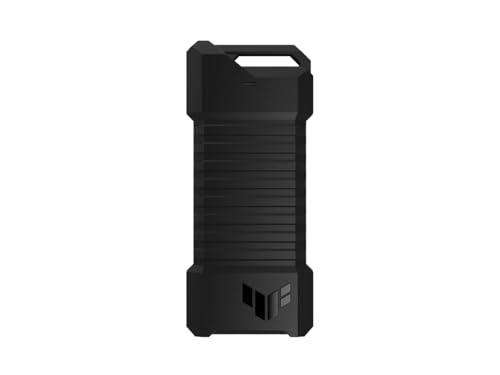
Best for Rugged Versatility – ASUS TUF Gaming A1 SSD Enclosure
For SSD enclosures for large files that may be used on the move, the ASUS TUF Gaming A1 combines up to 10Gbps USB-C performance with a rugged enclosure. Its dual M.2 interface supports both NVMe PCIe and SATA SSDs, while IP68 water and dust resistance adds protection for mobile use.
Best For: Gamers and mobile users who need a durable enclosure for M.2 NVMe or SATA SSDs.
Pros:
- USB-C 3.2 Gen 2 supports transfer speeds up to 10Gbps.
- Works with M.2 NVMe PCIe and SATA SSDs in 2242, 2260, and 2280 sizes.
- Q-latch mechanism simplifies SSD installation.
- MIL-STD-810H drop resistance and IP68 water and dust resistance improve durability.
Cons:
- Listed capacity is 2TB, so larger-drive users should verify compatibility before buying.
- The enclosure weighs 249g, making it less lightweight than simpler models.
This ASUS enclosure stands out when durability and drive flexibility are as important as transfer speed. It is a particularly appealing option for gaming setups, travel, and other situations where an external SSD may face dust, water, or accidental drops.
Best Aluminum 2.5-Inch Pick – UGREEN USB-C SATA Enclosure
For shoppers comparing SSD enclosures for large files, the UGREEN USB-C enclosure is a practical choice for 2.5-inch SATA SSDs and hard drives. Its USB 3.1 Gen 2 USB-C connection supports up to 10Gbps, while the SATA interface supports up to 6Gbps with UASP acceleration.
Best For: Users transferring, backing up, or expanding storage with a 2.5-inch SATA SSD or HDD.
Pros:
- Supports 2.5-inch SATA I, II, and III drives up to 6TB.
- Aluminum construction helps with passive heat dissipation.
- Tool-free, plug-and-play setup with no separate power supply required.
- Includes a USB-C to USB-C cable and supports Windows, macOS, and Linux.
Cons:
- Works with 2.5-inch SATA drives, not M.2 NVMe SSDs.
- USB-A-only devices require a separate compatible USB-C-to-USB-A cable.
This enclosure is a straightforward option when your existing drive uses the common 2.5-inch SATA format. The 6Gbps SATA limit makes it better suited to SATA-based large-file transfers than to maximizing the speed of newer NVMe drives.
Best Rugged M.2 Option – ASUS Cobble 10Gbps SSD Enclosure
The ASUS Cobble is designed for SSD enclosures for large files where sustained USB-C performance and physical protection matter. Its USB 3.2 Gen 2 connection delivers up to 10Gbps, and the enclosure supports both NVMe and SATA M.2 SSD protocols.
Best For: Cross-platform users moving large files, recording 4K ProRes video, or carrying an M.2 drive in demanding environments.
Pros:
- Supports sustained 10Gbps USB-C performance.
- Works with both NVMe and SATA M.2 SSDs in 2230 through 2280 sizes.
- Tool-free ASUS Q-Latch enables quick SSD swaps.
- IP55 water and dust resistance adds protection against spills and debris.
Cons:
- Supports M.2 drives rather than 2.5-inch SATA drives.
- Actual transfer performance depends on the installed SSD and host device.
With dual-protocol support, quick installation, and IP55 protection, the Cobble is a versatile enclosure for portable workflows. It is especially appealing if you move an M.2 SSD among macOS, Windows, mobile, and console devices.
Best Value Dual-Protocol Pick – SSK M.2 10Gbps Enclosure
The SSK enclosure is a flexible choice among SSD enclosures for large files, supporting compatible NVMe PCIe and SATA M.2 drives over USB 3.2 Gen 2. Its RTL9210B controller supports UASP and TRIM, while the aluminum shell and thermal pads help manage heat during portable use.
Best For: Users who need one compact enclosure for compatible M.2 NVMe or SATA drives and want both USB-C and USB-A cables included.
Pros:
- Supports M.2 2242, 2260, and 2280 NVMe or SATA drives.
- Provides up to 10Gbps USB 3.2 Gen 2 connectivity.
- Includes USB-C and USB-A cables, thermal pads, and a screwdriver.
- Aluminum housing, UASP, and TRIM support are suited to portable transfers.
Cons:
- Does not support M.2 PCIe AHCI drives, mSATA SSDs, or non-M.2 devices.
- Drive installation requires the included screw and screwdriver rather than a tool-free latch.
- New media may need formatting before use, and the file system must be supported by the host.
The SSK offers broad compatibility within the M.2 category and includes useful accessories for getting started. Check your SSD type carefully before buying, particularly if it is an older AHCI, mSATA, or non-M.2 model.
How We Picked the Best SSD Enclosures for Large Files
We focused on enclosure design and specifications that matter when transferring large files repeatedly. The lineup includes USB4 and 10Gbps NVMe models for higher throughput, SATA enclosures for older or budget-friendly SSDs, and cases that support both NVMe and SATA M.2 drives. We also considered tool-free installation, connector options, cooling, protective construction, and compatibility with common operating systems and host devices.
Advertised speeds are theoretical. Actual performance depends on the SSD, USB port, cable, controller, file sizes, thermal conditions, and the computer or phone being used.
Quick Comparison
| Best For | Recommended Type | Interface Focus |
|---|---|---|
| Maximum portable transfer speed | SABRENT USB4 NVMe enclosure | USB4 |
| Fast everyday NVMe storage | 10Gbps NVMe enclosure | USB-C 3.2 Gen 2 |
| Flexible M.2 compatibility | Dual-protocol NVMe/SATA enclosure | USB-C 10Gbps |
| Existing 2.5-inch SATA SSD | Tool-free SATA enclosure | USB 3.0 or USB-C |
| Rugged travel use | Protected ASUS enclosure | USB-C |
Key Buying Factors for SSD Enclosures for Large Files
Drive and Protocol Compatibility
Check whether your SSD is an M.2 NVMe PCIe drive, an M.2 SATA drive, or a 2.5-inch SATA model. M.2 size also matters, with 2280 being common but not universal. An enclosure that supports both NVMe and SATA M.2 drives offers flexibility, but verify the listed key types and supported lengths before buying.
Interface and Real-World Speed
USB4 enclosures can deliver the highest potential throughput when paired with a compatible computer, cable, and SSD. A 10Gbps USB-C enclosure is usually the more practical choice for everyday file transfers and costs less. USB 3.0 SATA cases are limited by both the interface and the SATA drive, but remain adequate for backups and media libraries.
Cooling and Sustained Transfers
Large-file workloads can expose thermal limits quickly. Look for aluminum construction, thermal pads, vents, or an included heatsink. Cooling helps reduce throttling during long transfers, though it cannot overcome a slow SSD or host port.
Build Quality and Portability
Tool-free installation is convenient, while a secure latch or screw prevents the drive from shifting. For travel, prioritize impact resistance, dust or water protection, a sturdy cable, and a compact enclosure. Confirm whether the claimed rating applies only when ports and covers are properly sealed.
Who Should Buy Which SSD Enclosures for Large Files?
- Choose USB4 if you regularly move very large video files or work from an external NVMe drive and have a compatible USB4 host.
- Choose a 10Gbps NVMe enclosure for the best balance of speed, price, size, and broad computer compatibility.
- Choose a dual NVMe/SATA M.2 case if you reuse multiple M.2 drives or are unsure which protocol your spare drive uses.
- Choose a 2.5-inch SATA enclosure when upgrading an older laptop drive or repurposing an existing SATA SSD.
- Choose a rugged model for field work, commuting, photography, or any situation where drops, dust, and moisture are realistic concerns.
Before ordering, match the enclosure to the SSD interface, confirm your computer’s USB standard, and use a cable rated for the advertised speed.