The best streaming encoders for home studios make it easier to send camera, switcher, or computer video to YouTube, Facebook Live, IPTV platforms, and private streaming workflows.
This roundup compares 10 hardware encoders across HDMI and SDI connectivity, 4K support, streaming protocols, recording, portability, and production features so you can choose the right fit for your studio.
Best 10 Streaming Encoders for Home Studios Picks for 2026
Flexible 4K Network Encoder
URayCoder HDMI Streaming Encoder

- 4K input with H.264/H.265 encoding
- Supports RTMP, SRT, RTSP, HLS, and more
- Four-stream output plus overlays and branding
Best For: Protocol-rich HDMI streaming and branded home studio broadcasts
Portable Production Hub

- Encoder, switcher, monitor, and recorder in one
- Three HDMI inputs with NDI and SD card support
- Streams to up to three platforms simultaneously
Best For: Portable multi-camera Full HD production
Compact NDI Gateway

- 4K HDMI passthrough with NDI|HX conversion
- Supports SRT, RTMP(S), and RTSP streaming
- USB-C, PoE, tripod mount, and web control
Best For: Compact gaming, webcam, and NDI studio workflows
Broadcast-Grade 4K Encoder
Blackmagic Streaming Encoder 4K
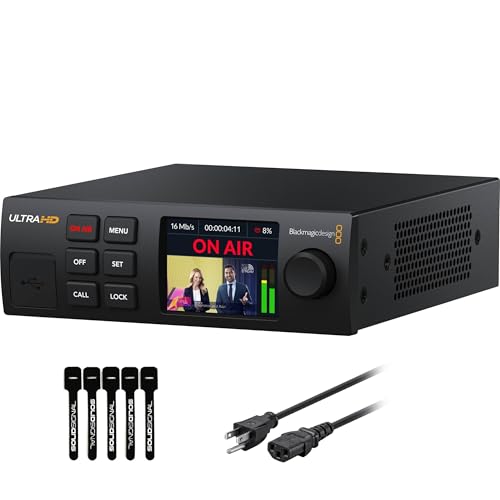
- H.264/H.265 streaming up to 2160p60
- 12G-SDI input with standards conversion
- Ethernet and mobile auto-failover
Best For: Advanced SDI-based home studios and broadcast workflows
Flexible HDMI Multistreamer
URayCoder H.265 HDMI to IP Encoder

- 1080p60 H.265/H.264 hardware encoding
- Supports multiple protocols and up to four streams
- Adds logos, text, timestamps, and accepts line-in audio
Best For: HDMI-based home studios that need multistreaming flexibility
Professional SDI Powerhouse
Magewell Ultra Encode SDI Plus

- Supports SDI encoding up to 4K30
- Streams and records at the same time
- Adds NDI|HX, Wi-Fi, PoE, overlays, and multi-destination output
Best For: SDI-based home studios with advanced production workflows
Compact Browser-Ready Encoder

- 1080p60 H.265/H.264 hardware encoding
- Browser setup with no PC software required
- Supports RTMP, RTSP, SRT, HLS, WebRTC, and more
Best For: Simple HDMI streaming setups needing compact, software-free operation
Best Hybrid 4K Encoder

- HDMI and SDI inputs with mixed layouts
- 4K H.264 or HEVC encoding
- Streams to up to six destinations
Best For: Hybrid HDMI/SDI home studios needing advanced production flexibility
Best All-in-One Studio Switcher

- Switches, encodes, records, and streams standalone
- 5.44-inch AMOLED touchscreen
- HDMI, USB, and IP source support
Best For: Creators wanting touchscreen-controlled, computer-free production
Best Compact HDMI Encoder

- 4K HDMI encoding with loop-through
- 128 GB internal recording storage
- Multi-protocol and multi-destination streaming
Best For: HDMI-based studios needing compact 4K streaming and recording
Flexible 4K Network Encoder – URayCoder HDMI Streaming Encoder
For home studios needing broad platform and protocol support, this URayCoder encoder converts HDMI video into network streams without requiring a dedicated encoding computer. It supports 4K input, multiple output formats, and extensive stream customization.
Best For: Home studios that need flexible HDMI-to-IP streaming, multistreaming, and branded overlays.
Pros:
- Supports 4K at up to 30fps and up to 120fps at 2K or lower resolutions.
- Works with RTMP(S), SRT, RTSP, HLS, UDP, WebRTC, and other protocols.
- Can output up to four streams using different protocols and add text, logos, or timestamps.
Cons:
- Its single HDMI input may limit multi-camera studio setups.
- The extensive configuration options may take time for beginners to learn.
This is a strong choice when protocol flexibility and customization matter more than a built-in touchscreen or switching interface. Its lifetime warranty and technical support add reassurance for long-term studio use.
Portable Production Hub – YoloLiv YoloBox Pro
The YoloBox Pro combines encoding, switching, monitoring, and recording in one portable unit, making it a practical alternative to assembling a computer-based setup. For streaming encoders for home studios, its touchscreen workflow and multiple connectivity options are especially useful.
Best For: Creators who want portable multi-camera production with integrated switching and recording.
Pros:
- Combines a Full HD encoder, switcher, monitor, and recorder.
- Provides three HDMI inputs, USB connectivity, SD card support, and one NDI signal input.
- Can stream to up to three horizontal platforms simultaneously without subscription fees.
- Includes a bright 8-inch touchscreen and a 10,000mAh battery rated for over four hours of use.
Cons:
- It is a Full HD-focused device rather than a 4K streaming encoder.
- Bonding requires additional charges.
- The one-year warranty is shorter than some competing options.
Choose this model if you want to switch sources, monitor the program, and stream without building a separate rack or computer workflow. Its portability also suits mobile shoots and compact studio spaces.
Compact NDI Gateway – ZowieBox 4K HDMI Encoder
The ZowieBox is a compact option for home studios that use NDI or need flexible HDMI-to-IP conversion. It supports 4K video, HDMI passthrough, SRT, RTMP(S), and RTSP, while its web interface allows control from a computer, phone, or tablet.
Best For: Small studios, gaming setups, and IP video workflows that need NDI conversion and low-latency passthrough.
Pros:
- Supports 4K capture with zero-lag HDMI passthrough and 1080p60 decoding.
- Converts HDMI to NDI|HX3, HX2, or HX and supports SRT, RTMP(S), and RTSP.
- Offers USB-C power, PoE, a tripod mount, and a compact 5.9-ounce design.
- Provides web-based configuration and status monitoring from multiple device types.
Cons:
- Encoder and decoder modes cannot run simultaneously.
- Full NDI signals are not supported.
- USB capture-card functionality is not currently supported.
This is a particularly appealing fit for creators integrating gaming, webcams, PTZ cameras, or NDI equipment into a compact studio. Verify the mode and connection requirements before buying, especially if you need full NDI or USB capture.
Broadcast-Grade 4K Encoder – Blackmagic Streaming Encoder 4K
For home studios built around professional SDI equipment, the Blackmagic Streaming Encoder 4K provides H.264 and H.265 streaming up to 2160p60 without an encoding PC. It also adds standards conversion, monitoring outputs, mobile failover, and production-oriented control features.
Best For: Advanced home studios using 12G-SDI cameras, broadcast monitoring, and reliable internet redundancy.
Pros:
- Encodes HD or 4K video up to 2160p60 using H.264 or H.265.
- Accepts 12G-SDI input up to DCI 4K60 and includes SDI loop output.
- Supports Gigabit Ethernet plus USB-C smartphone tethering with automatic failover.
- Includes SDI and HDMI monitor outputs, webcam outputs, captions, timecode, and REST API control.
Cons:
- Its SDI-centered design may be excessive for HDMI-only home studios.
- The one-year manufacturer warranty is relatively limited.
- Advanced broadcast features may require compatible equipment and a more technical setup.
This is the most production-focused option in the group, particularly for studios that already use SDI cameras or need dependable 4K60 delivery. It offers substantial expansion potential, but simpler HDMI workflows may not use all of its capabilities.
Flexible HDMI Multistreamer – URayCoder H.265 HDMI to IP Encoder
For home studios seeking streaming encoders for home studios, this URayCoder model offers a flexible way to convert an HDMI source into network video. It supports 1080p60 encoding, multiple streaming protocols, and simultaneous output to up to four streams, making it useful when one source needs to reach several destinations.
Best For: Home creators who want broad protocol support, multistreaming, and customizable on-screen branding from an HDMI source.
Pros:
- Supports H.265/H.264 encoding at up to 1920×1080 and 60 fps.
- Works with RTSP, RTMP(S), SRT, HLS, UDP, ONVIF, and other protocols.
- Can output up to four video streams and add text, logos, or timestamps.
- Accepts HDMI audio or external line-in audio.
Cons:
- Limited to 1080p input and output rather than 4K.
- Advanced configuration may still require familiarity with network streaming.
This is a versatile choice for a home studio with an HDMI camera, console, or other source and a need for flexible distribution. Its lifetime warranty and technical support add reassurance for users planning a longer-term setup.
Professional SDI Powerhouse – Magewell Ultra Encode SDI Plus
Among streaming encoders for home studios, the Magewell Ultra Encode SDI Plus is the most production-oriented option here. Its SDI input supports up to 4K resolution, while built-in recording, NDI|HX, overlays, and multiple network connections make it suitable for a more advanced studio or live-production workflow.
Best For: Home studios built around professional SDI cameras or production equipment that need 4K encoding, recording, and network workflow options.
Pros:
- Encodes SDI video up to 4096x2160p30 using H.264 or H.265.
- Supports RTMP(S), SRT, NDI|HX, HLS, and TS over UDP/RTP.
- Streams and records simultaneously to internal, USB, or network storage.
- Includes Gigabit Ethernet with PoE, Wi-Fi, overlays, scaling, and de-interlacing.
Cons:
- Its SDI connectivity is not a direct match for HDMI-only home studio equipment.
- More features and professional controls may be excessive for basic streaming.
- 4G/5G modem support requires a modem that is not supplied.
The Ultra Encode SDI Plus is best viewed as a compact professional encoder rather than a simple webcam accessory. It makes the most sense when your studio already uses SDI and you will benefit from recording, NDI|HX, 4K support, and flexible network connectivity.
Compact Browser-Ready Encoder – UNISHEEN 1080P60 HDMI Encoder
This UNISHEEN unit is a practical pick for home studios that want streaming encoders for home studios without relying on dedicated computer software. It converts HDMI to several IP streaming formats, supports 1080p60 hardware encoding, and can be configured through a web browser.
Best For: Creators who want a small, low-power HDMI encoder with browser-based setup and support for mainstream and specialized streaming protocols.
Pros:
- Provides hardware H.265/H.264 encoding at 1080p60.
- Supports SRT, RTMP(S), RTSP, UDP, HLS, WebRTC, and additional IP formats.
- Browser-based configuration requires no software or drivers.
- Includes HDMI and 3.5mm audio support plus text, logo, and timestamp overlays.
Cons:
- Maximum resolution is 1080p rather than 4K.
- Advanced setups require basic networking knowledge.
- Coverage is limited by a one-year manufacturer warranty.
Its compact size, browser setup, and wide protocol selection make this a straightforward option for a single HDMI source. It is especially appealing for a permanent or portable setup where low-power, software-free operation matters more than 4K production features.
Best Hybrid 4K Encoder – Ultra Encode AIO
For home studios combining cameras, switchers, or other HDMI and SDI sources, the Magewell Ultra Encode AIO is a highly flexible choice among streaming encoders for home studios. It supports 4K encoding, multi-destination streaming, recording, and onboard layouts without requiring a separate computer for every task.
Best For: Home studios that need HDMI and SDI compatibility, multi-camera layouts, and advanced streaming or recording workflows.
Pros:
- Accepts HDMI and SDI inputs, with picture-in-picture and side-by-side layouts.
- Supports 4K encoding with H.264 or HEVC compression.
- Streams to up to six destinations using protocols including RTMP, RTMPS, SRT, and NDI|HX.
- Can stream and record simultaneously while adding text, image, or clock overlays.
Cons:
- Its broad feature set may be more than a simple single-camera studio needs.
- At 3.6 pounds and with rack-mount hardware, it is less compact than basic HDMI encoders.
The Ultra Encode AIO is the strongest fit here for studios that value input flexibility and production control. Choose it when SDI support, multiple destinations, and integrated video processing matter more than minimal size.
Best All-in-One Studio Switcher – Director Mini
The Magewell Director Mini combines switching, encoding, recording, monitoring, and streaming in one compact unit, making it a practical option for creators seeking streaming encoders for home studios. Its touchscreen and support for HDMI, USB, IP sources, graphics, and scenes reduce the need for an external production computer.
Best For: Home creators who want an integrated, touchscreen-controlled setup for YouTube, Twitch, Facebook, and mobile or fixed productions.
Pros:
- Combines source switching, encoding, recording, monitoring, and streaming in one device.
- Accepts up to two HDMI sources, two USB sources, and three simultaneous IP sources.
- Built-in 5.44-inch AMOLED touchscreen supports scene control and monitoring.
- Supports graphics, webpages, chroma key, timers, scoreboards, and overlays.
Cons:
- Its maximum hardware encoding resolution is 1080p60 rather than 4K.
- Cellular connectivity requires a separately purchased USB modem.
- The feature-rich workflow may be unnecessary for a basic one-source stream.
Director Mini is the most self-contained option in this group. It is particularly appealing when you want a portable production center with a display, battery support, and built-in scene tools instead of assembling those functions separately.
Best Compact HDMI Encoder – Ultra Encode HDMI Plus
For a home studio built around HDMI cameras, consoles, or switchers, the Magewell Ultra Encode HDMI Plus offers a focused path into streaming encoders for home studios. It adds 4K encoding, HDMI loop-through, multi-protocol delivery, internal storage, and simultaneous recording in a compact standalone design.
Best For: HDMI-based studios that need local pass-through monitoring, 4K support, and dependable recording alongside live streaming.
Pros:
- Encodes HDMI video up to 4096×2160p30 and provides HDMI loop-through.
- Supports RTMP, RTMPS, SRT, NDI|HX, HLS, and TS over UDP/RTP.
- Includes 128 GB of internal storage and supports USB or network recording.
- Offers simultaneous streaming and recording plus overlays and scheduled or loop recording.
Cons:
- It is designed around HDMI and does not provide an SDI input.
- 4K input encoding is limited to 30 frames per second.
- 4G/5G modem connectivity requires a modem that is not included.
The Ultra Encode HDMI Plus is a strong match for studios that want a small, dedicated HDMI encoder without giving up recording or IP workflow options. Its loop-through output is especially useful for monitoring a source locally while streaming it.
How We Picked the Best Streaming Encoders for Home Studios
We focused on dedicated hardware encoders that can accept a camera, switcher, or other video source and deliver a live stream without relying entirely on a computer. The selection includes compact HDMI models, professional SDI units, all-in-one switchers, and systems with NDI, recording, or mobile-production features.
We compared supported resolutions and frame rates, input and output options, network connectivity, protocol support, ease of setup, and the amount of production control each device provides. Because home studios vary widely, the list includes both straightforward single-source encoders and expandable tools for multi-camera productions.
Quick Comparison
| Best for | Look for | Typical choice |
|---|---|---|
| Simple camera streaming | HDMI input, RTMP, reliable Ethernet | Compact 1080p encoder |
| 4K workflows | 4K input, HEVC, sufficient bandwidth | Standalone 4K HDMI encoder |
| Multi-camera production | Multiple inputs, switching, recording | All-in-one switcher or production encoder |
| Professional SDI studios | SDI connectivity, locking connections, PoE | Dedicated SDI encoder |
| Networked video setups | NDI, SRT, and flexible IP routing | NDI-capable encoder |
Key Buying Factors for Streaming Encoders for Home Studios
Inputs and Video Resolution
Match the encoder to your source devices. HDMI is common for mirrorless cameras, camcorders, and computers, while SDI is more suitable for longer cable runs and professional cameras. If you shoot in 4K, verify that the encoder accepts your desired frame rate and can output a practical stream resolution.
Protocols and Network Connection
RTMP remains widely supported by major platforms, while RTMPS adds encrypted delivery. SRT can be valuable when network conditions are unstable, and HLS or WebRTC may suit specialized distribution. Ethernet is generally more dependable than Wi-Fi for a fixed studio; models with mobile or wireless options add flexibility rather than replacing a strong wired connection.
Encoding, Recording, and Production Features
H.264 offers broad compatibility, while HEVC can reduce bandwidth at similar image quality when the destination supports it. Consider whether you need local recording, HDMI loop-through, NDI|HX, audio control, overlays, multiview, or built-in switching. Extra features are useful only if they simplify your workflow.
Setup, Heat, and Long-Session Reliability
Check power requirements, ventilation, firmware support, and the availability of status information. A small encoder may be ideal for a single camera, but a larger unit can provide better control and connectivity for frequent live events.
Who Should Buy Which Streaming Encoders for Home Studios?
Choose a compact 1080p HDMI encoder if you mainly stream one camera or presentation source and want the simplest setup. Select a standalone 4K HDMI model if image detail, loop-through, HEVC, or future-proofing matters. SDI-focused Magewell options are better for professional cameras and fixed studio infrastructure.
For creators who need camera switching, recording, touchscreen control, or a portable production system, an all-in-one switcher such as a YoloBox or Magewell Director-style device can replace several separate tools. Choose an NDI-capable model when your studio already routes video over a local network. Finally, prioritize SRT and dependable Ethernet when reliable delivery is more important than the lowest possible equipment cost.