The best streaming encoders turn HDMI or SDI video into a dependable network stream for platforms, studios, houses of worship, classrooms, and IPTV systems. The right model can simplify a production workflow while preserving video quality and reducing reliance on a computer.
This roundup compares 10 streaming encoders across 4K support, codec options, input types, streaming protocols, recording, loop-through, and advanced production features. Use the buying guide below to narrow the choices by your source equipment and delivery needs.
Best 10 Streaming Encoders Picks for 2026
Best Multi-Platform Value
URayCoder 4K HDMI Streaming Encoder

- 4K H.265/H.264 encoding
- Up to four protocol outputs
- Lifetime warranty and support
Best For: Multi-platform HDMI streaming on a budget
Best for Broadcast Flexibility

- HDMI and SDI input support
- Streams to up to six destinations
- Records while streaming
Best For: Mixed-source live production and broadcast workflows
Best Customizable HDMI Encoder
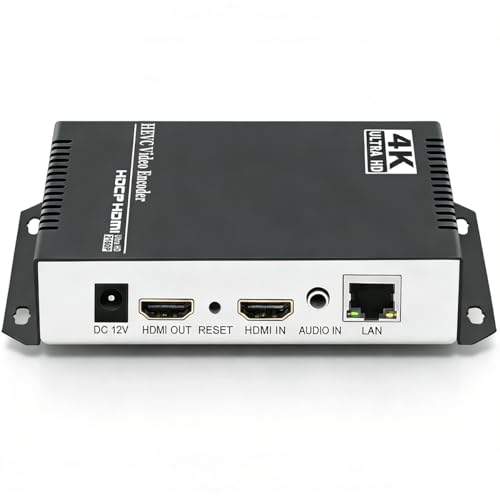
- 4K H.265/H.264 encoding
- Four simultaneous protocol outputs
- Branding and audio controls
Best For: Customized HDMI streaming to platforms and servers
Best HDMI Encoder with Recording
Magewell Ultra Encode HDMI Plus

- 4K HDMI encoding with loop-through
- 128GB internal recording storage
- PoE, Wi-Fi, and NDI|HX support
Best For: HDMI production with monitoring and simultaneous recording
Protocol-Rich SDI Streaming Encoder

- H.264/H.265 encoding for SDI sources
- Outputs up to four simultaneous streams
- Supports RTMP, SRT, HLS, UDP, and more
Best For: SDI broadcast, IPTV, and multi-destination streaming
Professional 4K Production Encoder
Blackmagic Streaming Encoder 4K
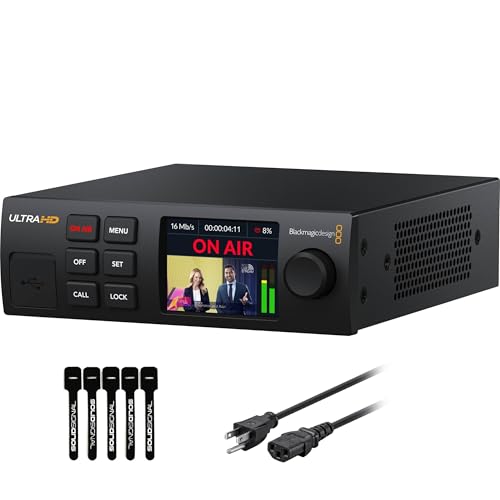
- Encodes up to 2160p60 in H.264 or H.265
- 12G-SDI input with standards conversion
- Ethernet and mobile connectivity with failover
Best For: Professional 4K SDI production and live events
Flexible 4K HDMI Streaming Encoder

- Accepts 4K HDMI input at up to 30fps
- Supports H.264/H.265 and many protocols
- Outputs up to four streams simultaneously
Best For: HDMI-based multi-platform streaming and IPTV
Best Compact Encoder
1080P60 H.265 HDMI Streaming Encoder

- Hardware H.265/H.264 encoding at 1080p60
- Broad RTMP, RTSP, SRT, HLS, and WebRTC support
- Browser setup with OSD overlay tools
Best For: Single-source HD streaming and compact installations
Best Multi-Channel Encoder
4K HDMI Encoder for Up to 16 Feeds

- Four HDMI inputs with external audio connections
- Supports up to two 4K30 and two 1080p60 channels
- Can distribute up to 16 feeds
Best For: Multi-camera broadcasts and IPTV distribution
Best Flexible Single-Channel Encoder

- 1080p60 H.265/H.264/MJPEG encoding
- Up to four simultaneous protocol outputs
- Extensive overlay and image-control settings
Best For: Customizable single-source streaming and network video
Best Multi-Platform Value – URayCoder 4K HDMI Streaming Encoder
For buyers comparing streaming encoders, the URayCoder UHE265-1L-4K offers a flexible HDMI-to-network solution with 4K input and support for multiple streaming protocols. It can send up to four streams using different protocols, making it useful for simultaneous distribution to services such as YouTube, Facebook, Twitch, and Vimeo.
Best For: Creators and organizations that need affordable 4K HDMI encoding with multi-platform output and customizable overlays.
Pros:
- Supports H.265/H.264 encoding, 4K at up to 30fps, and lower-resolution frame rates up to 120fps.
- Works with RTMP(S), RTSP, SRT, HLS, UDP, WebRTC, and other protocols.
- Adds text, logos, timestamps, and scrolling captions, with adjustable resolution, bitrate, and audio.
- Includes lifetime warranty and technical support.
Cons:
- Accepts a single HDMI input rather than HDMI and SDI sources.
- 4K encoding is limited to 30fps.
This URayCoder is a strong fit when protocol flexibility and simultaneous platform streaming matter more than advanced broadcast inputs. Its web-based management and customization options also make it approachable for smaller production teams.
Best for Broadcast Flexibility – Magewell Ultra Encode AIO 4K
Among streaming encoders, the Magewell Ultra Encode AIO stands out for combining HDMI and SDI connectivity with 4K encoding, dual-input mixing, recording, and broad protocol support. It is designed for more involved live-production workflows where source flexibility and monitoring matter.
Best For: Broadcast, event, education, and corporate teams needing HDMI/SDI inputs, multi-destination streaming, and integrated recording.
Pros:
- Accepts HDMI and SDI sources and supports picture-in-picture or side-by-side layouts.
- Encodes HDMI up to 4096×2160p60 and SDI up to 4096×2160p30 using H.264 or HEVC.
- Streams to up to six destinations through RTMP(S), SRT, NDI|HX, HLS, and other protocols.
- Records to SD card, USB storage, or network drives while streaming.
Cons:
- Its 3.6-pound rack-mount form factor is less compact than a simple HDMI encoder.
- The feature set may be more extensive than needed for basic single-source streaming.
The Ultra Encode AIO is the most versatile choice here for mixed-source production. Its input options, six-destination streaming, overlays, recording, PoE, Wi-Fi, and API control support complex setups without requiring separate encoding and recording hardware.
Best Customizable HDMI Encoder – URayCoder 4K IP Video Encoder
This URayCoder is one of the more adaptable streaming encoders for turning an HDMI source into network video. It supports 4K H.265/H.264 encoding, multiple delivery protocols, and simultaneous outputs, while offering useful controls for branding and stream presentation.
Best For: HDMI-based YouTube, Facebook, OBS, and server streaming where overlays, audio options, and protocol compatibility are priorities.
Pros:
- Supports 4K input and output at up to 30fps, with up to 120fps at 2K and below.
- Can output four streams with different protocols, including RTSP, RTMPS, HLS, SRT, UDP, and WebRTC.
- Provides cropping, rotation, mirroring, bitrate controls, logos, text, and timestamps.
- Supports HDMI-embedded audio and line-in audio.
Cons:
- Designed around HDMI input and does not provide the HDMI/SDI flexibility of the Magewell AIO.
- 4K output is limited to 30fps.
Choose this model if you want a configurable HDMI encoder with broad server compatibility and built-in branding tools. It is particularly practical for permanent or semi-permanent streaming installations that need several output destinations.
Best HDMI Encoder with Recording – Magewell Ultra Encode HDMI Plus
The Magewell Ultra Encode HDMI Plus is a focused option among streaming encoders for HDMI-based production. It combines 4K encoding with loop-through monitoring, multi-protocol streaming, 128GB internal storage, and recording to external or network locations.
Best For: HDMI camera, switcher, gaming, education, corporate AV, and event setups that need local pass-through and recording.
Pros:
- Encodes HDMI up to 4096×2160p30 and provides HDMI loop-through for displays or switchers.
- Streams through RTMP(S), SRT, NDI|HX, HLS, and TS over UDP/RTP.
- Records to included 128GB internal storage, USB storage, or network locations while streaming.
- Supports PoE, Wi-Fi, 4G/5G USB modems, overlays, web control, and API integration.
Cons:
- It is limited to HDMI input and does not accept SDI sources.
- 4K encoding is limited to 30fps.
- 4G/5G USB modems are supported but not supplied.
For HDMI workflows that need dependable pass-through and built-in capture, the Ultra Encode HDMI Plus is a well-rounded choice. Its internal storage and NDI|HX support make it especially useful for mobile, remote, and IP-based production systems.
Protocol-Rich SDI Streaming Encoder – URayCoder SDI Encoder
For SDI-based production setups, this URayCoder model is one of the more flexible streaming encoders in the group. It converts SDI video and audio to network streams and supports multiple protocols, making it suitable for broadcasting to different platforms or servers.
Best For: SDI cameras, broadcast sources, IPTV distribution, and users who need simultaneous multi-protocol streaming.
Pros:
- Supports H.264 and H.265 encoding with SDI input.
- Can output up to four streams simultaneously using different protocols.
- Works with HTTP, RTSP, RTMP/S, SRT, HLS, UDP, RTP, and additional formats.
- Offers overlays, cropping, rotation, mirroring, and adjustable stream settings.
Cons:
- Designed for SDI sources rather than HDMI devices.
- The supplied power plug is Type I, which may require compatibility checking.
- Its extensive configuration options may be more than casual users need.
This is a practical choice when protocol flexibility and multiple simultaneous outputs matter more than a simple plug-and-stream workflow. Lifetime technical support, SDK/API access, and customization options add value for more specialized deployments.
Professional 4K Production Encoder – Blackmagic Streaming Encoder 4K
The Blackmagic Design Streaming Encoder 4K is built for production teams that need high-resolution streaming encoders with broadcast-oriented connectivity. It handles up to 2160p60, supports SRT and RTMP, and can switch automatically between Ethernet and tethered mobile data.
Best For: Professional SDI workflows, 4K live production, mobile backup connectivity, and broadcast teams needing monitoring and control features.
Pros:
- Supports H.264 and H.265 encoding up to Ultra HD 2160p60.
- Accepts 12G-SDI input and includes SDI loop output with standards conversion.
- Provides Ethernet and USB-C mobile connectivity with automatic failover.
- Includes HDMI/SDI monitoring, webcam output, closed captions, timecode, and REST API control.
Cons:
- Its professional feature set may be excessive for basic streaming.
- Requires an SDI-based source for the primary video workflow.
- Has a one-year manufacturer warranty rather than lifetime coverage.
Choose this encoder when reliability, 4K capability, and integration with a broader production system are priorities. Features such as standards conversion, tally, talkback, and mobile failover make it especially well suited to demanding live events.
Flexible 4K HDMI Streaming Encoder – URayCoder HDMI Encoder
This URayCoder model is a versatile option for HDMI-based streaming setups. Among streaming encoders, it stands out for accepting 4K HDMI input, supporting a broad range of network protocols, and allowing up to four streams to be delivered to different platforms or destinations.
Best For: HDMI cameras, computers, consoles, IPTV, YouTube and Facebook streaming, and multi-platform broadcasts.
Pros:
- Supports 4K input up to 3840×2160 at 30fps and up to 120fps at 2K or lower.
- Encodes in H.264 or H.265 and supports HDCP 1.4 decryption.
- Can output four streams simultaneously using protocols such as RTMP/S, SRT, HLS, WebRTC, and ONVIF.
- Offers overlays, adjustable bitrate and resolution, video transformations, and HDMI or line-in audio.
Cons:
- 4K streaming is limited to a maximum of 30fps.
- It is intended for HDMI sources, not SDI equipment.
- The supplied details do not specify the complete physical port configuration.
This is a strong fit for creators and small production teams moving HDMI sources onto an IP network. Its broad protocol support and multi-stream output provide room to expand beyond a single-platform workflow, while browser- or device-based management keeps setup approachable.
Best Compact Encoder – 1080P60 H.265 HDMI Streaming Encoder
This compact option is one of the more approachable streaming encoders for converting an HDMI source into network streams without dedicated PC software. It supports 1080p60 hardware encoding, browser-based setup, and a broad selection of protocols for live broadcasts, IPTV, monitoring, and digital signage.
Best For: Single-source 1080p streaming, remote monitoring, IPTV, and users who want a small encoder with browser-based configuration.
Pros:
- Hardware H.265/H.264 encoding supports 1080p at 60 frames per second.
- Works with RTMP(S), RTSP, SRT, HLS, WebRTC, UDP, HTTP, and additional protocols.
- Compact, low-power design supports continuous operation and flexible placement.
- Includes HDMI audio, 3.5mm audio input, and customizable OSD overlays.
Cons:
- Handles one HDMI input rather than multiple sources.
- Advanced configurations require basic networking knowledge.
- Requires a separate 12V power supply; the listing specifies no included plug.
Choose this model when portability and protocol flexibility matter more than multi-input production. Its 1080p60 ceiling makes it a practical fit for standard HD workflows, while browser setup and OSD tools add convenience for ongoing deployments.
Best Multi-Channel Encoder – 4K HDMI Encoder for Up to 16 Feeds
For larger live-production or IPTV setups, this multi-channel unit stands apart from single-input streaming encoders. It accepts four HDMI sources, supports mixed 4K30 and 1080p60 inputs within its stated configuration, and can distribute streams to as many as 16 platforms or destinations.
Best For: Multi-camera broadcasts, IPTV systems, CATV head-ends, hotels, and operators distributing several sources to multiple platforms.
Pros:
- Four HDMI inputs and external audio inputs support multi-source workflows.
- Supports up to two 4K30 channels plus two 1080p60 channels.
- Can output up to 16 feeds using different or matching protocols.
- LCD screen, OSD tools, mirror/flip controls, and broad protocol support aid operation.
Cons:
- Larger and heavier than single-channel streaming encoders.
- Its multi-channel feature set may be excessive for a basic one-camera stream.
- Complex deployments may require technical troubleshooting, particularly if streams stutter or the unit needs reboots.
This is the strongest choice here for scaling beyond one source or one destination. The four-channel architecture and 16-feed maximum offer considerable flexibility, but buyers should be comfortable planning network, platform, and audio routing before installation.
Best Flexible Single-Channel Encoder – HEVC HDMI to IP Encoder
This single-channel model is a flexible choice among streaming encoders for users who want detailed stream controls without moving to a multi-input chassis. It supports 1080p60 H.265/H.264 encoding, multiple output protocols, HDMI or line-in audio, and customizable overlays for live streaming and network video applications.
Best For: Creators, broadcasters, and network-video users who need flexible 1080p streaming, multi-platform output, and branding controls.
Pros:
- Supports 1080p60 H.265, H.264, and MJPEG encoding.
- Can output up to four streams using different protocols.
- Offers RTMP(S), RTSP, SRT, HLS, UDP/RTP, ONVIF, and other compatibility options.
- Provides text, scrolling caption, logo, timestamp, cropping, rotation, and mirroring controls.
Cons:
- Has one HDMI channel and is not designed for multi-camera input.
- Its listed dimensions and weight are greater than the most compact option here.
- The supplied details do not identify a current software-update date.
Consider this encoder when customization and simultaneous protocol output are priorities. It combines a manageable single-input design with unusually broad control over audio, overlays, and image handling, making it suitable for branded streams and varied network environments.
How We Picked These Streaming Encoders
We focused on standalone hardware that accepts common HDMI or SDI sources and converts them into network-ready video. The selection covers entry-level single-input units, professional Magewell and Blackmagic models, SDI-focused hardware, and multi-channel encoders for larger installations.
Important criteria included support for H.264 and HEVC/H.265, 4K or 1080p handling, useful output protocols, audio support, recording, loop-through, NDI, PoE, and overall suitability for live production or IPTV distribution. Because specifications can vary by firmware and input mode, verify the manufacturer’s current documentation before buying.
Quick Comparison
| Need | What to prioritize |
|---|---|
| Simple HDMI livestreaming | 1080p support, RTMP, reliable Ethernet, and straightforward setup |
| 4K production | 4K input and encoding, HEVC efficiency, and sufficient network bandwidth |
| Broadcast or studio sources | SDI input, stable clocking, professional audio, and long-run reliability |
| Flexible distribution | RTSP, SRT, HLS, UDP, RTMP/RTMPS, or WebRTC as required |
| Multi-camera installations | Multiple inputs, simultaneous feeds, and centralized management |
Key Buying Factors for Streaming Encoders
Input, Resolution, and Frame Rate
Match the encoder to the source connector first. HDMI is common for cameras, laptops, and consumer equipment, while SDI is better suited to professional cameras and longer cable runs. Confirm whether 4K means input pass-through, recording, or actual encoded output, and check the supported frame rates.
Codec and Bitrate Efficiency
H.264 offers broad compatibility with streaming services and playback devices. HEVC/H.265 can deliver comparable quality at a lower bitrate, but compatibility may be narrower. Make sure the destination platform and receiving hardware support your chosen codec before relying on it.
Protocols and Network Connectivity
RTMP or RTMPS is usually the simplest route to major social platforms. RTSP, UDP, and RTP are useful for local networks and IPTV, while SRT can improve reliability over unpredictable connections. HLS and WebRTC serve different latency and distribution requirements. Wired Ethernet is generally preferable to Wi-Fi for critical broadcasts.
Production and Installation Features
Loop-through is valuable when the source must also feed a monitor or switcher. NDI can simplify IP production, PoE can reduce cabling, and onboard recording adds a backup option. Consider configuration tools, status displays, remote management, audio embedding, and simultaneous outputs if the encoder will run unattended.
Who Should Buy Which Streaming Encoders?
Choose a basic HDMI encoder if you need an affordable way to send one camera, presentation, or gaming source to a single platform. Choose a 4K HDMI model when your source and destination benefit from higher resolution or when you want HEVC bandwidth savings.
Professional producers should look closely at Magewell or Blackmagic options for stronger connectivity, recording, monitoring, and integration with established workflows. SDI models are the better fit for broadcast cameras and installed venues. For IPTV operators, campuses, and multi-room systems, prioritize protocol flexibility, simultaneous feeds, remote administration, and dependable long-duration operation over headline resolution alone.