Teleprompters can make livestreams feel more polished, reduce filler words, and help you stay on message without sounding stiff. The best models balance readable screens, smooth scrolling, and a setup that fits your camera or phone workflow.
In this roundup, we focused on teleprompters for livestreaming that are practical for solo creators, educators, business presenters, and anyone who wants a more confident on-camera delivery.
Best 10 Teleprompters for Livestreaming Picks for 2026
Built-In Screen Simplicity
Elgato Prompter with Built-In Screen

- 9-inch built-in display
- Drag-and-drop for scripts or chat
- Works with many cameras and Stream Deck
Best For: Streamers and presenters who want an all-in-one teleprompter
Portable Tablet Rig
Glide Gear TMP 100 with 12-inch Glass

- Fits phones and tablets up to 10.5 x 8 inches
- 70/30 beam splitter glass
- Includes carry bag and no-assembly design
Best For: Mobile livestreamers who want a compact tablet-based teleprompter
Built-In Monitor Value
NEEWER X11 2-in-1 with 11-inch Glass
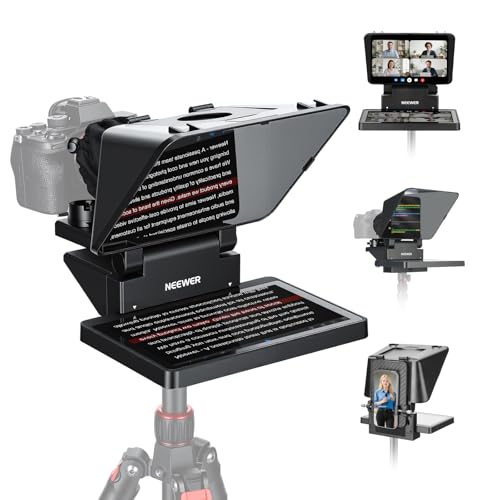
- Built-in 9-inch LCD for mirroring
- 11-inch multi-coated beam splitter glass
- Works with USB-C and computer monitor setups
Best For: Livestreamers who want a built-in monitor and flexible hookups
Ultra-Compact Carry Option
Little Prompter Personal Teleprompter

- 6 x 6 x 6 inch compact design
- Works with DSLR, webcam, or laptop camera
- Uses 70/30 BeamSplitter glass
Best For: Creators who want the smallest, lightest teleprompter setup
Premium Metal Pick
Desview T12S 12.9" Teleprompter
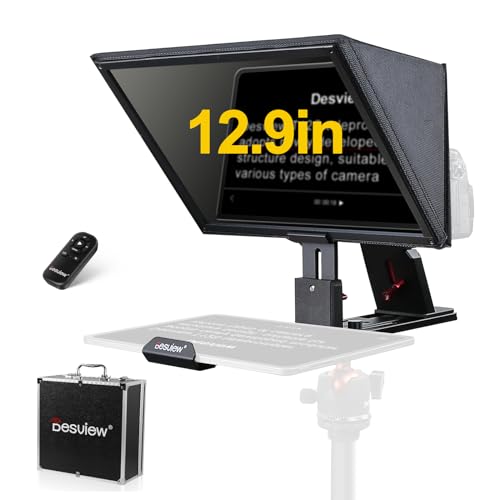
- Supports cameras and tablets up to 12.9 inches.
- Bluetooth remote and app let you control scripts easily.
- Zero-ghosting beam splitter glass improves readability.
Best For: Studio creators and livestream hosts needing a durable, larger teleprompter.
Quick Setup Choice
9.3" Phone & Camera Teleprompter

- Ready in about 2 minutes with a quick-release design.
- Works with smartphones plus DSLR and mirrorless cameras.
- App and Bluetooth remote simplify script control.
Best For: Solo livestreamers and presenters who prioritize fast setup.
Ultra-Portable Fold Pick
LENSGO TC7S 9.7" Fold Teleprompter

- Folds in one second for fast packing and setup.
- High-definition glass keeps prompts clear and readable.
- App plus Bluetooth remote help control scripts smoothly.
Best For: Mobile creators and teachers who need a compact, travel-ready teleprompter.
All-in-One Pick
Desview T5 Teleprompter for Streaming

- Works with smartphones, tablets, and DSLR cameras
- Includes adapter rings plus Bluetooth remote
- Free app supports txt/docx scripts and mirror mode
Best For: Creators switching between phone, tablet, and DSLR setups
Compact Creator Pick
AMBITFUL Mini 7.5" Teleprompter

- Small tabletop teleprompter with included tripod
- Supports smartphones and DSLR cameras
- Cold shoe mount adds mic or light options
Best For: Portable desktop streaming and interview setups
Tablet Streaming Pick
NEEWER Basics X12B 12" Teleprompter

- No-assembly design for faster setup
- Bluetooth remote and app control script playback
- Made for iPad and tablet-based workflows
Best For: iPad and tablet users who want a simple streaming teleprompter
Built-In Screen Simplicity – Elgato Prompter with Built-In Screen
For teleprompters for livestreaming, the Elgato Prompter is built for creators who want a cleaner, faster setup without relying on a separate tablet or phone. Its built-in display lets you drag and drop any window or app onto the screen, so you can read scripts, Twitch chat, or meeting notes while keeping your eyes near the lens.
Best For: Streamers, presenters, and video-call users who want an all-in-one teleprompter with a built-in screen.
Pros:
- Built-in 9-inch display means no extra tablet or smartphone screen is required.
- Works with scripts, Twitch chat, Zoom, Teams, and other windows via drag-and-drop.
- Supports a wide range of cameras and works with Elgato Camera Hub and Stream Deck.
- Simple desktop-controlled setup with PC or Mac, not a third-party mobile app.
Cons:
- Mac use requires free DisplayLink software.
- Android use requires free DisplayLink Presenter software.
- It is a more specialized setup than basic tablet-style teleprompters.
If you want a streamlined teleprompter that behaves more like a monitor than an add-on gadget, this Elgato model stands out. It is especially practical for live streaming and professional video calls where eye contact matters.
Portable Tablet Rig – Glide Gear TMP 100 with 12-inch Glass
Glide Gear TMP 100 Teleprompter – DSLR, Tablet, Smartphone – 12" Glass, Carry Case, No Assembly
Check Price On AmazonIf you need teleprompters for livestreaming with a more traditional tablet-based workflow, the Glide Gear TMP 100 is a practical, travel-friendly option. It fits smartphones and tablets up to 10.5 x 8 inches, uses 70/30 beam splitter glass, and includes a carry case for transport.
Best For: Creators who want a compact teleprompter that works with tablets or phones and packs down easily.
Pros:
- Compatible with smartphones and tablets up to 10.5 x 8 inches.
- 70/30 beam splitter glass helps keep the script visible while preserving camera clarity.
- Collapsible design and carry bag make it easier to move and store.
- Includes tripod threads and accessory mounting options for lights and mics.
Cons:
- Does not fit the iPad Pro.
- Requires a teleprompter app with mirror text support, which is not included.
- Less self-contained than models with a built-in screen.
The TMP 100 focuses on portability and compatibility rather than built-in electronics. That makes it a solid fit for mobile livestream setups, especially if you already use a tablet or phone as your script display.
Built-In Monitor Value – NEEWER X11 2-in-1 with 11-inch Glass
The NEEWER X11 is a strong pick for teleprompters for livestreaming if you want a built-in monitor and flexible connection options. It includes an 11-inch beam splitter glass panel and a 9-inch LCD screen, so you can mirror scripts without needing a separate tablet or phone for prompts.
Best For: Streamers and video presenters who want a built-in-screen teleprompter with mirror-casting support.
Pros:
- Built-in 9-inch LCD screen supports screen mirroring for live streaming and video conferencing.
- 11-inch beam splitter glass uses multi-coated HD glass to reduce ghosting.
- Can connect to computers via USB-C, and supports Windows and macOS use as a second display.
- Adjustable holder and quick-release plate add flexibility for camera setups.
Cons:
- Some connections require drivers.
- Mirroring support for iPhone and Android is limited to DP protocol devices.
- Voice sync is not supported.
This model is a good middle ground between a basic tablet teleprompter and a more premium built-in display system. It is especially appealing if you want a self-contained prompt screen plus computer-monitor functionality in one unit.
Ultra-Compact Carry Option – Little Prompter Personal Teleprompter
For creators who want teleprompters for livestreaming without a bulky rig, the Little Prompter keeps things simple and small. It is a compact 6-inch cube that works with DSLRs, webcams, and built-in laptop cameras, but it does require a smart device and teleprompter app for the script.
Best For: Users who want the smallest possible teleprompter for lightweight video and live presentation setups.
Pros:
- Very compact 6 x 6 x 6 inch footprint.
- Weighs less than a pound, so it is easy to move and set up.
- Compatible with DSLR cameras, webcams, and built-in laptop cameras.
- Uses 70/30 BeamSplitter glass for script reflection.
Cons:
- Requires a smart device and teleprompter app to display the script.
- Smaller form factor may be less suitable for larger production builds.
- Less feature-rich than models with built-in screens.
The Little Prompter is best viewed as a minimalist tool: small, portable, and focused on basic teleprompting. If your priority is keeping your livestream setup light and unobtrusive, it is a compelling choice.
Premium Metal Pick – Desview T12S 12.9" Teleprompter
If you want teleprompters for livestreaming that feel more like a production tool than a basic accessory, the Desview T12S is built for that job. Its 12.9-inch support, beam splitter glass, and app-based control make it a strong fit for creators who need readable prompts while keeping direct eye contact with the camera.
Best For: Creators, educators, and livestream hosts who want a durable teleprompter with tablet support and a more polished studio setup.
Pros:
- Supports DSLR, mirrorless cameras, camcorders, and tablets up to 12.9 inches.
- Includes Bluetooth remote and free app control for script editing, speed, and text size.
- Beam splitter glass is designed for clear text with zero ghosting, even in bright conditions.
- Tool-free assembly and a carry case make it easier to deploy and travel with.
Cons:
- At 3 kg, it is heavier than compact phone-only teleprompters.
- The larger metal build may be more than some casual mobile streamers need.
Overall, the T12S is a practical step up if you want a sturdier, larger-format teleprompter for consistent livestreaming and content production. It trades portability for a more capable camera-and-tablet workflow.
Quick Setup Choice – 9.3" Phone & Camera Teleprompter
For shoppers comparing teleprompters for livestreaming on a budget-friendly, compact setup, this 9.3-inch model focuses on speed and simplicity. It works with smartphones and cameras, uses 70/30 beam-splitter glass, and is designed to get you recording quickly without a complicated build.
Best For: Solo creators, presenters, and live streamers who want a lightweight teleprompter with fast setup.
Pros:
- Quick-release design can be ready in about 2 minutes.
- Compatible with smartphones, DSLR cameras, and mirrorless cameras.
- 70/30 beam-splitter glass helps keep text readable while preserving camera visibility.
- Includes app control and a Bluetooth remote for script management.
Cons:
- Smaller 9.3-inch size may feel limited for users wanting a larger prompting area.
- Best suited to lighter setups rather than more substantial studio rigs.
This is a sensible pick if you want a portable teleprompter that emphasizes convenience over size. It is especially appealing for creators who need to move fast between livestreams, interviews, and presentations.
Ultra-Portable Fold Pick – LENSGO TC7S 9.7" Fold Teleprompter
If portability matters most in teleprompters for livestreaming, the LENSGO TC7S stands out with its one-second fold design and lightweight build. It is aimed at creators who want a compact prompting solution for phone-based recording, online teaching, interviews, and travel-friendly live streams.
Best For: Mobile creators, teachers, and interview hosts who need a foldable teleprompter they can pack and set up quickly.
Pros:
- Folds in one second, making it easy to store and transport.
- Uses high-definition beam splitter glass with a special coating for clear prompting.
- Works with iPhone, Android, and smartphones, plus tablets under 8 inches.
- Bluetooth remote and TCQI app support script control, speed changes, and display settings.
Cons:
- Tablet support is limited to devices below 8 inches.
- Best for phone-centric workflows rather than larger camera rigs.
The TC7S is a smart choice if you value speed, compact storage, and easy mobility. It gives you the essentials for confident prompting without committing to a bulkier studio setup.
All-in-One Pick – Desview T5 Teleprompter for Streaming
If you want one of the more flexible teleprompters for livestreaming, the Desview T5 is built to cover both mobile and camera-based setups. It works with smartphones, tablets under 11 inches, and DSLR cameras, and the included adapter rings help it fit a wide range of lenses for different production styles.
Best For: Creators who need a versatile teleprompter that can switch between phone, tablet, and DSLR workflows.
Pros:
- Supports smartphones, tablets under 11 inches, and DSLR cameras.
- Includes 49/52/55/58/62/67/72/77/82mm adapter rings for broad compatibility.
- Free Desview app supports txt/docx import, font settings, mirror mode, and timer control.
- Bluetooth remote adds hands-free playback and page-turn control.
Cons:
- Tablet support is limited to models under 11 inches.
- Requires app setup to use the full script-editing feature set.
- Best suited to users who want a more involved all-in-one rig rather than a basic compact unit.
The Desview T5 stands out as a practical option if you need teleprompters for livestreaming and also want the flexibility to use the same unit across multiple devices. Its coated glass, light-blocking foam, and adjustable front panel make it a well-rounded pick for cleaner on-camera reading.
Compact Creator Pick – AMBITFUL Mini 7.5" Teleprompter
The AMBITFUL Mini 7.5″ is a compact choice for teleprompters for livestreaming when you want a smaller desktop setup. It comes with a tabletop tripod, phone expansion parts, and lens adapter rings, making it a straightforward option for live sessions, interviews, and short-form recording.
Best For: Creators who want a portable tabletop teleprompter for streaming, interviews, and quick video production.
Pros:
- Compact 7.5-inch design is easy to place on a desk or table.
- Includes tabletop tripod, phone holder, expansion board, and adapter rings.
- Supports smartphones and DSLR cameras.
- Built-in cold shoe lets you add a microphone or light.
Cons:
- Phone clip width range is limited to 2.2″ to 3.2″.
- Designed around a tabletop setup rather than a larger studio rig.
- Works best with wide-angle lenses of 35mm or more.
This model makes sense if portability and simplicity matter more than size. The included tripod and accessory mounting options give it enough flexibility for a small streaming desk without adding much bulk.
Tablet Streaming Pick – NEEWER Basics X12B 12" Teleprompter
The NEEWER Basics X12B is a practical option for teleprompters for livestreaming if you use a tablet or iPad-based setup. It features a no-assembly design, Bluetooth app and remote control, and a 12-inch beam splitter glass panel that is meant to keep scripts easy to read during presentations, courses, and recordings.
Best For: Tablet users who want an easy setup teleprompter for streaming, tutorials, and online teaching.
Pros:
- No assembly design makes setup faster and simpler.
- Works with iPads, iPad Air, iPad Pro 11″, and compatible smartphones.
- Bluetooth remote and app support play/pause, scroll speed, page turns, and font changes.
- Foldable body and carry case make it easier to store and transport.
Cons:
- Not for phone shooting, according to the product notes.
- Does not function as a monitor or allow direct on-screen self-viewing.
- Best suited to tablet-centered workflows rather than mobile-only creators.
If your livestreaming workflow already relies on a tablet, the X12B keeps things simple and functional. The no-assembly build and remote/app controls make it especially appealing for users who want less setup friction and more time on camera.
How We Picked the Best Teleprompters for Livestreaming
We prioritized models that are easy to set up, readable at typical livestream distances, and compatible with common creator gear. That means looking at screen size, glass quality, app or remote control, camera and device support, and whether the design works for quick solo production.
We also favored options that reduce friction during live sessions, such as no-assembly frames, built-in displays, mirrored screen support, and carrying cases for creators who move between locations.
Quick Comparison: What Matters Most
For livestreaming, the main tradeoff is usually between convenience and flexibility. Larger teleprompters tend to be easier to read and better for full-script delivery, while compact models are easier to travel with and faster to deploy.
Large-Format Options
Best for desktop studio setups, longer scripts, and users who want a more comfortable reading window.
Compact Options
Best for mobile creators, small desks, and faster one-person livestream setups.
Key Buying Factors for Teleprompters for Livestreaming
- Display size and readability: Bigger screens are easier to read from farther away, especially if you deliver longer segments or use a larger camera rig.
- Camera and device compatibility: Check whether the teleprompter supports DSLRs, webcams, tablets, or smartphones, depending on your streaming workflow.
- Control method: Remote control, app-based scrolling, and screen mirroring can make live delivery smoother and help you adjust speed on the fly.
- Glass and image clarity: Beam splitter glass quality affects how clearly you can read the script while keeping your camera image clean.
- Setup speed: If you go live often, a no-assembly or quick-fold design can save time and lower the chance of mistakes before broadcast.
- Portability: Carry cases and lighter materials matter if you stream from multiple locations or need to pack gear frequently.
Who Should Buy Which Teleprompters for Livestreaming?
If you want the simplest all-in-one workflow, choose a model with a built-in screen or strong app control. If you already use a camera, tablet, or phone setup, a more traditional teleprompter may give you better value and flexibility.
Creators who livestream from a desk should lean toward larger displays and stable mounts, while mobile presenters, coaches, and solo hosts may prefer compact teleprompters that fold fast and travel easily. The right choice depends on your script length, camera distance, and how often you need to set up in a hurry.