A good thermal camera can make home energy audits faster, clearer, and far more actionable. Instead of guessing where conditioned air is escaping, you can see temperature differences that point to insulation gaps, duct leaks, and problem areas around windows, doors, and penetrations.
This roundup focuses on practical options for homeowners, inspectors, and DIY energy auditors who want a reliable thermal imaging tool for home energy audits without overspending on features they won’t use.
Best 10 Thermal Imaging Tool for Home Energy Audits Picks for 2026
Phone-Friendly Home Inspection Pick
FLIR One Pro iOS Thermal Camera

- Lightning-port iPhone compatibility
- VividIR boosts detail to 480x360
- App guide helps with home inspections
Best For: iPhone owners checking air leaks and moisture
Compact Precision Pick
Klein TI250 Rechargeable Thermal Imager

- Over 19,200 pixels for clear troubleshooting
- Adjustable emissivity from 0.01 to 0.99
- Rechargeable with USB-C storage and alarms
Best For: Portable inspections with temperature alarms
Guided Inspection Pick

- AI flags moisture, insulation, and floor issues
- Dual thermal and thermometer modes
- Up to 11 hours of runtime
Best For: DIYers and inspectors who want guided scans
Advanced Analysis Pick
FOXWELL RT280 PRO Thermal Camera

- Dual thermal and visible-light cameras
- 512x384 effective resolution with TISR
- Windows PC software for analysis and reports
Best For: Detailed inspections and report-ready analysis
Compact Dual-Mode Thermal Imager
GT14S Thermal Imaging Camera with Thermometer Mode

- Thermal + thermometer modes
- 240g lightweight handheld design
- Up to 14 hours of runtime
Best For: Homeowners and DIYers doing energy audits and HVAC checks
Phone-Powered Android Thermal Camera
Finder S1 USB-C Thermal Camera for Android

- Turns Android phones into a thermal imager
- Live Super Resolution enhancement
- Battery-free, low-power operation
Best For: Android users who want a compact thermal camera for home checks
High-Detail Inspection Thermal Camera
Tadeto 256x192 Thermal Imager with Laser Pointer

- Super-resolution to 320x240 display output
- 2.8-inch screen with laser and LED light
- Photo/video capture plus offline analysis software
Best For: Inspectors and DIYers who want clearer thermal detail and reporting tools
Compact Phone-Based Imager
Klein Tools TI223 Mobile Thermal Imaging Camera for iOS and Android
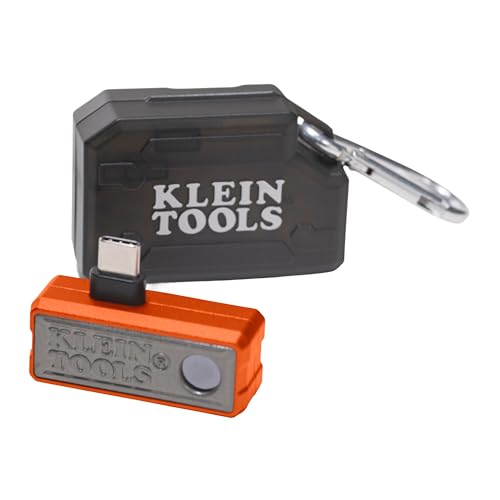
- 19,200-pixel thermal resolution
- Works with iOS and Android via USB-C
- Captures images, video, and time-lapse
Best For: Home energy audits with a phone-connected thermal camera
High-Detail Smart Scanner
HSFTOOLS F2W Thermal Camera with Super Resolution

- 256x192 detector with 640x480 super resolution
- Intelligent scene detection for leaks and insulation issues
- Wi-Fi app plus Windows PC analysis
Best For: Detailed home inspections with app and PC analysis
Field-Ready Inspector
FOXWELL RT280 Thermal Imaging Camera with 8GB Storage

- 320x240 LCD with TISR-enhanced imaging
- Stores over 20,000 images and videos
- Rugged IP54 design with drop resistance
Best For: Rugged home inspections with onboard storage and PC reports
Phone-Friendly Home Inspection Pick – FLIR One Pro iOS Thermal Camera
If you want a thermal imaging tool for home energy audits that stays compact and easy to carry, the FLIR One Pro is built around smartphone convenience. It plugs into iPhones with a Lightning port and uses MSX plus VividIR to make thermal patterns easier to interpret when checking for air leaks, moisture buildup, and other common home issues.
Best For: iPhone users who want a portable inspection camera for basic home energy and moisture checks.
Pros:
- Works directly with iPhones that have a Lightning port, including iPhone 14 and older
- VividIR upscales 160×120 native IR to 480×360 for more detail
- MSX merges thermal and visual images to help reveal edges and problem areas
- Includes a step-by-step inspection guide in the app for typical home faults
Cons:
- Only compatible with iPhones using a Lightning port
- Native IR resolution is 160×120 before super-resolution processing
For quick homeowner walkthroughs, this model stands out for ease of use and app-guided inspections rather than standalone industrial features. It is a practical choice when portability and simple thermal checks matter most.
Compact Precision Pick – Klein TI250 Rechargeable Thermal Imager
The Klein Tools TI250 is a practical thermal imaging tool for home energy audits when you want a compact handheld unit with temperature-point controls. Its over-19,200-pixel display, adjustable emissivity, and high/low temperature alarms make it useful for spotting hot and cold areas across different surfaces.
Best For: Users who want a rechargeable, pocketable thermal imager for general troubleshooting and home checks.
Pros:
- Over 19,200 pixels for more detailed thermal troubleshooting
- Adjustable emissivity from 0.01 to 0.99 for different materials
- High and low temperature alarms help monitor deviations
- Rechargeable lithium-ion battery and USB-C image storage
Cons:
- Less focused on advanced home-audit guidance than some app-based models
- Temperature range and alarm features may be more than casual users need
This model makes sense if you want a straightforward tool with useful measurement controls and simple portability. It is especially appealing when you need a rechargeable imager that can be carried and used repeatedly without battery swaps.
Guided Inspection Pick – GT16S AI Thermal Camera
The GT16S is a strong thermal imaging tool for home energy audits if you want built-in help identifying problem areas. Its AI scene detection highlights suspected moisture, insulation, floor heating, electrical, and solar-panel issues, while the dual-mode temperature setup lets you scan whole areas or take precise single-point readings.
Best For: Home inspectors and DIYers who want AI-assisted scanning with long battery life.
Pros:
- AI scene detection automatically highlights likely problem areas
- Five built-in inspection scenarios for moisture, insulation, floor heating, electrical, and solar panels
- 240×240 display image from a native 128×128 sensor via deep-learning enhancement
- Up to 11 hours of runtime and a lightweight 0.5 lb build
Cons:
- Native sensor resolution is 128×128 before enhancement
- May offer more inspection modes than a basic homeowner needs
For users who want more guided analysis and less guesswork, this model is designed to speed up inspections. The long runtime and temperature alarm support make it a solid all-day option for checking energy losses and hidden issues.
Advanced Analysis Pick – FOXWELL RT280 PRO Thermal Camera
If you need a thermal imaging tool for home energy audits with more analysis features, the FOXWELL RT280 PRO is built for detailed inspection work. It combines thermal and visible-light cameras, offers multiple fusion modes, and supports PC-based analysis with point, line, area, and report-generation tools.
Best For: Users who want higher-resolution imaging and PC report analysis for deeper troubleshooting.
Pros:
- Dual-lens setup with thermal and 2MP visible-light cameras
- Effective resolution boosted to 512×384 with TISR technology
- 9 color palettes, laser targeting, and LED light for darker spaces
- PC software supports 2D/3D analysis and automatic report generation
Cons:
- PC analysis is Windows-only, not compatible with Mac
- More advanced than needed for simple one-time home checks
This is the most feature-rich option in the group for buyers who want to document and analyze findings in more depth. Its rugged design and expanded imaging modes make it better suited to users who expect regular inspection work.
Compact Dual-Mode Thermal Imager – GT14S Thermal Imaging Camera with Thermometer Mode
If you want a thermal imaging tool for home energy audits that also handles everyday temperature checks, the GT14S is built for flexible, on-the-spot use. Its thermal mode helps you scan for insulation gaps, floor heat loss, and HVAC issues, while thermometer mode gives quick point readings when you need exact numbers.
Best For: Homeowners and DIYers who want a lightweight thermal camera for audits, HVAC checks, and general household diagnostics.
Pros:
- Dual inspection modes: full thermal imaging plus thermometer mode for point readings
- Ultra-light 240g body with a non-slip grip for easy handheld use
- NETD under 50mK and a 50° field of view for spotting subtle temperature differences across larger areas
- Up to 14 hours of battery life for longer inspection sessions
Cons:
- More of a dedicated handheld tool than a phone-based accessory
- No mention of onboard reporting or computer analysis software
- Accuracy still depends on correct emissivity and distance settings
For buyers who want a straightforward thermal imager with long runtime and simple controls, the GT14S offers a practical balance of portability and inspection features. It is especially appealing if you want one device that can handle both home energy audit work and broader temperature monitoring.
Phone-Powered Android Thermal Camera – Finder S1 USB-C Thermal Camera for Android
The Finder S1 is a strong choice if you want a thermal imaging tool for home energy audits without carrying a separate display unit. It turns a compatible Android phone or tablet into a thermal imager, making it easy to spot leaks, hotspots, and cold spots during quick inspections.
Best For: Android users who want a compact, low-power thermal camera for leak detection, household checks, and field use.
Pros:
- Plug-and-play USB-C design for compatible Android phones and tablets
- Live Super Resolution enhancement boosts the displayed image from 96×96 to 720×720
- 50° field of view with point, line, and area measurements for flexible inspection work
- Battery-free, ultra-low 0.31W power draw for extended use with a phone or tablet
Cons:
- Not compatible with iPhone
- Requires a separate Android device to operate
- Native detector resolution is lower before software enhancement
For Android owners, this model keeps thermal inspection simple and portable while adding useful measurement tools and alerts. It is a good fit when you want convenient home energy audit capability in a pocketable format.
High-Detail Inspection Thermal Camera – Tadeto 256×192 Thermal Imager with Laser Pointer
For buyers who want a thermal imaging tool for home energy audits with more visual detail, the Tadeto model focuses on clarity and inspection aids. Its super-resolution processing, large display, laser pointer, and LED fill light make it easier to confirm problem areas in dim spaces and review thermal changes on the spot.
Best For: Home inspectors, electricians, HVAC users, and DIYers who want more viewing detail and built-in inspection aids.
Pros:
- Super-resolution processing boosts the native image to 320×240 HD display output
- 25Hz refresh rate for smoother real-time thermal viewing
- 2.8-inch screen plus laser pointer and LED fill light for easier target confirmation
- Photo and video capture with offline analysis software for later review and reporting
Cons:
- Offline analysis software is not supported on Mac
- Heavier than the smallest pocket-style options at 1.32 pounds
- More feature-rich than needed for very basic temperature spot checks
This is the most inspection-oriented option of the three, especially if you value clearer viewing, documentation, and post-inspection analysis. For home energy audits, it offers a strong mix of detail and workflow features without relying on a phone.
Compact Phone-Based Imager – Klein Tools TI223 Mobile Thermal Imaging Camera for iOS and Android
If you want a thermal imaging tool for home energy audits that works right from your phone, the Klein Tools TI223 is a practical pick. Its 19,200-pixel sensor, broad temperature span, and phone-friendly design make it useful for spotting hot and cold areas around windows, doors, outlets, and HVAC components.
Best For: Homeowners and DIYers who want a compact thermal camera that pairs with iOS or Android devices for quick inspection sessions.
Pros:
- 19,200-pixel resolution helps reveal hot and cold spots more clearly.
- Works with iOS and Android devices through USB-C and fits many phone cases.
- Captures thermal images, video, and time-lapse for documentation.
- Offers spot, high/low, and differential temperature readouts.
Cons:
- Phone-based setup may not suit users who want a standalone handheld unit.
- Temperature visualization depends on the connected mobile device.
Overall, the TI223 is a straightforward choice if you value portability and easy sharing over a dedicated built-in display. It covers the basics well for home energy checks and general troubleshooting.
High-Detail Smart Scanner – HSFTOOLS F2W Thermal Camera with Super Resolution
The HSFTOOLS F2W is built for buyers who want a thermal imaging tool for home energy audits with more detail and smarter guidance. Its 256×192 detector, 640×480 super resolution, and scene detection features are aimed at making insulation gaps, moisture issues, and other problem areas easier to identify.
Best For: Users who want a sharper thermal image and automated scene detection for faster home inspections.
Pros:
- Super resolution boosts the image from 256×192 to 640×480.
- Intelligent scene detection is designed to flag leaks and insulation voids.
- Wi-Fi app support and Windows software help with sharing and reporting.
- 25Hz refresh rate and <40 mK sensitivity support smooth inspections.
Cons:
- PC analysis is limited to Windows software.
- The feature set may be more than casual users need for simple spot checks.
For home energy work, the F2W stands out because it combines stronger thermal detail with guided detection and analysis tools. That makes it a solid option when you want more confidence in what the camera is showing.
Field-Ready Inspector – FOXWELL RT280 Thermal Imaging Camera with 8GB Storage
The FOXWELL RT280 is a strong fit if you want a thermal imaging tool for home energy audits that also feels ready for tougher jobsite use. With a 320×240 screen, TISR-enhanced imaging, and built-in storage, it is designed to make inspections easier to document and review.
Best For: Home inspectors and hands-on users who want a rugged handheld thermal camera with onboard storage and PC reporting.
Pros:
- 320×240 LCD and TISR technology improve thermal clarity.
- Built-in 8GB storage holds over 20,000 images and videos.
- PC software supports 2D/3D analysis and report generation.
- IP54 rating and 6.6-foot drop resistance add durability.
Cons:
- PC analysis is for Windows, not Mac.
- It is bulkier than phone-mounted thermal camera options.
The RT280 offers a balanced mix of image detail, storage, and ruggedness for repeated inspection work. If you want a handheld camera that can handle documentation and field use, it is an easy model to consider.
How We Picked the Best Thermal Imaging Tool for Home Energy Audits
For a Thermal Imaging Tool for Home Energy Audits, we prioritized image clarity, usable temperature range, frame rate, battery life, app quality, and ease of spotting real-world building issues. We also looked for models that can help distinguish surface temperature patterns caused by drafts, insulation defects, moisture risks, and HVAC inefficiencies.
We favored tools that are practical in home settings: easy to aim, quick to read, and sensitive enough to show differences around ceilings, outlets, attic access points, and exterior walls.
Quick Comparison
Smartphone attachments are convenient for occasional use and portability. Handheld cameras usually offer better ergonomics, longer battery life, and a more focused workflow for larger audits. Higher-resolution models generally make it easier to interpret small anomalies, while basic models can still be useful for checking obvious leaks and confirming problem areas.
Key Buying Factors for a Thermal Imaging Tool for Home Energy Audits
Resolution and Image Clarity
Higher thermal resolution helps reveal smaller temperature differences and makes it easier to separate a real issue from background noise. For home energy audits, clearer images are especially helpful when comparing wall sections, window frames, and duct runs.
Temperature Range and Sensitivity
Look for a wide enough temperature range to handle both winter drafts and summer cooling losses. Good sensitivity matters because many energy issues only show modest temperature differences, especially when indoor and outdoor conditions are close.
Display and Workflow
A bright screen, intuitive controls, and fast startup make fieldwork easier. If you plan to walk through multiple rooms or document findings, features like image capture, onboard storage, and mobile app export can save time.
Practical Features
Useful extras include center spot temperature, high/low temperature alarms, multiple palettes, and laser aiming. These won’t replace good audit technique, but they can make scans faster and more consistent.
Who Should Buy Which Thermal Imaging Tool for Home Energy Audits?
If you want simple, occasional checks, a compact smartphone-connected model may be enough. If you plan to inspect several homes, a handheld unit with stronger image quality and battery life is usually the better choice. Budget buyers can focus on basic leak detection, while frequent users and serious DIY auditors should lean toward models with higher resolution and better thermal detail.
For the best results, use any thermal imager in the right conditions: strong indoor-outdoor temperature contrast, stable HVAC settings, and a methodical room-by-room approach. That will matter just as much as the camera itself.