Schools often need to prepare software, lesson materials, recovery tools, or assessment files across many USB drives. The right duplicator can reduce repetitive computer-based copying while helping staff maintain consistent, usable media.
This roundup compares 10 standalone USB and drive-duplication systems, ranging from compact one-to-two-drive units to higher-output models designed for batch work. Use the guide below to match ports, speed, sanitization features, and ease of operation to your school’s workflow.
Best 10 USB Duplicators for Schools Picks for 2026
High-Volume Standalone Pick

- Copies up to 15 drives at once
- No computer or software required
- Up to 2GB per minute
Best For: School IT departments duplicating drives in larger batches
Compact Multi-Format Choice
- Duplicates up to nine USB drives
- Supports USB 1.0 through 3.0 media
- Includes copy and erase modes
Best For: Schools needing flexible small-batch duplication
Maximum-Capacity Production Pick
USB131SA 1-to-31 USB Duplicator
- Copies to 31 targets
- Standalone with LCD status feedback
- Supports asynchronous copying up to 256MB masters
Best For: District-scale or high-volume USB distribution
Easy-Operation Touchscreen Pick
- Duplicates up to 10 flash drives
- Touchscreen copy and erase controls
- Supports USB 2.0, 3.0, and 3.1 media
Best For: School staff wanting simple, guided daily operation
Best Compact Pick

- Copies one source to two USB drives
- Supports quick and whole-media copying
- LCD controls with testing and erase tools
Best For: Small school IT teams and portable deployment work
Best High-Volume Pick
1:15 Standalone USB Duplicator

- Copies one source to up to 15 targets
- Supports USB 2.0 and 3.0 media
- Works with multiple file systems
Best For: District or school IT teams preparing large batches
Best for Verification

- Copies or erases up to five USB drives
- Offers sector-by-sector and file copying
- Includes copy comparison and drive testing
Best For: IT teams needing duplication, validation, and media sanitation
Best High-Capacity Pick
Vinpower 1-to-7 USB Duplicator

- Copies one source to up to seven USB drives
- Works without a PC or software
- Includes Raw Copy and secure erasing modes
Best For: Schools preparing many USB drives for classroom or IT deployment
Best Dual-Bay Versatility
StarTech USB and SATA Duplicator Dock

- Copies or erases two USB drives without a PC
- Docks 2.5-inch and 3.5-inch SATA drives
- Includes LCD status information and multiple erase modes
Best For: School IT teams managing USB, HDD, and SSD workflows
Best 1-to-1 Sanitizing Tool

- Copies and erases one USB or SATA drive at a time
- Offers four copy and five erase modes
- Includes Copy & Compare verification
Best For: Technicians handling individual drive cloning and sanitization
High-Volume Standalone Pick – Systor 1-to-15 USB Duplicator
For schools preparing many drives at once, this Systor unit is a practical choice among USB duplicators for schools. It works without a computer or software, supports synchronous and asynchronous copying, and duplicates source media bit by bit at up to 2GB per minute.
Best For: Schools that need to copy up to 15 USB drives in a standalone workflow.
Pros:
- Copies to 15 target drives simultaneously.
- Standalone operation requires no computer or software.
- Supports bit-by-bit duplication, synchronous copying, and asynchronous copying.
- Includes one-year parts, three-year labor, and lifetime technical support coverage.
Cons:
- USB Type-C drives require an adapter.
- Its listed USB 2.0 interface may be less suitable for newer high-speed storage workflows.
With a large 1-to-15 capacity and consistent listed transfer speed, the Systor is well suited to school IT departments handling repeated distribution or imaging tasks.
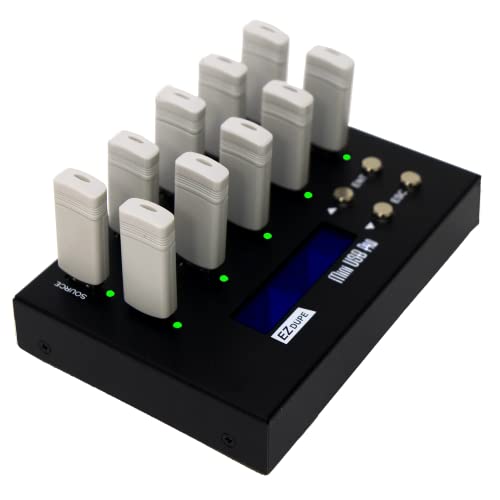
Compact Multi-Format Choice – EZ Dupe MiniUSB Pro 1-to-9
The EZ Dupe MiniUSB Pro offers a compact option for schools seeking USB duplicators for schools that can handle both flash media and compatible external storage. It supports USB 1.0, 2.0, and 3.0 media, with quick-copy and sector-by-sector modes.
Best For: Schools needing flexible duplication and data-erasing features for batches of up to nine USB devices.
Pros:
- Copies up to nine USB flash drives simultaneously.
- Supports quick copying and whole-media, sector-by-sector copying.
- Includes two erase functions for data-sanitizing tasks.
- Supports external USB-powered hard drives up to 2TB when separately powered.
Cons:
- Its nine-target capacity is lower than larger duplicators.
- External hard drives must have their own power source.
- Includes a one-year manufacturer warranty.
This is a versatile fit for school technology teams that value multiple copy modes and basic sanitization in a smaller standalone unit.
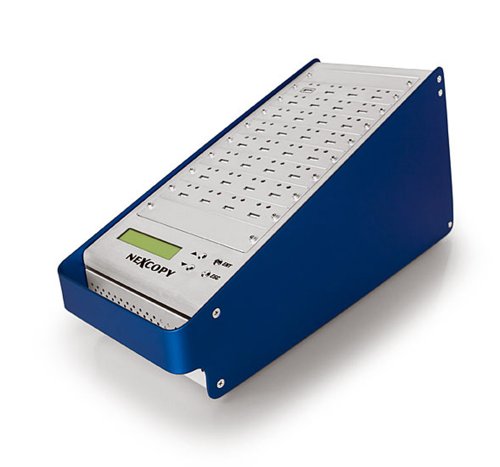
Maximum-Capacity Production Pick – USB131SA 1-to-31 USB Duplicator
For large deployments, the USB131SA stands out among USB duplicators for schools with its 1-master, 31-target configuration. It operates independently of a PC or software and provides LCD status feedback during asynchronous duplication.
Best For: Large schools or districts distributing the same USB content across up to 31 target drives.
Pros:
- Supports one master and 31 target drives.
- Standalone design requires no PC or software.
- Provides real-time performance feedback and status on an LCD.
- Supports asynchronous duplication for masters up to 256MB.
Cons:
- Its asynchronous master limit is listed as 256MB.
- The unit weighs 18 pounds, making it less portable.
- The supplied notes do not specify a warranty.
The 31-target layout makes this model especially appropriate for high-volume distribution, provided the master-size limitation fits the school’s copying requirements.
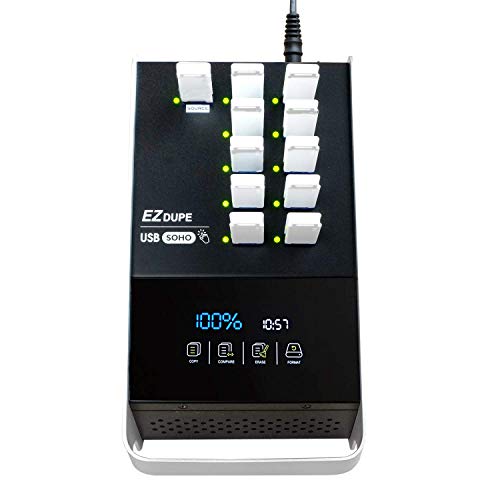
Easy-Operation Touchscreen Pick – EZ Dupe SOHO Touch 1-to-10
The EZ Dupe SOHO Touch is a user-friendly option for schools comparing USB duplicators for schools. Its touchscreen menu provides direct controls for copying, comparing, formatting, and erasing, while its design supports daily operation with USB flash media.
Best For: School staff who want straightforward touchscreen control for recurring duplication and media-management tasks.
Pros:
- Copies up to 10 USB flash drives simultaneously.
- Touchscreen interface simplifies copy, compare, format, and erase functions.
- Supports USB 2.0, 3.0, and 3.1 flash media.
- Supports all file formats, file sizes, and drive capacities on USB flash media according to the supplied notes.
Cons:
- The supplied notes do not specify a computer-free operating mode.
- Its 10-target capacity is below the largest models in this roundup.
- Includes a one-year manufacturer warranty.
For schools prioritizing ease of use, the touchscreen and built-in comparison and erase tools make this a convenient daily-use option rather than a maximum-capacity production system.
Best Compact Pick – Portable 1:2 USB Duplicator
For schools seeking practical USB duplicators for schools, the BestDuplicator UB300 provides a compact, computer-free way to copy one flash drive to two targets at once. Its LCD controls, verification tools, and support for Quick Copy or bit-for-bit Whole Media Copy make it suitable for preparing classroom, lab, or IT deployment media.
Best For: School IT staff and technicians who need a portable 1-to-2 duplicator for routine drive deployment, testing, or backup.
Pros:
- Copies one USB drive to two targets simultaneously without a computer.
- Offers both data-only copying and whole-media cloning.
- Includes capacity checks, device information, speed tests, and erase functions.
- Compact design with LCD navigation and port status LEDs.
Cons:
- Limited to two target drives per duplication cycle.
- Designed primarily for USB 1.1 and USB 2.0 media.
- Card duplication requires a compatible USB card reader sold separately.
The UB300 is a sensible choice when portability and straightforward operation matter more than high-volume throughput. It is especially useful for smaller schools or departments handling a few prepared drives at a time.
Best High-Volume Pick – 1:15 Standalone USB Duplicator
DupliM 1:15 USB Flash Drive Duplicator Stand-Alone Burner Cloner Copier (1 to 15)
Check Price On AmazonWhen a school needs to prepare many drives in one session, the DupliM 1:15 is one of the more capacity-focused USB duplicators for schools. Its standalone design accepts one source and up to 15 targets, with a three-step LCD workflow and support for USB 2.0 and 3.0 flash drives.
Best For: Larger schools, districts, and technology departments distributing the same files or prepared media across many USB drives.
Pros:
- Duplicates one source drive to as many as 15 target drives.
- Works without a computer through a simple LCD-based process.
- Supports USB 2.0 and 3.0 flash drives plus external 2.5-inch hard drives or SSDs.
- Supports several file systems, including FAT, FAT32, NTFS, HFS, and Ext2/3/4.
Cons:
- Weighs about 7 pounds, making it less convenient for mobile use.
- Maximum listed hard-drive capacity is under 2TB.
- Large batches may require more setup space and coordinated media handling.
The DupliM stands out for throughput potential and broad media support. It is a strong fit when reducing the number of duplication cycles is more important than having a lightweight unit.
Best for Verification – 1:5 USB Duplicator and Eraser
The StarTech 1:5 combines USB duplication with drive-erasing and verification features, making it a versatile option among USB duplicators for schools. It can copy to five targets without a computer, scan media for errors, and compare completed copies with the source.
Best For: School IT departments that need to create boot drives, validate copies, and sanitize USB media for reuse.
Pros:
- Duplicates or erases up to five USB drives in a standalone unit.
- Supports file copying, sector-by-sector cloning, and multiple erase modes.
- Copy-and-Compare helps verify cloned drives against the source.
- LCD controls, drive testing, and red/green status LEDs aid monitoring.
Cons:
- Handles fewer target drives per cycle than the 1:15 DupliM.
- Asynchronous copying is limited to source content under 64MB.
- Some external USB devices may require their own power source.
The StarTech is particularly appealing where media sanitation and verification are part of the workflow, not just duplication. Its five-target capacity balances batch copying with a relatively compact portable form factor.
Best High-Capacity Pick – Vinpower 1-to-7 USB Duplicator
For schools that need to prepare multiple student or classroom drives, the Vinpower Flash Memory USB Duplicator offers a standalone way to copy USB content without a computer or software. Its 1-to-7 capacity, portable design, and flexible copy modes make it a practical choice among USB duplicators for schools.
Best For: IT departments and staff deploying bootable drives, software, firmware, training materials, or other USB-based resources across multiple classrooms.
Pros:
- Copies one USB drive to up to seven targets without a PC.
- Smart Copy, Raw Copy, and Read Error Skip support different duplication needs.
- Built-in DoD 5220.22-M eraser supports secure USB drive reuse.
- Compatible USB-C PD power-bank operation and a compact design improve portability.
Cons:
- Daisy-chain cable is not included.
- Standalone USB duplication only; it is not described as a SATA drive duplicator.
Its seven-target capacity is the main advantage for school deployments, especially when many identical drives must be prepared at once. Daisy-chaining compatible units can expand capacity further, while the eraser adds value for recurring IT workflows.
Best Dual-Bay Versatility – StarTech USB and SATA Duplicator Dock
The StarTech.com USBDUP12 combines USB duplication with a dual-bay SATA HDD and SSD docking station. For schools managing both flash drives and internal storage, it provides a standalone option for copying, erasing, and accessing different media without relying on a computer.
Best For: School IT teams that handle USB drives alongside 2.5-inch or 3.5-inch SATA hard drives and SSDs.
Pros:
- Duplicates or erases two USB drives without a PC.
- Supports 2.5-inch and 3.5-inch SATA HDDs and SSDs through its dual-bay dock.
- Offers sector-by-sector, file/system copy, quick erase, and DoD three-pass overwrite modes.
- LCD feedback shows drive information, speeds, and errors.
Cons:
- USB duplication is limited to two drives at a time.
- The broader HDD/SSD functionality may be more than needed for USB-only deployments.
This model is a strong fit when a school’s storage workflow extends beyond flash drives. Its asynchronous copy mode can also help staff continue processing drives by inserting a new one after a duplication finishes.
Best 1-to-1 Sanitizing Tool – StarTech USB and SATA Cloner
For schools that usually duplicate one drive at a time, the StarTech.com SU2DUPERA11 provides 1:1 copying and erasing across USB and SATA media. Its standalone operation, tool-free design, and verification option make it a focused choice among USB duplicators for schools.
Best For: School technicians who need to clone or sanitize individual USB flash drives, SATA HDDs, or SATA SSDs.
Pros:
- Supports cross-interface copying between USB and SATA drives.
- Provides four duplication modes and five erase modes, including DoD 5220.22-M three-pass overwrite.
- Copy & Compare helps verify a completed clone against the source.
- Supports 2.5-inch and 3.5-inch SATA drives with a toolless setup.
Cons:
- Its 1:1 design is slower for large batches than multi-target duplicators.
- Some additional interfaces, including IDE and M.2 SATA, require separately sold adapters.
- USB copying is listed at up to 2.4GB/min, below its stated SATA speed.
This is a practical choice for one-off replacements, drive migrations, and secure reuse rather than mass classroom deployment. The range of erase modes and built-in comparison function give technicians useful control over individual-drive jobs.
How We Picked the Best USB Duplicators for Schools
We focused on standalone duplicators that can copy USB flash drives without requiring a connected computer. The selected models vary in port count, media compatibility, copying speed, display and menu design, and erasure functions. We also considered whether each unit suits occasional classroom preparation, IT-department deployment, or larger batch operations.
Because school workflows differ, there is no single best specification for every campus. A small department may value a compact, affordable unit, while a district technology office may prioritize throughput, verification, and secure media sanitization.
Quick Comparison
| Best For | What to Prioritize | Suitable Configuration |
|---|---|---|
| Occasional classroom use | Simple controls and low setup time | 1:2 or 1:5 duplicator |
| School IT departments | Higher port count, verification, and erase modes | 1:7 to 1:15 duplicator |
| District-wide deployments | Maximum batch capacity and consistent throughput | 1:15 or 1:31 duplicator |
| Mixed USB and storage media | Broad compatibility and docking support | USB and HDD/SSD cloner |
Key Buying Factors for USB Duplicators for Schools
Port Count and Workload
The ratio describes how many target drives can be copied from one source at a time. More target ports improve batch productivity, but they also increase the unit’s size and cost. Estimate the number of drives your staff prepares in a typical session rather than choosing solely by the largest advertised capacity.
Copy Speed and Verification
Rated speed is usually expressed in gigabytes per minute and can vary with the source drive, target drives, file size, and interface generation. A verify function is valuable for school IT teams because it checks whether copies were written correctly instead of relying only on completion indicators.
Supported Media
Confirm that the duplicator supports the USB generations and drive types used by your school. Some units focus on flash drives, while others can also clone SATA hard drives or SSDs. Compatibility with larger-capacity devices and different file systems should be checked before purchase.
Sanitization and Data Protection
Erase modes matter when drives are reused for student testing, loan programs, or staff distribution. Look for clear overwrite options and an operating process that helps prevent accidentally erasing the source drive. Keep master media controlled and use write-protected or clearly labeled source devices when possible.
Controls, Display, and Support
An LCD or touchscreen menu can make it easier for staff to select copy, compare, or erase functions without a computer. Consider documentation, warranty coverage, replacement parts, and whether the unit’s controls are straightforward enough for occasional users.
Who Should Buy Which USB Duplicators for Schools?
Choose a compact duplicator if a teacher, librarian, or small department prepares only a few drives at a time. A one-to-two or one-to-five model keeps the investment and footprint modest.
Choose a mid-capacity unit if school IT staff regularly distribute classroom software, bootable utilities, or standardized instructional media. Seven to 15 target ports can substantially reduce repetitive work.
Choose a high-capacity or multifunction model for district teams, computer labs, or repair departments with recurring bulk requirements. Higher port counts and support for hard drives or SSDs are most useful when paired with documented procedures and staff training.