Choosing the right video switcher with multiview can simplify multi-camera production by letting you monitor sources, switch scenes, and manage audio from one workflow.
This roundup covers compact HDMI mixers, professional HDMI and SDI systems, seamless multiviewers, and all-in-one streaming setups for creators, educators, and production teams.
Best 10 Video Switcher with Multi View Picks for 2026
Best All-in-One Production Deck

- Four HDMI inputs with two-display MultiView support
- Built-in streaming, recording, playback, and audio tools
- Hardware controls plus portrait and landscape streaming
Best For: Feature-rich live events, worship, conferences, and podcasts
Best for Audio-First Live Production

- Switches up to six HDMI and USB video sources
- Two studio-grade XLR combo inputs with Revolution Preamps
- Scenes, overlays, chroma key, streaming, and ISO recording
Best For: Podcasts, interviews, and audio-focused live shows
Best Compact Streaming Switcher

- Four-input HDMI switcher with built-in multiview
- Streaming, recording, transitions, keys, and audio mixing
- Compact design for desktop multicamera productions
Best For: Education, presentations, esports, and internet streaming
Best Budget Multiview Monitor

- Six layouts for viewing up to four HDMI sources
- Seamless 4x1 switching at up to 1080p60
- IR and RS232 control with optical and 3.5mm audio output
Best For: HDMI monitoring, security cameras, gaming, and presentations
Best Overall
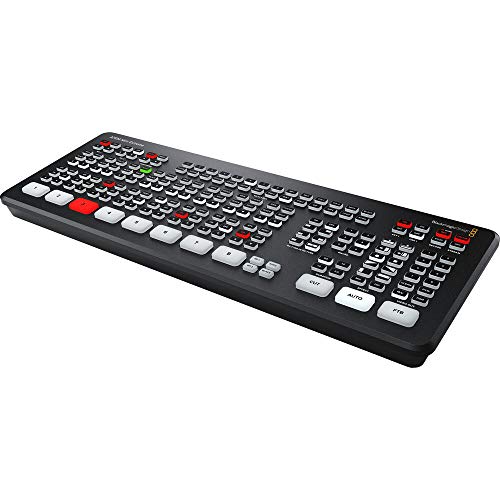
- Eight 10-bit HD HDMI inputs
- Re-sync and frame-rate conversion on every input
- Streaming, recording, and multiview support
Best For: Larger HD multi-camera livestreams
Best Portable Setup

- Built-in 4-inch multiview screen
- Four HDMI inputs with zero-latency switching
- PTZ, keying, PIP, and AUX output controls
Best For: Mobile streaming and compact productions
Best for 4K Monitoring
J-Tech Digital 4K Multi-Viewer

- Supports 4K at 60Hz
- Eight layouts including PiP, PBP, and quad view
- RCA and optical audio extraction
Best For: 4K multi-source monitoring and HDMI installations
Professional Multi-View Powerhouse

- Four HDMI and four SDI inputs with NDI|HX3 support
- Built-in screen, PTZ control, recording, and multi-view
- Streams to two platforms with multiple protocol options
Best For: Professional multi-camera events and live productions
Compact HDMI Multi-View Switcher
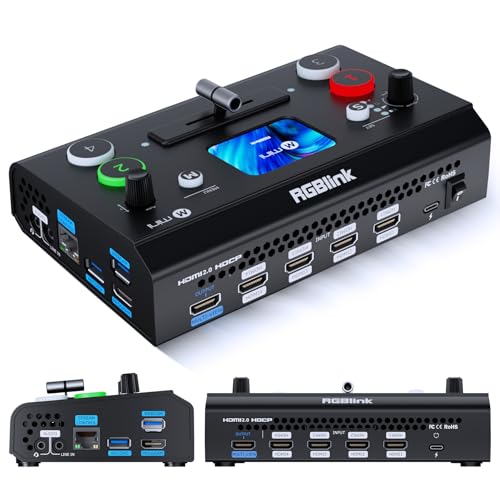
- Four HDMI inputs with dual 1080p HDMI outputs
- 2.1-inch touch screen and T-bar control
- UVC webcam mode plus optional recording and effects
Best For: Entry-level HDMI streaming and small productions
Portable All-in-One Multi-View Kit

- 14-inch integrated monitor with four HDMI/SDI inputs
- Dual HDMI outputs preserve program and multi-view monitoring
- AC, DC, or USB power-bank operation for mobile use
Best For: Field production and portable multi-camera streaming
Best All-in-One Production Deck – GoStream Deck HDMI Pro
If you need a video switcher with multi view for a flexible live-production setup, the Osee GoStream Deck combines four HDMI inputs, two HDMI outputs, audio controls, recording, playback, and streaming in one unit. Its hardware control panel also supports landscape and portrait streaming, overlays, chroma key, and PC-free operation.
Best For: Churches, conferences, weddings, podcasts, education, and other productions needing integrated switching, audio, streaming, and recording.
Pros:
- Four HDMI inputs and two HDMI outputs support MultiView and monitoring.
- Records to an SD card or USB SSD and supports MP4 playback.
- Offers Ethernet streaming to three platforms, USB streaming, audio effects, and graphics overlays.
- Physical PVW/PGM buses, T-Bar, macros, and auto-switching support hands-on or automated control.
Cons:
- The broad feature set may require more setup than a basic switcher.
- Its listed HDMI inputs are suited to HDMI-based sources rather than other video connections.
The GoStream Deck is a strong choice when a video switcher with multi view must do more than change camera angles. It is particularly appealing if you want recording, playback, overlays, and direct streaming without relying entirely on a computer.
Best for Audio-First Live Production – RØDECaster Video
The RØDECaster Video is a video switcher with multi view designed for productions where video and microphone audio need equal attention. It switches up to six sources, supports customizable multi-source scenes, and adds studio-grade XLR inputs, media playback, overlays, chroma keying, direct streaming, and recording.
Best For: Podcasters, interview shows, streamers, and live producers who want advanced audio capture alongside multi-camera video control.
Pros:
- Handles up to six video sources through four HDMI and two USB inputs.
- Two Neutrik combo inputs use high-gain Revolution Preamps for XLR microphones and instruments.
- Provides seven customizable scenes, graphic overlays, automatic chroma keying, and transitions.
- Supports Wi-Fi or Ethernet streaming, USB software output, external recording, and ISO recording.
Cons:
- Its feature-rich design may be more than needed for simple camera switching.
- The supplied dimensions list the unit as relatively deep, which may matter for compact desks or racks.
Choose the RØDECaster Video when clean spoken-word audio and flexible scene control are central to the production. Its combination of six-source switching, multi-source scenes, and direct audio connectivity makes it especially capable for studio-style live content.
Best Compact Streaming Switcher – ATEM Mini Pro
The Blackmagic Design ATEM Mini Pro is a compact video switcher with multi view for four-camera HDMI productions. It combines HDMI switching, transitions, keying, audio mixing, Ethernet streaming, multiview output, and USB-C recording in a small desktop unit.
Best For: Education, business presentations, esports, and multicamera internet streaming with HDMI cameras.
Pros:
- Four HDMI inputs support 10-bit 4:2:2 YUV video and embedded audio.
- Includes four-camera multiview, multiple transition types, upstream keys, and a downstream keyer.
- Built-in six-input, two-channel audio mixer supports HDMI and analog audio.
- Ethernet streaming, multiview output, and USB-C webcam or external-drive recording are built in.
Cons:
- It has four HDMI inputs and does not list USB video inputs like some newer production systems.
- The supplied specifications identify a single HDMI output, used for program or multiview functions.
The ATEM Mini Pro remains a practical pick for straightforward four-camera HDMI streaming. Its compact size and integrated multiview, streaming, recording, and mixing features make it well suited to desktop and presentation-focused workflows.
Best Budget Multiview Monitor – PORTTA 4×1 HDMI Multiviewer
The PORTTA 4×1 is a video switcher with multi view focused on displaying and selecting HDMI sources rather than producing a full livestream. It offers six viewing layouts, seamless switching, 1080p at 60Hz support, scaling for 1080p and 720p, and control through an IR remote or RS232.
Best For: Users who need to monitor four HDMI devices on one display, including security cameras, game consoles, computers, or media players.
Pros:
- Six layouts include four equal screens, side-by-side, picture-in-picture, full screen, and one-large-three-small views.
- Seamless switching enables smooth changes among four HDMI inputs.
- Supports up to 1080p at 60Hz with 1080p and 720p scaler functions.
- Includes Toslink and 3.5mm audio output support, plus IR and RS232 control.
Cons:
- It is a multiviewer and switcher, not a full live-production mixer with streaming or recording features.
- It provides one HDMI output, so all selected viewing layouts feed a single display.
The PORTTA is best viewed as a monitoring and source-selection solution. It makes sense when the priority is seeing several HDMI feeds at once or switching among them smoothly, rather than adding broadcast-style audio, overlays, or online streaming.
Best Overall – ATEM Mini Extreme
The Blackmagic Design ATEM Mini Extreme is a strong choice if you need a video switcher with multi view for larger HDMI-based live productions. It provides eight HDMI inputs, input re-sync and frame-rate conversion on every input, plus streaming and recording capabilities.
Best For: Multi-camera livestreams and productions that need eight HDMI sources with built-in multiview functionality.
Pros:
- Eight 10-bit HD HDMI inputs
- Input re-sync and frame-rate conversion on all eight inputs
- Supports streaming, recording, and multiview
Cons:
- Designed around HD HDMI inputs rather than 4K switching
- Heavier and larger than the compact four-input option in this roundup
Choose this model when input capacity is your priority. Its eight HDMI connections make it especially practical for more involved multi-camera setups, while the built-in production features reduce the need for additional equipment.
Best Portable Setup – Mixer Plus 4-Channel Switcher
The Mixer Plus is a practical video switcher with multi view for mobile productions and small studios. Its built-in 4-inch screen provides real-time monitoring, while four HDMI inputs, customizable transitions, and scene presets support efficient multi-camera switching.
Best For: Portable live streaming, online classes, events, YouTube, OBS, and Zoom setups needing on-device monitoring.
Pros:
- Built-in 4-inch multiview display
- Four HDMI inputs with zero-latency switching
- Includes chroma key, luma key, PIP, DSK, logo overlay, and PTZ control
- Customizable AUX HDMI output with multiple signal choices
Cons:
- Four inputs provide less capacity than the eight-input ATEM model
- The supplied notes do not specify 4K support
This is the most convenient pick when portability and direct monitoring matter. The integrated screen and broad production controls make it useful when you want a compact switcher without relying on a separate multiview monitor.
Best for 4K Monitoring – J-Tech Digital 4K Multi-Viewer
The J-Tech Digital JTECH-MV41A suits buyers seeking a video switcher with multi view for 4K source monitoring. It combines four HDMI inputs with 4K at 60Hz support, eight display modes, and audio extraction for installations involving consoles, players, computers, or other HDMI devices.
Best For: 4K 60Hz multi-source monitoring, quad viewing, home theater systems, and professional HDMI installations.
Pros:
- Supports video up to 4K at 60Hz
- Eight viewing modes, including PiP, PBP, and quad view
- RCA and optical audio outputs with support for multichannel formats
- Includes mounting ears, a one-year warranty, and lifetime technical support
Cons:
- Offers four HDMI inputs rather than eight
- Focused on multi-viewing and switching rather than live-production streaming features
Consider this J-Tech model when resolution and viewing flexibility are more important than broadcast-oriented controls. Its 4K 60Hz support, configurable layouts, and audio extraction make it a versatile choice for monitoring and fixed HDMI setups.
Professional Multi-View Powerhouse – Tenveo PC500
For demanding productions, the Tenveo PC500 is a video switcher with multi view capabilities, extensive camera connectivity, PTZ control, recording, and streaming built in. Its combination of HDMI, SDI, USB, and NDI|HX3 support makes it suited to larger live-production setups.
Best For: Churches, studios, events, conferences, education, and other professional multi-camera productions.
Pros:
- Accepts four HDMI inputs, four SDI inputs, USB, and NDI|HX3 sources.
- Supports multi-view, PTZ camera control, presets, AI tracking, and cruise tracks.
- Offers USB recording, dual recording support, UVC output, and SRT, RTMP, RTSP, and NDI|HX3 streaming.
- Includes a built-in 5.5-inch FHD screen for real-time monitoring.
Cons:
- Outputs are limited to 1080p60 even though some inputs support 4K60.
- The broad feature set may be more than smaller or simpler productions require.
The PC500 stands out when you need a centralized control surface for multiple cameras, live streaming, monitoring, and recording. It is a strong fit for buyers prioritizing professional routing and production flexibility over compactness.
Compact HDMI Multi-View Switcher – RGBlink Mini V3
The RGBlink Mini V3 is a compact video switcher with multi view functionality for HDMI-based live streaming and multi-camera work. It combines four HDMI inputs, a 2.1-inch touch screen, dual HDMI outputs, UVC webcam mode, and a physical T-bar in a portable design.
Best For: Entry-level creators, streamers, educators, and small multi-camera productions using HDMI sources.
Pros:
- Provides four HDMI inputs and two 1080p HDMI outputs for program and preview workflows.
- Offers a built-in touch screen and professional T-bar control.
- Supports UVC webcam mode for platforms such as YouTube and Facebook.
- Includes PIP layouts, chroma key, logo overlays, and 15 transition effects.
Cons:
- Recording and selected advanced features require optional TAO Cloud activation.
- A 35W or higher USB-C power adapter is recommended for stable operation.
- It is limited to HDMI connectivity rather than offering SDI inputs.
This is an appealing choice for buyers who want a small, approachable HDMI switcher with multi-view-style preview and streaming features. Check the licensing requirements carefully if recording, PTZ control, or creative effects are essential to your workflow.
Portable All-in-One Multi-View Kit – Osee GoStream Duet Kit
The Osee GoStream Duet Kit is a video switcher with multi view monitoring designed for mobile production. It pairs a GoStream Duet mixer with a 14-inch display, four HDMI/SDI inputs, dual HDMI outputs, USB connectivity, and flexible power options.
Best For: Portable live streaming, field production, events, and creators who need an integrated monitor and mounting solution.
Pros:
- Combines the switcher, 14-inch 1080×1920 screen, silent fan, and mounting plates in one kit.
- Accepts four HDMI/SDI inputs and provides two HDMI outputs for program and multi-view monitoring.
- Includes two USB ports for a camera and streaming software such as OBS, vMix, or Zoom.
- Can run from AC, DC, or a USB power bank and can supply 5V USB power to additional devices.
Cons:
- At about 5 kg or 12 pounds, it is portable but not especially lightweight.
- The integrated kit is less compact than a standalone switcher for simple setups.
- The supplied notes do not specify the recording formats or output frame rates.
The GoStream Duet Kit is compelling when portability and an integrated monitoring setup matter more than minimizing size. Its HDMI/SDI inputs, large built-in display, and flexible power options make it practical for productions away from a fixed studio.
How We Picked the Best Video Switcher with Multi View
We focused on the features that most affect real-world multi-camera production: input type and count, output resolution, multiview flexibility, switching speed, audio handling, recording, streaming connectivity, and portability. The selection includes dedicated multiviewers as well as complete production switchers, because these devices serve different needs even when they share similar terminology.
We also considered workflow fit. A compact HDMI switcher may be ideal for a creator or classroom, while an SDI-capable model is better suited to longer cable runs and event production. Built-in screens, USB output, network streaming, and onboard recording can reduce the amount of extra equipment required.
Quick Comparison
| Best For | What to Prioritize | Typical Choice |
|---|---|---|
| Home studios and creators | Simple HDMI switching, USB streaming, compact design | Entry-level HDMI production switcher |
| Remote classes and presentations | Easy source monitoring, audio support, reliable output | HDMI multiviewer or portable mixer |
| Professional live production | SDI inputs, 4K support, recording, robust control | Advanced HDMI/SDI switcher |
| Small event crews | Built-in display, flexible outputs, fast setup | Portable switcher with integrated screen |
Key Buying Factors for a Video Switcher with Multiview
Inputs, Outputs, and Signal Compatibility
Count your cameras and playback sources before buying, then leave room for expansion. HDMI is common for consumer cameras, consoles, and laptops, while SDI is preferable for professional cameras and longer runs. Check whether the switcher accepts the exact frame rates and resolutions your sources produce. A 4K input specification does not always mean every output or multiview mode operates in 4K.
Multiview Layout and Monitoring
Look for the number of display modes, picture-in-picture options, labels, audio meters, and full-screen preview controls you need. A basic quad view may be enough for four fixed cameras, whereas a live producer may need customizable layouts and clear program-versus-preview monitoring.
Streaming, Recording, and Audio
USB webcam output can make streaming straightforward, but network streaming is useful when you want to avoid a computer. If recording matters, verify supported storage, file format, and whether recording can run while streaming. For audio, check embedded HDMI handling, analog inputs, audio extraction, mixing controls, and monitoring outputs.
Control, Portability, and Reliability
Physical buttons are helpful during fast live changes; touchscreen or software control can provide deeper configuration. Built-in screens reduce setup time, while rack-friendly designs suit permanent installations. Confirm power requirements, cooling, firmware support, and the manufacturer’s maximum cable lengths.
Who Should Buy Which Video Switcher with Multi View?
Choose a compact HDMI switcher if you stream from a desk, classroom, studio, or small event and want a simple setup with minimal accessories. Choose a dedicated multiviewer if your main priority is monitoring and seamless source selection rather than full production, streaming, or recording.
Choose a feature-rich HDMI production switcher if you need integrated streaming, recording, audio mixing, and multiple camera inputs in one unit. Choose an HDMI/SDI model for professional cameras, longer cable runs, larger venues, or a workflow that may expand beyond consumer equipment. Before purchasing, match every source, display, audio device, and streaming destination to the switcher’s documented specifications.