Choosing the right webcam can make your stream look sharper, sound cleaner, and feel far more professional. From 4K models with AI tracking to simple plug-and-play options, the best choice depends on your room, setup, and content style.
This roundup of webcams for live streaming focuses on image quality, autofocus, audio, and ease of use so you can quickly narrow down the right fit.
Best 10 Webcams for Live Streaming Picks for 2026
Premium AI PTZ
Insta360 Link 2 4K AI Tracking Webcam

- 4K HDR video from a 1/2-inch sensor
- Physical AI tracking and gesture control
- DeskView and Whiteboard modes for creators
Best For: Streamers and presenters wanting premium video with intelligent tracking
Privacy-Focused 4K

- 4K@30fps support with a 1080p default
- PDAF autofocus and automatic light adjustment
- Privacy cover plus dual omnidirectional mics
Best For: Users wanting a simple privacy-minded 4K webcam
Auto-Framing 4K
Insta360 Link 2C Streaming Webcam

- 4K HDR video with a 1/2-inch sensor
- Auto framing for solo or group shots
- Gesture control with DeskView and Whiteboard modes
Best For: Streamers who want automatic framing and premium 4K quality
Budget Classic
Logitech C920S HD Pro 1080p Webcam

- Full HD 1080p video with autofocus
- Stereo audio with dual microphones
- Privacy shutter for lens protection
Best For: Budget buyers wanting a reliable 1080p streaming webcam
Editor’s Choice
EMEET S600 4K Streaming Webcam

- 4K at 30FPS or 1080P at 60FPS
- PDAF autofocus with auto light balancing
- Built-in privacy cover and noise-canceling mics
Best For: Streamers who want 4K detail and easy plug-and-play setup
Premium Pick

- Up to 4K at 30 fps with autofocus
- RightLight 3 improves glare and backlighting
- Three field-of-view presets for better framing
Best For: Creators who want premium 4K video and adjustable framing
Budget-Friendly Streamer
Angetube 1080P Ring Light Webcam
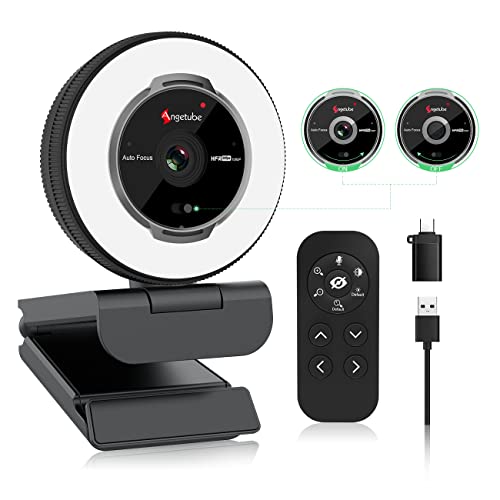
- Built-in ring light with adjustable brightness
- 1080p at 60 FPS with autofocus
- USB-A/C compatibility and privacy cover
Best For: Streamers who want lighting help and an affordable 1080p setup
Flagship 4K AI PTZ
Insta360 Link 2 Pro for Streaming

- 4K video with a large 1/1.3-inch sensor
- AI tracking physically pans and tilts to follow you
- Directional mics and Stream Deck support
Best For: Streamers and presenters who want premium video and smart tracking
Classic 1080p Streaming Pick

- 1080p/30fps plus 720p/60fps for smoother motion
- Auto light correction and autofocus
- Dual mics and XSplit VCam support
Best For: Budget-conscious streamers who want reliable 1080p quality
Simple 4K Plug-and-Play

- 4K Ultra HD video with plug-and-play setup
- Physical sliding lens cover for privacy
- USB-C and USB-A support with 360-degree flexibility
Best For: Users who want an easy 4K webcam with privacy protection
Premium AI PTZ – Insta360 Link 2 4K AI Tracking Webcam
If you want webcams for live streaming that look and feel more like a camera rig than a basic computer accessory, the Insta360 Link 2 is built for that job. Its 4K sensor, HDR, PDAF autofocus, and physical AI tracking make it a strong pick for creators who move around on stream or want a polished desk setup.
Best For: Streamers, presenters, and creators who want premium image quality with AI tracking and advanced framing control.
Pros:
- 1/2-inch sensor with 4K HDR video for detailed, low-light-friendly image quality
- Physical AI tracking keeps you centered as you move around the room
- PDAF autofocus helps maintain crisp focus during streaming and calls
- Gesture control, smartphone remote control, DeskView, and Whiteboard modes add flexibility
Cons:
- Not compatible with ARM-based Windows systems or Windows Hello Face Recognition
- Advanced features may be more than casual users need
Overall, the Link 2 is a feature-rich streaming webcam for users who care about image quality and intelligent framing. It is especially appealing if you want a single camera that can handle face cam, desk demos, and presentation-style content.
Privacy-Focused 4K – EMEET NOVA 4K PDAF Webcam
The EMEET NOVA is a practical option if you need webcams for live streaming with 4K detail, straightforward controls, and a privacy cover. It defaults to 1080p, but you can switch to 4K in software, and its fixed 73° field of view keeps the framing stable for solo use or a tidy desk setup.
Best For: Users who want a simple 4K webcam with privacy protection, clear audio, and basic manual adjustment.
Pros:
- 4K at 30fps support with a CMOS sensor for high-detail video
- PDAF autofocus stays sharp within the stated fixed focus range
- Two built-in omnidirectional mics provide clear voice pickup
- Privacy cover, tripod mount, and flexible stand make it easy to position
Cons:
- Video defaults to 1080p, so 4K must be enabled in software or supported apps
- No facial tracking, autofocus closing, or FOV adjustment
- Focus range is fixed, so it is less flexible than more advanced streaming webcams
In practice, the NOVA is best for users who value clean 4K output and simple setup over advanced creator features. It is a solid fit for streamers who want dependable quality without paying for tracking extras.
Auto-Framing 4K – Insta360 Link 2C Streaming Webcam
The Insta360 Link 2C is a strong choice for webcams for live streaming when you want 4K detail, auto framing, and easy control without the physical pan-and-tilt tracking of the full Link 2. It uses a 1/2-inch sensor, HDR, PDAF autofocus, and AI noise-canceling audio to deliver a polished stream setup.
Best For: Streamers and remote presenters who want automatic framing, sharp 4K video, and creator-friendly features.
Pros:
- 4K video with HDR and a 1/2-inch sensor for strong image quality
- Auto framing keeps one person or a group clearly in view
- PDAF autofocus and natural bokeh help maintain a clean, cinematic look
- Gesture control, smartphone remote control, DeskView, and Whiteboard modes add versatility
Cons:
- No physical AI tracking like the higher-end Link 2
- Not compatible with ARM-based Windows systems or Windows Hello Face Recognition
The Link 2C fits creators who want modern webcam automation and strong image quality in a compact package. It is a smart middle ground if you want premium streaming features but do not need full motorized tracking.
Budget Classic – Logitech C920S HD Pro 1080p Webcam
The Logitech C920S is a dependable option if you need webcams for live streaming and want a familiar, straightforward setup. It delivers Full HD 1080p video, autofocus, light correction, and stereo audio, making it a practical pick for entry-level streaming, calls, and recording.
Best For: Budget-minded streamers who want a proven 1080p webcam with privacy protection and simple operation.
Pros:
- Full HD 1080p video for crisp everyday streaming and recording
- Autofocus and light correction help maintain a usable image in varying conditions
- Dual mics provide stereo audio for natural-sounding capture
- Privacy shutter adds simple lens protection when not in use
Cons:
- Limited to 1080p rather than 4K
- Less feature-rich than newer streaming webcams with AI framing or creator modes
The C920S remains a solid practical pick when you want trusted performance without paying for premium extras. If your priority is stable 1080p output and a privacy shutter, it still covers the essentials well.
Editor’s Choice – EMEET S600 4K Streaming Webcam
If you want webcams for live streaming that prioritize sharp image quality and easy setup, the EMEET S600 is built for that lane. It offers 4K at 30FPS or 1080P at 60FPS, plus PDAF autofocus and automatic light balancing to help keep your shot clear in changing conditions.
Best For: Streamers and content creators who want 4K detail, strong autofocus, and simple plug-and-play use.
Pros:
- 4K/30FPS and 1080P/60FPS options for high-quality streaming
- PDAF autofocus and auto light adjustment help keep images stable and sharp
- Built-in privacy cover and dual noise-canceling mics add convenience
- Plug-and-play USB setup with optional EMEETLINK customization
Cons:
- 4K resolution depends on using compatible software or apps like OBS
- At 4K, the field of view is fixed at 73°
Overall, the S600 is a practical pick if you want a streaming-focused webcam with premium resolution, dependable autofocus, and straightforward operation. It balances creator-friendly features with a durable, compact design.
Premium Pick – Logitech Brio Ultra 4K Webcam
Among webcams for live streaming, the Logitech Brio stands out for its polished video quality and flexible framing options. It supports up to 4K at 30 fps, includes autofocus and RightLight 3 for tricky lighting, and gives you three field-of-view presets to match your scene.
Best For: Creators and professionals who want a refined 4K webcam with strong low-light handling and adjustable framing.
Pros:
- Up to 4K at 30 fps with autofocus and 5x digital zoom
- RightLight 3 helps correct glare and backlighting
- Three dFOV presets make framing more flexible
- Dual mics and noise cancellation support clearer audio
Cons:
- The included privacy shade is attachable rather than built in
- Advanced controls rely on the Logi Options+ app
The Brio is a strong choice if you want a high-end webcam that can adapt to different shooting setups. Its mix of image tuning, framing control, and platform support makes it easy to slot into a streaming or meeting workflow.
Budget-Friendly Streamer – Angetube 1080P Ring Light Webcam
If you’re shopping webcams for live streaming on a simpler budget, the Angetube 862Pro offers a useful mix of lighting, autofocus, and audio. Its built-in ring light has three color temperatures with adjustable brightness, and the 1080p 60 FPS camera is designed to keep you looking clear in everyday streaming setups.
Best For: Budget-minded streamers who want built-in lighting and a straightforward 1080p webcam.
Pros:
- Built-in ring light with three color temperatures and stepless brightness
- 1080p at 60 FPS with auto low-light correction and autofocus
- Dual noise-canceling mics and a privacy cover
- USB-A and USB-C support with broad platform compatibility
Cons:
- Zoom is only available at 720p and lower resolutions
- It is a 1080p webcam, not a 4K model
This is a practical option if you want streaming-friendly features without moving into higher-priced 4K territory. The built-in lighting and remote controls make it especially convenient for quick setup and everyday use.
Flagship 4K AI PTZ – Insta360 Link 2 Pro for Streaming
If you want one of the most capable webcams for live streaming, the Insta360 Link 2 Pro is built for creators who need sharp 4K video, responsive framing, and software-driven controls. Its large 1/1.3-inch sensor helps deliver cleaner low-light performance, while the PTZ design follows you around the room for a more polished on-camera look.
Best For: Streamers, presenters, and hybrid creators who want premium image quality with AI tracking.
Pros:
- 4K video with a large 1/1.3-inch sensor for detailed image quality and stronger low-light performance
- AI tracking with physical pan and tilt keeps you or a group framed during streams and meetings
- Directional beamforming mics help isolate your voice and reduce background noise
- Works with major platforms like Twitch, Zoom, Teams, plus Stream Deck integration for faster workflows
Cons:
- Not compatible with ARM-based Windows systems
- Does not support Windows Hello Face Recognition
- More advanced than a basic plug-and-play webcam, so it may be more than casual users need
Overall, this is the strongest pick here if your priority is a creator-focused webcam that combines premium video, smart framing, and useful control options. It suits live streamers who want a more production-ready setup without adding extra gear.
Classic 1080p Streaming Pick – Logitech C922x HD Pro
The Logitech C922x HD Pro remains a practical option among webcams for live streaming if you want a proven 1080p model with useful extras. It offers Full HD 1080p/30fps video, 720p/60fps for smoother motion, and automatic HD light correction to help keep your image bright and clear.
Best For: Budget-conscious streamers who want reliable 1080p quality and easy setup.
Pros:
- Full HD 1080p video with 720p/60fps mode for smoother streaming motion
- Automatic HD light correction and autofocus help in low-light environments
- Dual microphones capture stereo audio for calls and recorded content
- Includes XSplit VCam license for background removal, replacement, and blur
Cons:
- No privacy shutter
- Only 1080p rather than 4K
- Older design compared with newer creator-focused webcams
For creators who mainly need dependable 1080p streaming without stepping up to a premium 4K model, this webcam still covers the essentials well. It is especially appealing if you value simple lighting correction and a smoother 60fps option for gaming or live content.
Simple 4K Plug-and-Play – AOC AC310 Streaming Webcam
The AOC AC310 is a straightforward choice for webcams for live streaming when you want 4K resolution without a complicated setup. It pairs true plug-and-play use with USB-C and USB-A connectivity, plus a 90-degree field of view and 360-degree flexibility for easy positioning.
Best For: Streamers and home users who want an easy 4K webcam with privacy protection.
Pros:
- 4K Ultra HD video for sharp, professional-looking image quality
- Physical sliding lens cover adds privacy when the camera is not in use
- USB-C & USB-A adapter support makes it broadly compatible and easy to connect
- 90-degree field of view with full 360-degree flexibility for simpler placement
Cons:
- Does not include advanced AI tracking or creator-specific framing modes
- Only a basic noise-canceling mic is mentioned, so audio features are less emphasized than on some rivals
- Best for users who want simplicity rather than deep software control
This model makes sense if you want a clean 4K upgrade and prefer a low-fuss webcam that plugs in quickly. It is a sensible fit for streaming, video calls, and general use when privacy and ease of setup matter as much as image quality.
How We Picked the Best Webcams for Live Streaming
We focused on Webcams for Live Streaming that balance sharp video, reliable autofocus, useful mic performance, and consistent real-world usability. We also considered sensor size, low-light handling, framing features, and compatibility with PC and Mac setups.
Quick Comparison
Higher-end 4K models are best for creators who want strong detail, better crop flexibility, and more polished on-camera presentation. Midrange options can be a smarter buy if you want dependable 1080p or 4K video without paying for AI tracking or advanced controls. Budget picks are ideal if you mainly need a straightforward camera for occasional streaming.
Key Buying Factors for Webcams for Live Streaming
Resolution and Frame Rate
4K can be helpful if you plan to crop in post or want extra detail, but 1080p is still excellent for most live streams. Frame rate matters too: 60fps can look smoother for fast motion, while 30fps is usually fine for talking-head content.
Sensor Quality and Low Light
A larger sensor generally performs better in dim rooms, reducing noise and preserving skin tones. If you stream at night or in mixed lighting, this matters more than a spec sheet alone.
Autofocus and Framing
Fast, accurate autofocus keeps your face sharp as you move. Auto framing and PTZ-style control can be especially useful if you stand, demonstrate products, or change positions during a stream.
Audio and Noise Reduction
Built-in microphones are convenient, but they vary widely. Look for noise-canceling mics if you need backup audio, though many streamers will still prefer a dedicated microphone for the best results.
Mounting, Field of View, and Software
Check whether the webcam fits your monitor, tripod, or arm mount, and whether its software offers controls you’ll actually use. A wide field of view is helpful for group shots, while a tighter frame often looks more focused for solo streaming.
Who Should Buy Which Webcams for Live Streaming?
If you want the most polished on-camera look, choose a premium 4K PTZ model with AI tracking and stronger low-light performance. If you want a practical all-around option, a solid 4K autofocus webcam is often the best value. If you are just starting out or need a simple backup camera, a proven 1080p model can still deliver reliable results for live streaming.