Finding the right webcam under 1000 is easier when you know what actually improves your picture: sensor quality, autofocus, microphone performance, and low-light handling.
This roundup focuses on practical picks for video calls, classes, and streaming, so you can choose a camera that fits your budget and your setup.
Best 10 Webcams Under 1000 Picks for 2026
Budget-Friendly 1080p Pick

- 1080p Full HD at 30fps
- Noise-cancelling mic
- Privacy cover and plug-and-play USB
Best For: remote work, school, and everyday video calls
Creator-Focused 4K Choice
EMEET S600 4K Streaming Webcam

- 4K 30fps or 1080p 60fps
- PDAF autofocus with light balancing
- Privacy cover and dual noise-canceling mics
Best For: streaming, content creation, and sharper video calls
Versatile Meeting Cam
AVerMedia Live Streamer Cam 313

- 1080p Full HD video
- 360° swivel for easy angle changes
- Privacy shutter with dual microphones
Best For: presentations, teaching, and flexible desk setups
Premium Build 4K Option
Acer 4K Webcam with Sony Sensor

- UHD 4K with Sony 1/2" sensor
- PDAF autofocus and dual digital mics
- Magnetic privacy cover and metal body
Best For: professionals who want premium 4K performance and a durable build
Budget Pick
1080p Plug-and-Play Webcam for Everyday Use

- 1080p video up to 30 fps
- USB plug-and-play with no drivers
- Works with Zoom, Teams, Meet, and more
Best For: Simple everyday calls, classes, and casual streaming
Privacy Pick
Logitech Brio 101 Full HD Webcam

- 1080p video with RightLight brightness boost
- Integrated privacy cover for quick lens blocking
- Built-in mic and USB-A plug-and-play setup
Best For: Remote work, meetings, and users who want a privacy cover
Premium Pick
UGREEN 4K Webcam with Dual Mics

- 4K@30fps support with 8MP sensor
- PDAF autofocus and auto exposure
- Dual mics plus privacy cover and USB-C support
Best For: Sharper video, autofocus, and better audio for work or streaming
Budget Privacy Pick
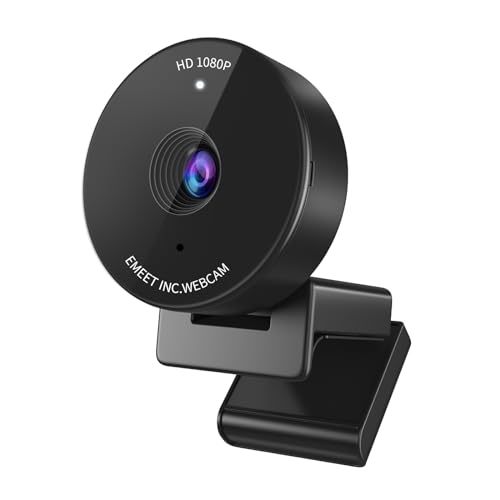
- 1080P 30FPS video with low-light correction
- Physical privacy cover for added protection
- 70° view keeps framing tight and personal
Best For: Personal calls, classes, and privacy-conscious users
4K Plug-and-Play Value
AOC 4K Webcam with Noise-Canceling Mic

- 4K Ultra HD video for sharper calls
- Physical sliding lens cover for privacy
- USB-C and USB-A support with plug-and-play use
Best For: Meetings, conferencing, and easy 4K setup
Creator Performance Pick
AOC 4K Webcam with Sony Sensor

- 4K IMX363 sensor for detailed capture
- 1080P 60FPS for smoother motion
- PDAF autofocus and privacy shutter included
Best For: Streaming, demos, and smoother high-motion video
Budget-Friendly 1080p Pick – NexiGo N60 1080P Webcam
If you want webcams under 1000 that cover the basics well, the NexiGo N60 is a straightforward 1080p option for calls, classes, and casual streaming. It delivers 30fps Full HD video, includes a noise-cancelling microphone, and adds a privacy cover for everyday use.
Best For: Remote workers, students, and anyone who wants a simple plug-and-play webcam for Zoom, Skype, Teams, and video calling.
Pros:
- 1080p Full HD video at 30fps for clear everyday conferencing
- Built-in noise-cancelling microphone helps reduce ambient sound
- Privacy cover adds a useful security layer when not in use
- USB plug-and-play setup works without extra drivers
Cons:
- Fixed-focus design is less flexible than autofocus models
- Not compatible with Xbox, PS4, or PS5
- Best image range is optimized for typical indoor distances
Overall, this is a practical entry-level webcam that focuses on ease of use and dependable 1080p quality. It is a solid pick if you care more about reliable meeting performance than advanced creator features.
Creator-Focused 4K Choice – EMEET S600 4K Streaming Webcam
Among webcams under 1000, the EMEET S600 stands out if you want more than standard meeting-quality video. It offers 4K at 30fps or 1080p at 60fps, plus PDAF autofocus and automatic light balancing to help keep your image sharp and stable.
Best For: Streamers and content creators who want a sharper 4K webcam with autofocus and better image control.
Pros:
- 4K at 30fps or 1080p at 60fps for flexible recording options
- PDAF autofocus is designed for faster, more stable focusing
- Auto light adjustment helps balance shadows and highlights
- Built-in privacy cover and dual noise-canceling mics add convenience
Cons:
- Some video resolution behavior depends on software or apps used
- At 4K, the field of view is fixed at 73°
- Best suited to users who will use customization tools like EMEETLINK
This is a strong upgrade pick for users who care about image quality, autofocus performance, and streaming-friendly features. It balances creator-focused performance with simple plug-and-play setup.
Versatile Meeting Cam – AVerMedia Live Streamer Cam 313
If you are comparing webcams under 1000 for presentations or flexible desk setups, the AVerMedia Live Streamer Cam 313 is worth a look. It records sharp 1080p Full HD video, includes a dual microphone setup, and adds a 360° swivel design for easier angle changes.
Best For: Teachers, presenters, and creators who need a flexible 1080p webcam for meetings, demos, and live streaming.
Pros:
- 1080p Full HD video is suitable for conferencing and streaming
- 360° swivel makes it easy to switch between angles
- Built-in privacy shutter helps protect the lens when idle
- Dual microphones and plug-and-play USB setup add convenience
Cons:
- Fixed-focus design may be less ideal for very close-up shots
- 1080p30 output is more modest than higher-frame-rate creator cameras
- Best for users who will make use of the swivel feature
For buyers who want a dependable webcam with microphone support and unusual angle flexibility, this model has a clear advantage. It is especially useful when your camera needs change from one meeting or demo to the next.
Premium Build 4K Option – Acer 4K Webcam with Sony Sensor
For shoppers looking at webcams under 1000 and wanting a more premium-feeling model, the Acer 4K webcam brings a Sony 1/2″ sensor, PDAF, and an all-metal unibody design. It is aimed at users who want cleaner 4K video, strong low-light performance, and a durable camera that is easy to carry.
Best For: Professionals and creators who want a premium 4K webcam with autofocus, strong privacy features, and a metal build.
Pros:
- UHD 4K image quality with a Sony 1/2″ sensor
- PDAF autofocus helps keep video sharp and stable
- Dual digital microphones filter out common background noise
- Magnetic privacy cover and plug-and-play USB-C to A design
Cons:
- Premium materials may be more than casual users need
- Maximum viewing angle is listed at 83 degrees, which is not ultra-wide
- Some users may not need 4K for standard video calls
This webcam is strongest when build quality, portability, and privacy matter as much as image quality. It is a polished choice for anyone who wants a durable 4K setup that still keeps installation simple.
Budget Pick – 1080p Plug-and-Play Webcam for Everyday Use
If you want webcams under 1000 that cover the basics well, this 1080p USB model is a straightforward option for calls, classes, streaming, and casual gaming. It offers Full HD video, plug-and-play setup, and broad compatibility, making it an easy choice for a simple desktop or laptop setup.
Best For: Students, remote workers, and anyone who wants an affordable no-fuss webcam for daily video use.
Pros:
- 1080p video at up to 30 fps for clear everyday conferencing and recording
- No-driver USB plug-and-play setup keeps installation simple
- Compatible with Mac and Windows PCs plus major platforms like Zoom and Google Meet
- Stable transmission chip and low-light adjustment help keep video smooth and usable
Cons:
- Only Full HD, not 4K or higher-resolution capture
- Basic compact design, so it does not add premium extras like a privacy cover
- Best suited to general use rather than advanced creator features
Overall, this is a practical pick if you want a dependable webcam for everyday meetings and streaming without extra setup hassles. It focuses on clear 1080p performance and broad compatibility rather than specialty features.
Privacy Pick – Logitech Brio 101 Full HD Webcam
For shoppers browsing webcams under 1000, the Logitech Brio 101 stands out as a polished 1080p option for meetings and streaming. It adds useful extras like automatic brightness adjustment, a built-in mic, and a sliding privacy cover, so it fits well in a home office or shared workspace.
Best For: Remote workers and everyday video callers who want a reliable brand name with privacy and light correction.
Pros:
- Full HD 1080p video for meetings and streaming
- RightLight auto-light balance brightens your image and reduces shadows
- Integrated privacy cover adds quick on-demand lens protection
- Built-in mic and plug-and-play USB-A connection keep setup simple
Cons:
- Fixed-focus design limits hands-on adjustment
- 1080p resolution may be enough for meetings but not for higher-end creator workflows
- Uses USB-A, so some newer setups may need an adapter
In practice, the Brio 101 is a strong all-rounder if you value ease of use and privacy over advanced capture specs. It is designed to work cleanly out of the box and look better in less-than-ideal lighting.
Premium Pick – UGREEN 4K Webcam with Dual Mics
If you are comparing webcams under 1000 and want a step up in image quality, this UGREEN model brings 4K@30fps support plus autofocus and stronger low-light handling. It is aimed at conferencing, streaming, and recording, with dual microphones and USB-A/USB-C flexibility that make it a more complete desktop camera.
Best For: Users who want sharper 4K video, autofocus, and dual-mic audio for work or content creation.
Pros:
- 4K@30fps support with an 8MP CMOS sensor for sharper video
- PDAF autofocus helps keep subjects clear from close range to farther away
- Dual built-in microphones improve audio pickup for calls and group streams
- Built-in privacy cover and USB-A to C adapter add convenience
Cons:
- 4K output depends on both the webcam and your software/hardware supporting it
- More features than a basic webcam, so it may be more than casual users need
- Best results come when your setup can take advantage of its higher-end specs
As a higher-spec choice, this webcam makes sense if you want more detail and better autofocus than a standard 1080p model. It is especially appealing for anyone who regularly records, streams, or joins frequent professional calls.
Budget Privacy Pick – EMEET C950 1080P Webcam
If you want webcams under 1000 that keep things simple and private, the EMEET C950 is built for everyday calls, classes, and home office use. It delivers 1080P video with low-light correction, a narrow 70° field of view, and easy software control for adjusting image settings.
Best For: Personal video calls, online classes, and users who want a compact webcam with a physical privacy cover.
Pros:
- 1080P at 30FPS with low-light correction for sharper everyday video.
- Physical privacy cover adds a simple layer of camera protection.
- 70° field of view helps keep the focus on you, not your room.
- Built-in omnidirectional mic supports clear voice pickup for calls.
Cons:
- Fixed-focus design is less flexible than autofocus models.
- Best image quality depends on a well-lit setup and proper positioning.
- May not be the best fit if you want a wider view for group framing.
This is a practical pick if you value privacy and straightforward performance over extra frills. It covers the basics well for remote work and study while staying compact and easy to use across common platforms.
4K Plug-and-Play Value – AOC 4K Webcam with Noise-Canceling Mic
Among webcams under 1000, this AOC model stands out if you want a big jump in image quality without complicating setup. It offers 4K video, a 90° field of view, a physical sliding lens cover, and plug-and-play operation with USB-C and USB-A support.
Best For: Video conferencing, online meetings, and users who want 4K detail with simple setup and built-in privacy.
Pros:
- 4K Ultra HD video delivers crisp, professional-looking detail.
- Physical sliding lens cover supports privacy when the camera is not in use.
- USB-C and USB-A adapter make it easy to connect to different devices.
- 90° field of view gives you room for calls and wider framing.
Cons:
- Wide framing may show more of your background than narrow-view cameras.
- Best suited to users who want simple plug-and-play use rather than advanced controls.
- Compact webcam design may not appeal to buyers looking for a more adjustable setup.
This is a strong choice for anyone who wants higher-resolution video and an easy out-of-box experience. The added privacy shutter and broad compatibility make it especially appealing for everyday work calls and meetings.
Creator Performance Pick – AOC 4K Webcam with Sony Sensor
If you need webcams under 1000 that handle both sharp video and smoother motion, this AOC AC410 is built for more demanding use. It combines 4K output, 1080P at 60FPS, PDAF autofocus, and a 75° field of view for a more polished on-camera presence.
Best For: Streaming, gaming, product demos, and users who want fast autofocus with smooth 60FPS video.
Pros:
- 4K resolution with a flagship IMX363 sensor for detailed video.
- 1080P at 60FPS helps motion look smoother during streams or gestures.
- PDAF autofocus is designed to lock on quickly without hunting.
- Physical privacy shutter and included tripod add convenience out of the box.
Cons:
- 75° field of view is relatively tight if you want a broader room view.
- Best for users who value performance more than a minimal feature set.
- May be more camera than needed for basic casual calling.
This model makes sense if your webcam needs go beyond standard meetings. The combination of 4K detail, smoother 60FPS capture, and rapid autofocus gives it a clear edge for creators and presenters.
How We Picked the Best Webcams Under 1000
We looked for Webcams Under 1000 that offer the best balance of image quality, audio clarity, ease of use, and useful extras like privacy covers or software control. Resolution matters, but sensor size, autofocus behavior, and field of view often matter more in real-world use.
We also prioritized models that are simple to set up, widely compatible, and suited to common buyer needs such as remote work, online classes, content creation, and streaming.
Quick Comparison
For a fast shortlist, 1080p models are usually the best value for everyday meetings, while 4K options are better if you want sharper detail, more cropping room, or a more polished on-camera look. Dual microphones and noise reduction help if you do not use a headset, while privacy shutters or covers add convenience for shared spaces.
Key Buying Factors for Webcams Under 1000
Resolution and Frame Rate
1080p is still the sweet spot for most buyers, but 4K webcams can look cleaner on larger monitors and give streamers more flexibility. If you care about motion smoothness, check whether the camera supports 60fps at 1080p or higher.
Sensor and Autofocus
A better sensor can improve color, sharpness, and low-light performance more than resolution alone. Autofocus is especially useful if you lean in, move around, or use your camera for presentations.
Audio and Privacy
Built-in microphones are convenient, but quality varies a lot. Noise-reduction mics help in quiet home offices, while a physical privacy cover or shutter is a strong plus for shared rooms and daily use.
Software, Mounting, and Compatibility
Look for plug-and-play USB support first, then check whether the webcam includes useful software for exposure, framing, or color adjustments. A flexible mount or swivel base can also make positioning much easier.
Who Should Buy Which Webcams Under 1000?
If you want a simple webcam for work calls or school, a dependable 1080p model is usually the smartest buy. If you stream, record content, or want sharper image quality, a 4K model with good autofocus and a strong sensor is worth the upgrade.
Buyers in shared spaces should favor privacy covers, while anyone who takes calls in a noisy room should put microphone quality near the top of the list. In short, the best Webcams Under 1000 are the ones that match your use case instead of overspending on specs you will not notice.