The best robot building kits for hobbyists make it easier to turn curiosity about electronics, coding, and engineering into a hands-on project. The options in this roundup range from programmable Arduino cars to app-controlled arms, walking robots, and multi-build STEM sets.
Whether you are choosing a first kit, planning a family project, or looking for a more advanced platform, compare compatibility, build complexity, control methods, and room for future upgrades before buying.
Best 10 Robot Building Kits for Hobbyists Picks for 2026
Best Programmable Car

- Arduino-compatible platform for custom coding
- FPV camera, line tracking, and obstacle avoidance
- Guided wiring with rechargeable battery included
Best For: Beginners and hobbyists building a programmable sensor robot
Best Mechanical Arm Build

- 975-piece build with tracked undercarriage
- Interchangeable gripper, drill, and bucket tools
- Remote control plus app action programming
Best For: Teens and adults who enjoy mechanical robot construction
Best Mechanical Coding Lesson
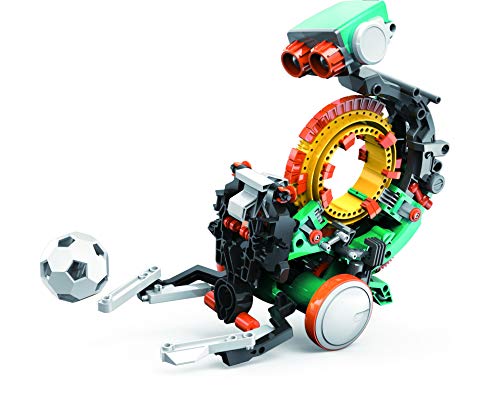
- Mechanical coding wheel sequences robot actions
- Build can take multiple hours
- Teaches engineering and coding basics through play
Best For: Hands-on learners ages 10+ exploring mechanical coding
Best Rebuildable 3-in-1 Kit
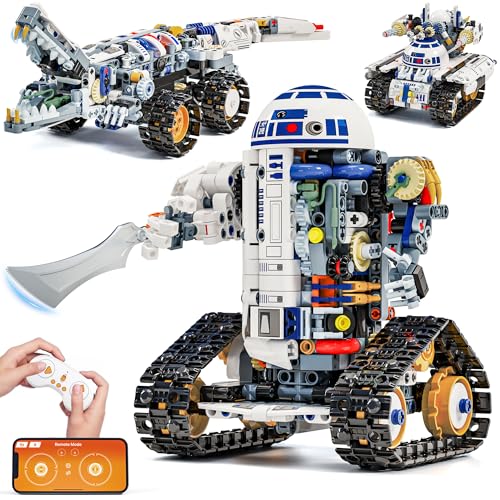
- Builds an automotive robot, crocodile, or tank
- App, remote, path, and STEM coding modes
- Rechargeable battery offers up to 45 minutes
Best For: Families wanting repeatable builds and accessible RC play
Best Multi-Model Starter
5-in-1 App-Controlled Robot Kit

- Five rebuildable robot and vehicle designs
- Remote and smartphone app control
- 337 pieces with guided instructions
Best For: Young beginners exploring robot construction and basic programming
Best for Rebuilding and Playtime

- 488 pieces and five buildable designs
- Bluetooth app plus remote control
- Rechargeable battery supports up to 40 minutes
Best For: Builders who prioritize variety, customization, and interactive play
Best for Learning to Code
ACEBOTT Arduino-Compatible Robot Car

- Supports Scratch, Arduino, and Python
- Includes 16 story-based tutorials
- Works with computers, tablets, and smartphones
Best For: Students and hobbyists progressing from beginner to advanced coding
Best Starter Pick
Sillbird 5-in-1 Programmable Robot
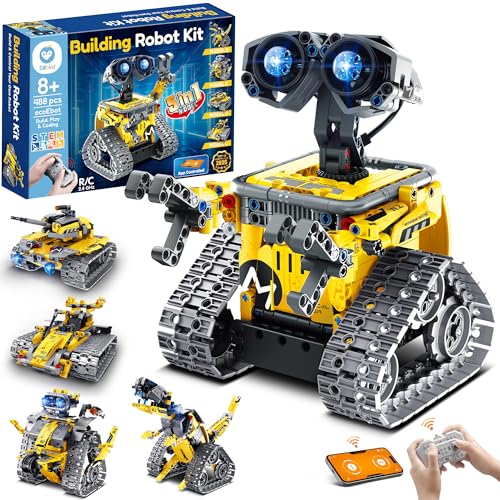
- 488 pieces with five buildable models
- App and remote-control operation
- Rechargeable playtime of up to 40 minutes
Best For: Younger builders learning construction and basic programming
Best for Model Variety
6-in-1 Space Robot Building Kit

- 780 pieces and six space-themed models
- App and 2.4GHz remote control
- Includes path coding and programming modes
Best For: Builders who enjoy repeated assembly and space-themed designs
Best Programmable Car – ELEGOO UNO R3 Smart Robot Car
For hobbyists looking for robot building kits for hobbyists with room to grow, the ELEGOO UNO R3 Smart Robot Car combines hands-on assembly with Arduino programming and several interactive driving modes. Its guided wiring and included examples make it approachable for beginners while leaving room for custom coding projects.
Best For: Beginners, family STEM projects, coding clubs, and hobbyists who want a programmable car with camera-based FPV features.
Pros:
- Supports app and IR control, FPV video, line tracking, and obstacle avoidance.
- Arduino IDE compatibility encourages custom routes, reactions, and experiments.
- Keyed connectors and an illustrated tutorial help reduce beginner wiring mistakes.
- Includes a rechargeable 2000 mAh lithium-ion battery and multiple sensors.
Cons:
- The first build may benefit from adult guidance, especially for younger users.
- Its 1.23 kg chassis is more substantial than a simple entry-level robot toy.
This is a strong choice when coding and electronics matter as much as driving. Choose it over a purely mechanical kit if you want a platform for repeatable robotics experiments and Arduino learning.
Best Mechanical Arm Build – 3-in-1 Tracked Robot Arm
This 3-in-1 robot arm set is one of the more mechanically focused robot building kits for hobbyists, with 975 ABS building pieces, a tracked base, and interchangeable working tools. It emphasizes construction and hands-on movement, while app programming adds a coding-style layer after assembly.
Best For: Older children, teens, and adult builders who enjoy mechanical arms, tracked vehicles, and interchangeable functions.
Pros:
- Three interchangeable tool heads provide a gripper, drill, and bucket.
- Tracked undercarriage is designed for climbing and crossing obstacles.
- Offers both remote control and programmed action sequences through the app.
- Large 975-piece build delivers substantial assembly and display appeal.
Cons:
- Only one configuration can be built at a time.
- The set requires a 9V battery for operation.
- Its 8–14 recommended age range may make it less suitable for very young builders.
The standout feature is the combination of a tracked robot and functional-looking arm tools. It is a good fit for builders who prioritize mechanical detail and tactile construction over sensor-heavy programming.
Best Mechanical Coding Lesson – TEACH TECH Mech-5
The TEACH TECH Mech-5 offers a focused introduction to coding through mechanical construction rather than an app or programmable controller. Among robot building kits for hobbyists, it stands out for its coding wheel, which lets builders sequence actions such as throwing, lifting, kicking, and drawing.
Best For: Future engineers and hands-on learners ages 10 and up who want a longer, mission-based introduction to mechanical coding.
Pros:
- Coding buttons on the mechanical wheel create visible, hands-on sequences.
- The robot can throw, lift, kick, draw, and perform other actions.
- Detailed assembly provides several hours of building experience.
- Supports lessons in mechanical engineering, problem solving, and coding basics.
Cons:
- It is an in-depth build rather than a quick, ready-to-use toy.
- Operation requires two AAA batteries.
- The included instruction manual is in English.
Mech-5 is best viewed as a structured STEM project rather than a feature-packed remote-control robot. Its appeal comes from physically seeing how coded mechanical inputs produce different actions.
Best Rebuildable 3-in-1 Kit – Glikid 3-in-1 STEM Robot
For families comparing robot building kits for hobbyists, this 776-piece Glikid set offers three distinct builds from one collection of parts: an automotive robot, track crocodile, or mechanical tank. App and remote control modes make it easy to test the completed model, while the illustrated manual supports the construction process.
Best For: Builders ages 8 and up who want multiple vehicle-style models, app control, and a rechargeable platform for shared projects.
Pros:
- Builds three models, with one configuration assembled at a time.
- Includes remote control, Bluetooth app control, path mode, and STEM coding mode.
- Built-in 3.7V 500mAh Li-Po battery provides up to 45 minutes of play per charge.
- Step-by-step printed instructions cover all three models.
Cons:
- The remote requires two AAA batteries, which are not included.
- Only one of the three models can be built at a time.
- The moderate-speed design may be less appealing to users seeking fast RC performance.
This kit balances rebuilding value with accessible remote and app play. It is especially practical for younger builders or families who want one project that can be revisited in several forms.
Best Multi-Model Starter – 5-in-1 App-Controlled Robot Kit
For hobbyists seeking robot building kits for hobbyists that balance construction and play, this 337-piece set offers five different models, including a camera robot, battle armor, and agricultural harvester. Remote control and smartphone programming add an approachable introduction to robotics.
Best For: Kids ages 8–12 and beginners who want guided building, multiple rebuild options, and basic app-based programming.
Pros:
- Five customizable robot and vehicle designs in one kit
- Includes both remote and iOS/Android app control
- Step-by-step instructions support independent assembly
- 337 pieces encourage rebuilding and creative modifications
Cons:
- Programming is described as basic, so advanced hobbyists may outgrow it
- The manufacturer lists different age guidance in the supplied details
This is a practical entry point for younger builders who want more than a single finished model. Its strongest advantage is variety, while experienced coders may prefer a kit with deeper programming support.
Best for Rebuilding and Playtime – Sillbird 5-in-1 Robot Kit
This Sillbird set is one of the more play-focused robot building kits for hobbyists, combining 488 pieces with five build options: a robot, car, tank, dinosaur, or a custom creation. Bluetooth app control, a remote, adjustable joints, and a rechargeable battery make it easy to move from building to interactive play.
Best For: Kids ages 8 and up who want a larger piece count, repeated rebuilding, and up to 40 minutes of battery-powered play.
Pros:
- 488 pieces provide room for building and customization
- Five designs include robot, car, tank, and dinosaur forms
- Dual control through Bluetooth app and remote
- Rechargeable battery offers up to 40 minutes of continuous play
Cons:
- Its programming features are presented less technically than dedicated coding kits
- Assembly may be more involved because of the higher piece count
The Sillbird is a strong choice when the goal is hands-on construction followed by active play. It suits families who value model variety and rechargeable convenience more than a structured, advanced coding curriculum.
Best for Learning to Code – ACEBOTT Arduino-Compatible Robot Car
For learners who want robot building kits for hobbyists with a clearer path into coding, the ACEBOTT robot car supports Scratch, Arduino, and Python. Its ESP32 controller, 16 story-based tutorials, mobile-friendly programming, and no-solder assembly create a progression from beginner experiments to more advanced projects.
Best For: Kids and teens ages 8–16, classrooms, and developing hobbyists who want hands-on robotics with multiple programming languages.
Pros:
- Supports Scratch, Arduino, and Python for different skill levels
- Includes 16 story-based tutorials plus videos and illustrated instructions
- Can be programmed on computers, tablets, and smartphones
- No soldering is required for assembly
Cons:
- Batteries are not included
- The supplied details identify it primarily as a single smart car kit rather than a multi-model set
- Its broader programming options may require more learning time than basic kits
ACEBOTT is the most education-oriented option in this group for users ready to connect building with real coding practice. It is especially compelling for classrooms and older learners, though beginners should be prepared to follow the tutorial path and supply batteries.
Best Starter Pick – Sillbird 5-in-1 Programmable Robot
For shoppers comparing robot building kits for hobbyists, the Sillbird 5-in-1 set offers an approachable way to combine construction, basic programming, and remote-controlled play. Its 488 pieces and progressive model options make it suitable for younger builders developing skills step by step.
Best For: Kids and teens ages 8 and up who want multiple builds, app or remote control, and screen-free STEM play.
Pros:
- Builds five different models, including a robot, dinosaur, car, and tank.
- Supports Bluetooth app control and remote control, with basic programming and path features.
- Includes colorful, step-by-step instructions and a rechargeable battery offering up to 40 minutes of play.
Cons:
- Only one model can be built at a time.
- The manufacturer age information varies between the listed ranges of 6–16 and 8+.
This is a practical entry point for families seeking a versatile building set rather than a highly advanced robotics platform. The multiple difficulty levels and clear instructions help make the assembly experience accessible.
Best for Model Variety – 6-in-1 Space Robot Building Kit
Among robot building kits for hobbyists, this 780-piece space-themed set stands out for its larger parts count and six engineering-focused models. It combines rebuilding with app-based coding activities, making it a flexible choice for children who enjoy changing designs and experimenting with controls.
Best For: Kids ages 8 and up who want space-themed builds, multiple control modes, and introductory coding activities.
Pros:
- Offers six models, including a space robot, battle robot, tank, fighter, and tracked vehicle.
- Provides both 2.4GHz remote control and app control with path coding, gravity control, and STEM programming modes.
- Uses a rechargeable battery, powerful motor system, and lighting effects.
Cons:
- Only one robot model can be built at a time, so rebuilding is required to switch designs.
- The supplied notes do not specify the battery’s playtime.
The higher piece count gives this kit more construction variety than simpler sets, while the app adds additional ways to play after assembly. It is a good fit when repeat building and space-themed designs matter more than a single permanent model.
Best Advanced Project – ACEBOTT ESP8266 Spider Robot
For older learners exploring robot building kits for hobbyists, the ACEBOTT ESP8266 spider robot offers a more electronics- and programming-oriented project. Its guided lessons, pre-burned program, app control, and metal servos make it a stronger choice for studying how a walking robot works.
Best For: Teens, programming beginners, and adults interested in a guided quadruped robotics project.
Pros:
- Includes a paper manual with eight lessons covering programming and electronic hardware principles.
- Features six movement modes and nine preset actions.
- Uses an ESP8266 motherboard, customized rudder, MG90 metal servo, and app control.
- Supports Type-C direct charging and includes a pre-burned program for post-assembly use.
Cons:
- A flat-top battery is required but not included.
- The project requires screw-based assembly and is more advanced than basic block-building kits.
This kit is best viewed as a hands-on robotics lesson with a moving end product, rather than a simple model-building toy. The structured lessons and preloaded software reduce the setup barrier, while the battery requirement should be planned for before purchase.
How We Picked These Robot Building Kits for Hobbyists
We selected kits that offer a practical balance of building, programming, and hands-on control. The roundup includes Arduino- and Scratch-compatible platforms, app and remote-control models, multi-configuration sets, and kits aimed at different age and experience levels. We also considered component variety, project flexibility, learning value, and whether the kit can remain useful after the first build.
Age recommendations are helpful starting points, but they do not replace supervision or an assessment of the builder’s patience, reading ability, and previous experience with electronics.
Quick Comparison
| Best for | Look for | Typical advantage |
|---|---|---|
| First-time builders | Clear instructions and remote control | Fast, approachable results |
| Coding learners | Arduino, Scratch, or app support | More programming practice |
| Creative builders | Multi-in-one configurations | More ways to rebuild and experiment |
| Advanced hobbyists | Expandable boards and sensors | Longer-term project potential |
Key Buying Factors for Robot Building Kits for Hobbyists
Programming and Controller Compatibility
Check whether the kit works with Arduino, Scratch, a dedicated app, or only a remote control. Remote control is convenient for immediate play, while programmable boards provide more meaningful practice with sensors, motors, logic, and automation. Confirm the required software, device support, and connection method before ordering.
Build Complexity and Instructions
A kit with hundreds of pieces can be rewarding but may be frustrating for a beginner. Look for illustrated instructions, organized components, stable construction, and a project scope that matches the builder. Younger users may need an adult for wiring, troubleshooting, or setup.
Robot Types and Rebuild Value
Multi-build kits can extend interest by supporting cars, arms, walkers, or other configurations. However, versatility is only useful when the instructions and parts are well organized. If the goal is coding depth, a single robust platform may be better than a large set focused mainly on rebuilding.
Power, Parts, and Expandability
Verify whether batteries, charging equipment, a phone, or a computer are required or sold separately. Also check replacement-part availability and whether the board accepts additional sensors or motors. These details often determine whether a kit remains useful beyond the initial project.
Who Should Buy Which Robot Building Kits for Hobbyists?
Choose a remote-controlled or app-controlled starter kit for a younger builder who wants quick, visible results. An Arduino- or Scratch-compatible smart car is a stronger choice for learners interested in coding and sensor-based behavior. A robotic arm suits users who enjoy mechanical movement and precision, while a multi-configuration set works well for families or groups who want several projects from one purchase.
More experienced makers should prioritize accessible wiring, documented software, sensor options, and upgrade potential over age labels or piece count. For adults, an ESP8266-based or similarly expandable platform can provide a better foundation for custom programming and experimentation. Whichever kit you choose, confirm the included parts and software requirements, then plan time for assembly, testing, and troubleshooting.