The best robot building kits turn screen time into hands-on problem-solving. From simple solar-powered experiments to Arduino-compatible cars, these sets let kids build, test, and improve working robots.
Our roundup compares 10 robot building kits under $300 across age ranges, programming options, components, control methods, and learning potential so you can choose a kit that matches the builder’s skills and interests.
Best 10 Robot Building Kits Under 300 Picks for 2026
Solar Starter Pick

- Build 13 land- or water-moving models
- Explores solar power without standard electric play
- Designed for hands-on STEM learning ages 8–15
Best For: Young beginners and family STEM projects
Programmable Choice
ELEGOO UNO R3 Smart Robot Car V4

- Build, code, and drive a working robot car
- Includes FPV video and sensor-based features
- Arduino-compatible with guided wiring and tutorials
Best For: Older beginners, classrooms, and coding clubs
Most Build Variety

- Offers 36 robot builds and 14 motorized models
- Includes a parts tray for sorting and storage
- Provides booklet and video assembly guidance
Best For: Creative builders ages 8–13
Renewable-Energy Pick

- Includes 12 builds from 190 parts
- Explores solar energy with robots, cars, and boats
- Can be used in sunlight or with a flashlight
Best For: Solar STEM lessons and hands-on learners
Most Versatile Pick

- 673 pieces build five different models
- Remote and app control with programming modes
- Rechargeable power with lights and sounds
Best For: Kids ages 6-12 who want varied builds and interactive control
Best Mechanical Coding Project
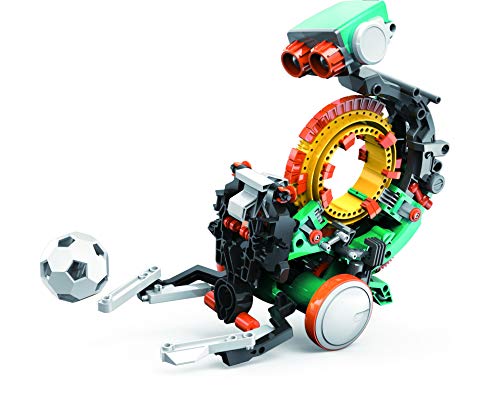
- Coding wheel controls multiple mechanical actions
- Detailed, multi-hour hands-on assembly
- Designed for STEM and problem-solving practice
Best For: Ages 10+ who prefer mechanical coding over app control
Best Family-Friendly Starter

- 488 pieces create five different models
- Remote and app include programming modes
- Rechargeable battery offers up to 40 minutes
Best For: Kids ages 8-13 beginning with buildable app-controlled robots
Best Solar-Powered Starter

- Builds 12 rolling, crawling, or floating robots
- Uses solar power or an indoor battery box
- Designed for hands-on STEM learning ages 6–15
Best For: Younger kids exploring mechanics and renewable energy
Best for Coding Progression
ACEBOTT Programmable Robot Car

- Supports Scratch, Arduino, and Python
- Includes 16 guided robotics tutorials
- Works with computers, tablets, and smartphones
Best For: Learners building coding skills from beginner to advanced
Best for Multi-Model Building

- Includes 780 pieces and six space-themed models
- Adds app control, remote control, and path coding
- Uses a rechargeable battery with lighting effects
Best For: Kids who enjoy rebuilding and interactive robot play
Solar Starter Pick – 13-in-1 Solar Robot Kit
For shoppers comparing robot building kits under 300, this 13-in-1 solar set is a straightforward choice for younger builders who want multiple projects without relying on batteries. Kids can assemble, disassemble, and rebuild models designed to move on land or water while exploring solar power.
Best For: Children ages 8–15 who are beginning STEM and robotics activities, especially families seeking a screen-free parent-child project.
Pros:
- Offers 13 different robot builds with reusable parts.
- Introduces solar energy through hands-on play.
- Includes smooth, non-toxic ABS components and step-by-step guidance.
- Supports creativity, problem-solving, and practical assembly skills.
Cons:
- Solar operation depends on access to suitable light.
- The product details provide limited information about advanced programming features.
This kit is most appealing when variety and renewable-energy learning matter more than coding. It provides a gentle introduction to mechanical building and can work well as a shared family activity.
Programmable Choice – ELEGOO UNO R3 Smart Robot Car V4
Among robot building kits under 300, the ELEGOO UNO R3 Smart Robot Car V4 stands out for builders ready to move beyond assembly into coding and electronics. It combines a programmable car platform with camera-based FPV video, line tracking, obstacle avoidance, and app or remote control.
Best For: Builders ages 12 and up, coding clubs, STEM classrooms, and families comfortable providing adult guidance during a first robotics project.
Pros:
- Supports Arduino programming and custom robotics experiments.
- Includes FPV video, line tracking, and ultrasonic obstacle avoidance.
- Keyed connectors and an illustrated tutorial help reduce wiring mistakes.
- Comes with a rechargeable 2000 mAh lithium-ion battery and multiple control options.
Cons:
- Its electronics and programming focus may be more demanding than a basic construction kit.
- Recommended for ages 12 and up, with adult guidance for first-time builders.
- The kit is centered on one robot-car platform rather than numerous separate builds.
This is the strongest fit for learners who want a functional, programmable robot rather than only a mechanical building experience. Its sensors and camera create room for continued experimentation after the initial assembly.
Most Build Variety – JOVA Klever Kits 36-in-1
For shoppers seeking robot building kits under 300 with lots of repeat play, the JOVA Klever Kits set offers 36 possible builds, including 14 motorized models. Its organized tray, printed instructions, and video tutorials make it practical for kids who enjoy switching between walking machines, racing cars, and other designs.
Best For: Children ages 8–13 who value creative variety, screen-free building, and solo or family activities.
Pros:
- Provides 36 build options, including 14 motorized models.
- Sorting tray helps keep components organized between projects.
- Combines a full-color instruction booklet with video tutorials.
- Encourages mechanics, engineering, logical thinking, and teamwork.
Cons:
- The notes do not specify programming or app-control features.
- With many parts and builds, younger children may benefit from supervision.
This kit is a good match for families that want maximum construction variety in one package. It favors mechanical exploration and rebuilding over software-based robotics.
Renewable-Energy Pick – Sillbird 12-in-1 Solar Kit
This Sillbird set is a practical option among robot building kits under 300 for children learning about renewable energy through construction. The 190-piece kit supports 12 build experiences, including robots, cars, and boats, and can be used outdoors in sunlight or indoors with a flashlight.
Best For: Children ages 8–13, homeschool or classroom STEM activities, and families looking for a solar-powered building challenge.
Pros:
- Offers 12 progressively challenging builds from 190 parts.
- Uses an expanded solar panel to collect more sunlight.
- Supports indoor play with a flashlight as well as outdoor use.
- Step-by-step instructions encourage independent building and family participation.
Cons:
- Solar performance varies with available light, particularly indoors.
- The notes do not indicate programming or remote-control functions.
This kit suits buyers who want a balance of model variety and renewable-energy education. It is less focused on coding, but its robot, car, and boat projects offer accessible mechanical STEM practice.
Most Versatile Pick – 5-in-1 STEM RC Robot Kit
If you want robot building kits under 300 that offer plenty of replay value, this 673-piece set is a strong option. Kids can rebuild it into five models, then control their creations with the included remote or a smartphone app.
Best For: Children ages 6-12 who enjoy building, remote control play, and beginner-friendly coding activities.
Pros:
- Five rebuildable models include a humanoid robot, fighter jet, mechanical arm, bulldozer, and tracked vehicle.
- Remote and app control include path, gyro, and programming modes.
- Rechargeable battery, LED effects, and 30+ sound effects add interactive play.
- Compatible with most standard building bricks.
Cons:
- Remote requires two AA batteries, which are not included.
- The kit contains small parts and is not suitable for children under 3.
- Some builds may require adult help despite the illustrated instructions.
This is a well-rounded choice for families prioritizing variety and hands-on learning. Its five models and multiple control options provide more ways to play than a single-build robot kit.
Best Mechanical Coding Project – TEACH TECH Mech-5 Robot
Among robot building kits under 300, the TEACH TECH Mech-5 stands out as a focused mechanical engineering project. Rather than relying on app control, it uses coding buttons placed on a coding wheel to program physical actions.
Best For: Future engineers ages 10 and up who want a detailed build with hands-on coding and mechanical problem-solving.
Pros:
- The coding wheel programs actions such as throwing, lifting, kicking, and drawing.
- Detailed assembly makes the build an in-depth STEM project.
- Mission-based activities encourage learning by doing.
- Includes a one-year warranty against manufacturer defects.
Cons:
- Recommended for ages 10 and up, so it is less suitable for younger children.
- Assembly can take multiple hours and requires careful attention to the instructions.
- It uses two AAA batteries rather than a rechargeable battery.
Choose Mech-5 when the building process matters as much as the finished robot. Its button-based mechanical programming offers a tangible introduction to coding concepts without requiring a smartphone or app.
Best Family-Friendly Starter – Sillbird 5-in-1 Robot Kit
For shoppers comparing robot building kits under 300, the Sillbird set offers a manageable 488-piece introduction to building, app control, and basic programming. Its five model options and illustrated instructions give kids several ways to learn and play.
Best For: Kids ages 8-13 who want a colorful, rechargeable kit with multiple builds and simple app-based controls.
Pros:
- Five models include a robot, dinosaur, tank, car, and other creative designs.
- Remote and app controls offer path, gyro, one-handed driving, and programming modes.
- Clear illustrations support more independent assembly.
- Rechargeable battery provides up to 40 minutes of play.
Cons:
- The battery runtime is shorter than some comparable rechargeable kits.
- With 488 pieces, it has fewer parts than the larger 673-piece alternative.
- The supplied details list a D battery requirement, so battery specifications should be checked before purchase.
This kit is a practical middle ground for children who want both construction and interactive play. It is less extensive than a larger piece-count set, but the five designs and accessible instructions can make it a good family starter.
Best Solar-Powered Starter – 12-in-1 Solar Robot Kit
If you are comparing robot building kits under 300 for a younger learner, this 12-in-1 solar robot kit offers a straightforward introduction to mechanical science and renewable energy. Children can build robots that roll, crawl, or float, then power them with sunlight outdoors or the included battery box indoors.
Best For: Kids ages 6–15 who want varied, hands-on robot builds without coding requirements.
Pros:
- Supports 12 different robot designs.
- Offers solar and battery-powered operation for indoor or outdoor use.
- Uses non-toxic ABS plastic and includes step-by-step instructions.
- Encourages creative thinking, spatial logic, and engineering skills.
Cons:
- AAA battery for the battery box is not included.
- Only one robot configuration can be assembled at a time.
This is a practical choice when variety and renewable-energy exploration matter more than programmable controls. Its multiple build options also make it suitable for progressing from simpler models to more involved assemblies.
Best for Coding Progression – ACEBOTT Programmable Robot Car
Among robot building kits under 300, the ACEBOTT Robotics Kit stands out for learners who want to move from visual coding into text-based programming. Its ESP32 controller, story-based tutorials, and app or remote control provide a guided path through assembly, electronics, and robotics.
Best For: Kids and teens ages 8–16 who want Scratch, Arduino, and Python programming in one robot car kit.
Pros:
- Supports Scratch, Arduino, and Python for different skill levels.
- Includes 16 story-based tutorials with video and illustrated guidance.
- Can be programmed on computers, tablets, and smartphones.
- Offers both mobile app control and included IR remote control.
Cons:
- Batteries are not included.
- The programming features may be more advanced than needed for very young beginners.
This kit is a stronger long-term learning choice than a purely mechanical build because children can continue developing coding skills as they progress. The no-solder assembly and mobile support also make it adaptable for home learning, classrooms, or training programs.
Best for Multi-Model Building – 6-in-1 Space Robot Kit
For shoppers comparing robot building kits under 300, this 780-piece set combines construction, app control, and introductory programming. It lets kids rebuild the parts into six space-themed models, including a space robot, battle robot, tank, fighter, and tracked vehicle.
Best For: Kids ages 8–16+ who enjoy rebuilding larger kits and controlling robots through an app or remote.
Pros:
- Includes 780 pieces and six distinct robot or vehicle designs.
- Provides 2.4GHz remote and mobile app control.
- App features driving simulation, gravity control, path coding, and STEM programming.
- Uses a rechargeable battery and includes lighting effects.
Cons:
- Only one model can be built at a time.
- The larger piece count may require more time and patience to assemble.
This set is a good fit for children who value construction variety and interactive play. Its rechargeable power system and app-based coding add engagement beyond standard building blocks, while the six rebuildable designs encourage repeated use.
How We Picked the Best Robot Building Kits Under 300
We focused on kits that combine construction with meaningful STEM practice rather than offering only a finished toy. The selection includes solar-powered models, motorized building sets, remote-control robots, coding platforms, and Arduino-compatible cars. We also considered stated age ranges, assembly complexity, included electronics, app or controller support, expandability, and the type of guidance available to beginners.
Because “under $300” covers a wide range of products, the right value depends on the learner. A lower-priced solar or block-based kit may be ideal for first projects, while an Arduino or app-controlled platform can provide more room for programming and future modifications.
Quick Comparison
| Kit Type | Best For | Typical Learning Focus |
|---|---|---|
| Solar-powered multi-in-one kits | First-time builders | Simple mechanics, renewable energy, following instructions |
| Block-based robot kits | Younger children | Construction, motors, basic control |
| Remote-control kits | Hands-on play | Assembly, movement, cause and effect |
| Arduino-compatible kits | Older learners and hobbyists | Coding, sensors, electronics, troubleshooting |
| Coding robot kits | Structured STEM learning | Programming logic, commands, and iteration |
Key Buying Factors for Robot Building Kits Under 300
Age and Skill Level
Use the manufacturer’s age guidance as a starting point, but also consider patience, fine-motor ability, and previous building experience. A kit with hundreds of pieces may be exciting for an experienced child but frustrating for a beginner.
Programming and Control
Remote controls provide immediate feedback and are usually easier to start with. App-based and Scratch-compatible kits add visual programming, while Arduino-compatible models offer greater flexibility but require more setup and troubleshooting.
Power and Electronics
Check whether batteries, USB cables, chargers, or other power components are included. Solar kits work best in strong light and may be less consistent indoors. Also verify the motor, sensor, camera, and connectivity features that matter most to your project.
Build Variety and Expandability
Multi-model kits encourage experimentation, but the number of advertised builds does not always indicate depth. Look for clear instructions, reusable components, sturdy connectors, and compatibility with common parts if you expect the learner to create original designs.
Support and Safety
Look for readable manuals, accessible tutorials, replacement-part availability, and adult supervision requirements. Small parts, tools, exposed wiring, and rechargeable batteries all deserve attention, particularly for younger children.
Who Should Buy Which Robot Building Kits Under 300?
Choose a solar-powered or simple multi-model kit for a first introduction to robotics and basic engineering. Block-based sets are a strong fit for younger builders who enjoy construction and immediate play. Remote-control kits suit children who want a working machine without starting with text-based programming.
For ages roughly 10 and up, coding-focused kits can provide a more structured path into programming. Choose an Arduino-compatible robot car or an app-supported platform when the learner is ready to work with sensors, code, and troubleshooting. If several children will share the kit, prioritize durable parts, varied build options, and clear instructions over the highest feature count.