A wireless nanny cam can help you check in on a room from your phone, but the best choice depends on more than resolution. Wi-Fi compatibility, power, storage, and a useful viewing angle matter just as much.
These 10 options include visible pan-tilt cameras and smaller, less conspicuous designs. Use the guide below to narrow the field before checking each model’s current specifications and price.
Best 10 Wireless Nanny Cam Picks for 2026
Best Two-Camera Kit
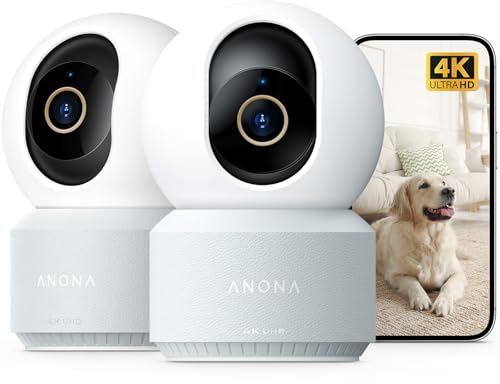
- Two indoor 4K cameras
- Dual-band Wi-Fi 6
- Person, pet, and crying alerts
Best For: Monitoring two rooms with one kit
Best for Local Storage
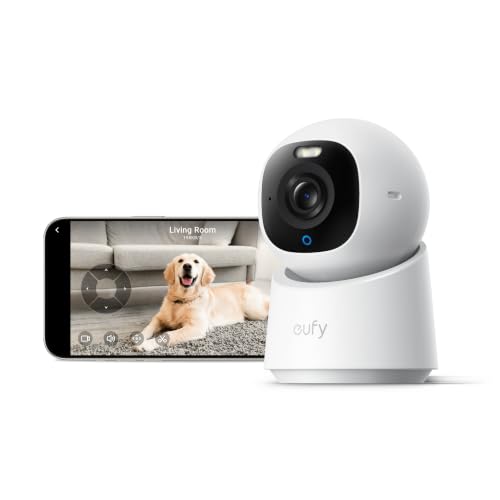
- 4K pan-and-tilt view
- On-device crying detection
- Core functions without a subscription
Best For: Local recording and smart-home integration
Best Straightforward Pan-Tilt Cam

- 1080p pan-and-tilt view
- Two-way audio and motion alerts
- Local microSD recording
Best For: Basic indoor monitoring over 2.4 GHz Wi-Fi
Best Dual-Band Storage Options

- 4K video with a 120° lens
- 2.4GHz and 5GHz Wi-Fi
- Cloud or microSD storage up to 256GB
Best For: Indoor monitoring with flexible storage
Best Magnetic Mount

- Cordless magnetic mounting
- Up to 8 hours continuous recording
- 4K live view on dual-band Wi-Fi
Best For: Temporary, repositionable indoor monitoring
Best Audio-Free Option

- 1080p video with a 150° view
- Motion alerts with snapshots
- Corded, 2.4GHz-only, and no audio
Best For: Indoor video monitoring without audio
Best Smoke-Detector-Style Design

- Ceiling-mount, corded design
- Direct AP or remote 2.4GHz Wi-Fi viewing
- 1080p video and adjustable motion alerts
Best For: Ceiling-mounted indoor monitoring with two viewing modes
Best Two-Camera Kit – Anona 4K Indoor Camera 2-Pack
If you want a wireless nanny cam for two indoor spaces, this Anona 2-pack offers app viewing over dual-band Wi-Fi 6. Each camera combines 4K video with motorized pan and tilt, auto-tracking, and alerts for people, pets, and crying.
Best For: Households monitoring two rooms that want detailed video and flexible Wi-Fi connectivity.
Pros:
- Two 4K cameras with approximately 360° pan and 110° tilt.
- Person, pet, and crying detection with phone notifications.
- Supports 2.4 GHz and 5 GHz Wi-Fi, plus optional microSD or cloud storage.
Cons:
- Requires a power outlet; the cameras are not battery-powered.
- microSD cards are not included.
The two-camera package is the main advantage if you need coverage in more than one room. Its Wi-Fi connection is wireless, but plan for a power cable at each location.
Best for Local Storage – eufy Security Indoor Cam E30
The eufy Security E30 is a wireless nanny cam option for buyers who want Wi-Fi viewing without a required monthly fee for its core functions. It pairs 4K video with a panoramic pan-and-tilt view, two-way audio, and on-device detection of people, pets, audio cues, and crying.
Best For: Families seeking local recording and broad smart-home compatibility.
Pros:
- Local SD-card recording and core functions without a subscription.
- Auto-tracks people and pets and detects crying sounds.
- Supports HomeKit, Alexa, and Google Assistant; spotlight enables color night vision.
Cons:
- Needs wired power and a separately sold SD card for local storage.
- HomeKit video is limited to 1080p rather than 4K.
This is a strong fit if you prefer local footage over an ongoing cloud plan. Note that optional cloud storage or premium features may carry a fee.
Best Battery-Powered Mini Cam – Funstorm B11
For a wireless nanny cam that does not need to stay plugged into an outlet, the compact Funstorm B11 uses a rechargeable 2600 mAh battery and Wi-Fi app viewing. It offers motion alerts and night vision, though its resolution and battery-runtime claims deserve a careful read.
Best For: Indoor spots where running a permanent power cable is inconvenient.
Pros:
- Rechargeable battery and compact 2 x 2.7 x 0.7-inch body.
- Remote app viewing with motion notifications.
- Night vision for checking a room in low light.
Cons:
- The listing advertises 4K, but its specifications also state 1080p video capture.
- The 100-day battery claim is described as standby life; continuous-use runtime is unclear.
- Power adapter is not included.
Choose this one for placement flexibility rather than assuming 4K recording or months of continuous monitoring. The supplied notes do not establish dedicated crying detection or two-way audio.
Best Straightforward Pan-Tilt Cam – Tapo C200
The Tapo C200 keeps the wireless nanny cam essentials straightforward: 1080p video over 2.4 GHz Wi-Fi, phone notifications for motion, and two-way audio. Its motorized 360° horizontal and 114° vertical ranges help you check more of an indoor room from the app.
Best For: Buyers who want basic room coverage and local recording without prioritizing 4K.
Pros:
- Wide pan-and-tilt range and infrared night vision.
- Two-way audio for speaking through the camera.
- Supports local recording to a microSD card up to 512 GB.
Cons:
- 1080p resolution is lower than the 4K options here.
- Connects only to 2.4 GHz Wi-Fi and requires wired power.
- microSD card is not included.
Its appeal is practical coverage and familiar features rather than advanced detection: the supplied notes specify motion alerts, not crying or person identification.
Best Dual-Band Storage Options – realhide 4K Mini Camera
This wireless nanny cam pairs a compact, battery-powered design with 4K video, a 120° lens, and support for both 2.4GHz and 5GHz Wi-Fi. It is worth considering if you want remote motion alerts without committing to one recording method.
Best For: Indoor monitoring with a choice of cloud or local storage.
Pros:
- Supports dual-band Wi-Fi and smartphone motion alerts.
- Offers night vision and a 120° viewing angle.
- Provides free rolling cloud storage or microSD storage up to 256GB.
Cons:
- Indoor-only and not water resistant.
- Specific continuous recording runtime is not stated.
The storage flexibility is its clearest advantage. If battery runtime is a deciding factor, confirm the expected recording time before buying; the stated long standby applies to sleep mode.
Best Magnetic Mount – AMZCEV C12 Mini Camera
For renters or anyone who wants to avoid drilling, this wireless nanny cam uses a compact magnetic mount and a rechargeable battery. Its dual-band Wi-Fi connection supports 4K live viewing through an iOS or Android app.
Best For: Temporary indoor placements where a cordless, repositionable camera is useful.
Pros:
- Magnetic mounting makes placement and removal straightforward.
- Offers up to 8 hours of continuous recording or 60 days of standby in power-save mode.
- Provides motion alerts, a 150° view, and a choice of cloud or microSD storage.
Cons:
- The stated 60-day battery life is for standby, not continuous recording.
- A microSD card is not included; the listed night-vision range differs between the bullets and specifications.
The C12 is a practical pick when easy relocation matters more than all-day battery recording. Its 1200mAh battery recharges by USB-C, but plan around the stated eight-hour continuous runtime.
Best Audio-Free Option – braosusner 1080P Clock Camera
This clock-style wireless nanny cam provides 1080p video, a 150° viewing angle, and remote viewing through an Android or iOS app. Unlike the battery-powered picks, it uses corded power and connects to 2.4GHz Wi-Fi only.
Best For: Indoor video monitoring when audio recording is not wanted.
Pros:
- Sends motion notifications with snapshots to your phone.
- Supports password protection and multiple cameras in one app.
- Overwrites older files when the SD card is full.
Cons:
- Requires corded power and a 2.4GHz Wi-Fi network.
- Has no microphone and cannot record audio.
Choose this model if video-only monitoring fits your needs. The wide view and motion snapshots are useful for checking a room, while its power cord limits placement compared with cordless cameras.
Best for No-Fee Cloud Storage – 4K Mini Nanny Cam
If you want a wireless nanny cam without a recurring cloud bill, this mini camera offers free cloud storage through its app. It also supports remote viewing over Wi-Fi and local recording when internet access is unavailable.
Best For: Buyers who want app-accessible clips without a cloud subscription.
Pros:
- Free cloud storage with app playback and no subscription.
- Advertised 4K daytime video, night vision up to 15 feet, and motion alerts.
- Can record continuously to an SD card while offline.
Cons:
- SD card for offline recording is not included.
- Remote live viewing requires Wi-Fi.
The main advantage is storage flexibility: use the app for remote access or save footage locally during an outage. Check the 15-foot stated night-vision range against the size of the room you plan to monitor.
Best Smoke-Detector-Style Design – DAIFAC 1080p Wi-Fi Camera
This smoke-detector-style wireless nanny cam is a ceiling-mount, corded camera for indoor monitoring—not a functioning smoke detector. It streams 1080p video to a smartphone and offers both nearby direct viewing and remote access over 2.4GHz Wi-Fi.
Best For: Buyers seeking a ceiling-mounted camera with local and remote viewing options.
Pros:
- 1080p video and a wide-angle view for room coverage.
- Adjustable motion sensitivity with phone alerts.
- AP mode allows direct phone viewing without Wi-Fi within a stated 49.2-foot range.
- Supports continuous loop recording on a microSD card up to 128GB.
Cons:
- It does not detect smoke and must not replace a smoke alarm.
- Requires corded power; microSD card is not included.
- Optional cloud video history requires a subscription.
Its direct-connection mode is useful where internet service is unavailable, while 2.4GHz Wi-Fi enables viewing away from home. The listing gives conflicting viewing-angle figures, so verify the stated coverage before buying for a particularly wide room.
Best for Magnetic Placement – FeeOlsa A9 Pro 2K Mini Camera
For a wireless nanny cam you can reposition on a metal surface, the compact FeeOlsa A9 Pro combines a magnetic mount with an advertised 2K image and 160° viewing angle. Its 2.4GHz Wi-Fi connection supports remote access and phone motion alerts.
Best For: Indoor monitoring where magnetic placement and a wide field of view matter.
Pros:
- Built-in magnet simplifies placement on suitable metal surfaces.
- Advertised 2K resolution and 160° wide-angle view.
- Motion-triggered phone notifications and remote access.
- Offers encrypted cloud storage or local microSD storage up to 256GB.
Cons:
- Does not support 5GHz Wi-Fi.
- MicroSD card is not included.
- The supplied notes do not specify battery runtime.
This is the most placement-focused option of the three, especially if you have a convenient metal mounting spot. Before relying on its wire-free setup, confirm that its power arrangement and runtime suit your monitoring schedule.
How We Picked These Wireless Nanny Cams
We considered the range of options in this roundup rather than treating every camera as interchangeable. The selection includes 1080p through advertised 4K models, pan-tilt cameras, compact battery-powered designs, and cameras built into familiar-looking objects. We prioritized practical differences: how each camera connects, whether it needs constant power, what it can see at night, and how you access recordings. Advertised battery life, resolution, and cloud terms should be verified against the current listing before you buy.
Quick Comparison: Which Type Fits Your Room?
Choose a visible pan-tilt camera if you want to scan a larger room or follow movement; the Anona, eufy E30, and Tapo C200 fit that category. A compact camera may suit a shelf or a temporary location where a full-size camera is awkward. The clock- and smoke-detector-style options are less conspicuous, but their shape alone does not tell you how well they record. Compare their field of view, power needs, and app support before choosing one.
Key Buying Factors for a Wireless Nanny Cam
Wi-Fi and Remote Access
Check your home network before ordering. Many indoor cameras use 2.4GHz Wi-Fi, while some listed models advertise 5GHz support. Confirm the exact bands supported by the camera you choose, especially if your router separates them. Also check whether live viewing, alerts, and playback work in the app you plan to use.
Power and Placement
“Wireless” usually means Wi-Fi connectivity, not freedom from power cables. Plug-in models avoid recharge interruptions but need a nearby outlet. Battery models offer more placement flexibility, though advertised runtimes can change substantially with frequent live viewing, motion events, or night vision. Make sure the mounting position gives you a clear view without pointing into private spaces.
Picture, Alerts, and Storage
Higher advertised resolution can help with detail, but lighting, compression, and viewing angle affect what you actually see. For nighttime use, check sample footage and the stated night-vision range. Look for adjustable motion zones or sensitivity if false alerts would be a problem. Review whether recordings use a memory card, cloud storage, or both, and whether playback or longer retention requires payment. Use strong account credentials and keep camera firmware updated.
Who Should Buy Which Wireless Nanny Cam?
For a nursery or shared living area, start with a visible pan-tilt model if broad coverage is your priority. Pick a compact option when space is limited, but check its power plan first. If you prefer an unobtrusive design, compare the clock, smoke-detector-style, and mini cameras carefully; do not assume they offer better footage or easier setup. Whatever Wireless Nanny Cam you choose, use it only where recording is lawful, tell caregivers and other people who may be recorded, and never place a camera in a bathroom or other private area.