Choosing the right capture card can make a major difference in stream quality, recording reliability, and overall setup simplicity. The best options balance resolution, frame rate, passthrough performance, and compatibility with your gear.
In this roundup, we focus on capture cards that fit a range of budgets and use cases, from straightforward 1080p streaming to higher-end 4K passthrough for modern consoles and PCs.
Best 10 Capture Cards Picks for 2026
Premium 4K60 Capture
Elgato 4K S for PS5, Xbox Series X/S, Switch 2

- 4K60 recording with vivid color support
- 1440p120 or 1080p240 passthrough
- 3.5mm analog audio input for commentary
Best For: High-end console players and creators who want premium 4K capture with fast passthrough
Budget Plug-and-Play
Guermok 1080P60 USB3.0 Capture Card

- Up to 1080p60 capture over USB 3.0
- Plug-and-play with no external power
- Wide device and software compatibility
Best For: First-time buyers who want an affordable, portable capture card for basic streaming
High-Frame-Rate Capture
XIIXMASK 4K60 Pass-Through Card

- 4K60 capture with 4K passthrough
- 1080p120 support for high-frame-rate video
- 3.5mm audio in and mic out ports
Best For: Streamers who want fast refresh-rate support and simple plug-and-play capture
Pro VRR Capture
PORTTA DX20R 4K60 Low-Latency Card

- 4K60 capture with ultra-low latency
- VRR and HDR support for smoother gameplay
- Utility software for audio and video control
Best For: Gamers and streamers who want advanced display features plus low-latency capture
Editor’s Choice
XIIXMASK USB 3.0 HDMI Capture Card, 1080P 60FPS

- 1080p60 capture with 4K 60Hz loop-out
- Mic-in support for live commentary
- Wide support for PCs, consoles, and cameras
Best For: Streamers and gamers who want stable, low-latency capture
Best Plug-and-Play Pick
acer USB 3.0 HDMI Capture Card, 4K Loop-Out

- Plug and play with no drivers or external power
- 4K input and 1080P@60Hz capture
- Mic-in plus wide app/device compatibility
Best For: Users who want an easy, portable capture card
Budget-Friendly Option
4K HDMI Video Capture Card, 1080P 60FPS

- Plug and play with no drivers or extra power
- 1080p capture with HDMI loop-out
- Mic-in support and low-latency streaming
Best For: Windows users who want a simple capture card for basic streaming
Budget Streamer Pick
Newhope USB 3.0 HDMI Capture Card, 1080P 60FPS

- 1080p 60fps capture with low latency
- HDMI loop-out for real-time play
- Plug-and-play with mic-in support
Best For: Streamers and teachers who want simple capture and commentary support
Portable Creator Choice
Capture Card 4K HDMI Video Streaming to USB 3.0
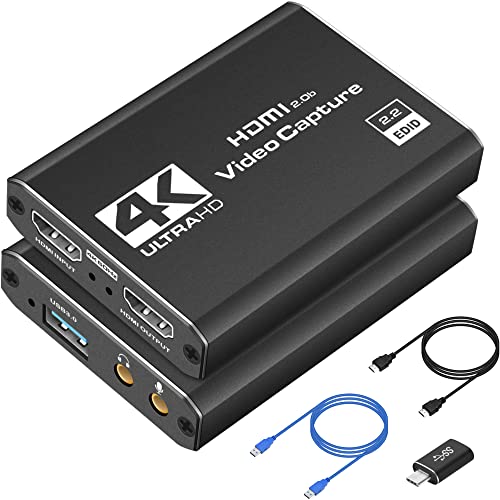
- 1080p 60fps capture with 4K HDMI support
- Plug-and-play with OBS, Streamlabs, and XSplit
- Lightweight design for portable setups
Best For: Creators who need a portable, easy-to-use capture solution
Simple Console Adapter Pick
4K HDMI Capture Card for Streaming, Full HD 1080P

- 1080p capture with 4K HDMI input support
- HDMI loop-out for no-delay gameplay
- Mic-in and plug-and-play setup
Best For: Console gamers who want straightforward streaming and commentary support
Premium 4K60 Capture – Elgato 4K S for PS5, Xbox Series X/S, Switch 2
If you want capture cards that can keep up with modern consoles, the Elgato 4K S is built for high-end gameplay recording with 4K60 capture, HDR10 support, and high-frame-rate passthrough. It’s a strong pick if you want smooth recording and low-latency play on supported setups.
Best For: Players and creators who want a compact, cross-platform capture card for 4K60 recording and high refresh-rate passthrough.
Pros:
- Captures up to 4K60 for crisp, detailed footage.
- Supports 1440p120 or 1080p240 passthrough for high-frame-rate gameplay.
- HDR10 capture support with tone mapping on Windows.
- Includes a 3.5mm analog audio input for chat or commentary.
Cons:
- Full HDR tone mapping support is listed for Windows.
- Requires compatible hardware and OS requirements for best results.
This is a polished option for users who want a premium USB-C capture card with broad console support and flexible audio input. If your priority is clean 4K recording with high refresh-rate passthrough, it stands out well.
Budget Plug-and-Play – Guermok 1080P60 USB3.0 Capture Card
Among capture cards, this Guermok model is aimed at simple, affordable HDMI capture with USB 3.0 connectivity and plug-and-play setup. It records up to 1080p60 and is a practical choice for basic streaming, recording, meetings, and teaching setups.
Best For: Budget-conscious users who want a lightweight capture card for everyday 1080p60 recording and streaming.
Pros:
- Supports up to 1080p60 capture from HDMI sources.
- Plug-and-play design with no external power or extra driver setup.
- Works with a wide range of systems and software, including OBS Studio and Zoom.
- Compact and portable for travel or outdoor streaming.
Cons:
- Designed for capture use only, not direct screen casting to a monitor or TV.
- Requires capture software to function.
- Audio setup may require restarting OBS Studio after configuration.
This is a straightforward entry-level option if you mainly need reliable 1080p capture without extra complexity. It covers a lot of devices, but it’s best treated as a practical utility card rather than a feature-heavy one.
High-Frame-Rate Capture – XIIXMASK 4K60 Pass-Through Card
If you’re comparing capture cards for both quality and flexibility, the XIIXMASK USB 3.0 model delivers 4K60 capture with 4K passthrough plus 1080p120 support. It’s built for streaming, gameplay recording, and device mirroring without needing driver installation.
Best For: Streamers and gamers who want 4K60 capture with high-frame-rate support and simple plug-and-play setup.
Pros:
- Captures up to 4K60 and supports 4K passthrough.
- Handles 1080p120 recording for high-frame-rate content.
- Includes both USB-A and USB-C connection options.
- Has 3.5mm audio in and mic out ports for commentary.
Cons:
- Windows platform support is emphasized in the supplied details.
- USB 3.0 is required for the listed performance.
This card is a strong middle-ground choice if you want advanced refresh-rate support without extra setup steps. The bundled cable and broad device compatibility make it easy to slot into a streaming or recording workflow.
Pro VRR Capture – PORTTA DX20R 4K60 Low-Latency Card
For buyers who want capture cards with more advanced display features, the PORTTA DX20R focuses on 4K60 capture, ultra-low latency, and high-refresh passthrough. It also adds VRR and HDR support, making it a capable choice for modern console and PC setups.
Best For: Users who want low-latency 4K capture with VRR and HDR support for smooth gameplay recording.
Pros:
- Captures at 4K@60Hz with passthrough up to 1080p@240Hz.
- Supports VRR and HDR for smoother, more flexible gameplay display.
- Plug-and-play compatibility with Windows, macOS, and Linux.
- Includes utility software for video, audio, EDID, and firmware control.
Cons:
- Advanced controls depend on the PORTTA CapHub Utility.
- Platform details in the supplied notes are centered on Windows and macOS for the software.
This is the most feature-rich option in the group if you care about display tuning as much as recording. It’s especially appealing for users who want a capture card that can handle modern gaming features without sacrificing ease of use.
Editor’s Choice – XIIXMASK USB 3.0 HDMI Capture Card, 1080P 60FPS
If you want a practical capture card for streaming or recording, this XIIXMASK model focuses on the essentials: USB 3.0 connectivity, 1080p60 capture, and 4K 60Hz HDMI loop-out. It’s a solid fit for live gameplay, online meetings, and simple creator setups where low latency and broad device support matter more than extra complexity.
Best For: Streamers and gamers who want a stable, low-latency capture card with mic-in support and wide compatibility.
Pros:
- Captures up to 1080p 60fps and supports 2K30 output.
- 4K 60Hz HDMI input and loop-out for passthrough monitoring.
- Mic-in support for adding commentary during streams or recordings.
- Works with Windows, Mac OS, Linux, Android, and many devices.
Cons:
- Mic-in does not record party chats.
- OBS audio setup requires a restart after configuration.
- Requires a USB 3.0 connection for best performance.
Overall, this is a well-rounded option if you want a straightforward capture card with strong compatibility and low-lag performance. It’s especially appealing for mixed use across consoles, cameras, and computers.
Best Plug-and-Play Pick – acer USB 3.0 HDMI Capture Card, 4K Loop-Out
This Acer capture card is built for easy setup, making it a good choice if you want capture cards that work quickly without extra drivers or power. It supports 4K input, 1080P@60Hz output, and low-latency streaming, so it covers the common needs of gamers, teachers, and creators.
Best For: Users who want a simple plug-and-play capture card for streaming, teaching, or recording on the go.
Pros:
- Plug and play with no extra drivers or external power.
- 4K input with 1080P@60Hz capture performance.
- Mic-in support for commentary and voice capture.
- Compatible with OBS, XSplit, VLC, and major consoles/devices.
Cons:
- Capture resolution is listed as 1080p/720p rather than 4K capture.
- Requires a USB 3.0 port to run properly.
- Best suited to users comfortable working within supported software and device lists.
As a travel-friendly, no-fuss option, this capture card is strongest when convenience is the priority. It offers a balanced feature set for everyday streaming and video capture tasks.
Budget-Friendly Option – 4K HDMI Video Capture Card, 1080P 60FPS
If you’re comparing capture cards and want a simple HDMI-to-USB 3.0 model, this Rybozen unit focuses on the basics: plug-and-play use, 1080p capture, and low-latency HDMI loop-out. It’s a sensible match for streaming, game capture, and camera input when you want a no-driver setup.
Best For: Windows users who want a straightforward capture card for streaming from consoles, cameras, or HDMI sources.
Pros:
- Plug and play with no driver or external power required.
- 1080p capture with HDMI loop-out and low latency.
- Mic-in support for external commentary.
- Works with Windows and Mac OS, plus OBS, Twitch, YouTube, and more.
Cons:
- Operating system details in the notes are Windows-focused in the specs.
- Does not support 4K120Hz or 4K144Hz input.
- Output is listed up to 2K30Hz, not higher-resolution capture.
This is a practical entry-level choice if you want core capture-card features without extra setup steps. It’s best for users who value simplicity and basic streaming compatibility over higher-end resolution support.
Budget Streamer Pick – Newhope USB 3.0 HDMI Capture Card, 1080P 60FPS
If you want one of the more practical capture cards for everyday streaming, this Newhope model focuses on smooth 1080p 60fps capture with low latency and simple setup. It also adds HDMI loop-out and mic-in support, which makes it a useful fit for gaming, teaching, or basic live production.
Best For: Streamers, teachers, and gamers who want easy plug-and-play capture with commentary support.
Pros:
- Captures HDMI video at up to 1080p 60fps with low latency
- Includes HDMI loop-out for real-time play on an external display
- Supports mic-in for external commentary
- Plug-and-play design with no driver or external power needed
Cons:
- Mic input only accepts a 3.5mm TRS standard microphone headset
- Does not position itself as a 4K capture device
- Best suited to straightforward capture needs rather than advanced setups
This is a solid pick if you value convenience and broad compatibility over extra frills. With support for Windows, macOS, Linux, and iPadOS 17+, it covers a wide range of devices and software without complicating the workflow.
Portable Creator Choice – Capture Card 4K HDMI Video Streaming to USB 3.0
Among capture cards aimed at creators, this USB 3.0 model keeps the setup simple while delivering 1080p 60fps capture and 4K HDMI passthrough-style functionality for real-time use. It is built for people who want quick compatibility with common streaming tools and a compact device they can move between setups.
Best For: Creators who need a lightweight, plug-and-play capture card for gaming and streaming.
Pros:
- Supports 1080p 60fps capture with 4K HDMI input capability
- Plug-and-play operation with no drivers needed
- Compatible with OBS Studio, Streamlabs, and XSplit
- Works with PS5, Xbox, Switch, PCs, DSLR cameras, and more
Cons:
- Requires a USB 3.0 port to use properly
- Only listed for Windows and macOS systems
- Compact build is practical, but not aimed at advanced pro features
If you want a straightforward capture card for travel, events, or a flexible home setup, this one keeps the essentials in place. The low-latency design and broad HDMI device support make it a good all-around choice for casual and semi-serious streaming.
Simple Console Adapter Pick – 4K HDMI Capture Card for Streaming, Full HD 1080P
This capture card is built for users who want a simple way to record or stream HDMI sources at 1080p while keeping gameplay smooth through HDMI loop-out. It also includes mic-in support and plug-and-play operation, which makes it a practical option for console gaming and basic creator setups.
Best For: Console players and streamers who want easy HDMI capture with commentary input.
Pros:
- Captures video up to 1080p and supports 4K HDMI input
- Includes HDMI loop-out for lag-free play on an external display
- Supports mic-in for external commentary
- Works with Windows, Mac OS, and Linux according to the notes
Cons:
- Capture resolution tops out at 1080p rather than true 4K recording
- Mic support is limited to a 3.5mm TRS standard microphone headset
- Best suited to simple recording and streaming rather than advanced production workflows
For buyers comparing capture cards mainly on ease of use, this one covers the core needs without extra setup hassle. Its combination of USB 3.0, low-latency performance, and wide device compatibility makes it a dependable starter-friendly choice.
How We Picked the Best Capture Cards
We focused on Capture Cards that offer the most value for streamers, creators, and console players. Priority went to models with dependable USB 3.0 connectivity, clear capture quality, low latency passthrough, and broad device support. We also looked at ease of setup, because a good capture card should be simple to integrate into a PC, console, or camera workflow.
Quick Comparison
The main differences come down to capture resolution, passthrough resolution, and how much lag you can tolerate. If you want the simplest setup, 1080p60 models are usually enough for streaming and recording. If you play on a high-refresh display or want future-proofing, choose a card with stronger 4K passthrough or higher refresh support.
Key Buying Factors for Capture Cards
Resolution and Frame Rate
For most creators, 1080p at 60fps is the sweet spot. It looks clean, works well with most platforms, and keeps system demands reasonable. If you are recording gameplay or using a high-end console, look for 4K input or passthrough support so the card does not become a bottleneck.
Passthrough and Latency
Passthrough lets you play on a monitor or TV while the card captures the feed for your PC. Low-latency passthrough matters if you want responsive gameplay, especially in shooters, racing games, or competitive titles. Higher refresh passthrough is useful if your display runs at 120Hz or 240Hz.
Compatibility and Connection Type
Check whether the capture card works with your console, PC, camera, and software before buying. USB 3.0 is common and usually enough for plug-and-play use, while USB-C can be convenient for newer laptops and desktops. Make sure your setup has the right ports and enough bandwidth.
Audio and Software Support
Good Capture Cards should handle audio cleanly and work with popular streaming apps. If you plan to use commentary, gameplay, or camera input together, confirm that the device supports your preferred workflow without extra converters or complicated drivers.
Who Should Buy Which Capture Cards?
If you want the most polished all-around option, choose a higher-end model with strong console support and reliable passthrough. If you are mainly streaming at 1080p, a budget-friendly USB 3.0 card is usually the better value. Creators using cameras, handheld devices, or secondary PCs should prioritize broad compatibility and stable 60fps capture over marketing claims.
In short, the best Capture Cards are the ones that match your resolution needs, display setup, and software workflow. Buy for your current setup first, then choose the most headroom you can reasonably afford.