Compact mini PCs have come a long way from simple office boxes. Today’s models can handle multitasking, 4K streaming, light gaming, and even AI-assisted workflows in a footprint that saves serious desk space.
In this roundup, we focus on the best balance of performance, expandability, connectivity, and value so you can choose a small desktop that fits your daily needs without overspending.
Best 10 Compact Mini PCs Picks for 2026
Performance-Focused Compact Mini PC
Ryzen 7 Pro 8845HS with 1TB SSD

- Ryzen 7 Pro 8845HS with Radeon 780M graphics
- 16GB DDR5 RAM and 1TB PCIe 4.0 SSD
- USB4, dual 2.5GbE, and triple/quad-display support
Best For: Users who want a small desktop for gaming, creative work, and serious multitasking
Entry-Level Budget Mini PC
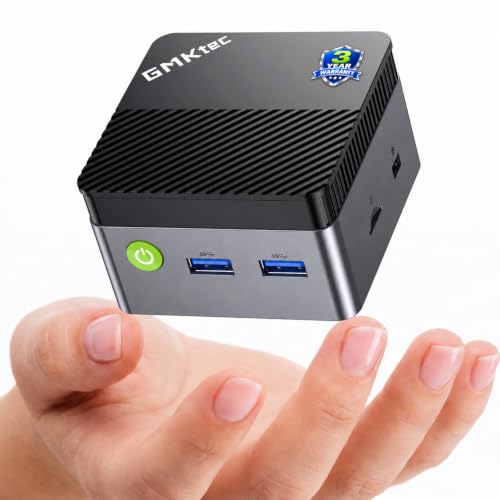
- Intel Celeron N5095 for everyday tasks
- 8GB LPDDR4 and 128GB SSD
- Dual HDMI 2.0 with 4K@60Hz output
Best For: Students, home offices, front desks, and light everyday computing
Balanced Home Office Mini PC

- Ryzen 5 3501U with 4 cores and 8 threads
- 16GB RAM and 512GB NVMe SSD
- Triple display support via dual HDMI and USB-C
Best For: Users who want a compact all-rounder for work, entertainment, and multi-monitor setups
High-Performance Compact Mini PC
BOSGAME P6 Ryzen 9 6900HX Mini PC

- Ryzen 9 6900HX for strong multitasking
- 24GB LPDDR5X RAM and 1TB PCIe 4.0 SSD
- Triple 4K display support with broad connectivity
Best For: Creators, power users, and small-desk home offices
Quiet Upgrade-Friendly Mini PC
GEEKOM A5 Ryzen 7 7730U Mini PC

- Ryzen 7 7730U for office and light creative work
- Upgradeable to 64GB RAM and 10TB storage
- Quiet 30dB design with four-display support
Best For: Quiet home offices and upgrade-minded buyers
Budget-Friendly Everyday Mini PC

- Ryzen 5 3501U for everyday productivity
- 8GB RAM and 256GB SSD for quick startup
- Triple-display support with WiFi 6 and Bluetooth 5.3
Best For: Students and home users needing a simple small desktop
Budget Everyday Pick

- Intel N5030 for basic productivity
- 12GB RAM with 256GB SSD
- Dual 4K display support and storage expansion
Best For: Home office, school, and everyday desktop use
Power User Pick
Glorlin Ryzen 7 8745HS Mini PC

- Ryzen 7 8745HS with 8 cores and 16 threads
- Radeon 780M graphics for media and light gaming
- Quad 4K display support plus USB4
Best For: Multitasking, programming, and light gaming
Value Triple-Display Pick

- Ryzen 5 3501U for everyday performance
- Triple-display support with dual HDMI and USB-C
- Windows 11 Pro plus Ubuntu support
Best For: Budget workstations and simple multi-monitor setups
Performance-Focused Compact Mini PC – Ryzen 7 Pro 8845HS with 1TB SSD
If you want compact mini pcs with near-desktop-class power, this model is built for heavier workloads. The Ryzen 7 Pro 8845HS, Radeon 780M graphics, DDR5 memory, and PCIe 4.0 storage make it a strong fit for gaming, content creation, and demanding office use without taking much desk space.
Best For: Power users who want a small desktop for gaming, creative work, and serious multitasking.
Pros:
- Ryzen 7 Pro 8845HS and Radeon 780M deliver strong performance for its size.
- 16GB DDR5 RAM and 1TB PCIe 4.0 SSD support fast multitasking and quick loading.
- Two USB4 ports, HDMI 2.1, DisplayPort 1.4, and dual 2.5GbE add excellent connectivity.
- Built-in AI NPU and TPM/Active Directory support help with modern workflows and business use.
Cons:
- Only 16GB RAM is included initially, so some users may want to upgrade later.
- Its feature set is more than basic users need, which may make it overkill for simple browsing or streaming.
This is the strongest all-around option here if you care about speed, display flexibility, and room to grow. It stands out as a compact system that can handle both work and play, especially if you need more than entry-level performance.
Quiet Everyday Mini PC – Ryzen 7330U for Triple 4K
For buyers comparing compact mini pcs for office work and light creative tasks, the KAMRUI Pinova P2 focuses on efficiency and display flexibility. Its Ryzen 7330U chip, 16GB LPDDR4X memory, and triple 4K output support make it a practical fit for a tidy desk or portable setup.
Best For: Home offices, business users, and anyone who wants a quiet mini PC with triple-monitor support.
Pros:
- Ryzen 7330U offers efficient 4-core/8-thread performance for multitasking.
- Triple 4K@60Hz output is useful for productivity and presentations.
- Compact case with VESA mount helps save desk space.
- Quiet cooling and low 15W TDP suit shared or quiet workspaces.
Cons:
- 256GB SSD is modest if you store lots of media or large projects.
- It is aimed more at productivity than high-end gaming or heavy creation.
This model makes sense if you value efficiency, low noise, and multiple displays over raw speed. It is a sensible compact desktop for everyday work where stability and space savings matter most.
Entry-Level Budget Mini PC – Intel N5095 for Basic Use
If you need compact mini pcs for everyday basics, the GMKtec G5S keeps things simple and affordable. The Intel Celeron N5095, 8GB LPDDR4 memory, and 128GB SSD are aimed at office work, online classes, streaming, digital signage, and other light-duty tasks.
Best For: Students, home offices, front desks, and light everyday computing.
Pros:
- Very small footprint makes it easy to place behind a monitor or in tight spaces.
- Low-power design with quiet cooling is well suited to calm work areas.
- Dual HDMI 2.0 outputs support up to two 4K@60Hz displays.
- Storage can be expanded later with support for up to 8TB.
Cons:
- The N5095 is an entry-level chip, so it is not built for demanding apps or gaming.
- 8GB memory is onboard and not replaceable.
This is the most straightforward pick in the group for basic computing needs. It is best when you want a tiny, low-noise system that handles the essentials without adding cost or complexity.
Balanced Home Office Mini PC – Ryzen 5 3501U with 512GB SSD
Among compact mini pcs, this Getorli model aims for a balanced mix of everyday speed and useful expansion. The Ryzen 5 3501U, 16GB RAM, and 512GB NVMe SSD are a solid match for home office work, streaming, learning, and light gaming, while triple-display support adds flexibility.
Best For: Users who want a compact all-rounder for work, entertainment, and multi-monitor setups.
Pros:
- Ryzen 5 3501U with 4 cores and 8 threads handles everyday tasks responsively.
- 16GB RAM and 512GB NVMe SSD give it a more comfortable starting point than entry-level systems.
- Dual HDMI plus USB-C support up to three displays.
- WiFi 6, Bluetooth 5.3, and Gigabit Ethernet cover modern connectivity needs.
Cons:
- It is still a mainstream daily-use system, not a high-performance gaming PC.
- Graphics are integrated Radeon Vega 8, so heavier visual workloads will be limited.
This is a good middle-ground choice if you want more capability than a basic mini PC without moving into premium hardware. It fits well in a home office or shared space where flexibility and storage matter.
High-Performance Compact Mini PC – BOSGAME P6 Ryzen 9 6900HX Mini PC
If you want compact mini pcs that can still handle serious everyday work, the BOSGAME P6 is built around the Ryzen 9 6900HX with 24GB LPDDR5X RAM and a 1TB PCIe 4.0 SSD. It fits the compact-PC brief while offering enough speed for multitasking, light creative work, and flexible multi-monitor use without taking over your desk.
Best For: Creators, power users, and home-office buyers who want a small system with strong multitasking and expansion options.
Pros:
- Ryzen 9 6900HX (8C/16T, up to 4.9GHz) supports smooth multitasking and light content creation.
- 24GB LPDDR5X memory and 1TB PCIe 4.0 SSD provide fast boot times and responsive everyday use.
- Drives up to three 4K displays at 60Hz through HDMI, DisplayPort, and USB-C.
- Dual 1Gbps Ethernet, Wi-Fi 6E, Bluetooth 5.3, and expandable storage add flexibility for work setups.
Cons:
- Built for light gaming and productivity, not heavy AAA gaming.
- Bluetooth 5.3 may require the latest Intel driver to fully activate.
- Advanced networking features may be more than casual users need.
This is a strong pick if you want compact mini pcs with higher-end performance and real connectivity depth. It balances speed, quiet operation, and expansion in a small footprint.
Quiet Upgrade-Friendly Mini PC – GEEKOM A5 Ryzen 7 7730U Mini PC
The GEEKOM A5 fits the compact mini pcs category by pairing a Ryzen 7 7730U with quiet, efficient operation and a flexible upgrade path. With 16GB RAM, a 512GB SSD, and support for multiple displays, it is a practical choice for office work, remote workflows, and light creative tasks.
Best For: Home offices, small businesses, and users who want a quiet mini PC with good expandability.
Pros:
- Ryzen 7 7730U with 8 cores and 16 threads handles office work, meetings, coding, and light editing.
- Upgradeable design supports up to 64GB RAM and up to 10TB total storage.
- Can drive up to four displays, including 8K output through USB-C.
- Quiet 30dB operation, 15W power draw, and 3-year limited warranty add value.
Cons:
- Integrated Vega 8 graphics are suited to light graphics work, not demanding gaming.
- Some AI assistant features depend on compatible software and workflow setup.
- Detailed expansion potential may be more than basic users need.
For buyers comparing compact mini pcs on efficiency and long-term flexibility, the A5 stands out. It is a sensible balance of quiet operation, modern connectivity, and upgrade headroom.
Budget-Friendly Everyday Mini PC – Glorlin Ryzen 5 3501U Mini PC
If you are shopping compact mini pcs for basic daily use, the Glorlin Mini PC keeps things simple with a Ryzen 5 3501U, 8GB RAM, and a 256GB SSD. It is geared toward web browsing, office work, video calls, and streaming, with a small footprint that helps reduce desk clutter.
Best For: Students, home users, and office workers who want an affordable small desktop for everyday tasks.
Pros:
- Ryzen 5 3501U is suitable for browsing, office work, and video calls.
- 8GB RAM and a 256GB SSD deliver quick startup and smooth basic operation.
- Supports dual or triple displays through HDMI and USB-C for better multitasking.
- Includes WiFi 6, Bluetooth 5.3, Ethernet, and a 1-year warranty.
Cons:
- 8GB RAM and 256GB storage are modest for heavier workloads.
- Integrated graphics are only meant for light everyday use.
- Processor and memory specs are aimed at basic productivity rather than performance work.
This model makes sense if you want compact mini pcs that stay practical and affordable. It focuses on the essentials, which is exactly what many everyday desktop setups need.
Budget Everyday Pick – KAMRUI AK1PLUS Mini PC
If you want compact mini pcs for everyday tasks without giving up useful expansion, the KAMRUI AK1PLUS is a practical option. Its Intel N5030 chip, 12GB of RAM, and 256GB SSD are aimed at browsing, office work, online classes, video calls, and light multitasking, while the small chassis helps keep your desk clear.
Best For: Home office users, students, and business buyers who need a space-saving desktop for routine work.
Pros:
- Intel N5030 offers a step up from the N4500 for everyday computing.
- 12GB memory and a 256GB SSD help with faster boot times and smoother app loading.
- Dual HDMI 2.0 ports support two 4K@60Hz displays for productive multitasking.
- Strong expansion support for M.2 storage plus a 2.5-inch SATA SSD/HDD.
Cons:
- Not built for demanding gaming or heavy creative workloads.
- Storage and memory limits are modest compared with higher-end mini PCs.
Overall, the AK1PLUS makes sense if you need a quiet, low-power mini desktop for daily work and want flexibility to add storage later. It is especially appealing for users who value dual-screen support in a very small footprint.
Power User Pick – Glorlin Ryzen 7 8745HS Mini PC
For buyers comparing compact mini pcs that can do more than basic office work, the Glorlin Ryzen 7 8745HS stands out with stronger hardware and broader display support. Its 8-core Ryzen chip, 16GB DDR5 memory, 1TB SSD, and Radeon 780M graphics make it a better fit for multitasking, programming, media playback, and light gaming.
Best For: Power users who want a small desktop for productivity, programming, and light gaming.
Pros:
- Ryzen 7 8745HS delivers 8 cores, 16 threads, and up to 4.9GHz boost.
- Radeon 780M graphics support smooth 4K video playback and casual gaming.
- Quad 4K display support helps with coding, trading, and content workflows.
- USB4, dual 2.5G LAN, WiFi 6, and Bluetooth 5.3 add modern connectivity.
Cons:
- Single 16GB memory configuration may not suit buyers wanting more RAM out of the box.
- More powerful hardware usually means a higher cost than entry-level mini PCs.
In practice, this is the strongest all-rounder in the group if you want a compact desktop that can handle heavier everyday workloads and multiple displays. It is a smart fit for users who want mini PC convenience without staying in the entry-level performance tier.
Value Triple-Display Pick – BOSGAME E2 Plus Mini PC
The BOSGAME E2 Plus is a good choice if you want compact mini pcs that focus on practical day-to-day value. With a Ryzen 5 3501U processor, 8GB of RAM, and a 256GB SSD, it is designed for office work, video meetings, streaming, browsing, and standard multitasking in a space-saving desktop format.
Best For: Budget-minded buyers who want a simple mini desktop for work and home use.
Pros:
- Ryzen 5 3501U provides reliable everyday performance for common tasks.
- Dual HDMI and USB-C display output support up to three monitors.
- Wi-Fi 5, Bluetooth 5.0, and Gigabit Ethernet cover basic connectivity needs.
- Supports Windows 11 Pro and Ubuntu, which adds flexibility.
Cons:
- 8GB RAM and a 256GB SATA SSD are modest for heavier workloads.
- Wi-Fi 5 is less current than the Wi-Fi 6 found on newer mini PCs.
As a value-focused mini desktop, the E2 Plus is best when you care more about dependable everyday use and multi-monitor support than top-end speed. It is a sensible pick for a home office, classroom, or reception area.
How We Picked These Compact Mini PCs
We prioritized processors, memory, storage, display support, wireless connectivity, and upgrade potential. For Compact Mini PCs, the best choices are not just fast on paper; they should also stay practical for real-world use, from office tasks and home media to creative work and casual gaming.
We also looked for a clear match between specs and intended use. Higher-end AMD Ryzen 7 and Ryzen 9 options are better suited to heavier multitasking, while entry-level Intel and Ryzen 3-class systems make more sense for browsing, streaming, and light productivity.
Quick Comparison of Compact Mini PCs
Think of these systems in three broad groups. Budget models are best for everyday computing and secondary rooms. Midrange Compact Mini PCs offer the most balanced mix of speed, storage, and display output for most users. Performance-focused systems with stronger Ryzen chips, faster SSDs, and better graphics are the right call if you want more headroom for editing, AI features, or light gaming.
Best for Everyday Use
Choose lower-power models with 8GB to 12GB of RAM and SSD storage if your workload is mostly web, email, documents, and streaming.
Best for Multitasking and Future-Proofing
Look for 16GB RAM or more, newer Ryzen processors, and at least 512GB of SSD storage if you keep many tabs open or run several apps at once.
Best for More Demanding Users
If you care about graphics performance, multi-monitor setups, or heavier workloads, prioritize stronger integrated graphics, USB4 or fast USB-C, and higher-speed DDR5 memory.
Key Buying Factors for Compact Mini PCs
CPU: The processor determines most of the day-to-day speed. Ryzen 5 and Intel N-series chips are fine for basic tasks, while Ryzen 7 and Ryzen 9 class systems are better for demanding multitasking.
RAM: 16GB is the sweet spot for most buyers. Less can work for simple use, but more memory helps keep Compact Mini PCs responsive as your workload grows.
Storage: A 512GB SSD is a practical minimum for many buyers. If you store games, media, or work files locally, 1TB is more comfortable.
Graphics and displays: Integrated graphics are fine for everyday computing, but check how many monitors the system supports and whether it can handle 4K output at your desired refresh rate.
Ports and networking: Fast Wi-Fi, Bluetooth, enough USB ports, and Ethernet matter more than many shoppers expect. If you use external drives, docks, or multiple displays, connectivity can make or break the experience.
Who Should Buy Which Compact Mini PCs?
Buy budget Compact Mini PCs if you want a low-cost desktop for browsing, streaming, schoolwork, or a home office with modest demands.
Buy midrange models if you want the best overall value for multitasking, dual-monitor setups, and smoother long-term use.
Buy higher-performance models if you need stronger integrated graphics, more memory bandwidth, or extra storage for creative apps, heavier workloads, or light gaming.
If you are unsure, start with 16GB RAM, a 512GB or larger SSD, and a newer Ryzen 5 or Ryzen 7 processor. That combination gives most shoppers the most balanced compact mini pc experience in 2026.