Moving terabytes of photos, videos, backups, or business data does not have to mean copying files one drive at a time. The right hard drive duplicator can clone SATA HDDs and SSDs directly, often without a computer, while helping you verify capacity, manage multiple targets, or securely erase retired media.
This roundup compares 10 options for home labs, IT departments, repair shops, content workflows, and high-volume deployment. Pay close attention to drive format, target count, rated transfer speed, and whether you need standalone cloning, computer-connected storage, or both.
Best 10 Hard Drive Duplicators for Large Files Picks for 2026
Best Overall
StarTech SDOCK2U33R Dual-Bay Duplicator

- Standalone sector-by-sector SATA cloning
- Supports 2.5- and 3.5-inch drives of any capacity
- USB 3.0 and eSATA connectivity
Best For: IT professionals needing a versatile SATA cloning dock
Fastest SATA Pick
StarTech SDOCK2U313R 28GB/min Duplicator

- Advertised cloning speed up to 28 GB/min
- USB 3.2 Gen 2 host connection
- Supports SATA I/II/III, 4Kn, and TRIM
Best For: Faster standalone SATA drive duplication
Best for Bulk USB Jobs

- Copies up to 15 USB devices simultaneously
- Supports capacities above 2TB
- Includes multiple copy and erase modes
Best For: High-volume USB duplication and drive erasure
Best Budget Dock
SABRENT EC-HD2B Dual-Bay Cloner

- Offline cloning requires no drivers or computer
- Supports 2.5- and 3.5-inch SATA drives
- Handles drives up to 10TB
Best For: Simple home and small-office SATA cloning
Best Portable Data Recovery Pick
Vinpower 1-to-3 SATA HDD/SSD Duplicator

- Standalone cloning for 2.5-inch and 3.5-inch SATA drives
- Raw Mode supports bit-by-bit duplication
- Error skipping helps recover data from troubled drives
Best For: Portable cloning, recovery work, and secure drive erasure
Best High-Volume Batch Pick
EZ DUPE 1-to-11 SATA Tower Duplicator
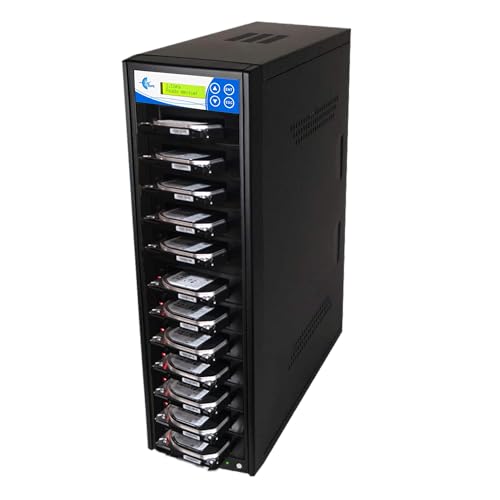
- Duplicates up to 11 SATA drives simultaneously
- Rated at 150MB/s or 9GB/min per slot
- Provides four copy and seven erase modes
Best For: Business, repair, and large-scale SATA drive duplication
Best Dual-Bay Dock Pick
MAIWO 48TB SATA HDD/SSD Cloner

- Offline cloning for 2.5-inch and 3.5-inch SATA drives
- Supports up to 48TB total across two bays
- Adds three USB 3.0 hub ports
Best For: Home offices and flexible cloning plus USB access
High-Volume Workstation

- Duplicates up to five SATA drives simultaneously
- Standalone operation with no computer required
- Includes DoD-compliant sanitization
Best For: High-volume drive duplication and erasure
Balanced Batch Choice
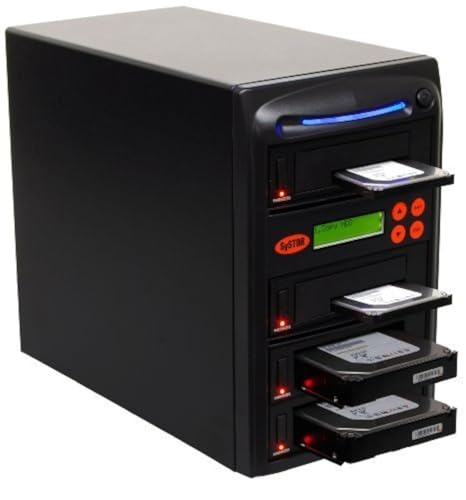
- Copies to three drives simultaneously
- Handles 3.5-inch HDDs and 2.5-inch SSDs
- Supports duplication and sanitization
Best For: Small shops and moderate batch workloads
Compact Dual-Bay Tool

- Duplicates one drive at a time
- Supports 2.5-inch and 3.5-inch SATA media
- Features hot-swappable drive handling
Best For: Single-drive cloning and replacement tasks
Best Overall – StarTech SDOCK2U33R Dual-Bay Duplicator
For hard drive duplicators for large files, the StarTech SDOCK2U33RE is a flexible choice for cloning 2.5- and 3.5-inch SATA drives without a computer. Its sector-by-sector copying supports any file format and copies the entire source drive, including empty sectors.
Best For: IT professionals and users who need a standalone SATA duplicator plus a convenient drive-docking station.
Pros:
- Standalone cloning requires no PC and supports SATA I/II/III drives of any capacity.
- Sector-by-sector duplication works with any file format and reaches up to 22 GB/min.
- Supports both USB 3.0 and eSATA connections for drive access.
- Includes cables, universal power adapter, eject buttons, and a two-year warranty.
Cons:
- The target drive must be equal to or larger than the source.
- IDE drives require a separately sold adapter.
- USB and eSATA connections are external rather than built into the drive bays.
This model balances standalone cloning with everyday drive access. It is particularly practical when you want a tool that can duplicate drives and also serve as a simple SATA dock.
Fastest SATA Pick – StarTech SDOCK2U313R 28GB/min Duplicator
Among hard drive duplicators for large files, the StarTech SDOCK2U313R stands out for its stated duplication speed of up to 28 GB/min. It clones SATA drives independently of a computer and also functions as a USB-connected drive dock.
Best For: Users prioritizing faster standalone SATA cloning and broad compatibility with 2.5- and 3.5-inch drives.
Pros:
- Up to 28 GB/min sector-by-sector copying for large, complete drive transfers.
- Supports SATA I/II/III drives, 4Kn, TRIM, and any file format.
- USB 3.2 Gen 2 provides a host connection rated up to 10 Gbps.
- Tool-free, trayless design includes drive doors and eject buttons.
Cons:
- The destination drive must be equal to or larger than the source.
- It is designed for SATA drives; IDE use requires a separate adapter.
- The maximum real-world speed can depend on the drives and connection.
With its higher advertised cloning rate and 10 Gbps USB host connection, this is the strongest fit in the group for users who regularly move large SATA drive contents and want minimal setup.
Best for Bulk USB Jobs – EZ DUPE USB Cyclone 1-to-15
The EZ DUPE USB Cyclone is built for simultaneous USB duplication rather than a conventional two-bay SATA workflow. It supports up to 15 Type-A USB devices, handles capacities above 2TB, and offers several copy and erase modes without requiring a computer.
Best For: Businesses and multimedia workflows that need to copy or erase many USB drives or external USB hard drives at once.
Pros:
- Duplicates up to 15 USB Type-A devices in a standalone system.
- Supports USB 1.0 through USB 3.1 and capacities above 2TB with no stated capacity limit.
- Offers Essential Files, Full, Partitioned, and Percentage Copy modes.
- Includes Quick, Full, DoD 3-pass, and DoD 7-pass erase modes.
Cons:
- Advertised slot speed is up to 45 MB/s, substantially below the SATA duplicators’ stated rates.
- It is intended for USB media and USB external drives, not direct internal SATA drive insertion.
- Its 15-port design is heavier and less compact than a two-bay dock.
This is the specialized choice for volume USB work. Its multiple copy and erasure modes make it more useful for repeated distribution, testing, or sanitization tasks than for occasional single-drive cloning.
Best Budget Dock – SABRENT EC-HD2B Dual-Bay Cloner
For shoppers seeking hard drive duplicators for large files without extra software, the SABRENT EC-HD2B offers a straightforward dual-bay SATA docking and offline-cloning setup. It accepts standard 2.5- and 3.5-inch SATA drives and supports drives up to 10TB.
Best For: Home users and small offices that need simple offline cloning and USB 3.0 access for SATA HDDs or SSDs.
Pros:
- Supports both 2.5- and 3.5-inch SATA hard drives and SSDs.
- Offline cloning works without drivers or a computer.
- Supports drives up to 10TB and USB 3.0 transfer speeds up to 5 Gbps.
- Dual bays allow the unit to function as both a cloner and drive dock.
Cons:
- Its stated offline-cloning speed is up to 60 Mbps, slower than the StarTech models’ advertised rates.
- It does not list the broader sector-by-sector and file-format details provided for the StarTech duplicators.
- The listed drive support is capped at 10TB.
The EC-HD2B is a practical entry-level option when uncomplicated offline cloning matters more than maximum throughput. Its dual-bay design also makes it useful for reading or transferring data between SATA drives.
Best Portable Data Recovery Pick – Vinpower 1-to-3 SATA HDD/SSD Duplicator
For shoppers comparing hard drive duplicators for large files, the Vinpower HDDMINI offers standalone cloning for 2.5-inch and 3.5-inch SATA HDDs and SSDs. Smart Copy transfers accessible data, while Raw Mode performs bit-by-bit duplication when a complete copy is needed.
Best For: Field work, drive recovery, and users who need a compact duplicator with error skipping and secure erase features.
Pros:
- Works without a computer or host connection.
- Supports both 2.5-inch and 3.5-inch SATA HDDs and SSDs.
- Read Error Skip can continue copying around bad sectors.
- Includes DoD-style secure erase functionality.
Cons:
- Duplicates up to three target drives, fewer than the 11-target tower model.
- Optional CF support requires an additional interface module.
The Vinpower is a practical choice when portability and data recovery flexibility matter more than high-volume batch duplication. Its Raw Mode and error-skipping capability make it especially useful for challenging source drives.
Best High-Volume Batch Pick – EZ DUPE 1-to-11 SATA Tower Duplicator
The EZ DUPE H11HSATB is built for users comparing hard drive duplicators for large files across many drives at once. It can copy up to 11 SATA HDDs or SSDs simultaneously at a stated 150MB per second per slot, with multiple duplication and erase modes.
Best For: IT departments, repair businesses, and production environments that need to duplicate multiple SATA drives in a standalone tower.
Pros:
- Supports up to 11 target drives at the same time.
- Offers Quick Copy, Full Copy, partitioned-area, and percentage-copy modes.
- Includes seven erase modes, including DoD 3-pass and 7-pass options.
- Operates without software, a computer, or a host connection.
Cons:
- Its tower design and 3-pound weight are less portable than compact duplicators.
- Supports SATA drives, without stated compatibility for other interfaces.
Choose this model when throughput and batch capacity are the priorities. Its 11-target design can reduce repetitive work, while selectable copy modes help match the process to full-drive or partition-specific jobs.
Best Dual-Bay Dock Pick – MAIWO 48TB SATA HDD/SSD Cloner
For buyers seeking hard drive duplicators for large files with everyday computer connectivity, the MAIWO dual-bay cloner combines offline copying with a USB 3.0 hub. It supports 2.5-inch and 3.5-inch SATA drives, with up to 24TB per bay and 48TB total capacity according to the supplied specifications.
Best For: Home offices and IT users who want offline drive cloning plus USB-connected file transfers and storage access.
Pros:
- Supports offline cloning without drivers or a computer.
- Accepts both 2.5-inch and 3.5-inch SATA HDDs and SSDs.
- Provides three USB 3.0 Type-A hub ports.
- LED indicators show cloning progress at 25%, 50%, 75%, and 100%.
Cons:
- Only two drive bays are available for cloning.
- Compatibility is limited to SATA HDDs and SSDs for drive duplication.
- Its stated 5Gbps USB bandwidth may not match the throughput of a dedicated multi-target tower for every workflow.
The MAIWO is a versatile middle ground: it handles offline one-drive-to-one-drive cloning while also functioning as a USB 3.0 dock. It suits users who need occasional large transfers rather than high-volume duplication.
High-Volume Workstation – 1:5 Systor HDD/SSD Duplicator
For teams seeking hard drive duplicators for large files, the Systor SYS105HS-DP offers five-target SATA duplication without requiring a computer or software. It supports both 3.5-inch hard drives and 2.5-inch SSDs, with speeds up to 90MB per second.
Best For: Businesses and technicians duplicating multiple SATA drives at once.
Pros:
- Copies to up to five drives simultaneously.
- Standalone operation requires no computer or software.
- Supports data-only or whole-drive duplication.
- Includes DoD 5220.22-M-compliant drive sanitization.
Cons:
- Limited to SATA HDDs and SSDs.
- Its 26-pound weight may make relocation inconvenient.
With a consistent listed speed of up to 90MB per second and five-drive capacity, this model is the strongest fit here for high-volume duplication workflows. Its included warranty and lifetime technical support add useful operational reassurance.
Balanced Batch Choice – 1:3 Systor HDD/SSD Duplicator
The Systor SYS103HS-DP is a practical middle-ground option for hard drive duplicators for large files. Its standalone design copies to three drives at speeds up to 90MB per second and accommodates both 3.5-inch HDDs and 2.5-inch SSDs without adapters.
Best For: Small businesses and repair shops that need batch duplication without a five-target unit.
Pros:
- Duplicates multiple drives simultaneously at up to 90MB per second.
- Works with 3.5-inch hard drives and 2.5-inch SSDs.
- Copies files, data, or complete drives.
- Supports DoD 5220.22-M-compliant sanitization.
Cons:
- Provides three target positions, fewer than the 1:5 model.
- Designed for SATA media rather than broader interface compatibility.
This model balances throughput and capacity for users who regularly duplicate several drives but do not need five targets. Its no-software workflow and included technical support make it straightforward for routine service work.
Compact Dual-Bay Tool – 1:1 Systor HDD/SSD Duplicator
For one-at-a-time cloning, the Systor SYS101HS-DP provides a simple standalone approach to hard drive duplicators for large files. It supports 2.5-inch and 3.5-inch SATA HDDs and SSDs, with hot-swappable bays and a listed transfer speed of up to 90MB per second.
Best For: Individual drive replacements, personal use, and lower-volume business tasks.
Pros:
- Standalone design works without a computer or software.
- Supports both 2.5-inch and 3.5-inch SATA drives.
- Offers hot-swappable drive handling.
- Can copy data or entire drives and sanitize media.
Cons:
- Its 1:1 design is slower for batch production than multi-target models.
- Compatibility is centered on SATA HDDs and SSDs.
The SYS101HS-DP is the most focused choice in this group for single-drive cloning and erasure. Hot swapping and broad SATA form-factor support keep routine replacements convenient, while the listed speed matches the larger Systor units.
How We Picked the Best Hard Drive Duplicators for Large Files
We focused on standalone SATA duplicators and cloning docks that support 2.5-inch or 3.5-inch HDDs and SSDs. The selection covers single-target, multi-target, dual-bay, and tower-style designs so buyers can match throughput to their workload. We also considered advertised transfer rates, drive compatibility, erasure functions, connection options, capacity claims, and practical usability for repeated large-file transfers.
Transfer-rate figures are typically maximum or manufacturer-rated values. Real performance depends on the source drive, target drives, interface, data type, drive health, and whether the duplicator performs a sector-by-sector clone.
Quick Comparison
| Type | Best for | Main advantage | Watch for |
|---|---|---|---|
| Dual-bay dock | Home and small-office users | Simple cloning and drive access | Usually one target at a time |
| 1:1 duplicator | Occasional exact copies | Compact, focused workflow | Limited expansion |
| 1:3 or 1:5 tower | IT teams and repair shops | Multiple simultaneous targets | Higher cost and desk space |
| 1:11 or 1:15 system | High-volume deployment | Maximum batch productivity | Needs consistent media and workflow planning |
Key Buying Factors for Hard Drive Duplicators for Large Files
Drive Format and Capacity
Confirm that the unit accepts both 2.5-inch and 3.5-inch SATA drives if your inventory includes desktop disks. Check supported capacity carefully, especially when cloning newer high-capacity disks. A duplicator may copy a drive sector by sector, so the destination generally needs to be equal to or larger than the source.
Speed Versus Batch Size
For occasional transfers, a dual-bay dock may be sufficient. For repeated deployments, the number of target bays can matter more than the headline speed. A slower multi-target unit may finish a batch sooner than a faster 1:1 device when several identical drives are required.
Standalone Cloning and Computer Connectivity
Standalone operation is useful for direct disk-to-disk copying without software. USB or eSATA connectivity adds value when you also want to browse drives, move selected files, or use the unit as a docking station. Verify which ports are for host connection and which are intended for drive duplication.
Erasure and Data Handling
If drives are being repurposed, look for a documented erase mode and choose the appropriate security level for your organization. Cloning and erasing are separate workflows, so confirm that the controls make it difficult to select the wrong source or target.
Who Should Buy Which Hard Drive Duplicators for Large Files?
Choose a dual-bay dock such as the StarTech.com, Sabrent, or Maiwo style of product for occasional upgrades, backups, and mixed computer use. A 1:1 Systor unit fits buyers who need a straightforward dedicated copier with minimal equipment. Small IT teams and repair businesses should consider 1:3 or 1:5 systems, while organizations deploying many identical drives will benefit from the EZ DUPE, Vinpower, or larger Systor tower options. Prioritize target count, safety controls, and repeatability over maximum advertised speed alone.