Duplicating multiple USB drives at once can save hours when you need consistent copies for training materials, software distribution, media delivery, or IT deployment. The right machine balances target count, copy speed, format compatibility, and ease of operation.
This roundup compares 10 multi-target USB duplicators, from compact four-port units to high-capacity systems designed for frequent batch production. Use the guide below to match the hardware to your workload and budget.
Best 10 Multi Target USB Duplicators Picks for 2026
Best High-Capacity Pick
Vinpower USBDBL 15-Target USB Duplicator

- 15 target slots with standalone operation
- Asynchronous, Smart Copy, and Raw Mode
- Secure erase plus optional media adapters
Best For: High-volume USB and flash-media duplication
Best for Large Batch Runs

- Handles up to 55 target USB drives
- Standalone synchronous and asynchronous modes
- Stated speed up to 2GB per minute
Best For: Very large production and distribution batches
Best PC-Connected Option
Nexcopy USB160PRO 16-Target Duplicator

- 16 targets with USB 3.0 connectivity
- PC-connected Nexcopy software interface
- Advanced partition and serial features with Nexcopy media
Best For: Software-managed USB production workflows
Best Compact Duplicator and Eraser
StarTech 1:15 USB Cloner and Eraser

- 15-target standalone duplication and erasing
- Sector-by-sector copying and Copy & Compare
- Compact 3.9-pound design with LCD controls
Best For: IT technicians handling cloning and sanitizing
Touchscreen Standalone Pick
Acumen Disc EZ Dupe 1-to-10 USB Duplicator

- Copies to up to 10 USB drives
- Standalone touchscreen operation
- Copy, compare, erase, and format modes
Best For: Computer-free duplication with an easy touchscreen interface
IT Workflow Pick
StarTech 1-to-5 USB Duplicator and Eraser

- Standalone duplication for up to five drives
- File, sector, and verification modes
- Includes multi-pass erase options
Best For: Technicians who need cloning and drive sanitization
Computer-Connected Speed Pick
DupliM Mini 1-to-10 USB Duplicator

- Duplicates up to 10 drives simultaneously
- USB 3.0 computer-connected operation
- Copies from images, drives, or folders
Best For: Mac and PC users needing flexible 10-drive duplication
Best Overall Multi-Target Disc Tower
SharkCopier 3-Target CD/DVD Duplicator

- Standalone three-target CD/DVD duplication
- 2 TB hard drive stores master projects
- USB 3.0 transfer and true audio comparison
Best For: Recurring CD/DVD batches with stored projects and USB file transfer
Best Portable USB Option
EZ Dupe 1-to-4 Mini USB Plus MK II
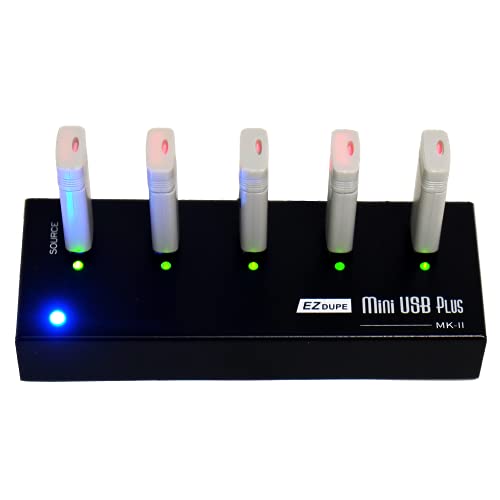
- Copies four USB drives simultaneously
- Compact standalone design weighs 12.8 ounces
- Supports USB 1.0, 2.0, and 3.0 media
Best For: Portable, small-batch USB flash-drive duplication
Best High-Volume USB Choice
BestDuplicator 23-Target USB Copier

- Duplicates up to 23 USB drives simultaneously
- Bit-by-bit copying supports all data formats
- Adds secure erase and auto-counter features
Best For: Large USB duplication batches and repeat production workflows
Best High-Capacity Pick – Vinpower USBDBL 15-Target USB Duplicator
For teams needing multi target usb duplicators without a computer, the Vinpower USBDBL offers 15 target slots and standalone operation. Its asynchronous copying lets each target operate independently, while Smart Copy and Raw Mode cover both file-level and bit-by-bit duplication.
Best For: Businesses and technicians duplicating varied USB media in higher-volume batches.
Pros:
- Copies to 15 USB drives without a PC.
- Supports asynchronous duplication for independent target copying.
- Includes Smart Copy, Raw Mode, and secure erase functions.
- Can support SD, microSD, and CompactFlash with optional adapter modules.
Cons:
- At 11 pounds, it is less convenient to move than lighter units.
- Additional flash-media formats require separate adapter modules.
This is a versatile standalone choice when capacity, independent duplication, and media flexibility matter more than portability.
Best for Large Batch Runs – Systor 1-to-55 USB Duplicator
The Systor SYS-USBD-55 is designed for very large duplication batches, with one source and up to 55 target USB drives. This standalone multi target usb duplicator supports synchronous and asynchronous modes and maintains its stated 2GB-per-minute rate as the number of loaded drives increases.
Best For: Organizations producing large quantities of identical USB drives at once.
Pros:
- Supports up to 55 target drives.
- Requires no computer or software.
- Offers synchronous and asynchronous copy modes.
- Includes long-term support coverage with lifetime technical support.
Cons:
- Its 62-pound weight makes it difficult to relocate.
- USB Type-C drives need an adapter.
- The listed transfer rate is 33MB per second, or up to 2GB per minute.
Choose this model when throughput scale and target count are the priorities; it is substantially less suitable for compact workspaces or frequent transport.
Best PC-Connected Option – Nexcopy USB160PRO 16-Target Duplicator
Nexcopy USB160PRO - 16 Target USB 3.0 Duplicator with Partition Tool Module Drive Manager Software
Check Price On AmazonThe Nexcopy USB160PRO takes a PC-connected approach to multi target usb duplicators, using USB 3.0 for fast transfers while remaining backward compatible with USB 2.0. Its software interface adds data streaming and extraction tools, while optional Nexcopy media enables specialized partition and serial-number features.
Best For: Users who want software control and advanced USB media management from a connected computer.
Pros:
- Provides 16 target USB ports.
- Uses USB 3.0 and supports USB 2.0 compatibility.
- Includes a user-friendly Nexcopy software interface.
- Supports read-only, USB CD-ROM, and hard-coded serial-number features with compatible Nexcopy media.
Cons:
- Requires a PC connection rather than standalone operation.
- Advanced features require Nexcopy USB media.
This model fits workflows that benefit from computer-based control and specialized media preparation, rather than users seeking a self-contained duplicator.
Best Compact Duplicator and Eraser – StarTech 1:15 USB Cloner and Eraser
The StarTech USBDUPE115 combines 15-target duplication with USB drive erasing in a standalone unit. It supports file-system and sector-by-sector copying, verification through Copy & Compare, and asynchronous copying for source content under 128MB.
Best For: IT technicians who need a manageable unit for cloning, verification, and secure USB sanitizing.
Pros:
- Duplicates or erases up to 15 USB drives without a computer.
- Supports file-based and sector-by-sector copy modes.
- Offers quick erase, single-pass, and 3-pass overwrite options.
- LCD controls provide drive information, performance, and error scanning.
Cons:
- Asynchronous mode is limited to source content under 128MB.
- Its stated copy speed is 1.5GB per minute, slower than some larger systems.
With its lighter 3.9-pound design and built-in sanitizing tools, this is a practical choice for field technicians and smaller duplication jobs.
Touchscreen Standalone Pick – Acumen Disc EZ Dupe 1-to-10 USB Duplicator
The Acumen Disc EZ Dupe is a practical choice among multi target usb duplicators when you want to copy to as many as 10 drives without connecting a computer. Its touchscreen interface, source analysis feature, and support for copying, comparing, erasing, and formatting make routine media management straightforward.
Best For: Small offices, technicians, and users who want standalone 1-to-10 USB duplication with touchscreen controls.
Pros:
- Copies to up to 10 USB drives in a standalone system.
- Touchscreen interface provides readable operation and real-time information.
- Supports most file formats, file sizes, and drive capacities.
- Offers copy, compare, erase, and format functions.
Cons:
- Listed transfer speed is up to 35 MB/s.
- Its USB interface specifications include USB 1.1 and USB 2.0 Type-A connectivity.
Choose this model if simple, computer-free operation matters more than the highest available transfer speeds. The bright display and broad task support make it an accessible option for recurring duplication jobs.
IT Workflow Pick – StarTech 1-to-5 USB Duplicator and Eraser
The StarTech USBDUP15 is a versatile option among multi target usb duplicators for technicians who need both cloning and drive sanitization. It works without a computer, supports USB 3.0, 2.0, and 1.1 media, and adds verification, error scanning, and multiple erase modes.
Best For: IT professionals and technicians managing boot drives, USB distribution, and secure drive-erasure tasks.
Pros:
- Duplicates or erases up to five USB drives from a standalone unit.
- Supports file-based and sector-by-sector copying.
- Includes Quick Erase, single-pass, and three-pass overwrite modes.
- Copy-and-Compare can verify completed clones, while the LCD reports drive information and performance.
Cons:
- Its five-drive target capacity is lower than 1-to-10 models.
- External USB devices may need their own power source.
- Asynchronous copying is limited to source content under 64 MB.
This is the strongest fit when duplication is only part of the job. Its erase standards, verification tools, upgradeable firmware, and standalone workflow give it useful depth for professional media handling.
Computer-Connected Speed Pick – DupliM Mini 1-to-10 USB Duplicator
The DupliM Mini takes a different approach to multi target usb duplicators by connecting to a Windows or Mac computer. Its software can duplicate up to 10 USB 3.0 or 2.0 drives at once from image files, flash drives, or selected files and folders on the computer.
Best For: Mac and PC users who want compact, software-controlled duplication to as many as 10 USB flash drives.
Pros:
- Duplicates up to 10 USB 3.0 or 2.0 drives simultaneously.
- Uses SuperSpeed USB 3.0 technology.
- Can copy from image files, flash drives, or selected computer files and folders.
- Includes software, power adapter, USB 3.0 cable, and U.S.-based technical support.
Cons:
- Requires a connected Windows or Mac computer.
- Compatible operating systems and hardware have minimum requirements.
- It is intended for USB flash or pen drives rather than a fully standalone workflow.
Select this model if your duplication process already centers on a computer and you want flexible source options. It offers a compact 10-target setup, but users seeking computer-free operation should consider a standalone alternative.
Best Overall Multi-Target Disc Tower – SharkCopier 3-Target CD/DVD Duplicator
For buyers comparing multi target usb duplicators with broader disc-copying needs, the Vinpower SharkCopier adds three-target CD/DVD duplication, standalone operation, and USB 3.0 file transfer. Its built-in 2 TB hard drive can store master projects for later recall without reconnecting a computer.
Best For: Businesses and organizations duplicating CDs and DVDs in recurring batches while also needing USB-connected project transfers.
Pros:
- Standalone tower operation requires no PC.
- Duplicates to three targets simultaneously.
- Includes a 2 TB hard drive for stored projects.
- Supports USB 3.0, DVD speeds up to 24x, and CD-R speeds up to 52x.
Cons:
- Cannot copy protected discs.
- At 16 pounds, it is less portable than compact USB duplicators.
- Its three-target design is lower capacity than larger multi-target towers.
The SharkCopier is a versatile choice when disc duplication is the priority but USB 3.0 workflow support is also useful. Its hard-drive storage and true audio comparison capability add convenience for repeat and music-CD projects.
Best Portable USB Option – EZ Dupe 1-to-4 Mini USB Plus MK II
This compact EZ Dupe is a practical pick among multi target usb duplicators when portability matters. It copies up to four USB flash drives simultaneously, works without a computer, and supports USB 1.0, 2.0, and 3.0 flash media.
Best For: Mobile teams, small offices, and users who need straightforward four-drive duplication from a compact standalone unit.
Pros:
- Copies up to four USB drives at the same time.
- Standalone plug-and-use operation needs no computer.
- Compact 12.8-ounce design is easy to transport.
- Updated version reaches up to 2.5 GB per minute, depending on drive speeds.
Cons:
- It does not offer the large target count of desktop duplicator towers.
- External USB storage devices require their own power source.
- Actual copy speed depends on the connected flash drives.
Choose the Mini USB Plus MK II for convenience rather than maximum output volume. Its four-port asynchronous copying and power-bank compatibility make it especially useful for field work and smaller duplication jobs.
Best High-Volume USB Choice – BestDuplicator 23-Target USB Copier
For high-output buyers evaluating multi target usb duplicators, the BestDuplicator BD-USB-23T provides 23 USB targets in a standalone format. It supports bit-by-bit duplication, smart copy for accessible content, secure erase, and firmware upgrades.
Best For: Organizations producing large batches of USB drives and needing a high-capacity, PC-free duplication station.
Pros:
- Duplicates to up to 23 USB flash drives at once.
- Standalone operation eliminates the need for a PC.
- Bit-by-bit duplication supports all data formats.
- Includes secure erase, multilingual LCD support, and auto-counting.
Cons:
- Its 19-pound form factor is not intended for frequent transport.
- The listed warranty is six months.
- It is designed for USB duplication rather than CD/DVD media.
The BD-USB-23T is the strongest fit here for volume USB production. Its 23-target capacity can reduce batch time substantially, while secure erase and copy-count tracking support repeatable operational workflows.
How We Picked the Best Multi Target USB Duplicators
We focused on standalone and computer-connected duplicators that can copy to several USB targets simultaneously. The selection covers a broad range of capacities, including portable four- and five-target models, midrange 10- to 16-target machines, and large systems with more than 20 ports. We also considered practical features such as standalone operation, USB 3.0 support, LCD or touchscreen controls, erase and sanitize functions, partition tools, software support, and suitability for recurring batch work.
Target count is important, but it is not the only measure of productivity. A well-matched five-port duplicator may be more useful than a 55-port system if your batches are small or your workspace is limited.
Quick Comparison
- Small batches: Four- and five-target models are compact and easier to store or transport.
- General-purpose production: Six- to 16-target units offer a practical balance of throughput, price, and footprint.
- High-volume work: 23-, 55-, and other large-capacity systems reduce operator time when many drives must be processed together.
- Computer-assisted workflows: Connected duplicators may add management software, partition controls, and easier source-file handling.
- Mixed media needs: Some models support broader flash-media workflows or combine USB duplication with optical-disc copying.
Key Buying Factors for Multi-Target USB Duplicators
Target Count and Throughput
Choose enough target ports to handle your normal batch size without paying for unused capacity. Check the advertised copy speed as well as the number of targets, since a high port count does not automatically mean every drive will finish quickly.
Source and Drive Compatibility
Confirm support for the USB drive types, capacities, file systems, and partition layouts you use. If you distribute bootable media or drives with multiple partitions, look for sector-level copying or a dedicated partition-management feature rather than assuming a basic file copy will preserve everything.
Standalone Controls and Verification
Standalone systems are useful when you want to duplicate drives without tying up a computer. LCDs, touchscreens, status indicators, and post-copy verification can make repetitive jobs easier to monitor and help identify failed targets before delivery.
Erase, Sanitize, and Software Features
If drives are reused, an integrated erase or sanitizing mode can simplify preparation. Computer-connected models may be preferable when you need saved job settings, drive management, partition tools, or a more detailed workflow.
Speed, Cooling, and Physical Setup
Large duplicators need adequate desk space, ventilation, and reliable power. For frequent use, consider the unit’s physical layout, cable access, cooling, warranty coverage, and availability of replacement parts or support.
Who Should Buy Which Multi Target USB Duplicators?
Choose a compact model if you create occasional batches, travel between work sites, or have limited desk space. These units are easier to operate and store, though they require more cycles for large jobs.
Choose a midrange duplicator for schools, small businesses, event teams, software publishers, and IT departments with recurring but manageable production needs. Ten to 16 targets often provide a strong balance of capacity and flexibility.
Choose a high-target system when minimizing operator time matters more than portability. These machines make sense for fulfillment, distribution, training, and other environments where dozens of identical drives are processed regularly.
Choose a computer-connected or feature-rich model when partition tools, drive management, or workflow control are more important than simple one-button duplication. Before buying, estimate your weekly batch volume, confirm source-drive requirements, and compare the total cost of ownership—not just the number of ports.