Choosing among the best logic analyzers for makers can make debugging Arduino, Raspberry Pi, FPGA, and embedded projects far faster. The right tool helps you see digital signals, decode protocols, and find timing problems without guesswork.
This roundup compares ten options across channel count, sampling speed, memory, software support, portability, and value, so you can match the analyzer to your projects and budget.
Best 10 Logic Analyzers for Makers Picks for 2026
Budget Bench Starter
HiLetgo 8-Channel 24MHz Logic Analyzer

- Eight channels and up to 24 MHz sampling
- USB tool for UART, IIC, and SPI debugging
- Input range stated up to 5.25 V
Best For: Entry-level embedded and Arduino troubleshooting
Protocol Debugging Pick
LA1010 16-Channel 100MHz Analyzer

- Sixteen channels at 100 MHz per channel
- Decodes 30+ protocols through KingstVIS
- Works with Windows, macOS, and Linux
Best For: Multi-bus embedded development and protocol analysis
Software-Friendly DIY Pick
Comidox 8-Channel 24MHz Analyzer

- Works with Saleae software and PulseView
- Eight channels with up to 24 MHz sampling
- Includes USB cable and 10 Dupont wires
Best For: Arduino, robotics, and DIY protocol debugging
High-Speed Capture Choice
DSLogic Plus 16-Channel 400MHz Analyzer
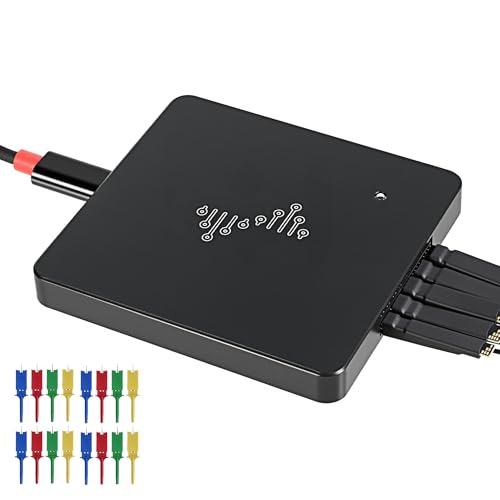
- Sixteen channels with 400 MHz sampling
- Dual stream and buffer capture modes
- 16G stream depth and nearly 100 decoders
Best For: High-speed, long-duration digital signal capture
Best Breadboard-Ready Kit
LONELY BINARY 8-Channel 24MHz Logic Analyzer

- Eight digital channels for I2C, SPI, and UART work
- Includes breadboard adapter, clips, wires, and case
- USB-A and USB-C cables; Windows, Mac, and Linux support
Best For: Makers seeking a flexible, accessory-rich prototyping kit
Best Software-Focused Pick

- Eight inputs support digital and analog measurements
- Up to 100 MS/s digital sampling
- Logic 2 software supports Windows, Mac, and Linux
Best For: Makers wanting versatile measurements and broad protocol support
Best High-Speed Multi-Channel Option
BINGOX 16-Channel 400MHz Analyzer

- Sixteen channels for complex digital debugging
- Up to 400MHz sampling with 256Mbit onboard memory
- USB-C and Windows, macOS, and Linux compatibility
Best For: Advanced projects requiring many channels and fast capture
Editor's Choice

- 16 digital/analog inputs
- Up to 500 MS/s digital sampling
- Cross-platform with broad protocol decoding
Best For: Advanced embedded debugging and mixed-signal maker projects
Budget Pick
hiBCTR 8-Channel 24MHz Analyzer

- Eight-channel capture up to 24 MHz
- Sigrok PulseView compatibility
- Supports common 5V to 2.0V logic levels
Best For: Entry-level microcontroller and FPGA debugging
High-Speed Pick
LA2016 16-Channel 200MHz Analyzer

- 16 channels at up to 200 MHz
- 1Gbit deep capture memory
- Decodes more than 20 protocols
Best For: Complex digital debugging and multi-bus analysis
Budget Bench Starter – HiLetgo 8-Channel 24MHz Logic Analyzer
For makers seeking practical logic analyzers for makers, this HiLetgo model covers common digital debugging tasks without an elaborate setup. It provides eight channels, sampling up to 24 MHz, and a USB connection for embedded-systems and protocol work.
Best For: Arduino, UART, IIC, SPI, and general embedded debugging at modest signal speeds.
Pros:
- Eight channels with sampling rates up to 24 MHz.
- Supports adjustable rates from 25 kHz through 24 MHz.
- Wide stated input range from -0.5 V to 5.25 V.
- USB connectivity and a ferrite-ring cable are included.
Cons:
- Only eight channels are available for simultaneous monitoring.
- The notes describe it as suited to general applications around 10 MHz, rather than high-speed analysis.
This is a straightforward, low-cost choice for makers who mainly need to inspect common digital buses and signals rather than capture demanding high-speed designs.
Protocol Debugging Pick – LA1010 16-Channel 100MHz Analyzer
The LA1010 is a stronger fit for makers who need more inputs and faster capture than basic USB analyzers provide. Its 16 channels, 100 MHz sampling rate per channel, and KingstVIS software support detailed waveform viewing and protocol-oriented debugging.
Best For: Embedded developers working across UART, I2C, SPI, CAN, and other supported digital protocols on Windows, macOS, or Linux.
Pros:
- Captures 16 digital signals simultaneously.
- Provides a 100 MHz sampling rate per channel.
- KingstVIS software supports real-time waveform display and decoding for more than 30 protocols.
- Supports Windows, macOS, and Linux, with stated automatic driver installation.
Cons:
- Its broader feature set may be more than needed for simple, low-speed projects.
- The product is a USB-connected instrument, so analysis depends on a computer.
Among these logic analyzers for makers, the LA1010 stands out when channel count, cross-platform software, and protocol decoding matter more than the smallest possible form factor.
Software-Friendly DIY Pick – Comidox 8-Channel 24MHz Analyzer
This Comidox analyzer is designed for makers who want an affordable USB tool that works with familiar Saleae-compatible software and PulseView. It offers eight digital channels, up to 24 MHz sampling, and automatic analysis for several common communication protocols.
Best For: Arduino, ARM, FPGA, robotics, and DIY projects involving UART, SPI, or I2C signals.
Pros:
- Compatible with Saleae Logic Analyzer software and PulseView.
- Offers eight channels with sampling rates up to 24 MHz.
- Supports automatic analysis of UART, I2C, SPI, and other standard protocols.
- Includes a USB cable and 10 Dupont wires for connecting to projects.
Cons:
- Eight channels may limit larger multi-signal investigations.
- The stated voltage range is 0 V to 5.5 V, with a 1.5 V logic threshold, so voltage compatibility should be checked carefully.
Its software compatibility and included hookup leads make this a convenient starting point for hands-on electronics work, especially when portability and low cost are priorities.
High-Speed Capture Choice – DSLogic Plus 16-Channel 400MHz Analyzer
For makers handling faster or longer digital captures, the DSLogic Plus offers substantially more headroom than basic USB analyzers. It combines 16 channels, a 400 MHz sampling rate, dual capture modes, and substantial memory for PC-based analysis.
Best For: Detailed digital waveform capture where high sampling speed, long recordings, or many simultaneous signals are important.
Pros:
- Provides 16 channels and a stated 400 MHz sampling rate.
- Offers 16G sample depth in stream mode and 256Mbits of onboard SDRAM.
- Dual stream and buffer modes support real-time transfer or temporary high-speed storage.
- Supports adjustable thresholds, shielded wires, nearly 100 protocol decoders, and Windows, macOS, and Linux.
Cons:
- Its advanced capture capabilities may be unnecessary for basic UART or I2C checks.
- Analysis requires a computer through the USB 2.0 Type-C interface.
This is the most capable option in the group for demanding captures, particularly when a project needs more speed, memory, and protocol-decoding coverage than entry-level logic analyzers for makers typically provide.
Best Breadboard-Ready Kit – LONELY BINARY 8-Channel 24MHz Logic Analyzer
For makers who want a ready-to-use option among logic analyzers for makers, this LONELY BINARY kit combines eight digital channels with breakout hardware, breadboard access, and a useful accessory bundle. Its 24MHz capture rate suits common Arduino, ESP32, Raspberry Pi, I2C, SPI, and UART debugging tasks.
Best For: Hobbyists, students, and embedded-project builders who value flexible, solder-free connections and included accessories.
Pros:
- Eight channels support simultaneous analysis of more complex digital communication.
- Includes a breakout board, breadboard adapter, test clips, alligator clips, jumper wires, and storage case.
- USB-A and USB-C cables support Windows, Mac, Linux, and Ubuntu setups.
- Designed for practical debugging of I2C, SPI, and UART signals.
Cons:
- The 24MHz maximum capture rate is lower than the faster analyzers in this roundup.
- Its broad accessory kit may be more than users need for simple, occasional measurements.
This is a strong starter-to-intermediate choice when connection convenience matters as much as channel count. The included adapters and clips reduce setup friction, while eight-channel capture provides useful room for multi-signal microcontroller projects.
Best Software-Focused Pick – Saleae Logic 8
The Saleae Logic 8 is a polished choice among logic analyzers for makers who need both digital and analog inputs. With eight multi-use inputs, up to 100 MS/s digital sampling, and support for Logic 2 software on Windows, Mac, and Linux, it is suited to detailed protocol work and repeatable troubleshooting.
Best For: Makers and developers who want an established, portable analyzer with digital and analog measurement capability.
Pros:
- Eight inputs can be used for digital or analog measurements.
- Digital sampling reaches up to 100 MS/s, while analog sampling reaches up to 10 MS/s.
- Supports SPI, I2C, and more than 23 additional digital protocols.
- Works with Saleae Logic 2 software on Windows, Mac, and Linux.
Cons:
- It uses USB 2.0 and relies on PC memory for its large sample capacities.
- The supplied notes do not indicate a bundled breakout-board or clip accessory kit.
Choose this model when software workflow and mixed digital/analog capability are priorities. Its higher digital sample rate and broad protocol support make it a versatile option for makers moving beyond basic serial debugging.
Best High-Speed Multi-Channel Option – BINGOX 16-Channel 400MHz Analyzer
BINGOX USB Logic Analyzer, 16 Channels, 400MHz Sampling Rate, 256Mbit Memory, USB-C Interface
Check Price On AmazonFor high-signal-count projects, this BINGOX model stands out among logic analyzers for makers with 16 channels, a stated sampling rate of up to 400MHz, and 256Mbit of onboard memory. The USB-C interface and Windows, macOS, and Linux compatibility make it practical for embedded development, FPGA testing, and digital troubleshooting.
Best For: Makers and embedded developers analyzing many digital lines or fast signal activity at once.
Pros:
- Sixteen channels can capture more signals simultaneously than the other listed models.
- Up to 400MHz sampling is intended for fast digital signals and short timing events.
- 256Mbit onboard memory supports longer or more stable data captures.
- USB-C connectivity and compatibility with Windows, macOS, and Linux simplify computer setup.
Cons:
- The supplied notes do not list included probes, clips, breakout boards, or analysis software.
- Its high channel count and sampling capability may exceed the needs of basic Arduino or serial debugging.
This is the most capable choice here for channel density and stated sampling speed. It makes the most sense for advanced digital troubleshooting where capturing multiple buses or fast transitions is more important than a bundled prototyping accessory set.
Editor's Choice – Saleae Logic Pro 16
For makers who need a capable, cross-platform instrument, the Saleae Logic Pro 16 is a versatile choice among logic analyzers for makers. Its 16 inputs can handle digital or analog signals, while broad protocol support and high sample rates suit detailed embedded-system debugging.
Best For: Makers who want premium digital and analog capture with extensive protocol decoding.
Pros:
- Provides 16 multi-use digital/analog inputs.
- Decodes SPI, I2C, and more than 23 additional protocols.
- Supports digital sampling up to 500 MS/s and analog sampling up to 50 MS/s.
- Works with Windows, Mac, and Linux and uses USB 3.0.
Cons:
- USB-powered operation requires a connected computer.
- Its capabilities may be more than needed for simple, low-speed projects.
The Logic Pro 16 is a strong fit when flexibility, high-speed capture, and cross-platform software matter more than choosing the simplest budget analyzer.
Budget Pick – hiBCTR 8-Channel 24MHz Analyzer
The hiBCTR 8-channel analyzer is a practical starting point for makers working with common microcontroller and FPGA signals. It supports selectable sampling rates, popular protocol decoding through Sigrok PulseView, and several common logic levels without adding unnecessary complexity.
Best For: Budget-conscious makers debugging UART, I2C, or SPI at general-purpose speeds.
Pros:
- Captures up to eight digital signals at sample rates up to 24 MHz.
- Works with Sigrok PulseView and decodes UART, I2C, and SPI.
- Supports 5V, 3.3V, 2.5V, and 2.0V logic systems.
- 1MΩ input impedance helps minimize circuit loading.
Cons:
- Eight channels provide less coverage than 16-channel alternatives.
- 24 MHz sampling is aimed at general applications around 10 MHz, not high-speed buses.
- Operation with 1.8V systems is not recommended.
Its protocol support and wide logic-level compatibility make it a sensible low-cost tool for everyday digital troubleshooting, provided your signals stay within its speed and voltage guidance.
High-Speed Pick – LA2016 16-Channel 200MHz Analyzer
For makers analyzing more channels or faster digital activity, the LA2016 combines 16-channel capture with a 200 MHz sampling rate and 1Gbit memory. Its PC software adds broad protocol decoding, waveform tools, and data export for more involved debugging sessions.
Best For: Makers who need deep captures and extensive protocol support across Windows, macOS, or Linux.
Pros:
- Captures 16 digital signals simultaneously at up to 200 MHz.
- Includes 1Gbit of deep memory for complex debugging.
- Software decodes more than 20 protocols, including I2C, SPI, UART, CAN, and JTAG.
- Includes probes, hook clips, and a USB cable for a portable setup.
Cons:
- It is a digital analyzer rather than a digital/analog instrument.
- The listed operating-system support specifically names Windows through 10, macOS, and Linux.
- The feature-rich software may take longer to learn than a basic analyzer.
The LA2016 is a compelling option when channel count, capture depth, and protocol coverage are priorities, especially for projects involving buses such as CAN, USB 1.1, or JTAG.
How We Picked These Logic Analyzers for Makers
We focused on practical features that affect real-world electronics debugging: channel count, maximum sampling rate, capture memory, protocol support, computer compatibility, connection type, and ease of use. The selection includes affordable 8-channel USB analyzers for beginners, higher-channel models for more complex boards, and polished Saleae instruments for users who value dependable software and a streamlined workflow.
Specifications can vary by operating mode and software, so treat advertised maximum speeds as peak figures rather than guaranteed performance on every protocol. For the best results, confirm current software compatibility and included accessories before buying.
Quick Comparison
| Best For | Look For |
|---|---|
| Basic Arduino and UART debugging | 8 channels, 24MHz sampling, protocol decoding |
| I2C, SPI, and multi-signal projects | 16 channels and deeper capture memory |
| Fast digital buses | 100MHz to 400MHz sampling, with adequate memory |
| Portable bench or field work | Compact USB design, USB-C, and reliable software |
| Frequent professional-style analysis | Strong application support, clear documentation, and dependable triggering |
Key Buying Factors for Logic Analyzers for Makers
Channel Count
Eight channels are enough for many UART, I2C, and simple SPI jobs. Choose 16 channels if you need to monitor several buses, chip-select lines, clocks, or control signals simultaneously.
Sampling Rate and Memory
A higher sampling rate captures faster transitions and gives more timing detail, but it can consume memory quickly. As a general rule, select a rate comfortably above the signal frequency, especially when measuring pulse width, glitches, or clock relationships.
Protocol Decoding
Look for support for the protocols you actually use, such as UART, I2C, SPI, CAN, and common serial formats. Decoding turns raw waveforms into readable transactions and can save substantial troubleshooting time.
Software and Compatibility
Software quality often matters as much as hardware. Check whether the analyzer works with your operating system, whether drivers are easy to install, and whether the application provides useful triggers, search tools, exports, and zoom controls.
Electrical Safety and Connections
Verify the analyzer’s input voltage limits and ground requirements before connecting it to a board. A compact USB analyzer is convenient, but probes, breakout boards, and a USB-C or USB-A cable can significantly affect usability.
Who Should Buy Which Logic Analyzers for Makers?
Beginners and budget-conscious makers: Start with an 8-channel, 24MHz USB model for learning UART, I2C, SPI, and basic digital troubleshooting.
Arduino, ARM, and FPGA builders: Choose a 16-channel analyzer when projects use several signals or require simultaneous bus monitoring.
Users debugging faster interfaces: Favor models advertising 100MHz or higher sampling, while checking memory depth and the actual bandwidth of your target signals.
Frequent users who value workflow: A Saleae Logic 8 or Logic Pro 16 is worth considering for polished software, broad platform support, and a more refined overall experience.