The best portable RAID enclosures make it easier to combine multiple SATA or NVMe drives into a faster, larger, or more redundant external storage system. They are useful for backups, media libraries, workstation storage, and moving large projects between computers.
This roundup compares 10 options across two- to five-bay designs, USB-C connectivity, hardware RAID features, cooling, and compatibility so you can choose an enclosure that fits your drives and workflow.
Best 10 Portable Raid Enclosures Picks for 2026
Best Balanced 2-Bay Pick
TERRAMASTER D2-320 USB RAID Enclosure

- USB 3.2 Gen 2 up to 10Gbps
- RAID 0, 1, JBOD, and SINGLE modes
- Supports two SATA HDDs or SSDs
Best For: Flexible two-drive local storage and backups
Best Portable NVMe Option
NEWQ Dual-Bay M.2 RAID Enclosure

- 20Gbps USB 3.2 transfer speed
- RAID 0, 1, JBOD, and Clone modes
- Tool-free dual M.2 2280 NVMe access
Best For: Portable SSD workflows and direct drive cloning
Best Four-Bay DAS
QNAP TR-004 USB Type-C RAID Enclosure

- Four 3.5-inch SATA drive bays
- Hardware RAID 0, 1, 5, JBOD, and individual disks
- USB Type-C for Windows, Mac, and Linux
Best For: Four-drive local storage and QNAP NAS expansion
Best High-Capacity Workstation Pick

- Five bays and up to 110TB stated capacity
- RAID 0, 1, 3, 5, 10, JBOD, Clone, and Clear
- Built-in 150W power supply and 80mm fan
Best For: Large media libraries, backups, and multi-drive workstations
High-Capacity Pick
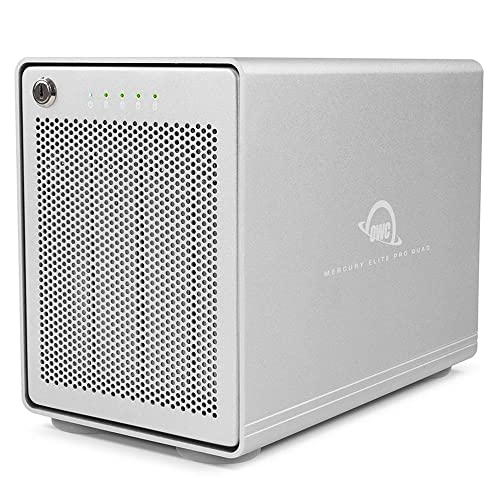
- Four bays for 2.5-inch or 3.5-inch SATA drives
- USB-C 10Gb/s connectivity with up to 947MB/s performance
- Supports software RAID; SOFTRAID is not included
Best For: Desktop users needing flexible, expandable storage
Portable Dual-Bay Pick
CineRAID CR-H218P Dual-Bay RAID Enclosure

- Compact, bus-powered enclosure for two 2.5-inch drives
- USB 3.1 Gen 2 connectivity up to 10Gbps
- Supports RAID 0, RAID 1, JBOD, and Normal modes
Best For: Mobile storage, gaming expansion, and creator setups
Professional 20Gbps Pick
ORICO 4-Bay 20Gbps RAID Enclosure

- Six RAID modes, including RAID 5 and RAID 10
- Four bays support up to 104TB total and hot-swapping
- USB 3.2 Gen 2x2 supports 20Gbps with compatible USB4 hardware
Best For: Professional video, IT, AI, and research storage workflows
Compact RAID Pick
Vantec NexStar GX Dual-Bay Enclosure

- Supports two 2.5-inch SATA SSDs or HDDs
- Offers individual, RAID 0, and RAID 1 modes
- Compact aluminum design with USB 3.0
Best For: Portable two-drive 2.5-inch storage setups
Flexible Dual-Bay Value

- Supports 2.5-inch and 3.5-inch SATA drives
- Includes four RAID and storage modes
- USB-A/C 3.0 and built-in cooling fan
Best For: Mixed-size drives and desktop storage expansion
High-Capacity Multi-Drive Pick

- Holds five 2.5-inch or 3.5-inch SATA drives
- Offers eight RAID and storage modes
- Supports up to 160TB with smart cooling
Best For: Large external arrays and multi-drive workflows
Best Balanced 2-Bay Pick – TERRAMASTER D2-320 USB RAID Enclosure
For shoppers comparing portable RAID enclosures, the TERRAMASTER D2-320 is a practical two-drive DAS with USB 3.2 Gen 2 connectivity, hardware RAID, and support for both 2.5-inch and 3.5-inch SATA drives. It is diskless, so you can choose the drives and capacity that fit your needs.
Best For: Users who want a flexible two-bay enclosure for RAID performance, mirrored backups, or large local storage.
Pros:
- Supports RAID 0, RAID 1, JBOD, and SINGLE modes.
- USB 3.2 Gen 2 offers up to 10Gbps connectivity.
- Accepts two SATA HDDs or SSDs, with up to 44TB total capacity based on the stated drive limit.
- Tool-free trays and temperature-controlled fan simplify installation and cooling.
Cons:
- It is direct-attached storage, not a NAS, so it does not provide network storage.
- Drives are not included.
- Its desktop two-bay design is less suited to users needing many drive bays.
The D2-320 is a well-rounded choice when you want fast USB storage with hardware RAID and straightforward drive installation. RAID 1 adds redundancy, while RAID 0 can prioritize speed when used with suitable drives.
Best Portable NVMe Option – NEWQ Dual-Bay M.2 RAID Enclosure
Among portable RAID enclosures, this NEWQ model stands out for its compact dual-bay M.2 2280 NVMe design. It combines 20Gbps USB 3.2 connectivity with RAID modes and an offline clone function for users who frequently move, back up, or duplicate SSD data.
Best For: Professionals and enthusiasts who need portable dual-NVMe storage, fast transfers, or direct SSD cloning.
Pros:
- Supports RAID 0, RAID 1, JBOD, and Clone modes.
- Offers up to 20Gbps data transfer through USB 3.2.
- Tool-free access makes SSD replacement and cloning more convenient.
- Aluminum construction supports heat dissipation while keeping the enclosure portable.
Cons:
- Compatible drives are M.2 2280 NVMe SSDs rather than standard 2.5-inch or 3.5-inch SATA drives.
- SSD storage is not included.
- High-capacity dual-drive setups may require the auxiliary USB-C input for stable operation.
This enclosure is a strong fit when compact size and SSD-focused performance matter more than broad drive compatibility. Its Clone mode is especially useful for direct duplication, while RAID 1 provides a mirrored backup arrangement.
Best Four-Bay DAS – QNAP TR-004 USB Type-C RAID Enclosure
QNAP TR-004 4 Bay USB Type-C Direct Attached Storage (DAS) with hardware RAID (Diskless)
Check Price On AmazonThe QNAP TR-004 is a practical choice among portable RAID enclosures for users who need four drive bays and hardware RAID without building a full NAS. It connects directly over USB Type-C and works with Windows, macOS, and Linux systems, while also offering NAS backup and expansion use cases.
Best For: Home offices and small businesses that need four-drive local storage or a QNAP NAS expansion and backup device.
Pros:
- Four 3.5-inch SATA bays provide more expansion room than two-bay designs.
- Hardware RAID supports RAID 0, 1, 5, JBOD, and individual disks.
- USB Type-C direct attachment supports Windows, macOS, and Linux.
- Lockable drive bays and included screws support secure installation of 3.5-inch or 2.5-inch drives.
Cons:
- It uses USB 3.0 with a stated 5Gbps data-transfer rate, below newer 10Gbps and 20Gbps options.
- It is diskless, so drives must be purchased separately.
- QNAP NAS compatibility has specific model and QTS-version limitations.
The TR-004 makes sense for buyers prioritizing bay count and RAID 5 support over maximum interface speed. Review the stated QNAP compatibility restrictions carefully if you plan to connect it to a NAS.
Best High-Capacity Workstation Pick – ORICO 5-Bay RAID Enclosure
For large media libraries and backup projects, the ORICO 5-bay model is one of the more capacious portable RAID enclosures in this roundup. It supports five 2.5-inch or 3.5-inch SATA HDDs or SSDs, hardware RAID modes, and a built-in power supply designed for multi-drive operation.
Best For: Video editors, media managers, and workstations that need up to five SATA drives and substantial desktop capacity.
Pros:
- Five bays support up to 110TB based on five 22TB drives.
- Offers RAID 0, 1, 3, 5, 10, JBOD, Clone, and Clear modes.
- Built-in 150W power supply supports multiple mechanical drives without a separate adapter.
- Aluminum alloy housing, an 80mm fan, and venting support sustained cooling.
Cons:
- USB 3.0 connectivity is rated at up to 230MB/s, below the faster USB interfaces in this roundup.
- Its five-bay desktop format is less compact than smaller portable enclosures.
- The enclosure carries a one-year warranty according to the supplied details.
The ORICO is best viewed as a high-capacity desktop workstation enclosure rather than an ultraportable drive carrier. Its broad RAID selection, integrated power supply, and cooling system make it suitable for sizable local storage and demanding multi-drive workflows.
High-Capacity Pick – OWC Mercury Elite Pro Quad
For shoppers comparing portable raid enclosures, the OWC Mercury Elite Pro Quad is a flexible four-bay option with USB-C connectivity and support for both 2.5-inch and 3.5-inch SATA drives. It is designed for desktop Mac or Windows setups and supports software RAID, though SOFTRAID is not included.
Best For: Desktop users who want a four-drive enclosure with broad drive-size compatibility and high-capacity storage potential.
Pros:
- Four universal bays support 2.5-inch and 3.5-inch drives.
- USB 3.2 at up to 10Gb/s with USB-C connectivity.
- Advertised performance reaches up to 947MB/s, with software RAID support.
- Works with USB-C or Thunderbolt 3-equipped Mac and Windows PCs.
Cons:
- Drives are not included.
- SOFTRAID software is not included.
- Its four-bay desktop design is less compact than a dual-bay enclosure.
The Mercury Elite Pro Quad is a practical choice when expansion and drive flexibility matter more than minimizing size. Budget separately for drives and RAID software if needed.
Portable Dual-Bay Pick – CineRAID CR-H218P Dual-Bay RAID Enclosure
The CineRAID CR-H218P stands out among portable raid enclosures for its compact dual-bay design, bus-powered operation, and included TPU cover. Its built-in RAID modes support common mirroring, striping, and independent-drive configurations for compatible 2.5-inch SATA SSDs or HDDs.
Best For: Mobile users, gamers, and creators who need a lightweight two-drive enclosure for laptops or console storage expansion.
Pros:
- Supports two 2.5-inch SATA drives, including drives up to 12.5mm thick.
- Built-in RAID 0, RAID 1, JBOD, and Normal modes.
- USB 3.1 Gen 2 supports up to 10Gbps and is backward compatible with USB 3.0 and 2.0.
- Bus-powered design and included TPU cover improve portability and protection.
Cons:
- Only supports two internal drives.
- Designed for 2.5-inch drives rather than larger 3.5-inch disks.
- Its enclosure material is plastic.
Choose the CR-H218P when portability is the priority and two 2.5-inch drives are enough. Its integrated RAID controls make it versatile for mobile backups, gaming expansion, or creator workflows.
Professional 20Gbps Pick – ORICO 4-Bay 20Gbps RAID Enclosure
For professional users evaluating portable raid enclosures, the ORICO 4-Bay model combines USB 3.2 Gen 2×2 connectivity with six RAID modes and support for up to four SATA drives. It is built for high-capacity storage, hot-swapping, and sustained desktop workflows across Windows, macOS, and Linux.
Best For: Video professionals, enterprise IT teams, and research or AI users managing large multi-drive storage arrays.
Pros:
- Supports RAID 0, 1, 5, 10, JBOD, and Normal modes.
- Four bays support 2.5-inch and 3.5-inch SATA drives up to 104TB total.
- USB 3.2 Gen 2×2 offers up to 20Gbps with a compatible USB4 connection.
- Includes hot-swapping, a 45dB fan, aluminum construction, and a built-in 150W power supply.
Cons:
- Thunderbolt connections are limited to around 10Gbps rather than the full 20Gbps.
- Changing RAID modes erases drive contents, so backups are required.
- The fan and four-bay desktop design may be less suitable for quiet or highly mobile setups.
The ORICO enclosure offers the broadest RAID flexibility and highest stated capacity of these options. It makes the most sense for users with demanding storage needs and hardware capable of taking advantage of USB 3.2 Gen 2×2 speeds.
Compact RAID Pick – Vantec NexStar GX Dual-Bay Enclosure
Vantec Nexstar GX USB 3.0 Dual 2.5" SATA SSD/HDD RAID Enclosure, Black (NST-272S3-BK)
Check Price On AmazonFor shoppers comparing portable raid enclosures, the Vantec NexStar GX is a compact dual-bay option for two 2.5-inch SATA SSDs or hard drives. It supports individual-drive use, RAID 0, and RAID 1, with USB 3.0 transfer speeds up to 5Gbps and an aluminum housing for heat dissipation.
Best For: Users who want a small, portable enclosure for two 2.5-inch SATA drives and straightforward RAID options.
Pros:
- Supports two 2.5-inch SATA I/II/III SSDs or HDDs.
- Offers individual, RAID 0, and RAID 1 modes with automatic RAID 1 rebuild support.
- Compact aluminum enclosure includes a stand, USB cable, and AC adapter.
- Supports UASP and USB 3.0 speeds up to 5Gbps.
Cons:
- Limited to two 2.5-inch drives; 3.5-inch drives are not supported.
- Hard drives are not included.
- Requires an external 5V/2A power adapter.
The NexStar GX is a practical choice when portability and a small footprint matter more than maximum drive capacity. Its RAID 1 support adds redundancy, while RAID 0 is available when speed and combined capacity are the priority.
Flexible Dual-Bay Value – CENMATE 2-Bay RAID Enclosure
The CENMATE 2-Bay RAID Enclosure is one of the more flexible portable raid enclosures for mixed drive collections, accepting both 2.5- and 3.5-inch SATA HDDs or SSDs. It provides four modes—RAID 0, RAID 1, Normal, and JBOD—through a USB 3.0 connection rated up to 5Gbps.
Best For: Home or small-business users who need dual-bay support for both 2.5- and 3.5-inch drives.
Pros:
- Accepts both 2.5-inch and 3.5-inch SATA HDDs or SSDs.
- Provides RAID 0, RAID 1, Normal, and JBOD modes.
- Aluminum construction and a built-in 2-inch cooling fan help manage heat.
- Includes both USB-A and USB-C 3.0 cables.
Cons:
- Fan noise is rated around 40–50 decibels.
- Changing RAID configurations can result in data loss and requires resetting the array.
- It is larger and heavier than compact 2.5-inch-only enclosures.
Choose this CENMATE model if drive-format flexibility is important. The fan and dual-bay design suit desktop use, but noise-sensitive buyers may prefer a quieter enclosure.
High-Capacity Multi-Drive Pick – UGREEN 5-Bay USB-C DAS
For buyers who need more than two drives, the UGREEN 5-Bay USB-C DAS is a high-capacity choice among portable raid enclosures. It holds up to five 2.5- or 3.5-inch SATA drives, supports eight RAID and storage modes, and connects to Windows, macOS, Linux, and compatible NAS devices at up to 5Gbps.
Best For: Users building a large external storage array with multiple drives and advanced RAID requirements.
Pros:
- Holds up to five 2.5-inch or 3.5-inch SATA HDDs or SSDs.
- Supports PM, RAID 0, RAID 1, RAID 3, RAID 5, RAID 10, Large, and Clone modes.
- Supports up to 160TB total capacity, based on five drives up to 32TB each.
- Smart cooling adjusts fan speed using S.M.A.R.T. temperature readings.
Cons:
- Larger and heavier than two-bay portable enclosures.
- USB transfer speeds are limited to 5Gbps.
- Changing RAID modes requires reformatting, so data must be backed up first.
The UGREEN enclosure is best suited to users who prioritize capacity and configuration choices over minimum size. Its five bays, status LEDs, and automatic cooling make it a strong fit for a more substantial desktop-based storage setup.
How We Picked These Portable Raid Enclosures
We focused on enclosure design, drive compatibility, RAID flexibility, connection speed, cooling, ease of installation, and practical capacity. The selection includes compact dual-bay models for portable SSD or HDD setups, as well as larger four- and five-bay units for higher-capacity storage. We also considered whether each enclosure supports hardware RAID, JBOD, disk cloning, tool-free installation, and both 2.5-inch and 3.5-inch SATA drives where applicable.
Because these are generally diskless enclosures, remember to budget for compatible drives separately. A fast host computer, suitable USB cable, and properly matched drives are also necessary to achieve the advertised performance.
Quick Comparison
| Best For | Recommended Type | What to Look For |
|---|---|---|
| Portable SSD or small backup setup | Dual-bay enclosure | Compact design, USB 3.1 or faster, RAID 1 |
| Large media libraries | Four- or five-bay enclosure | High capacity, active cooling, flexible RAID modes |
| Workstation storage | USB-C DAS with hardware RAID | Consistent performance, monitoring, and reliable cooling |
| Drive migration or duplication | Enclosure with clone mode | Standalone cloning and clear drive-status controls |
Key Buying Factors for Portable Raid Enclosures
Drive Size and Interface
Check whether the enclosure accepts 2.5-inch drives, 3.5-inch drives, M.2 NVMe modules, or a combination. SATA and NVMe are not interchangeable, and an enclosure designed for one interface will not support the other without the appropriate controller.
RAID Modes and Data Protection
RAID 0 combines drives for higher speed and capacity but provides no redundancy. RAID 1 mirrors data for better protection, although usable capacity is reduced by half. JBOD treats drives independently, while normal or single-disk modes can be useful for basic external storage. RAID is not a substitute for an independent backup.
Connection Speed and Real-World Performance
USB 3.0 is adequate for many hard drives, while USB 3.1, USB 3.2 Gen 2, and 20Gbps connections offer more headroom for SSDs and multi-drive arrays. The computer port, cable, drive speed, RAID mode, and enclosure controller can all limit actual throughput.
Cooling, Noise, and Installation
Multi-bay enclosures generate more heat, especially with several mechanical drives or SSDs operating together. A fan, ventilation, and temperature management are important for sustained transfers. Tool-free trays simplify upgrades, while a sturdy chassis helps reduce vibration from 3.5-inch drives.
Who Should Buy Which Portable Raid Enclosures?
Choose a compact two-bay model if you need a portable backup device, mirrored personal storage, or a simple way to combine two SSDs or hard drives. Models with clone mode are particularly useful when migrating from an older drive without relying on a computer.
A four-bay enclosure is a better fit for photographers, video editors, and home users managing a growing media library. It offers more capacity and RAID flexibility without the size and cost of a larger server-style system.
Five-bay models suit users who need maximum expansion, multiple RAID options, or a large USB-attached archive. Prioritize active cooling and a reliable power supply for these systems. Whichever portable RAID enclosure you select, maintain a separate backup of irreplaceable files and verify that your operating system supports the chosen RAID configuration.