Robot arms for indoor use can turn a desk, classroom, or home workshop into a hands-on lab for coding, electronics, automation, and robotics. The right kit depends on your experience, preferred programming platform, workspace, and whether you want guided projects or an open-ended development platform.
We selected 10 options spanning beginner-friendly STEM toys, Arduino-compatible kits, programmable multi-axis arms, and advanced AI-focused systems. Use the guide below to match features, control methods, and learning potential to your project.
Best 10 Robot Arms for Indoor Use Picks for 2026
Best Open-Source Pick

- Python, Arduino, and ESP32 programming support
- Wi-Fi, Bluetooth, and sensor expansion ports
- Inverse kinematics with precision bus servos
Best For: Advanced indoor robotics learning and wireless programming projects
Best Budget Learning Kit
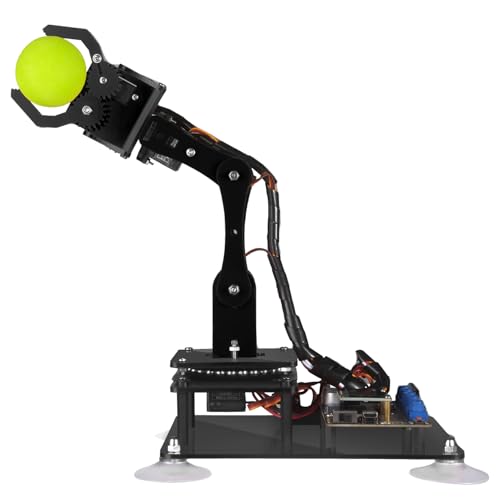
- Arduino IDE compatibility with sample routines
- Knob and graphical PC control options
- Digital tutorials and one-year parts warranty
Best For: Indoor Arduino beginners and student robotics projects
Best Multi-Control Option
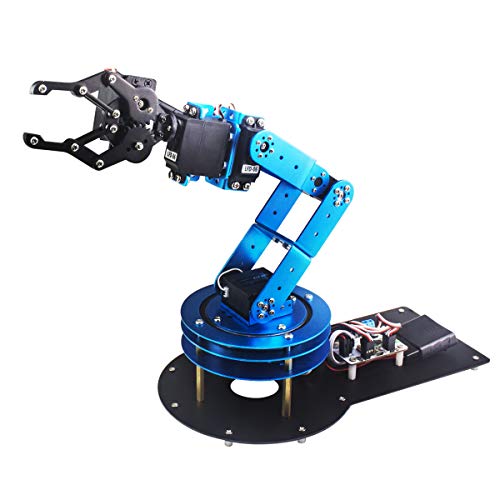
- Six-axis movement for grasping and custom actions
- PC, app, mouse, and wireless-handle control
- Metal structure with anti-stall protection
Best For: Versatile indoor demonstrations and hands-on robotics learning
Best Family STEM Project
Wooden Mechanical Robot Arm Kit

- No-soldering assembly for beginners
- Teaches circuits, motors, and mechanical movement
- Recommended for ages 8 and up
Best For: Family, classroom, and beginner indoor STEM activities
Advanced AI Pick

- 500mm reach with 500g payload
- LeRobot and VLA ecosystem support
- Vision, voice, and open-source controls
Best For: University labs and experienced AI robotics makers
Beginner DIY Pick

- Compact acrylic kit for desk use
- Records and repeats up to 170 actions
- Includes assembly and programming tutorials
Best For: Beginners, teens, and introductory STEM projects
Research-Ready Pick

- Open-source six-axis research platform
- LeRobot, Hugging Face, and ROS2 compatible
- Leader-follower tracking for AI training
Best For: AI robotics research, teleoperation, and advanced STEM labs
Best Indoor Play Pick
2-in-1 Remote-Control Robot Arm

- No assembly required
- Rotating gripper and 360-degree wheels
- Includes rechargeable batteries and remote
Best For: Kids and adults seeking accessible indoor STEM play
Best Programmable Desktop Arm
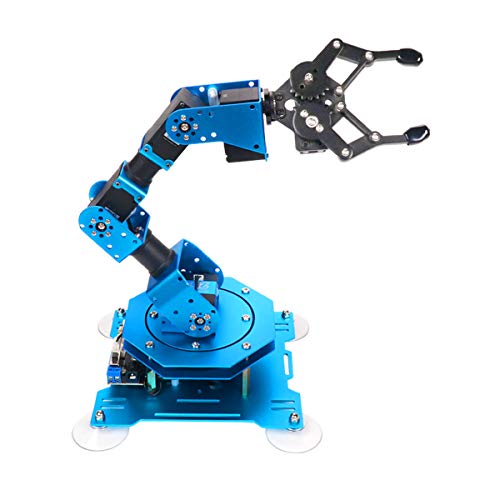
- Six intelligent serial-bus servos
- PC, app, mouse, and controller support
- Stable metal build with 500g capacity
Best For: Indoor coding, action editing, and robotics education
Best Open-Source Starter

- Arduino-compatible and open source
- Supports app, knob, and offline controls
- Expansion ports enable sensor projects
Best For: Adult makers learning Arduino and robotics development
Best Open-Source Pick – MaxArm ESP32 Robotic Arm Kit
For shoppers comparing robot arms for indoor use, the MaxArm is a strong choice for programming practice and hands-on robotics learning. Its aluminum construction, inverse-kinematics support, and ESP32 connectivity make it suited to more advanced tabletop projects.
Best For: Teens and adults learning Arduino, Python, ESP32 development, and robotic-arm control.
Pros:
- Supports Python and Arduino programming across multiple control methods.
- ESP32 controller includes Wi-Fi, Bluetooth, sensor ports, LED, buzzer, and expansion interfaces.
- Link mechanism and inverse kinematics enable movement along the x, y, and z axes.
- Three precision bus servos support programmed trajectories and high-accuracy movement.
Cons:
- Recommended for ages 16 and up, so it may be too advanced for younger children.
- Its 1.89 kg weight and aluminum construction make it less portable than simpler kits.
The MaxArm stands out when expandability and software control matter most. It is a practical indoor platform for users who want to connect sensors, experiment with wireless control, and develop increasingly complex robot-arm projects.
Best Budget Learning Kit – Adeept 5DOF Robotic Arm
The Adeept 5DOF is a compact option for anyone seeking robot arms for indoor use with a clear focus on Arduino learning. Its included tutorials, code routines, and multiple control methods make it approachable for hands-on programming practice.
Best For: Beginners and students who want to assemble, program, and experiment with a five-axis robotic arm.
Pros:
- Compatible with the Arduino IDE and includes example code routines.
- Can be operated with potentiometer knobs or graphical PC software.
- Supports projects such as self-learning, drawing, and imitation.
- Includes digital assembly guides and a one-year parts warranty.
Cons:
- The manufacturer recommends it for ages 16 and up.
- Its polycarbonate construction may feel less substantial than a metal-arm design.
- Tutorials are supplied digitally rather than as paper manuals.
Choose the Adeept when structured guidance and Arduino compatibility are higher priorities than wireless connectivity or a heavier-duty build. Its smaller footprint also works well for indoor desks and classroom workspaces.
Best Multi-Control Option – LeArm 6DOF Desktop Robot Arm
The LeArm combines six degrees of freedom with several control options, making it a versatile selection among robot arms for indoor use. Its metal frame, reinforced base, and included programming software support both learning and creative tabletop demonstrations.
Best For: Students, engineers, and hobbyists who want flexible control and a sturdy desktop learning platform.
Pros:
- Six-degree-of-freedom movement supports grasping, transportation, and custom actions.
- Works with PC, app, mouse, and wireless-handle controls.
- Metal brackets, high-torque base servos, and industrial-grade bearings promote stability.
- Anti-stall protection helps protect the end servos from blocked movement.
Cons:
- It requires an AC adapter and does not include battery operation.
- The larger desktop dimensions require more workspace than compact kits.
- Its manual operation and assembly focus may require patience from beginners.
The LeArm is a well-rounded choice for indoor users who want to switch between hands-on control, software, and wireless operation. Its six-axis design offers more movement flexibility than simpler educational arms.
Best Family STEM Project – Wooden Mechanical Robot Arm Kit
For families looking for robot arms for indoor use, this wooden DIY kit offers an accessible introduction to circuits, motors, and mechanical movement. The no-soldering assembly is designed to turn building into a practical STEM activity for children, teens, and adults.
Best For: Kids ages 8 and up, families, classrooms, and beginners completing a guided engineering project.
Pros:
- Combines wooden construction with motors, wiring, and a PCB microcontroller board.
- No soldering is required, making assembly more approachable for beginners.
- Encourages problem-solving, patience, circuit awareness, and mechanical learning.
- Suitable for family activities, school science projects, and STEM gifting.
Cons:
- Six AA batteries are required but are not included.
- The wooden design is intended for learning and play rather than advanced programming.
- Assembly may be challenging for younger children without adult guidance.
This kit is the most beginner-friendly option in the group, especially for hands-on building rather than software development. It is a good indoor project when the goal is to make robotics concepts engaging and tangible.
Advanced AI Pick – NexArm 6-Axis Robotic Arm
For shoppers comparing robot arms for indoor use, the NexArm Standard Kit is a capable desktop platform for programming, computer vision, and embodied-AI experimentation. Its metal construction, 500mm reach, 500g payload, and open-source controls make it better suited to serious indoor development than simple introductory projects.
Best For: University labs, AI developers, and experienced makers exploring imitation learning, VLA models, and vision-guided grasping.
Pros:
- Six-axis arm with a 500mm reach, 500g payload, and ±2mm repeatability.
- Includes K230 vision capabilities, voice interaction, and more than 30 built-in AI vision features.
- Works with LeRobot and supports PC, app, remote, and Arduino programming.
Cons:
- Its advanced AI features and programming-oriented design may be excessive for casual users.
- Recommended for ages 15 and up, so it is not intended as a young-child kit.
The NexArm stands out when indoor use means building and testing complete AI workflows. Buyers should choose it for expandability and research potential rather than a plug-and-play educational toy.
Beginner DIY Pick – Arduino 4-Axis Robot Arm Kit
Among robot arms for indoor use, this compact Arduino building kit is aimed at learning rather than heavy-duty automation. Its small acrylic frame, guided assembly, joystick control, and action-recording feature provide a hands-on way for beginners, teens, and adults to explore robotics.
Best For: Beginners and students learning electronics, programming, mechanics, and basic robot-arm control at a desk.
Pros:
- Four-axis design provides movement through a rotating base, elbow, wrist, and gripper.
- Can record up to 170 actions and repeat them once.
- Includes assembly and programming tutorials with technical support.
Cons:
- The kit requires two batteries, which are not included in the supplied details.
- Its acrylic construction and small 0.56kg form factor are geared toward learning, not demanding loads.
- The listed warranty is limited to 30 days.
This is a practical entry point for indoor STEM projects when affordability and hands-on assembly matter most. It is less suitable for users seeking advanced vision, AI, or industrial-style performance.
Research-Ready Pick – Robify SO-ARM101 AI Arm
The Robify SO-ARM101 is one of the more research-focused robot arms for indoor use, combining six-axis movement with open-source software compatibility. Its magnetic-encoder servos, leader-follower tracking, and support for LeRobot, Hugging Face, and ROS2 make it a strong option for desktop AI robotics development.
Best For: Robotics labs, AI researchers, engineering students, STEM educators, and makers developing imitation-learning or teleoperation projects.
Pros:
- Six-axis, open-source design supports VLA and imitation-learning work.
- Twelve magnetic-encoder servos provide smooth motion, 360-degree rotation, and ±0.1-degree repeat positioning accuracy.
- Leader-follower tracking enables human correction during reinforcement-learning training.
Cons:
- The adult-oriented research kit may be more complex than beginners need.
- Its 7.9-pound weight and included power and control hardware make it less portable than a small teaching kit.
- USB-powered operation requires a host computer rather than separate batteries.
Choose the Robify when software compatibility and hands-on AI research are higher priorities than simplicity. It offers a more specialized indoor development platform for users prepared to handle calibration, wiring, and SDK setup.
Best Indoor Play Pick – 2-in-1 Remote-Control Robot Arm
For shoppers seeking robot arms for indoor use that are easy to operate without assembly, this 2-in-1 YAZHIYI kit combines a movable robotic arm with wheeled driving. Its remote control, rotating gripper, rechargeable batteries, and tabletop design make it suited to hands-on STEM play at home.
Best For: Kids and adults interested in imaginative indoor play, basic mechanical principles, and introductory STEM exploration.
Pros:
- No assembly is required, so it can be used soon after unpacking.
- The gripper rotates, while McNamhen wheels support 360-degree movement.
- Includes a 2.4GHz remote, two rechargeable batteries, USB charging cable, and toolkit.
- Designed to grasp items weighing approximately 350–500g.
Cons:
- It is a toy-oriented model rather than a programmable coding platform.
- Remote operation may offer less precision than app- or PC-controlled arms.
This is the most accessible option of the three for casual indoor use. Choose it when easy remote play and mobility matter more than programming or sensor expansion.
Best Programmable Desktop Arm – Hiwonder xArm1S 6DOF Kit
The Hiwonder xArm1S is a strong choice for robot arms for indoor use when programming, control flexibility, and repeatable movement are priorities. Its six-axis metal construction supports grasping and object transport, with control available through a PC, app, mouse, or wireless controller.
Best For: Students, makers, and robotics learners who want a desktop platform for coding, action editing, and STEM projects.
Pros:
- Six high-precision intelligent servos provide position, voltage, and temperature feedback.
- Supports PC, phone app, mouse, wireless PS2 controller, and manual control.
- Aluminum alloy construction, high-torque servos, and industrial-grade bearings support stability.
- Can grasp objects weighing up to 500g, according to the supplied specifications.
Cons:
- The available features may be more than casual users need for simple indoor play.
- It is intended for tabletop use and is not described as a mobile wheeled robot.
With multiple control methods and action-editing options, the xArm1S is the most versatile choice here for structured learning and creative robotics projects. It is a better fit than a basic toy if you want room to experiment with programming.
Best Open-Source Starter – miniArm Arduino Robot Kit
For advanced learners comparing robot arms for indoor use, the miniArm offers an Arduino-compatible, open-source foundation for programming and hardware experimentation. Its Atmega328 platform, knob controller, Bluetooth module, digital servos, and expansion ports make it useful for building beyond the included arm.
Best For: Adult learners and makers developing Arduino skills, integrating sensors, and exploring secondary robotics projects.
Pros:
- Open-source programs, tutorials, and development examples support customization.
- Compatible with Arduino programming through its Atmega328 platform.
- Offers app control, knob-based real-time control, and offline action editing.
- Expansion ports support optional sensor and camera integrations.
Cons:
- The Starter Kit does not include the listed ultrasonic, touch, acceleration, or ESP32-Cam modules.
- Its 17-years-and-up recommendation makes it less suitable for young children.
- Programming and expansion may require more setup than a remote-control toy.
The miniArm stands out when open-source development is the main goal. Select it for Arduino-oriented learning and future sensor projects, especially if you are comfortable adding and configuring components.
How We Picked the Best Robot Arms for Indoor Use
We compared these kits by looking at practical indoor-use factors: axis count, construction, programming support, control options, learning materials, setup demands, and likely user age. Arduino and ESP32 compatibility can make a kit especially approachable for learners, while Python, app, PC, or open-source support gives experienced users more room to customize projects.
We also considered the difference between educational play and serious development. A lightweight plastic arm may be easier for a child to assemble, whereas a full-metal six-axis platform is generally better suited to repeatable experiments, computer vision, imitation learning, or AI research.
Quick Comparison
| Best For | Look For | Typical Strength |
|---|---|---|
| Young beginners | Simple assembly, remote control, guided activities | Accessible STEM learning |
| Arduino learners | Arduino IDE support, example code, sensors | Hands-on programming |
| Intermediate makers | Five or six axes, app or PC control, repeatable motions | More complex projects |
| Advanced developers | Open-source software, Python, AI, imitation learning | Research and customization |
Key Buying Factors for Robot Arms for Indoor Use
Degrees of Freedom and Movement
More axes generally provide more natural positioning and orientation, but they also increase setup complexity and programming demands. A five-axis arm is often sufficient for learning, sorting, picking, and basic automation. Six-axis designs are better for advanced motion planning and tool orientation.
Programming and Control
Check whether the kit supports Arduino, ESP32, Python, a desktop application, Bluetooth, Wi-Fi, or a mobile app. Beginners benefit from tutorials and block-based or example-driven lessons. Open-source firmware and documented APIs matter more if you plan to add computer vision, custom software, or AI models.
Build Quality, Payload, and Workspace
Metal construction can improve rigidity and durability, while lighter plastic designs are easier to assemble and safer for younger users. Verify the arm’s reach, gripper style, stated payload, and base footprint before buying. Keep a clear, stable work area and avoid treating educational arms as industrial equipment.
Included Learning Materials
Look for manuals, wiring guidance, sample programs, tutorials, and a reliable support community. A lower-cost kit with excellent documentation may be more useful than a feature-rich arm that requires extensive troubleshooting.
Who Should Buy Which Robot Arms for Indoor Use?
Choose a guided kids’ robotics kit for younger learners who need simple assembly and immediate, supervised activities. Arduino-compatible five-axis arms are a strong fit for teens, beginners, and makers learning servos, coding, and electronics. Consider a six-axis arm with PC or app control if you want broader movement experiments and more flexible demonstrations.
Advanced hobbyists, educators, and developers should prioritize open-source platforms with Python support, full-metal construction, documented interfaces, and AI or imitation-learning compatibility. Before purchasing, confirm what is included in the box, whether a controller or power supply is required, and whether the software works with your computer and operating system.