Choosing among soldering microscopes for beginners can be confusing: magnification claims vary widely, while working distance, lighting, and display quality often matter more in everyday PCB repair.
This roundup compares 10 digital microscope options across screen size, camera features, lens flexibility, mounting styles, and ease of use so you can choose a setup that fits your bench and budget.
Best 10 Soldering Microscopes for Beginners Picks for 2026
Best All-in-One Station

- 2160P HDMI microscope with 7-inch display
- Three lenses for soldering and general observation
- Includes helping hands, storage, mat, and tool holder
Best For: Beginners wanting a complete soldering workstation
Best Portable Starter
Elikliv EDM4 Digital Microscope

- Compact 4.3-inch 720P display
- Rechargeable battery lasts up to three hours
- Adjustable stand and eight LED lights
Best For: Casual circuit inspection and portable hobby use
Best Versatile Microscope

- Three lenses for repair, coins, and slides
- 2160P recording with HDMI output
- Adjustable metal boom arm for soldering
Best For: Beginners wanting repair and educational versatility
Best Compact PCB Pick
5-inch LCD Soldering Microscope

- Standalone 5-inch IPS display
- C-clamp and flexible arm for hands-free work
- Plug-and-play viewing with Windows or Mac camera apps
Best For: Basic PCB repair in compact workspaces
Most Versatile Pick
Andonstar AD249S-M 3-Lens Digital Microscope

- Three lenses cover soldering, coins, and slides
- 2160P recording with HDMI output
- Adjustable metal boom arm and included 32GB card
Best For: Beginners seeking a flexible microscope for repairs and general inspection
Best Beginner-Friendly Work Area
TOMLOV DM9 Max Digital Soldering Microscope

- Tall stand and large heat-resistant base
- 10.1-inch IPS display with 178° viewing angle
- Remote control and 10 adjustable LED lights
Best For: Beginners needing stable, spacious PCB repair and soldering setup
Best All-Purpose Starter Kit
Andonstar AD210 Digital Microscope

- 10.1-inch IPS screen with 1080P video
- Adjustable stand and 1cm–26cm working distance
- Top, side, and bottom LED illumination
Best For: Beginners wanting soldering, coin, and slide-viewing capabilities
Best 3D Viewing Pick
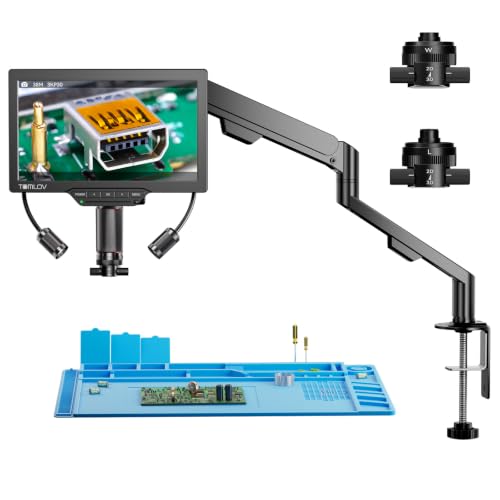
- 3D 360-degree side viewing
- Magnetic long-distance and wide-angle lenses
- 3K image on a 7-inch IPS screen
Best For: Beginners needing flexible PCB and hobby inspection
Best Autofocus Upgrade

- TOF-assisted autofocus with two preset focus points
- 4K video and 52MP image capture
- 8-inch screen with dual gooseneck lights
Best For: Beginners wanting easier focusing and documentation
Best Simple Starter Setup
TOMLOV DM9 7-Inch Digital Microscope

- Stable metal base and adjustable stand
- 7-inch screen with adjustable lighting
- 12MP photos, 1080P video, and 16GB storage
Best For: Beginners doing light soldering and coin inspection
Best All-in-One Station – Andonstar AD246S-M Plus
For beginners comparing soldering microscopes for beginners, the Andonstar AD246S-M Plus stands out as a complete workstation rather than just a digital viewer. Its 7-inch display, 2160P output, three interchangeable lenses, extension base, tool holder, and helping hands create a well-equipped setup for electronics repair and broader hobby use.
Best For: Beginners who want a comprehensive soldering station with room to expand into coin, plant, stone, and slide observation.
Pros:
- Includes a soldering mat, helping hands, tool holder, component storage boxes, and extension base.
- Three lenses cover soldering, general inspection, and biological slides.
- 7-inch monitor, 2160P HDMI output, remote control, and included 32GB SD card support comfortable viewing and recording.
- Windows measurement software can capture photos, videos, and measurements.
Cons:
- The extensive accessory package may be more than a beginner needs for basic PCB inspection.
- Lens changes require removing and installing screws.
This is the strongest choice when convenience and a ready-to-use workspace matter most. Its larger footprint and broad feature set make it especially suitable for a dedicated bench.
Best Portable Starter – Elikliv EDM4 Digital Microscope
The Elikliv EDM4 is a straightforward option for beginners choosing soldering microscopes for beginners on a budget-conscious or portable setup. Its 4.3-inch screen, adjustable stand, eight LED lights, rechargeable battery, and Windows or Mac viewing make it useful for circuit inspection and occasional repair work.
Best For: Beginners who need a compact, battery-powered microscope for light circuit-board inspection and general hobby viewing.
Pros:
- Rechargeable battery provides up to three hours of continuous use.
- Adjustable stand helps set the camera distance and viewing angle.
- Eight adjustable LED lights improve visibility in dim work areas.
- Can connect to Windows or MacBook for a larger shared view.
Cons:
- The 4.3-inch display is smaller than the screens on the Andonstar models.
- A memory card is required for saving photos and videos but is not included.
- Its 720P imaging is less detailed than 2160P alternatives.
The EDM4 is a sensible entry point for casual inspection and STEM-style exploration. For frequent soldering, its smaller screen and general-purpose stand may feel less specialized than a dedicated soldering station.
Best Versatile Microscope – Andonstar AD246S-M
The Andonstar AD246S-M is a versatile pick for beginners researching soldering microscopes for beginners who also want one device for other projects. Its three lenses, 7-inch display, 2160P recording, HDMI output, and adjustable metal boom arm support electronics repair while also covering coins, plants, stones, and prepared slides.
Best For: Beginners and families who want a soldering microscope that can also support general observation and educational demonstrations.
Pros:
- Lens L is designed for soldering and circuit-board or mobile-phone repair.
- Lens A and Lens D extend the system to coins, plants, stones, and biological slides.
- Adjustable metal boom arm provides a larger work envelope for repair tasks.
- Includes HDMI, remote control, measurement software support, and a 32GB Micro SD card.
Cons:
- It does not include the Plus model’s listed extension base, storage boxes, tool holder, or helping hands.
- Changing lenses requires removing and installing screws.
This model offers an appealing balance between dedicated soldering capability and all-purpose versatility. Choose it over the Plus version if you already have bench accessories or prefer a simpler package.
Best Compact PCB Pick – 5-inch LCD Soldering Microscope
This 5-inch LCD model keeps the learning curve simple for beginners shopping for soldering microscopes for beginners. It has a screen that works without a computer, a flexible arm, a C-clamp for hands-free positioning, and plug-and-play PC viewing through standard camera apps.
Best For: Beginners focused on solder-joint checks and electronics repair in a compact or irregular workspace.
Pros:
- 5-inch IPS display allows standalone use without a computer.
- C-clamp and flexible gooseneck arm help keep both hands available for soldering.
- Windows and Mac computer viewing works through built-in camera applications without third-party software.
- Supports up to 1000X digital magnification and 1080P repair video recording.
Cons:
- Micro SD card up to 32GB is required for saving photos and videos but is not included.
- It is designed for micro-details rather than full-screen views of large objects.
- Manual distance and focus adjustments are required; it is not autofocus.
This is a practical, space-conscious choice for basic PCB work. Its simple PC connection and hands-free clamp are beginner-friendly, though users wanting multi-lens versatility or a larger display should consider the Andonstar models.
Most Versatile Pick – Andonstar AD249S-M 3-Lens Digital Microscope
For beginners comparing soldering microscopes for beginners, the Andonstar AD249S-M stands out as a flexible, high-resolution kit. Its dedicated soldering lens, adjustable boom arm, 10.1-inch display, and included accessories make it suitable for electronics work while leaving room for coins and biological slides.
Best For: Beginners who want one microscope for soldering, coin inspection, and basic slide viewing.
Pros:
- Includes three interchangeable lenses, including a lens designed for soldering and circuit-board repair.
- 2160P video recording, HDMI output, and a large 10.1-inch screen support comfortable viewing.
- Adjustable metal boom arm provides a larger work envelope for repair tasks.
- Includes a 32GB Micro SD card, remote control, slides, and measurement software compatibility.
Cons:
- The multi-lens setup may involve more initial setup and lens changes than a simpler microscope.
- Its broad feature set may be more than beginners need for basic soldering alone.
The AD249S-M is a strong all-purpose choice when flexibility matters. Choose it if you want high-resolution recording and multiple viewing options rather than a dedicated soldering-only tool.
Best Beginner-Friendly Work Area – TOMLOV DM9 Max Digital Soldering Microscope
The TOMLOV DM9 Max is a practical option among soldering microscopes for beginners, especially if you need room to move tools around a circuit board. Its tall stand, large heat-resistant base, 10.1-inch IPS screen, and remote control are designed to make detailed repair work easier to observe.
Best For: Beginners who prioritize generous clearance and simple controls for PCB repair, soldering, and coin viewing.
Pros:
- Tall 12.6-inch metal stand and large base leave space for boards, tweezers, and a soldering iron.
- 10.1-inch IPS screen offers a 178-degree viewing angle.
- Adjustable lighting includes eight lens LEDs and two dimmable gooseneck side lights.
- Remote control supports magnification, photos, and video recording without disturbing the sample.
Cons:
- Video recording is specified at 1080P, rather than the higher 2160P resolution offered by some alternatives.
- The product is optimized for digital screen viewing, so it may not suit users seeking a traditional optical microscope.
With its stable base and clear operating controls, the DM9 Max is an approachable starting point for hands-on repairs. It is particularly useful when workspace and lighting are more important than maximum recording resolution.
Best All-Purpose Starter Kit – Andonstar AD210 Digital Microscope
The Andonstar AD210 is a well-rounded choice for shoppers looking at soldering microscopes for beginners. It combines a 10.1-inch IPS display with a strong, adjustable stand, multiple lighting modes, and accessories for electronics repair, coin inspection, and biological slides.
Best For: Beginners who want a straightforward digital microscope for soldering plus coin collecting and slide observation.
Pros:
- Large 10.1-inch IPS screen supports 1080P video and 12MP photos.
- Working distance adjusts from 1cm to 26cm, with a stand reaching up to 12.6 inches.
- Three lighting types provide top and side illumination for repairs and coins, plus bottom lighting for slides.
- Includes a 32GB SD card, card reader, remote control, slide kit, and bottom light stage.
Cons:
- Its 1080P video specification is lower than the 2160P recording offered by the AD249S-M.
- The broad accessory package may be unnecessary if your only goal is soldering.
The AD210 makes sense for beginners who want one setup that can grow beyond electronics repair. Its adjustable working distance and varied illumination are useful for switching between circuit boards, coins, and transparent specimens.
Best 3D Viewing Pick – TOMLOV TM3K-3D
For beginners comparing soldering microscopes for beginners, the TOMLOV TM3K-3D stands out for its unusual side-viewing design. Its 3K display, long-distance lens, and adjustable arm make it easier to inspect solder joints and components while leaving room to work.
Best For: Beginners who want flexible 3D viewing for PCB repair, soldering, jewelry, or coin inspection.
Pros:
- 3D, 360-degree viewing helps reveal components from multiple angles.
- Magnetic L and W lenses switch without tools.
- 7-inch IPS screen and HDMI/USB connectivity support comfortable viewing.
- Flexible arm and adjustable gooseneck spotlight help position the workspace.
Cons:
- The 3D features may be more than beginners need for basic inspection.
- The supplied notes do not specify the full working-distance or magnification range.
The TM3K-3D is a versatile choice if you want a beginner-friendly soldering setup that also handles coins, jewelry, and other close-up subjects. Its dual-lens system and side-view capability are the main reasons to choose it over a more conventional digital microscope.
Best Autofocus Upgrade – TOMLOV TM4K-AF Flex
The TOMLOV TM4K-AF Flex is a strong option for beginners seeking soldering microscopes for beginners with less manual focusing. Its autofocus system, preset focus points, large 8-inch screen, and flexible arm simplify setup for PCB work and other detailed inspections.
Best For: Beginners and hobbyists who value autofocus, a large display, and advanced recording features.
Pros:
- TOF-assisted autofocus is designed to keep images clear as subjects change.
- P1 and P2 focus presets help inspect uneven surfaces quickly.
- 4K video, 52MP images, and an 8-inch screen provide detailed viewing.
- Dual adjustable gooseneck lights offer flood or spotlight illumination.
Cons:
- Its advanced autofocus and recording features may be unnecessary for simple beginner projects.
- The supplied specifications describe digital magnification up to 2000X, so results depend on the digital zoom and working setup.
Choose the TM4K-AF Flex when ease of focusing and a roomy display matter more than keeping the setup minimal. The included remote, memory card, grid lines, and multiple display outputs make it particularly capable for documenting repairs or teaching.
Best Simple Starter Setup – TOMLOV DM9 7-Inch Digital Microscope
For beginners looking for practical soldering microscopes for beginners, the TOMLOV DM9 offers a straightforward screen-based setup. Its sturdy metal base, adjustable stand, 7-inch display, and flexible lighting support small PCB tasks while also working well for coins and general close-up inspection.
Best For: Beginners who want a stable, easy-to-view microscope for light soldering, coins, and hobby projects.
Pros:
- Solid metal base and stand help reduce shaking during inspection.
- Built-in 7-inch screen supports comfortable shared viewing.
- Adjustable LEDs and two gooseneck lights help manage shadows and glare.
- 12MP photos, 1080P video, PC connection, and included 16GB storage support documentation.
Cons:
- The product is positioned primarily for coin inspection, so it may be less specialized for demanding micro-soldering.
- The notes describe height and focus adjustments rather than autofocus.
The DM9 is a sensible entry point for users who prefer a stable base and simple controls over more advanced optical features. It is especially appealing when coin collecting and occasional light soldering are both part of the plan.
How We Picked the Best Soldering Microscopes for Beginners
We focused on the features that make close-up electronics work easier rather than treating maximum advertised magnification as the deciding factor. Our comparison considers image resolution, screen size, working distance, lighting control, lens options, camera positioning, mounting stability, and setup simplicity.
We also included several form factors: compact LCD microscopes, larger HDMI models, dual-lens and 3D designs, and autofocus systems. That range matters because a beginner doing occasional repairs may want an uncomplicated all-in-one unit, while a frequent hobbyist may benefit from a more adjustable arm, a wider view, or improved depth perception.
Quick Comparison
For a straightforward starting point, look for a microscope with a built-in LCD display, adjustable LED lighting, and enough clearance to hold a soldering iron beneath the lens. Seven-inch screens are compact and practical; 8- to 10.1-inch displays are easier to share and view for long sessions. HDMI output is useful if you want a larger monitor or a cleaner workstation display.
Single-lens models are generally simpler and less expensive. Three-lens systems can provide more flexibility across inspection tasks, while dual-lens or 3D designs may help with component height and positioning. Autofocus can reduce manual adjustment, but it should not replace a stable stand and suitable working distance.
Key Buying Factors for Soldering Microscopes for Beginners
Working Distance and Bench Clearance
Choose a setup that leaves room for tweezers, a soldering iron, and your hands. A very high magnification level is less useful if the lens sits too close to the circuit board.
Display and Image Quality
A clear LCD screen makes live work more comfortable than relying on a small computer window. Higher-resolution cameras can reveal fine traces and solder joints, but image quality also depends on lighting, focus, and lens alignment.
Lighting Control
Adjustable LED brightness helps reduce glare from solder, connectors, and bare copper. A diffuser or flexible auxiliary light can be valuable when shiny surfaces wash out details.
Stand Stability and Adjustability
A rigid stand prevents the image from shaking when you touch the board. C-clamp and flex-arm designs save space, while a broader base may be preferable if you frequently reposition the microscope.
Connectivity and Recording
HDMI output is convenient for a larger monitor, and computer compatibility may matter if you want to capture images or video. Confirm operating-system support and included cables before buying.
Who Should Buy Which Soldering Microscopes for Beginners?
Choose a compact 5- or 7-inch LCD model if you want an affordable, easy-to-use microscope for occasional repairs and inspection. A 10.1-inch display is better for extended sessions or shared viewing. Select a three-lens model if you want more optical flexibility, and consider a 3D design when judging component height or working around dense boards is important. Autofocus and flex-arm models suit users who value faster repositioning, while a traditional fixed stand is often the better choice for maximum stability. For most first-time buyers, prioritize comfortable working distance, a steady mount, useful lighting controls, and a readable screen before paying extra for extreme magnification claims.