Standing presentations demand a teleprompter that keeps your eye line natural, your pacing steady, and your setup simple. The right model should be easy to read at a glance without forcing you to lean, strain, or break delivery.
In this roundup, we focus on teleprompters for standing presentations that balance visibility, compatibility, portability, and quick setup so you can spend less time adjusting gear and more time presenting well.
Best 10 Teleprompters for Standing Presentations Picks for 2026
Portable Presentation Pick
Neewer X14 III for Tablets & Phones

- Assembly-free foldable design
- 14-inch beamsplitter glass
- Remote and app control
Best For: standing presentations that need fast setup and mobile-device scripting
Built-In Display Choice
Elgato Prompter with Desktop Control

- Built-in display, no extra device needed
- PC/Mac drag-and-drop control
- Works for scripts, chat, and calls
Best For: desk-based presentations, streaming, and video calls
No-Assembly Standard
Glide Gear TMP 100 for Tablets

- No-assembly, travel-friendly design
- 12-inch 70/30 beam splitter glass
- Supports phones and tablets up to 10.5 x 8 inches
Best For: portable presentations with tablets or smartphones
Integrated Monitor Pick
NEEWER X11 with Built-In Monitor
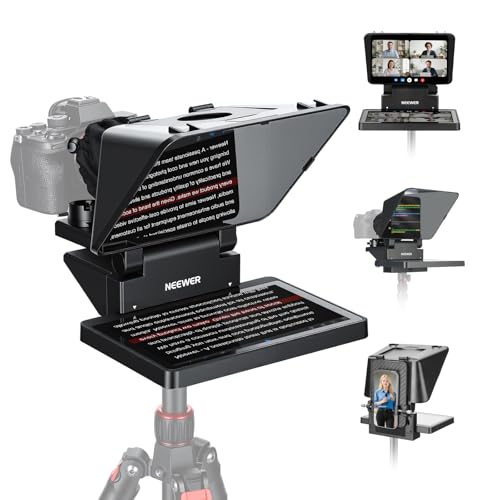
- Built-in 9-inch LCD monitor
- Supports computer screen mirroring
- 11-inch beam splitter glass
Best For: standing presentations, streaming, and conferencing with minimal device juggling
Studio-Ready Wide-Angle Option

- 18-inch beam splitter with clear text display
- Supports tablets up to 12.9 inches and many cameras
- App and Bluetooth remote control for script playback
Best For: Presenters and creators needing a larger, sturdy teleprompter
Most Flexible Compact Pick

- Works with smartphones, tablets under 11 inches, and DSLR cameras
- Includes multiple adapter rings and a Bluetooth remote
- App supports file import, font tweaks, and timer tools
Best For: Speakers and creators needing one setup for multiple devices
Large-Screen Presentation Choice
FEELWORLD TP16 Folding Teleprompter

- 16-inch glass with 70% light transmission
- Supports prompting devices up to 16 inches
- Foldable frame with app and Bluetooth control
Best For: Speakers who want a large viewing area and fast setup
Easy Setup Pick
NEEWER Basics X12B 12" Teleprompter

- No-assembly design for quick setup
- 12-inch HD display with remote and app control
- Foldable aluminum alloy build with carry case
Best For: Presenters and creators who want a simple, portable teleprompter
Portable Value Pick
GVM 12" Collapsible Teleprompter Kit
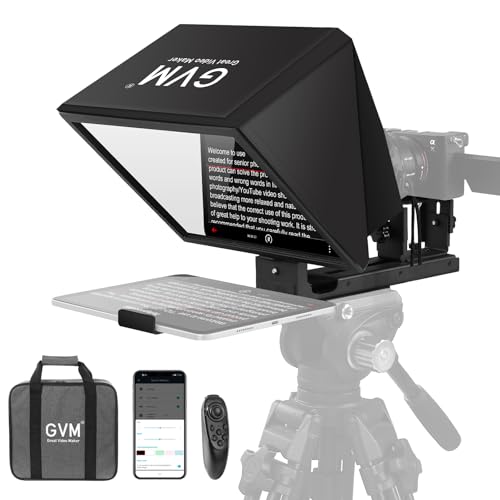
- Installation-free collapsible design
- Supports tablets, phones, and DSLR/mirrorless cameras
- Remote control, app support, and carry bag included
Best For: Presenters who want a portable, multi-device teleprompter
Wide-Angle Upgrade
13" Wide-Angle Teleprompter for Camera

- 13-inch wide-angle beam splitter glass
- Height and viewing angle adjust from 50° to 90°
- App support and wireless remote included
Best For: Presenters who want a larger, more adjustable teleprompter setup
Portable Presentation Pick – Neewer X14 III for Tablets & Phones
If you want teleprompters for standing presentations that set up fast and travel easily, the Neewer X14 III is built for that workflow. Its foldable, assembly-free design, 14-inch beamsplitter glass, and included remote/app control make it a practical choice for speeches, online courses, and live presentations.
Best For: presenters who need a portable teleprompter for standing talks, tutorials, and speech delivery with minimal setup.
Pros:
- Assembly-free foldable design is quick to deploy and store in the included carry case.
- 14-inch HD beamsplitter with 45b0 tilt is made for clear script viewing.
- RT113 remote and app support let you control speed, pages, and font size from Bluetooth.
- Fits tablets and phones up to 8.7 inches wide, including common iPad and smartphone models.
Cons:
- Best suited to mobile devices rather than a built-in monitor workflow.
- Maximum device width and camera fit range may require checking dimensions before purchase.
The X14 III is a strong pick if your priority is fast setup, portability, and simple script control for upright speaking. It balances a large viewing surface with a compact folded form, which is useful when you move between rooms or events.
Built-In Display Choice – Elgato Prompter with Desktop Control
For teleprompters for standing presentations, the Elgato Prompter stands out because it has a built-in screen, so you do not need to mount a tablet or phone. That makes it a clean desktop-controlled option for scripts, chat, and video calls when you want to keep eye contact with the camera.
Best For: streamers, presenters, and remote speakers who want a built-in-display teleprompter with computer-based control.
Pros:
- Built-in display removes the need for a separate tablet or smartphone.
- Works with PC or Mac and supports drag-and-drop window use.
- Useful for scripts, Twitch chat, Zoom, and Teams eye contact.
- Compatible with a wide range of cameras and integrates with Camera Hub and Stream Deck.
Cons:
- Requires desktop software support, including DisplayLink on Mac and Android.
- Less portable than simpler tablet-based teleprompter setups.
This is a polished solution if you want your prompting system to feel like part of a computer-based studio setup. It is especially appealing when your presentation, streaming, or conferencing work already happens at a desk.
No-Assembly Standard – Glide Gear TMP 100 for Tablets
Glide Gear TMP 100 Teleprompter – DSLR, Tablet, Smartphone – 12" Glass, Carry Case, No Assembly
Check Price On AmazonThe Glide Gear TMP 100 is a straightforward option for teleprompters for standing presentations if you want a no-assembly design and broad tablet or smartphone support. Its 12-inch glass, carry bag, and mirror-text app compatibility make it a practical fit for presenters who want a simple, professional setup.
Best For: presenters who want a durable, portable teleprompter for tablets or smartphones without a complicated setup.
Pros:
- No-assembly design makes setup fast and travel-friendly.
- 12-inch 70/30 beam splitter glass supports clear script reflection.
- Works with smartphones and tablets up to 10.5 x 8 inches.
- Includes tripod mounting threads and accessory mounting options for a fuller rig.
Cons:
- Does not fit iPad Pro according to the supplied notes.
- Requires a teleprompter app with mirror text functionality; app is not included.
The TMP 100 is a dependable middle-ground choice when you want a familiar teleprompter layout and flexible device support. It is well suited to speakers who value portability, quick setup, and a standard tablet-led workflow.
Integrated Monitor Pick – NEEWER X11 with Built-In Monitor
If you want teleprompters for standing presentations with a built-in display, the NEEWER X11 is designed to reduce setup friction. It includes a 9-inch LCD monitor for screen mirroring, supports computer connections, and still keeps the familiar teleprompter layout for eye contact while speaking.
Best For: presenters who want an integrated monitor teleprompter for live streaming, video conferencing, and camera-facing talks.
Pros:
- Built-in 9-inch LCD monitor means no tablet or phone is required for prompts.
- Supports direct computer connection and screen mirroring for fast setup.
- Clear 11-inch beam splitter glass is designed to reduce ghosting.
- Adjustable holder and QR plate help fit a range of camera setups.
Cons:
- Some connection methods require drivers, according to the supplied notes.
- Phone mirroring is limited to iPhone and Android devices with DP protocol only.
This model makes sense when you want a more integrated prompting rig than a tablet-based unit. It is especially useful for presenters who switch between streaming, conferencing, and scripted camera work and want a built-in screen to simplify the process.
Studio-Ready Wide-Angle Option – GVM 18'' Teleprompter Kit
If you want teleprompters for standing presentations that can double for recording, this GVM kit gives you a large 18-inch layout, a solid aluminum frame, and app-based control for smoother delivery. It supports tablets up to 12.9 inches and works with small- to mid-sized cameras, making it a flexible pick for presenters who need readable text and a stable setup.
Best For: Presenters, livestreamers, and video creators who want a larger teleprompter with wide compatibility.
Pros:
- 18-inch design with a colorless beam splitter for clear, no-ghost text display
- Supports iPad/tablets up to 12.9 inches plus SLR, camcorder, digital camera, and DV machines
- Bluetooth remote and iOS/Android app control for font size, speed, and background color
- Solid aluminum construction adds sturdiness for regular use
Cons:
- At 16.12 pounds, it is heavier than compact travel-friendly options
- Best suited to users who want a larger, more equipment-heavy setup
This is a strong choice if you want a more substantial teleprompter for standing presentations and camera-based delivery. Its larger glass and broad device support make it practical for classrooms, studios, and live broadcasts.
Most Flexible Compact Pick – Desview T5 Teleprompter
For teleprompters for standing presentations where flexibility matters, the Desview T5 is built to work with smartphones, tablets under 11 inches, and DSLR cameras. It includes adapter rings from 49mm to 82mm, plus an app and Bluetooth remote, so you can move between live streaming, video recording, and presentation work without much setup hassle.
Best For: Speakers and content creators who want an all-in-one teleprompter for mobile or DSLR use.
Pros:
- Compatible with smartphones, tablets under 11 inches, and DSLR cameras
- Includes 49/52/55/58/62/67/72/77/82mm adapter rings for broad camera support
- Official app supports txt/docx import, font and background adjustments, and timer tools
- Bluetooth remote adds hands-free control of play/pause and scroll speed
Cons:
- Tablet support is limited to devices under 11 inches
- Smaller format may not suit users who want a large prompting surface
The T5 is a practical choice if you need one teleprompter to cover multiple device types and shooting styles. Its lightweight build, remote control, and flexible mounting make it a smart fit for mobile presenters and solo creators.
Large-Screen Presentation Choice – FEELWORLD TP16 Folding Teleprompter
If you need teleprompters for standing presentations with a bigger reading area, the FEELWORLD TP16 is built around a 16-inch beam splitter and support for prompting devices up to 16 inches. It also uses app and Bluetooth control, so it can work well for speeches, recorded presentations, and camera-based shoots where readability is the priority.
Best For: Speakers who want a larger teleprompter window and quick folding setup.
Pros:
- 16-inch beam splitter glass offers clear text with 70% light transmission
- Supports prompting devices up to 16 inches
- App and Bluetooth remote control add convenient script management
- Foldable design and 135° tilting glass frame make assembly quicker
Cons:
- Larger size may be less convenient for tight spaces or frequent travel
- Designed more for stationary setups than ultra-portable use
The TP16 is a sensible pick when larger text visibility matters more than compact size. Its wide prompting area and foldable frame make it a solid fit for stage-style speaking, studio work, and other presentation-heavy setups.
Easy Setup Pick – NEEWER Basics X12B 12" Teleprompter
If you need teleprompters for standing presentations, the NEEWER Basics X12B is a simple, practical option built around quick setup and straightforward script control. Its no-assembly design, 12-inch beam splitter glass, and included remote make it a convenient choice for presenters who want to get in front of the camera fast.
Best For: Presenters, online course creators, and tutorial makers who want an installation-free teleprompter with basic Bluetooth app and remote control.
Pros:
- No-assembly design makes setup fast and easy.
- 12-inch HD display with 75% light transmittance for readable text up to 10 ft.
- Includes remote and app control for play/pause, scrolling, font size, and page changes.
- Foldable aluminum alloy build and carry case improve portability.
Cons:
- Not for phone shooting.
- Does not function as a monitor or allow direct on-screen self viewing.
- 12-inch screen may be limiting if you want a larger prompt area.
Overall, this is a solid fit if you value simplicity over extras. It covers the essentials well for standing presentations, especially when you need a lightweight teleprompter that sets up quickly and travels easily.
Portable Value Pick – GVM 12" Collapsible Teleprompter Kit
For teleprompters for standing presentations, the GVM 12-inch kit stands out for its collapsible, installation-free design and broad device support. It is aimed at users who want a portable teleprompter that can handle tablets, smartphones, and cameras without a complicated setup.
Best For: Presenters, live streamers, and video creators who want a collapsible teleprompter with app-based remote control.
Pros:
- Installation-free, all-in-one design is easy to mount on a tripod.
- 12-inch optical glass supports clear reading up to 15 ft.
- Works with smartphones, tablets up to 8.6 inches, and DSLR/mirrorless cameras.
- Includes remote control, app support, and a carry bag for portability.
Cons:
- Tablet size limit is 8.6 inches, so larger tablets will not fit.
- Heavier than some compact alternatives at 5.68 pounds.
- Focuses on core functions rather than advanced extras.
This is a good pick if you want a flexible teleprompter that can move easily between presentations and recording sessions. It keeps the setup simple while offering the device compatibility many standing presenters need.
Wide-Angle Upgrade – 13" Wide-Angle Teleprompter for Camera
If you want teleprompters for standing presentations with a larger viewing area, this 13-inch model is built around a wide-angle beam splitter glass and adjustable positioning. The height and bezel angle can be tuned from 50° to 90°, which can help match different camera setups and presentation styles.
Best For: Users who want a larger teleprompter display and adjustable viewing angle for studio, live streaming, or presentation work.
Pros:
- 13-inch wide-angle beam splitter glass gives a larger script viewing area.
- Adjustable height and bezel angle from 50° to 90°.
- Lightweight aluminum alloy frame balances stability and portability.
- Supports tablet script display with app control and includes a wireless remote.
Cons:
- Does not include detailed device size compatibility in the supplied notes.
- Likely less compact than smaller 12-inch models.
- More focused on camera-based setups than ultra-minimal portability.
For presenters who want a bit more screen space and setup flexibility, this is the most adjustable option in the group. It makes sense if your standing presentations need clearer visibility from different angles and distances.
How We Picked the Best Teleprompters for Standing Presentations
We prioritized teleprompters that work well at standing height, with enough screen or glass size to remain readable from a natural presenter position. We also looked for stable mounts, practical smartphone/tablet/DSLR compatibility, and controls that make live prompting smoother.
Because Teleprompters for Standing Presentations are often used in small studios, classrooms, webinars, and mobile setups, we gave extra weight to ease of assembly, portability, and whether the system can be set up and broken down quickly.
Quick Comparison
In broad terms, larger models are better if you want a more comfortable reading window or plan to stand farther from the camera. Smaller and more compact options suit tighter spaces, lighter rigs, and travel-friendly workflows. Built-in screen designs can simplify prompting, while tablet- or phone-based models offer more flexibility and lower overall cost.
Key Buying Factors for Teleprompters for Standing Presentations
Reading Height and Screen Size
For standing use, the prompt should sit high enough that you can maintain a direct gaze without looking down. A larger reflective area or a built-in display can improve readability, especially if you use longer scripts or stand a few feet from the camera.
Device Compatibility
Check whether the teleprompter supports your preferred prompt source: tablet, phone, or built-in monitor. Also confirm support for your camera type and lens diameter so you do not run into mounting issues later.
Build Quality and Stability
A stable frame matters more than many buyers expect. All-metal or reinforced aluminum designs tend to hold alignment better, which helps maintain a consistent eye line during longer presentations.
Setup Speed and Portability
If you move between rooms or shoot on location, look for no-assembly or folding designs and a included case or compact form factor. Faster setup makes it easier to use the teleprompter regularly instead of only for planned shoots.
Remote and App Control
Remote control, app-based scrolling, and screen mirroring features can make delivery smoother by letting you adjust pace without breaking focus. These are especially useful for live talking-head videos and recorded presentations.
Who Should Buy Which Teleprompters for Standing Presentations?
Choose a larger, more feature-rich model if you regularly give professional presentations, teach on camera, or record scripted content at standing height. Go with a compact tablet or smartphone teleprompter if you need portability and simpler scripting workflows. If you want the least friction possible, a built-in screen model can be the easiest path to a clean standing presentation setup.
For most buyers, the best teleprompter is the one that matches your camera setup, the distance you stand from the lens, and how often you need to move the system. If those three factors line up, your delivery will feel more natural and confident immediately.