Wireless video can make a home studio easier to configure, especially when cameras, monitors, capture devices, and streaming stations are spread across a room. The right transmitter-receiver system can reduce cable clutter while preserving dependable image quality and responsive monitoring.
We selected 10 options covering 4K and 1080p workflows, HDMI and SDI connectivity, UVC output, multi-receiver setups, and different budget levels. Use the guide below to match range, latency, compatibility, and expansion needs to your studio.
Best 10 Video Transmitters for Home Studios Picks for 2026
Best Multi-Receiver Value
Hollyland Pyro H Wireless HDMI System

- 4K30 HDMI transmission with 60ms latency
- Supports up to four receivers
- UVC streaming and dual-band Smart Channel Scan
Best For: Multi-viewer home studio monitoring and live streaming
Best for Long-Range Monitoring

- Up to 3 km transmission distance
- 1080p60 with 35ms latency
- HDMI, SDI, USB-C, and unlimited Broadcast mode receivers
Best For: Long-distance, interference-prone 1080p monitoring
Best Hybrid HDMI/SDI Pick
Hollyland Pyro S Wireless Video System

- HDMI and SDI input/output
- 4K30 transmission with 50ms latency
- Supports four receivers plus UVC and RTMP streaming
Best For: Home studios with mixed HDMI and SDI equipment
Best Pocket 3 Streaming Kit
Vrriis Wireless Video System for Osmo Pocket 3

- Optimized for DJI Osmo Pocket 3
- 1080p60 UVC output for computer streaming
- 20 channels and support for up to five receivers
Best For: Pocket 3-based home studio streaming and monitoring
Professional Dual-Input Pick

- HDMI and SDI support
- 0.05-second latency with up to 1,200-foot stated range
- Connects to up to four receivers or mobile devices
Best For: Home studios using mixed HDMI and SDI gear
Built-In Monitor Pick
Wireless HDMI System with 7-Inch Display
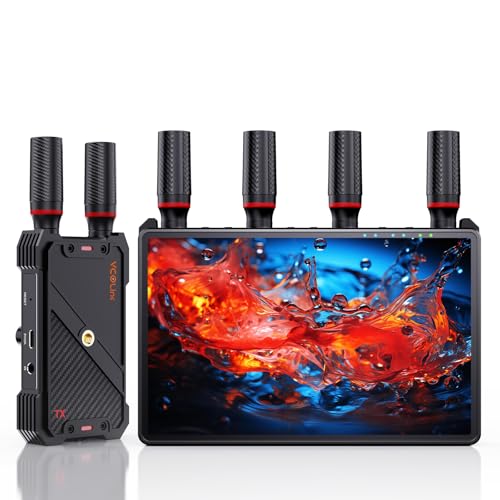
- Receiver includes a 7-inch HD monitor
- Supports up to five receivers with 1080p/60Hz video
- Features HDMI loop-out and flexible power options
Best For: Compact studios needing portable on-set monitoring
Streaming-Friendly Pick
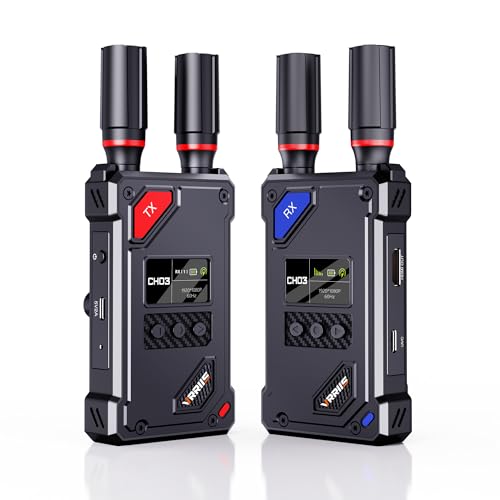
- UVC output works with OBS and other streaming platforms
- 20 adjustable channels with signal and interference display
- 1080p/60Hz transmission with HDMI loop-out
Best For: Home streamers connecting cameras directly to a computer
Long-Range 4K Pick

- 4K at 30Hz with synchronized audio
- Plug-and-play, pre-paired setup
- Up to 1,150 feet in open conditions
Best For: Home studios needing long-range 4K HDMI transmission
Professional Connectivity Pick

- HDMI and 3G-SDI input/output
- 4K transmission at up to 30fps
- App monitoring for up to four devices
Best For: Studios using cameras, monitors, or switchers with SDI
Flexible 1080p Monitoring Pick

- 1080p at 60Hz with 0.05-second delay
- Transmitter loop-out for local monitoring
- Dual receiver output and IR control
Best For: Studios needing responsive Full HD monitoring and flexible power
Best Multi-Receiver Value – Hollyland Pyro H Wireless HDMI System
For home studios that need dependable wireless monitoring, the Hollyland Pyro H combines 4K30 HDMI transmission, dual-band operation, and a practical multi-receiver design. Its UVC support also makes it useful for computer-based live streaming without requiring a separate capture card.
Best For: Home studio teams, live streamers, and creators who need wireless HDMI monitoring for several viewers.
Pros:
- Transmits up to 4K30 over HDMI with 60ms latency.
- Supports transmission to up to four receivers for collaborative monitoring.
- Offers 2.4GHz and 5GHz dual-band operation with Smart Channel Scan.
- Includes UVC support for plug-and-play computer streaming.
Cons:
- It is an HDMI-focused system rather than an HDMI-and-SDI solution.
- The listed 1,300-foot range depends on suitable conditions and line of sight.
The Pyro H is a well-rounded choice among video transmitters for home studios, especially when 4K monitoring and multiple receivers matter more than SDI connectivity.
Best for Long-Range Monitoring – DJI SDR Transmission Combo
The DJI SDR Transmission Combo is designed for home studios and production spaces where signal stability and distance are priorities. It supports 1080p60 monitoring, automatic frequency hopping across multiple bands, and convenient USB-C, HDMI, and SDI output options.
Best For: Creators who need long-range 1080p monitoring, interference management, and flexible receiver connections.
Pros:
- Provides up to 3 km of transmission distance with enhanced penetration.
- Supports 1080p60 video at up to 20 Mbps with 35ms latency.
- Uses automatic frequency hopping across 2.4GHz, 5.8GHz, and DFS bands.
- Broadcast mode can connect one transmitter to an unlimited number of receivers.
Cons:
- Its listed transmission resolution tops out at 1080p60 rather than 4K.
- The combo includes advanced features that may exceed the needs of a simple single-monitor setup.
Among video transmitters for home studios, this DJI system stands out when extended range, anti-interference performance, and broad monitoring access are more important than UHD transmission.
Best Hybrid HDMI/SDI Pick – Hollyland Pyro S Wireless Video System
The Hollyland Pyro S is a flexible option for home studios using both HDMI and SDI equipment. It delivers 4K30 HDMI transmission, low 50ms latency, multi-receiver support, and monitoring tools through the companion app, while also adding UVC and RTMP streaming capabilities.
Best For: Hybrid home studios that connect cameras, monitors, and streaming equipment through both HDMI and SDI.
Pros:
- Supports HDMI and SDI input/output for broad equipment compatibility.
- Transmits up to 4K30 with 50ms latency and up to 1,300 feet of range.
- Connects one transmitter to up to four receivers.
- Includes app tools such as waveform, vectorscope, zebra, and anamorphic de-squeeze.
Cons:
- It may be more capability than a basic HDMI-only home studio requires.
- Its 4K transmission support is specified through HDMI, while SDI supports listed frame rates up to 59.94 FPS.
The Pyro S is one of the more adaptable video transmitters for home studios, making the most sense when SDI compatibility and on-device monitoring tools justify the upgrade over a simpler HDMI kit.
Best Pocket 3 Streaming Kit – Vrriis Wireless Video System for Osmo Pocket 3
Built around the DJI Osmo Pocket 3, this Vrriis kit offers a straightforward way to add wireless monitoring and computer streaming to a compact camera setup. It transmits 1080p video, includes UVC output, and provides a status display with channel, signal, resolution, and battery information.
Best For: Osmo Pocket 3 users who want wireless 1080p streaming to a monitor, TV, or computer.
Pros:
- Uses a built-in Type-C connector optimized for the Osmo Pocket 3.
- Supports up to 1080p60 UVC output for computer streaming with software such as OBS.
- Offers 20 adjustable channels and a status LCD.
- Supports one transmitter with up to five receivers and HDMI loopout.
Cons:
- It is limited to 1080p rather than 4K transmission.
- Walls, glass, brick, and metal obstacles can reduce range or interrupt the signal.
- NP-F batteries are not included.
For creators centered on the Osmo Pocket 3, this is a practical entry among video transmitters for home studios, particularly for OBS streaming and multi-screen 1080p monitoring.
Professional Dual-Input Pick – Accsoon CineView SE
The Accsoon CineView SE is a strong option among video transmitters for home studios when you need both HDMI and SDI connectivity. It supports 1080p video at up to 60fps, dual-band transmission, and monitoring across multiple devices.
Best For: Home studios and small production teams using cameras or monitors with HDMI and SDI outputs.
Pros:
- Supports both HDMI and SDI equipment.
- Dual-band 2.4GHz and 5GHz transmission is designed to improve stability in interference-heavy environments.
- Connects one transmitter to up to four receivers or mobile devices.
- Offers 0.05-second latency and a stated range of up to 1,200 feet in clear conditions.
Cons:
- Batteries, DC cable, and USB cables are sold separately.
- The stated transmission range assumes an obstacle-free environment.
- Its professional SDI support may be more than a basic home setup requires.
Choose the CineView SE if flexible inputs, crew monitoring, and professional app features matter more than keeping the system minimal. Its SDI/HDMI combination also gives a home studio room to grow.
Built-In Monitor Pick – Wireless HDMI System with 7-Inch Display
This wireless HDMI kit stands out among video transmitters for home studios because the receiver includes a built-in 7-inch monitor. It can also send video to an external display, making it useful when you want a compact monitoring solution without adding another screen.
Best For: Home studios, filming setups, and small crews that want portable monitoring and shared HDMI output.
Pros:
- Built-in 7-inch HD receiver screen reduces the need for a separate monitor.
- Supports 1080p at 60Hz with less than 0.05-second stated latency.
- One transmitter can broadcast to up to five receivers.
- Includes HDMI loop-out, an IR remote, and NP-F battery, power-bank, or USB-C power options.
Cons:
- An HDMI cable for the external monitor is not included.
- Smartphone and tablet use requires a Type-C-to-HDMI cable.
- The listed 1,312-foot range is specified for line-of-sight use.
The built-in display makes this system especially practical when space and setup time are limited. It is a convenient choice for solo creators or teams that need both private receiver monitoring and a larger client-facing screen.
Streaming-Friendly Pick – Vrriis Wireless Video System
The Vrriis WL087 is one of the more streaming-oriented video transmitters for home studios, with UVC output for sending received footage to software such as OBS without a separate capture device. It also offers manual channel selection and HDMI loop-out for local monitoring.
Best For: Home streamers and creators who want direct computer-based live streaming with flexible channel control.
Pros:
- UVC output supports streaming to platforms and software such as OBS through the included USB-C cable.
- Offers 20 manually adjustable channels with an LCD showing signal strength and interference.
- Supports 1080p at 60Hz with a stated 0.05-second latency.
- Includes HDMI loop-out and can support up to five receivers.
Cons:
- The stated 1,500-foot range applies to clear line-of-sight conditions; walls and other obstacles can reduce coverage.
- Batteries are not included.
- Transmission distance decreases as additional receivers are added.
For a home studio built around live streaming, the UVC connection is the main advantage because it can simplify the path into a computer. Manual channel selection is also useful when wireless congestion affects the signal.
Long-Range 4K Pick – WL095P Wireless HDMI System
For home studios that need to send a camera or computer feed to a distant display, this 4K wireless HDMI kit combines plug-and-play setup with a stated 1,150-foot open-field range. Its 0.1-second latency and support for up to 4K at 30Hz make it a practical option for monitoring, presentations, and entertainment.
Best For: Home studios needing long-range 4K HDMI transmission with multiroom display support.
Pros:
- Supports UHD 4K at 30Hz with synchronized audio.
- Pre-paired transmitter and receiver require no apps or drivers.
- Offers dual HDMI output on the receiver and supports up to four receivers.
- Includes a 3.5mm audio interface for compatible speakers or soundbars.
Cons:
- The 1,150-foot range applies to open-field conditions; walls and other materials can reduce coverage.
- Transmission distance decreases as additional receivers are added.
- 4K support is limited to 30Hz.
This is a strong fit when range and 4K capability matter more than compact, professional broadcast connectivity. Its simple installation also suits creators who want to reduce HDMI cable clutter.
Professional Connectivity Pick – Hollyland Mars 4K
Among video transmitters for home studios, the Hollyland Mars 4K stands out for adding SDI alongside HDMI. It supports 4K video at up to 30 frames per second, app monitoring, and professional frame-rate options, making it suited to camera setups that may grow beyond basic consumer HDMI workflows.
Best For: Home studios using cameras, monitors, or switchers with HDMI and 3G-SDI connections.
Pros:
- Supports video transmission up to 3840×2160 at 24, 25, or 30fps through HDMI.
- Provides HDMI and SDI input/output options, including 23.98, 29.97, and 59.94 FPS SDI output.
- Offers up to 450 feet of stated line-of-sight range with 66ms latency in laboratory conditions.
- Supports monitoring through up to four iOS or Android app devices.
Cons:
- The stated range and latency are based on interference-free laboratory conditions.
- It uses H.264 encoding rather than the H.265 encoding listed for some competing products.
- QC/PD charging and 5V/2A charging are not supported.
The Mars 4K is the most production-oriented choice in this group. Its SDI support, LCD screen, joystick controls, and flexible power options are valuable for a serious studio, though the system is more specialized than a basic wireless HDMI extender.
Flexible 1080p Monitoring Pick – WL082 Wireless HDMI System
This 1080p wireless HDMI kit is a practical choice for home studios that prioritize low delay, local monitoring, and flexible power. It combines a stated 1,300-foot open-field range with 0.05-second latency, transmitter loop-out, receiver dual output, and IR control for compatible source devices.
Best For: Home studios needing responsive Full HD monitoring with loop-out and remote-source control.
Pros:
- Supports 1080p at 60Hz with a stated 0.05-second delay.
- Transmitter loop-out enables a local monitor while sending the signal wirelessly.
- Receiver dual HDMI output can connect two screens simultaneously.
- Supports NP-F batteries, USB-C power, adapters, and compatible portable power banks.
Cons:
- Maximum resolution is Full HD 1080p rather than 4K.
- The 1,300-foot range is specified for open, interference-free conditions; obstacles can reduce it.
- Batteries are not included.
Choose this system if your studio workflow is centered on 1080p and you value practical monitoring features. The loop-out and IR extension are especially useful when the operator needs to view or control the source from another location.
How We Picked the Best Video Transmitters for Home Studios
We compared these systems by looking at the features that matter most in a studio: supported resolution and frame rates, HDMI or SDI compatibility, wireless range, latency, connection stability, receiver capacity, and monitoring or streaming extras. We also considered whether a product supports practical workflows such as sending one camera feed to several displays, connecting to a computer through UVC, or maintaining a wired loop-out connection.
Advertised range is measured in ideal conditions, so walls, nearby Wi-Fi networks, other radio devices, and antenna placement can reduce real-world performance. A transmitter that meets your required distance with some headroom is usually a better choice than one that only matches the maximum on paper.
Quick Comparison
| Priority | Look For | Best Fit |
|---|---|---|
| High-resolution monitoring | 4K30 input or transmission, HDMI, and low latency | 4K cameras and studio displays |
| Professional camera support | SDI alongside HDMI | Hybrid or broadcast-style rigs |
| Computer streaming | UVC output and compatible USB connection | Webcams, live production, and video calls |
| Multiple viewing points | Several receivers or receiver/monitor bundles | Directors, presenters, and clients |
| Long-distance links | Strong range, interference management, and clear line of sight | Large rooms or separate studio areas |
Key Buying Factors for Video Transmitters for Home Studios
Resolution, Frame Rate, and Latency
Choose a system based on the camera output you actually use. 4K support is useful for high-resolution monitoring and flexible cropping, while 1080p60 is often sufficient for streaming and keeps bandwidth requirements lower. Low latency matters for live presenters, focus pulling, gaming, and camera operation; even a short delay can feel distracting when audio and video must stay tightly aligned.
Inputs, Outputs, and Studio Compatibility
Check whether your camera and monitor use HDMI, SDI, or both. HDMI is common on mirrorless cameras and consumer equipment, while SDI is better suited to longer wired runs and professional hardware. Loop-out is valuable when you need to feed a local monitor or capture device at the same time. UVC output can simplify computer-based streaming, but verify the required cable, operating system, and resolution support.
Range, Interference, and Expansion
Dual-band operation, channel selection, and interference-resistant design can improve reliability in busy homes. For multi-person productions, confirm how many receivers one transmitter supports and whether additional receivers are sold separately. Keep the transmitter and receiver antennas unobstructed and avoid assuming that the maximum advertised range applies through several walls.
Power and Everyday Handling
Review power options before buying. Battery-powered units are convenient for cameras, while USB or DC power may be better for fixed studio installations. Consider mounting, antenna size, display indicators, pairing steps, and whether the controls are accessible once the devices are attached to a camera cage or rig.
Who Should Buy Which Video Transmitters for Home Studios?
Choose a 4K HDMI system if your home studio uses modern mirrorless or cinema cameras and you want detailed monitoring without running another long cable. Choose an HDMI-and-SDI model for a mixed setup or if you expect to add professional cameras, switchers, or SDI monitors.
Choose a UVC-equipped transmitter when direct computer connectivity is central to your workflow, such as live streaming, remote teaching, or video calls. Choose a multi-receiver or monitor bundle when a presenter, operator, and client all need to view the same feed. For larger spaces, prioritize stable range and interference control over the highest headline resolution. Finally, if your setup is mostly stationary and latency is less important, a wired connection may still deliver the simplest and most dependable result.