Choosing the right wireless video system can simplify a multi-camera production, but specifications vary widely between consumer HDMI extenders and professional camera transmitters.
This roundup compares 10 options by range, latency, receiver capacity, video support, connectivity, and setup flexibility so you can match the system to your cameras, displays, and shooting environment.
Best 10 Video Transmitters for Multi Camera Setups Picks for 2026
On-Set Multi-Viewer Hub
7-Inch Monitor Wireless HDMI Kit
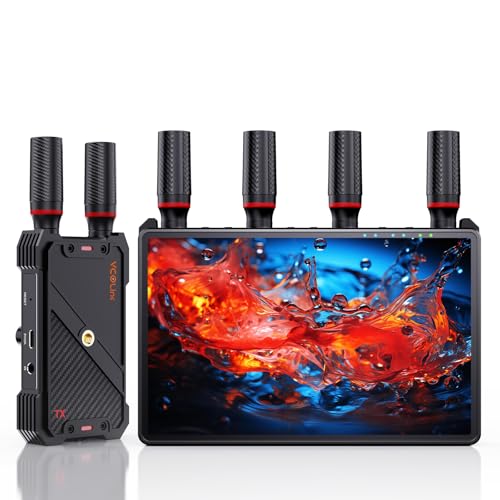
- 1080p60 transmission with under 0.05-second latency
- One transmitter can support up to five receivers
- Built-in 7-inch monitor, HDMI out, and loop-out
Best For: Film crews and live productions needing multiple monitoring points
Large-Venue Display Link
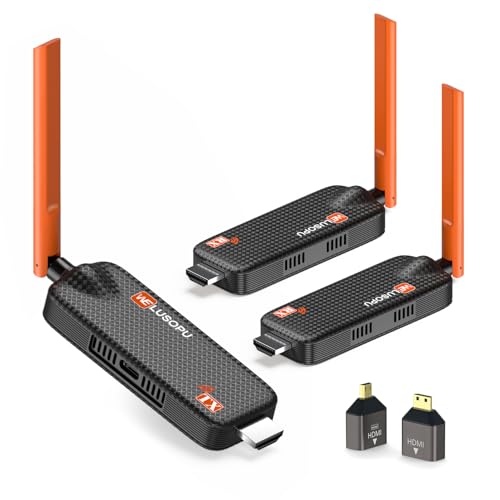
- Includes two receivers and supports up to six displays
- 4K input with 1080p60 output
- 656-foot stated range with dual-band transmission
Best For: Multi-screen presentations, classrooms, venues, and monitoring
Mobile Crew Monitor
Accsoon CineView Nano Transmitter
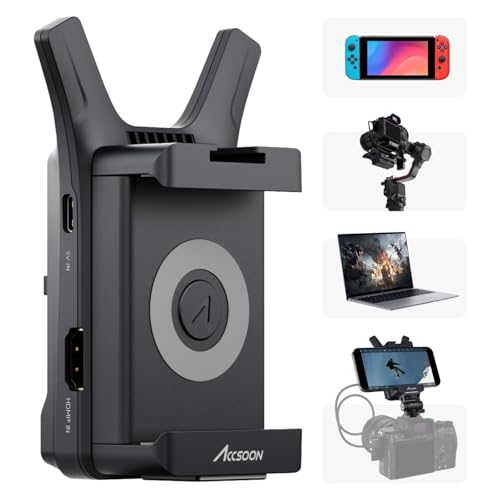
- Sends 1080p60 video to up to four mobile devices
- Under 0.06-second latency with a 500-foot-class range
- Lightweight 72.3-gram body with flexible power options
Best For: Portable camera, DSLR, and gimbal monitoring with phones or tablets
Simple Multi-TV Sender
Dual-Receiver Wireless HDMI Kit

- Includes two receivers and supports up to six receivers
- 165-foot open-environment range with dual-band wireless
- Includes adapters for USB-C, micro-HDMI, and mini-HDMI sources
Best For: Homes, offices, classrooms, and venues sharing one source across displays
Professional Dual-Band Choice

- HDMI and SDI support at 1080p/60fps
- Dual-band transmission with claimed 0.05s latency
- Up to 1,200ft range; transmitter only
Best For: Professional camera crews and live production
Multi-Display HDMI Kit

- One transmitter plus two receivers included
- 1080p/60Hz simultaneous display output
- Plug-and-play with claimed 165ft open-area range
Best For: Presentations and distributing one HDMI source to two screens
Four-Screen Monitoring Pick

- One transmitter and three receivers included
- Streams 1080p/60Hz to up to four screens
- TuTuPlay phone and tablet preview support
Best For: Filmmaking, security monitoring, and multi-screen HDMI distribution
Long-Range Monitor Link
1300-Foot Wireless HDMI System

- Up to 1,300 feet in open-field conditions
- Transmitter loop-out for local monitoring
- Supports up to five receivers
Best For: Long-distance production and monitoring layouts
Mobile Preview Pick

- 1080p at 60Hz over 5GHz
- TuTuPlay phone and tablet preview
- Streams to up to four receivers
Best For: Filming and remote live-view monitoring
Compact Multi-Display Option
YAOMAISI G9R Pro Wireless HDMI

- One transmitter supports up to four receivers
- 1080p 60Hz with claimed 0.1-second latency
- Pre-paired, software-free setup
Best For: Portable multi-screen setups in smaller spaces
On-Set Multi-Viewer Hub – 7-Inch Monitor Wireless HDMI Kit
For teams comparing video transmitters for multi camera setups, this kit stands out by combining wireless HDMI distribution with a built-in 7-inch receiver monitor. It sends 1080p video at up to 60Hz over a stated 1,312-foot line-of-sight range, with latency below 0.05 seconds, and supports one transmitter paired with up to five receivers.
Best For: Film crews, studios, and live productions that need several operators or clients to monitor a feed.
Pros:
- Built-in 7-inch HD screen reduces the need for a separate monitoring display.
- Supports up to five receivers, with HDMI output from each receiver for larger displays.
- Offers HDMI loop-out, IR remote control, and flexible NP-F battery, power-bank, or USB-C power options.
- Mounts through a standard 1/4-inch screw hole.
Cons:
- The stated 1,312-foot range applies to line-of-sight conditions.
- An HDMI cable is not included for connecting the receiver to an external display.
- Smartphone and tablet use requires a Type-C-to-HDMI cable.
This is the most complete monitoring-oriented option in the group, especially when the built-in screens and expandable receiver count can simplify on-set coordination.
Large-Venue Display Link – 4K Input Wireless HDMI System
Among video transmitters for multi camera setups, this system is geared toward distributing one source across multiple synchronized displays. It accepts 4K input, outputs 1080p at 60Hz, and includes two receivers while supporting expansion to as many as six displays according to the supplied specifications.
Best For: Classrooms, conference rooms, churches, restaurants, sports bars, and security-monitoring installations.
Pros:
- Supports 1-to-6 multi-display casting, with two receivers included.
- Offers a stated 656-foot range and approximately 0.1-second latency.
- Uses 5.8GHz and 2.4GHz dual-band transmission with dual 5dBi antennas.
- Plug-and-play operation requires no app, Bluetooth pairing, or Wi-Fi password for standard setup.
Cons:
- Output is 1080p even though the transmitter accepts 4K input.
- Its standard wireless HDMI workflow distributes one source rather than independently switching several camera feeds.
- Mobile-device monitoring uses the Tutuplay app.
Choose this model when synchronized screens and long-distance venue coverage matter more than a dedicated camera-operator monitor or advanced production controls.
Mobile Crew Monitor – Accsoon CineView Nano Transmitter
For compact video transmitters for multi camera setups, the Accsoon CineView Nano sends a camera’s 1080p60 HDMI feed to up to four iOS or Android devices through the Accsoon SEE app. Its 72.3-gram aluminum body, 500-foot-class stated range, and sub-0.06-second latency make it suited to mobile crews and gimbal-based shooting.
Best For: Photographers, DSLR operators, gimbal users, and small crews who prefer phones or tablets as lightweight monitors.
Pros:
- Supports monitoring on up to four iOS or Android devices.
- Maintains 1080p at 60 frames per second with latency below 0.06 seconds.
- Compact 72.3-gram aluminum design includes mounting accessories for compatible gimbals and cameras.
- Supports NP-F batteries or 5V USB power and provides a USB-C output for charging other devices.
Cons:
- HDMI cables, NP-F batteries, and charging cables are sold separately.
- Phone monitoring uses the device’s Wi-Fi connection; live streaming through the app requires a 5G network.
- The system is designed around mobile-app monitoring rather than included dedicated receiver screens.
The Nano is the most portable choice here, offering a practical way for several crew members to view the same camera feed without carrying multiple hardware receivers.
Simple Multi-TV Sender – Dual-Receiver Wireless HDMI Kit
This dual-receiver kit offers a straightforward option for video transmitters for multi camera setups when the priority is sending one HDMI source to several nearby displays. It includes one transmitter and two receivers, supports expansion to up to six receivers, and has a stated 165-foot range in open environments.
Best For: Homes, offices, classrooms, bars, churches, and conference spaces that need the same feed on multiple TVs or projectors.
Pros:
- Includes two receivers and can be expanded to as many as six large screens or TVs.
- Supports 5.8GHz and 2.4GHz dual-band transmission with a dual-antenna design.
- Plug-and-play setup works with cameras, laptops, consoles, set-top boxes, and other HDMI sources.
- Includes USB-C-to-HDMI, micro-HDMI, and mini-HDMI adapters for broader source compatibility.
Cons:
- The stated 165-foot range applies to open environments and may fall to about 50 feet through walls.
- It cannot transmit from one TV to another TV.
- The current app does not support controlling the transmitter-connected laptop from a phone or iPad.
This is a practical budget-style distribution setup for nearby displays, but production teams needing dedicated receiver monitors or more specialized camera workflows may prefer the other options.
Professional Dual-Band Choice – Accsoon CineView SE
For demanding video transmitters for multi camera setups, the Accsoon CineView SE stands out with HDMI and SDI support, dual-band transmission, and a stated range of up to 1,200 feet. It is designed for crews that need low-latency 1080p monitoring across several compatible devices.
Best For: Professional camera crews, live production, and multi-camera monitoring where HDMI and SDI flexibility matter.
Pros:
- Supports HDMI and SDI inputs with 1080p video up to 60fps.
- Uses simultaneous 2.4GHz and 5GHz transmission to help address interference.
- Offers claimed 0.05-second latency and up to 1,200 feet of transmission range.
- Compact aluminum construction, OLED display, silent cooling, and Accsoon GO app support.
Cons:
- This listing includes only the transmitter, so a compatible receiver is needed.
- Maximum performance depends on the environment and receiver setup.
The CineView SE is the most production-oriented option here, particularly for setups that combine HDMI and SDI cameras. Its transmitter-only configuration means you should confirm receiver compatibility before buying.
Multi-Display HDMI Kit – YAOMAISI G9R Pro
The YAOMAISI G9R Pro is a practical choice when video transmitters for multi camera setups need to feed multiple screens from one HDMI source. Its included one-transmitter, two-receiver configuration supports simultaneous display expansion at 1080p and 60Hz without apps, drivers, or network setup.
Best For: Presentations, church services, sports viewing, and HDMI source distribution to two displays.
Pros:
- Includes one transmitter and two receivers for simultaneous two-screen output.
- Supports 1080p at 60Hz with stated latency of about 0.1 seconds.
- Pre-paired plug-and-play operation with no app, driver, Wi-Fi, or Bluetooth connection required.
- Dual-band 2.4GHz/5.8GHz operation and heat-control technology support extended use.
Cons:
- The transmitter must connect to an HDMI output device, not directly to a TV.
- The transmitter supports 1080p output only, despite receiver 4K decoding support.
- Range claims are for open areas; walls can reduce the stated distance.
This kit is better suited to distributing one source across multiple displays than to a conventional camera-to-camera production workflow. Check the source resolution, HDMI output, and available USB power before installation.
Four-Screen Monitoring Pick – Lemorele Wireless HDMI Kit
The Lemorele kit is a flexible option among video transmitters for multi camera setups, combining one HDMI transmitter with three receivers and phone-based preview through the TuTuPlay app. It supports 1080p at 60Hz and is designed for cameras, laptops, monitors, and other HDMI-equipped sources.
Best For: Filmmakers, security monitoring, presentations, and installations requiring one source on up to four screens.
Pros:
- One transmitter can stream to up to four receivers simultaneously.
- Supports 1080p Full HD at 60Hz with a claimed line-of-sight range of up to 656 feet.
- TuTuPlay app enables real-time preview on compatible iOS and Android phones or tablets.
- Aluminum-alloy body provides durability and heat dissipation, with plug-and-play setup.
Cons:
- Phone and tablet preview works through the app; mobile devices cannot act as the source transmitter.
- HDMI adapters may be required for USB-C or Micro HDMI camera connections.
- Its range specification is based on line-of-sight operation.
With three receivers included, Lemorele offers the broadest multi-screen configuration in this group. It is especially useful when a camera operator, presenter, or monitoring team needs several viewing points from one HDMI source.
Long-Range Monitor Link – 1300-Foot Wireless HDMI System
For video transmitters for multi camera setups that prioritize range and monitoring flexibility, the Vrriis system combines 1080p transmission with a local loop-out and multiple receiver support. Its claimed open-field range is substantial, though walls and other obstacles can reduce coverage.
Best For: Long-distance point-to-point monitoring, event production, and setups that need a local monitor plus remote displays.
Pros:
- Claims up to 1,300 feet of 1080p transmission in an unobstructed area.
- Transmitter loop-out supports a local monitoring display.
- One transmitter can switch between up to five receivers.
- Supports NP-F batteries, USB-C power, and adapters.
Cons:
- Walls, metal, brick, and glass can significantly reduce range.
- Additional receivers reduce the wireless transmission distance.
- Batteries are not included.
This is the most range-focused option here, with useful monitoring outputs and flexible power choices. It is a strong fit for larger spaces, provided the installation has a clear wireless path.
Mobile Preview Pick – Lemorele R1000 Wireless HDMI
The Lemorele R1000 is a practical choice among video transmitters for multi camera setups when remote previewing matters. Alongside 1080p at 60Hz transmission, its TuTuPlay app can turn an iOS or Android phone or tablet into a live-view monitor for an HDMI source.
Best For: Filmmakers, streamers, and security-monitoring users who want a portable phone or tablet preview screen.
Pros:
- Provides 1080p 60Hz transmission over 5GHz wireless.
- TuTuPlay supports real-time viewing on compatible phones and tablets.
- One transmitter can stream to up to four receivers.
- Aluminum-alloy construction is designed for durability and heat dissipation.
Cons:
- The stated 656-foot range depends on line-of-sight conditions.
- Phones can preview the signal through the app but cannot serve as the transmitting source.
- USB-C and Micro HDMI sources may require optional adapters.
Choose this model when mobile monitoring is more valuable than maximum range. Its app-based preview adds flexibility for framing shots or checking a live stream from around the room.
Compact Multi-Display Option – YAOMAISI G9R Pro Wireless HDMI
For compact video transmitters for multi camera setups, the YAOMAISI G9R Pro offers 1080p at 60Hz and a 1TX-to-4RX design. Its pre-paired units are intended for straightforward installation without an app, driver, Wi-Fi network, or Bluetooth connection.
Best For: Portable presentations, small events, and multi-screen installations within moderate distances.
Pros:
- Supports one transmitter sending to up to four receivers simultaneously.
- Delivers 1080p at 60Hz with claimed ultra-low 0.1-second latency.
- Pre-paired plug-and-play setup requires no drivers or software.
- Compact units include unfoldable antennas for signal enhancement.
Cons:
- Open-environment range is rated at 165 feet, with a much shorter through-wall estimate.
- Each unit needs stable 5V/1A power to avoid interruptions.
- The plastic enclosure may be less rugged than an aluminum-bodied alternative.
This is a convenient multi-display choice for users who value quick setup and portability. Its shorter range makes it better suited to rooms and smaller venues than large, open production sites.
How We Picked the Best Video Transmitters for Multi Camera Setups
We focused on the features that matter most when several cameras or remote displays must share dependable wireless video. Each option was considered for supported resolution and frame rate, stated transmission range, latency, receiver expansion, connection type, installation process, and useful extras such as loop-out ports or remote control support.
We also separated simple HDMI distribution systems from purpose-built camera transmitters. A multi-TV extender may be convenient for presentations, classrooms, and monitoring, while a professional unit with HDMI or SDI input, dual-band wireless operation, and app support is generally better suited to live production.
Quick Comparison
| What to Compare | Why It Matters |
|---|---|
| Resolution and frame rate | Determines whether the system can pass your camera’s 1080p or 4K signal at the desired refresh rate. |
| Range | Shows how far cameras and displays can be separated, though walls and interference reduce real-world distance. |
| Receiver capacity | Indicates how many monitors, TVs, or viewing stations can receive one transmitter’s signal. |
| Latency | Affects live direction, focus, performance, and confidence monitoring. |
| Inputs and outputs | HDMI, SDI, loop-out, and adapter support determine compatibility with cameras and production hardware. |
Key Buying Factors for Video Transmitters for Multi-Camera Setups
Check Camera and Display Compatibility
Confirm the camera’s output type before buying. HDMI-only systems will not connect directly to an SDI camera without the correct converter. Also verify whether the transmitter accepts the exact resolution and frame rate your cameras produce. Some products advertise 4K input but transmit at 1080p, which may be perfectly adequate for monitoring but not for a 4K workflow.
Prioritize Practical Range and Low Latency
Use the advertised range as a best-case figure in an open area. For venues with people, walls, Wi-Fi congestion, or metal structures, choose extra range and dual-band operation where possible. Low latency is especially important for live switching, camera operators, presenters, and performers who rely on a real-time display.
Match Receiver Capacity to the System
For multi-camera work, distinguish between one transmitter per camera and systems designed to send one source to multiple screens. A setup that supports several receivers can simplify monitoring, but it does not necessarily combine multiple camera feeds. Plan the signal path before purchase, including whether you need a switcher, recorder, confidence monitor, or director’s display.
Consider Power, Mounting, and Reliability
Battery-powered camera transmitters are more portable, while plug-in HDMI extenders can be simpler for permanent installations. Look for secure connectors, mounting options, clear pairing indicators, and a loop-out if the camera operator or local monitor must retain a wired feed. For paid productions, test every unit in the actual venue before the event.
Who Should Buy Which Video Transmitters for Multi Camera Setups?
Choose a professional camera transmitter if you need dependable monitoring, low delay, HDMI or SDI connectivity, or a compact rig-mounted solution for events, interviews, and film sets.
Choose a multi-receiver HDMI system if one camera or presentation source must feed several TVs or monitors. These are often the most straightforward choice for classrooms, conference rooms, houses of worship, and signage.
Choose a long-range model with loop-out when operators need a local wired monitor while another display receives video wirelessly. For smaller spaces, a shorter-range plug-and-play kit may provide better value and easier installation.